check FORD RANGER 2023 Owners Manual
[x] Cancel search | Manufacturer: FORD, Model Year: 2023, Model line: RANGER, Model: FORD RANGER 2023Pages: 470, PDF Size: 13.06 MB
Page 325 of 470
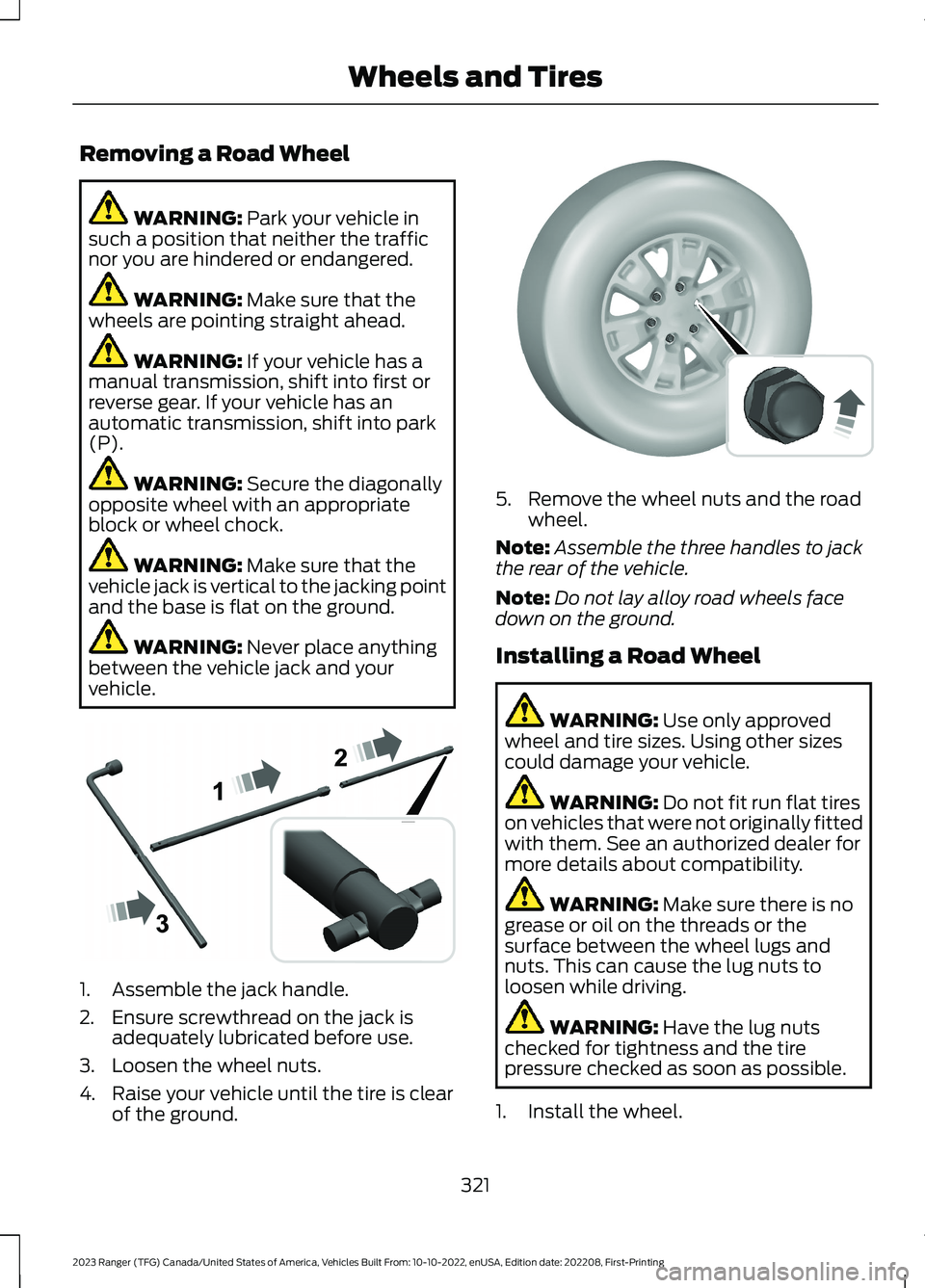
Removing a Road Wheel
WARNING: Park your vehicle insuch a position that neither the trafficnor you are hindered or endangered.
WARNING: Make sure that thewheels are pointing straight ahead.
WARNING: If your vehicle has amanual transmission, shift into first orreverse gear. If your vehicle has anautomatic transmission, shift into park(P).
WARNING: Secure the diagonallyopposite wheel with an appropriateblock or wheel chock.
WARNING: Make sure that thevehicle jack is vertical to the jacking pointand the base is flat on the ground.
WARNING: Never place anythingbetween the vehicle jack and yourvehicle.
1.Assemble the jack handle.
2.Ensure screwthread on the jack isadequately lubricated before use.
3.Loosen the wheel nuts.
4.Raise your vehicle until the tire is clearof the ground.
5.Remove the wheel nuts and the roadwheel.
Note:Assemble the three handles to jackthe rear of the vehicle.
Note:Do not lay alloy road wheels facedown on the ground.
Installing a Road Wheel
WARNING: Use only approvedwheel and tire sizes. Using other sizescould damage your vehicle.
WARNING: Do not fit run flat tireson vehicles that were not originally fittedwith them. See an authorized dealer formore details about compatibility.
WARNING: Make sure there is nogrease or oil on the threads or thesurface between the wheel lugs andnuts. This can cause the lug nuts toloosen while driving.
WARNING: Have the lug nutschecked for tightness and the tirepressure checked as soon as possible.
1.Install the wheel.
321
2023 Ranger (TFG) Canada/United States of America, Vehicles Built From: 10-10-2022, enUSA, Edition date: 202208, First-PrintingWheels and TiresE266665 E134693
Page 331 of 470
VEHICLE IDENTIFICATION
NUMBER
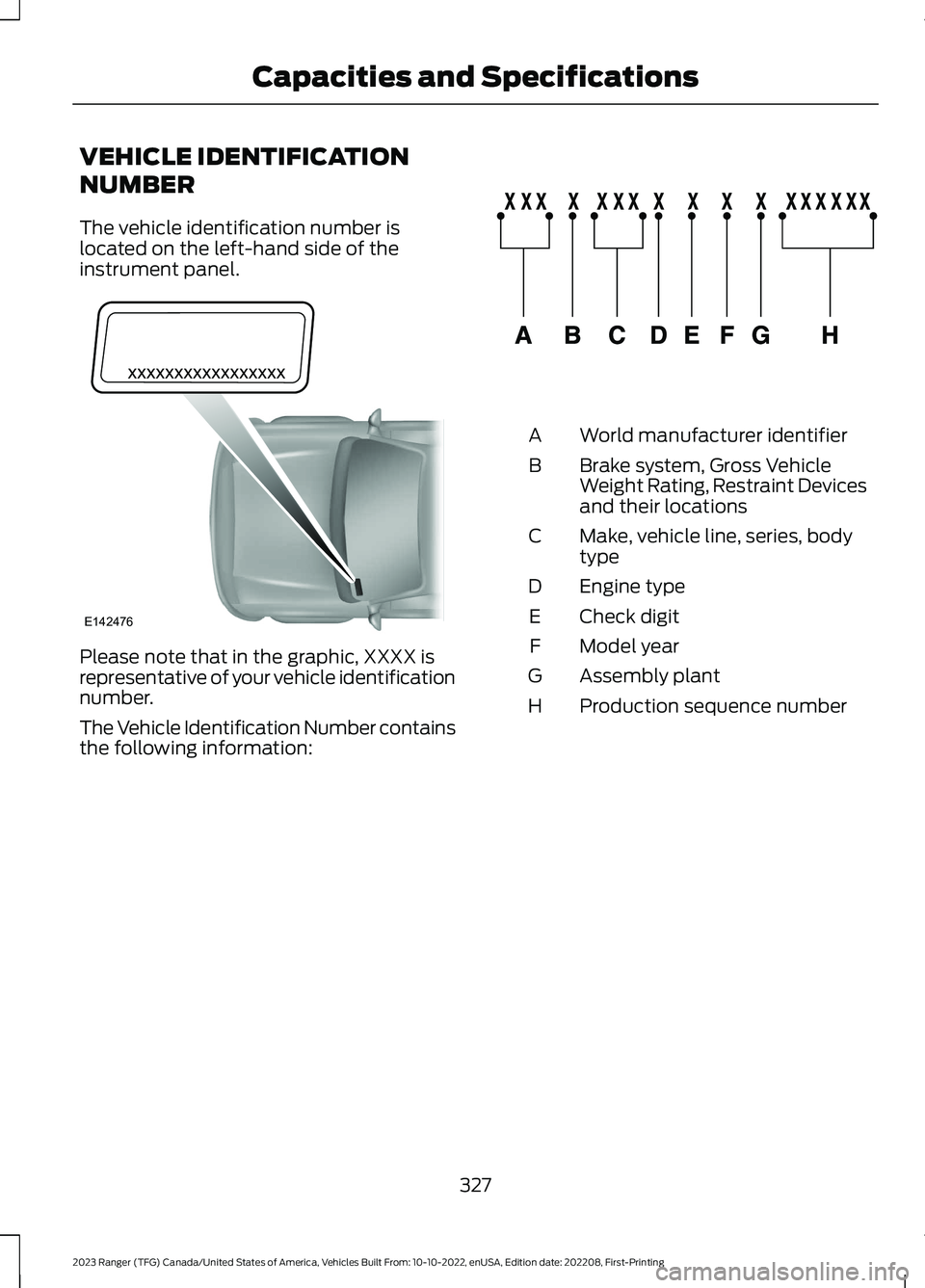
The vehicle identification number islocated on the left-hand side of theinstrument panel.
Please note that in the graphic, XXXX isrepresentative of your vehicle identificationnumber.
The Vehicle Identification Number containsthe following information:
World manufacturer identifierA
Brake system, Gross VehicleWeight Rating, Restraint Devicesand their locations
B
Make, vehicle line, series, bodytypeC
Engine typeD
Check digitE
Model yearF
Assembly plantG
Production sequence numberH
327
2023 Ranger (TFG) Canada/United States of America, Vehicles Built From: 10-10-2022, enUSA, Edition date: 202208, First-PrintingCapacities and SpecificationsE142476 E142477
Page 341 of 470
WHAT IS A CONNECTED
VEHICLE
A connected vehicle has technology thatallows your vehicle to connect to a mobilenetwork and for you to access a range offeatures. When used in conjunction withthe FordPass app, it could allow you tomonitor and control your vehicle further,for example checking the tire pressures,the fuel level and the vehicle location. Foradditional information, refer to the localFord website.
CONNECTED VEHICLE
REQUIREMENTS
Connected service and related featurefunctionality requires a compatible vehiclenetwork.
Some remote features require additionalservice activation. Log in to your Fordaccount for details. Some restrictions, thirdparty terms and message or data ratesmay apply.
CONNECTED VEHICLE
LIMITATIONS
Evolving technology, cellular networks, orregulations could affect functionality andavailability, or continued provision of somefeatures. These changes could even stopsome features from functioning.
CONNECTING THE VEHICLE TO
A MOBILE NETWORK
WHAT IS THE MODEM
The modem allows access to arange of features built into yourvehicle.
ENABLING AND DISABLING THEMODEM - VEHICLES WITH: AM/FM/USB/BLUETOOTH
1.Using the information display controlon the steering wheel, select Settings.
2.Select FordPass.
3.Select Connectivity.
4.Switch connectivity features on or off.
ENABLING AND DISABLING THEMODEM - VEHICLES WITH: SYNC3
1.Press Settings.
2.Press FordPass Connect.
3.Press Connectivity Settings.
4.Switch connectivity features on or off.
CONNECTING FORDPASS TO THEMODEM
1.Make sure that the modem is enabledusing the vehicle settings menu.
2.Open the FordPass app on your deviceand log in.
3.Add your vehicle or select your vehicleif already added.
4.Select the option to activate yourvehicle.
5.Make sure that the name on the screenmatches the name shown in yourFordPass account.
6.Confirm that FordPass account isconnected to the modem.
CONNECTING THE VEHICLE TO
A WI-FI NETWORK - VEHICLES
WITH: SYNC 3
1.Press Settings.
2.Press Wi-Fi.
337
2023 Ranger (TFG) Canada/United States of America, Vehicles Built From: 10-10-2022, enUSA, Edition date: 202208, First-PrintingConnected Vehicle
Page 351 of 470
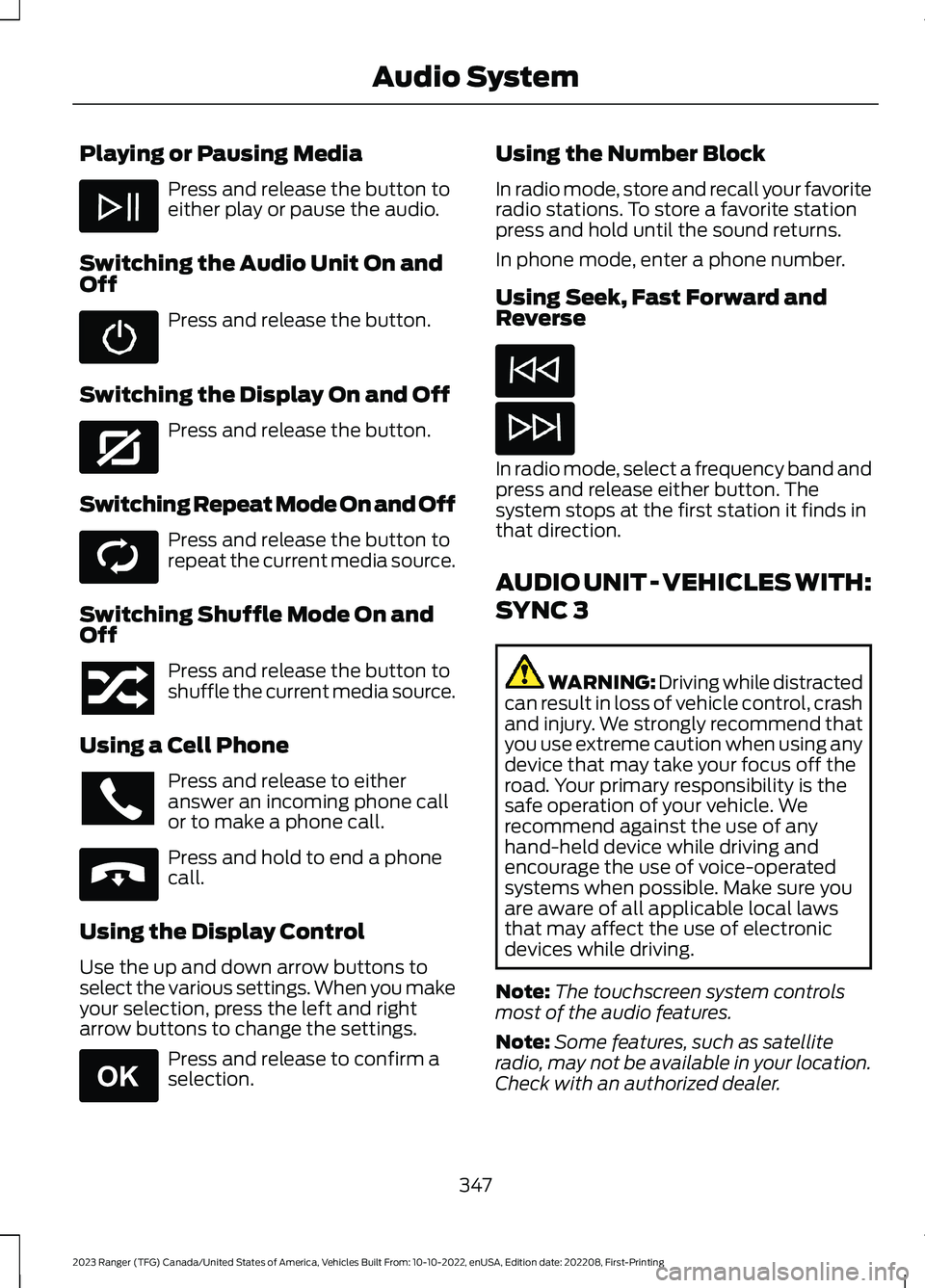
Playing or Pausing Media
Press and release the button toeither play or pause the audio.
Switching the Audio Unit On andOff
Press and release the button.
Switching the Display On and Off
Press and release the button.
Switching Repeat Mode On and Off
Press and release the button torepeat the current media source.
Switching Shuffle Mode On andOff
Press and release the button toshuffle the current media source.
Using a Cell Phone
Press and release to eitheranswer an incoming phone callor to make a phone call.
Press and hold to end a phonecall.
Using the Display Control
Use the up and down arrow buttons toselect the various settings. When you makeyour selection, press the left and rightarrow buttons to change the settings.
Press and release to confirm aselection.
Using the Number Block
In radio mode, store and recall your favoriteradio stations. To store a favorite stationpress and hold until the sound returns.
In phone mode, enter a phone number.
Using Seek, Fast Forward andReverse
In radio mode, select a frequency band andpress and release either button. Thesystem stops at the first station it finds inthat direction.
AUDIO UNIT - VEHICLES WITH:
SYNC 3
WARNING: Driving while distractedcan result in loss of vehicle control, crashand injury. We strongly recommend thatyou use extreme caution when using anydevice that may take your focus off theroad. Your primary responsibility is thesafe operation of your vehicle. Werecommend against the use of anyhand-held device while driving andencourage the use of voice-operatedsystems when possible. Make sure youare aware of all applicable local lawsthat may affect the use of electronicdevices while driving.
Note:The touchscreen system controlsmost of the audio features.
Note:Some features, such as satelliteradio, may not be available in your location.Check with an authorized dealer.
347
2023 Ranger (TFG) Canada/United States of America, Vehicles Built From: 10-10-2022, enUSA, Edition date: 202208, First-PrintingAudio System E272035 E268569 E265040 E265041
Page 355 of 470
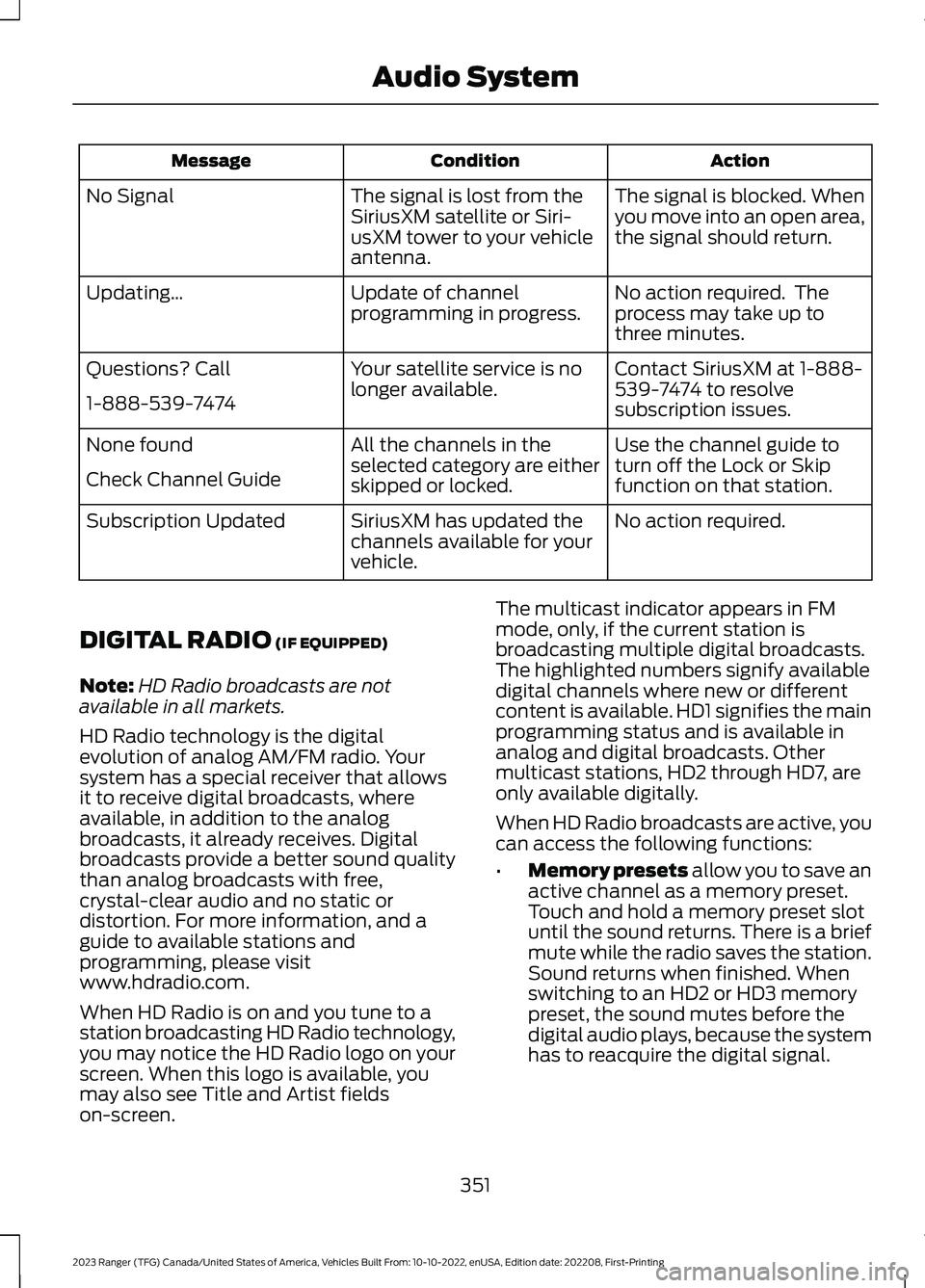
ActionConditionMessage
The signal is blocked. Whenyou move into an open area,the signal should return.
The signal is lost from theSiriusXM satellite or Siri-usXM tower to your vehicleantenna.
No Signal
No action required. Theprocess may take up tothree minutes.
Update of channelprogramming in progress.Updating…
Contact SiriusXM at 1-888-539-7474 to resolvesubscription issues.
Your satellite service is nolonger available.Questions? Call
1-888-539-7474
Use the channel guide toturn off the Lock or Skipfunction on that station.
All the channels in theselected category are eitherskipped or locked.
None found
Check Channel Guide
No action required.SiriusXM has updated thechannels available for yourvehicle.
Subscription Updated
DIGITAL RADIO (IF EQUIPPED)
Note:HD Radio broadcasts are notavailable in all markets.
HD Radio technology is the digitalevolution of analog AM/FM radio. Yoursystem has a special receiver that allowsit to receive digital broadcasts, whereavailable, in addition to the analogbroadcasts, it already receives. Digitalbroadcasts provide a better sound qualitythan analog broadcasts with free,crystal-clear audio and no static ordistortion. For more information, and aguide to available stations andprogramming, please visitwww.hdradio.com.
When HD Radio is on and you tune to astation broadcasting HD Radio technology,you may notice the HD Radio logo on yourscreen. When this logo is available, youmay also see Title and Artist fieldson-screen.
The multicast indicator appears in FMmode, only, if the current station isbroadcasting multiple digital broadcasts.The highlighted numbers signify availabledigital channels where new or differentcontent is available. HD1 signifies the mainprogramming status and is available inanalog and digital broadcasts. Othermulticast stations, HD2 through HD7, areonly available digitally.
When HD Radio broadcasts are active, youcan access the following functions:
•Memory presets allow you to save anactive channel as a memory preset.Touch and hold a memory preset slotuntil the sound returns. There is a briefmute while the radio saves the station.Sound returns when finished. Whenswitching to an HD2 or HD3 memorypreset, the sound mutes before thedigital audio plays, because the systemhas to reacquire the digital signal.
351
2023 Ranger (TFG) Canada/United States of America, Vehicles Built From: 10-10-2022, enUSA, Edition date: 202208, First-PrintingAudio System
Page 366 of 470
Data is sent to Ford in the United Statesthrough the connected device. Theinformation is encrypted and includes, forexample, the vehicle identification numberof your vehicle, the SYNC module serialnumber, odometer, enabled apps, usagestatistics and debugging information.Updates may take place.
Note:You must enable mobile apps foreach connected device the first time youselect a mobile app using the system.
Note:Standard data rates apply. Ford isnot responsible for any additional chargesyou may receive from your service provider,when your vehicle sends or receives datathrough the connected device. This includesany additional charges incurred due todriving in areas when roaming out of a homenetwork.
USING SYNC™ WITH YOUR
MEDIA PLAYER
SYNC supports digital media sourcesincluding: iPod,Bluetooth® devices, andmost USB drives. SYNC also supportsaudio formats, such as MP3, WMA, WAVand ACC.
Media Sources
The AUX or MEDIA button allows you toview and select available media sources.
Press the AUX or MEDIA button to viewyour sources. Use the directional arrowsand OK button to select your source. Youcan also use the steering wheel audiocontrols.
Audio Voice Commands
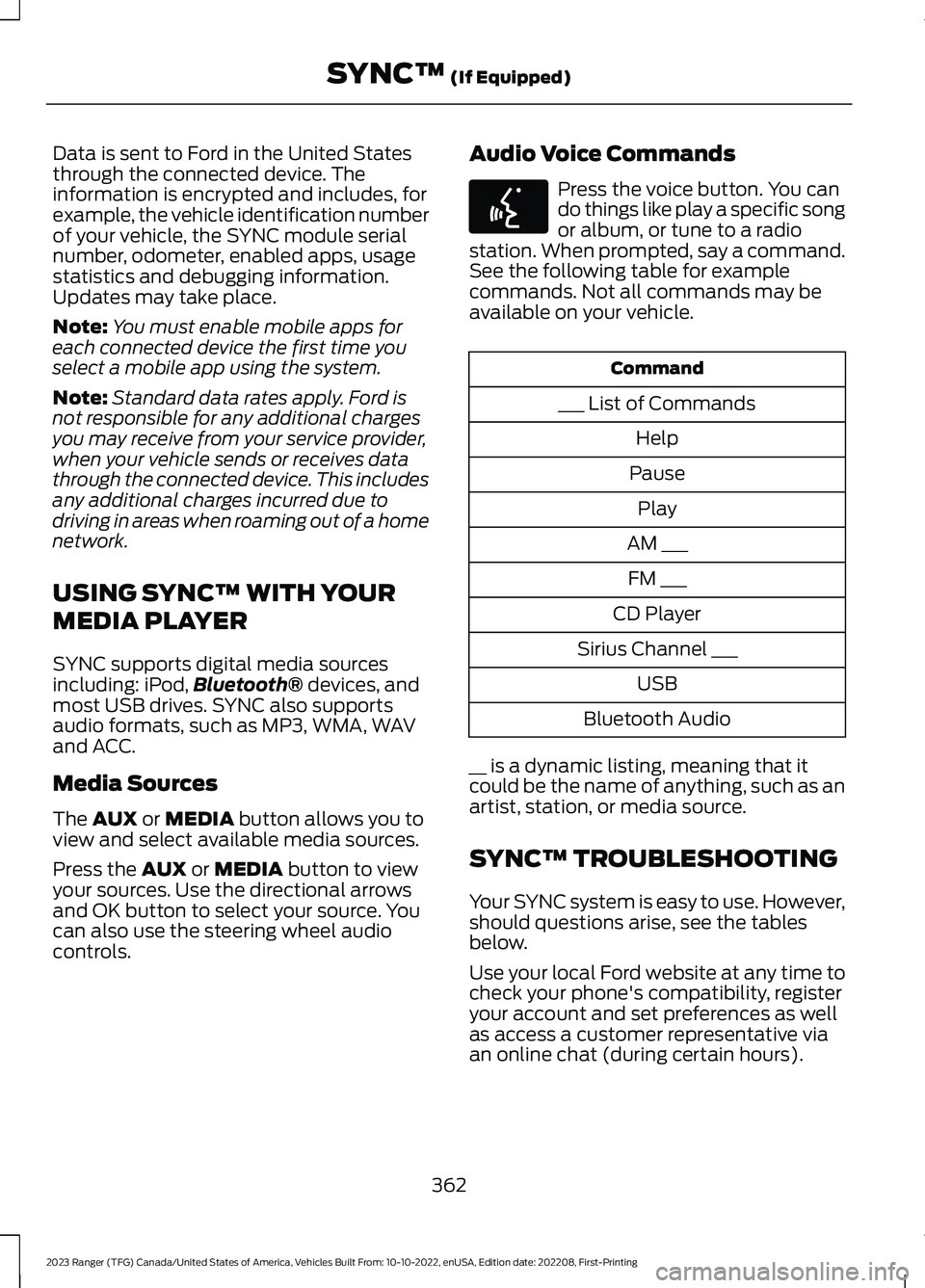
Press the voice button. You cando things like play a specific songor album, or tune to a radiostation. When prompted, say a command.See the following table for examplecommands. Not all commands may beavailable on your vehicle.
Command
___ List of Commands
Help
Pause
Play
AM ___
FM ___
CD Player
Sirius Channel ___
USB
Bluetooth Audio
__ is a dynamic listing, meaning that itcould be the name of anything, such as anartist, station, or media source.
SYNC™ TROUBLESHOOTING
Your SYNC system is easy to use. However,should questions arise, see the tablesbelow.
Use your local Ford website at any time tocheck your phone's compatibility, registeryour account and set preferences as wellas access a customer representative viaan online chat (during certain hours).
362
2023 Ranger (TFG) Canada/United States of America, Vehicles Built From: 10-10-2022, enUSA, Edition date: 202208, First-PrintingSYNC™ (If Equipped)E142599
Page 368 of 470
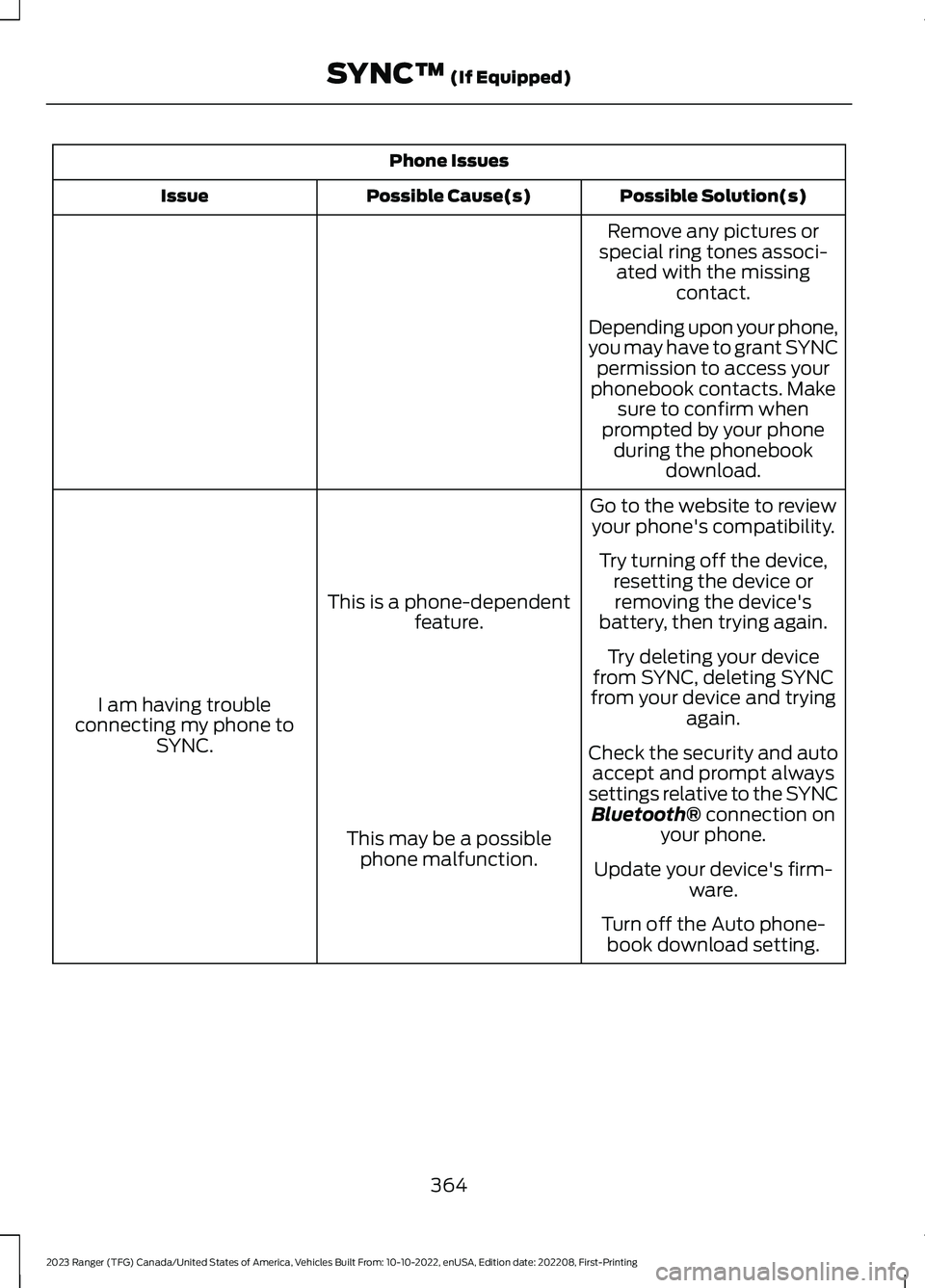
Phone Issues
Possible Solution(s)Possible Cause(s)Issue
Remove any pictures orspecial ring tones associ-ated with the missingcontact.
Depending upon your phone,you may have to grant SYNCpermission to access yourphonebook contacts. Makesure to confirm whenprompted by your phoneduring the phonebookdownload.
Go to the website to reviewyour phone's compatibility.
This is a phone-dependentfeature.
I am having troubleconnecting my phone toSYNC.
Try turning off the device,resetting the device orremoving the device'sbattery, then trying again.
Try deleting your devicefrom SYNC, deleting SYNCfrom your device and tryingagain.
Check the security and autoaccept and prompt alwayssettings relative to the SYNCBluetooth® connection onyour phone.This may be a possiblephone malfunction.Update your device's firm-ware.
Turn off the Auto phone-book download setting.
364
2023 Ranger (TFG) Canada/United States of America, Vehicles Built From: 10-10-2022, enUSA, Edition date: 202208, First-PrintingSYNC™ (If Equipped)
Page 373 of 470
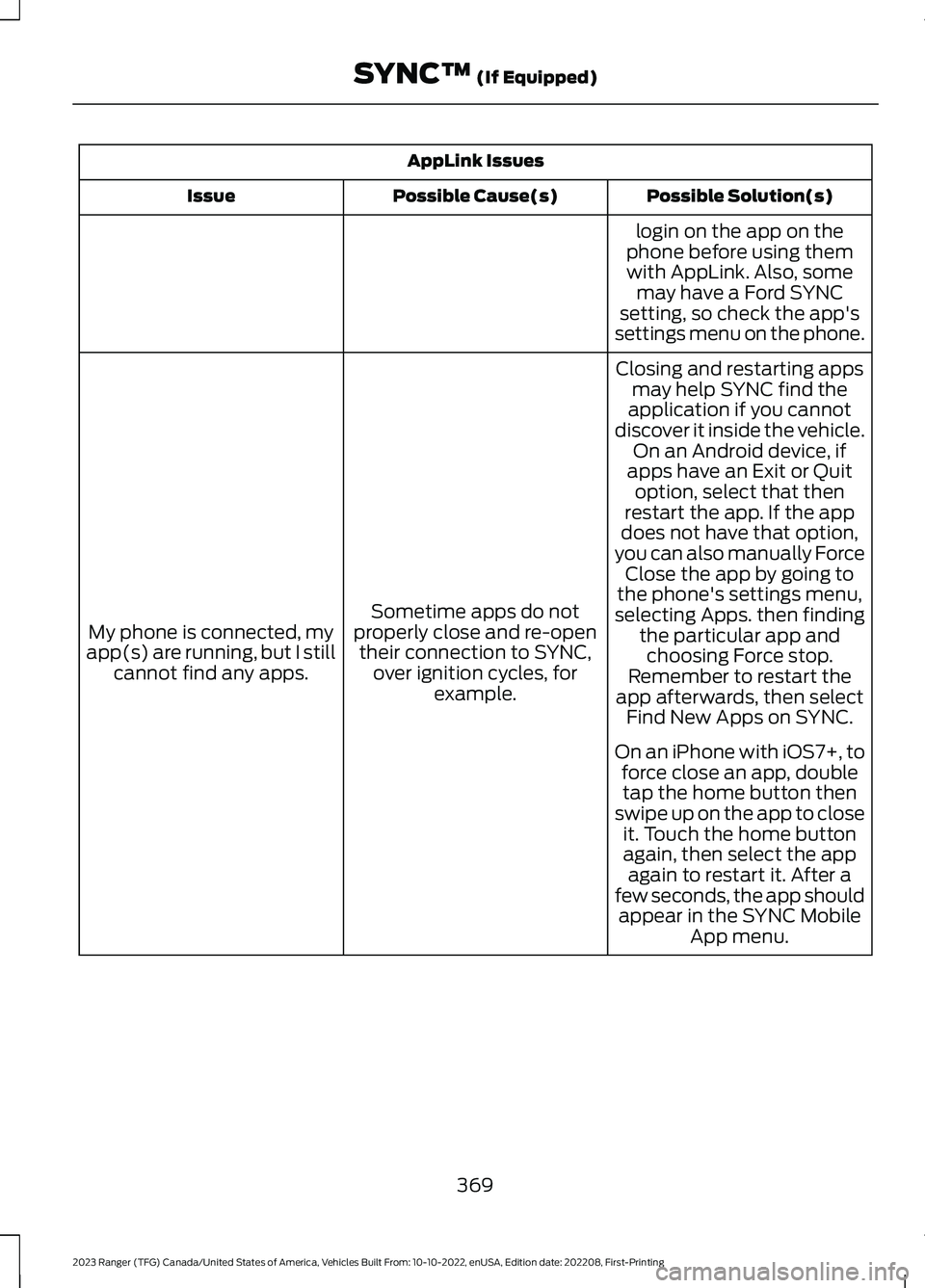
AppLink Issues
Possible Solution(s)Possible Cause(s)Issue
login on the app on thephone before using themwith AppLink. Also, somemay have a Ford SYNCsetting, so check the app'ssettings menu on the phone.
Closing and restarting appsmay help SYNC find theapplication if you cannotdiscover it inside the vehicle.On an Android device, ifapps have an Exit or Quit
Sometime apps do notproperly close and re-opentheir connection to SYNC,over ignition cycles, forexample.
My phone is connected, myapp(s) are running, but I stillcannot find any apps.
option, select that thenrestart the app. If the appdoes not have that option,you can also manually ForceClose the app by going tothe phone's settings menu,selecting Apps. then findingthe particular app andchoosing Force stop.Remember to restart theapp afterwards, then selectFind New Apps on SYNC.
On an iPhone with iOS7+, toforce close an app, doubletap the home button thenswipe up on the app to closeit. Touch the home buttonagain, then select the appagain to restart it. After afew seconds, the app shouldappear in the SYNC MobileApp menu.
369
2023 Ranger (TFG) Canada/United States of America, Vehicles Built From: 10-10-2022, enUSA, Edition date: 202208, First-PrintingSYNC™ (If Equipped)
Page 378 of 470
Switching Automatic System UpdatesOn
Select the settings option on thefeature bar.
1.Select Automatic Updates.
2.Switch Automatic System Updateson.
The system is now set to check for andreceive system updates when it isconnected to a Wi-Fi network.
Note:You can use the system when adownload is in progress.
Note:If the system is disconnected fromthe Wi-Fi network when a download is inprogress, the download continues the nexttime the system is connected to a Wi-Finetwork.
Additional Information andAssistance
For additional information and assistance,we recommend that you contact anauthorized dealer or refer to the local Fordwebsite.
USING VOICE RECOGNITION
The system allows you to interact with theentertainment, information andcommunication systems on your vehicleusing voice commands. This allows youto keep your hands on the steering wheeland focus on what is in front of you.
Press the voice control buttonon the steering wheel and waitfor the voice prompt.
Note:Press the voice control button againto interrupt a voice prompt and beginspeaking.
Note:Turn the volume control when a voiceprompt plays to adjust the volume.
Note:Press and hold the voice controlbutton on the steering wheel to use Siri onyour iOS device.
The following voice commands aredesigned to help you from any screen:
•List of Commands
•Help
The following tables list some of the morefrequently used voice commands. For acomplete list of voice commands, refer toour website.
General
DescriptionVoice Command
Get a list of voice commands for a specific feature.1___ List of Commands
Cancel an active voice session.Cancel
Get a list of voice commands for a specific feature.1___ Help
Return to the previous screen.Go back
Go to the main menu.Main Menu
374
2023 Ranger (TFG) Canada/United States of America, Vehicles Built From: 10-10-2022, enUSA, Edition date: 202208, First-PrintingSYNC™ 3 (If Equipped)E280315 E142599
Page 385 of 470
Using the Radio
Setting a Radio Station Using theTouchscreen
Directly Tuning a Radio Station
Select Sources.
Select AM or FM.
Select Frequency.
Enter the frequency of the radio stationand select Enter.
Note:You must enter the frequency to twodecimal places.
Selecting a Radio Station From a List
Select Sources.
Select FM or DAB.
Select Station.
Select a radio station from the list.
Switching Traffic Announcements On
Select Traffic (TA).
Note:If you switch traffic announcementson, traffic announcements broadcast byradio stations interrupt the current audiosource to help you plan your route.
Storing a Radio Station
You can use the different sets of presetsto allow different drivers to store theirfavorite radio stations.
Set a radio station.
Select Presets.
Note:Only do this if you wish to select adifferent set of presets.
Press and hold one of the preset buttons.
Note:The radio briefly mutes to indicatethe radio station has been stored.
Streaming Music From aBluetooth® Device.
Check the compatibility of your device onthe regional Ford website.
Pair your device. See Phone (page 385).
Select Sources.
1.Select Bluetooth®.
Searching for Tracks on Bluetooth®Device.
Select Browse.
Select a track.
Note:Select the cover art to viewinformation about the current track.
Repeating Tracks on Bluetooth®Device.
Select the repeat icon to repeattracks.
Note: You can repeat one track or all trackson an audio format Bluetooth® Device.You can repeat one track, all tracks or alltracks in one folder on a Bluetooth® Device.
Note:A small number one appears next tothe repeat icon to indicate that a track is setto repeat. A small folder icon appears nextto it to indicate that a folder is set to repeat
Playing Tracks on Bluetooth® Devicein a Random Order.
Select to play tracks in a randomorder.
Playing Music From a USB or MediaPlayer
Connect your device to a USB port.
Select Sources.
381
2023 Ranger (TFG) Canada/United States of America, Vehicles Built From: 10-10-2022, enUSA, Edition date: 202208, First-PrintingSYNC™ 3 (If Equipped)