display FORD SUPER DUTY 2013 3.G Owners Manual
[x] Cancel search | Manufacturer: FORD, Model Year: 2013, Model line: SUPER DUTY, Model: FORD SUPER DUTY 2013 3.GPages: 563, PDF Size: 7.27 MB
Page 459 of 563
INTRODUCTION
WARNING:Driving while distracted can result in loss of vehicle
control, accident and injury. Ford strongly recommends that
drivers use extreme caution when using any device or feature that may
take their focus off the road. Your primary responsibility is the safe
operation of the vehicle. We recommend against the use of any
handheld device while driving, encourage the use of voice-operated
systems when possible and that you become aware of applicable state
and local laws that may affect use of electronic devices while driving.
Note:Some features are not available while your vehicle is moving.
Note:Your system is equipped with a feature that allows you to access
and control audio features for 30 minutes after you switch the ignition
off (and no doors open).
This system uses a four-corner strategy to provide quick access several
vehicle features and settings. The touchscreen provides easy interaction
with your cellular phone, multimedia, climate control and navigation
system. The corners display any active modes within those menus, such
as phone status or the climate temperature.
SETTINGS
Press to select any of the following:
•Clock
•Display
•Sound
•Vehicle
•Settings
•Help
INFORMATION
Press to select any of the following:
•SYNC® Services
•SIRIUS® Travel Link™
•Alerts
•Calendar
•SYNC Apps
If the icon is yellow, seeAlertsin theInformationsection of this chapter.
458MyFord Touch® (If Equipped)
2013 F-250/350/450/550(f23)
Owners Guide gf, 1st Printing
USA(fus)
Page 461 of 563
HOME
Press to access your home screen. Depending on your vehicle’s
option package and software, your screens may vary in
appearance from the descriptions in this section. Your features may also
be limited depending on your market. Check with your authorized dealer
for availability.
Using the Touch-sensitive Controls on Your System
To turn a feature on and off, just touch the graphic with your finger. To
get the best performance from the touch-sensitive controls:
•Do not press hard on the controls. They are sensitive to light touch.
•Use your bare finger to touch the center of a touch-control graphic.
Touching off-center of the graphic may affect operation of a nearby
control.
•Make sure your hands are clean and dry.
•Since the touchscreen operates based on the touch of a finger, you
may have trouble using it if you are wearing gloves.
•Keep metal and other conductive material away from the surface of
the touchscreen as this may cause electronic interference (for
example, inadvertently turning on a feature other than the one you
meant to turn on).
Depending on your vehicle and option package, you may also have these
controls on your bezel:
•Power: Switch the media or climate features off and on.
•VOL:Control the volume of playing media.
•Fan: Control the speed of the climate system fan.
•Seek and Tune buttons: Use as you normally would in media modes.
•Eject: Eject a CD from the entertainment system.
•Radio preset buttons: Located below the touchscreen, you can use
these buttons to enter a radio preset in addition to using the
touchscreen.
•MEDIA:Touch the word repeatedly to see all available media modes.
The screen does not change, but you see the media change in the
lower left status bar.
•Hazard flasher: Switch the hazard flashers off and on.
Cleaning the Touchscreen Display
Use a clean, soft cloth such as one used for cleaning glasses. If dirt or
fingerprints are still visible, apply a small amount of alcohol to the cloth.
Do not pour or spray alcohol onto the display. Do not use detergent or
any type of solvent to clean the display.
460MyFord Touch® (If Equipped)
2013 F-250/350/450/550(f23)
Owners Guide gf, 1st Printing
USA(fus)
Page 469 of 563
Some of the voice commands that are available while viewing this screen
are:
“POINTS OF INTEREST” or “POI”
“Destination
“Search by name”
“Search by category”
“Change search area”
Note:These are just a sample of the voice commands available within
the Points of Interest section; the categories themselves are also
technically voice commands.
If you choose Intersection from the navigation screen, you can choose
from the following:
•1st Street
•2nd Street
•City
•State/Prov.
Some of the voice commands that are available while viewing this screen
are:
“INTERSECTION”
“Enter first street name”
“Change first street name”
“Enter second street name”
“Change second street name”
“Enter city”
“Change city”
“Enter state”
“Change state”
The dual mode feature is also available when the voice system displays a
list of items to pick from during a voice session, where you would be
able to touch the line item or say “Line 2”. If the system does not
understand a voice command, or there are multiple options, the system
displays a voice command list for you.
468MyFord Touch® (If Equipped)
2013 F-250/350/450/550(f23)
Owners Guide gf, 1st Printing
USA(fus)
Page 472 of 563
When you select: You can:
Options Sound Settingsallows you to adjust Bass,
Midrange, Treble, Balance and Fade, DSP
(Digital Signal Processing), Occupancy Mode,
and Speed Compensated Volume settings.
(Your vehicle may not have all these settings.)
Set PTY for Seek/Scanallows you to select
a category of music you would like to search
for and then choose to either seek or scan for
the stations.
RDS Text Displayallows you to view the
information broadcast by FM stations.
Auto Presets (AST)allows you to have the
system automatically store the six strongest
stations in your current location.
TAG Button(if available) allows you to tag a
song to download later. When you selectOn,
TAG appears on-screen when HD Radio is
active. You can touchTA Gto save the
information of the song that is playing. When
you plug in your portable music player, the
information transfers (if supported by your
device). When you are connected to iTunes®,
the tags appear to remind you of the songs
you would like to download. SeeHD Radio
informationlater in this chapter.
Direct TuneEnter the desired station number when
prompted. PressEnter.
MyFord Touch® (If Equipped)471
2013 F-250/350/450/550(f23)
Owners Guide gf, 1st Printing
USA(fus)
Page 482 of 563
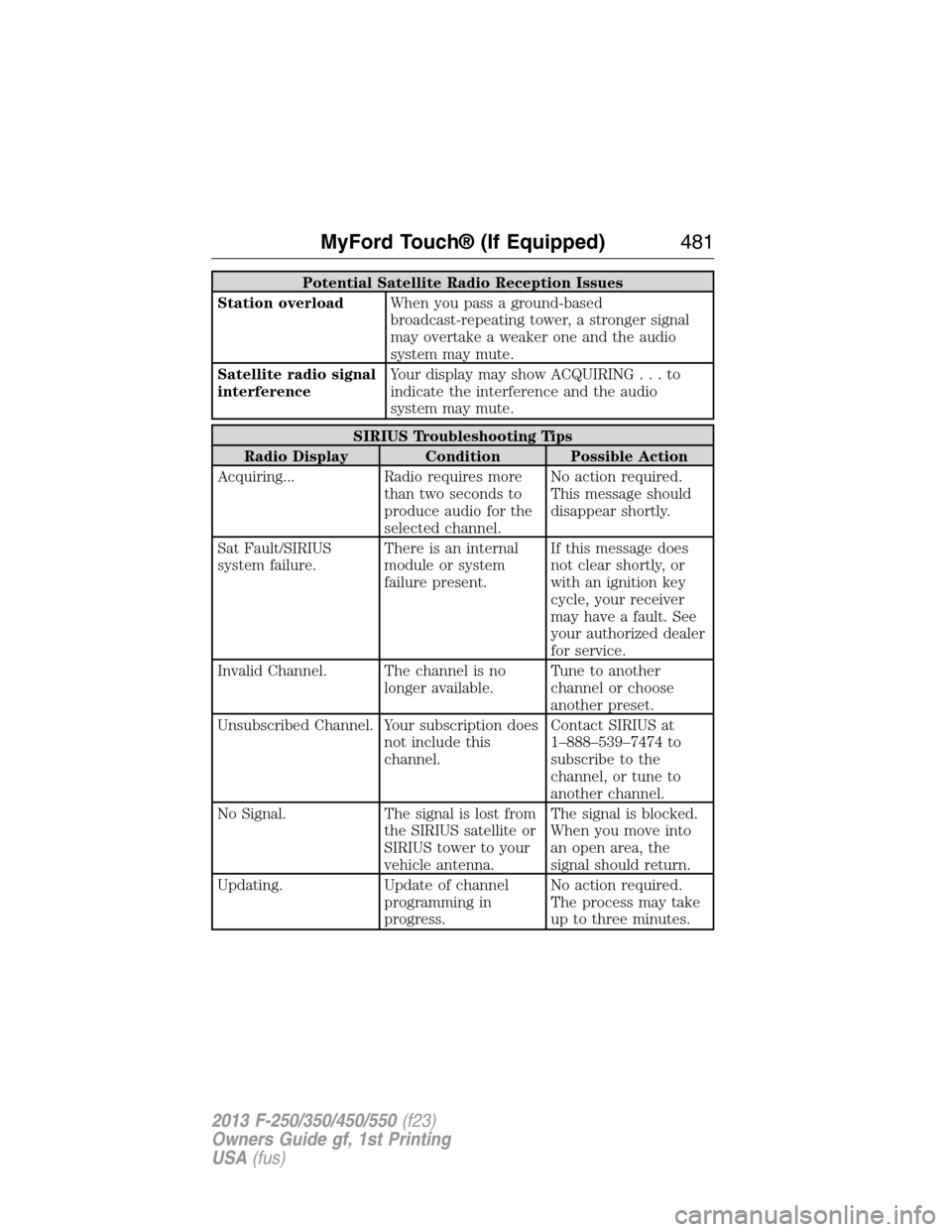
Potential Satellite Radio Reception Issues
Station overloadWhen you pass a ground-based
broadcast-repeating tower, a stronger signal
may overtake a weaker one and the audio
system may mute.
Satellite radio signal
interferenceYour display may show ACQUIRING...to
indicate the interference and the audio
system may mute.
SIRIUS Troubleshooting Tips
Radio Display Condition Possible Action
Acquiring... Radio requires more
than two seconds to
produce audio for the
selected channel.No action required.
This message should
disappear shortly.
Sat Fault/SIRIUS
system failure.There is an internal
module or system
failure present.If this message does
not clear shortly, or
with an ignition key
cycle, your receiver
may have a fault. See
your authorized dealer
for service.
Invalid Channel. The channel is no
longer available.Tune to another
channel or choose
another preset.
Unsubscribed Channel. Your subscription does
not include this
channel.Contact SIRIUS at
1–888–539–7474 to
subscribe to the
channel, or tune to
another channel.
No Signal. The signal is lost from
the SIRIUS satellite or
SIRIUS tower to your
vehicle antenna.The signal is blocked.
When you move into
an open area, the
signal should return.
Updating. Update of channel
programming in
progress.No action required.
The process may take
up to three minutes.
MyFord Touch® (If Equipped)481
2013 F-250/350/450/550(f23)
Owners Guide gf, 1st Printing
USA(fus)
Page 483 of 563
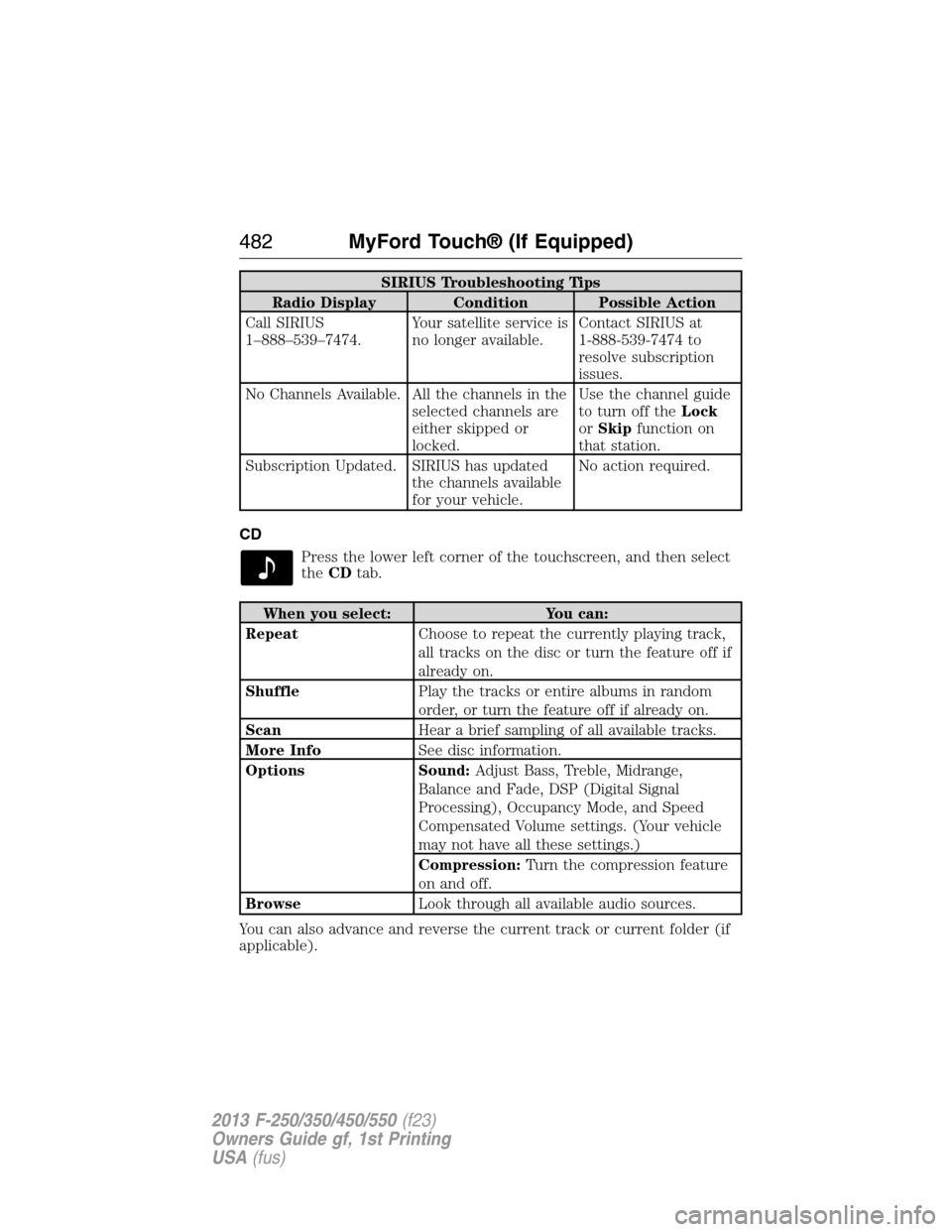
SIRIUS Troubleshooting Tips
Radio Display Condition Possible Action
Call SIRIUS
1–888–539–7474.Your satellite service is
no longer available.Contact SIRIUS at
1-888-539-7474 to
resolve subscription
issues.
No Channels Available. All the channels in the
selected channels are
either skipped or
locked.Use the channel guide
to turn off theLock
orSkipfunction on
that station.
Subscription Updated. SIRIUS has updated
the channels available
for your vehicle.No action required.
CD
Press the lower left corner of the touchscreen, and then select
theCDtab.
When you select: You can:
RepeatChoose to repeat the currently playing track,
all tracks on the disc or turn the feature off if
already on.
ShufflePlay the tracks or entire albums in random
order, or turn the feature off if already on.
ScanHear a brief sampling of all available tracks.
More InfoSee disc information.
Options Sound:Adjust Bass, Treble, Midrange,
Balance and Fade, DSP (Digital Signal
Processing), Occupancy Mode, and Speed
Compensated Volume settings. (Your vehicle
may not have all these settings.)
Compression:Turn the compression feature
on and off.
BrowseLook through all available audio sources.
You can also advance and reverse the current track or current folder (if
applicable).
482MyFord Touch® (If Equipped)
2013 F-250/350/450/550(f23)
Owners Guide gf, 1st Printing
USA(fus)
Page 485 of 563
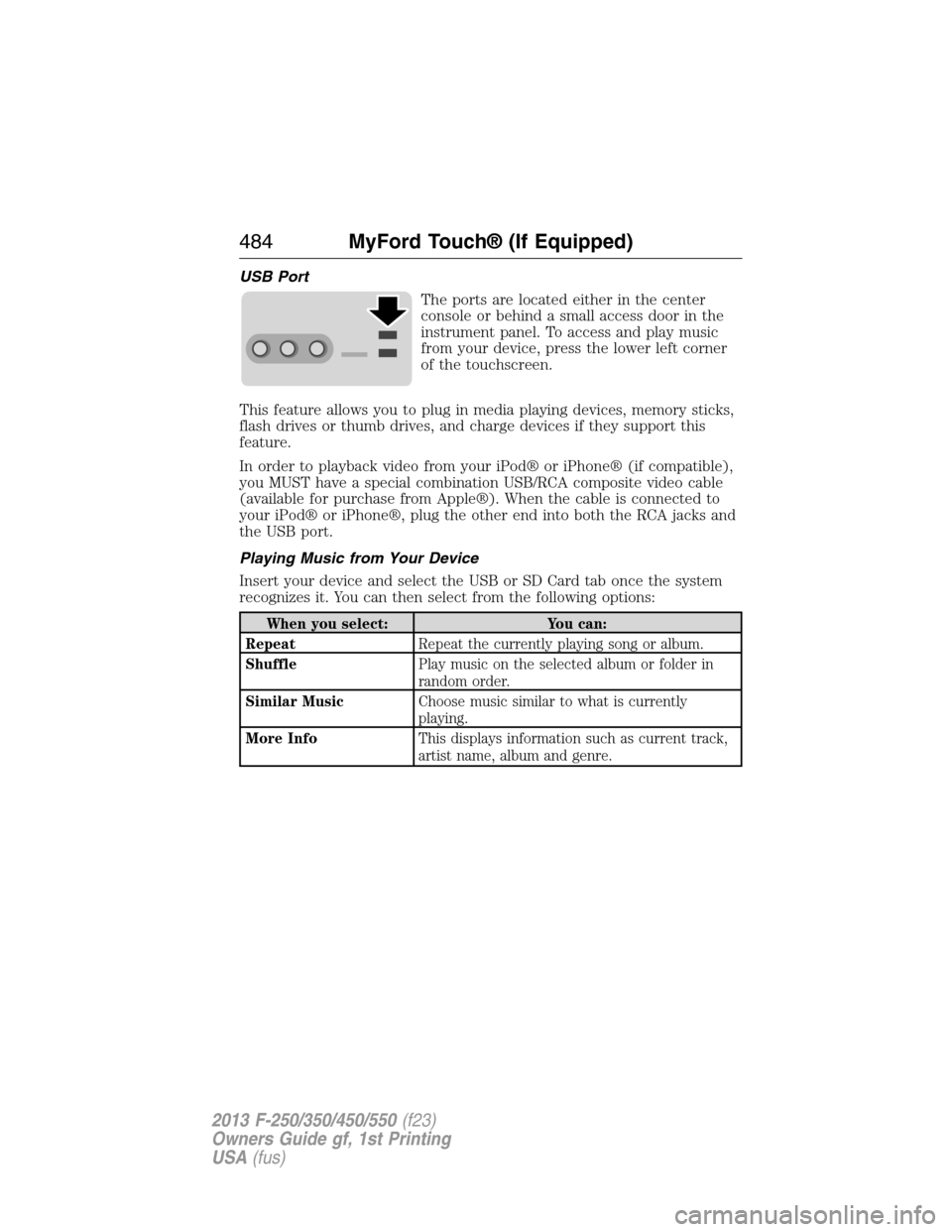
USB Port
The ports are located either in the center
console or behind a small access door in the
instrument panel. To access and play music
from your device, press the lower left corner
of the touchscreen.
This feature allows you to plug in media playing devices, memory sticks,
flash drives or thumb drives, and charge devices if they support this
feature.
In order to playback video from your iPod® or iPhone® (if compatible),
you MUST have a special combination USB/RCA composite video cable
(available for purchase from Apple®). When the cable is connected to
your iPod® or iPhone®, plug the other end into both the RCA jacks and
the USB port.
Playing Music from Your Device
Insert your device and select the USB or SD Card tab once the system
recognizes it. You can then select from the following options:
When you select: You can:
RepeatRepeat the currently playing song or album.
ShufflePlay music on the selected album or folder in
random order.
Similar MusicChoose music similar to what is currently
playing.
More InfoThis displays information such as current track,
artist name, album and genre.
484MyFord Touch® (If Equipped)
2013 F-250/350/450/550(f23)
Owners Guide gf, 1st Printing
USA(fus)
Page 486 of 563
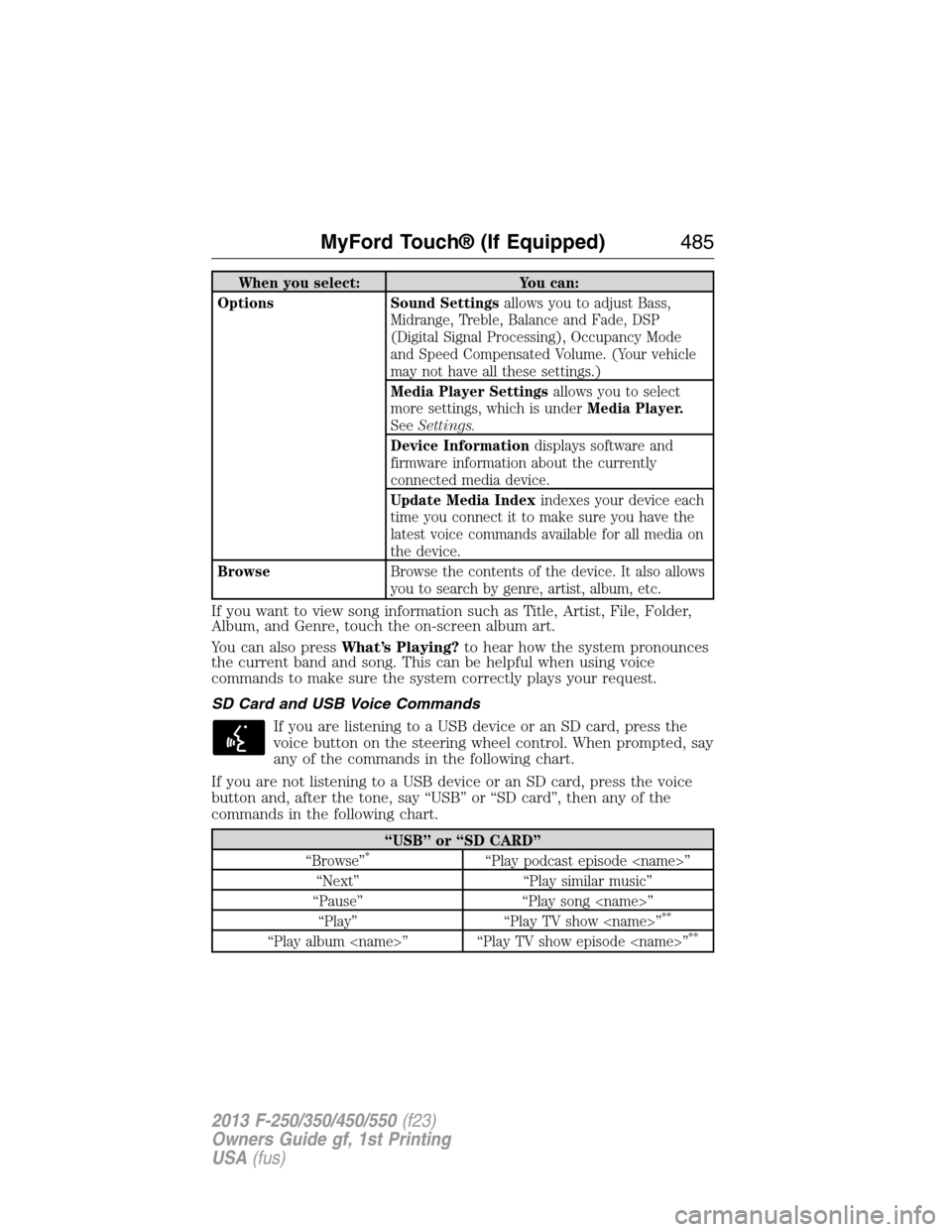
When you select: You can:
Options Sound Settingsallows you to adjust Bass,
Midrange, Treble, Balance and Fade, DSP
(Digital Signal Processing), Occupancy Mode
and Speed Compensated Volume. (Your vehicle
may not have all these settings.)
Media Player Settingsallows you to select
more settings, which is underMedia Player.
SeeSettings.
Device Informationdisplays software and
firmware information about the currently
connected media device.
Update Media Indexindexes your device each
time you connect it to make sure you have the
latest voice commands available for all media on
the device.
BrowseBrowse the contents of the device. It also allows
you to search by genre, artist, album, etc.
If you want to view song information such as Title, Artist, File, Folder,
Album, and Genre, touch the on-screen album art.
You can also pressWhat’s Playing?to hear how the system pronounces
the current band and song. This can be helpful when using voice
commands to make sure the system correctly plays your request.
SD Card and USB Voice Commands
If you are listening to a USB device or an SD card, press the
voice button on the steering wheel control. When prompted, say
any of the commands in the following chart.
If you are not listening to a USB device or an SD card, press the voice
button and, after the tone, say “USB” or “SD card”, then any of the
commands in the following chart.
“USB” or “SD CARD”
“Browse”*“Play podcast episode
“Next” “Play similar music”
“Pause” “Play song
“Play” “Play TV show
**
“Play album
MyFord Touch® (If Equipped)485
2013 F-250/350/450/550(f23)
Owners Guide gf, 1st Printing
USA(fus)
Page 492 of 563
Pairing Your Phone for the First Time
WARNING:Driving while distracted can result in loss of vehicle
control, accident and injury. Ford strongly recommends that
drivers use extreme caution when using any device that may take their
focus off the road. Your primary responsibility is the safe operation of
the vehicle. We recommend against the use of any handheld device
while driving, encourage the use of voice-operated systems when
possible and that you become aware of applicable state and local laws
that may affect use of electronic devices while driving.
The first thing you must do to use the phone features of SYNC is to pair
your Bluetooth-enabled cellular phone with SYNC. This allows you to use
your phone in a hands-free manner.
Note:Put the transmission in positionP.Turn on your vehicle ignition
and the radio.
1. TouchAdd Phonein the upper left corner of the touchscreen.
2. Make sure that Bluetooth is set toOnand that your cellular phone is
in the proper mode. See your phone’s user guide if necessary.
3. When prompted on your phone’s display, enter the six-digit PIN
provided by SYNC in the radio display. The display indicates when
the pairing is successful and asks you if you want to download your
phonebook.
SYNC may prompt you with more phone options. For more information
on your phone’s capability, see your phone’s user guide and visit the
website.
Pairing Subsequent Phones
Note:Put the transmission in positionP.Turn on your vehicle ignition
and the radio.
1. Press thePhonecorner of the touchscreen >Settings>BT
Devices>Add Device.
2. Make sure that Bluetooth is set toOnand that your cellular phone is
in the proper mode. See your phone’s user guide if necessary.
3. When prompted on your phone’s display, enter the six-digit PIN
provided by SYNC on the screen. The display indicates when the
pairing is successful. The system asks you if you want to download
your phonebook.
SYNC may prompt you with more phone options. For more information
on your phone’s capability, see your phone’s user guide and visit the
website.
MyFord Touch® (If Equipped)491
2013 F-250/350/450/550(f23)
Owners Guide gf, 1st Printing
USA(fus)
Page 493 of 563
Making Calls
Press the voice button. When prompted, say, “Call
say “Dial”, then the desired number.
To end the call or exit phone mode, press and hold the phone
button.
Receiving Calls
During an incoming call, an audible tone sounds. Call information
appears in the display if it is available.
Accept the call by pressingAccepton the touchscreen or by
pressing the phone button on your steering wheel controls.
Reject the call by pressingRejecton the touchscreen or by
pressing and holding the phone button on your steering wheel controls.
Ignore the call by doing nothing. SYNC logs it as a missed call.
Phone Menu Options
Press the top left corner on your touchscreen to select from the
following options:
When you select: You can:
PhoneAccess the on-screen numerical pad to enter
a number and place a call.
During an active call, you can also choose to:
•Mute the call
•Put it on hold
•Turn on privacy (returns the call to your
cellular phone)
•Join two calls
•End the call.
Quick DialSelect and call contacts stored in your
phonebook contacts and call history folder.
492MyFord Touch® (If Equipped)
2013 F-250/350/450/550(f23)
Owners Guide gf, 1st Printing
USA(fus)