buttons FORD SUPER DUTY 2015 3.G Owners Manual
[x] Cancel search | Manufacturer: FORD, Model Year: 2015, Model line: SUPER DUTY, Model: FORD SUPER DUTY 2015 3.GPages: 470, PDF Size: 18.24 MB
Page 54 of 470
1.Insert the key you want to program intothe ignition.
2.Switch the ignition on.
3.Access the main menu on theinformation display controls. PressSETUP using the information displaybuttons until PRESS RESET TOCREATE MYKEY is displayed.
4.Press and release the RESET button.You will see HOLD RESET TOCONFIRM MYKEY in the display.
5.Press and hold the RESET button fortwo seconds until you see the messageMARK THIS AS RESTRICTED in thedisplay. Wait until you see KEYRESTRICTED AT NEXT START in thedisplay.
If You Have a Type 2 InformationDisplay:
1.Insert the key you want to program intothe ignition.
2.Switch the ignition on.
3.Access the main menu on theinformation display controls, and selectSETTINGS, then MYKEY by pressingOK or the > button.
4.Press OK or the > button to selectCREATE A MYKEY.
5.When prompted, hold the OK buttonuntil you see KEY RESTRICTED ATNEXT START in the display. The keywill be restricted at the next start.
MyKey is successfully created. Make sureyou label it so you can distinguish it fromthe admin keys.
You can also program configurablesettings for the key(s). Refer toProgramming/Changing ConfigurableSettings.
Programming/ChangingConfigurable Settings
Use the information display to program orchange your configurable MyKey settings.There are two types of informationdisplays, and their controls and messagingvary. To determine which type of displayyou have, you will need to referenceanother chapter. See GeneralInformation (page 81).
If You Have a Type 1 InformationDisplay:
1.Switch the ignition on using an adminkey.
2.Access the main menu on theinformation display controls, and pressSETUP until RESET FOR MYKEYSETTINGS displays.
3.Press and release the RESET buttonto display MyKey setup menus.
4.Press the SETUP button to enter yourchoice. Once you make a selection, thenext configurable setting will bedisplayed.
5.Repeat Steps 3 and 4 until you aredone changing the configurablesettings.
If You Have a Type 2 InformationDisplay:
1.Switch the ignition on using an adminkey.
2.Access the main menu on theinformation display controls, and selectSETTINGS, then MYKEY by pressingOK or the > button.
3.Use the arrow buttons to get to aconfigurable feature.
4.Press OK or > to make a selection.
51Super Duty (), enUSAMyKey™
Page 57 of 470
LOCKING AND UNLOCKING
You can use the power door lock controlor the remote control to lock and unlockyour vehicle.
Power Door Locks (If Equipped)
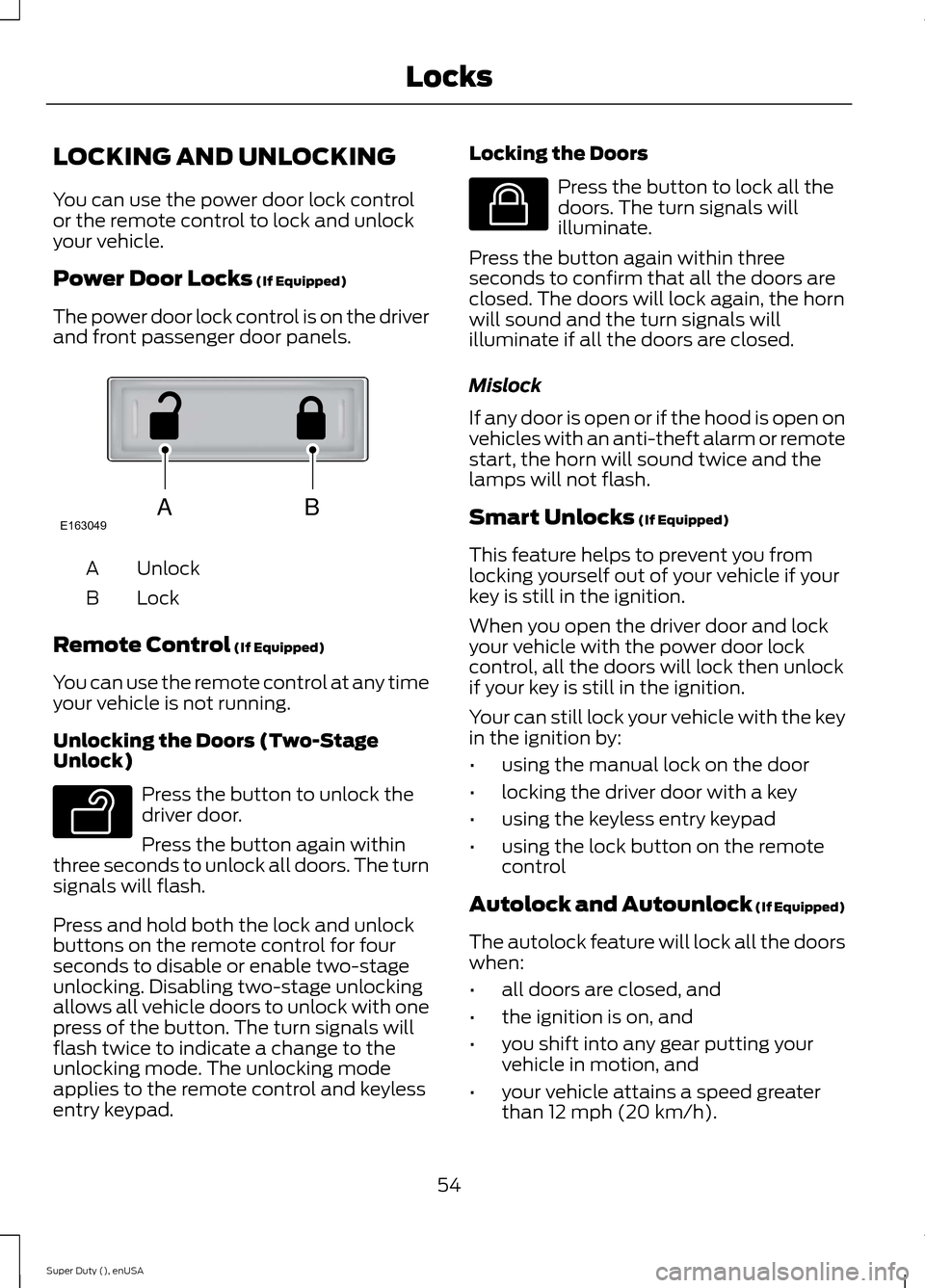
The power door lock control is on the driverand front passenger door panels.
UnlockA
LockB
Remote Control (If Equipped)
You can use the remote control at any timeyour vehicle is not running.
Unlocking the Doors (Two-StageUnlock)
Press the button to unlock thedriver door.
Press the button again withinthree seconds to unlock all doors. The turnsignals will flash.
Press and hold both the lock and unlockbuttons on the remote control for fourseconds to disable or enable two-stageunlocking. Disabling two-stage unlockingallows all vehicle doors to unlock with onepress of the button. The turn signals willflash twice to indicate a change to theunlocking mode. The unlocking modeapplies to the remote control and keylessentry keypad.
Locking the Doors
Press the button to lock all thedoors. The turn signals willilluminate.
Press the button again within threeseconds to confirm that all the doors areclosed. The doors will lock again, the hornwill sound and the turn signals willilluminate if all the doors are closed.
Mislock
If any door is open or if the hood is open onvehicles with an anti-theft alarm or remotestart, the horn will sound twice and thelamps will not flash.
Smart Unlocks (If Equipped)
This feature helps to prevent you fromlocking yourself out of your vehicle if yourkey is still in the ignition.
When you open the driver door and lockyour vehicle with the power door lockcontrol, all the doors will lock then unlockif your key is still in the ignition.
Your can still lock your vehicle with the keyin the ignition by:
•using the manual lock on the door
•locking the driver door with a key
•using the keyless entry keypad
•using the lock button on the remotecontrol
Autolock and Autounlock (If Equipped)
The autolock feature will lock all the doorswhen:
•all doors are closed, and
•the ignition is on, and
•you shift into any gear putting yourvehicle in motion, and
•your vehicle attains a speed greaterthan 12 mph (20 km/h).
54Super Duty (), enUSALocksABE163049 E138629 E138623
Page 88 of 470
COURTESY WIPE
This feature allows for an extra swipe ofthe wipers after a wipe/wash cycle.
CREATE MYKEY / MYKEY SETUP /CLEAR MYKEY
For more information, See Creating aMyKey (page 50).
RESET FOR REMOTE START (ifequipped)
REAR PARK AID
This feature sounds a warning tone to warnthe driver of obstacles near the rearbumper, and functions only when R(Reverse) gear is selected.
TBC MODE (if equipped)
Allows you to choose the trailer brakemode.
TBC EFFORT (if equipped)
Allows you to choose the level of initialbraking.
TRAILER SWAY (if equipped)
This feature uses the electronic stabilitycontrol to mitigate trailer sway.
LANGUAGE = ENGLISH / SPANISH /FRENCH
Allows you to choose which language themessage center will display in.
Waiting four seconds or pressing theRESET button cycles the message centerthrough each of the language choices.
Press the RESET button to set thelanguage choice.
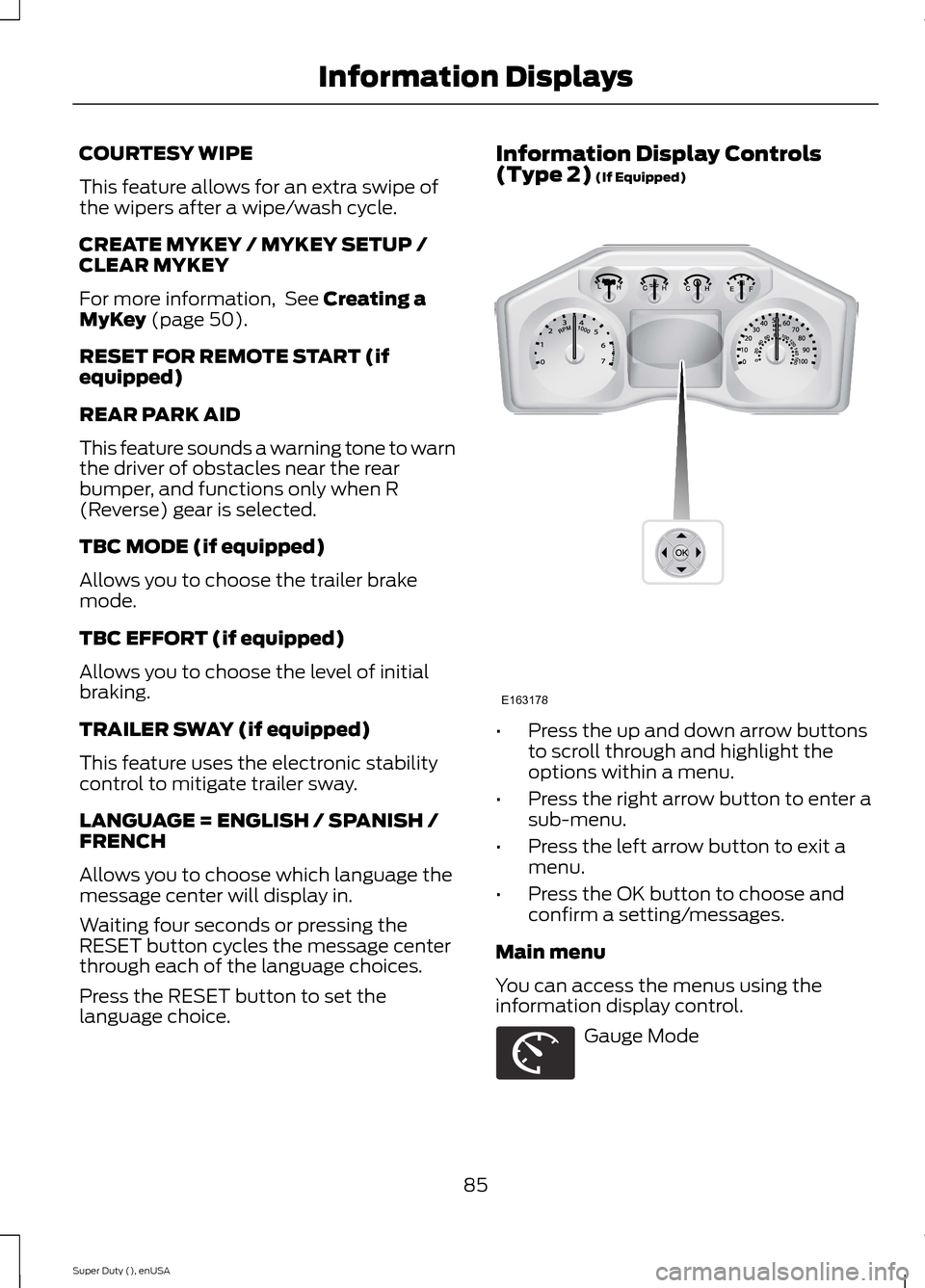
Information Display Controls(Type 2) (If Equipped)
•Press the up and down arrow buttonsto scroll through and highlight theoptions within a menu.
•Press the right arrow button to enter asub-menu.
•Press the left arrow button to exit amenu.
•Press the OK button to choose andconfirm a setting/messages.
Main menu
You can access the menus using theinformation display control.
Gauge Mode
85Super Duty (), enUSAInformation DisplaysE163178 E163179
Page 89 of 470
Trip A / B
Fuel Economy
Truck Apps (If Equipped)
Settings
Information
Display Mode
Use the arrow buttons to choosebetween the following gaugeoptions.
Gauge Mode
Engine Oil Temperature (Diesel only)Gauges Detail
Transmission Temperature
The compass orientationcan be changed betweenfixed north or rotating north.To change the modes, pressOK when the compassdisplay is shown. Use theright arrow to choose themode. Press and hold OK toset the mode.
Compass
Exhaust Filter (diesel only). Refer to your diesel supple-ment for more information.
Blank
Trip A / B
Use the arrow buttons to choosebetween the following tripoptions.
86Super Duty (), enUSAInformation DisplaysE138660 E163180 E163181 E144641 E144642 E163179 E138660
Page 90 of 470
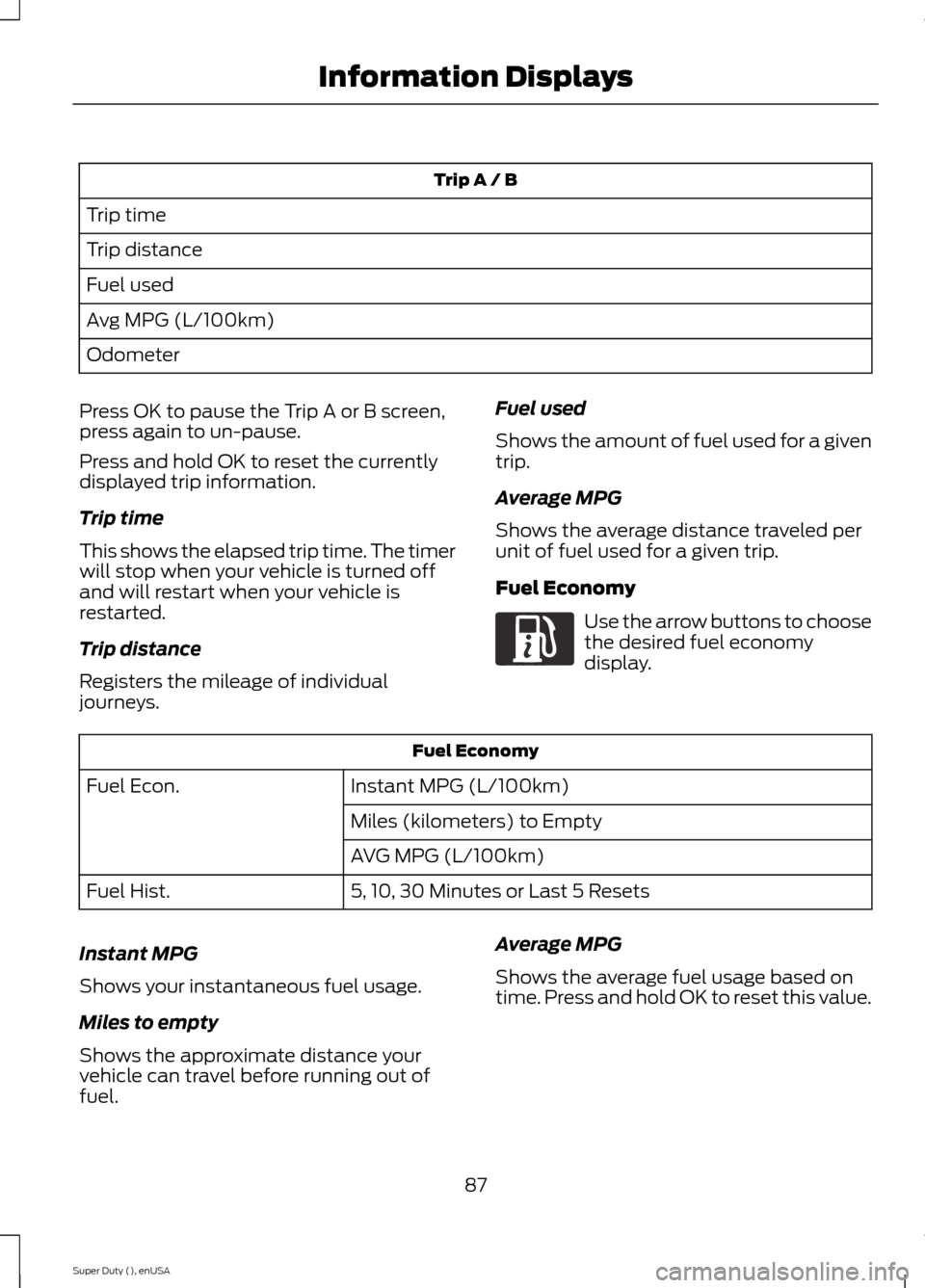
Trip A / B
Trip time
Trip distance
Fuel used
Avg MPG (L/100km)
Odometer
Press OK to pause the Trip A or B screen,press again to un-pause.
Press and hold OK to reset the currentlydisplayed trip information.
Trip time
This shows the elapsed trip time. The timerwill stop when your vehicle is turned offand will restart when your vehicle isrestarted.
Trip distance
Registers the mileage of individualjourneys.
Fuel used
Shows the amount of fuel used for a giventrip.
Average MPG
Shows the average distance traveled perunit of fuel used for a given trip.
Fuel Economy
Use the arrow buttons to choosethe desired fuel economydisplay.
Fuel Economy
Instant MPG (L/100km)Fuel Econ.
Miles (kilometers) to Empty
AVG MPG (L/100km)
5, 10, 30 Minutes or Last 5 ResetsFuel Hist.
Instant MPG
Shows your instantaneous fuel usage.
Miles to empty
Shows the approximate distance yourvehicle can travel before running out offuel.
Average MPG
Shows the average fuel usage based ontime. Press and hold OK to reset this value.
87Super Duty (), enUSAInformation DisplaysE163180
Page 92 of 470
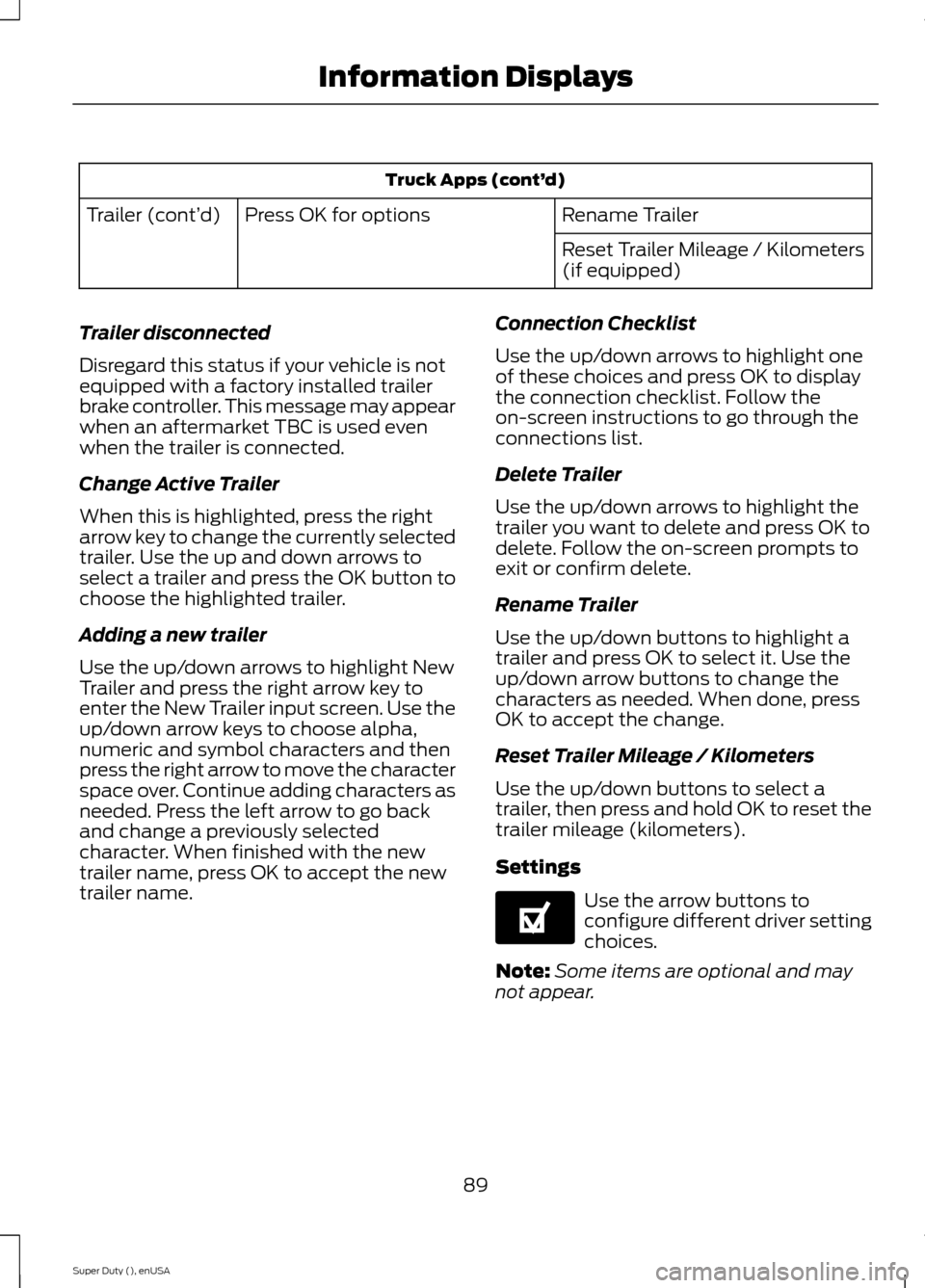
Truck Apps (cont’d)
Rename TrailerPress OK for optionsTrailer (cont’d)
Reset Trailer Mileage / Kilometers(if equipped)
Trailer disconnected
Disregard this status if your vehicle is notequipped with a factory installed trailerbrake controller. This message may appearwhen an aftermarket TBC is used evenwhen the trailer is connected.
Change Active Trailer
When this is highlighted, press the rightarrow key to change the currently selectedtrailer. Use the up and down arrows toselect a trailer and press the OK button tochoose the highlighted trailer.
Adding a new trailer
Use the up/down arrows to highlight NewTrailer and press the right arrow key toenter the New Trailer input screen. Use theup/down arrow keys to choose alpha,numeric and symbol characters and thenpress the right arrow to move the characterspace over. Continue adding characters asneeded. Press the left arrow to go backand change a previously selectedcharacter. When finished with the newtrailer name, press OK to accept the newtrailer name.
Connection Checklist
Use the up/down arrows to highlight oneof these choices and press OK to displaythe connection checklist. Follow theon-screen instructions to go through theconnections list.
Delete Trailer
Use the up/down arrows to highlight thetrailer you want to delete and press OK todelete. Follow the on-screen prompts toexit or confirm delete.
Rename Trailer
Use the up/down buttons to highlight atrailer and press OK to select it. Use theup/down arrow buttons to change thecharacters as needed. When done, pressOK to accept the change.
Reset Trailer Mileage / Kilometers
Use the up/down buttons to select atrailer, then press and hold OK to reset thetrailer mileage (kilometers).
Settings
Use the arrow buttons toconfigure different driver settingchoices.
Note:Some items are optional and maynot appear.
89Super Duty (), enUSAInformation DisplaysE144641
Page 94 of 470
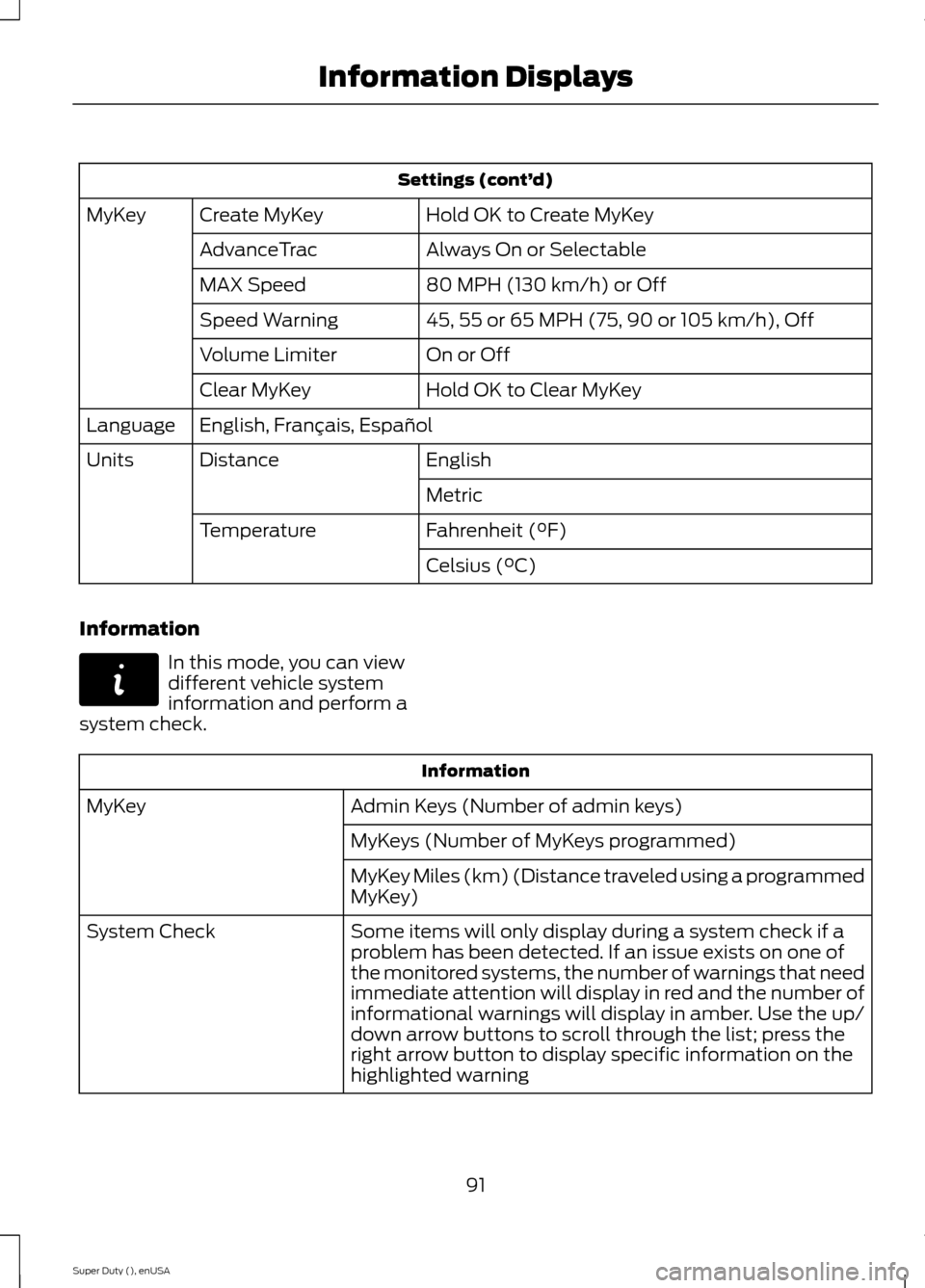
Settings (cont’d)
Hold OK to Create MyKeyCreate MyKeyMyKey
Always On or SelectableAdvanceTrac
80 MPH (130 km/h) or OffMAX Speed
45, 55 or 65 MPH (75, 90 or 105 km/h), OffSpeed Warning
On or OffVolume Limiter
Hold OK to Clear MyKeyClear MyKey
English, Français, EspañolLanguage
EnglishDistanceUnits
Metric
Fahrenheit (°F)Temperature
Celsius (°C)
Information
In this mode, you can viewdifferent vehicle systeminformation and perform asystem check.
Information
Admin Keys (Number of admin keys)MyKey
MyKeys (Number of MyKeys programmed)
MyKey Miles (km) (Distance traveled using a programmedMyKey)
Some items will only display during a system check if aproblem has been detected. If an issue exists on one ofthe monitored systems, the number of warnings that needimmediate attention will display in red and the number ofinformational warnings will display in amber. Use the up/down arrow buttons to scroll through the list; press theright arrow button to display specific information on thehighlighted warning
System Check
91Super Duty (), enUSAInformation DisplaysE144642
Page 106 of 470
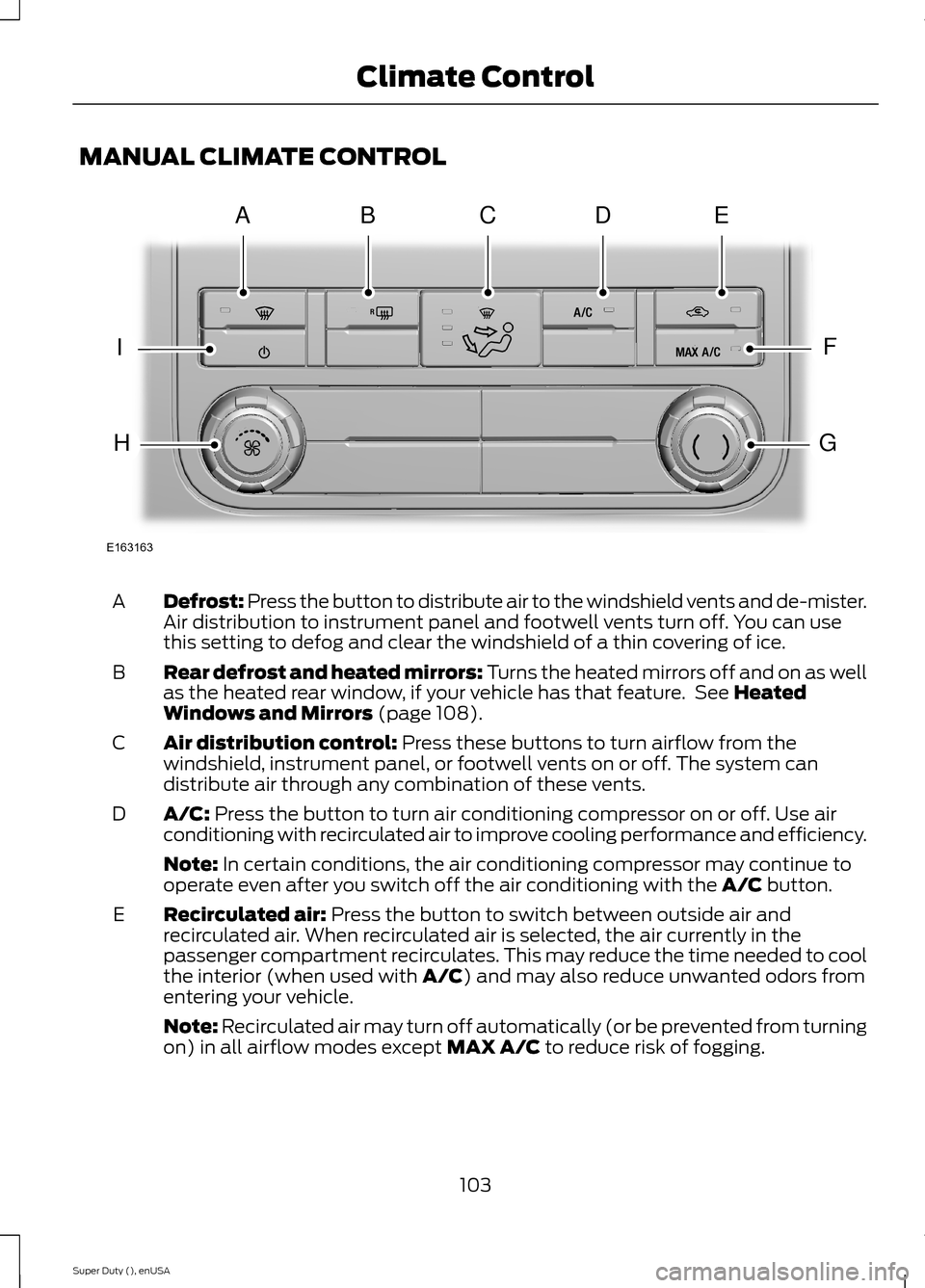
MANUAL CLIMATE CONTROL
Defrost: Press the button to distribute air to the windshield vents and de-mister.Air distribution to instrument panel and footwell vents turn off. You can usethis setting to defog and clear the windshield of a thin covering of ice.
A
Rear defrost and heated mirrors: Turns the heated mirrors off and on as wellas the heated rear window, if your vehicle has that feature. See HeatedWindows and Mirrors (page 108).
B
Air distribution control: Press these buttons to turn airflow from thewindshield, instrument panel, or footwell vents on or off. The system candistribute air through any combination of these vents.
C
A/C: Press the button to turn air conditioning compressor on or off. Use airconditioning with recirculated air to improve cooling performance and efficiency.D
Note: In certain conditions, the air conditioning compressor may continue tooperate even after you switch off the air conditioning with the A/C button.
Recirculated air: Press the button to switch between outside air andrecirculated air. When recirculated air is selected, the air currently in thepassenger compartment recirculates. This may reduce the time needed to coolthe interior (when used with A/C) and may also reduce unwanted odors fromentering your vehicle.
E
Note: Recirculated air may turn off automatically (or be prevented from turningon) in all airflow modes except MAX A/C to reduce risk of fogging.
103Super Duty (), enUSAClimate ControlE163163ABDCEFGIH
Page 108 of 470
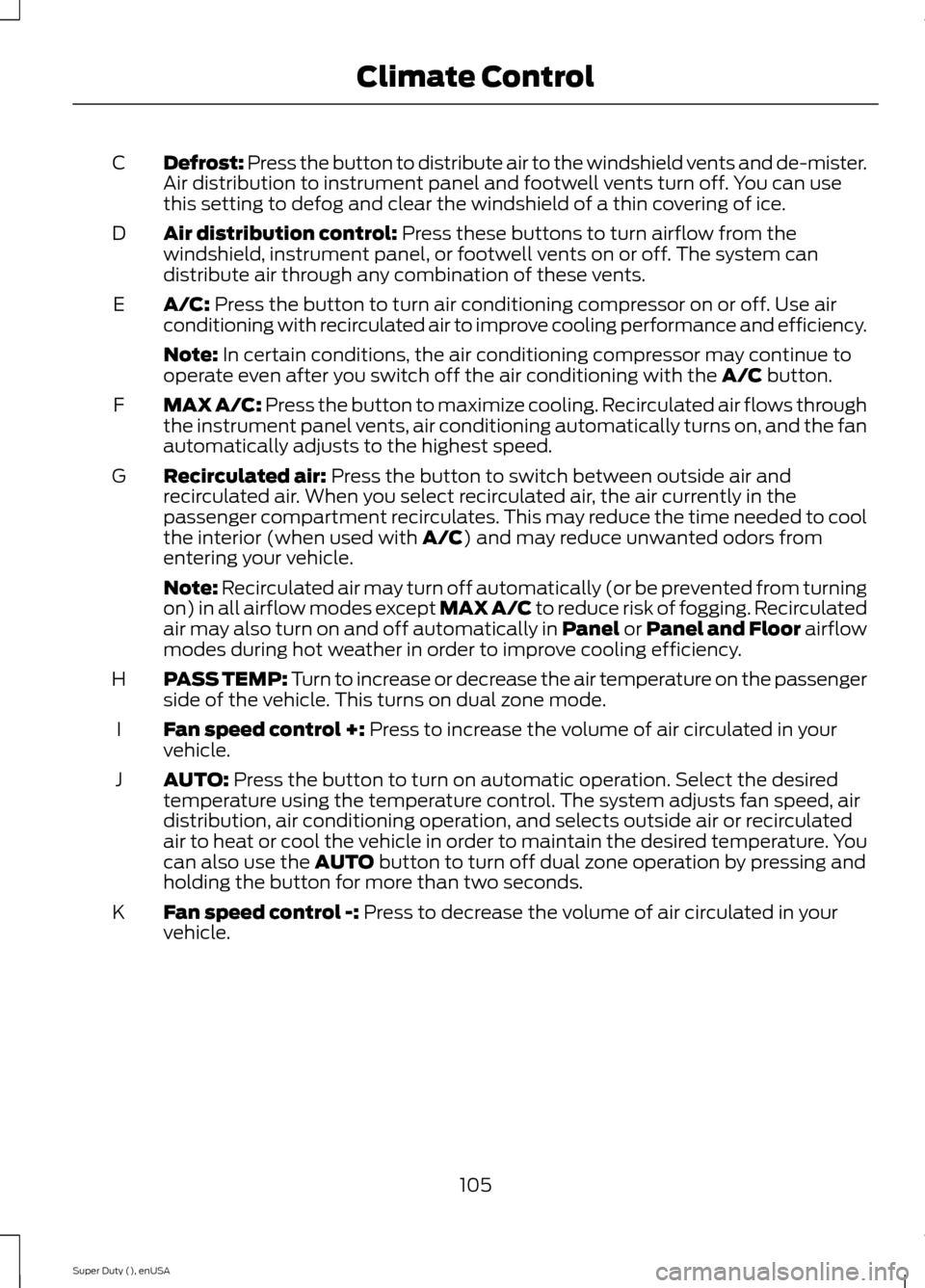
Defrost: Press the button to distribute air to the windshield vents and de-mister.Air distribution to instrument panel and footwell vents turn off. You can usethis setting to defog and clear the windshield of a thin covering of ice.
C
Air distribution control: Press these buttons to turn airflow from thewindshield, instrument panel, or footwell vents on or off. The system candistribute air through any combination of these vents.
D
A/C: Press the button to turn air conditioning compressor on or off. Use airconditioning with recirculated air to improve cooling performance and efficiency.E
Note: In certain conditions, the air conditioning compressor may continue tooperate even after you switch off the air conditioning with the A/C button.
MAX A/C: Press the button to maximize cooling. Recirculated air flows throughthe instrument panel vents, air conditioning automatically turns on, and the fanautomatically adjusts to the highest speed.
F
Recirculated air: Press the button to switch between outside air andrecirculated air. When you select recirculated air, the air currently in thepassenger compartment recirculates. This may reduce the time needed to coolthe interior (when used with A/C) and may reduce unwanted odors fromentering your vehicle.
G
Note: Recirculated air may turn off automatically (or be prevented from turningon) in all airflow modes except MAX A/C to reduce risk of fogging. Recirculatedair may also turn on and off automatically in Panel or Panel and Floor airflowmodes during hot weather in order to improve cooling efficiency.
PASS TEMP: Turn to increase or decrease the air temperature on the passengerside of the vehicle. This turns on dual zone mode.H
Fan speed control +: Press to increase the volume of air circulated in yourvehicle.I
AUTO: Press the button to turn on automatic operation. Select the desiredtemperature using the temperature control. The system adjusts fan speed, airdistribution, air conditioning operation, and selects outside air or recirculatedair to heat or cool the vehicle in order to maintain the desired temperature. Youcan also use the AUTO button to turn off dual zone operation by pressing andholding the button for more than two seconds.
J
Fan speed control -: Press to decrease the volume of air circulated in yourvehicle.K
105Super Duty (), enUSAClimate Control
Page 109 of 470
HINTS ON CONTROLLING THE
INTERIOR CLIMATE
General Hints
Note:Prolonged use of recirculated air maycause the windows to fog up.
Note:You may feel a small amount of airfrom the footwell air vents regardless of theair distribution setting.
Note:To reduce humidity build-up insideyour vehicle, do not drive with the systemswitched off or with recirculated air alwaysswitched on.
Note:Do not place objects under the frontseats as this may interfere with the airflowto the rear seats.
Note:Remove any snow, ice or leaves fromthe air intake area at the base of thewindshield.
Note:To improve the time to reach comfortin hot weather, drive with the windowsslightly open for 2-3 minutes after start-upor until your vehicle airs out.
Manual Climate Control
Note:To reduce fogging of the windshieldduring humid weather, adjust the airdistribution control to the windshield airvents position.
Automatic Climate Control
Note:Adjusting the settings when yourvehicle interior is extremely hot or cold isnot necessary. The system automaticallyadjusts to heat or cool the cabin to yourselected temperature as quickly as possible.For the system to function efficiently, theinstrument panel and side air vents shouldbe fully open.
Note:If you select AUTO during coldoutside temperatures, the system directsairflow to the windshield and side windowvents. In addition, the fan may run at aslower speed until the engine warms up.
Note:If you select AUTO during hot outsidetemperatures, or when the inside of thevehicle is hot, the system automatically usesrecirculated air to maximize interior cooling.When the interior reaches the selectedtemperature, the system automaticallyswitches to using outside air.
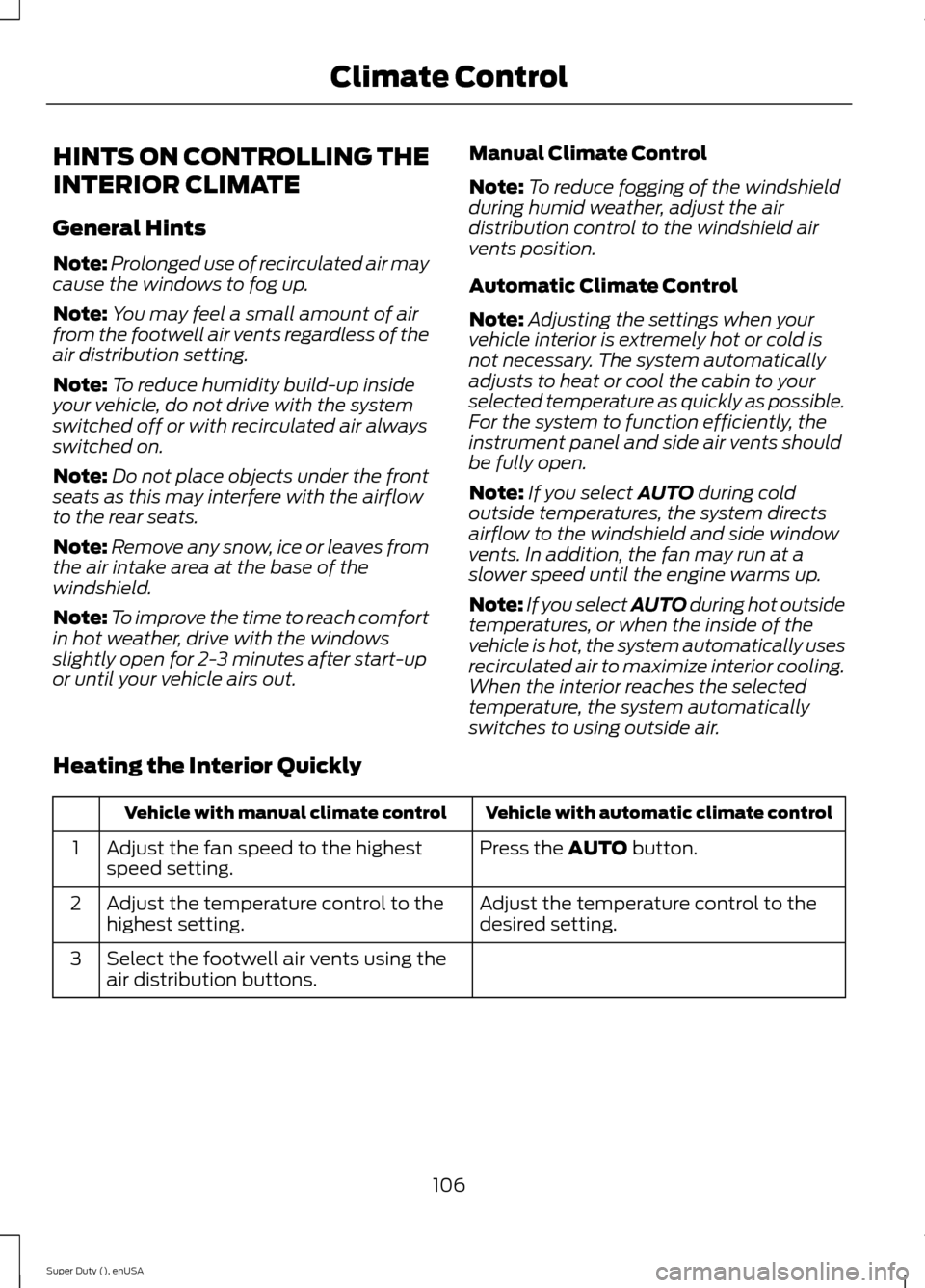
Heating the Interior Quickly
Vehicle with automatic climate controlVehicle with manual climate control
Press the AUTO button.Adjust the fan speed to the highestspeed setting.1
Adjust the temperature control to thedesired setting.Adjust the temperature control to thehighest setting.2
Select the footwell air vents using theair distribution buttons.3
106Super Duty (), enUSAClimate Control