wheel FORD SUPER DUTY 2021 Owner's Manual
[x] Cancel search | Manufacturer: FORD, Model Year: 2021, Model line: SUPER DUTY, Model: FORD SUPER DUTY 2021Pages: 666, PDF Size: 8.48 MB
Page 124 of 666
Settings
Follow onscreen directions to confirm
or modify your settings.
Clear MyKeys
Select Your
Setting
Distance Unit
Display
Setup
Temperature
Tire Pressure
Language
INFORMATION MESSAGES
Note: Depending on your vehicle options
and instrument cluster type, not all of the
messages display or are available. The
information display could abbreviate or
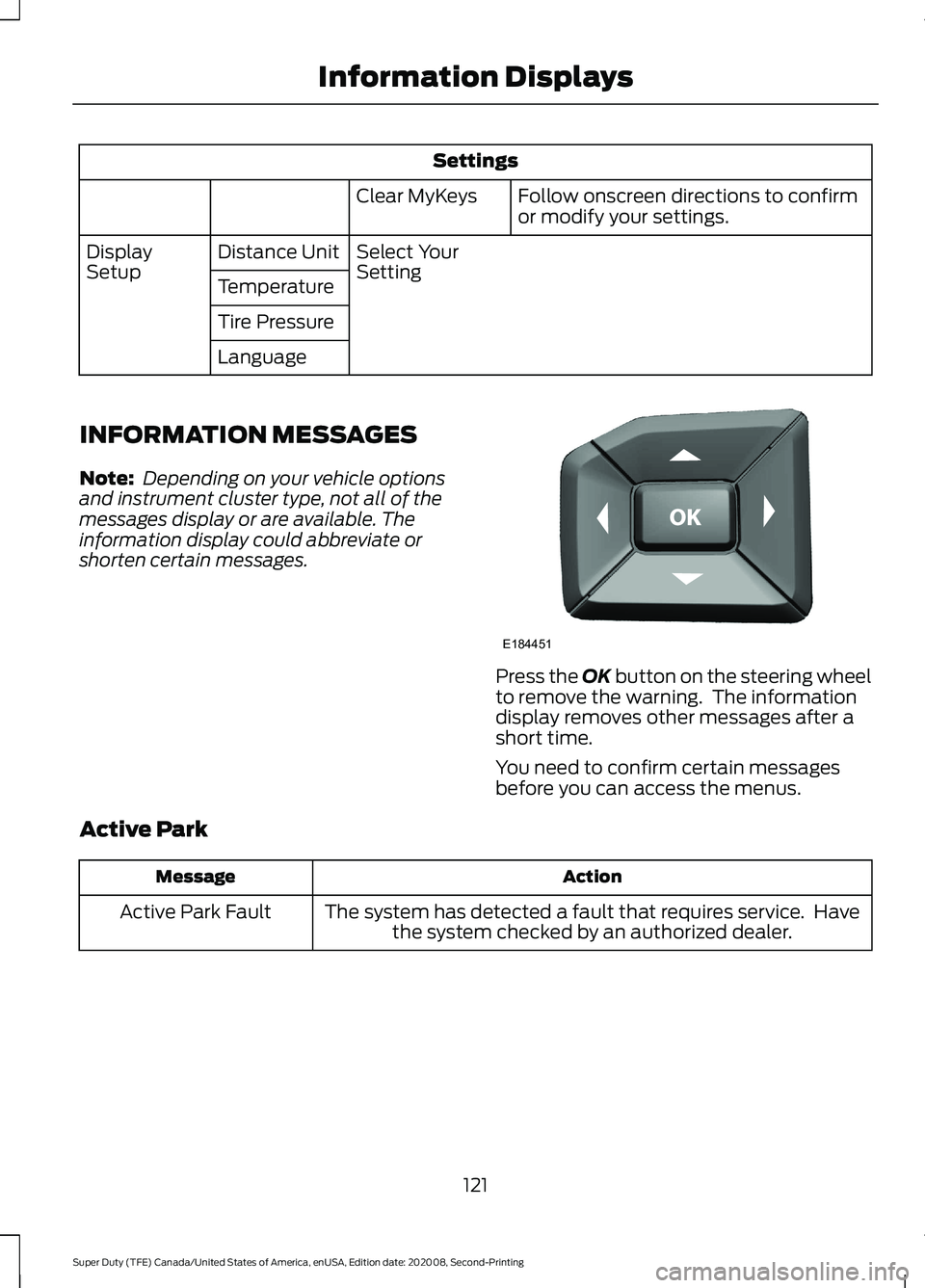
shorten certain messages. Press the OK button on the steering wheel
to remove the warning. The information
display removes other messages after a
short time.
You need to confirm certain messages
before you can access the menus.
Active Park Action
Message
The system has detected a fault that requires service. Havethe system checked by an authorized dealer.
Active Park Fault
121
Super Duty (TFE) Canada/United States of America, enUSA, Edition date: 202008, Second-Printing Information DisplaysE184451
Page 126 of 666
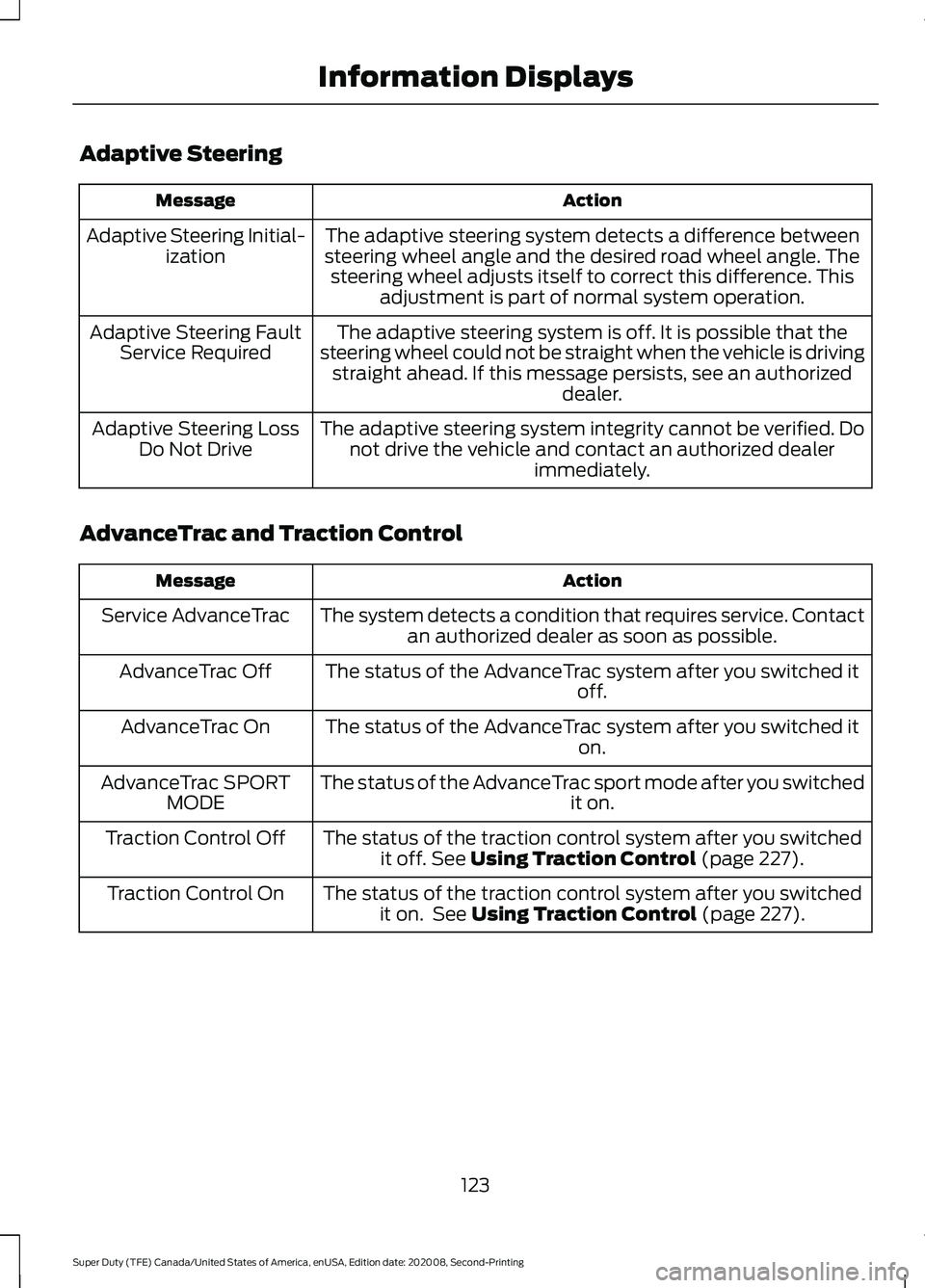
Adaptive Steering
Action
Message
The adaptive steering system detects a difference between
steering wheel angle and the desired road wheel angle. The steering wheel adjusts itself to correct this difference. This adjustment is part of normal system operation.
Adaptive Steering Initial-
ization
The adaptive steering system is off. It is possible that the
steering wheel could not be straight when the vehicle is driving straight ahead. If this message persists, see an authorized dealer.
Adaptive Steering Fault
Service Required
The adaptive steering system integrity cannot be verified. Donot drive the vehicle and contact an authorized dealer immediately.
Adaptive Steering Loss
Do Not Drive
AdvanceTrac and Traction Control Action
Message
The system detects a condition that requires service. Contactan authorized dealer as soon as possible.
Service AdvanceTrac
The status of the AdvanceTrac system after you switched it off.
AdvanceTrac Off
The status of the AdvanceTrac system after you switched it on.
AdvanceTrac On
The status of the AdvanceTrac sport mode after you switched it on.
AdvanceTrac SPORT
MODE
The status of the traction control system after you switchedit off. See Using Traction Control (page 227).
Traction Control Off
The status of the traction control system after you switchedit on. See
Using Traction Control (page 227).
Traction Control On
123
Super Duty (TFE) Canada/United States of America, enUSA, Edition date: 202008, Second-Printing Information Displays
Page 129 of 666
Action
Message
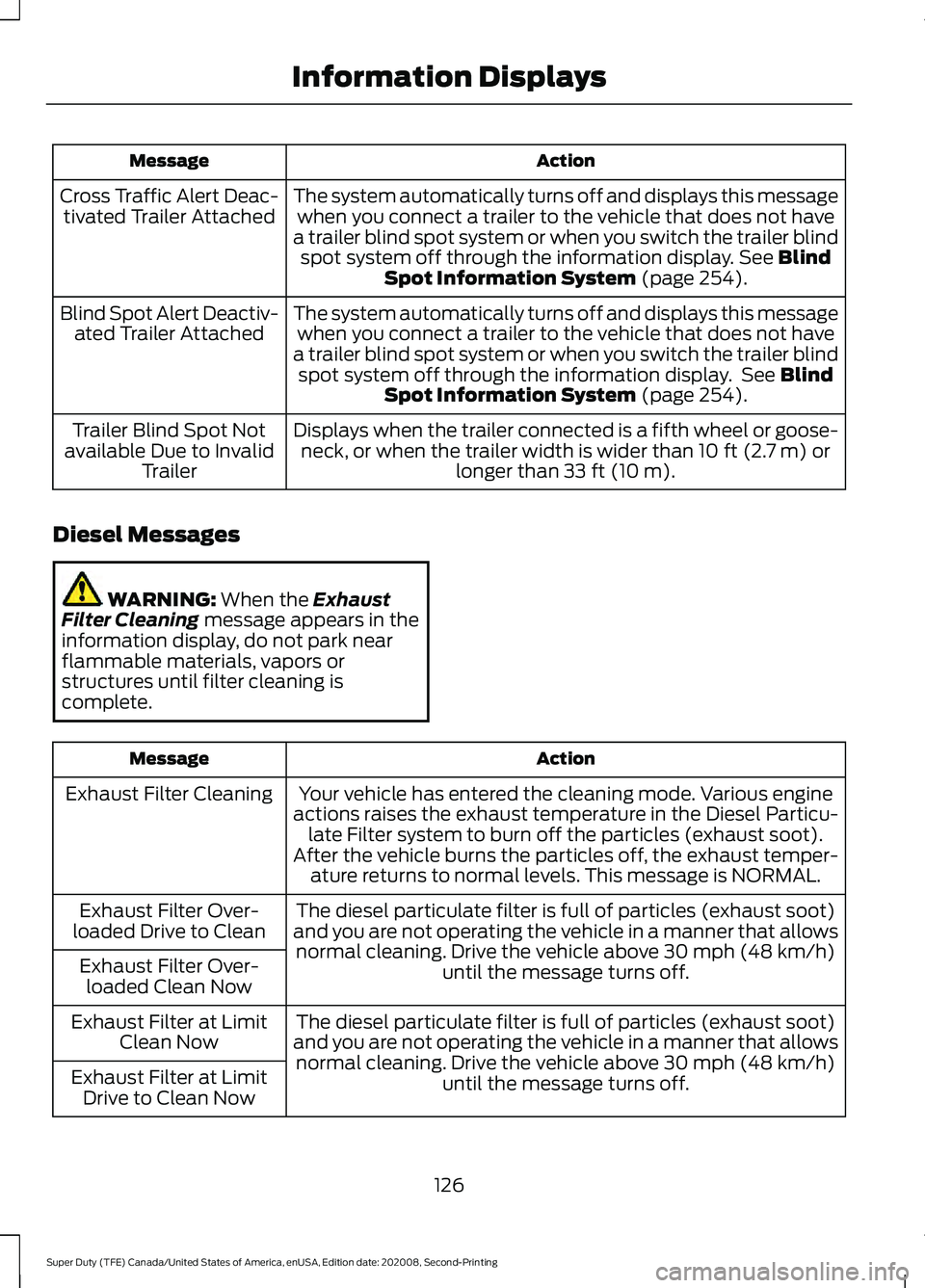
The system automatically turns off and displays this messagewhen you connect a trailer to the vehicle that does not have
a trailer blind spot system or when you switch the trailer blind spot system off through the information display. See Blind
Spot Information System (page 254).
Cross Traffic Alert Deac-
tivated Trailer Attached
The system automatically turns off and displays this messagewhen you connect a trailer to the vehicle that does not have
a trailer blind spot system or when you switch the trailer blind spot system off through the information display. See
Blind
Spot Information System (page 254).
Blind Spot Alert Deactiv-
ated Trailer Attached
Displays when the trailer connected is a fifth wheel or goose-neck, or when the trailer width is wider than
10 ft (2.7 m) or
longer than 33 ft (10 m).
Trailer Blind Spot Not
available Due to Invalid Trailer
Diesel Messages WARNING:
When the Exhaust
Filter Cleaning message appears in the
information display, do not park near
flammable materials, vapors or
structures until filter cleaning is
complete. Action
Message
Your vehicle has entered the cleaning mode. Various engine
actions raises the exhaust temperature in the Diesel Particu- late Filter system to burn off the particles (exhaust soot).
After the vehicle burns the particles off, the exhaust temper- ature returns to normal levels. This message is NORMAL.
Exhaust Filter Cleaning
The diesel particulate filter is full of particles (exhaust soot)
and you are not operating the vehicle in a manner that allows normal cleaning. Drive the vehicle above
30 mph (48 km/h)
until the message turns off.
Exhaust Filter Over-
loaded Drive to Clean
Exhaust Filter Over-loaded Clean Now
The diesel particulate filter is full of particles (exhaust soot)
and you are not operating the vehicle in a manner that allows normal cleaning. Drive the vehicle above
30 mph (48 km/h)
until the message turns off.
Exhaust Filter at Limit
Clean Now
Exhaust Filter at Limit Drive to Clean Now
126
Super Duty (TFE) Canada/United States of America, enUSA, Edition date: 202008, Second-Printing Information Displays
Page 132 of 666
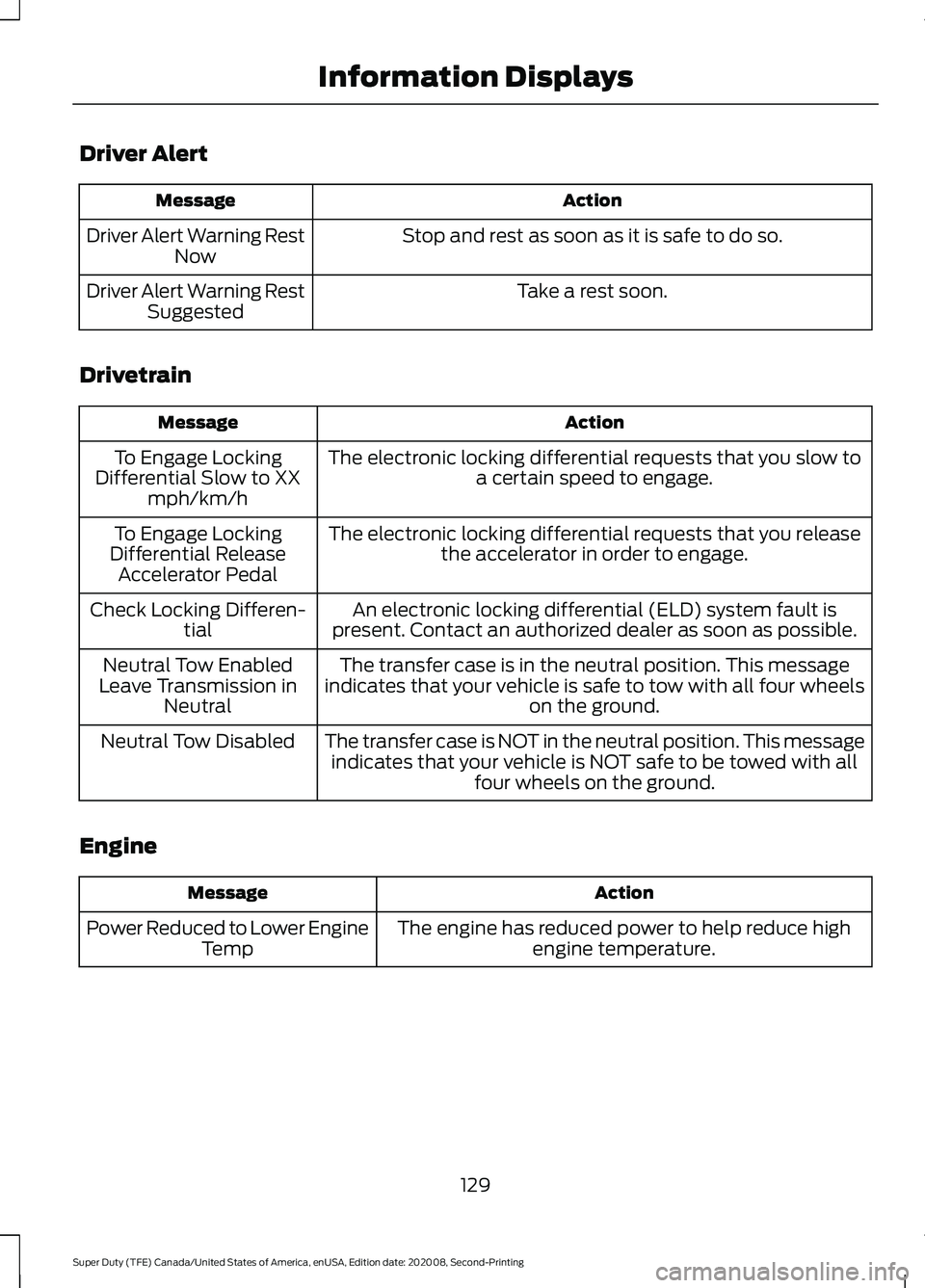
Driver Alert
Action
Message
Stop and rest as soon as it is safe to do so.
Driver Alert Warning Rest
Now
Take a rest soon.
Driver Alert Warning Rest
Suggested
Drivetrain Action
Message
The electronic locking differential requests that you slow toa certain speed to engage.
To Engage Locking
Differential Slow to XX mph/km/h
The electronic locking differential requests that you releasethe accelerator in order to engage.
To Engage Locking
Differential Release Accelerator Pedal
An electronic locking differential (ELD) system fault is
present. Contact an authorized dealer as soon as possible.
Check Locking Differen-
tial
The transfer case is in the neutral position. This message
indicates that your vehicle is safe to tow with all four wheels on the ground.
Neutral Tow Enabled
Leave Transmission in Neutral
The transfer case is NOT in the neutral position. This messageindicates that your vehicle is NOT safe to be towed with all four wheels on the ground.
Neutral Tow Disabled
Engine Action
Message
The engine has reduced power to help reduce highengine temperature.
Power Reduced to Lower Engine
Temp
129
Super Duty (TFE) Canada/United States of America, enUSA, Edition date: 202008, Second-Printing Information Displays
Page 134 of 666
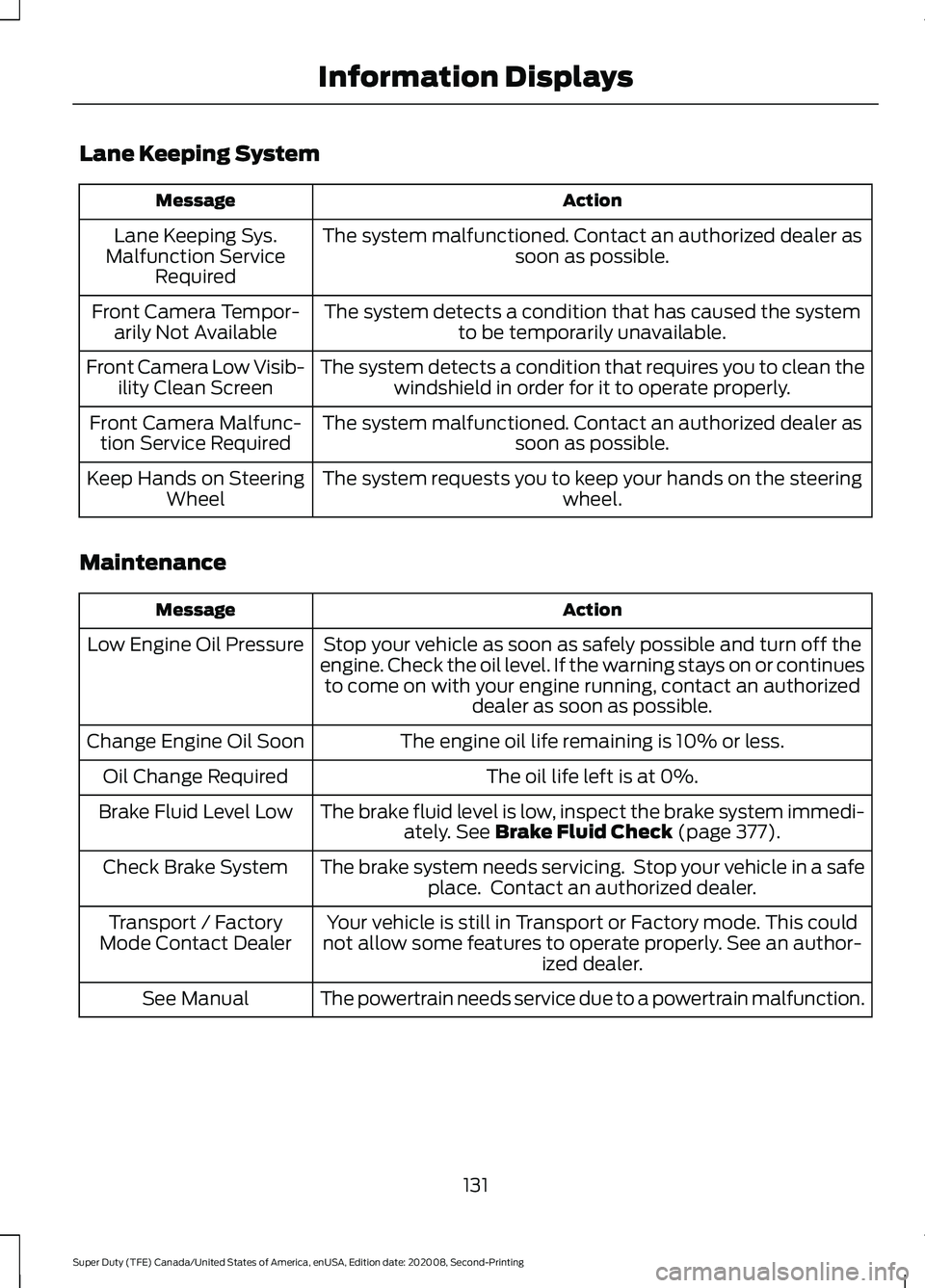
Lane Keeping System
Action
Message
The system malfunctioned. Contact an authorized dealer as soon as possible.
Lane Keeping Sys.
Malfunction Service Required
The system detects a condition that has caused the systemto be temporarily unavailable.
Front Camera Tempor-
arily Not Available
The system detects a condition that requires you to clean thewindshield in order for it to operate properly.
Front Camera Low Visib-
ility Clean Screen
The system malfunctioned. Contact an authorized dealer assoon as possible.
Front Camera Malfunc-
tion Service Required
The system requests you to keep your hands on the steering wheel.
Keep Hands on Steering
Wheel
Maintenance Action
Message
Stop your vehicle as soon as safely possible and turn off the
engine. Check the oil level. If the warning stays on or continues to come on with your engine running, contact an authorized dealer as soon as possible.
Low Engine Oil Pressure
The engine oil life remaining is 10% or less.
Change Engine Oil Soon
The oil life left is at 0%.
Oil Change Required
The brake fluid level is low, inspect the brake system immedi-ately. See Brake Fluid Check (page 377).
Brake Fluid Level Low
The brake system needs servicing. Stop your vehicle in a safeplace. Contact an authorized dealer.
Check Brake System
Your vehicle is still in Transport or Factory mode. This could
not allow some features to operate properly. See an author- ized dealer.
Transport / Factory
Mode Contact Dealer
The powertrain needs service due to a powertrain malfunction.
See Manual
131
Super Duty (TFE) Canada/United States of America, enUSA, Edition date: 202008, Second-Printing Information Displays
Page 142 of 666
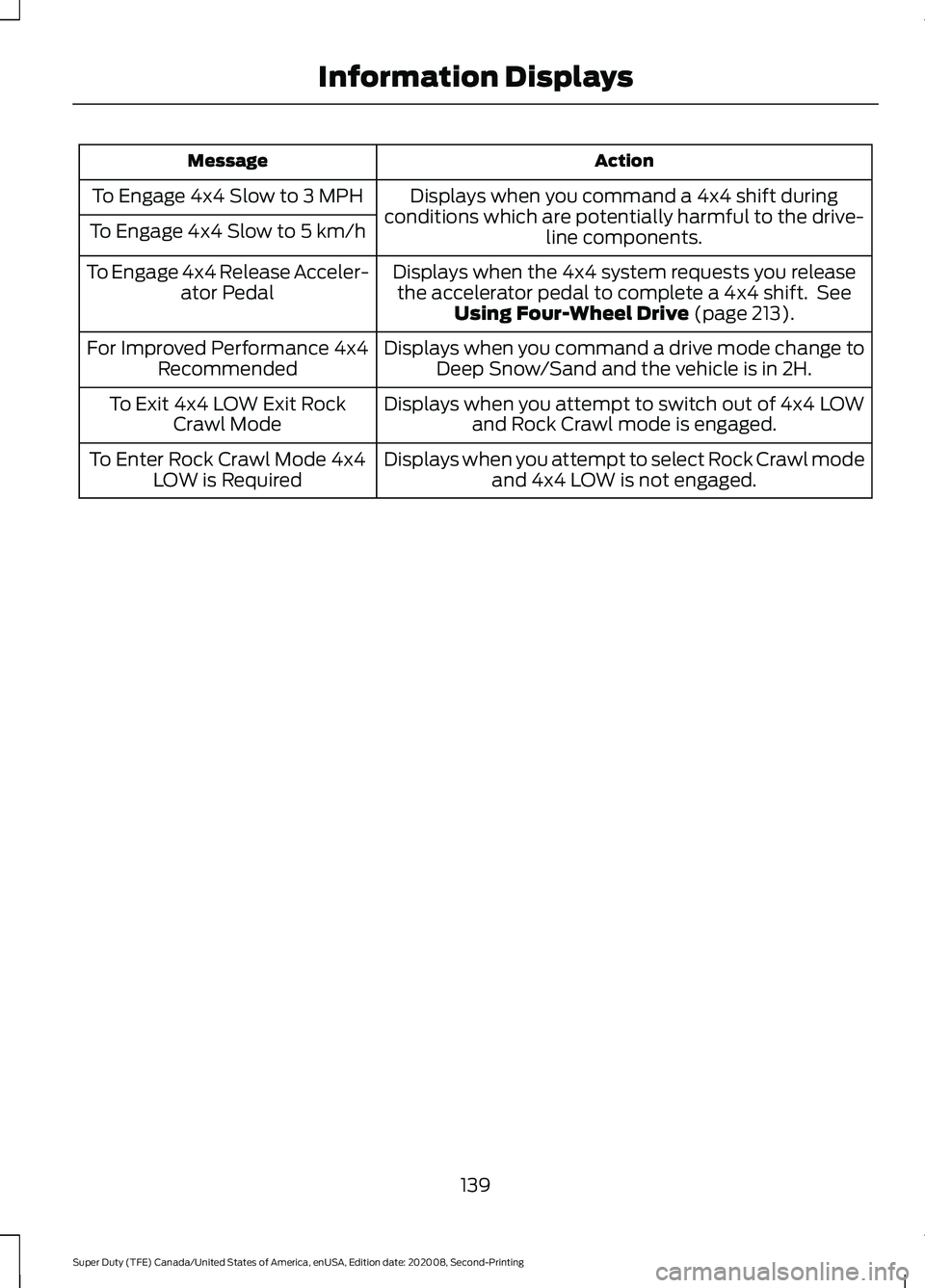
Action
Message
Displays when you command a 4x4 shift during
conditions which are potentially harmful to the drive- line components.
To Engage 4x4 Slow to 3 MPH
To Engage 4x4 Slow to 5 km/h
Displays when the 4x4 system requests you releasethe accelerator pedal to complete a 4x4 shift. See Using Four-Wheel Drive (page 213).
To Engage 4x4 Release Acceler-
ator Pedal
Displays when you command a drive mode change toDeep Snow/Sand and the vehicle is in 2H.
For Improved Performance 4x4
Recommended
Displays when you attempt to switch out of 4x4 LOWand Rock Crawl mode is engaged.
To Exit 4x4 LOW Exit Rock
Crawl Mode
Displays when you attempt to select Rock Crawl modeand 4x4 LOW is not engaged.
To Enter Rock Crawl Mode 4x4
LOW is Required
139
Super Duty (TFE) Canada/United States of America, enUSA, Edition date: 202008, Second-Printing Information Displays
Page 144 of 666
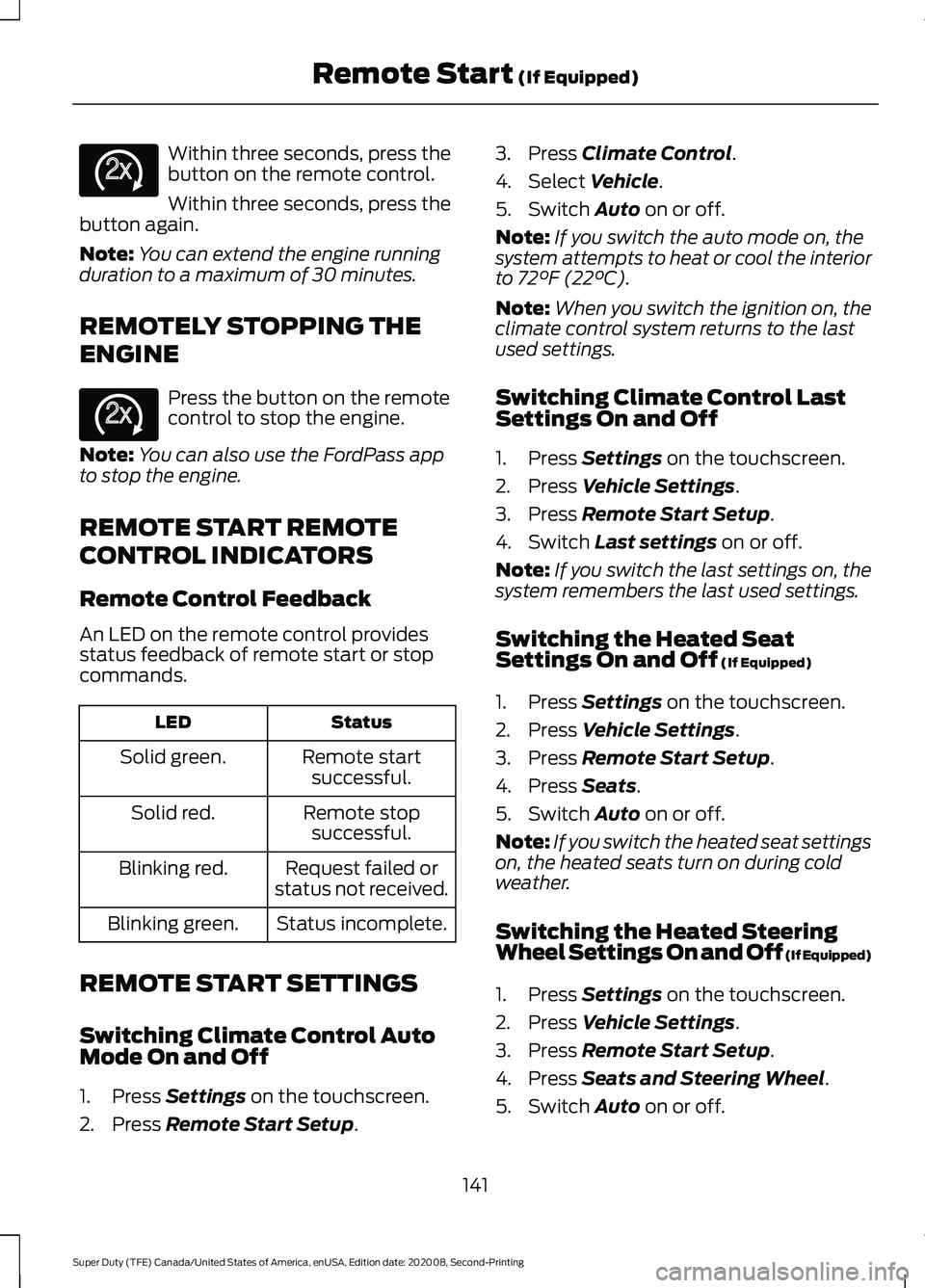
Within three seconds, press the
button on the remote control.
Within three seconds, press the
button again.
Note: You can extend the engine running
duration to a maximum of 30 minutes.
REMOTELY STOPPING THE
ENGINE Press the button on the remote
control to stop the engine.
Note: You can also use the FordPass app
to stop the engine.
REMOTE START REMOTE
CONTROL INDICATORS
Remote Control Feedback
An LED on the remote control provides
status feedback of remote start or stop
commands. Status
LED
Remote startsuccessful.
Solid green.
Remote stopsuccessful.
Solid red.
Request failed or
status not received.
Blinking red.
Status incomplete.
Blinking green.
REMOTE START SETTINGS
Switching Climate Control Auto
Mode On and Off
1. Press Settings on the touchscreen.
2. Press
Remote Start Setup. 3. Press
Climate Control.
4. Select
Vehicle.
5. Switch
Auto on or off.
Note: If you switch the auto mode on, the
system attempts to heat or cool the interior
to
72°F (22°C).
Note: When you switch the ignition on, the
climate control system returns to the last
used settings.
Switching Climate Control Last
Settings On and Off
1. Press
Settings on the touchscreen.
2. Press
Vehicle Settings.
3. Press
Remote Start Setup.
4. Switch
Last settings on or off.
Note: If you switch the last settings on, the
system remembers the last used settings.
Switching the Heated Seat
Settings On and Off
(If Equipped)
1. Press
Settings on the touchscreen.
2. Press
Vehicle Settings.
3. Press
Remote Start Setup.
4. Press
Seats.
5. Switch
Auto on or off.
Note: If you switch the heated seat settings
on, the heated seats turn on during cold
weather.
Switching the Heated Steering
Wheel Settings On and Off (If Equipped)
1. Press
Settings on the touchscreen.
2. Press
Vehicle Settings.
3. Press
Remote Start Setup.
4. Press
Seats and Steering Wheel.
5. Switch
Auto on or off.
141
Super Duty (TFE) Canada/United States of America, enUSA, Edition date: 202008, Second-Printing Remote Start
(If Equipped)E138625 E138625
Page 145 of 666
Note:
If you switch the heated steering
wheel settings on, the heated steering wheel
turns on during cold weather.
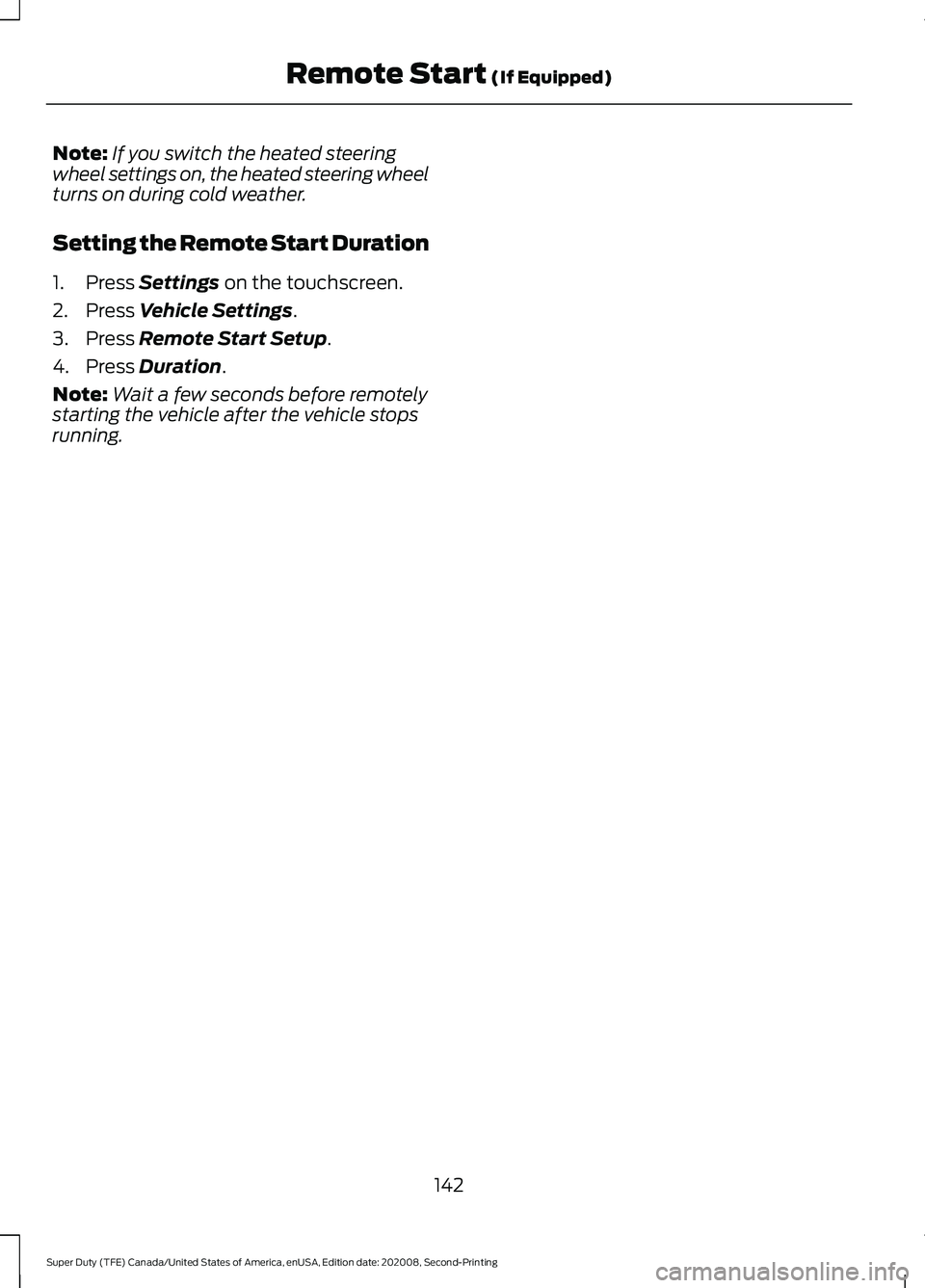
Setting the Remote Start Duration
1. Press Settings on the touchscreen.
2. Press
Vehicle Settings.
3. Press
Remote Start Setup.
4. Press
Duration.
Note: Wait a few seconds before remotely
starting the vehicle after the vehicle stops
running.
142
Super Duty (TFE) Canada/United States of America, enUSA, Edition date: 202008, Second-Printing Remote Start
(If Equipped)
Page 154 of 666
SITTING IN THE CORRECT
POSITION
WARNING: Sitting improperly, out
of position or with the seatback reclined
too far can take weight off the seat
cushion and affect the decision of the
passenger sensing system, resulting in
serious injury or death in the event of a
crash. Always sit upright against your
seat back, with your feet on the floor. WARNING: Do not recline the seat
backrest too far as this can cause the
occupant to slide under the seatbelt,
resulting in personal injury in the event
of a crash. WARNING:
Do not place objects
higher than the top of the seat backrest.
Failure to follow this instruction could
result in personal injury or death in the
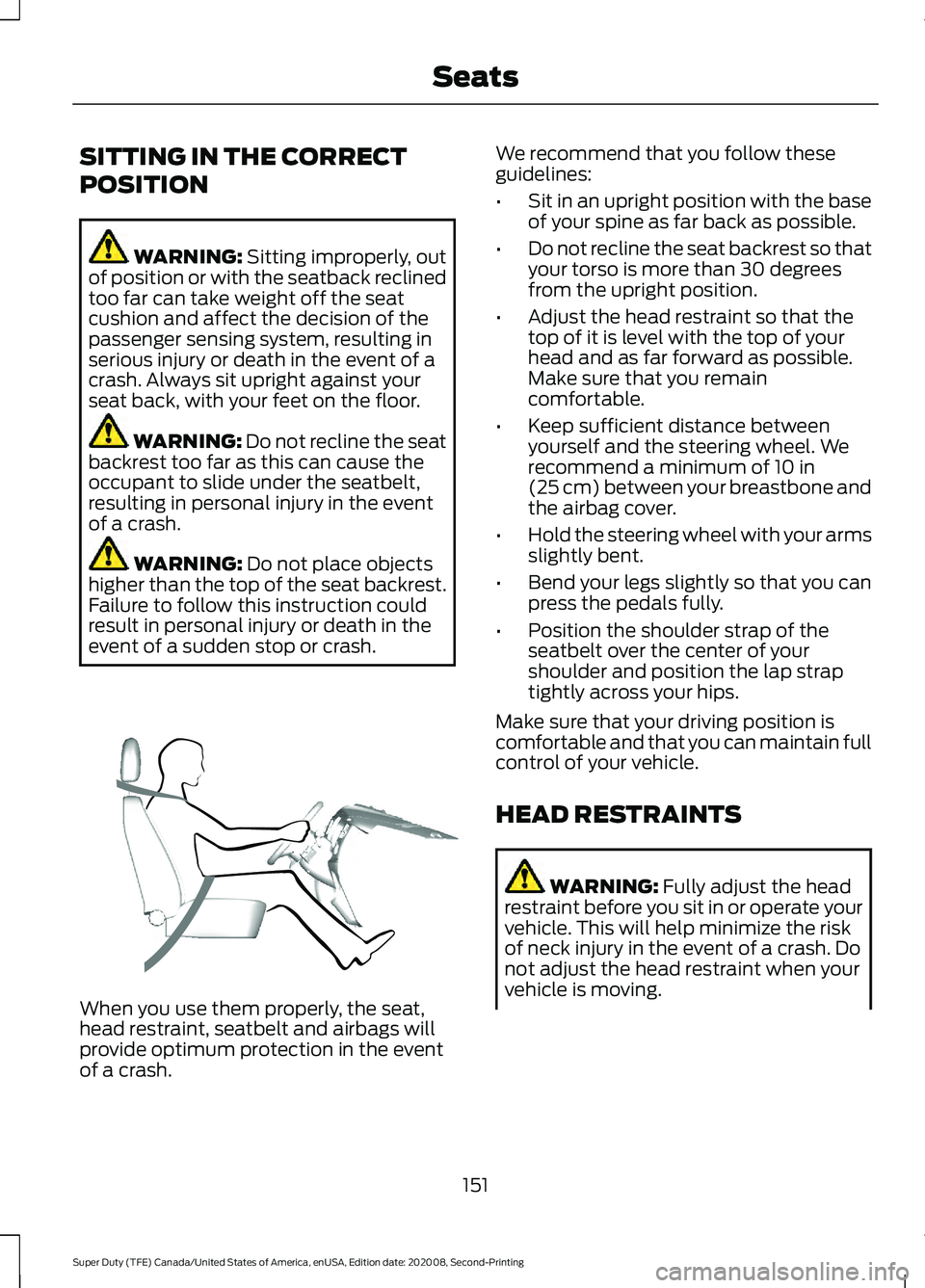
event of a sudden stop or crash. When you use them properly, the seat,
head restraint, seatbelt and airbags will
provide optimum protection in the event
of a crash. We recommend that you follow these
guidelines:
•
Sit in an upright position with the base
of your spine as far back as possible.
• Do not recline the seat backrest so that
your torso is more than 30 degrees
from the upright position.
• Adjust the head restraint so that the
top of it is level with the top of your
head and as far forward as possible.
Make sure that you remain
comfortable.
• Keep sufficient distance between
yourself and the steering wheel. We
recommend a minimum of
10 in
(25 cm) between your breastbone and
the airbag cover.
• Hold the steering wheel with your arms
slightly bent.
• Bend your legs slightly so that you can
press the pedals fully.
• Position the shoulder strap of the
seatbelt over the center of your
shoulder and position the lap strap
tightly across your hips.
Make sure that your driving position is
comfortable and that you can maintain full
control of your vehicle.
HEAD RESTRAINTS WARNING:
Fully adjust the head
restraint before you sit in or operate your
vehicle. This will help minimize the risk
of neck injury in the event of a crash. Do
not adjust the head restraint when your
vehicle is moving.
151
Super Duty (TFE) Canada/United States of America, enUSA, Edition date: 202008, Second-Printing SeatsE68595
Page 201 of 666
Filling the Diesel Exhaust Fluid
Tank
WARNING: Keep diesel exhaust
fluid out of reach of children. Avoid
contact with skin, eyes or clothing. In
case of contact with your eyes, flush
immediately with water and get prompt
medical attention. In case of contact
with your skin, clean immediately with
soap and water. If you swallow any
diesel exhaust fluid, drink plenty of
water, call a physician immediately. WARNING:
Only refill the diesel
exhaust fluid tank in a well ventilated
area. When you remove the diesel
exhaust fluid tank filler cap or a diesel
exhaust fluid container cap, ammonia
vapors may escape. Ammonia vapors
can be irritating to skin, eyes and mucous
membranes. Inhaling ammonia vapors
can cause burning to the eyes, throat and
nose and cause coughing and watery
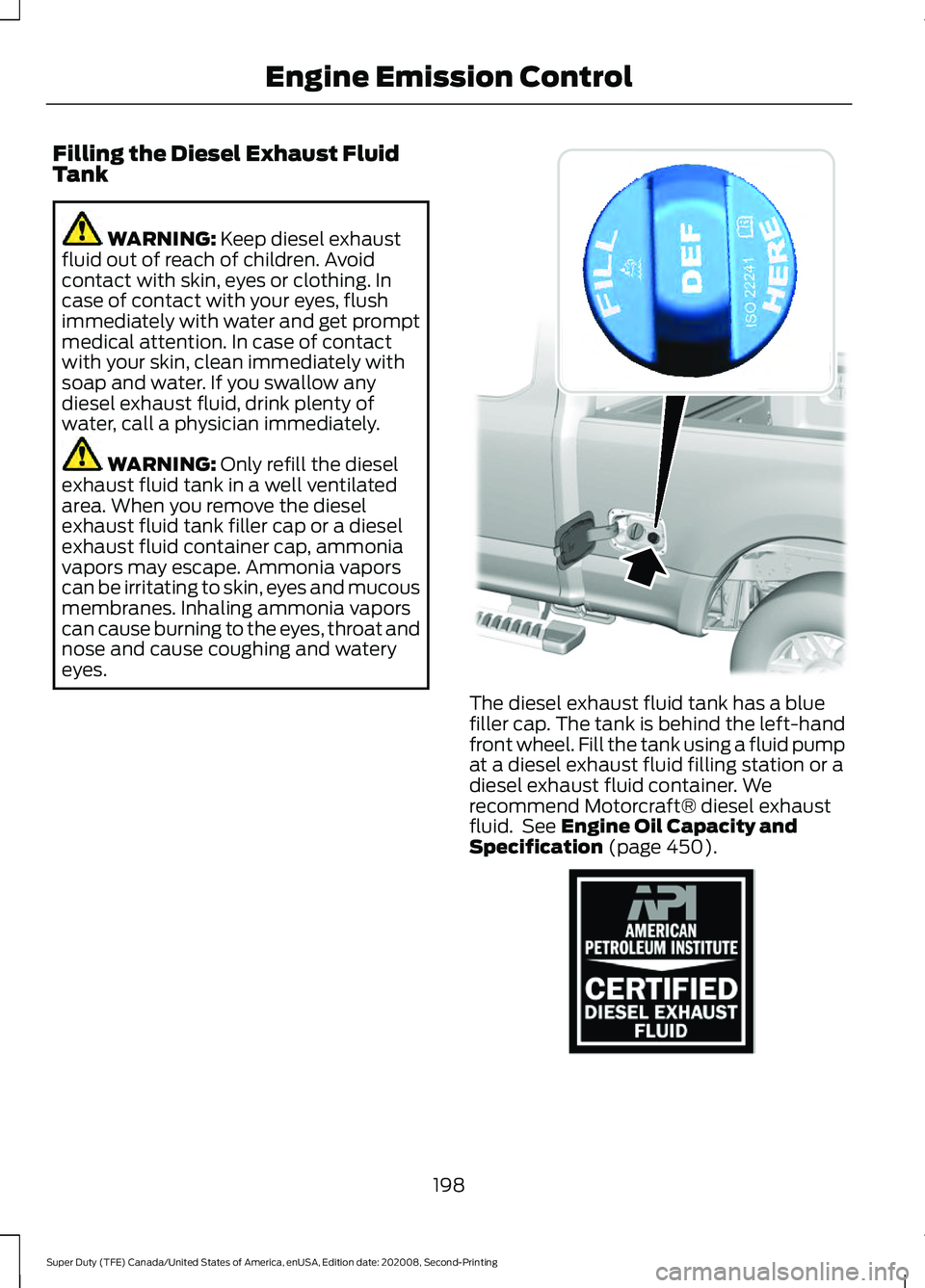
eyes. The diesel exhaust fluid tank has a blue
filler cap. The tank is behind the left-hand
front wheel. Fill the tank using a fluid pump
at a diesel exhaust fluid filling station or a
diesel exhaust fluid container. We
recommend Motorcraft® diesel exhaust
fluid. See
Engine Oil Capacity and
Specification (page 450). 198
Super Duty (TFE) Canada/United States of America, enUSA, Edition date: 202008, Second-Printing Engine Emission Control E308416 E163354