display FORD SUPER DUTY 2023 Owners Manual
[x] Cancel search | Manufacturer: FORD, Model Year: 2023, Model line: SUPER DUTY, Model: FORD SUPER DUTY 2023Pages: 738, PDF Size: 18.49 MB
Page 346 of 738
SWITCHING DISTANCEINDICATION ON AND OFF
To switch the system on or off, use thetouchscreen:
1.Press Features on the touchscreen.
2.Press Driver Assistance.
3.Press Pre-Collision Assist.
4.Switch Distance Indication on or off.
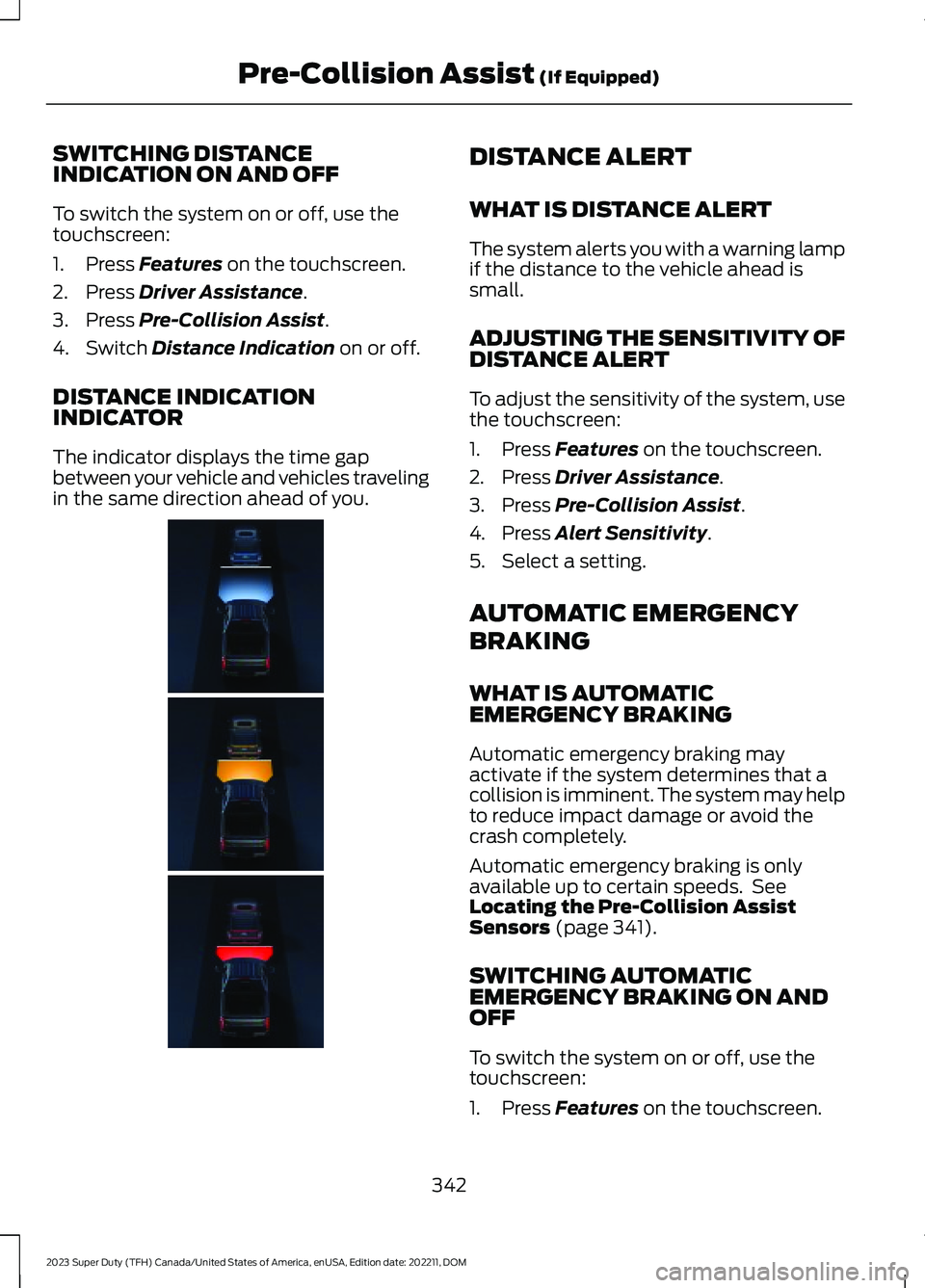
DISTANCE INDICATIONINDICATOR
The indicator displays the time gapbetween your vehicle and vehicles travelingin the same direction ahead of you.
DISTANCE ALERT
WHAT IS DISTANCE ALERT
The system alerts you with a warning lampif the distance to the vehicle ahead issmall.
ADJUSTING THE SENSITIVITY OFDISTANCE ALERT
To adjust the sensitivity of the system, usethe touchscreen:
1.Press Features on the touchscreen.
2.Press Driver Assistance.
3.Press Pre-Collision Assist.
4.Press Alert Sensitivity.
5.Select a setting.
AUTOMATIC EMERGENCY
BRAKING
WHAT IS AUTOMATICEMERGENCY BRAKING
Automatic emergency braking mayactivate if the system determines that acollision is imminent. The system may helpto reduce impact damage or avoid thecrash completely.
Automatic emergency braking is onlyavailable up to certain speeds. SeeLocating the Pre-Collision AssistSensors (page 341).
SWITCHING AUTOMATICEMERGENCY BRAKING ON ANDOFF
To switch the system on or off, use thetouchscreen:
1.Press Features on the touchscreen.
342
2023 Super Duty (TFH) Canada/United States of America, enUSA, Edition date: 202211, DOMPre-Collision Assist (If Equipped) E381968
Page 347 of 738
2.Press Driver Assistance.
3.Press Pre-Collision Assist.
4.Press Auto Emergency Braking.
5.Switch the feature on or off.
EVASIVE STEERING ASSIST
WHAT IS EVASIVE STEERINGASSIST
If your vehicle is rapidly approaching a roaduser, evasive steering assist helps you steeraround the road user.
After you turn the steering wheel in anattempt to avoid a crash with the roaduser, the system applies additional steeringtorque to help you steer around the roaduser. After you pass the road user, thesystem applies steering torque when youturn the steering wheel to steer back intothe lane. The system deactivates after youfully pass the road user.
Note:Road users are defined aspedestrians or bicyclists in your vehicle'spath or another stationary vehicle in thesame lane or a vehicle traveling in the samelane in the same direction as you. SeePre-Collision Assist Precautions (page338).
EVASIVE STEERING ASSISTLIMITATIONS
Evasive steering assist only activates whenall the following occur:
•Automatic emergency braking andevasive steering assist are on.
•The system detects a road user aheadand starts to apply the brakes.
•You significantly turn the steeringwheel to steer around a road user.
Note:Evasive steering assist does notautomatically steer around a road user. Ifyou do not turn the steering wheel, evasivesteering assist does not activate.
Note:Evasive steering assist does notactivate if the distance to the road userahead is too small and the system cannotavoid a crash.
SWITCHING EVASIVE STEERINGASSIST ON AND OFF
To switch the system on or off, use thetouchscreen:
1.Press Features on the touchscreen.
2.Press Driver Assistance.
3.Press Pre-Collision Assist.
4.Switch Evasive Steering on or off.
Note:If you switch automatic emergencybraking off, evasive steering assist turns off.
Note:Automatic emergency braking andevasive steering assist turn on every timeyou switch the ignition on.
PRE-COLLISION ASSIST –
TROUBLESHOOTING
PRE-COLLISION ASSIST –WARNING LAMPS
A telltale illuminates in theinstrument cluster display toindicate if the system is disabled,unavailable, or temporarily degraded dueto external environmental conditions.
Note:No action is needed if the telltaleilluminates without a correspondinginformation message. See Pre-CollisionAssist Precautions (page 338).
343
2023 Super Duty (TFH) Canada/United States of America, enUSA, Edition date: 202211, DOMPre-Collision Assist (If Equipped)E335612
Page 349 of 738
PRE-COLLISION ASSIST –FREQUENTLY ASKED QUESTIONS
Camera Troubleshooting
The windshield in front of thecamera is dirty or obstructed.
•Clean the outside of the windshield infront of the camera.
The windshield in front of thecamera is clean, but the messageremains in the instrument clusterdisplay.
•Wait a short time. It could take severalminutes for the camera to detect thatthere is no obstruction.
Radar Troubleshooting (If Equipped)
The surface of the radar in thegrille is dirty or obstructed.
•Clean the grille surface in front of theradar or remove the object causing theobstruction.
The surface of the radar in thegrille is clean, but the messageremains in the instrument clusterdisplay.
•Wait a short time. It could take severalminutes for the radar to detect thatthere is no obstruction.
Heavy rain, spray or fog isinterfering with the radar signals.
•Due to the current conditions, thesystem temporarily disables thisfeature. Pre-collision assist reactivatesa short time after the weatherconditions improve.
Swirling water, snow or ice on thesurface of the road could interferewith the radar signals.
•Due to the current conditions, thesystem temporarily disables thisfeature. Pre-collision assist reactivatesa short time after the weatherconditions improve.
Radar is out of alignment due to afront end impact.
•Have your vehicle serviced to have theradar checked for proper coverage andoperation.
PRE-COLLISION ASSIST
VIDEOS
Forward Collision Warning with brakesupport: F-Series
Pre-Collision Assist with AutomaticEmergency Braking
345
2023 Super Duty (TFH) Canada/United States of America, enUSA, Edition date: 202211, DOMPre-Collision Assist (If Equipped)
Page 352 of 738
WHAT IS SPEED SIGN
RECOGNITION
Speed sign recognition detects speed limitsigns to inform you of the current speedlimit. Detected speed signs appear in theinstrument cluster display.
HOW DOES SPEED SIGN
RECOGNITION WORK
Speed sign recognition uses a sensorbehind the interior mirror to detect speedsigns.
If your vehicle has speed sign recognitionwith navigation, stored speed sign datamay influence the indicated speed limitvalue.
SPEED SIGN RECOGNITION
PRECAUTIONS
WARNING: You are responsible forcontrolling your vehicle at all times. Thesystem is designed to be an aid and doesnot relieve you of your responsibility todrive with due care and attention. Failureto follow this instruction could result inthe loss of control of your vehicle,personal injury or death.
WARNING: In cold and severeweather conditions the system may notfunction. Rain, snow and spray can alllimit sensor performance.
WARNING: The system may notoperate properly if the sensor is blocked.Keep the windshield free fromobstruction.
Note:Do not carry out windshield repairsin the immediate area surrounding thesensor.
Note:If your vehicle has a suspension kitnot approved by Ford, the system may notcorrectly function.
Note:The system may not detect all speedsigns and may incorrectly read signs.
Note:Always fit our original parts whenreplacing headlamp bulbs. Other bulbs mayreduce system performance.
SPEED SIGN RECOGNITION
LIMITATIONS
Speed sign recognition may not operatecorrectly due to:
•Outdated map data.
•Incorrect recognition of speed limits bythe sensor of signs on parallel roads orexit ramps.
•Missed recognition of faded, dirty, ordistorted signs.
SPEED SIGN RECOGNITION
INDICATORS
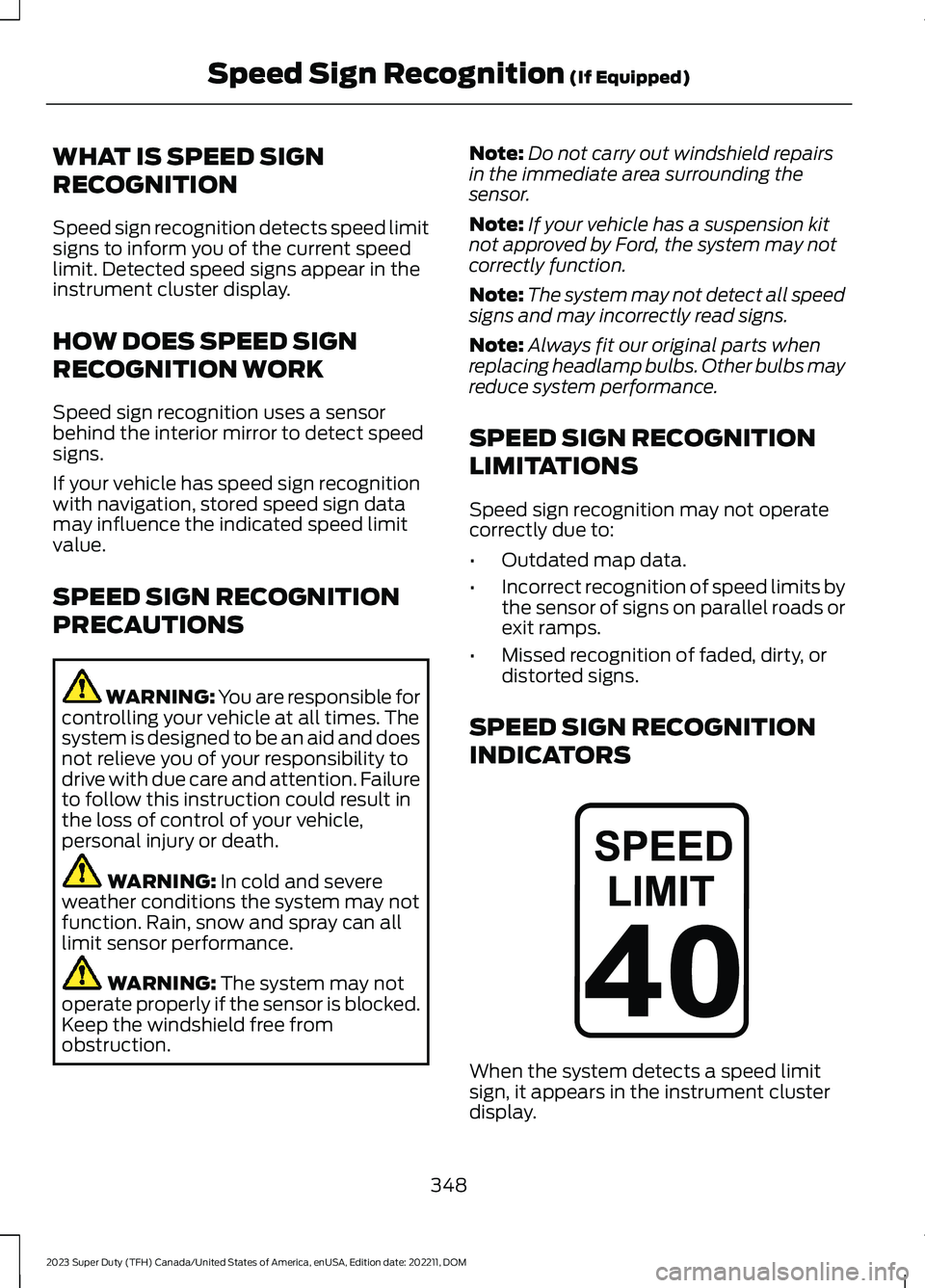
When the system detects a speed limitsign, it appears in the instrument clusterdisplay.
348
2023 Super Duty (TFH) Canada/United States of America, enUSA, Edition date: 202211, DOMSpeed Sign Recognition (If Equipped)E317824
Page 353 of 738
Note:Sign indicator image may vary basedon your vehicle's display type.
SETTING THE SPEED SIGN
RECOGNITION SPEED
WARNING
To set the speed warning, use thetouchscreen.
1.Press Features on the touchscreen.
2.Press Driver Assistance.
3.Press Speed Limit Assist.
4.Switch the feature on or off.
SETTING THE SPEED SIGN
RECOGNITION SPEED
TOLERANCE
To set the tolerance of the speed warning,use the touchscreen.
1.Press Features on the touchscreen.
2.Press Driver Assistance.
3.Press Speed Limit Assist.
4.Press Tolerance.
5.Use the slider bar to select the requiredlevel.
SPEED SIGN RECOGNITION – TROUBLESHOOTING
SPEED SIGN RECOGNITION – INFORMATION MESSAGES
ActionMessage
The traffic sign data provided by the navig-ation system is unavailable due to weak orno signal. Wait for a short period of time forthe signal to improve. If the messagecontinues to appear, have the systemchecked as soon as possible.
Traffic Sign Reduced Performance SeeManual
349
2023 Super Duty (TFH) Canada/United States of America, enUSA, Edition date: 202211, DOMSpeed Sign Recognition (If Equipped)
Page 366 of 738
When attaching the trailer wiring connectorto your vehicle, only use a proper fittingconnector that works with the vehicle andtrailer functions.
Trailer Light Check
WARNING: Never connect anytrailer lamp wiring to the vehicle's taillamp wiring; this may damage theelectrical system resulting in fire. Contactyour authorized dealer as soon aspossible for assistance in proper trailertow wiring installation. Additionalelectrical equipment may be required.
Most towed vehicles require trailer lamps.Make sure all running lights, brake lights,turn signals and hazard lights are working.
Safety Chains
Install trailer safety chains to the trailerhitch as recommended by themanufacturer. Cross the chains under thetrailer coupler and allow enough slack forturning tight corners. Do not allow thechains to drag on the ground.
Note:Do not attach safety chains to thebumper. Always connect the safety chainsto the frame or hook retainers of your trailerhitch.
If the trailer safety chain hook has a latch,make sure to fully close the latch.
Use the smaller holes in the safety chainbracket for trailer breakaway cables andsmall 3/8" s-hooks.
TRAILER BATTERY CHARGE/TRAILER POWER FEED
This feature allows the trailer’s battery tocharge under the following situations:
•Your vehicle is in the accessory orengine run position
•If the vehicle’s battery voltage is inoptimum condition, above 12.5 volts,and the trailer’s battery can still hold acharge, or is not too old.
Note: The trailer battery charge statusappears in the instrument cluster display.See Instrument Cluster Display (page 143).
The trailer power feed feature allows fora 12 volt power output on a 7-pin connectorwhen the system detects a trailer.
Note:Trailer power feed can provide amaximum output rate of 15 amps.
362
2023 Super Duty (TFH) Canada/United States of America, enUSA, Edition date: 202211, DOMConnecting a TrailerE265060 E376302
Page 368 of 738
CONNECTING A TRAILER – TROUBLESHOOTING
CONNECTING A TRAILER – INFORMATION MESSAGES
DescriptionMessage
The system senses a trailer connectionbecomes disconnected, either intentionallyor unintentionally, during a given ignitioncycle.
Trailer Disconnected
There are certain faults in your vehiclewiring and trailer wiring or brake system.Trailer Wiring Fault
The vehicle's battery voltage is low or thereis a fault with your trailer's battery. Yourtrailer's battery voltage is below 8 volts orit is connected in reverse polarity.
Trailer Battery Not Charging See Manual
One or more tires on your trailer is belowthe specified tire pressure.Trailer Tire Low Specified:
Displays when one or more tires on thetrailer is above the recommended temper-ature.
Trailer Tire Over Temperature
A trailer tire pressure sensor is malfunc-tioning. If the warning stays on or continuesto come on, have the system checked assoon as possible.
Trailer Tire Pressure Sensor Fault
The trailer tire pressure monitoring systemis malfunctioning. If the warning stays onor continues to come on, have the systemchecked.
Trailer Tire Pressure Monitor Fault
The system cannot detect the trailer tirepressure monitoring system.Trailer Tire Pressure Monitor Capability NotDetected
The trailer tire pressure monitoring systemis not set up.Trailer Tire Pressure Indication Not SetupSee Manual
CONNECTING A TRAILER
VIDEOS
Smart Trailer Tow Connector Video Link
364
2023 Super Duty (TFH) Canada/United States of America, enUSA, Edition date: 202211, DOMConnecting a Trailer
Page 374 of 738
TOWING A TRAILER – TROUBLESHOOTING
TOWING A TRAILER – INFORMATION MESSAGES
DetailsMessage
The left-hand trailer turn lamp requiresservice.Trailer Left Turn Lamps Fault Check Lamps
The right-hand trailer turn lamp requiresservice.Trailer Right Turn Lamps Fault CheckLamps
The vehicle's battery voltage is low or thereis a fault with your trailer's battery. Yourtrailer's battery voltage is below 8 volts orit is connected in reverse polarity.
Trailer Battery Not Charging See Manual
The system detects a short created by thetrailer lamps. Inspect and repair the trailerwiring, or have the system checked as soonas possible.
Trailer Lighting Module Fault See Manual
The trailer stoplamps require service.Trailer Stop Lamps Fault Check Lamps
The trailer sway control detects trailersway. Reduce the vehicle's speed.Trailer Sway Reduce Speed
Displays when one or more tires on thetrailer is above the recommended temper-ature.
Trailer Tire Over Temperature
One or more tires on your trailer is belowthe specified tire pressure.Trailer Tire Low Specified:
A trailer tire pressure sensor requiresservice. If the warning stays on or continuesto come on, have the system checked assoon as possible.
Trailer Tire Pressure Sensor Fault
The trailer tire pressure monitoring systemrequires service. If the warning stays on orcontinues to come on, have the systemchecked as soon as possible.
Trailer Tire Pressure Monitor Fault
The system cannot detect the trailer tirepressure monitoring system.Trailer Tire Pressure Monitor Capability NotDetected
The trailer tire pressure monitoring systemis not setup.Trailer Tire Pressure Indication Not SetupSee Manual
370
2023 Super Duty (TFH) Canada/United States of America, enUSA, Edition date: 202211, DOMTowing a Trailer
Page 376 of 738
WHAT IS THE INTEGRATED
TRAILER BRAKE CONTROLLER
The trailer brake controller assists insmooth and effective trailer braking basedon the towing vehicle’s brake pressure.
INTEGRATED TRAILER BRAKE
CONTROLLER PRECAUTIONS
WARNING: Use the integratedtrailer brake controller to properly adjustthe trailer brakes and check allconnections before towing a trailer.Failure to follow this instruction couldresult in the loss of control of yourvehicle, personal injury or death.
•Only use the manual control lever forproper adjustment of the gain duringtrailer setup. Misuse, such asapplication during trailer sway, couldcause instability of trailer or towvehicle.
•Avoid towing in adverse weatherconditions. The trailer brake controllerdoes not provide anti-lock control ofthe trailer wheels. Trailer wheels canlock up on slippery surfaces, resultingin reduced stability of trailer and towvehicle.
•The trailer brake controller is only afactory-installed or dealer-installeditem. Ford is not responsible forwarranty or performance of thecontroller due to misuse or customerinstallation.
Note:Do not attempt removal of the trailerbrake controller without consulting theWorkshop Manual. Damage to the unit mayresult.
Note:Make sure to set the integrated trailerbrake controller gain to 0 if you are using anaftermarket trailer brake controller.
USING THE INTEGRATED
TRAILER BRAKE CONTROLLER
1.Make sure the trailer brakes are in goodworking condition, functioning normallyand properly adjusted. See your trailerdealer if necessary.
Note:An authorized dealer can diagnosethe trailer brake controller to determineexactly which trailer fault has occurred. Yourvehicle warranty does not cover issues withyour trailer.
2.Hook up the trailer and make theelectrical connections according to thetrailer manufacturer's instructions.
Note:Select default mode if the trailer hassurge brakes, or no brakes at all. The systemhas no effect on the braking performanceof the trailer in either of these cases.
Note:If a trailer is connected by a four-pinconnector, the trailer braking function willnot be supported.
3.When you plug in a trailer with electricor electric-over-hydraulic brakes, amessage confirming connectionappears in the information display.
4.Use the gain adjustment to find thedesired starting point. A gain setting of6.0 is a good starting point for heavierloads.
Note:Use the following steps to adjust thegain setting whenever road, weather andtrailer, or vehicle loading conditions, changefrom when you initially set the gain.
5.In a traffic-free environment, tow thetrailer on a dry, level surface andsqueeze the manual control levercompletely.
372
2023 Super Duty (TFH) Canada/United States of America, enUSA, Edition date: 202211, DOMIntegrated Trailer Brake Controller
Page 377 of 738
6.If the trailer wheels lock up, indicatedby squealing tires, reduce the gainsetting. If the trailer wheels turn freely,increase the gain setting. Repeat Steps5 and 6 until the gain setting is at apoint just below trailer wheel lock-up.If towing a heavier trailer, trailer wheellock-up may not be attainable evenwith the maximum gain setting of 10.
Note:Only perform this procedure atspeeds of approximately 20–25 mph(30–40 km/h).
Note:The trailer brake controller reducesoutput at vehicle speeds below 11 mph(18 km/h) so that trailer and vehicle brakingis not jerky or harsh. This feature is onlyavailable when applying the brakes usingyour vehicle's brake pedal, not thecontroller.
Note:Your vehicle's brake system and thetrailer brake system work independently ofeach other. Changing the gain setting on thecontroller does not affect the operation ofyour vehicle's brakes whether you attach atrailer or not.
Note:With the proper electrical connection,pressing your vehicle brake pedal or usingthe manual control lever illuminates bothtrailer and vehicle brake lamps.
Note:When you switch the engine off, thecontroller output is disabled and the displayand module shut down. The controllermodule and display turn on when you switchthe ignition on.
Note:Trailer braking is suspended duringstop/start events to minimize battery draw.
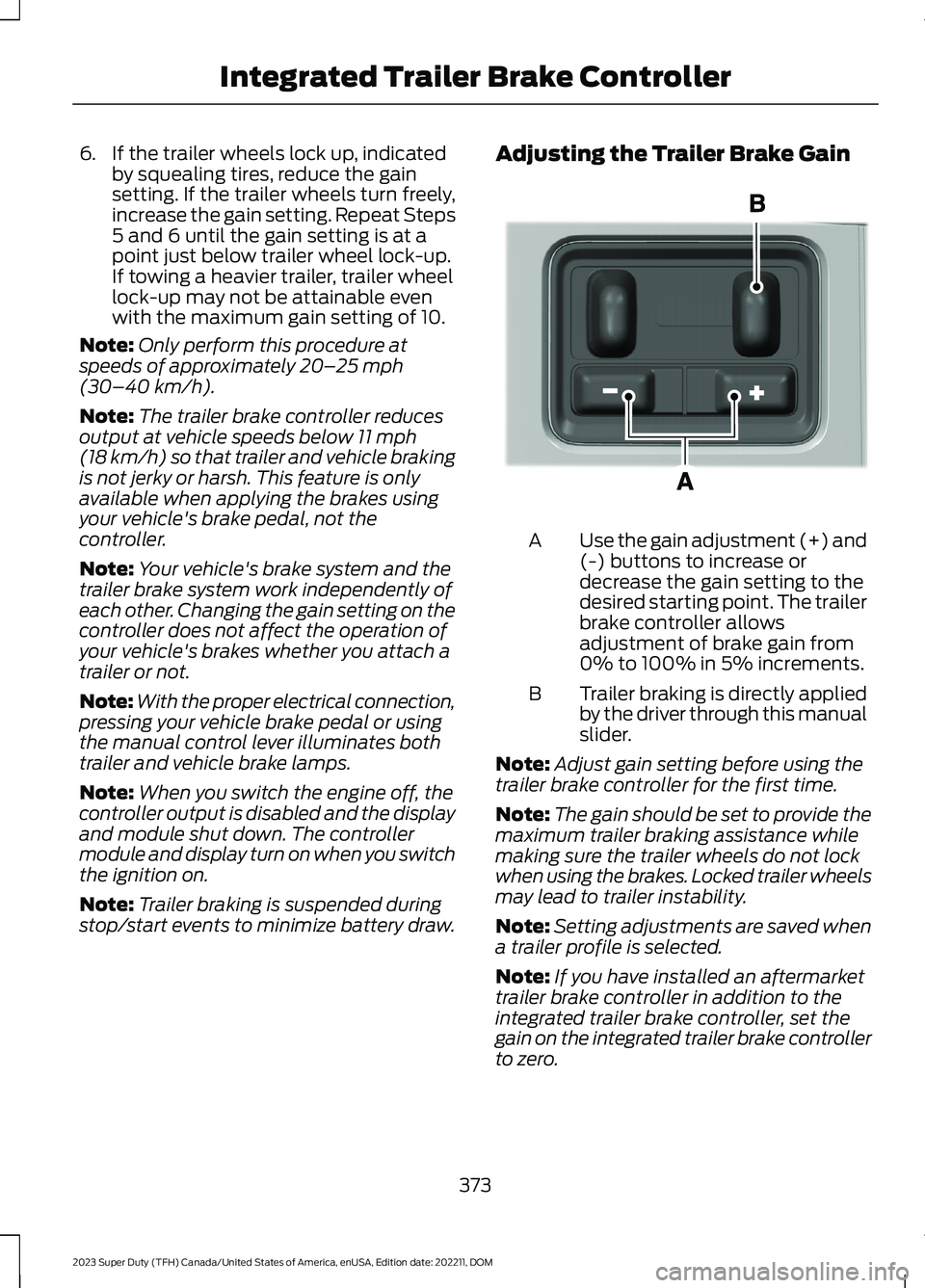
Adjusting the Trailer Brake Gain
Use the gain adjustment (+) and(-) buttons to increase ordecrease the gain setting to thedesired starting point. The trailerbrake controller allowsadjustment of brake gain from0% to 100% in 5% increments.
A
Trailer braking is directly appliedby the driver through this manualslider.
B
Note:Adjust gain setting before using thetrailer brake controller for the first time.
Note:The gain should be set to provide themaximum trailer braking assistance whilemaking sure the trailer wheels do not lockwhen using the brakes. Locked trailer wheelsmay lead to trailer instability.
Note:Setting adjustments are saved whena trailer profile is selected.
Note:If you have installed an aftermarkettrailer brake controller in addition to theintegrated trailer brake controller, set thegain on the integrated trailer brake controllerto zero.
373
2023 Super Duty (TFH) Canada/United States of America, enUSA, Edition date: 202211, DOMIntegrated Trailer Brake ControllerE333154