display FORD SUPER DUTY 2023 Owners Manual
[x] Cancel search | Manufacturer: FORD, Model Year: 2023, Model line: SUPER DUTY, Model: FORD SUPER DUTY 2023Pages: 738, PDF Size: 18.49 MB
Page 379 of 738
INTEGRATED TRAILER BRAKE CONTROLLER –
TROUBLESHOOTING
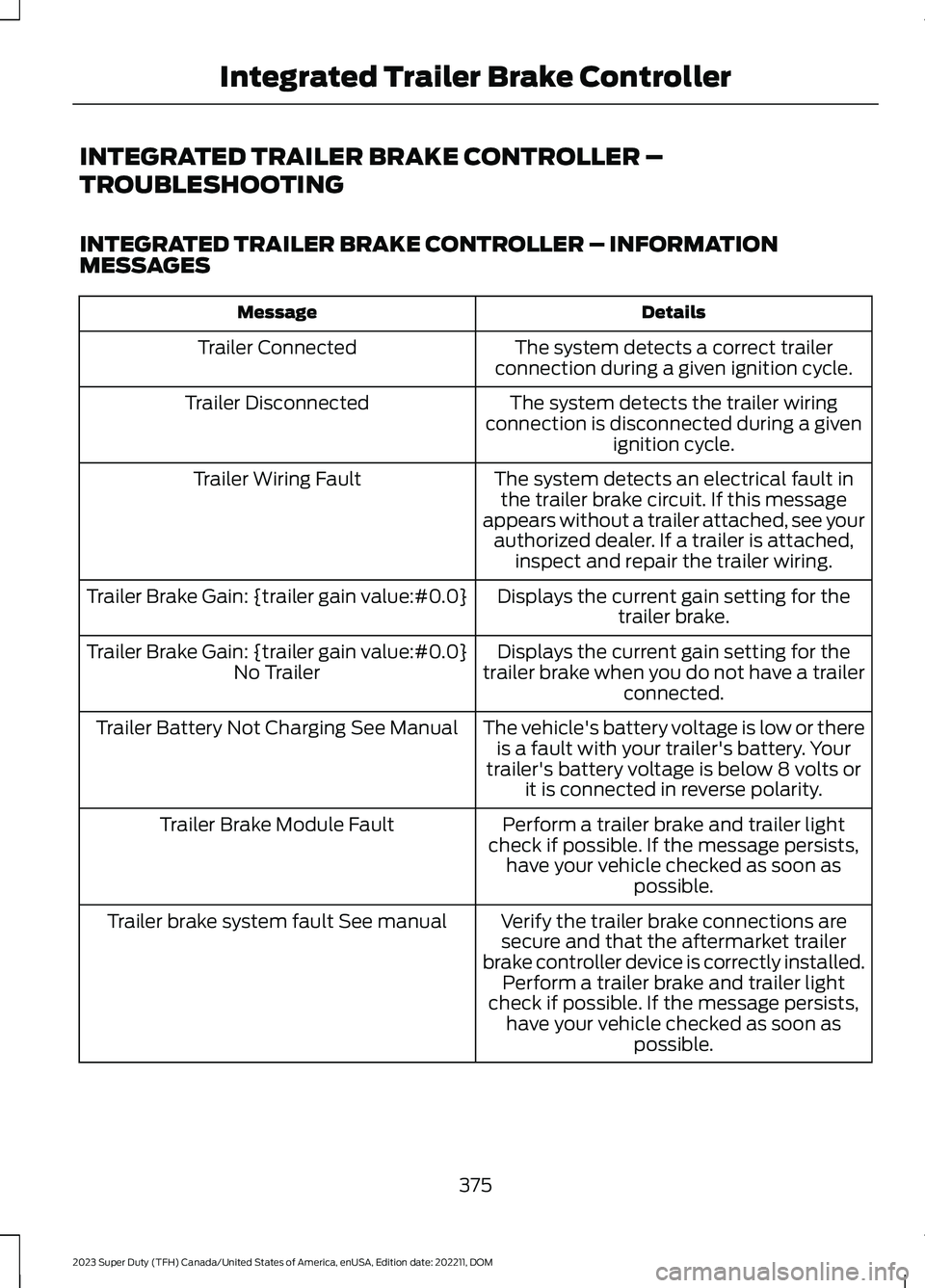
INTEGRATED TRAILER BRAKE CONTROLLER – INFORMATIONMESSAGES
DetailsMessage
The system detects a correct trailerconnection during a given ignition cycle.Trailer Connected
The system detects the trailer wiringconnection is disconnected during a givenignition cycle.
Trailer Disconnected
The system detects an electrical fault inthe trailer brake circuit. If this messageappears without a trailer attached, see yourauthorized dealer. If a trailer is attached,inspect and repair the trailer wiring.
Trailer Wiring Fault
Displays the current gain setting for thetrailer brake.Trailer Brake Gain: {trailer gain value:#0.0}
Displays the current gain setting for thetrailer brake when you do not have a trailerconnected.
Trailer Brake Gain: {trailer gain value:#0.0}No Trailer
The vehicle's battery voltage is low or thereis a fault with your trailer's battery. Yourtrailer's battery voltage is below 8 volts orit is connected in reverse polarity.
Trailer Battery Not Charging See Manual
Perform a trailer brake and trailer lightcheck if possible. If the message persists,have your vehicle checked as soon aspossible.
Trailer Brake Module Fault
Verify the trailer brake connections aresecure and that the aftermarket trailerbrake controller device is correctly installed.Perform a trailer brake and trailer lightcheck if possible. If the message persists,have your vehicle checked as soon aspossible.
Trailer brake system fault See manual
375
2023 Super Duty (TFH) Canada/United States of America, enUSA, Edition date: 202211, DOMIntegrated Trailer Brake Controller
Page 380 of 738
INTEGRATED TRAILER BRAKECONTROLLER – FREQUENTLYASKED QUESTIONS
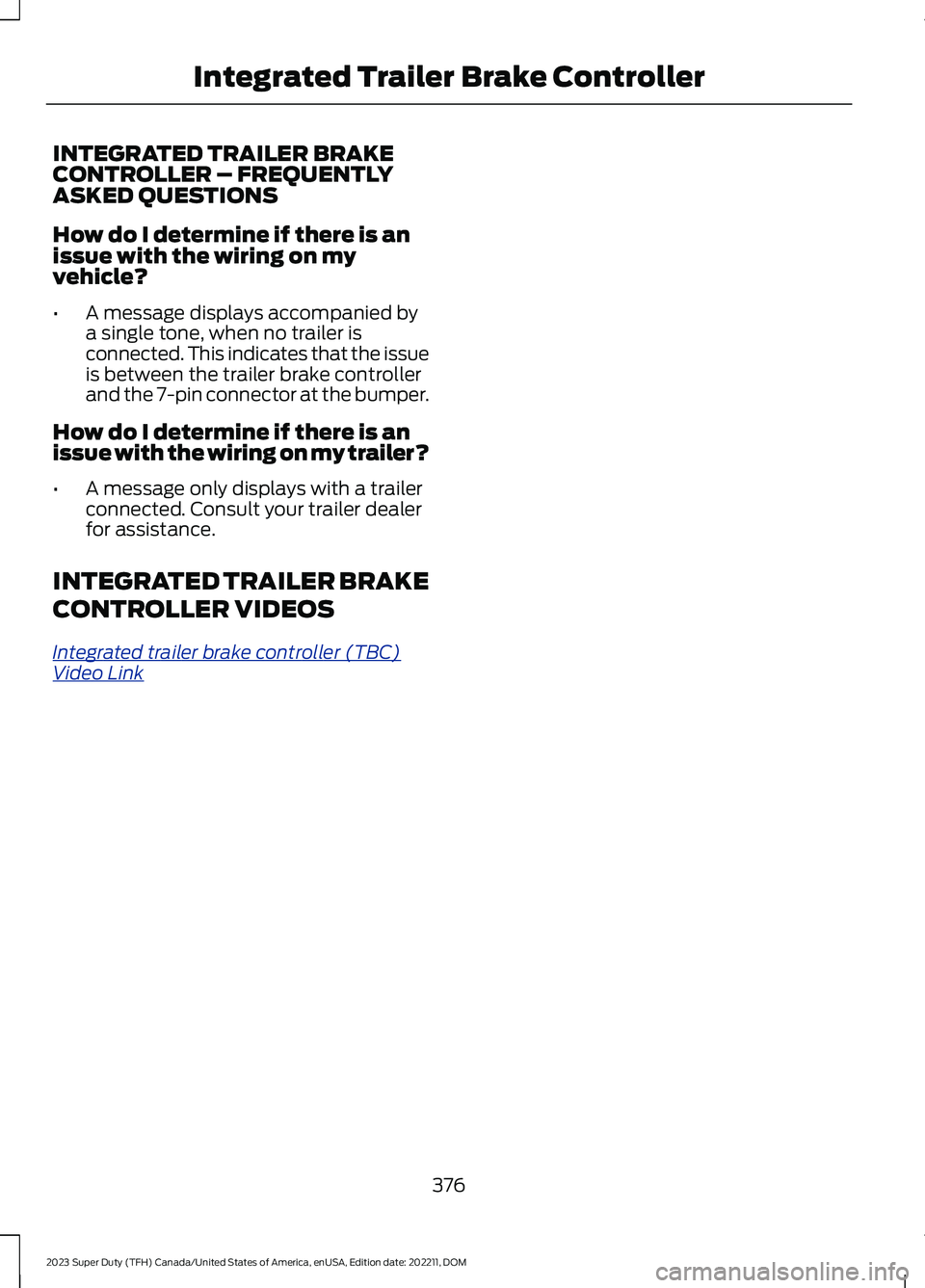
How do I determine if there is anissue with the wiring on myvehicle?
•A message displays accompanied bya single tone, when no trailer isconnected. This indicates that the issueis between the trailer brake controllerand the 7-pin connector at the bumper.
How do I determine if there is anissue with the wiring on my trailer?
•A message only displays with a trailerconnected. Consult your trailer dealerfor assistance.
INTEGRATED TRAILER BRAKE
CONTROLLER VIDEOS
Integrated trailer brake controller (TBC)Video Link
376
2023 Super Duty (TFH) Canada/United States of America, enUSA, Edition date: 202211, DOMIntegrated Trailer Brake Controller
Page 381 of 738
HOW DOES TRAILER SWAY
CONTROL WORK
The system applies the brakes to theindividual wheels and reduces enginetorque to aid vehicle stability.
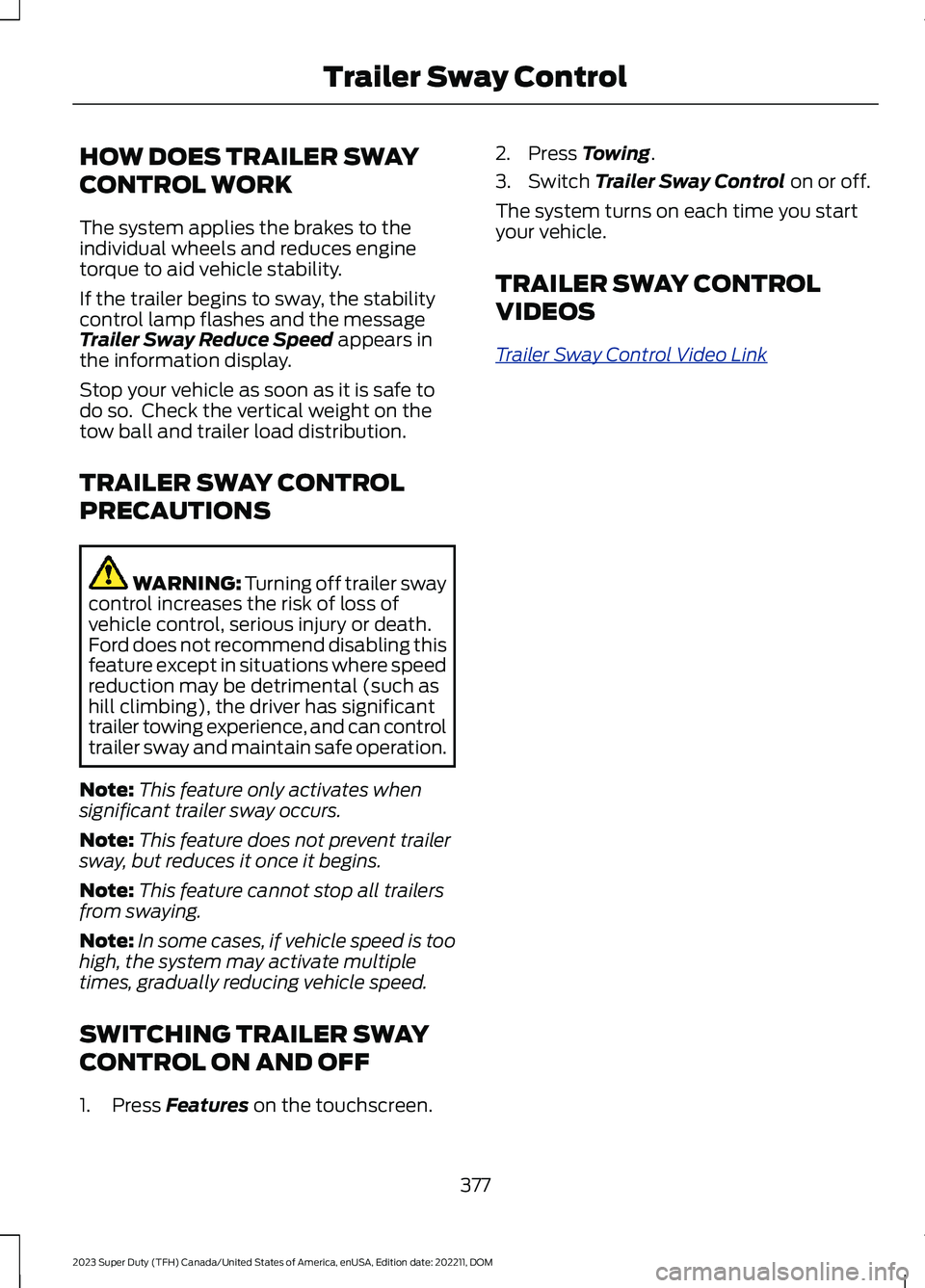
If the trailer begins to sway, the stabilitycontrol lamp flashes and the messageTrailer Sway Reduce Speed appears inthe information display.
Stop your vehicle as soon as it is safe todo so. Check the vertical weight on thetow ball and trailer load distribution.
TRAILER SWAY CONTROL
PRECAUTIONS
WARNING: Turning off trailer swaycontrol increases the risk of loss ofvehicle control, serious injury or death.Ford does not recommend disabling thisfeature except in situations where speedreduction may be detrimental (such ashill climbing), the driver has significanttrailer towing experience, and can controltrailer sway and maintain safe operation.
Note:This feature only activates whensignificant trailer sway occurs.
Note:This feature does not prevent trailersway, but reduces it once it begins.
Note:This feature cannot stop all trailersfrom swaying.
Note:In some cases, if vehicle speed is toohigh, the system may activate multipletimes, gradually reducing vehicle speed.
SWITCHING TRAILER SWAY
CONTROL ON AND OFF
1.Press Features on the touchscreen.
2.Press Towing.
3.Switch Trailer Sway Control on or off.
The system turns on each time you startyour vehicle.
TRAILER SWAY CONTROL
VIDEOS
Trailer Sway Control Video Link
377
2023 Super Duty (TFH) Canada/United States of America, enUSA, Edition date: 202211, DOMTrailer Sway Control
Page 392 of 738
Note:Your vehicle has two options for thetrailer reversing aid setup. If your vehiclecame with a trailer sensor kit or if a messagedisplays to install a sensor, follow the sensorinstallation instructions. See Trailer SensorInstallation (page 388). If your vehicle didnot come with a trailer sensor kit, follow thesticker installation instructions. SeeApplying the Trailer Reversing Aid Sticker(page 388).
APPLYING THE TRAILERREVERSING AID STICKER
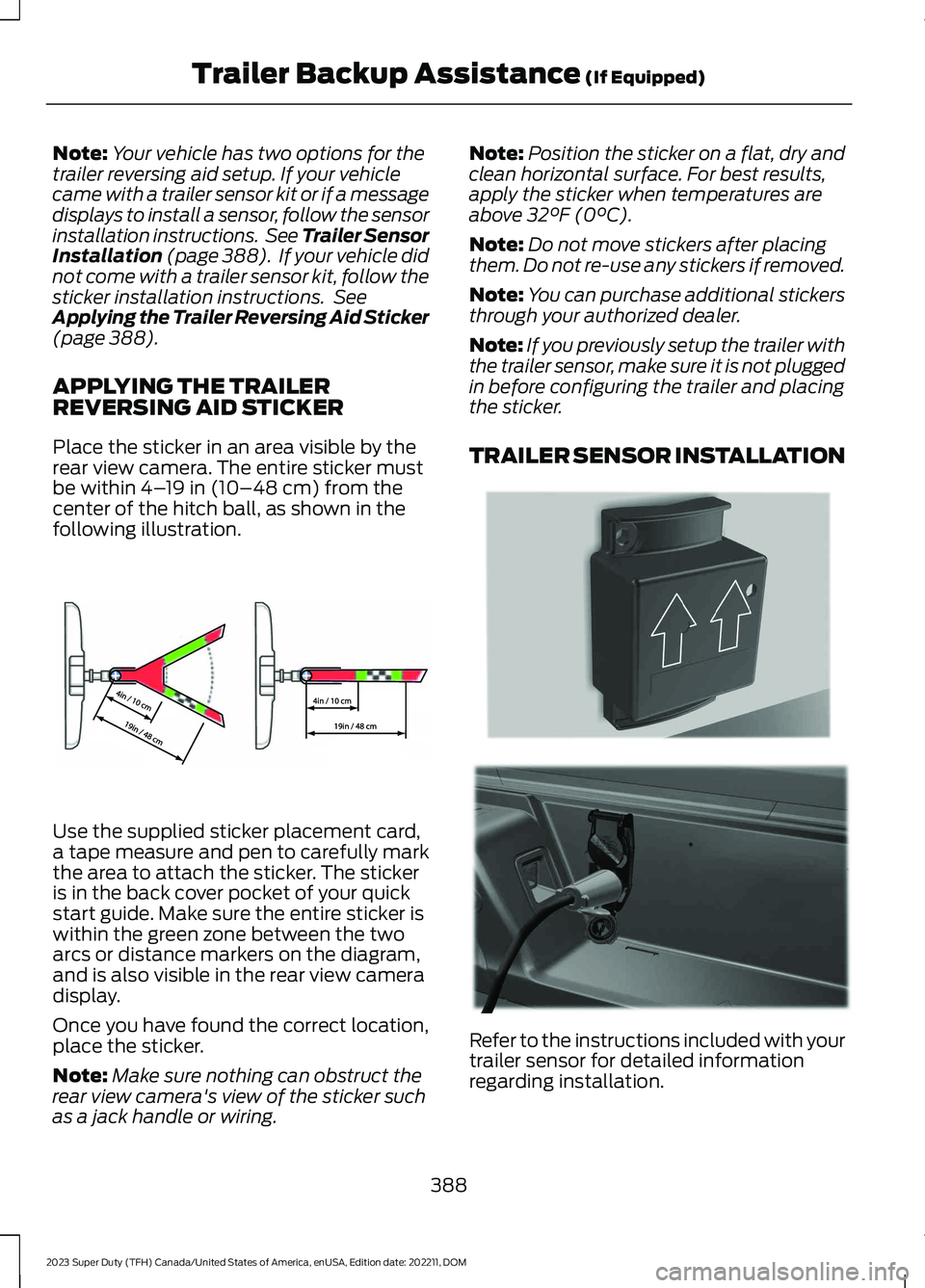
Place the sticker in an area visible by therear view camera. The entire sticker mustbe within 4–19 in (10–48 cm) from thecenter of the hitch ball, as shown in thefollowing illustration.
Use the supplied sticker placement card,a tape measure and pen to carefully markthe area to attach the sticker. The stickeris in the back cover pocket of your quickstart guide. Make sure the entire sticker iswithin the green zone between the twoarcs or distance markers on the diagram,and is also visible in the rear view cameradisplay.
Once you have found the correct location,place the sticker.
Note:Make sure nothing can obstruct therear view camera's view of the sticker suchas a jack handle or wiring.
Note:Position the sticker on a flat, dry andclean horizontal surface. For best results,apply the sticker when temperatures areabove 32°F (0°C).
Note:Do not move stickers after placingthem. Do not re-use any stickers if removed.
Note:You can purchase additional stickersthrough your authorized dealer.
Note:If you previously setup the trailer withthe trailer sensor, make sure it is not pluggedin before configuring the trailer and placingthe sticker.
TRAILER SENSOR INSTALLATION
Refer to the instructions included with yourtrailer sensor for detailed informationregarding installation.
388
2023 Super Duty (TFH) Canada/United States of America, enUSA, Edition date: 202211, DOMTrailer Backup Assistance (If Equipped)E333148 E315959 E335221
Page 394 of 738
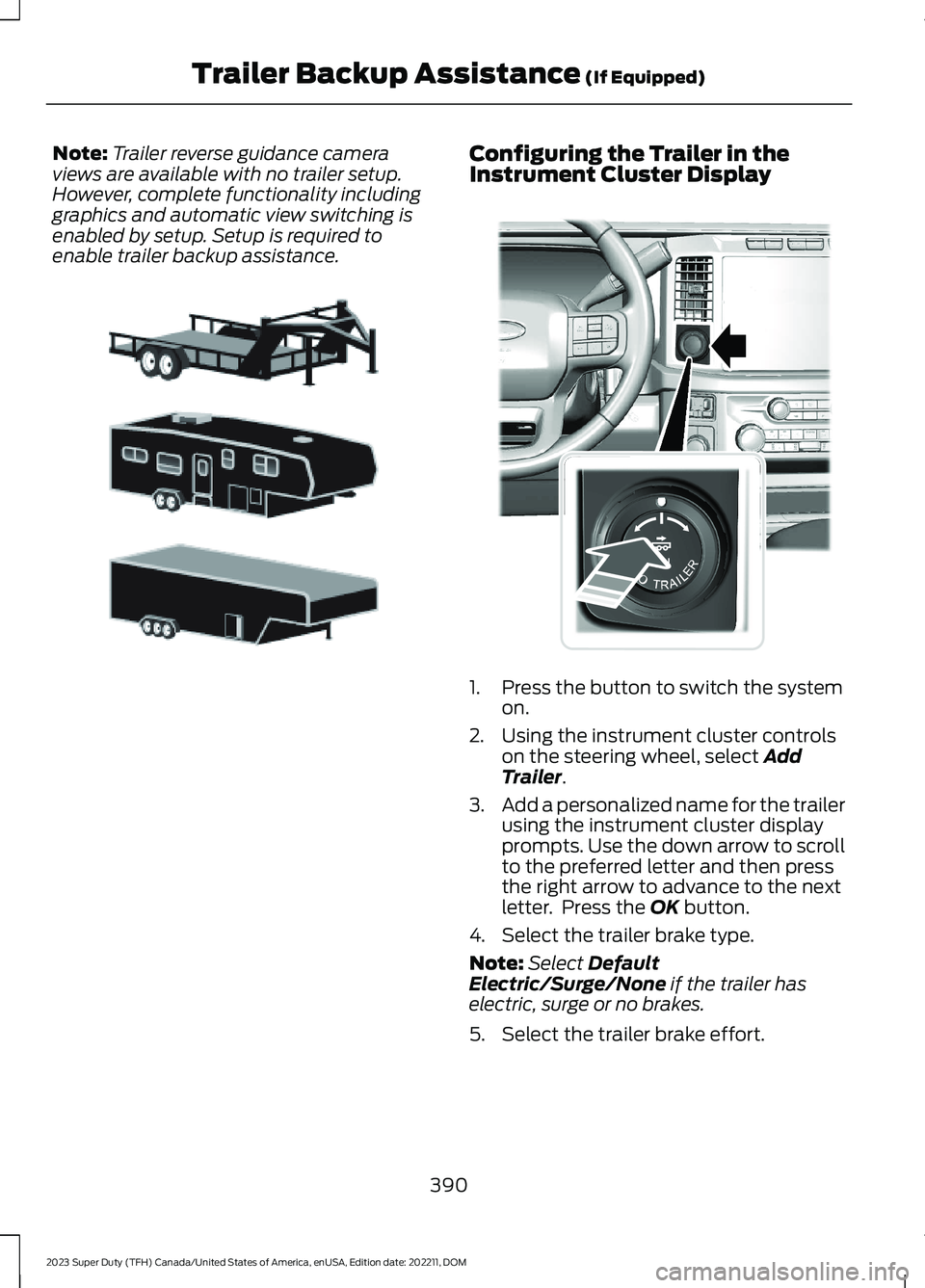
Note:Trailer reverse guidance cameraviews are available with no trailer setup.However, complete functionality includinggraphics and automatic view switching isenabled by setup. Setup is required toenable trailer backup assistance.
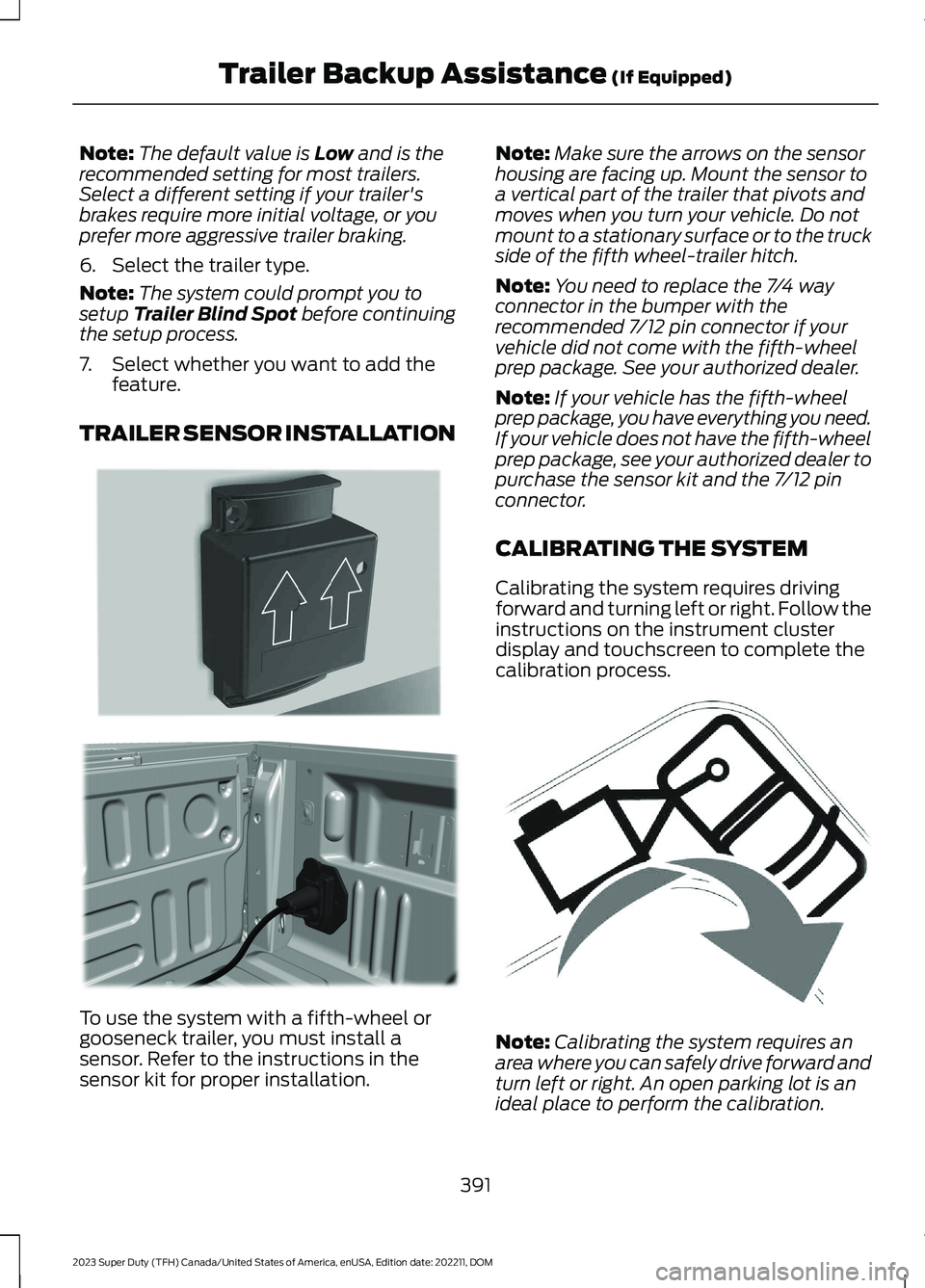
Configuring the Trailer in theInstrument Cluster Display
1.Press the button to switch the systemon.
2.Using the instrument cluster controlson the steering wheel, select AddTrailer.
3.Add a personalized name for the trailerusing the instrument cluster displayprompts. Use the down arrow to scrollto the preferred letter and then pressthe right arrow to advance to the nextletter. Press the OK button.
4.Select the trailer brake type.
Note:Select DefaultElectric/Surge/None if the trailer haselectric, surge or no brakes.
5.Select the trailer brake effort.
390
2023 Super Duty (TFH) Canada/United States of America, enUSA, Edition date: 202211, DOMTrailer Backup Assistance (If Equipped)E311877 E373857
Page 395 of 738
Note:The default value is Low and is therecommended setting for most trailers.Select a different setting if your trailer'sbrakes require more initial voltage, or youprefer more aggressive trailer braking.
6.Select the trailer type.
Note:The system could prompt you tosetup Trailer Blind Spot before continuingthe setup process.
7.Select whether you want to add thefeature.
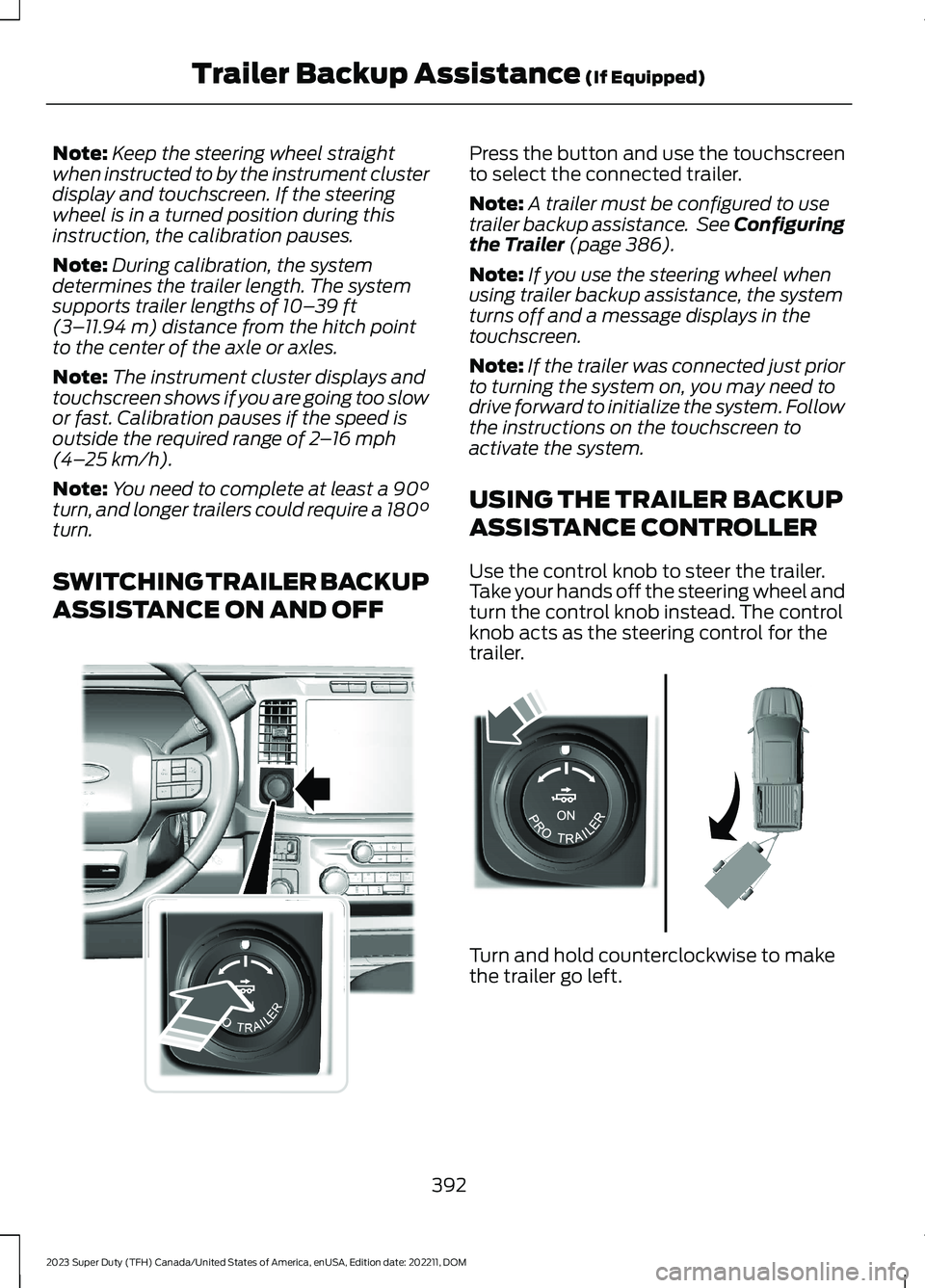
TRAILER SENSOR INSTALLATION
To use the system with a fifth-wheel orgooseneck trailer, you must install asensor. Refer to the instructions in thesensor kit for proper installation.
Note:Make sure the arrows on the sensorhousing are facing up. Mount the sensor toa vertical part of the trailer that pivots andmoves when you turn your vehicle. Do notmount to a stationary surface or to the truckside of the fifth wheel-trailer hitch.
Note:You need to replace the 7/4 wayconnector in the bumper with therecommended 7/12 pin connector if yourvehicle did not come with the fifth-wheelprep package. See your authorized dealer.
Note:If your vehicle has the fifth-wheelprep package, you have everything you need.If your vehicle does not have the fifth-wheelprep package, see your authorized dealer topurchase the sensor kit and the 7/12 pinconnector.
CALIBRATING THE SYSTEM
Calibrating the system requires drivingforward and turning left or right. Follow theinstructions on the instrument clusterdisplay and touchscreen to complete thecalibration process.
Note:Calibrating the system requires anarea where you can safely drive forward andturn left or right. An open parking lot is anideal place to perform the calibration.
391
2023 Super Duty (TFH) Canada/United States of America, enUSA, Edition date: 202211, DOMTrailer Backup Assistance (If Equipped)E315959 E316145 E346605
Page 396 of 738
Note:Keep the steering wheel straightwhen instructed to by the instrument clusterdisplay and touchscreen. If the steeringwheel is in a turned position during thisinstruction, the calibration pauses.
Note:During calibration, the systemdetermines the trailer length. The systemsupports trailer lengths of 10–39 ft(3–11.94 m) distance from the hitch pointto the center of the axle or axles.
Note:The instrument cluster displays andtouchscreen shows if you are going too slowor fast. Calibration pauses if the speed isoutside the required range of 2–16 mph(4–25 km/h).
Note:You need to complete at least a 90°turn, and longer trailers could require a 180°turn.
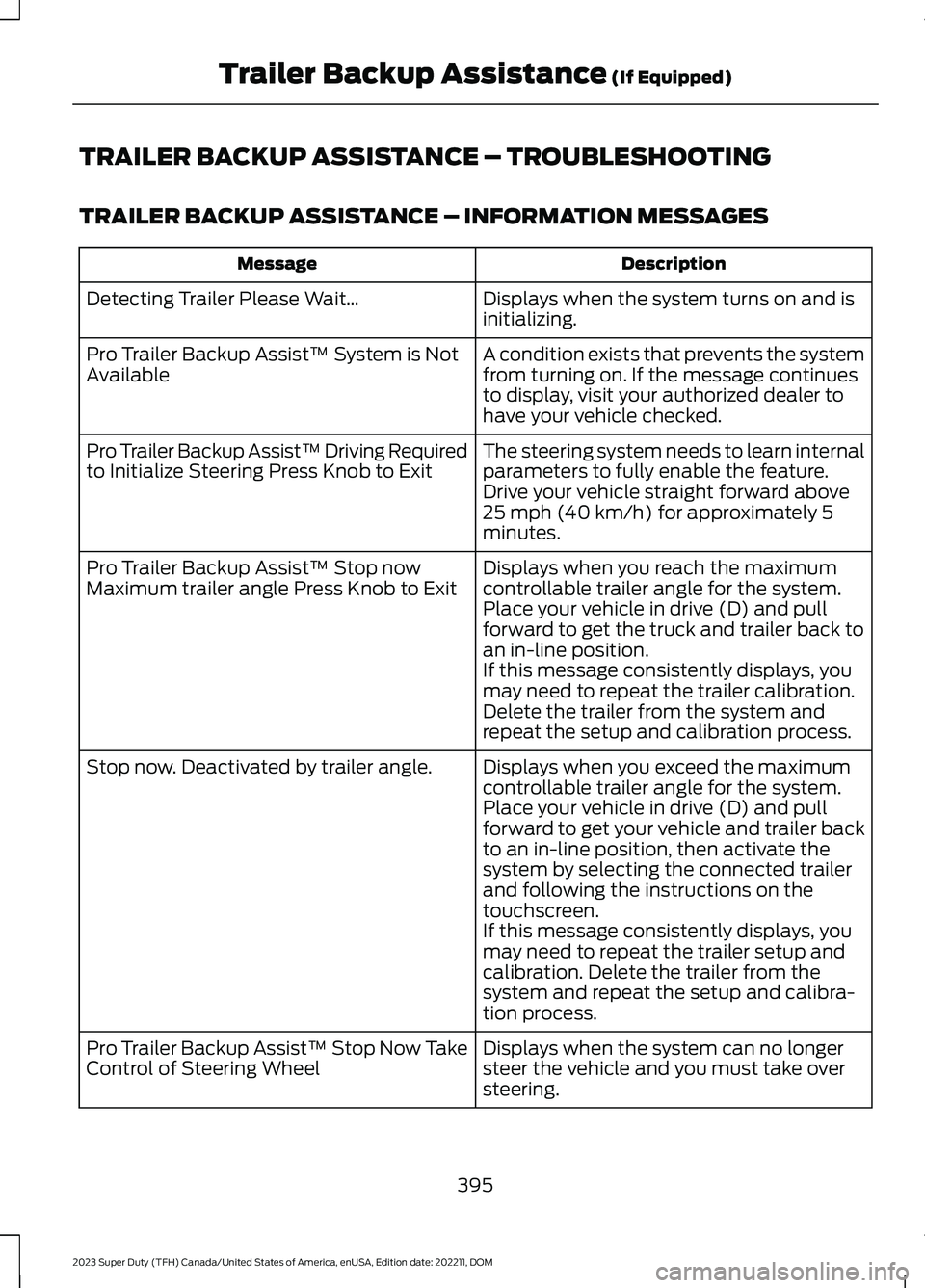
SWITCHING TRAILER BACKUP
ASSISTANCE ON AND OFF
Press the button and use the touchscreento select the connected trailer.
Note:A trailer must be configured to usetrailer backup assistance. See Configuringthe Trailer (page 386).
Note:If you use the steering wheel whenusing trailer backup assistance, the systemturns off and a message displays in thetouchscreen.
Note:If the trailer was connected just priorto turning the system on, you may need todrive forward to initialize the system. Followthe instructions on the touchscreen toactivate the system.
USING THE TRAILER BACKUP
ASSISTANCE CONTROLLER
Use the control knob to steer the trailer.Take your hands off the steering wheel andturn the control knob instead. The controlknob acts as the steering control for thetrailer.
Turn and hold counterclockwise to makethe trailer go left.
392
2023 Super Duty (TFH) Canada/United States of America, enUSA, Edition date: 202211, DOMTrailer Backup Assistance (If Equipped)E373857 E313025
Page 399 of 738
TRAILER BACKUP ASSISTANCE – TROUBLESHOOTING
TRAILER BACKUP ASSISTANCE – INFORMATION MESSAGES
DescriptionMessage
Displays when the system turns on and isinitializing.Detecting Trailer Please Wait…
A condition exists that prevents the systemfrom turning on. If the message continuesto display, visit your authorized dealer tohave your vehicle checked.
Pro Trailer Backup Assist™ System is NotAvailable
The steering system needs to learn internalparameters to fully enable the feature.Drive your vehicle straight forward above25 mph (40 km/h) for approximately 5minutes.
Pro Trailer Backup Assist™ Driving Requiredto Initialize Steering Press Knob to Exit
Displays when you reach the maximumcontrollable trailer angle for the system.Place your vehicle in drive (D) and pullforward to get the truck and trailer back toan in-line position.
Pro Trailer Backup Assist™ Stop nowMaximum trailer angle Press Knob to Exit
If this message consistently displays, youmay need to repeat the trailer calibration.Delete the trailer from the system andrepeat the setup and calibration process.
Displays when you exceed the maximumcontrollable trailer angle for the system.Place your vehicle in drive (D) and pullforward to get your vehicle and trailer backto an in-line position, then activate thesystem by selecting the connected trailerand following the instructions on thetouchscreen.
Stop now. Deactivated by trailer angle.
If this message consistently displays, youmay need to repeat the trailer setup andcalibration. Delete the trailer from thesystem and repeat the setup and calibra-tion process.
Displays when the system can no longersteer the vehicle and you must take oversteering.
Pro Trailer Backup Assist™ Stop Now TakeControl of Steering Wheel
395
2023 Super Duty (TFH) Canada/United States of America, enUSA, Edition date: 202211, DOMTrailer Backup Assistance (If Equipped)
Page 400 of 738
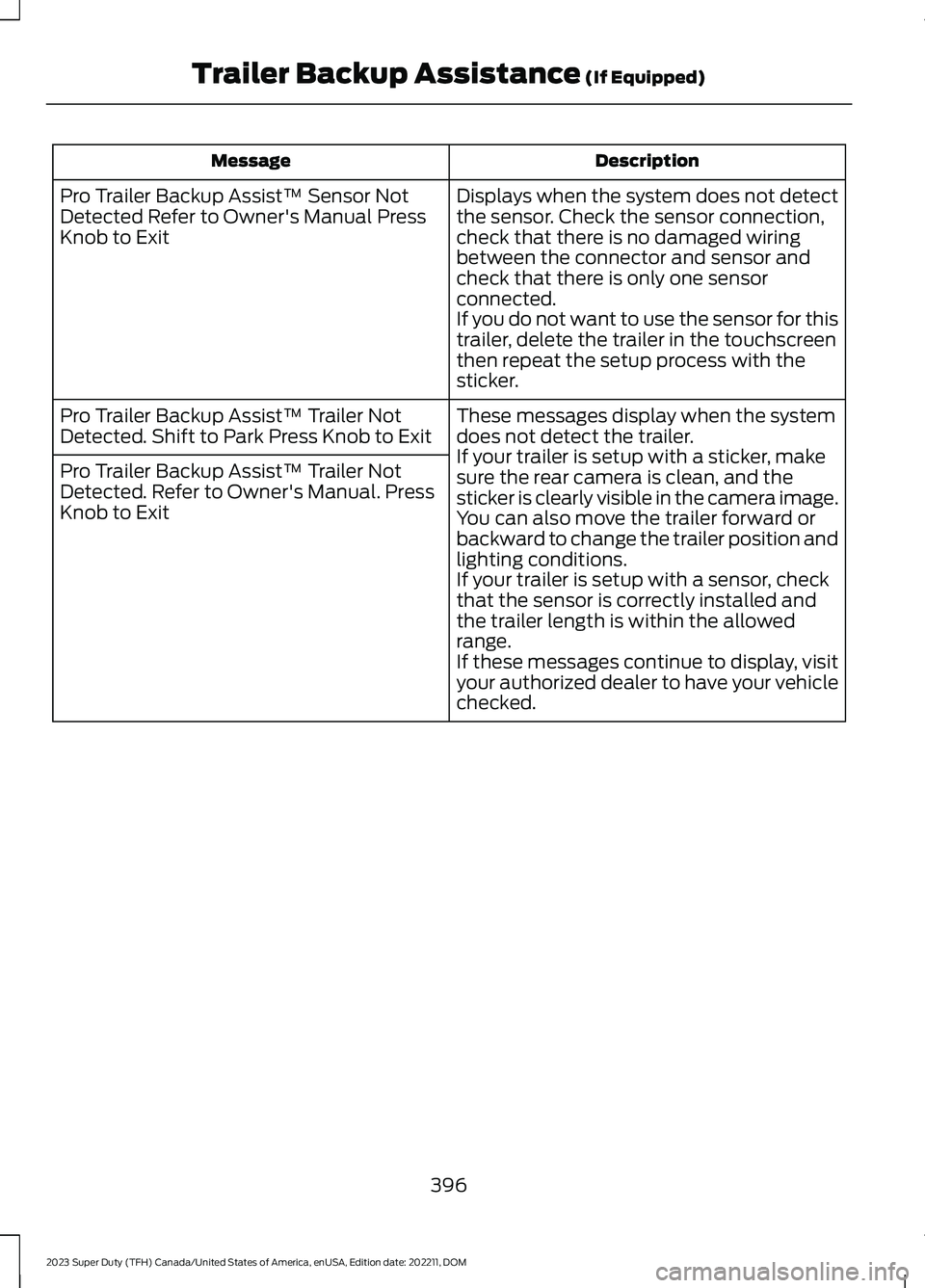
DescriptionMessage
Displays when the system does not detectthe sensor. Check the sensor connection,check that there is no damaged wiringbetween the connector and sensor andcheck that there is only one sensorconnected.If you do not want to use the sensor for thistrailer, delete the trailer in the touchscreenthen repeat the setup process with thesticker.
Pro Trailer Backup Assist™ Sensor NotDetected Refer to Owner's Manual PressKnob to Exit
These messages display when the systemdoes not detect the trailer.If your trailer is setup with a sticker, makesure the rear camera is clean, and thesticker is clearly visible in the camera image.You can also move the trailer forward orbackward to change the trailer position andlighting conditions.If your trailer is setup with a sensor, checkthat the sensor is correctly installed andthe trailer length is within the allowedrange.If these messages continue to display, visityour authorized dealer to have your vehiclechecked.
Pro Trailer Backup Assist™ Trailer NotDetected. Shift to Park Press Knob to Exit
Pro Trailer Backup Assist™ Trailer NotDetected. Refer to Owner's Manual. PressKnob to Exit
396
2023 Super Duty (TFH) Canada/United States of America, enUSA, Edition date: 202211, DOMTrailer Backup Assistance (If Equipped)
Page 401 of 738
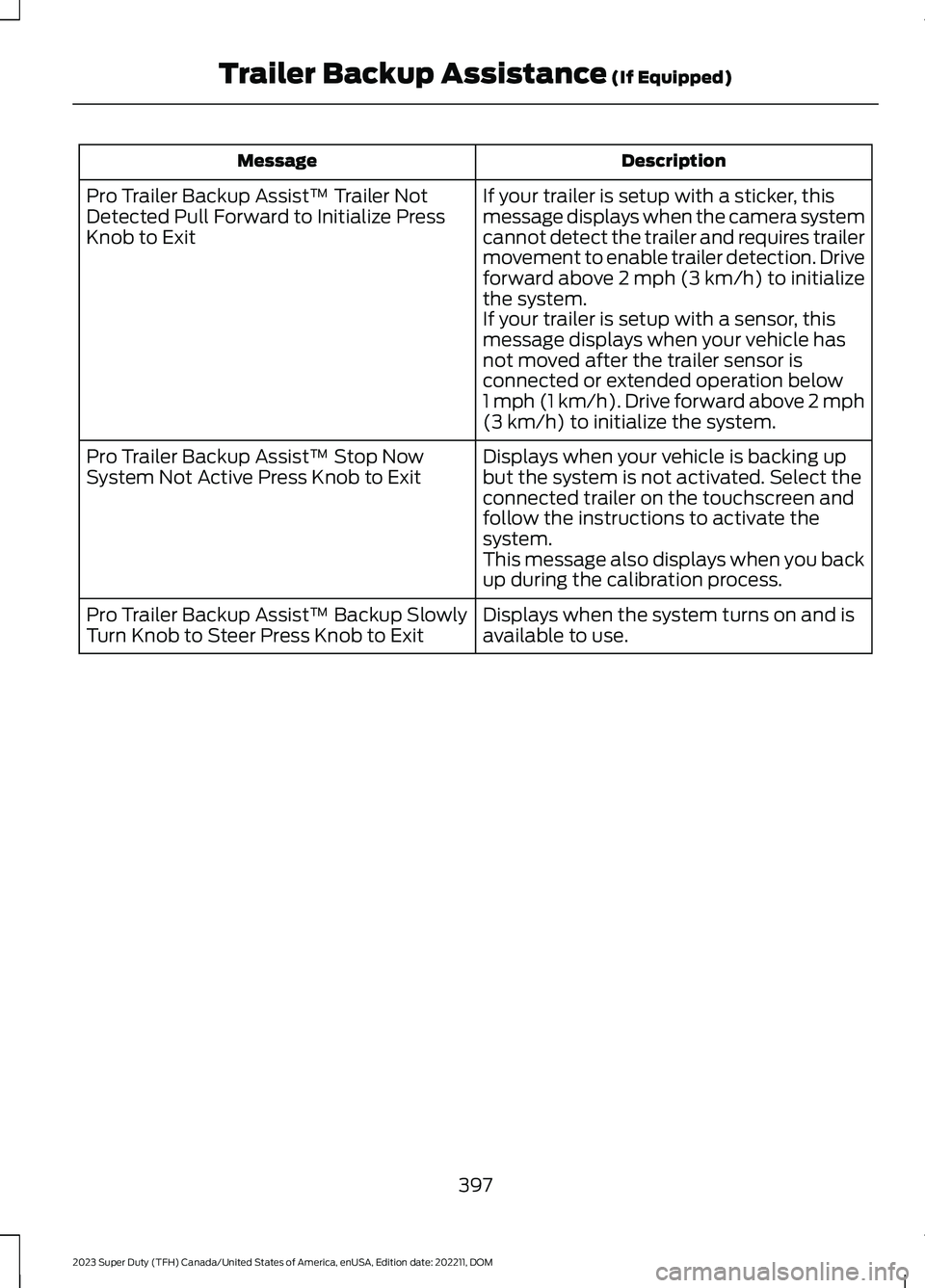
DescriptionMessage
If your trailer is setup with a sticker, thismessage displays when the camera systemcannot detect the trailer and requires trailermovement to enable trailer detection. Driveforward above 2 mph (3 km/h) to initializethe system.If your trailer is setup with a sensor, thismessage displays when your vehicle hasnot moved after the trailer sensor isconnected or extended operation below1 mph (1 km/h). Drive forward above 2 mph(3 km/h) to initialize the system.
Pro Trailer Backup Assist™ Trailer NotDetected Pull Forward to Initialize PressKnob to Exit
Displays when your vehicle is backing upbut the system is not activated. Select theconnected trailer on the touchscreen andfollow the instructions to activate thesystem.This message also displays when you backup during the calibration process.
Pro Trailer Backup Assist™ Stop NowSystem Not Active Press Knob to Exit
Displays when the system turns on and isavailable to use.Pro Trailer Backup Assist™ Backup SlowlyTurn Knob to Steer Press Knob to Exit
397
2023 Super Duty (TFH) Canada/United States of America, enUSA, Edition date: 202211, DOMTrailer Backup Assistance (If Equipped)