bluetooth FORD SUPER DUTY 2023 User Guide
[x] Cancel search | Manufacturer: FORD, Model Year: 2023, Model line: SUPER DUTY, Model: FORD SUPER DUTY 2023Pages: 738, PDF Size: 18.49 MB
Page 580 of 738
Note:Closing an app on your device willclose it on the touchscreen.
Note:For troubleshooting assistance selectMobile Apps List under Mobile Apps Help.
SWITCHING APPLE CARPLAY
ON AND OFF
Enabling Apple CarPlay with USB
1.Connect your device to a USB port.
2.Follow the instructions on your deviceand the touchscreen.
Note:Selecting "Enable Wireless CarPlay"on your device will prepare the device forwireless carplay when you re-enter thevehicle.
Enabling Apple CarPlay withWireless
1.Pair your device to Bluetooth®.
2.Follow the instructions on your deviceand the touchscreen.
Disabling Apple CarPlay
Select the settings option on thefeature bar.
1.Press Phone List.
2.Select your device from the list.
3.Press Disable.
Re-Enabling Apple CarPlay
Select the settings option on thefeature bar.
1.Press Phone List.
2.Select your device from the list.
3.Press Connect to Apple CarPlay.
SWITCHING ANDROID AUTO
ON AND OFF
Enabling Android Auto with USB
(If Equipped)
1.Connect your device to a USB port.
2.Follow the instructions on thetouchscreen.
Note:Certain features of the system arenot available when you are using AndroidAuto.
Enabling Android Auto withWireless
1.Pair your device to Bluetooth®.
2.Follow the instructions on your deviceand the touchscreen.
Note:Certain Android Devices do notsupport Android Auto Wireless. Pleasecheck your Android OS version forcompatibility.
Disabling Android Auto
Select the settings option on thefeature bar.
1.Press Phone List.
2.Select your device from the list.
3.Press Disable.
Re-Enabling Android Auto
Select the settings option on thefeature bar.
1.Press Phone List.
2.Select your device from the list.
3.Press Connect to Android Auto.
576
2023 Super Duty (TFH) Canada/United States of America, enUSA, Edition date: 202211, DOMApps
Page 707 of 738
ELECTROMAGNETIC
COMPATIBILITY
WARNING: Do not place objectsor mount equipment on or near theairbag cover, on the side of the front orrear seatbacks, or in areas that maycome into contact with a deployingairbag. Failure to follow theseinstructions may increase the risk ofpersonal injury in the event of a crash.
WARNING: Do not fasten antennacables to vehicle wiring, fuel pipes andbrake pipes.
WARNING: Keep antenna andpower cables at least 4 in (10 cm) fromany electronic modules and airbags.
Note:We test and certify your vehicle tomeet electromagnetic compatibilitylegislation. It is your responsibility to makesure that any equipment an authorizeddealer installs on your vehicle complies withapplicable local legislation and otherrequirements. Installation of someaftermarket electronic devices coulddegrade the performance of vehiclefunctions, which use radio frequency signalssuch as broadcast radio receiver, tirepressure monitoring system, push buttonstart,Bluetooth® connectivity or satellitenavigation.
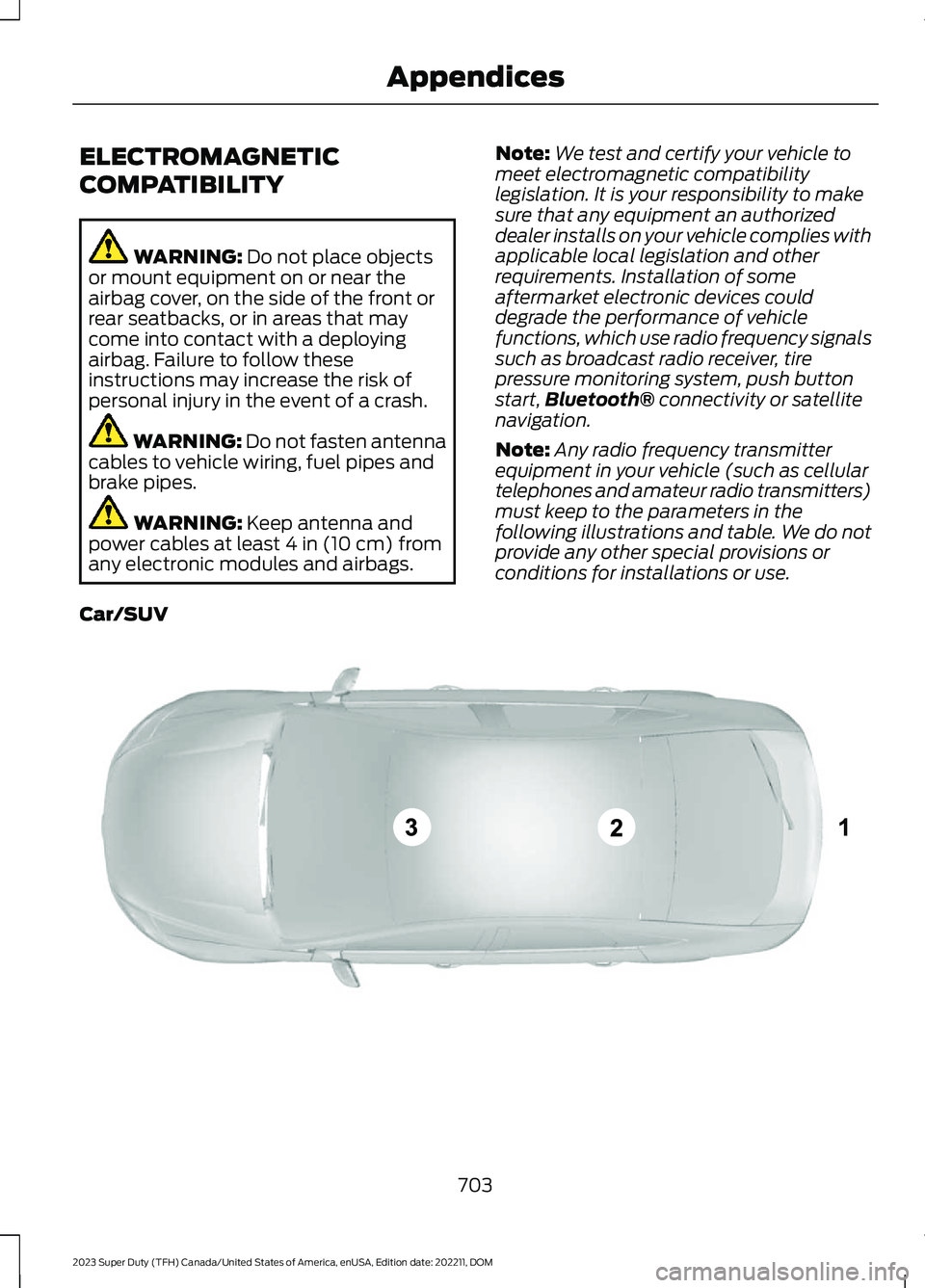
Note:Any radio frequency transmitterequipment in your vehicle (such as cellulartelephones and amateur radio transmitters)must keep to the parameters in thefollowing illustrations and table. We do notprovide any other special provisions orconditions for installations or use.
Car/SUV
703
2023 Super Duty (TFH) Canada/United States of America, enUSA, Edition date: 202211, DOMAppendicesE239120
Page 714 of 738
Blind Spot Information System With TrailerCoverage..........................................................328Blind Spot Information SystemIndicators.....................................................330Blind Spot Information SystemLimitations...................................................327Blind Spot Information SystemPrecautions..................................................327Blind Spot Information SystemRequirements.............................................327Blind Spot Information System –Troubleshooting.........................................331Blind Spot Information System –Information Messages.................................331Blind Spot Information SystemVideos............................................................331Blind Spot Information System WithTrailer Coverage.........................................328Blind Spot Information System With TrailerCoverage Limitations..................................328Selecting a Trailer..............................................330Setting a Trailer Length...................................329What Is Blind Spot Information System withTrailer Coverage.............................................328Bluetooth®.....................................................574Bonnet LockSee: Opening and Closing the Hood.........440Booster Seats...................................................47Brake Fluid Specification..........................250Brake Over Accelerator..............................249Brake Precautions.......................................249Brakes..............................................................249Anti-Lock Braking System..............................249Brakes – Troubleshooting..............................250Brakes – Troubleshooting........................250Brakes – Frequently AskedQuestions.........................................................252Brakes – Information Messages....................251Brakes – Warning Lamps...............................250Breaking-In.....................................................416
C
Calculating Payload....................................353Calculating the Load Limit.......................353Canceling the Set Speed...........................273Canceling the Set Speed Limit................316Capacities and Specifications................520
Catalytic Converter.....................................233Catalytic Converter –Troubleshooting............................................233Catalytic Converter Precautions............233Catalytic Converter –Troubleshooting........................................233Catalytic Converter – WarningLamps................................................................233Center Console..............................................198Opening the Center Console..........................198Center Console Work Surface.................193Center Console Work Surface –Troubleshooting.............................................194Center Console Work Surface –Troubleshooting.........................................194Center Console Work Surface – InformationMessages..........................................................194Center Display Limitations.......................563Center Display Overview..........................563Center Display Overview Videos...........564Center Display Precautions.....................563Changing a Flat Tire...................................509Changing a Road Wheel...........................509Changing the Fuel Filter - Diesel............453Changing the Fuel Filter -Gasoline.......................................................453Changing the Language.............................145Changing the Measurement Unit...........145Changing the Remote Control Battery -Vehicles With: Flip Key...............................74Changing the Remote Control Battery -Vehicles With: Push Button Start..........75Changing the Set Speed Limit................316Changing the Temperature Unit.............145Changing the Tire Pressure Unit.............145Changing the Vehicle Wi-Fi HotspotName or Password....................................551Charging a Device.........................................183Charging a Wireless Device......................195Checking the Brake Fluid..........................249Checking the Seatbelts...............................56Checking the Selective CatalyticReduction System Status.....................230Checking the Tire Pressures...................490Checking the Wiper Blades........................114Children and Airbags....................................64
710
2023 Super Duty (TFH) Canada/United States of America, enUSA, Edition date: 202211, DOMIndex
Page 715 of 738
Child Restraint Anchor Points....................37Locating the Child Restraint Lower AnchorPoints...................................................................37Locating the Child Restraint Top TetherAnchor Points...................................................38What Are the Child Restraint AnchorPoints...................................................................37Child Restraints...............................................39Child Restraint Position Information............39Child Restraints Recommendation...............40Child Safety......................................................36Child Restraint Anchor Points..........................37Child Restraints.....................................................39Installing Child Restraints.................................40Child Safety Locks - Crew Cab/SuperCab.......................................................49Child Safety Precautions.............................36Cleaning Products......................................469Cleaning the Exterior..................................470Cleaning Camera Lenses andSensors..............................................................471Cleaning Chrome, Aluminium or StainlessSteel...................................................................470Cleaning Headlamps and RearLamps...............................................................470Cleaning Stripes or Graphics..........................471Cleaning the Engine Compartment.............471Cleaning the Exhaust........................................472Cleaning the Exterior Precautions...............470Cleaning the Underbody..................................471Cleaning Wheels................................................470Cleaning Windows and WiperBlades...............................................................470Cleaning the Interior....................................472Cleaning Carpets and Floor Mats................474Cleaning Displays and Screens.....................473Cleaning Fabric...................................................473Cleaning Leather................................................473Cleaning Moonroof Tracks..............................474Cleaning Plastic..................................................473Cleaning Seatbelts............................................474Cleaning the Instrument Panel.....................472Cleaning Vinyl......................................................474Climate Control.............................................152Auto Mode.............................................................154Climate Control Hints.................................154Climate Control Videos..............................155
Closing the Tailgate......................................94Closing the Tailgate From Inside YourVehicle.................................................................94Closing the Tailgate From Outside YourVehicle.................................................................94Closing the Tailgate Using the RemoteControl................................................................95Cold Weather Precautions - 6.7LDiesel..............................................................415Cold Weather Precautions - 6.8L/7.3L..................................................................415Connected Navigation...............................579Connected Vehicle......................................548Connected Vehicle –Troubleshooting............................................549Connecting the Vehicle to a MobileNetwork...........................................................548Connected Vehicle Data..............................28Connected Vehicle Limitations..............548Connected Vehicle Requirements........548Connected Vehicle –Troubleshooting........................................549Connected Vehicle – Frequently AskedQuestions........................................................549Connected Vehicle Videos.......................550Connecting a Bluetooth® Device..........574Connecting a Trailer.....................................361Connecting a Trailer –Troubleshooting............................................364Hitches...................................................................359Connecting a Trailer Precautions..........359Connecting a Trailer –Troubleshooting........................................364Connecting a Trailer – InformationMessages.........................................................364Connecting a Trailer Videos....................364Connecting the Vehicle to a MobileNetwork.......................................................548Connecting FordPass to the Modem.........548Enabling and Disabling the Modem...........548What Is the Modem..........................................548Connecting the Vehicle to a Wi-FiNetwork.......................................................548Connecting Your Phone............................569Contacting Us...................................................19Coolant...........................................................450Adding Coolant..................................................450Changing the Coolant.......................................451
711
2023 Super Duty (TFH) Canada/United States of America, enUSA, Edition date: 202211, DOMIndex
Page 726 of 738
Passive Anti-Theft System.......................103How Does the Passive Anti-Theft SystemWork...................................................................103What Is the Passive Anti-TheftSystem...............................................................103Perchlorate.....................................................673Performing a System Reset....................584Personalized Settings.................................145Personal Profiles...........................................577Phone Menu..................................................569Phone..............................................................569Phone Precautions.....................................569Pickup Bed Anchor Points.......................356Installing and Removing the Pickup BedTie-Down Cleats............................................357Locating the Pickup Bed AnchorPoints................................................................356Pickup Bed Anchor Point LoadCapacities........................................................357Pickup Bed Anchor PointPrecautions.....................................................356Pickup Bed.....................................................356Pickup Bed Anchor Points..............................356Tailgate Anchor Points....................................358Pickup Bed Precautions............................356Pickup Bed Videos......................................358Playing Media Using Bluetooth®...........574Playing Media Using the USB Port.........183Playing or Pausing the AudioSource...........................................................553Post-Crash Alert System..........................423How Does the Post-Crash Alert SystemWork...................................................................423Post-Crash Alert System Limitations........423Switching the Post-Crash Alert SystemOff.......................................................................423What Is the Post-Crash AlertSystem..............................................................423Power Outlet Indicators.............................186Power Outlet Limitations..........................185Power Outlet..................................................185Power Outlet Precautions.........................185Power Outlet Videos...................................186Power Running Board Precautions........107Power Running Board Settings...............107Power Running Boards...............................107Power Running Boards –Troubleshooting............................................108
Power Running Boards –Troubleshooting........................................108Power Running Boards – Frequently AskedQuestions.........................................................108Power Running Boards Videos...............108Power Seats...................................................164Adjusting the Head Restraint.........................165Adjusting the Lumbar Support......................167Adjusting the Seat Backrest...........................166Adjusting the Seat Cushion............................166Adjusting the Seat Height................................167Head Restraint Components.........................164Installing the Head Restraint.........................166Moving the Seat Backward andForward.............................................................166Removing the Head Restraint.......................165Power Take-Off............................................236How Does the Power Take-Off Work.........236What is the Split Shaft Capability...............237Power-UpSee: Software Update Settings...................582See: Vehicle Software Updates...................582Pre-Collision Assist Limitations.............339Pre-Collision Assist Precautions...........338Pre-Collision Assist.....................................338Automatic Emergency Braking.....................342Distance Alert......................................................342Distance Indication............................................341Evasive Steering Assist....................................343Pre-Collision Assist –Troubleshooting............................................343Pre-Collision Assist –Troubleshooting........................................343Pre-Collision Assist – Frequently AskedQuestions........................................................345Pre-Collision Assist – InformationMessages.........................................................344Pre-Collision Assist – WarningLamps...............................................................343Pre-Collision Assist Videos......................345Predictive Speed Assist............................306Adjusting the Set Speed Tolerance............307How Does Predictive Speed AssistWork..................................................................306Predictive Speed Assist Alerts......................307Predictive Speed Assist Indicators.............308Predictive Speed Assist Limitations...........307Predictive Speed Assist Precautions.........306
722
2023 Super Duty (TFH) Canada/United States of America, enUSA, Edition date: 202211, DOMIndex