park assist FORD SUPER DUTY 2023 User Guide
[x] Cancel search | Manufacturer: FORD, Model Year: 2023, Model line: SUPER DUTY, Model: FORD SUPER DUTY 2023Pages: 738, PDF Size: 18.49 MB
Page 265 of 738
REVERSE BRAKE ASSIST –FREQUENTLY ASKED QUESTIONS
Why is reverse brake assistunavailable?
•Make sure the reverse brake assist ison. See Switching Reverse BrakeAssist On and Off (page 259).
•Make sure that all doors, liftgate ortailgate and hood are closed. Drive thevehicle on a straight road for a shortperiod. If the message remains, havethe system checked.
•If your vehicle has the cross traffic alertsystem, make sure it is on. SeeSwitching Cross Traffic Alert Onand Off (page 336).
•Make sure the rear parking aid systemis on. See Parking Aids (page 282).
•Make sure the traction control is on.See Switching Traction Control Onand Off (page 268).
•Your vehicle may have sustained a rearend impact. Have the sensors checkedfor proper coverage and operation.
•An anti-lock brake, traction control orstability control event may haveoccurred. Reverse brake assist resumesoperation when the event is complete.
•Make sure the rear view camera and360 degree camera are not dirty orobstructed. If dirty, clean the camera.If the message still appears aftercleaning the camera, wait a short timefor the message to clear. If themessage does not clear, have thesystem checked.
•Make sure the cross traffic alert, rearparking aid and side parking aid sensorsare not blocked or faulty. See Locatingthe Cross Traffic Alert Sensors(page 336). See Locating the RearParking Aid Sensors (page 283).
•You recently had your vehicle serviced,or the battery disconnected. Drive yourvehicle a short distance to resumesystem operation.
•Reverse brake assist does not functionwhen you connect a trailer. Operationresumes when you disconnect thetrailer.
Note:If the answers to why the system isunavailable do not assist in returning reversebrake assist to available, have the systemchecked as soon as possible.
261
2023 Super Duty (TFH) Canada/United States of America, enUSA, Edition date: 202211, DOMReverse Brake Assist (If Equipped)
Page 267 of 738
Note:If your vehicle sustains damage tothe bumper or fascia leaving it misalignedor bent, it could alter the sensing zonecausing inaccurate measurement ofobstacles or false alerts.
Note:Vehicle loading and suspensionchanges can impact the angle of the sensorsand may change the normal detection zoneof the system resulting in inaccuratemeasurement of obstacles or false alerts.
Note:When you connect a trailer, thesystem may detect the trailer and providean alert, or the system turns off. If thesystem does not turn off, switch the systemoff manually after you connect the trailer.
Note:You may experience reduced systemperformance on road surfaces that limitdeceleration. For example, roads with ice,loose gravel, mud or sand.
SWITCHING CROSS TRAFFIC
BRAKING ON AND OFF
1.Press Features on the touchscreen.
2.Press Driver Assistance.
3.Switch Cross Traffic Braking on oroff.
OVERRIDING CROSS TRAFFIC
BRAKING
There could be instances whenunexpected or unwanted braking occurs.Firmly pressing the accelerator pedal orswitching the feature off overrides thesystem.
CROSS TRAFFIC BRAKING
INDICATORS
If the system determines that a collisionwith an obstacle may occur, full brakingmay apply. Bring your vehicle to a stop asafe distance away from the obstacle.
A message and warningindicator appear when thesystem applies the brakes.
CROSS TRAFFIC BRAKING – TROUBLESHOOTING
CROSS TRAFFIC BRAKING – INFORMATION MESSAGES
ActionMessage
Drive the vehicle on a straight road for ashort period. Make sure the parking aids andcross traffic alert systems are on. If themessage remains on, have the systemchecked as soon as possible.
Reverse Brake Assist Not Available SeeManual
Displays when a system error has occurred.Have your vehicle checked as soon aspossible.
Reverse Brake Assist Fault
Displays when cross traffic braking is off.Reverse Brake Assist Off
263
2023 Super Duty (TFH) Canada/United States of America, enUSA, Edition date: 202211, DOMCross Traffic Braking (If Equipped)E293490
Page 269 of 738
WHAT IS HILL START ASSIST
Hill Start Assist makes it easier for you topull away when your vehicle is on a slopewithout using the parking brake.
HOW DOES HILL START
ASSIST WORK
When the system activates, your vehicleremains stationary for a few seconds afteryou release the brake pedal. This gives youtime to move your foot from the brakepedal to the accelerator pedal. The brakesrelease when you apply the acceleratorpedal and the vehicle begins to moveforward, or the vehicle is stationary beyondhill start assist hold time.
The system activates when your vehicle isin any forward gear and facing uphill, orwhen your vehicle is in reverse (R) andfacing downhill.
HILL START ASSIST
PRECAUTIONS
WARNING: The system does notreplace the parking brake. When youleave your vehicle, always apply theparking brake.
WARNING: You must remain inyour vehicle when the system turns on.At all times you are responsible forcontrolling your vehicle, supervising thesystem, and intervening if required.Failure to follow this instruction couldresult in the loss of control of yourvehicle, personal injury or death.
SWITCHING HILL START
ASSIST ON AND OFF
Hill start assist is active when you switchthe ignition on. You cannot switch thesystem on or off.
HILL START ASSIST –
TROUBLESHOOTING
HILL START ASSIST –INFORMATION MESSAGES
ActionMessage
Displays whensystem is not avail-able. Have yourvehicle checked assoon as possible.
Hill Start Assist NotAvailable
HILL START ASSIST VIDEOS
Hill Start Assist
265
2023 Super Duty (TFH) Canada/United States of America, enUSA, Edition date: 202211, DOMHill Start Assist
Page 270 of 738
HOW DOES AUTO HOLD WORK
Auto hold applies the brakes to hold yourvehicle after you bring the vehicle to a stop.This can help when waiting on a hill or intraffic.
SWITCHING AUTO HOLD ON
AND OFF
WARNING: The system does notreplace the parking brake. When youleave your vehicle, always apply theparking brake.
WARNING: You must remain inyour vehicle when the system turns on.At all times, you are responsible forcontrolling your vehicle, supervising thesystem and intervening, if required.Failure to take care may result in the lossof control of your vehicle, seriouspersonal injury or death.
You can switch the system on or off byaccessing the menu on the touchscreen.
1.Press Settings on the touchscreen.
2.Press Driver Assistance.
Note:You can only switch the system onafter you close the driver door and fastenyour seatbelt.
Note:The system remembers the lastsetting when you start your vehicle.
Note:When using an automatic car wash,make sure to switch auto hold off, or shiftto neutral (N) with the brake pedal appliedto ensure auto hold is not active.
USING AUTO HOLD
1.Bring your vehicle to a complete stop.The auto hold active indicatorilluminates in the information display.
2.Release the brake pedal. The systemholds your vehicle at a standstill. Theauto hold active indicator remainsilluminated in the information display.
3.Apply the accelerator and drive off ina normal manner. The system releasesthe brakes and the auto hold activeindicator switches off.
Note:The system only activates if youapply enough brake pressure on the brakepedal to bring the vehicle to a standstill.
Note:Under certain conditions, the systemcould apply the electric parking brake. Thebrake system warning lamp illuminates. Theelectric parking brake releases when youpress the accelerator pedal. SeeAutomatically Releasing the ElectricParking Brake (page 254).
Note:Auto hold cancels if you shift intoreverse (R), or neutral (N), and press thebrake pedal.
There could be actions that can cause theauto hold system not to work when thefollowing occur:
•When you use active park assist.
•The driver door is open.
•You shift into reverse (R), or neutral(N) before the system is active.
•Your vehicle is in temporary neutralmode.
AUTO HOLD INDICATORS
Illuminates when the system isactive.
266
2023 Super Duty (TFH) Canada/United States of America, enUSA, Edition date: 202211, DOMAuto HoldE323448
Page 277 of 738
WHAT IS TRAIL CONTROL
WARNING: The system does notcontrol speed in low traction conditionsor extremely steep slopes. The systemis designed to be an aid and does notrelieve you of your responsibility to drivewith due care and attention. Failure tofollow this instruction could result inpersonal injury.
Trail control lets you focus on steeringduring low-speed and off-road use bycontrolling your vehicle's acceleration andbraking to maintain the speed that you set.
You may hear a noise from the anti-lockbrake system pump motor when you usethe system. This is normal.
TRAIL CONTROL LIMITATIONS
Trail control is unavailable when any of thefollowing occur:
•Your vehicle speed is greater than20 mph (32 km/h) in two-wheel drivehigh (2H) or four-wheel drive high (4H)modes.
•Your vehicle speed is greater than9 mph (15 km/h) in four-wheel drivelow (4L) mode.
•Your vehicle speed is greater than5 mph (8 km/h) in reverse (R).
•The transmission is in park (P).
•The driver side door is open or yourseatbelt is off when the driver side dooris removed.
•Cruise control is on.
•Pro trailer backup assist is on.
SWITCHING TRAIL CONTROL
ON AND OFF
Press the button.
The system switches off if you press thebutton again or exceed 42 mph (68 km/h).
SETTING THE TRAIL CONTROL
SPEED
Note:The buttons are located on thesteering wheel.
Drive to your preferred speed.
Press button to increase the setcurrent speed.
Press button to decrease the setcurrent speed.
Note:The indicator changes color.
You can adjust the set speed in small orlarge increments. Press the toggle buttonupward or downward once to adjust theset speed in small increments. Press andhold the toggle button upward ordownward to adjust the set speed in largeincrements.
You can also decrease the set speed bybraking.
Note:If a set speed is set and the trailcontrol is active and the vehicle is stoppedby the brake, releasing the brake will allowthe vehicle to accelerate to the set speed.Pressing the brake pedal does not switchoff the system.
CANCELING THE SET SPEED
Press the button.
273
2023 Super Duty (TFH) Canada/United States of America, enUSA, Edition date: 202211, DOMTrail Control (If Equipped)E272858 E246884 E246885 E350925
Page 278 of 738
TRAIL CONTROL INDICATORS
TRAIL CONTROL – TROUBLESHOOTING
TRAIL CONTROL – INFORMATION MESSAGES
DetailsMessage
Displays when you must reduce your vehicle speed touse trail control.Reduce Speed To Enter TrailControl
Displays when you must release the park brake to usetrail control.Trail Control Not Available withPark Brake Applied
Displays when you must switch off the trailer backupassist to use trail control.Trail Control Not AvailableWhile Pro Trailer BackupAssist™ Active
Displays when you successfully enabled trail controland can set a speed with the Set+ or Set- control.Trail Control Enabled Use SETButton to Set Speed
Displays when a system fault has occurred when trailcontrol was active and the driver must resume control.Trail Control Off Driver ResumeControl
Displays when the system has turned off.Trail Control Off
Displays when a system fault is present. See the trailcontrol section in your Owner's Manual. See yourauthorized dealer for diagnosis.
Trail Control Fault See Manual
Displays when you must be in drive (D), neutral (N) orreverse (R) to use trail control.Trail Control To Activate SelectGear
Displays when you must switch the cruise control offto use trail control.Trail Control Not Available withCruise Control Active
Displays when you must close the driver door to usetrail control.Trail Control Not Available withDriver Door Open
Due to some driver action, Trail Control propulsion wasturned off but the vehicle will still brake if descendinga hill. The driver must press the Trail Control switch toturn the feature OFF, they can then turn it back on.
Descent Control Now ActivePress Trail Control Switch ToExit
Displays when you must have the seatbelt on to usetrail control.Trail Control Not Available withSeatbelt Off
274
2023 Super Duty (TFH) Canada/United States of America, enUSA, Edition date: 202211, DOMTrail Control (If Equipped)E272858
Page 286 of 738
PARKING AID PRECAUTIONS
WARNING: To help avoid personalinjury, always use caution when inreverse (R) and when using the sensingsystem.
WARNING: The system may notdetect objects with surfaces that absorbreflection. Always drive with due careand attention. Failure to take care mayresult in a crash.
WARNING: Traffic control systems,fluorescent lamps, inclement weather,air brakes, external motors and fans mayaffect the correct operation of thesensing system. This may cause reducedperformance or false alerts.
WARNING: The system may notdetect small or moving objects,particularly those close to the ground.
WARNING: The parking aid systemcan only assist you to detect objectswhen your vehicle is moving at parkingspeeds. To help avoid personal injury youmust take care when using the parkingaid system.
WARNING: The system may notfunction if the sensor is blocked.
WARNING: In cold and severeweather conditions the system may notfunction. Rain, snow and spray can alllimit sensor performance.
WARNING: If damage occurs in theimmediate area surrounding the sensor,have your vehicle checked as soon aspossible.
Note:If your vehicle sustains damageleaving the sensors misaligned, this willcause inaccurate measurements or falsealerts.
When you connect a trailer to your vehicle,the rear parking aid detects the trailer andprovides an alert. Disable the parking aidwhen you connect a trailer to prevent thealert.
Note:Connected trailers might be detectedby the vehicle and parking aid turns offautomatically in those instances.
Note:Certain add-on devices installedaround the bumper or fascia may createfalse alerts, for example, large trailerhitches, bike or surfboard racks, license platebrackets, bumper covers or any other devicethat could block the normal detection zoneof the parking aid system. Aftermarket sparetires or spare tire covers mounted to the reartailgate could cause false alerts from thepark aid system. Remove the add-on deviceto prevent false alerts.
Note: Keep the sensors free from snow, iceand large accumulations of dirt. If thesensors are covered, the system's accuracycan be affected.
Do not clean the sensors with sharpobjects.
SWITCHING PARKING AID ON
AND OFF - VEHICLES WITH:
FRONT PARKING AID
Muting the Audible Tone
Press the parking aid button toswitch the system's audible toneon and off.
Switching Parking Aid On and OffLong-Term
The system can be set to stay disabled inbetween ignition cycles.
282
2023 Super Duty (TFH) Canada/United States of America, enUSA, Edition date: 202211, DOMParking Aids (If Equipped)E383616
Page 287 of 738
1.Press Settings on the touchscreen.
2.Press Driver Assistance.
3.Press Park Aid sensors.
4.Switch Front Sensors (Always) orRear Sensors (Always) on or off.
SWITCHING PARKING AID ON
AND OFF - VEHICLES WITH:
REAR PARKING AID
Muting the Audible Tone
Shift into reverse (R) and pressthe button on the rear viewcamera display screen to switchthe system's audible tone on and off.
Switching Parking Aid On and OffLong-Term
The system can be set to stay disabled inbetween ignition cycles.
1.Press Settings on the touchscreen.
2.Press Driver Assistance.
3.Press Park Aid sensors.
4.Switch Front Sensors (Always) orRear Sensors (Always) on or off.
REAR PARKING AID
WHAT IS THE REAR PARKING AID
Rear parking sensors detect objects behindyour vehicle when in reverse (R).
REAR PARKING AID LIMITATIONS
There is a decreased coverage area at theouter corners.
The rear parking aid sensors are activewhen your vehicle is in reverse (R) and thevehicle speed is less than 5 mph (8 km/h).
The sensor coverage area is up to 71 in(180 cm) from the rear bumper.
The rear parking aid detects large objectswhen you shift into reverse (R) and any ofthe following occur:
•Your vehicle is moving backward at alow speed.
•Your vehicle is stationary but an objectis approaching the rear of your vehicleat a low speed.
•Your vehicle is moving backward at alow speed and an object is movingtowards your vehicle, for exampleanother vehicle at a low speed.
The system shall provide no audiblewarning for the object behind the vehiclewhen in neutral (N) gear.
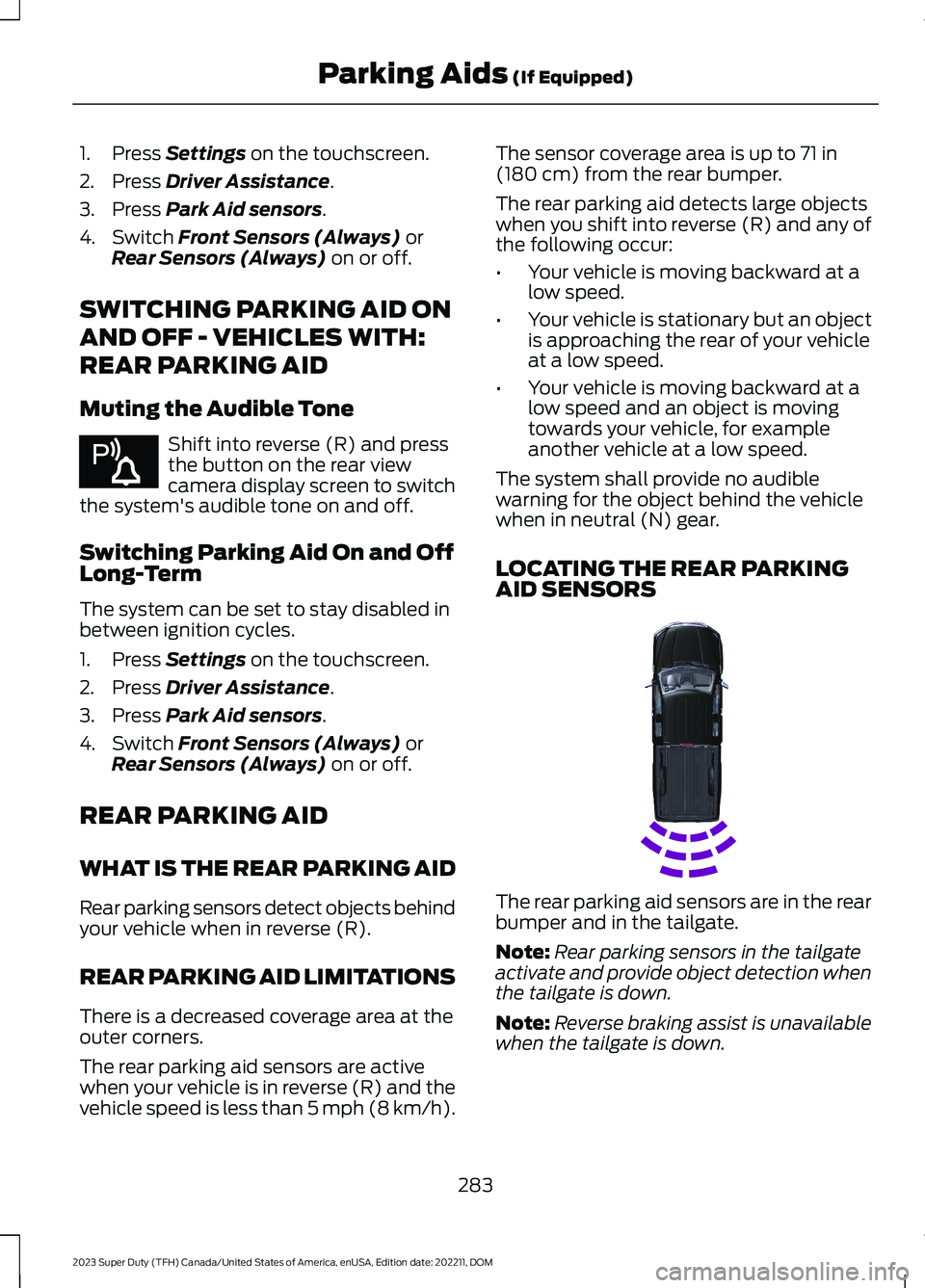
LOCATING THE REAR PARKINGAID SENSORS
The rear parking aid sensors are in the rearbumper and in the tailgate.
Note:Rear parking sensors in the tailgateactivate and provide object detection whenthe tailgate is down.
Note:Reverse braking assist is unavailablewhen the tailgate is down.
283
2023 Super Duty (TFH) Canada/United States of America, enUSA, Edition date: 202211, DOMParking Aids (If Equipped)E383616 E231381
Page 293 of 738
Note:Zooming in also engages park holdwhich applies the electric park brake whenyou shift to park (P). When you press thezoom button, the electronic park holdbutton illuminates on the touchscreen. SeeConnecting a Trailer (page 359).
Note:Manual zoom is only available whenthe transmission is in reverse (R).
Note:Only the centerline shows when youenable manual zoom.
SWITCHING REAR VIEW CAMERADELAY ON AND OFF
1.Press Features on the touchscreen.
2.Press Driver Assistance.
3.Press Rear View Camera.
4.Switch Rear View Camera Delay on oroff.
When shifting the transmission out ofreverse (R) and into any gear other thanpark (P), the camera image remains in thedisplay until:
•Your vehicle speed reachesapproximately 5 mph (8 km/h).
•You shift your vehicle into park (P).
REAR VIEW CAMERA VIDEOS
Dynamic Hitch Assist Video Link
289
2023 Super Duty (TFH) Canada/United States of America, enUSA, Edition date: 202211, DOMRear View Camera
Page 309 of 738
The indicator appears in the instrumentcluster display. When the system is on, thecolor of the indicator changes to indicatethe system status.
You can override the system at any timeby steering your vehicle.
Note:The correct requirements must bemet before you can switch the system on.See Lane Centering Requirements (page304).
Enabling and Disabling LaneCentering
1.Press Features on the touchscreen.
2.Press Driver Assistance.
3.Press Cruise Control.
4.Press Lane Centering Assist.
LANE CENTERING ALERTS
You must keep your hands on the steeringwheel at all times.
When the system is active and detects nosteering activity for a period of time, thesystem alerts you to put your hands on thesteering wheel. If you do not reactappropriately to the warnings the adaptivecruise control with lane centering systemcancels and slows your vehicle down toidle speeds while maintaining steeringcontrol. See Lane Centering AutomaticCancellation (page 305).
The system also alerts you if your vehiclecrosses lane line markings withoutdetected steering activity.
Note:The system could detect a light gripor light touch on the steering wheel ashands-off driving.
LANE CENTERING AUTOMATICCANCELLATION
When an external condition cancels thesystem, and your hands are on the steeringwheel, a tone sounds and a messageappears in the instrument cluster display.
When an external condition cancels thesystem, and your hands are not on thesteering wheel, the system immediatelyalerts you to take control of the vehicle. Ifthis alert is ignored, the system slows thevehicle while maintaining steeringassistance when lane markings areavailable. When no lane markings areavailable, the vehicle comes to a stop.
If your vehicle starts to slowdown after system cancellation,you must take full control of thevehicle. To re-enable adaptive cruisecontrol with lane centering aftercancellation, press and release the resumebutton.
Automatic cancellation can also occur if:
•The lane becomes too wide or narrow.
•The system cannot detect valid lanemarkings.
•Lane markings cross over one another.
•The curve of the road is too sharp.
Note:If your vehicle slows down due to yourinactivity twice within a key cycle, thesystem disables. To reset the system, whenthe vehicle is stationary, return the gearselector to park (P) and turn the vehicle off.Then, restart the vehicle with your foot onthe brake pedal.
LANE CENTERING MANUALCANCELLATION
When you perform the following actions,adaptive cruise control with lane centeringwill cancel:
305
2023 Super Duty (TFH) Canada/United States of America, enUSA, Edition date: 202211, DOMAdaptive Cruise Control (If Equipped)E308130