wheel FORD SUPER DUTY 2023 Owners Manual
[x] Cancel search | Manufacturer: FORD, Model Year: 2023, Model line: SUPER DUTY, Model: FORD SUPER DUTY 2023Pages: 738, PDF Size: 18.49 MB
Page 612 of 738
California Fuel Filter Replacement
If you register your vehicle in California, theCalifornia Air Resources Board hasdetermined that the failure to perform thismaintenance item does not nullify theemission warranty or limit recall liabilitybefore the completion of your vehicle'suseful life. Ford Motor Company, however,urges you to have all recommendedmaintenance services performed at thespecified intervals and to record all vehicleservice.
Hot Climate Oil Change Intervals
Vehicles operating in the Middle East,North Africa, Sub-Saharan Africa orlocations with similar climates using anAmerican Petroleum Institute (API)Certified for Gasoline Engines (Certificationmark) oil of SM or SN quality, the normaloil change interval is 3,000 mi (5,000 km).
If the available API SM or SN oils are notavailable, then the oil change interval is2,000 mi (3,000 km).
Engine Air Filter and Cabin Air FilterReplacement
The life of the engine air filter and cabin airfilter is dependent on exposure to dustyand dirty conditions. Vehicles operated inthese conditions require frequentinspection and replacement of the engineair filter and cabin air filter.
Diesel Particulate Filter
Over time, a slight amount of ash buildsup in the diesel particulate filter, which isnot removed during the regenerationprocess. The filter may need to be replacedwith a new or remanufactured part atapproximately 250,000 mi (400,000 km).Actual mileage varies depending on engineand vehicle operating conditions.
In this case, the engine control system setsa service light (wrench icon) to inform youto bring your vehicle to the dealer forservice. If there are any issues with theoxidation catalyst or particulate filtersystem, a service light (wrench or engineicon) sets by the engine control system toinform you to bring your vehicle into adealer for service.
SPECIAL OPERATING
CONDITIONS SCHEDULED
MAINTENANCE - GASOLINE
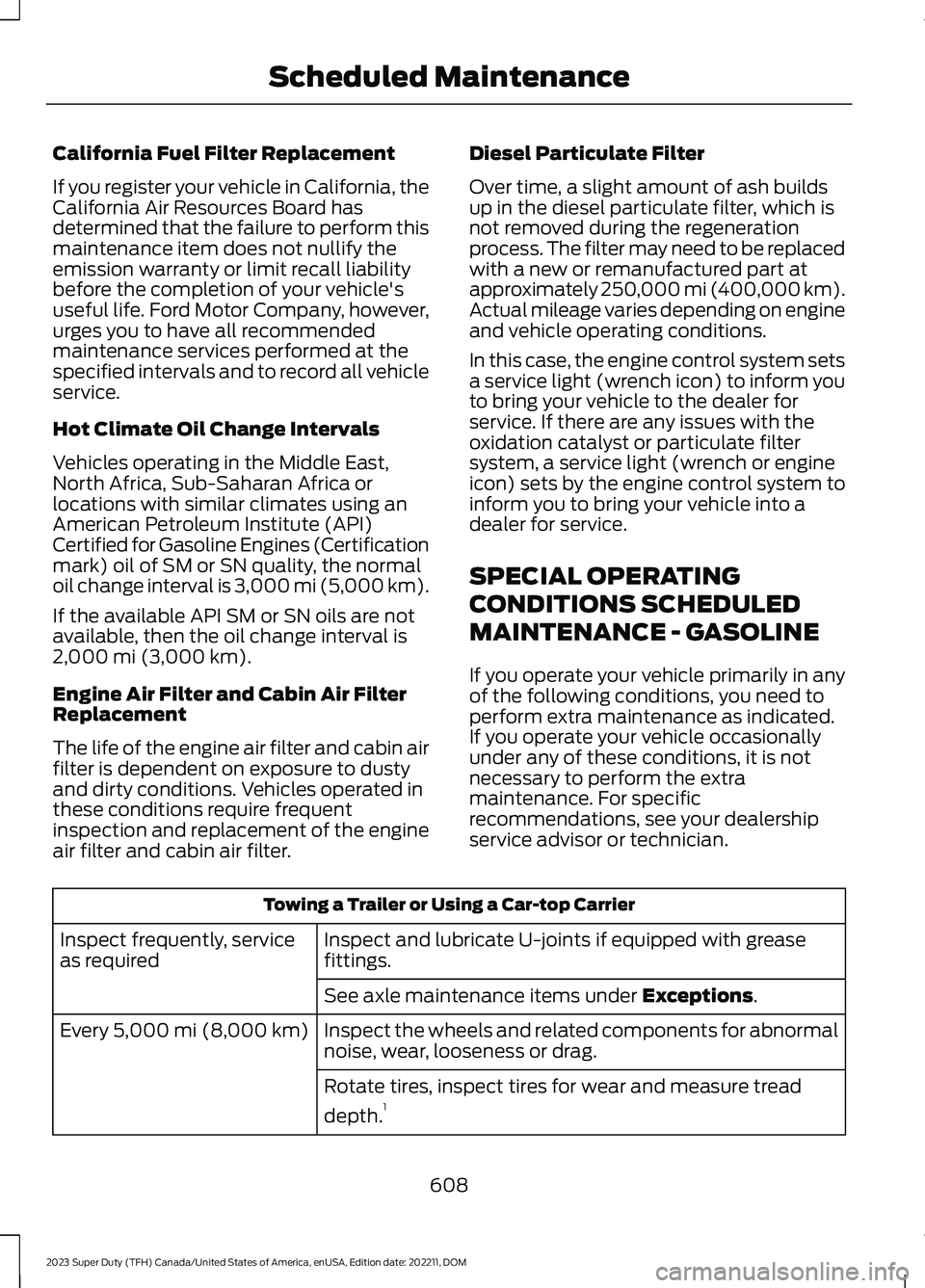
If you operate your vehicle primarily in anyof the following conditions, you need toperform extra maintenance as indicated.If you operate your vehicle occasionallyunder any of these conditions, it is notnecessary to perform the extramaintenance. For specificrecommendations, see your dealershipservice advisor or technician.
Towing a Trailer or Using a Car-top Carrier
Inspect and lubricate U-joints if equipped with greasefittings.Inspect frequently, serviceas required
See axle maintenance items under Exceptions.
Inspect the wheels and related components for abnormalnoise, wear, looseness or drag.Every 5,000 mi (8,000 km)
Rotate tires, inspect tires for wear and measure tread
depth.1
608
2023 Super Duty (TFH) Canada/United States of America, enUSA, Edition date: 202211, DOMScheduled Maintenance
Page 613 of 738
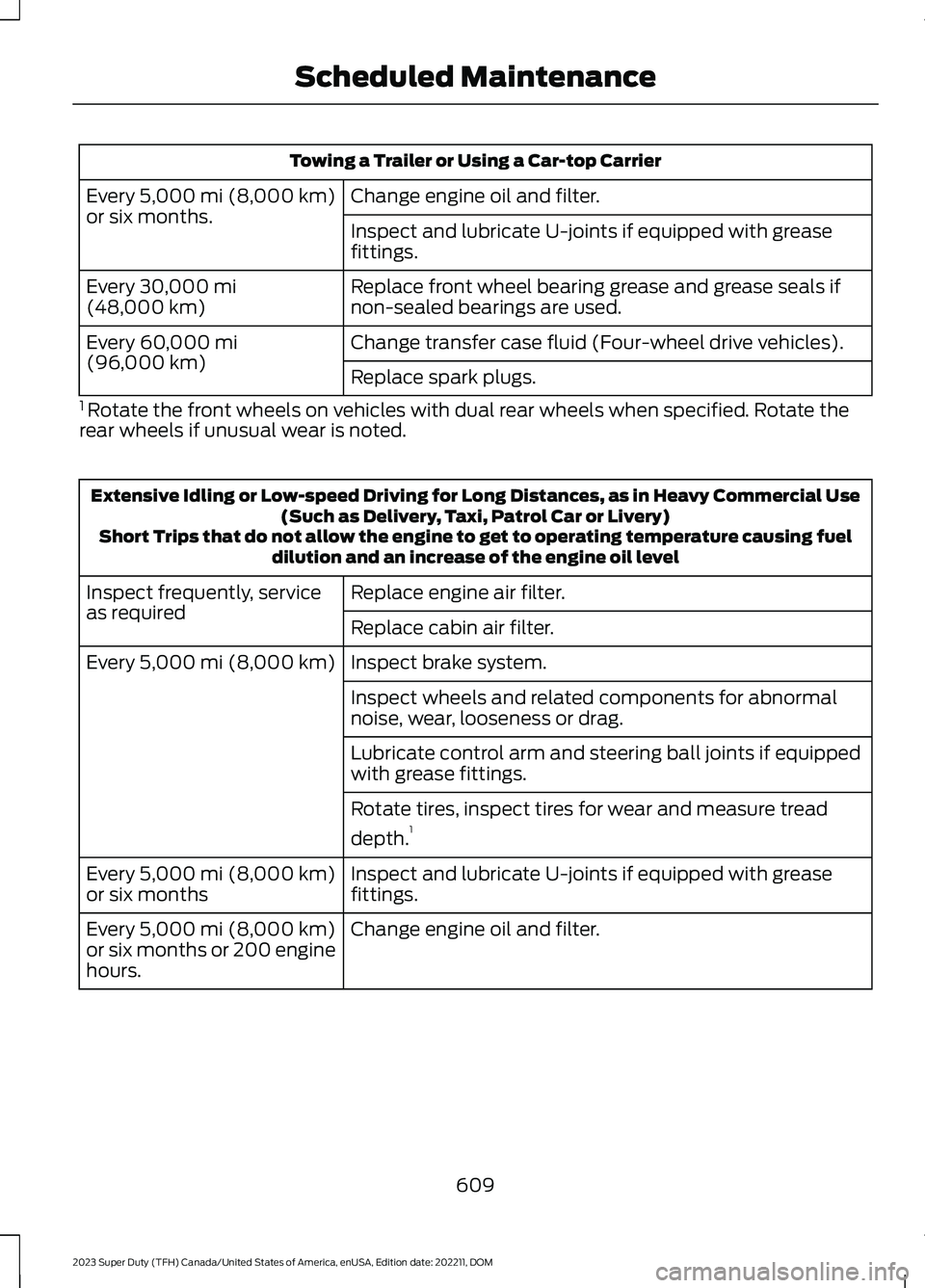
Towing a Trailer or Using a Car-top Carrier
Change engine oil and filter.Every 5,000 mi (8,000 km)or six months.Inspect and lubricate U-joints if equipped with greasefittings.
Replace front wheel bearing grease and grease seals ifnon-sealed bearings are used.Every 30,000 mi(48,000 km)
Change transfer case fluid (Four-wheel drive vehicles).Every 60,000 mi(96,000 km)Replace spark plugs.
1 Rotate the front wheels on vehicles with dual rear wheels when specified. Rotate therear wheels if unusual wear is noted.
Extensive Idling or Low-speed Driving for Long Distances, as in Heavy Commercial Use(Such as Delivery, Taxi, Patrol Car or Livery)Short Trips that do not allow the engine to get to operating temperature causing fueldilution and an increase of the engine oil level
Replace engine air filter.Inspect frequently, serviceas requiredReplace cabin air filter.
Inspect brake system.Every 5,000 mi (8,000 km)
Inspect wheels and related components for abnormalnoise, wear, looseness or drag.
Lubricate control arm and steering ball joints if equippedwith grease fittings.
Rotate tires, inspect tires for wear and measure tread
depth.1
Inspect and lubricate U-joints if equipped with greasefittings.Every 5,000 mi (8,000 km)or six months
Change engine oil and filter.Every 5,000 mi (8,000 km)or six months or 200 enginehours.
609
2023 Super Duty (TFH) Canada/United States of America, enUSA, Edition date: 202211, DOMScheduled Maintenance
Page 614 of 738
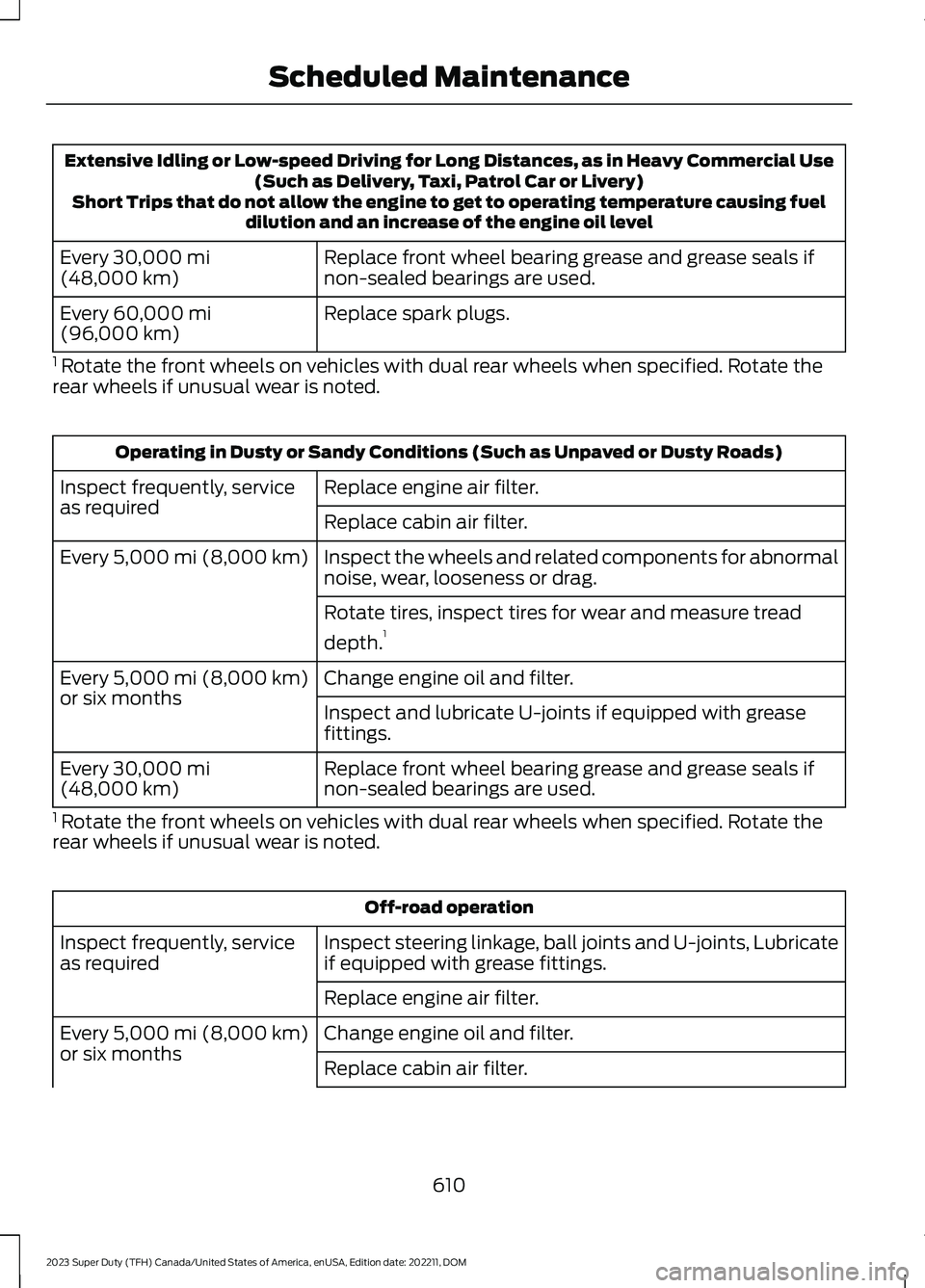
Extensive Idling or Low-speed Driving for Long Distances, as in Heavy Commercial Use(Such as Delivery, Taxi, Patrol Car or Livery)Short Trips that do not allow the engine to get to operating temperature causing fueldilution and an increase of the engine oil level
Replace front wheel bearing grease and grease seals ifnon-sealed bearings are used.Every 30,000 mi(48,000 km)
Replace spark plugs.Every 60,000 mi(96,000 km)
1 Rotate the front wheels on vehicles with dual rear wheels when specified. Rotate therear wheels if unusual wear is noted.
Operating in Dusty or Sandy Conditions (Such as Unpaved or Dusty Roads)
Replace engine air filter.Inspect frequently, serviceas requiredReplace cabin air filter.
Inspect the wheels and related components for abnormalnoise, wear, looseness or drag.Every 5,000 mi (8,000 km)
Rotate tires, inspect tires for wear and measure tread
depth.1
Change engine oil and filter.Every 5,000 mi (8,000 km)or six monthsInspect and lubricate U-joints if equipped with greasefittings.
Replace front wheel bearing grease and grease seals ifnon-sealed bearings are used.Every 30,000 mi(48,000 km)
1 Rotate the front wheels on vehicles with dual rear wheels when specified. Rotate therear wheels if unusual wear is noted.
Off-road operation
Inspect steering linkage, ball joints and U-joints, Lubricateif equipped with grease fittings.Inspect frequently, serviceas required
Replace engine air filter.
Change engine oil and filter.Every 5,000 mi (8,000 km)or six monthsReplace cabin air filter.
610
2023 Super Duty (TFH) Canada/United States of America, enUSA, Edition date: 202211, DOMScheduled Maintenance
Page 615 of 738
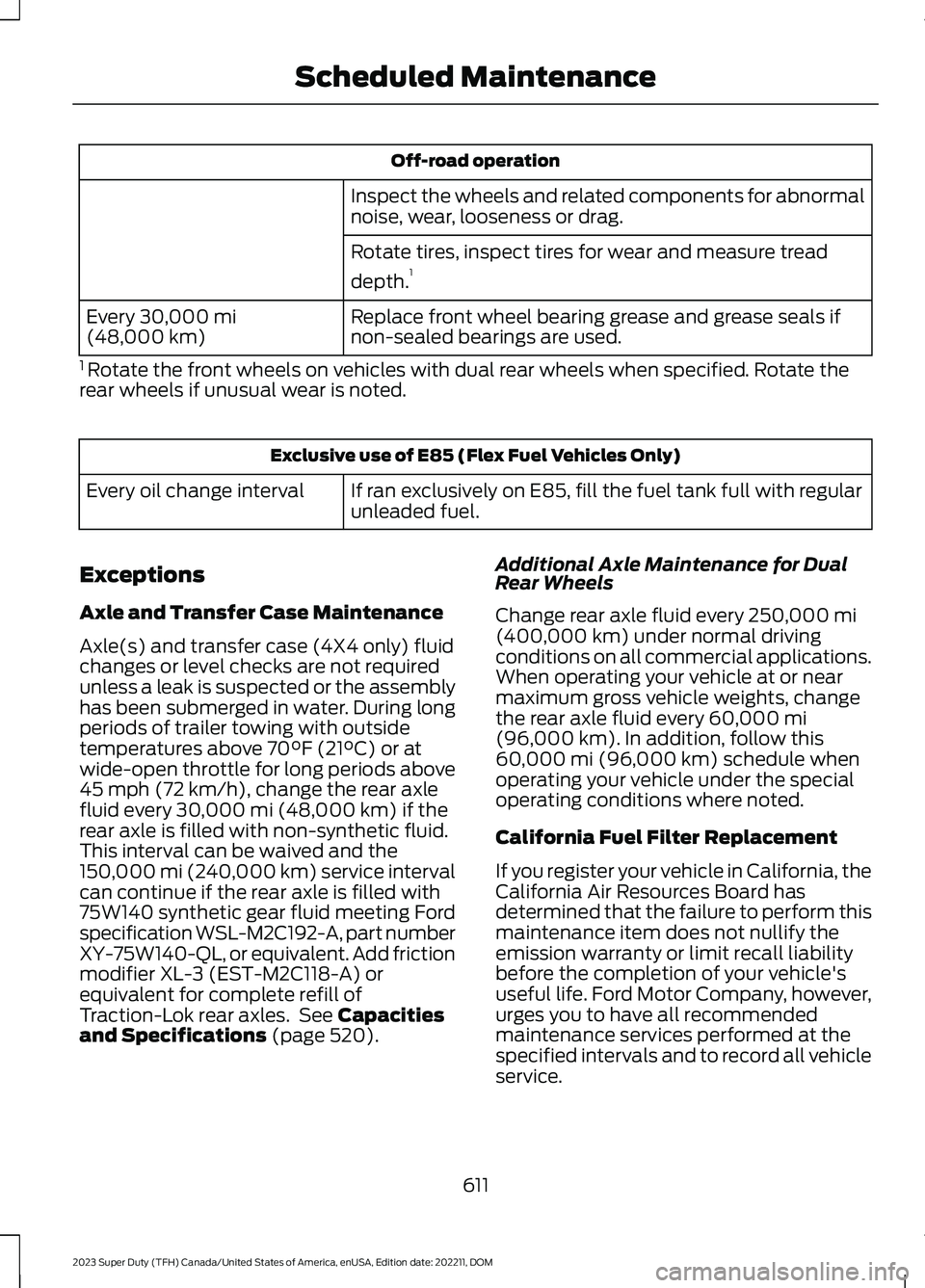
Off-road operation
Inspect the wheels and related components for abnormalnoise, wear, looseness or drag.
Rotate tires, inspect tires for wear and measure tread
depth.1
Replace front wheel bearing grease and grease seals ifnon-sealed bearings are used.Every 30,000 mi(48,000 km)
1 Rotate the front wheels on vehicles with dual rear wheels when specified. Rotate therear wheels if unusual wear is noted.
Exclusive use of E85 (Flex Fuel Vehicles Only)
If ran exclusively on E85, fill the fuel tank full with regularunleaded fuel.Every oil change interval
Exceptions
Axle and Transfer Case Maintenance
Axle(s) and transfer case (4X4 only) fluidchanges or level checks are not requiredunless a leak is suspected or the assemblyhas been submerged in water. During longperiods of trailer towing with outsidetemperatures above 70°F (21°C) or atwide-open throttle for long periods above45 mph (72 km/h), change the rear axlefluid every 30,000 mi (48,000 km) if therear axle is filled with non-synthetic fluid.This interval can be waived and the150,000 mi (240,000 km) service intervalcan continue if the rear axle is filled with75W140 synthetic gear fluid meeting Fordspecification WSL-M2C192-A, part numberXY-75W140-QL, or equivalent. Add frictionmodifier XL-3 (EST-M2C118-A) orequivalent for complete refill ofTraction-Lok rear axles. See Capacitiesand Specifications (page 520).
Additional Axle Maintenance for DualRear Wheels
Change rear axle fluid every 250,000 mi(400,000 km) under normal drivingconditions on all commercial applications.When operating your vehicle at or nearmaximum gross vehicle weights, changethe rear axle fluid every 60,000 mi(96,000 km). In addition, follow this60,000 mi (96,000 km) schedule whenoperating your vehicle under the specialoperating conditions where noted.
California Fuel Filter Replacement
If you register your vehicle in California, theCalifornia Air Resources Board hasdetermined that the failure to perform thismaintenance item does not nullify theemission warranty or limit recall liabilitybefore the completion of your vehicle'suseful life. Ford Motor Company, however,urges you to have all recommendedmaintenance services performed at thespecified intervals and to record all vehicleservice.
611
2023 Super Duty (TFH) Canada/United States of America, enUSA, Edition date: 202211, DOMScheduled Maintenance
Page 627 of 738
ROLLOVER WARNING
WARNING: Utility vehicles have asignificantly higher rollover rate thanother types of vehicles.
WARNING: Vehicles with a highercenter of gravity (utility and four-wheeldrive vehicles) handle differently thanvehicles with a lower center of gravity(passenger cars). Avoid sharp turns,excessive speed and abrupt steering inthese vehicles. Failure to drive cautiouslyincreases the risk of losing control of yourvehicle, vehicle rollover, personal injuryand death.
WARNING: In a rollover crash, anunbelted person is significantly morelikely to die than a person wearing aseatbelt.
WARNING: Do not becomeoverconfident in the ability of four-wheeldrive vehicles. Although a four-wheeldrive vehicle may accelerate better thana two-wheel drive vehicle in low tractionsituations, it won't stop any faster thantwo-wheel drive vehicles. Always driveat a safe speed.
Utility vehicles and trucks handledifferently than passenger cars in thevarious driving conditions that areencountered on streets, highways andoff-road. Utility vehicles and trucks are notdesigned for cornering at speeds as highas passenger cars any more than low-slungsports cars are designed to performsatisfactorily under off-road conditions.
THE BETTER BUSINESS
BUREAU AUTO LINE
PROGRAM
Your satisfaction is important to FordMotor Company and to your dealer. If awarranty concern has not been resolvedusing the three-step procedure outlinedearlier in this chapter in the Getting theServices you need section, you may beeligible to participate in the BBB AUTOLINE program.
The BBB AUTO LINE program consists oftwo parts – mediation and arbitration.During mediation, a representative of theBBB will contact both you and Ford MotorCompany to explore options for settlementof the claim. If an agreement is not reachedduring mediation or you do not want toparticipate in mediation, and if your claimis eligible, you may participate in thearbitration process. An arbitration hearingwill be scheduled so that you can presentyour case in an informal setting before animpartial person. The arbitrator considersthe testimony provided and makes adecision after the hearing.
Disputes submitted to the BBB AUTO LINEprogram are usually decided within 40days after you file your claim with the BBB.You are not bound by the decision, andmay reject the decision and proceed tocourt where all findings of the BBB AutoLine dispute, and decision, are admissiblein the court action. Should you choose toaccept the BBB AUTO LINE decision, Fordis then bound by the decision, and mustcomply with the decision within 30 daysof receipt of your acceptance letter.
BBB AUTO LINE Application: Using theinformation that follows, call or write torequest a program application. You will beasked for your name and address, generalinformation about your new vehicle,information about your warranty concerns,and any steps you have already taken to
623
2023 Super Duty (TFH) Canada/United States of America, enUSA, Edition date: 202211, DOMCustomer Information
Page 682 of 738
TRADEMARKS: This EULA does not grantyou any rights in connection with anytrademarks or service marks of FORDMOTOR COMPANY, its affiliates, and thirdparty software and service providers.
PRODUCT SUPPORT: Please refer toFORD MOTOR COMPANY instructionsprovided in the documentation for theDEVICES product support, such as thevehicle owner guide.
Should you have any questions concerningthis EULA, or if you desire to contact FORDMOTOR COMPANY for any other reason,please refer to the address provided in thedocumentation for the DEVICES.
No Liability for Certain Damages:EXCEPT AS PROHIBITED BY LAW, FORDMOTOR COMPANY, ANY THIRD PARTYSOFTWARE OR SERVICES SUPPLIERS,AND THEIR AFFILIATES SHALL HAVE NOLIABILITY FOR ANY INDIRECT, SPECIAL,CONSEQUENTIAL OR INCIDENTALDAMAGES ARISING FROM OR INCONNECTION WITH THE USE ORPERFORMANCE OF THE SOFTWARE. THISLIMITATION SHALL APPLY EVEN IF ANYREMEDY FAILS OF ITS ESSENTIALPURPOSE. THERE ARE NO WARRANTIESOTHER THAN THOSE THAT MAY BEEXPRESSLY PROVIDED FOR YOUR NEWVEHICLE.
SYNC® Automotive Important SafetyInformation Read and followinstructions:
•Before using your SYNC® system, readand follow all instructions and safetyinformation provided in this end usermanual ("Owner Guide".) Notfollowing precautions found in theOwner Guide can lead to an accidentor other serious injuries.
General Operation
•Voice Command Control: Certainfunctions within the SYNC® systemmay be accomplished using voicecommands. Using voice commandswhile driving helps you to operate thesystem without removing your handsfrom the wheel or eyes from the road.
•Prolonged Views of Screen: Do notaccess any function requiring aprolonged view of the screen while youare driving. Pull over in a safe and legalmanner before attempting to access afunction of the system requiringprolonged attention.
•Volume Setting: Do not raise thevolume excessively. Keep the volumeat a level where you can still hearoutside traffic and emergency signalswhile driving. Driving while unable tohear these sounds could cause anaccident.
•Navigation Features: Any navigationfeatures included in the system areintended to provide turn by turninstructions to get you to a desireddestination. Please make certain allpersons using this system carefullyread and follow instructions and safetyinformation fully.
•Distraction Hazard: Any navigationfeatures may require manual(non-verbal) setup. Attempting toperform such set-up or insert datawhile driving can distract your attentionand could cause an accident or otherserious injury. Stop the vehicle in a safeand legal manner before attemptingthese operations.
•Let Your Judgment Prevail: Anynavigation features are provided onlyas an aid. Make your driving decisionsbased on your observations of localconditions and existing trafficregulations. Any such feature is not a
678
2023 Super Duty (TFH) Canada/United States of America, enUSA, Edition date: 202211, DOMCustomer Information
Page 711 of 738
1
12V Battery.....................................................45612V Battery Precautions..................................456Battery Management SystemLimitations.......................................................457Changing the 12V Battery...............................457How Does the Battery ManagementSystem Work...................................................457Recycling and Disposing of the 12VBattery..............................................................458Resetting the Battery Sensor........................458What Is the Battery ManagementSystem..............................................................45712V Battery – Troubleshooting...............45912V Battery – Information Messages.........45912V Battery – Warning Lamps......................459
3
360 Degree Camera...................................290360 Degree Camera Settings.......................292360 Degree Camera Guide Lines...........291360 Degree Camera Precautions.........290360 Degree Camera Settings.................292Switching the 360 Degree Camera On andOff.......................................................................292Switching the 360 Degree CameraView...................................................................292
4
4WDSee: Four-Wheel Drive.....................................238
9
911 Assist............................................................67911 Assist Videos............................................68
A
A/CSee: Climate Control - Vehicles With:Automatic Temperature Control..............152See: Climate Control - Vehicles With: ManualTemperature Control....................................156About This Publication..................................21
ABSSee: Brakes..........................................................249Accessing Apps.............................................575Accessing Navigation.................................579Accessing the Passive Key BackupPosition........................................................209Accessing the Trip Computer - VehiclesWith: 12 Inch Screen.................................146Accessing the Trip Computer - VehiclesWith: 8 Inch Screen..................................146Accessories....................................................585Adaptive Cruise Control............................296Adaptive Cruise Control –Troubleshooting...........................................309Lane Centering...................................................303Predictive Speed Assist..................................306Predictive Speed Assist –Troubleshooting...........................................308Adaptive Cruise Control AutomaticCancellation...............................................299Adaptive Cruise Control Indicators.......303Adaptive Cruise ControlLimitations...................................................297Adaptive Cruise ControlPrecautions.................................................296Adaptive Cruise Control –Troubleshooting.......................................309Adaptive Cruise Control – InformationMessages........................................................309Adaptive Cruise Control Videos..............310Adaptive Front Lighting..............................124How Does Adaptive Front LightingWork....................................................................124Switching Adaptive Front Lighting On andOff........................................................................125Adjustable Pedals..........................................112Adjusting the Exterior Mirrors...................132Adjusting the Headlamps........................460Adjusting the Instrument Panel LightingBrightness.....................................................127Adjusting the Integrated Trailer BrakeController Mode.........................................374Adjusting the Map.......................................579Changing the Format of the Map................579Zooming the Map In and Out........................579Adjusting the Pedals.....................................112Adjusting the Seatbelt Height...................53Adjusting the Seatbelt Length..................54
707
2023 Super Duty (TFH) Canada/United States of America, enUSA, Edition date: 202211, DOMIndex
Page 712 of 738
Adjusting the Seatbelts DuringPregnancy......................................................53Adjusting the Sound Settings.................554Adjusting the Steering Wheel - VehiclesWith: Manual Adjustable SteeringColumn..........................................................109Adjusting the Steering Wheel - VehiclesWith: Power Adjustable SteeringColumn..........................................................109Adjusting the Volume................................554Aid Mode..........................................................319How Does Aid Mode Work..............................319What Is Aid Mode...............................................319Airbag Precautions........................................59Airbags................................................................57Air ConditioningSee: Climate Control - Vehicles With:Automatic Temperature Control..............152See: Climate Control - Vehicles With: ManualTemperature Control....................................156Air Conditioning System Capacity andSpecification..............................................536Alert and Aid Mode......................................319How Does Alert and Aid Mode Work...........319What Is Alert and Aid Mode............................319Alert Mode.......................................................318Adjusting the Steering Wheel VibrationIntensity.............................................................319How Does Alert Mode Work...........................318What Is Alert Mode............................................318Alexa Built-In.................................................567Alexa Built-In Requirements....................567Alexa Built-In Settings...............................567AM/FM Radio................................................555AM/FM Radio Limitations..............................555Selecting a Radio Station...............................555Ambient Lighting...........................................127Adjusting Ambient Lighting.............................127Switching Ambient Lighting On andOff........................................................................127Anti-Lock Braking System........................249Anti-Lock Braking SystemLimitations......................................................249Anti-Theft Alarm System..........................103Arming the Anti-Theft Alarm System........104Disarming the Anti-Theft AlarmSystem..............................................................104
How Does the Anti-Theft Alarm SystemWork...................................................................103What Are the Inclination Sensors................104What Are the Interior Sensors.......................103What Is the Anti-Theft AlarmSystem...............................................................103What Is the Battery Backup Alarm..............104What Is the Perimeter Alarm.........................103Anti-Theft Alarm System Settings........104Setting the Alarm Security Level..................104Switching Ask on Exit On and Off................104What are the Alarm Security Levels...........104What Is Ask on Exit............................................104Appendices....................................................703Applying the Electric ParkingBrake..............................................................253Applying the Electric Parking Brake in anEmergency...................................................253App Precautions...........................................575App Requirements.......................................575Apps..................................................................575Audio System................................................553AM/FM Radio......................................................555Audio System – Troubleshooting................559Digital Radio........................................................556Satellite Radio.....................................................557Audio System Precautions.......................553Audio System – Troubleshooting.........559Audio System – InformationMessages.........................................................559Auto-Dimming Interior Mirror....................131Auto-Dimming Interior MirrorLimitations.........................................................131What Is the Auto-Dimming InteriorMirror....................................................................131Auto Hold.......................................................266Auto Hold Indicators..................................266Autolamps.......................................................118Autolamp Settings..............................................118What Are Autolamps.........................................118Autolock............................................................82Autolock Requirements.....................................82What Is Autolock..................................................82Automatically Releasing the ElectricParking Brake.............................................254Automatic Crash Shutoff..........................423Automatic Crash ShutoffPrecautions.....................................................423
708
2023 Super Duty (TFH) Canada/United States of America, enUSA, Edition date: 202211, DOMIndex
Page 714 of 738
Blind Spot Information System With TrailerCoverage..........................................................328Blind Spot Information SystemIndicators.....................................................330Blind Spot Information SystemLimitations...................................................327Blind Spot Information SystemPrecautions..................................................327Blind Spot Information SystemRequirements.............................................327Blind Spot Information System –Troubleshooting.........................................331Blind Spot Information System –Information Messages.................................331Blind Spot Information SystemVideos............................................................331Blind Spot Information System WithTrailer Coverage.........................................328Blind Spot Information System With TrailerCoverage Limitations..................................328Selecting a Trailer..............................................330Setting a Trailer Length...................................329What Is Blind Spot Information System withTrailer Coverage.............................................328Bluetooth®.....................................................574Bonnet LockSee: Opening and Closing the Hood.........440Booster Seats...................................................47Brake Fluid Specification..........................250Brake Over Accelerator..............................249Brake Precautions.......................................249Brakes..............................................................249Anti-Lock Braking System..............................249Brakes – Troubleshooting..............................250Brakes – Troubleshooting........................250Brakes – Frequently AskedQuestions.........................................................252Brakes – Information Messages....................251Brakes – Warning Lamps...............................250Breaking-In.....................................................416
C
Calculating Payload....................................353Calculating the Load Limit.......................353Canceling the Set Speed...........................273Canceling the Set Speed Limit................316Capacities and Specifications................520
Catalytic Converter.....................................233Catalytic Converter –Troubleshooting............................................233Catalytic Converter Precautions............233Catalytic Converter –Troubleshooting........................................233Catalytic Converter – WarningLamps................................................................233Center Console..............................................198Opening the Center Console..........................198Center Console Work Surface.................193Center Console Work Surface –Troubleshooting.............................................194Center Console Work Surface –Troubleshooting.........................................194Center Console Work Surface – InformationMessages..........................................................194Center Display Limitations.......................563Center Display Overview..........................563Center Display Overview Videos...........564Center Display Precautions.....................563Changing a Flat Tire...................................509Changing a Road Wheel...........................509Changing the Fuel Filter - Diesel............453Changing the Fuel Filter -Gasoline.......................................................453Changing the Language.............................145Changing the Measurement Unit...........145Changing the Remote Control Battery -Vehicles With: Flip Key...............................74Changing the Remote Control Battery -Vehicles With: Push Button Start..........75Changing the Set Speed Limit................316Changing the Temperature Unit.............145Changing the Tire Pressure Unit.............145Changing the Vehicle Wi-Fi HotspotName or Password....................................551Charging a Device.........................................183Charging a Wireless Device......................195Checking the Brake Fluid..........................249Checking the Seatbelts...............................56Checking the Selective CatalyticReduction System Status.....................230Checking the Tire Pressures...................490Checking the Wiper Blades........................114Children and Airbags....................................64
710
2023 Super Duty (TFH) Canada/United States of America, enUSA, Edition date: 202211, DOMIndex
Page 715 of 738
Child Restraint Anchor Points....................37Locating the Child Restraint Lower AnchorPoints...................................................................37Locating the Child Restraint Top TetherAnchor Points...................................................38What Are the Child Restraint AnchorPoints...................................................................37Child Restraints...............................................39Child Restraint Position Information............39Child Restraints Recommendation...............40Child Safety......................................................36Child Restraint Anchor Points..........................37Child Restraints.....................................................39Installing Child Restraints.................................40Child Safety Locks - Crew Cab/SuperCab.......................................................49Child Safety Precautions.............................36Cleaning Products......................................469Cleaning the Exterior..................................470Cleaning Camera Lenses andSensors..............................................................471Cleaning Chrome, Aluminium or StainlessSteel...................................................................470Cleaning Headlamps and RearLamps...............................................................470Cleaning Stripes or Graphics..........................471Cleaning the Engine Compartment.............471Cleaning the Exhaust........................................472Cleaning the Exterior Precautions...............470Cleaning the Underbody..................................471Cleaning Wheels................................................470Cleaning Windows and WiperBlades...............................................................470Cleaning the Interior....................................472Cleaning Carpets and Floor Mats................474Cleaning Displays and Screens.....................473Cleaning Fabric...................................................473Cleaning Leather................................................473Cleaning Moonroof Tracks..............................474Cleaning Plastic..................................................473Cleaning Seatbelts............................................474Cleaning the Instrument Panel.....................472Cleaning Vinyl......................................................474Climate Control.............................................152Auto Mode.............................................................154Climate Control Hints.................................154Climate Control Videos..............................155
Closing the Tailgate......................................94Closing the Tailgate From Inside YourVehicle.................................................................94Closing the Tailgate From Outside YourVehicle.................................................................94Closing the Tailgate Using the RemoteControl................................................................95Cold Weather Precautions - 6.7LDiesel..............................................................415Cold Weather Precautions - 6.8L/7.3L..................................................................415Connected Navigation...............................579Connected Vehicle......................................548Connected Vehicle –Troubleshooting............................................549Connecting the Vehicle to a MobileNetwork...........................................................548Connected Vehicle Data..............................28Connected Vehicle Limitations..............548Connected Vehicle Requirements........548Connected Vehicle –Troubleshooting........................................549Connected Vehicle – Frequently AskedQuestions........................................................549Connected Vehicle Videos.......................550Connecting a Bluetooth® Device..........574Connecting a Trailer.....................................361Connecting a Trailer –Troubleshooting............................................364Hitches...................................................................359Connecting a Trailer Precautions..........359Connecting a Trailer –Troubleshooting........................................364Connecting a Trailer – InformationMessages.........................................................364Connecting a Trailer Videos....................364Connecting the Vehicle to a MobileNetwork.......................................................548Connecting FordPass to the Modem.........548Enabling and Disabling the Modem...........548What Is the Modem..........................................548Connecting the Vehicle to a Wi-FiNetwork.......................................................548Connecting Your Phone............................569Contacting Us...................................................19Coolant...........................................................450Adding Coolant..................................................450Changing the Coolant.......................................451
711
2023 Super Duty (TFH) Canada/United States of America, enUSA, Edition date: 202211, DOMIndex