ECO mode FORD SUPER DUTY 2023 Owner's Manual
[x] Cancel search | Manufacturer: FORD, Model Year: 2023, Model line: SUPER DUTY, Model: FORD SUPER DUTY 2023Pages: 738, PDF Size: 18.49 MB
Page 153 of 738
WHAT IS REMOTE START
The system allows you to remotely startyour vehicle and to adjust the interiortemperature according to the settings thatyou chose.
REMOTE START
PRECAUTIONS
WARNING: Do not start the enginein a closed garage or in other enclosedareas. Exhaust fumes are toxic. Alwaysopen the garage door before you startthe engine. Failure to follow thisinstruction could result in personal injuryor death.
REMOTE START LIMITATIONS
Remote start does not work under thefollowing conditions:
•The alarm horn is sounding.
•The hood is open.
•The transmission is not in park (P).
•The ignition is on.
•The battery voltage is below theminimum operating voltage.
•Remote start is not enabled.
Note:Do not use remote start if the fuellevel is low.
ENABLING REMOTE START
1.Press Settings on the touchscreen.
2.Press Vehicle.
3.Press Remote Start Setup.
4.Switch Remote Start on or off.
Note:To remote start with FordPass, makesure that the modem is enabled. SeeConnecting FordPass to the Modem(page 548).
REMOTELY STARTING AND
STOPPING THE VEHICLE
Remotely Starting the Vehicle
Press the button on the remotecontrol.
Within three seconds, press thebutton on the remote control.
Within three seconds, press thebutton again.
Note:You can also use FordPass to startthe vehicle.
Note:The vehicle doors lock when yousuccessfully remote start your vehicle.
Note:The turn signal lamps flash twice.
Note:The parking lamps turn on when thevehicle is running.
Note:The horn sounds if the system failsto start.
Note:All other vehicle systems remain offwhen you have remotely started the vehicle.
Note:The vehicle remains secured whenyou have remotely started the vehicle. Avalid key must be inside your vehicle toswitch the ignition on and drive your vehicle.
Remotely Stopping the Vehicle
Press the button on the remotecontrol.
149
2023 Super Duty (TFH) Canada/United States of America, enUSA, Edition date: 202211, DOMRemote Start (If Equipped)E138623 E138625 E138625
Page 154 of 738
EXTENDING THE REMOTE
START DURATION
To extend the remote start duration duringremote start, do the following:
Press the button on the remotecontrol.
Within three seconds, press thebutton on the remote control.
Within three seconds, press thebutton again.
If the duration is set to 15 minutes, theduration extends by another 15 minutes.This provides a total of 30 minutes.
Note:Remote start can only be extendedonce.
Note:A maximum of two remote starts, orone remote start with an extension, areallowed. To reset the restart procedureswitch the vehicle to on, then to off.
REMOTE START REMOTE
CONTROL INDICATORS
Remote Control Feedback
An LED on the remote control providesstatus feedback of remote start or stopcommands.
StatusLED
Remote startsuccessful.Solid green.
Remote stopsuccessful.Solid red.
Request failed orstatus not received.Blinking red.
Status incomplete.Blinking green.
REMOTE START SETTINGS
Climate Control Settings
1.Press Settings on the touchscreen.
2.Press Vehicle Settings.
3.Press Remote Start Setup.
4.Press Climate Control.
5.Press Auto or Last settings.
Note:If you switch the auto mode on, thesystem attempts to heat or cool the interiorto 72°F (22°C). When you switch the vehicleon, the climate control system returns tothe last used settings.
Note:If you switch the last settings on, thesystem remembers the last used settings.
Heated Seat Settings (If Equipped)
1.Press Settings on the touchscreen.
2.Press Vehicle Settings.
3.Press Remote Start Setup.
4.Press Seats.
5.Press Auto or Off.
Note:If you switch the heated seat settingson, the heated seats turn on during coldweather.
Note:You cannot adjust the heated seatsettings when you remotely start yourvehicle.
Heated Steering Wheel Settings (If
Equipped)
1.Press Settings on the touchscreen.
2.Press Vehicle Settings.
3.Press Remote Start Setup.
4.Press Seats and Steering Wheel.
5.Press Auto or Off.
Note:If you switch the heated steeringwheel settings on, the heated steering wheelturns on during cold weather.
150
2023 Super Duty (TFH) Canada/United States of America, enUSA, Edition date: 202211, DOMRemote Start (If Equipped)E138623 E138625
Page 156 of 738
IDENTIFYING THE CLIMATE
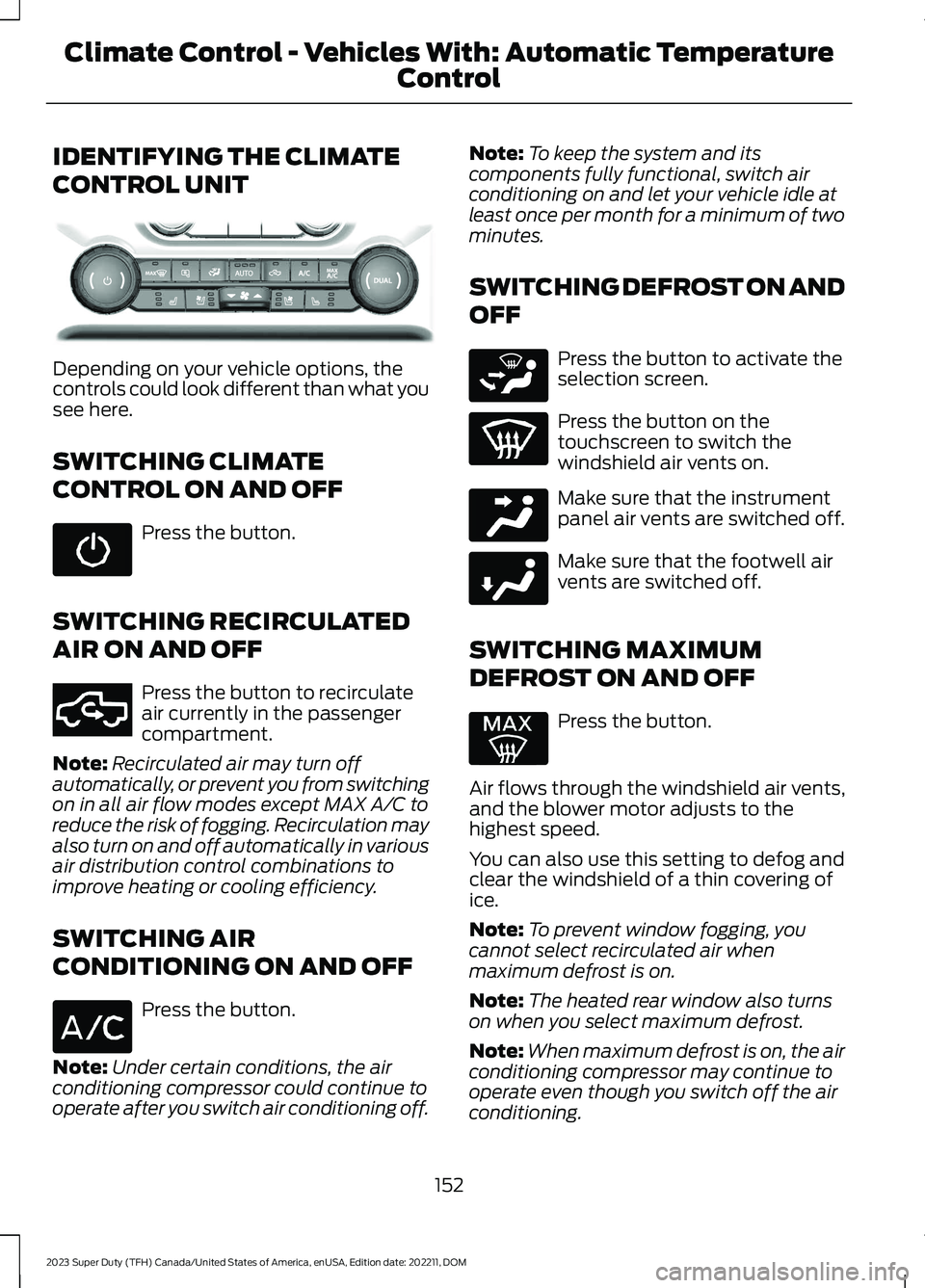
CONTROL UNIT
Depending on your vehicle options, thecontrols could look different than what yousee here.
SWITCHING CLIMATE
CONTROL ON AND OFF
Press the button.
SWITCHING RECIRCULATED
AIR ON AND OFF
Press the button to recirculateair currently in the passengercompartment.
Note:Recirculated air may turn offautomatically, or prevent you from switchingon in all air flow modes except MAX A/C toreduce the risk of fogging. Recirculation mayalso turn on and off automatically in variousair distribution control combinations toimprove heating or cooling efficiency.
SWITCHING AIR
CONDITIONING ON AND OFF
Press the button.
Note:Under certain conditions, the airconditioning compressor could continue tooperate after you switch air conditioning off.
Note:To keep the system and itscomponents fully functional, switch airconditioning on and let your vehicle idle atleast once per month for a minimum of twominutes.
SWITCHING DEFROST ON AND
OFF
Press the button to activate theselection screen.
Press the button on thetouchscreen to switch thewindshield air vents on.
Make sure that the instrumentpanel air vents are switched off.
Make sure that the footwell airvents are switched off.
SWITCHING MAXIMUM
DEFROST ON AND OFF
Press the button.
Air flows through the windshield air vents,and the blower motor adjusts to thehighest speed.
You can also use this setting to defog andclear the windshield of a thin covering ofice.
Note:To prevent window fogging, youcannot select recirculated air whenmaximum defrost is on.
Note:The heated rear window also turnson when you select maximum defrost.
Note:When maximum defrost is on, the airconditioning compressor may continue tooperate even though you switch off the airconditioning.
152
2023 Super Duty (TFH) Canada/United States of America, enUSA, Edition date: 202211, DOMClimate Control - Vehicles With: Automatic Temperature
ControlE373067 E351062 E265283 E244097 E244098
Page 159 of 738
Automatic Climate Control
•Adjusting the settings when yourvehicle interior is extremely hot or coldis not necessary. Automatic mode isbest recommended to maintain settemperature.
•The system adjusts to heat or cool theinterior to the temperature you selectas quickly as possible.
•For the system to function efficiently,the instrument panel and side air ventsshould be fully open.
•If you press AUTO during cold outsidetemperatures, the system directs airflow to the windshield and side windowair vents.In addition, the blower motormay run at a slower speed until theengine warms up.
•If you press AUTO during hottemperatures and the inside of thevehicle is hot, the system usesrecirculated air to maximize interiorcooling. Blower motor speed may alsoreduce until the air cools.
Quickly Heating the Interior
1.Press AUTO.
2.Adjust the temperature function to thesetting you prefer.
Recommended Settings forHeating
1.Press AUTO.
2.Adjust the temperature function to thesetting you prefer. Use 72°F (22°C) asa starting point, then adjust the settingas necessary.
Quickly Cooling the Interior
1.Press MAX A/C.
2.Drive with the windows open for a shortperiod of time.
Recommended Settings forCooling
1.Press AUTO.
2.Adjust the temperature function to thesetting you prefer. Use 72°F (22°C) asa starting point, then adjust the settingas necessary.
Defogging the Side Windows inCold Weather
1.Press and release defrost or maximumdefrost.
2.Adjust the temperature control to thesetting you prefer. Use 72°F (22°C) asa starting point, then adjust the settingas necessary.
CLIMATE CONTROL VIDEOS
Heated Mirrors
155
2023 Super Duty (TFH) Canada/United States of America, enUSA, Edition date: 202211, DOMClimate Control - Vehicles With: Automatic Temperature
Control
Page 160 of 738
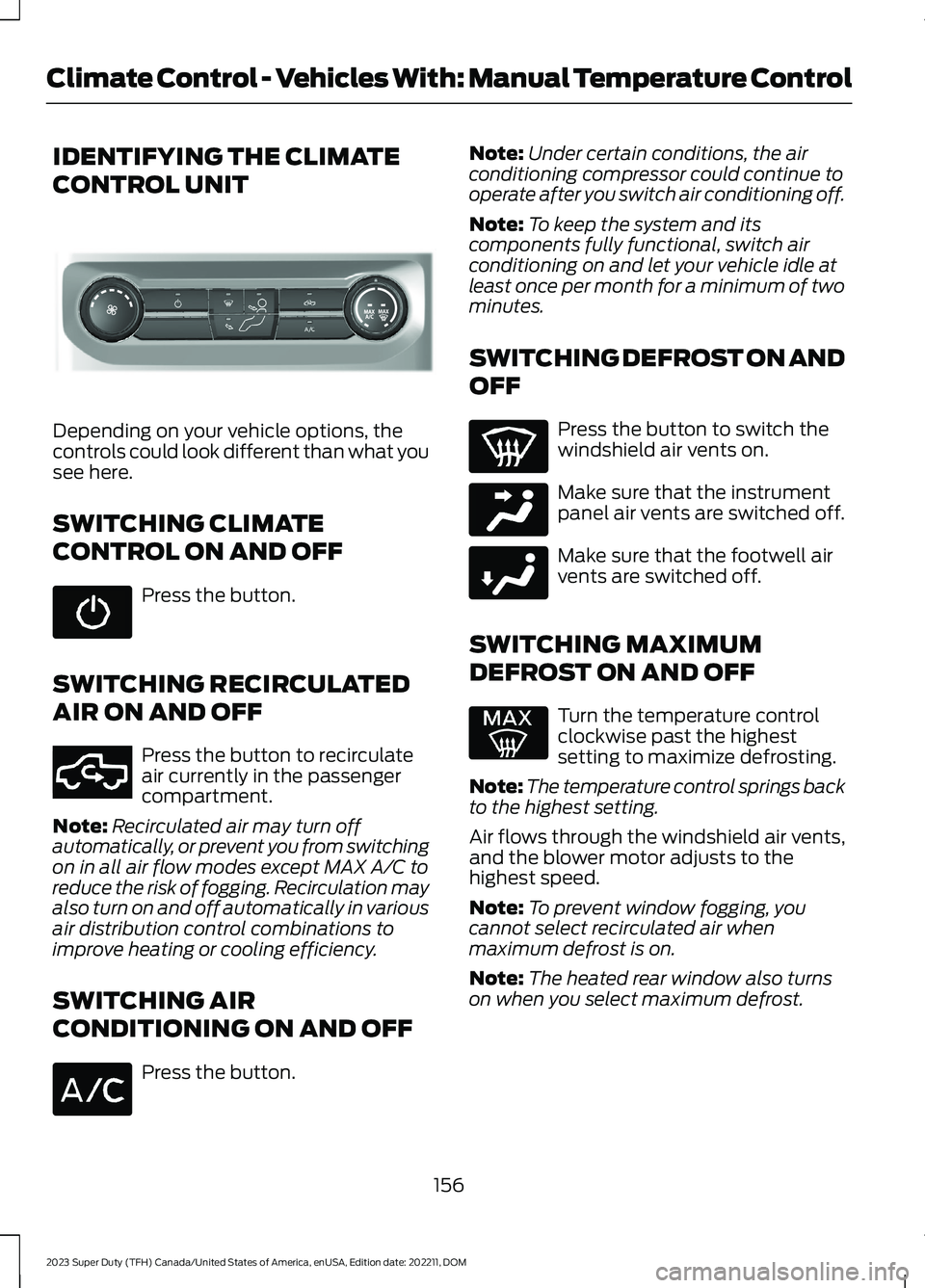
IDENTIFYING THE CLIMATE
CONTROL UNIT
Depending on your vehicle options, thecontrols could look different than what yousee here.
SWITCHING CLIMATE
CONTROL ON AND OFF
Press the button.
SWITCHING RECIRCULATED
AIR ON AND OFF
Press the button to recirculateair currently in the passengercompartment.
Note:Recirculated air may turn offautomatically, or prevent you from switchingon in all air flow modes except MAX A/C toreduce the risk of fogging. Recirculation mayalso turn on and off automatically in variousair distribution control combinations toimprove heating or cooling efficiency.
SWITCHING AIR
CONDITIONING ON AND OFF
Press the button.
Note:Under certain conditions, the airconditioning compressor could continue tooperate after you switch air conditioning off.
Note:To keep the system and itscomponents fully functional, switch airconditioning on and let your vehicle idle atleast once per month for a minimum of twominutes.
SWITCHING DEFROST ON AND
OFF
Press the button to switch thewindshield air vents on.
Make sure that the instrumentpanel air vents are switched off.
Make sure that the footwell airvents are switched off.
SWITCHING MAXIMUM
DEFROST ON AND OFF
Turn the temperature controlclockwise past the highestsetting to maximize defrosting.
Note:The temperature control springs backto the highest setting.
Air flows through the windshield air vents,and the blower motor adjusts to thehighest speed.
Note:To prevent window fogging, youcannot select recirculated air whenmaximum defrost is on.
Note:The heated rear window also turnson when you select maximum defrost.
156
2023 Super Duty (TFH) Canada/United States of America, enUSA, Edition date: 202211, DOMClimate Control - Vehicles With: Manual Temperature ControlE308141 E351062 E244097 E244098
Page 171 of 738
If you fully recline the passenger seat andthe vehicle is moving, a message appearson the instrument cluster and a tonesounds. To switch the warning off, returnthe seat to an upright position.
Adjusting the Upper Seat Backrest
(If Equipped)
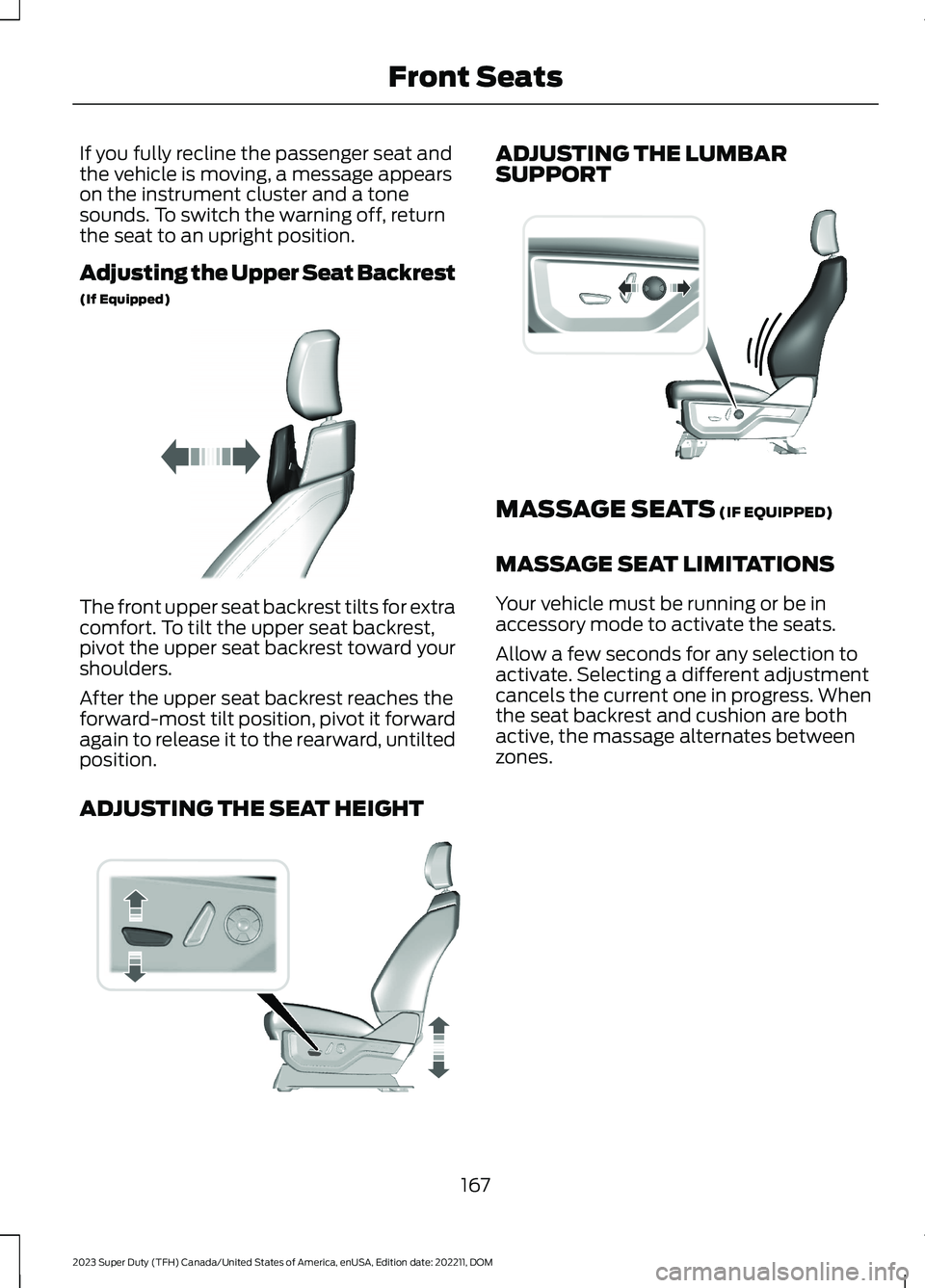
The front upper seat backrest tilts for extracomfort. To tilt the upper seat backrest,pivot the upper seat backrest toward yourshoulders.
After the upper seat backrest reaches theforward-most tilt position, pivot it forwardagain to release it to the rearward, untiltedposition.
ADJUSTING THE SEAT HEIGHT
ADJUSTING THE LUMBARSUPPORT
MASSAGE SEATS (IF EQUIPPED)
MASSAGE SEAT LIMITATIONS
Your vehicle must be running or be inaccessory mode to activate the seats.
Allow a few seconds for any selection toactivate. Selecting a different adjustmentcancels the current one in progress. Whenthe seat backrest and cushion are bothactive, the massage alternates betweenzones.
167
2023 Super Duty (TFH) Canada/United States of America, enUSA, Edition date: 202211, DOMFront SeatsE311333 E308337 E327927
Page 173 of 738
Press the heated seat symbol on theclimate controls or touchscreen to cyclethrough the various heat settings and off.The more indicators that display, thewarmer the temperature of the seat.
Note:The heated seats may remain onafter you remote start your vehicle, basedon your remote start settings. The heatedseats may also turn on when you start yourvehicle if they were on when you switchedyour vehicle off.
VENTILATED SEATS (IF EQUIPPED)
VENTILATED SEAT PRECAUTIONS
Do not:
•Spill liquid on the front seats. This maycause the air vent holes to becomeblocked and not work properly.
•Place cargo or objects under the seats.They may block the air intake causingthe air vents to not work properly.
SWITCHING THE VENTILATEDSEATS ON AND OFF
The vehicle must be running to use thisfeature.
Press this symbol on the climate controlsor the touchscreen to cycle through thevarious ventilation settings and off. Moreindicator lights indicate higher fan speeds.
Note:When you switch the climate controlfan speed and the ventilated seats to theirmaximum settings, the ventilated seatsprovide increased cooling.
If the engine falls below 350 RPM whilethe ventilated seats are on, the featureturns itself off unless the vehicle is inAuto-Start-Stop mode. You may need toreactivate the ventilated seats.
Note:The ventilated seats may remain onafter you remote start your vehicle, basedon your remote start settings. The ventilatedseats may also turn on when you start yourvehicle if they were on when you switchedyour vehicle off.
FRONT SEATS VIDEOS
4-Way Head Restraints Video Link
Power-Seat Adjustment Video Link
Max Recline Seats Video Link
169
2023 Super Duty (TFH) Canada/United States of America, enUSA, Edition date: 202211, DOMFront SeatsE146322 E224689
Page 191 of 738
WHAT IS THE ONBOARD
GENERATOR
The vehicle functions as a portablegenerator and can power devices thatrequire up to the rating listed on the poweroutlet label.
ONBOARD GENERATOR
PRECAUTIONS
WARNING: Do not connect anyvehicle power outlets to any premises.This can create a backfeed to utility lines.Failure to follow this instruction couldresult in property damage, fire, electricalshock or death.
WARNING: Do not keep electricaldevices plugged into the power outletwhenever the device is not in use. Theoutlet provides power when the vehicleis on. Failure to follow this instructioncould result in personal injury.
WARNING: Do not start the enginein a closed garage or in other enclosedareas. Exhaust fumes are toxic. Alwaysopen the garage door before you startthe engine. Failure to follow thisinstruction could result in personal injuryor death.
WARNING: Exhaust leaks mayresult in entry of harmful and potentiallylethal fumes into the passengercompartment. If you smell exhaustfumes inside your vehicle, have yourvehicle inspected immediately. Do notdrive if you smell exhaust fumes.
WARNING: The vehicle's engineruns while the generator is switched on.Running engines emit carbon monoxide.Only use the generator when the vehicleis outdoors. Failure to follow thisinstruction could result in personal injuryor death.
When you switch the power outlets on, thevehicle power down timer is disabled andthe vehicle continues to be powered on.
Note:We recommend using UL approveddevices for use with the power outlet.
Note:Make sure that plugged in devices donot exceed the ratings displayed on theoutlet covers.
Note:Unplug electrical devices from thepower outlet when they are not switchedon.
Note:Make sure there is no damage to theoutlets before driving your vehicle.
Note:Power could be limited duringextreme hot or cold temperatures tooptimize system performance.
Note:Close all outlet covers when not inuse.
Note:Automatic engine stop is disabledand the gasoline engine will continue to idlewhen the outlet is switched on.
Note:Make sure that objects are notblocking the inverter inlet and exhaust nearthe rear underseat storage compartment.
Note:The climate control system may turnon and power may be limited during extremehot or cold temperatures to optimize systemperformance.
Note:When the outlet is switched on andthe vehicle is in park (P) the engine turns off30 minutes after the low fuel warning isdisplayed. After the vehicle is turned off,generator mode only operates while drivingor until the vehicle is refueled.
187
2023 Super Duty (TFH) Canada/United States of America, enUSA, Edition date: 202211, DOMOnboard Generator (If Equipped)
Page 199 of 738
WHAT IS THE WIRELESS
ACCESSORY CHARGER
The wireless accessory charger allows youto charge one compatible Qi wirelesscharging device on the charging area.
WIRELESS ACCESSORY
CHARGER PRECAUTIONS
WARNING: Wireless chargingdevices can affect the operation ofimplanted medical devices, includingcardiac pacemakers. If you have anyimplanted medical devices, werecommend that you consult with yourphysician.
WARNING: Remove all metalobjects like coins and keys from thecharging surface and remove any metalobjects attached to your mobile phonebefore placing the device on the chargingsurface. Some mobile devices or casesmay attract metal objects. Metal objectson the charging surface or attached tothe phone may become hot whilecharging is active. If an object is left onor near the charging surface or attachedto the phone while the device is charging,let the objects cool before removing toprevent personal injury.
Keep the charging area clean and removeforeign objects prior to charging a device.
Do not place items with a magnetic stripor radio-frequency identification chip, forexample passports, parking tickets,transportation passes or credit cards, nearthe charging area when charging a device.Damage could occur to the magnetic stripor radio-frequency identification chip.
Do not place metal objects, for exampleremote controls, coins and candywrappers, on or near the charging areawhen charging a device. Metal objects mayheat up and degrade the chargingperformance, in addition to causinginterruptions in charging.
Charging could be interrupted, degraded,or could stop if any of the following occur:
•The system detects a foreign object.
•The device is misaligned on thecharging area.
•The device moves on the activecharging area when the vehicle is inmotion.
•The vehicle ambient temperature is toohigh.
•You attempt to charge a non-Qicompatible device on the wirelesscharger.
Note:During charging, the device and thecharger could heat up, this is normal. If thebattery gets hotter than usual, the devicemay stop charging.
LOCATING THE WIRELESS
ACCESSORY CHARGER
The charging area is in the centerconsole media bin below theinstrument panel.
CHARGING A WIRELESS
DEVICE
Place the device on the center of thecharging surface with the charging sidedown. The charging stops after your devicereaches a full charge.
You can use the charger when the vehicleis in accessory mode, when the vehicle isrunning, or when SYNC is on.
195
2023 Super Duty (TFH) Canada/United States of America, enUSA, Edition date: 202211, DOMWireless Accessory ChargerE297549
Page 206 of 738
STARTING AND STOPPING
THE ENGINE – PRECAUTIONS
WARNING: Extended idling at highengine speeds can produce very hightemperatures in the engine and exhaustsystem, creating the risk of fire or otherdamage.
WARNING: Do not park, idle ordrive your vehicle on dry grass or otherdry ground cover. The emission systemheats up the engine compartment andexhaust system, creating the risk of fire.
WARNING: Do not start the enginein a closed garage or in other enclosedareas. Exhaust fumes are toxic. Alwaysopen the garage door before you startthe engine. Failure to follow thisinstruction could result in personal injuryor death.
WARNING: Do not use startingfluid, for example ether, in the air intakesystem. Such fluid could causeimmediate explosive damage to theengine and possible personal injury.
WARNING: Exhaust leaks mayresult in entry of harmful and potentiallylethal fumes into the passengercompartment. If you smell exhaustfumes inside your vehicle, have yourvehicle inspected immediately. Do notdrive if you smell exhaust fumes.
The powertrain control system meets allCanadian interference-causing equipmentstandard requirements regulating theimpulse electrical field or radio noise.
Note:If you use your vehicle regularly abovethe altitude of 5,000 ft (1,524 m) and underthe temperature of -4.0°F (-20°C), it isrecommended to use the alternative engineoil. See Capacities and Specifications(page 520).
If you stop your vehicle and leave theengine idling for long periods, werecommend that you do one of thefollowing:
•Open the windows at least 1 in(2.5 cm).
•Set your climate control to outside air.
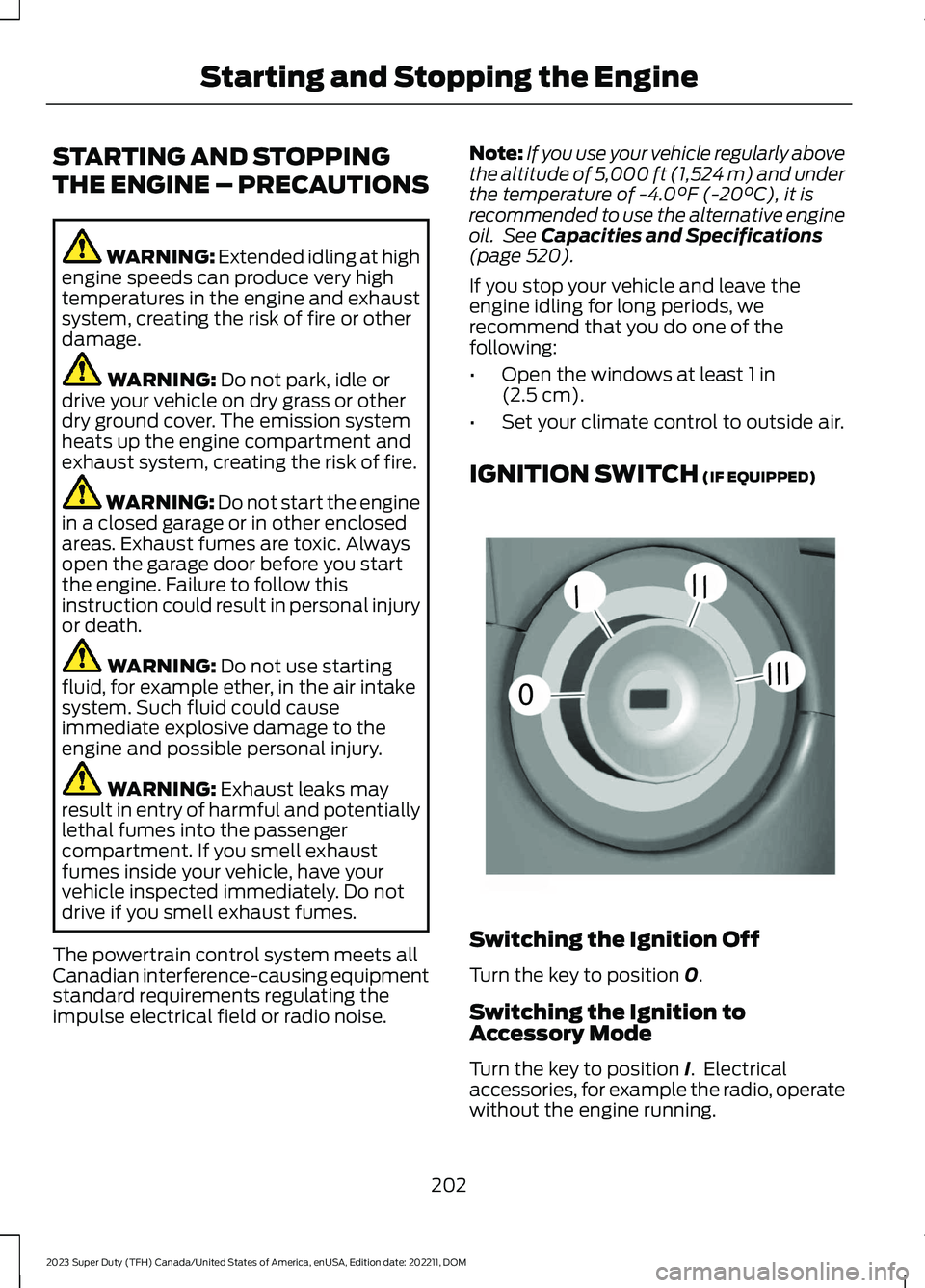
IGNITION SWITCH (IF EQUIPPED)
Switching the Ignition Off
Turn the key to position 0.
Switching the Ignition toAccessory Mode
Turn the key to position I. Electricalaccessories, for example the radio, operatewithout the engine running.
202
2023 Super Duty (TFH) Canada/United States of America, enUSA, Edition date: 202211, DOMStarting and Stopping the Engine0//////E252522