cruise control FORD SUPER DUTY 2023 Owners Manual
[x] Cancel search | Manufacturer: FORD, Model Year: 2023, Model line: SUPER DUTY, Model: FORD SUPER DUTY 2023Pages: 738, PDF Size: 18.49 MB
Page 14 of 738
Parking Aid Indicators...............................285
Parking Aids – Troubleshooting............285
Parking Aids Videos...................................286
Rear View Camera
What Is the Rear View Camera..............287
Rear View Camera Precautions.............287
Locating the Rear View Camera............287
Rear View Camera Guide Lines.............288
Rear View Camera Settings...................288
Rear View Camera Videos......................289
360 Degree Camera
What Is the 360 Degree Camera.........290
How Does the 360 Degree Camera Work.......................................................................290
360 Degree Camera Precautions........290
Locating the 360 Degree Cameras......290
360 Degree Camera Guide Lines..........291
360 Degree Camera Settings................292
Cruise Control
What Is Cruise Control..............................294
Switching Cruise Control On and Off........................................................................294
Setting the Cruise Control Speed........294
Canceling the Set Speed.........................295
Resuming the Set Speed.........................295
Cruise Control Indicators.........................295
Adaptive Cruise Control
How Does Adaptive Cruise Control WithStop and Go Work.................................296
Adaptive Cruise Control Precautions........................................................................296
Adaptive Cruise Control Limitations........................................................................297
Switching Adaptive Cruise Control Onand Off.......................................................299
Adaptive Cruise Control AutomaticCancellation.............................................299
Setting the Adaptive Cruise ControlSpeed.........................................................299
Setting the Adaptive Cruise Control Gap.......................................................................300
Canceling the Set Speed..........................301
Resuming the Set Speed..........................301
Overriding the Set Speed........................302
Adaptive Cruise Control Indicators......303
Switching From Adaptive Cruise Controlto Cruise Control.....................................303
Lane Centering............................................303
Predictive Speed Assist...........................306
Predictive Speed Assist –Troubleshooting.....................................308
Adaptive Cruise Control –Troubleshooting.....................................309
Adaptive Cruise Control Videos.............310
Drive Mode Control
What Is Drive Mode Control......................311
How Does Drive Mode Control Work..........................................................................311
Selecting a Drive Mode...............................311
Drive Modes...................................................312
Drive Mode Control – Troubleshooting.........................................................................314
Speed Limiter
How Does the Speed Limiter Work......316
Switching the Speed Limiter On and Off.........................................................................316
Setting the Speed Limit............................316
Changing the Set Speed Limit...............316
Canceling the Set Speed Limit...............316
Resuming the Set Speed Limit..............316
Intentionally Exceeding the Set SpeedLimit..............................................................316
Speed Limiter Indicators...........................316
Speed Limiter Audible Warnings...........316
10
2023 Super Duty (TFH) Canada/United States of America, enUSA, Edition date: 202211, DOMTable of Contents
Page 27 of 738
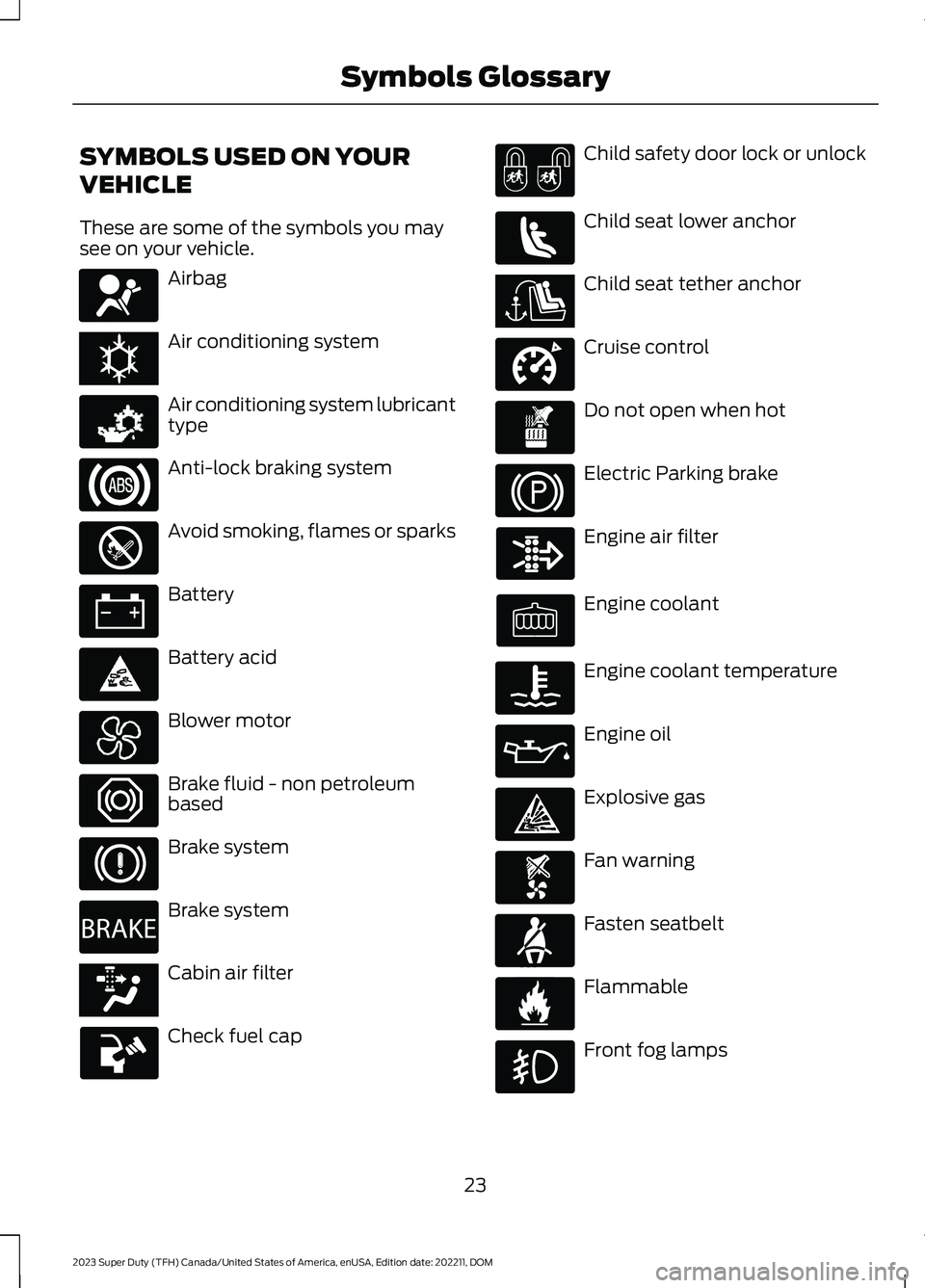
SYMBOLS USED ON YOUR
VEHICLE
These are some of the symbols you maysee on your vehicle.
Airbag
Air conditioning system
Air conditioning system lubricanttype
Anti-lock braking system
Avoid smoking, flames or sparks
Battery
Battery acid
Blower motor
Brake fluid - non petroleumbased
Brake system
Brake system
Cabin air filter
Check fuel cap
Child safety door lock or unlock
Child seat lower anchor
Child seat tether anchor
Cruise control
Do not open when hot
Electric Parking brake
Engine air filter
Engine coolant
Engine coolant temperature
Engine oil
Explosive gas
Fan warning
Fasten seatbelt
Flammable
Front fog lamps
23
2023 Super Duty (TFH) Canada/United States of America, enUSA, Edition date: 202211, DOMSymbols GlossaryE67017 E162384 E231157 E67020 E139220 E67021 E139227 E139209 E67024 E270480 E139223 E139211 E141128 E332905 E139219 E139212 E103308 E67022 E139221 E139228 E71880 E231160
Page 35 of 738
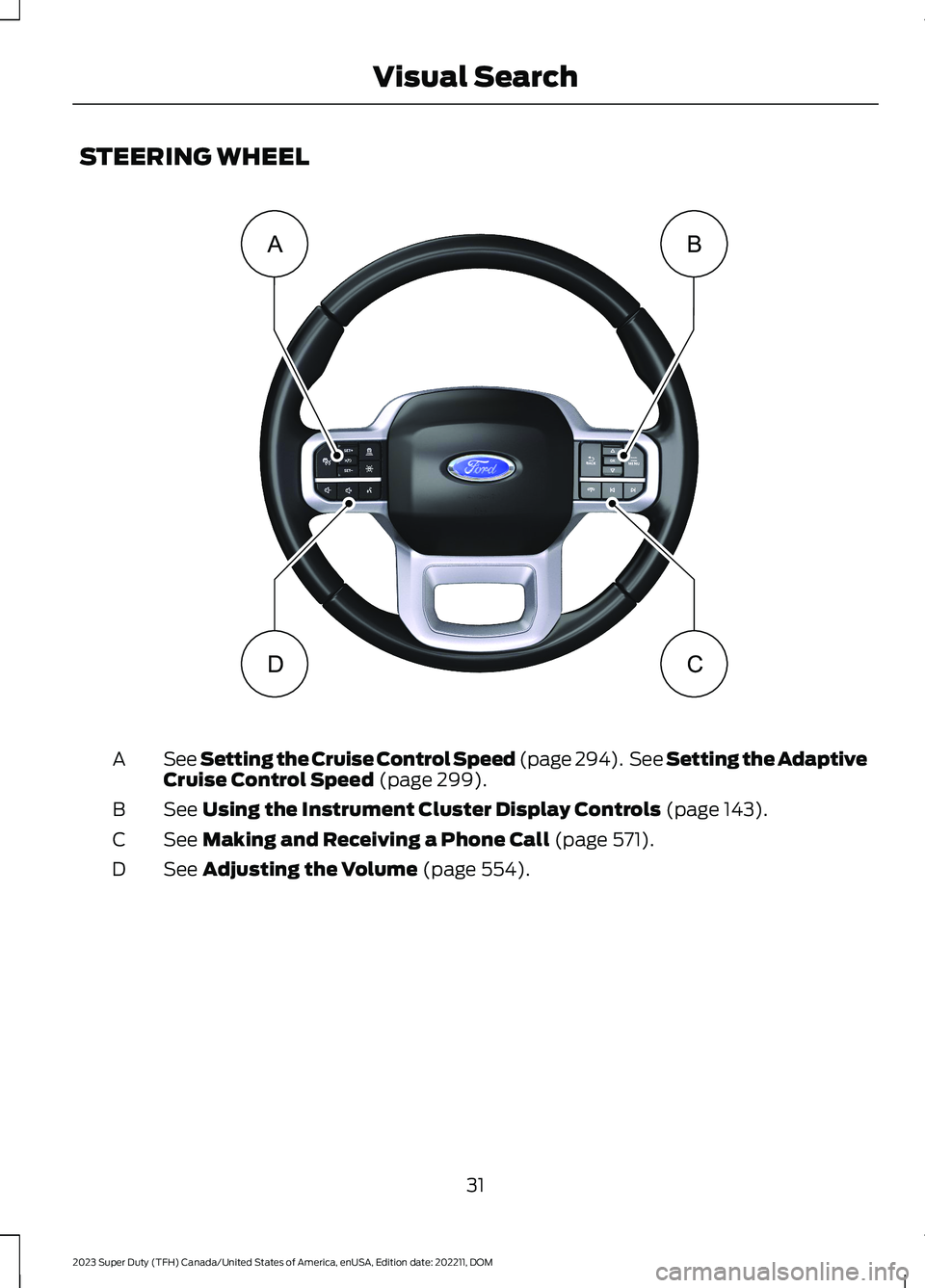
STEERING WHEEL
See Setting the Cruise Control Speed (page 294). See Setting the AdaptiveCruise Control Speed (page 299).A
See Using the Instrument Cluster Display Controls (page 143).B
See Making and Receiving a Phone Call (page 571).C
See Adjusting the Volume (page 554).D
31
2023 Super Duty (TFH) Canada/United States of America, enUSA, Edition date: 202211, DOMVisual SearchBADC E374894
Page 144 of 738
Fasten Seatbelt
It illuminates and a tone soundsuntil you fasten the seatbelts.
Hood Ajar
It illuminates when the ignitionis on and the hood is notcompletely closed.
Low Fuel Level
It illuminates when the fuel levelis low.
Low Tire Pressure
It illuminates when your tirepressure is low. If illuminated,check your tire pressure as soonas possible. If it begins to flash at anytime,have the system checked as soon aspossible.
Low Washer Fluid Level
It illuminates when the washerfluid is low.
Malfunction Indicator Lamp
It illuminates when the ignitionis on and the engine is off, this isnormal. If it illuminates when theengine is on this indicates the emissioncontrol system requires service. If it flashes,have your vehicle checked immediately.See Emission Law (page 700). SeeStarting and Stopping the Engine –Warning Lamps (page 209).
Oil Pressure
It illuminates when the engineoil pressure is low.
Powertrain Malfunction, ReducedPower, Electronic Throttle Control,Check 4X4
Illuminates when the powertrainor four-wheel drive requireservice. Have the systemchecked as soon as possible.
Tailgate Ajar
It illuminates when the ignitionis on and the tailgate is notcompletely closed.
Water in Fuel
It illuminates when the fuel andwater separator has a significantquantity of water in it andrequires immediate draining.
WHAT ARE THE INSTRUMENT
CLUSTER INDICATORS
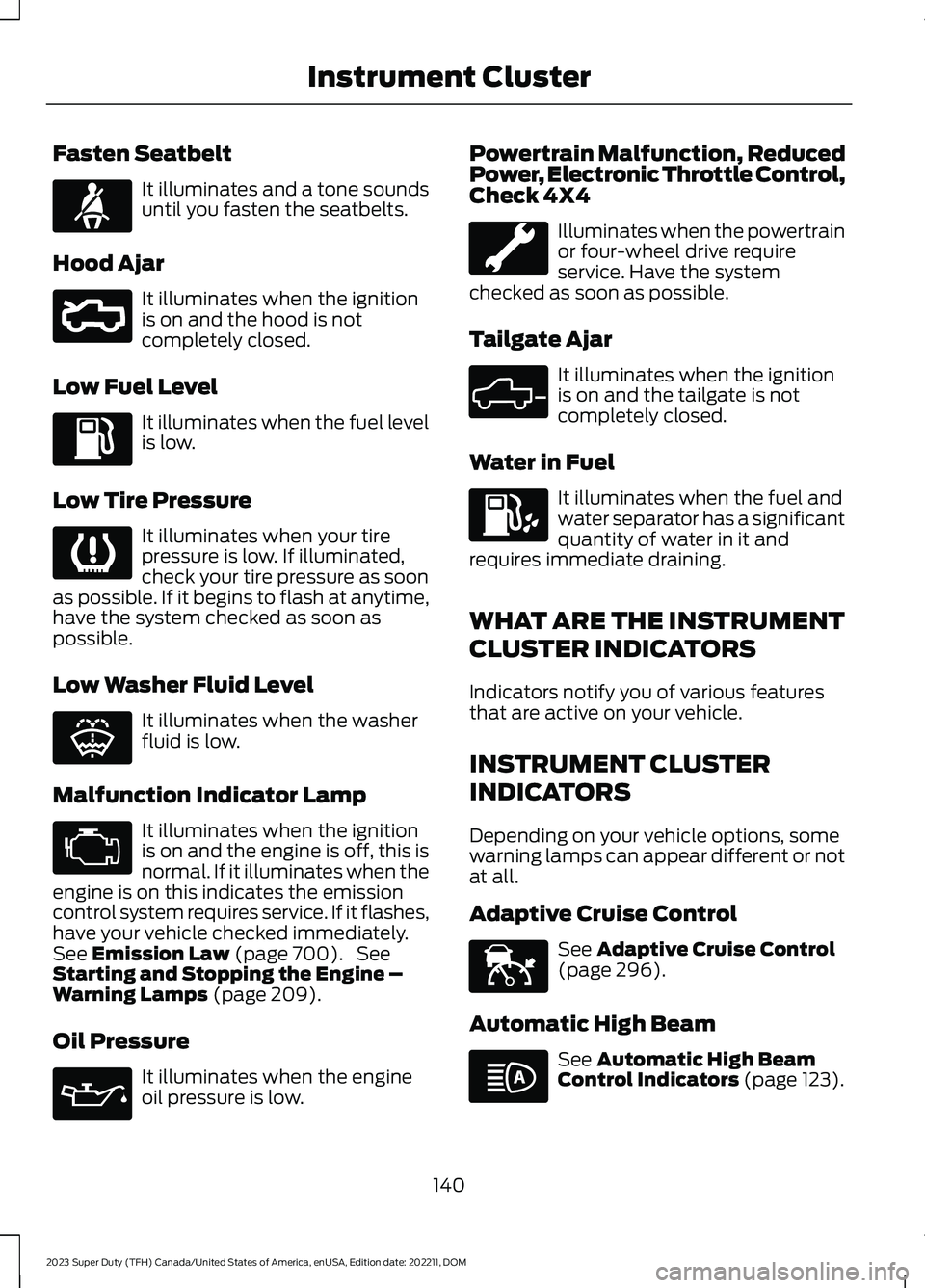
Indicators notify you of various featuresthat are active on your vehicle.
INSTRUMENT CLUSTER
INDICATORS
Depending on your vehicle options, somewarning lamps can appear different or notat all.
Adaptive Cruise Control
See Adaptive Cruise Control(page 296).
Automatic High Beam
See Automatic High BeamControl Indicators (page 123).
140
2023 Super Duty (TFH) Canada/United States of America, enUSA, Edition date: 202211, DOMInstrument ClusterE71880 E296055 E139232 E132353 E67028 E67022 E324523 E144524 E146105
Page 145 of 738
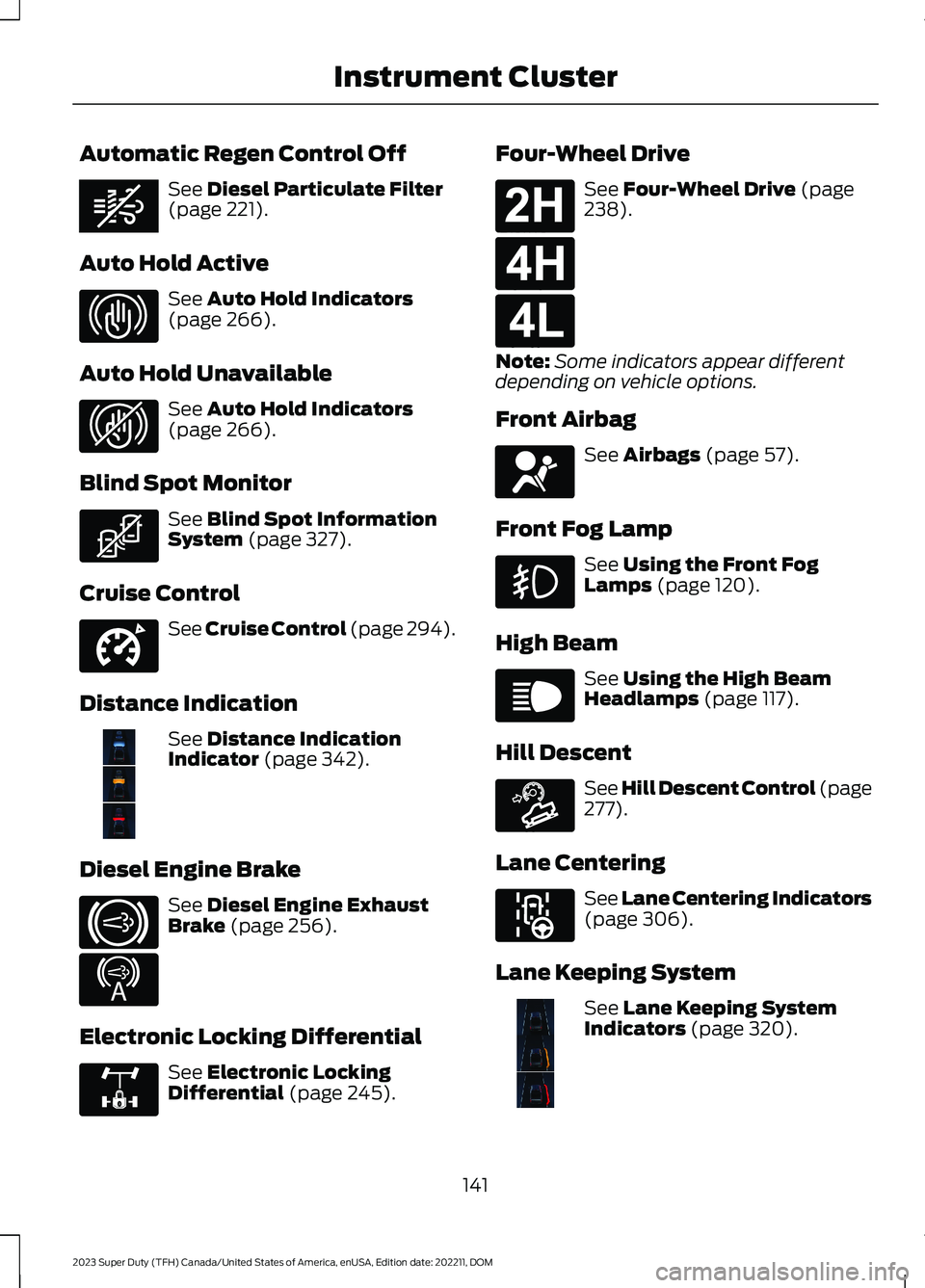
Automatic Regen Control Off
See Diesel Particulate Filter(page 221).
Auto Hold Active
See Auto Hold Indicators(page 266).
Auto Hold Unavailable
See Auto Hold Indicators(page 266).
Blind Spot Monitor
See Blind Spot InformationSystem (page 327).
Cruise Control
See Cruise Control (page 294).
Distance Indication
See Distance IndicationIndicator (page 342).
Diesel Engine Brake
See Diesel Engine ExhaustBrake (page 256).
Electronic Locking Differential
See Electronic LockingDifferential (page 245).
Four-Wheel Drive
See Four-Wheel Drive (page238).
Note:Some indicators appear differentdepending on vehicle options.
Front Airbag
See Airbags (page 57).
Front Fog Lamp
See Using the Front FogLamps (page 120).
High Beam
See Using the High BeamHeadlamps (page 117).
Hill Descent
See Hill Descent Control (page277).
Lane Centering
See Lane Centering Indicators(page 306).
Lane Keeping System
See Lane Keeping SystemIndicators (page 320).
141
2023 Super Duty (TFH) Canada/United States of America, enUSA, Edition date: 202211, DOMInstrument ClusterE362285 E323448 E323449 E323542 E332905 E381968 E171217 E234452 E325779 E181778 E181779 E181780 E67017 E67019 E163171 E297977 E382218
Page 245 of 738
SELECTING A FOUR-WHEEL
DRIVE MODE
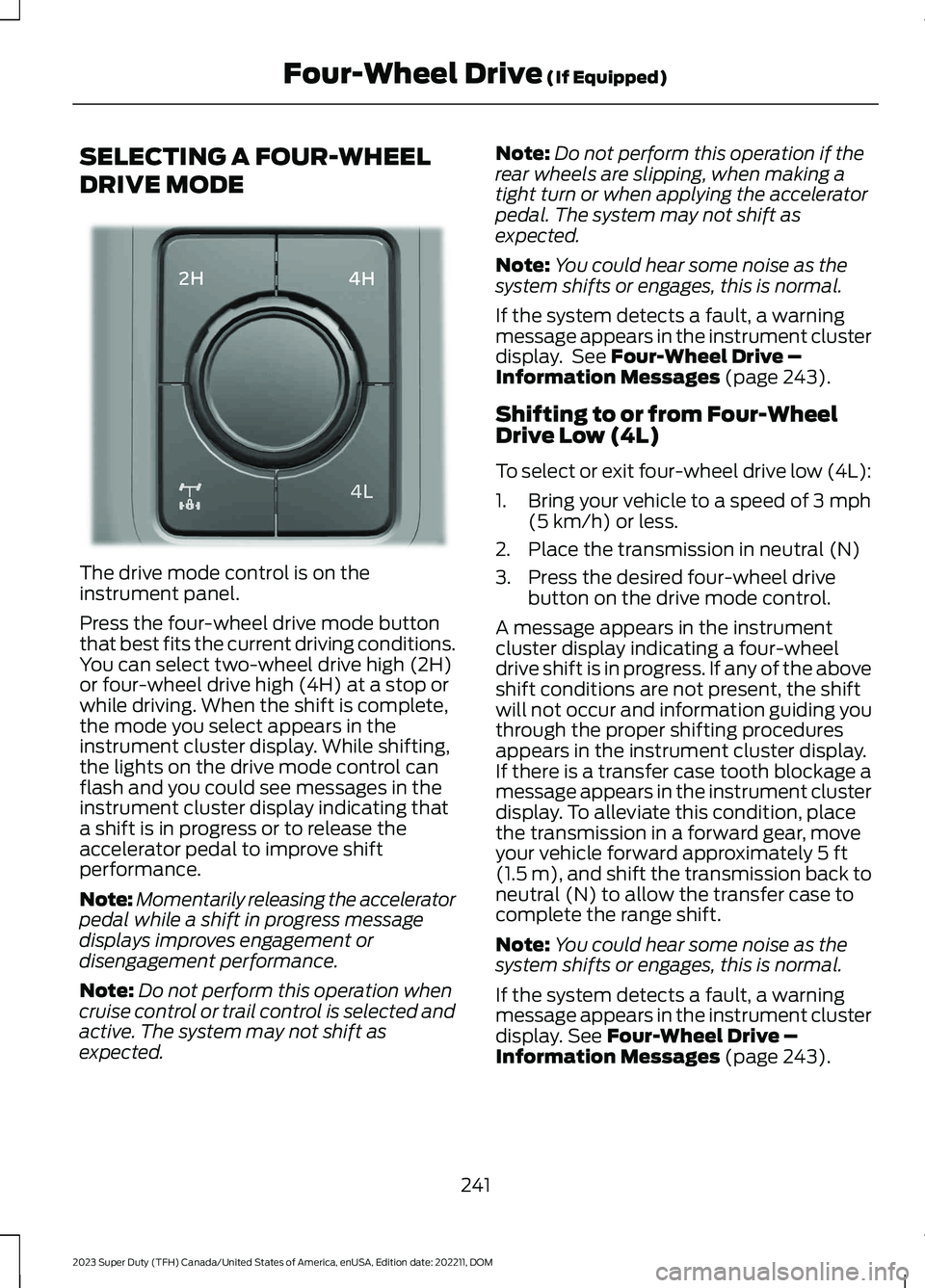
The drive mode control is on theinstrument panel.
Press the four-wheel drive mode buttonthat best fits the current driving conditions.You can select two-wheel drive high (2H)or four-wheel drive high (4H) at a stop orwhile driving. When the shift is complete,the mode you select appears in theinstrument cluster display. While shifting,the lights on the drive mode control canflash and you could see messages in theinstrument cluster display indicating thata shift is in progress or to release theaccelerator pedal to improve shiftperformance.
Note:Momentarily releasing the acceleratorpedal while a shift in progress messagedisplays improves engagement ordisengagement performance.
Note:Do not perform this operation whencruise control or trail control is selected andactive. The system may not shift asexpected.
Note:Do not perform this operation if therear wheels are slipping, when making atight turn or when applying the acceleratorpedal. The system may not shift asexpected.
Note:You could hear some noise as thesystem shifts or engages, this is normal.
If the system detects a fault, a warningmessage appears in the instrument clusterdisplay. See Four-Wheel Drive –Information Messages (page 243).
Shifting to or from Four-WheelDrive Low (4L)
To select or exit four-wheel drive low (4L):
1.Bring your vehicle to a speed of 3 mph(5 km/h) or less.
2.Place the transmission in neutral (N)
3.Press the desired four-wheel drivebutton on the drive mode control.
A message appears in the instrumentcluster display indicating a four-wheeldrive shift is in progress. If any of the aboveshift conditions are not present, the shiftwill not occur and information guiding youthrough the proper shifting proceduresappears in the instrument cluster display.If there is a transfer case tooth blockage amessage appears in the instrument clusterdisplay. To alleviate this condition, placethe transmission in a forward gear, moveyour vehicle forward approximately 5 ft(1.5 m), and shift the transmission back toneutral (N) to allow the transfer case tocomplete the range shift.
Note:You could hear some noise as thesystem shifts or engages, this is normal.
If the system detects a fault, a warningmessage appears in the instrument clusterdisplay. See Four-Wheel Drive –Information Messages (page 243).
241
2023 Super Duty (TFH) Canada/United States of America, enUSA, Edition date: 202211, DOMFour-Wheel Drive (If Equipped)E383456
Page 250 of 738
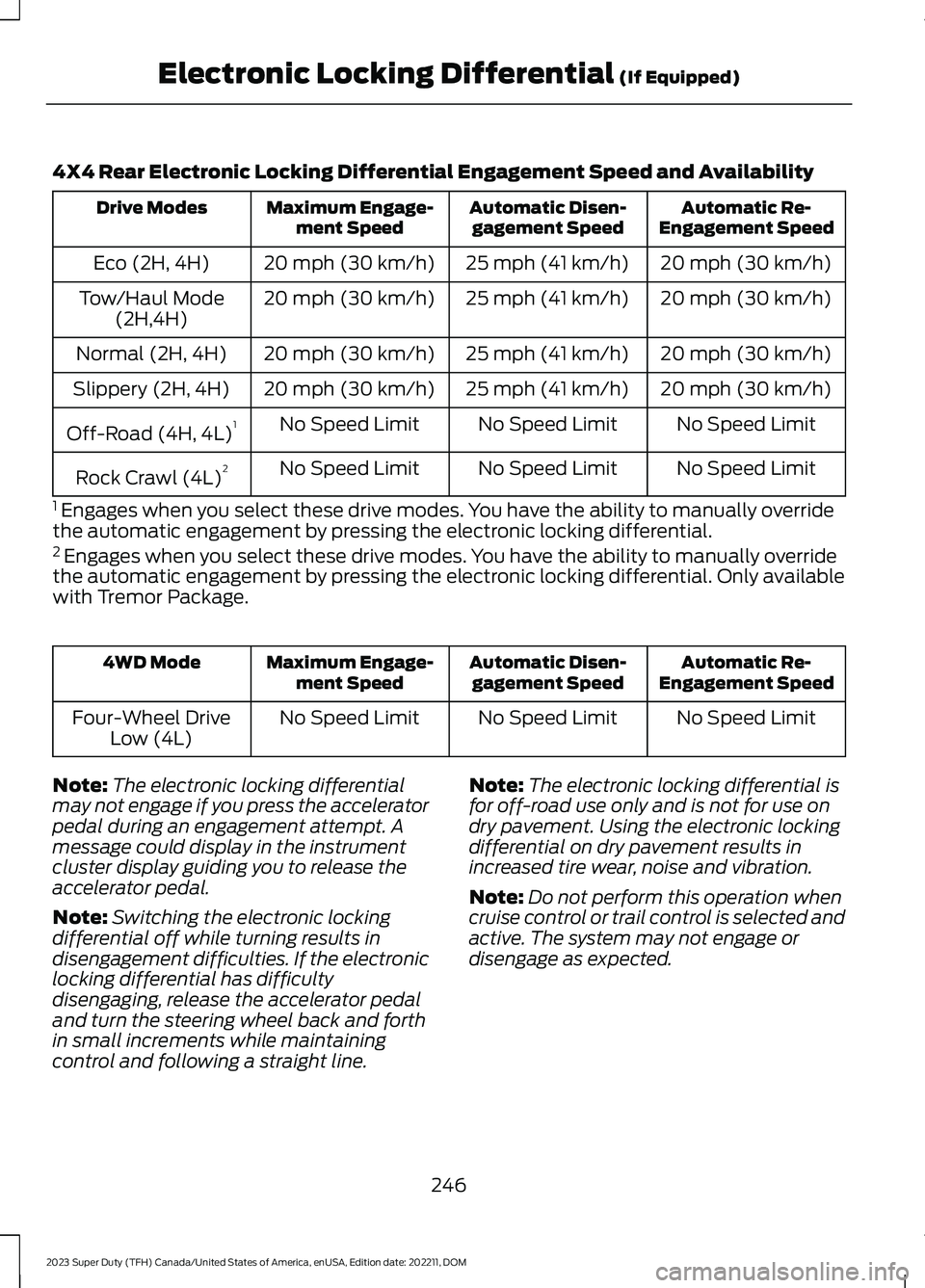
4X4 Rear Electronic Locking Differential Engagement Speed and Availability
Automatic Re-Engagement SpeedAutomatic Disen-gagement SpeedMaximum Engage-ment SpeedDrive Modes
20 mph (30 km/h)25 mph (41 km/h)20 mph (30 km/h)Eco (2H, 4H)
20 mph (30 km/h)25 mph (41 km/h)20 mph (30 km/h)Tow/Haul Mode(2H,4H)
20 mph (30 km/h)25 mph (41 km/h)20 mph (30 km/h)Normal (2H, 4H)
20 mph (30 km/h)25 mph (41 km/h)20 mph (30 km/h)Slippery (2H, 4H)
No Speed LimitNo Speed LimitNo Speed LimitOff-Road (4H, 4L)1
No Speed LimitNo Speed LimitNo Speed LimitRock Crawl (4L)2
1 Engages when you select these drive modes. You have the ability to manually overridethe automatic engagement by pressing the electronic locking differential.2 Engages when you select these drive modes. You have the ability to manually overridethe automatic engagement by pressing the electronic locking differential. Only availablewith Tremor Package.
Automatic Re-Engagement SpeedAutomatic Disen-gagement SpeedMaximum Engage-ment Speed4WD Mode
No Speed LimitNo Speed LimitNo Speed LimitFour-Wheel DriveLow (4L)
Note:The electronic locking differentialmay not engage if you press the acceleratorpedal during an engagement attempt. Amessage could display in the instrumentcluster display guiding you to release theaccelerator pedal.
Note:Switching the electronic lockingdifferential off while turning results indisengagement difficulties. If the electroniclocking differential has difficultydisengaging, release the accelerator pedaland turn the steering wheel back and forthin small increments while maintainingcontrol and following a straight line.
Note:The electronic locking differential isfor off-road use only and is not for use ondry pavement. Using the electronic lockingdifferential on dry pavement results inincreased tire wear, noise and vibration.
Note:Do not perform this operation whencruise control or trail control is selected andactive. The system may not engage ordisengage as expected.
246
2023 Super Duty (TFH) Canada/United States of America, enUSA, Edition date: 202211, DOMElectronic Locking Differential (If Equipped)
Page 251 of 738
SWITCHING THE ELECTRONIC
LOCKING DIFFERENTIAL ON
AND OFF - 4X2
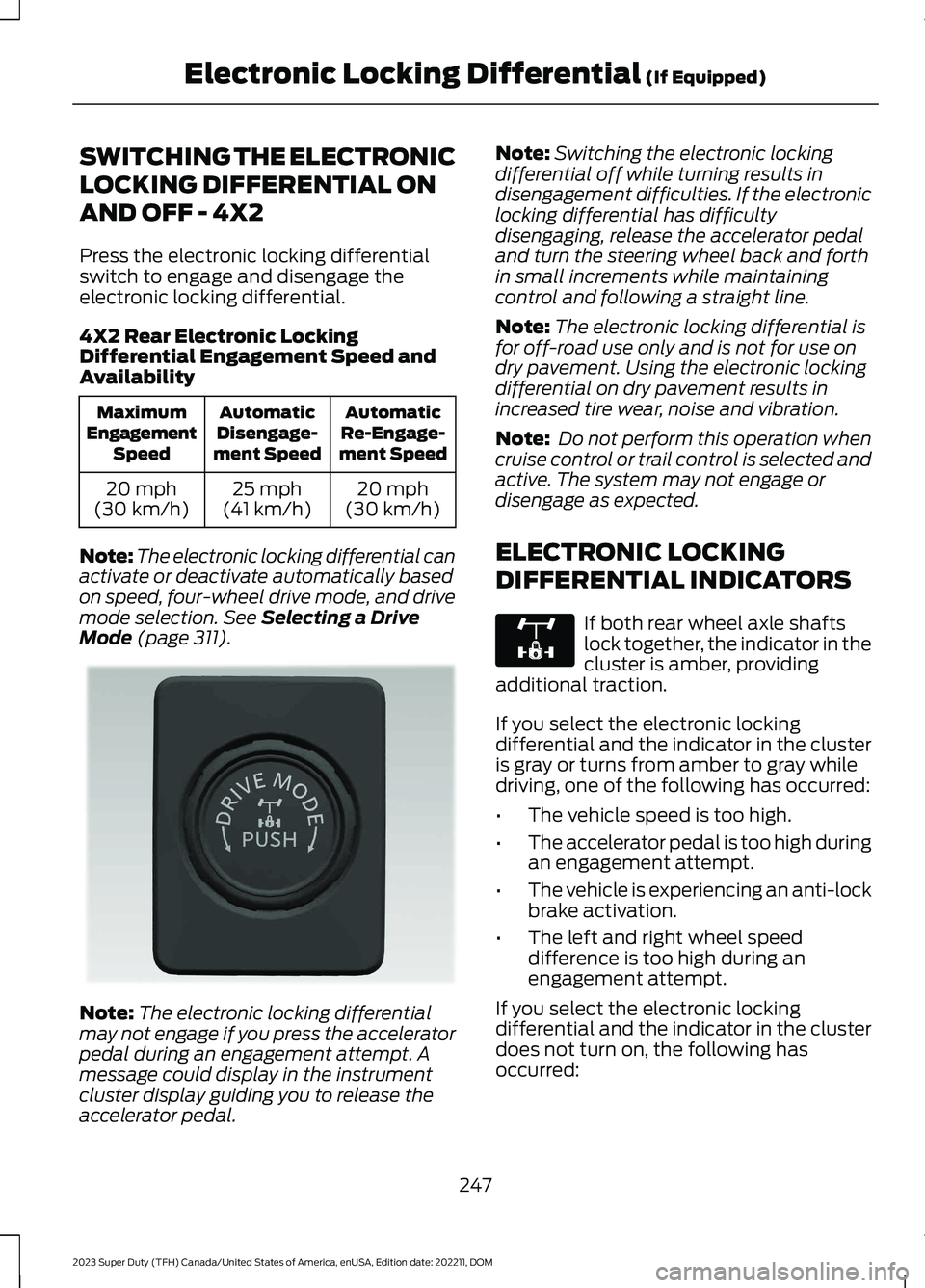
Press the electronic locking differentialswitch to engage and disengage theelectronic locking differential.
4X2 Rear Electronic LockingDifferential Engagement Speed andAvailability
AutomaticRe-Engage-ment Speed
AutomaticDisengage-ment Speed
MaximumEngagementSpeed
20 mph(30 km/h)25 mph(41 km/h)20 mph(30 km/h)
Note:The electronic locking differential canactivate or deactivate automatically basedon speed, four-wheel drive mode, and drivemode selection. See Selecting a DriveMode (page 311).
Note:The electronic locking differentialmay not engage if you press the acceleratorpedal during an engagement attempt. Amessage could display in the instrumentcluster display guiding you to release theaccelerator pedal.
Note:Switching the electronic lockingdifferential off while turning results indisengagement difficulties. If the electroniclocking differential has difficultydisengaging, release the accelerator pedaland turn the steering wheel back and forthin small increments while maintainingcontrol and following a straight line.
Note:The electronic locking differential isfor off-road use only and is not for use ondry pavement. Using the electronic lockingdifferential on dry pavement results inincreased tire wear, noise and vibration.
Note: Do not perform this operation whencruise control or trail control is selected andactive. The system may not engage ordisengage as expected.
ELECTRONIC LOCKING
DIFFERENTIAL INDICATORS
If both rear wheel axle shaftslock together, the indicator in thecluster is amber, providingadditional traction.
If you select the electronic lockingdifferential and the indicator in the clusteris gray or turns from amber to gray whiledriving, one of the following has occurred:
•The vehicle speed is too high.
•The accelerator pedal is too high duringan engagement attempt.
•The vehicle is experiencing an anti-lockbrake activation.
•The left and right wheel speeddifference is too high during anengagement attempt.
If you select the electronic lockingdifferential and the indicator in the clusterdoes not turn on, the following hasoccurred:
247
2023 Super Duty (TFH) Canada/United States of America, enUSA, Edition date: 202211, DOMElectronic Locking Differential (If Equipped)E373432 E325779
Page 260 of 738
DIESEL ENGINE EXHAUST
BRAKE – PRECAUTIONS
WARNING: Do not use tow/haulwhen the road surface is slippery. Failureto follow this instruction could result inthe loss of control of your vehicle.
WARNING: Do not use dieselengine exhaust braking when the roadsurface is slippery. Failure to follow thisinstruction could result in the loss ofcontrol of your vehicle.
USING THE DIESEL ENGINE
EXHAUST BRAKE
This feature increases engine braking athigher engine speeds to provide bettergrade descent control with less brake andtransmission wear and tear.
Note:Use this when driving downhill andcarrying heavy loads or trailering.
Benefits of engine braking are:
•Lower brake temperature.
•Reduced brake fade.
•Longer brake life.
•Improved driving and trailering control.
Press the button on the switchbank next to the audio unit toswitch the system on or off.
There are two engine brake modes, manualand automatic.
The following conditions must be met touse exhaust brake:
•Your vehicle is in a forward gear.
•The engine speed is above 1300 RPM.
•Your foot is off the accelerator.
You can use this feature with tow/haul orprogressive range selection to providefurther increased engine braking. Thetransmission upshifts to prevent the enginefrom entering the red zone on thetachometer.
Manual Engine Braking
1.Press the button to switch on manualengine braking.
2.Release the accelerator pedal tomaximize engine braking.
3.Apply the brakes. The transmissiondownshifts to lower gears.
Note:The engine braking feature onlyfunctions when you release the accelerator.
Note:You can shift the transmission tolower gears with progressive range selectionor manual shifting independent of pressingthe brakes.
Note:You can also use manual enginebraking with cruise control to improve gradedescent control.
Note:If your vehicle has adaptive cruisecontrol, the speed control system uses theselected engine brake mode, transmissiongears, and brakes to maintain the set speedand distance to the vehicle being followed.
Automatic Engine Braking
1.Press the button twice to switch onautomatic engine braking.
2.Release the accelerator or brake pedal.The system remembers your vehiclespeed.
256
2023 Super Duty (TFH) Canada/United States of America, enUSA, Edition date: 202211, DOMDiesel Engine Exhaust BrakeE171217
Page 277 of 738
WHAT IS TRAIL CONTROL
WARNING: The system does notcontrol speed in low traction conditionsor extremely steep slopes. The systemis designed to be an aid and does notrelieve you of your responsibility to drivewith due care and attention. Failure tofollow this instruction could result inpersonal injury.
Trail control lets you focus on steeringduring low-speed and off-road use bycontrolling your vehicle's acceleration andbraking to maintain the speed that you set.
You may hear a noise from the anti-lockbrake system pump motor when you usethe system. This is normal.
TRAIL CONTROL LIMITATIONS
Trail control is unavailable when any of thefollowing occur:
•Your vehicle speed is greater than20 mph (32 km/h) in two-wheel drivehigh (2H) or four-wheel drive high (4H)modes.
•Your vehicle speed is greater than9 mph (15 km/h) in four-wheel drivelow (4L) mode.
•Your vehicle speed is greater than5 mph (8 km/h) in reverse (R).
•The transmission is in park (P).
•The driver side door is open or yourseatbelt is off when the driver side dooris removed.
•Cruise control is on.
•Pro trailer backup assist is on.
SWITCHING TRAIL CONTROL
ON AND OFF
Press the button.
The system switches off if you press thebutton again or exceed 42 mph (68 km/h).
SETTING THE TRAIL CONTROL
SPEED
Note:The buttons are located on thesteering wheel.
Drive to your preferred speed.
Press button to increase the setcurrent speed.
Press button to decrease the setcurrent speed.
Note:The indicator changes color.
You can adjust the set speed in small orlarge increments. Press the toggle buttonupward or downward once to adjust theset speed in small increments. Press andhold the toggle button upward ordownward to adjust the set speed in largeincrements.
You can also decrease the set speed bybraking.
Note:If a set speed is set and the trailcontrol is active and the vehicle is stoppedby the brake, releasing the brake will allowthe vehicle to accelerate to the set speed.Pressing the brake pedal does not switchoff the system.
CANCELING THE SET SPEED
Press the button.
273
2023 Super Duty (TFH) Canada/United States of America, enUSA, Edition date: 202211, DOMTrail Control (If Equipped)E272858 E246884 E246885 E350925