start stop button FORD SUPER DUTY 2023 Owner's Manual
[x] Cancel search | Manufacturer: FORD, Model Year: 2023, Model line: SUPER DUTY, Model: FORD SUPER DUTY 2023Pages: 738, PDF Size: 18.49 MB
Page 216 of 738
Why can I not start the engine?
•If you cannot start the engine, do thefollowing:
1.Fully press the brake pedal or theclutch pedal.
Note:Make sure that the parking brake isapplied.
Note:Make sure that the transmission is inpark (P) or neutral (N).
2.Press the push button ignition switchuntil the engine starts.
Why does the system not detect apassive key?
•If the system does not detect a passivekey and you are unable to start theengine, insert the passive key into thebackup position and press the pushbutton ignition switch to start theengine. See Accessing the PassiveKey Backup Position (page 209).
STARTING AND STOPPING THEENGINE – FREQUENTLY ASKEDQUESTIONS - GASOLINE,VEHICLES WITHOUT: PUSHBUTTON START
Why is the engine idle speed highwhen I am starting the engine?
•The speed at which the engine idlesimmediately after starting is optimizedto minimize vehicle emissions andmaximize cabin comfort and fueleconomy.
Why does the engine not crank?
•You can only attempt to start theengine for a limited amount of timebefore the starting system temporarilydisables. If you exceed the starting timelimit, a message may appear and youcannot attempt to start the engine forat least 15 minutes.
Why do I experience differentdriving characteristics?
•If you disconnect the battery, yourvehicle may exhibit some unusualdriving characteristics forapproximately 5 mi (8 km) after youreconnect it. This is because the enginemanagement system must realignitself with the engine. You candisregard any unusual drivingcharacteristics during this period.
Why can I not start the engine?
If you cannot start the engine after 3attempts, wait 10 seconds and do thefollowing:
1.Fully press the brake pedal or theclutch pedal.
Note:Make sure that the parking brake isapplied.
Note:Make sure that the transmission is inpark (P) or neutral (N).
2.Fully press the accelerator pedal andhold it there.
3.Turn the key to position III and waituntil the engine stops cranking.
4.Release the accelerator pedal.
5.Turn the key to position III.
212
2023 Super Duty (TFH) Canada/United States of America, enUSA, Edition date: 202211, DOMStarting and Stopping the EngineE357998 E322354
Page 217 of 738
STARTING AND STOPPING THEENGINE – FREQUENTLY ASKEDQUESTIONS - GASOLINE,VEHICLES WITH: PUSH BUTTONSTART
Why is the engine speed high whenI am starting the engine?
•The speed at which the engine idlesimmediately after starting is optimizedto minimize vehicle emissions andmaximize cabin comfort and fueleconomy.
Why does the engine not crank?
•You can only attempt to start theengine for a limited amount of timebefore the starting system temporarilydisables. If you exceed the starting timelimit, a message may appear and youcannot attempt to start the engine forat least 15 minutes.
Why do I experience differentdriving characteristics?
•If you disconnect the battery, yourvehicle may exhibit some unusualdriving characteristics forapproximately 5.0 mi (8 km) after youreconnect it. This is because the enginemanagement system must realignitself with the engine. You candisregard any unusual drivingcharacteristics during this period.
Why can I not start the engine?
If you cannot start the engine after 3attempts, wait 10 seconds and do thefollowing:
1.Fully press the brake pedal or theclutch pedal.
Note:Make sure that the parking brake isapplied.
Note:Make sure that the transmission is inpark (P) or neutral (N).
2.Fully press the accelerator pedal andhold it there.
3.Press the push button ignition switch.
Note:The engine cranks for a short periodof time and then it stops.
4.Release the accelerator pedal.
5.Press the push button ignition switch.
Why does the system not detect apassive key?
•If the system does not detect a passivekey and you are unable to start theengine, insert the passive key into thebackup position and press the pushbutton ignition switch to start theengine. See Accessing the PassiveKey Backup Position (page 209).
STARTING AND STOPPING
THE ENGINE VIDEOS
Push-Button Start: F-Series Diesel
213
2023 Super Duty (TFH) Canada/United States of America, enUSA, Edition date: 202211, DOMStarting and Stopping the EngineE357998
Page 309 of 738
The indicator appears in the instrumentcluster display. When the system is on, thecolor of the indicator changes to indicatethe system status.
You can override the system at any timeby steering your vehicle.
Note:The correct requirements must bemet before you can switch the system on.See Lane Centering Requirements (page304).
Enabling and Disabling LaneCentering
1.Press Features on the touchscreen.
2.Press Driver Assistance.
3.Press Cruise Control.
4.Press Lane Centering Assist.
LANE CENTERING ALERTS
You must keep your hands on the steeringwheel at all times.
When the system is active and detects nosteering activity for a period of time, thesystem alerts you to put your hands on thesteering wheel. If you do not reactappropriately to the warnings the adaptivecruise control with lane centering systemcancels and slows your vehicle down toidle speeds while maintaining steeringcontrol. See Lane Centering AutomaticCancellation (page 305).
The system also alerts you if your vehiclecrosses lane line markings withoutdetected steering activity.
Note:The system could detect a light gripor light touch on the steering wheel ashands-off driving.
LANE CENTERING AUTOMATICCANCELLATION
When an external condition cancels thesystem, and your hands are on the steeringwheel, a tone sounds and a messageappears in the instrument cluster display.
When an external condition cancels thesystem, and your hands are not on thesteering wheel, the system immediatelyalerts you to take control of the vehicle. Ifthis alert is ignored, the system slows thevehicle while maintaining steeringassistance when lane markings areavailable. When no lane markings areavailable, the vehicle comes to a stop.
If your vehicle starts to slowdown after system cancellation,you must take full control of thevehicle. To re-enable adaptive cruisecontrol with lane centering aftercancellation, press and release the resumebutton.
Automatic cancellation can also occur if:
•The lane becomes too wide or narrow.
•The system cannot detect valid lanemarkings.
•Lane markings cross over one another.
•The curve of the road is too sharp.
Note:If your vehicle slows down due to yourinactivity twice within a key cycle, thesystem disables. To reset the system, whenthe vehicle is stationary, return the gearselector to park (P) and turn the vehicle off.Then, restart the vehicle with your foot onthe brake pedal.
LANE CENTERING MANUALCANCELLATION
When you perform the following actions,adaptive cruise control with lane centeringwill cancel:
305
2023 Super Duty (TFH) Canada/United States of America, enUSA, Edition date: 202211, DOMAdaptive Cruise Control (If Equipped)E308130
Page 313 of 738
ADAPTIVE CRUISE CONTROL
– TROUBLESHOOTING
ADAPTIVE CRUISE CONTROL –INFORMATION MESSAGES -VEHICLES WITH: LANECENTERING
Note:Depending on your vehicle optionsand instrument cluster type, somemessages can appear different or not at all.
ActionMessage
You must return your hands to the steering wheel and providesteering input to cancel the message.Keep Hands on SteeringWheel
Lane centering is currently not available, due to conditionsthat prevent the system from becoming active. To reset thesystem, when the vehicle is stationary, return the gear selectorto park (P) and turn the vehicle off. Then, restart the vehiclewith your foot on the brake pedal.
Lane Centering AssistNot Available
Adaptive cruise control with lane centering is about to cancel.You must immediately take full control of the vehicle.Resume Control
Adaptive cruise control with lane centering is in standby mode.When safe to do so, you can resume adaptive cruise controlwith lane centering by applying pressure on the acceleratorpedal. Alternatively, you can also re-enable adaptive cruisecontrol with lane centering by pressing the resume button onthe steering wheel.
Press Accelerator Pedalto Resume
ADAPTIVE CRUISE CONTROL –INFORMATION MESSAGES -VEHICLES WITH: STOP AND GO
Note:Depending on your vehicle optionsand instrument cluster type, not allmessages display or are available.
Note:The system could abbreviate orshorten certain messages depending uponwhich cluster type you have.
309
2023 Super Duty (TFH) Canada/United States of America, enUSA, Edition date: 202211, DOMAdaptive Cruise Control (If Equipped)
Page 377 of 738
6.If the trailer wheels lock up, indicatedby squealing tires, reduce the gainsetting. If the trailer wheels turn freely,increase the gain setting. Repeat Steps5 and 6 until the gain setting is at apoint just below trailer wheel lock-up.If towing a heavier trailer, trailer wheellock-up may not be attainable evenwith the maximum gain setting of 10.
Note:Only perform this procedure atspeeds of approximately 20–25 mph(30–40 km/h).
Note:The trailer brake controller reducesoutput at vehicle speeds below 11 mph(18 km/h) so that trailer and vehicle brakingis not jerky or harsh. This feature is onlyavailable when applying the brakes usingyour vehicle's brake pedal, not thecontroller.
Note:Your vehicle's brake system and thetrailer brake system work independently ofeach other. Changing the gain setting on thecontroller does not affect the operation ofyour vehicle's brakes whether you attach atrailer or not.
Note:With the proper electrical connection,pressing your vehicle brake pedal or usingthe manual control lever illuminates bothtrailer and vehicle brake lamps.
Note:When you switch the engine off, thecontroller output is disabled and the displayand module shut down. The controllermodule and display turn on when you switchthe ignition on.
Note:Trailer braking is suspended duringstop/start events to minimize battery draw.
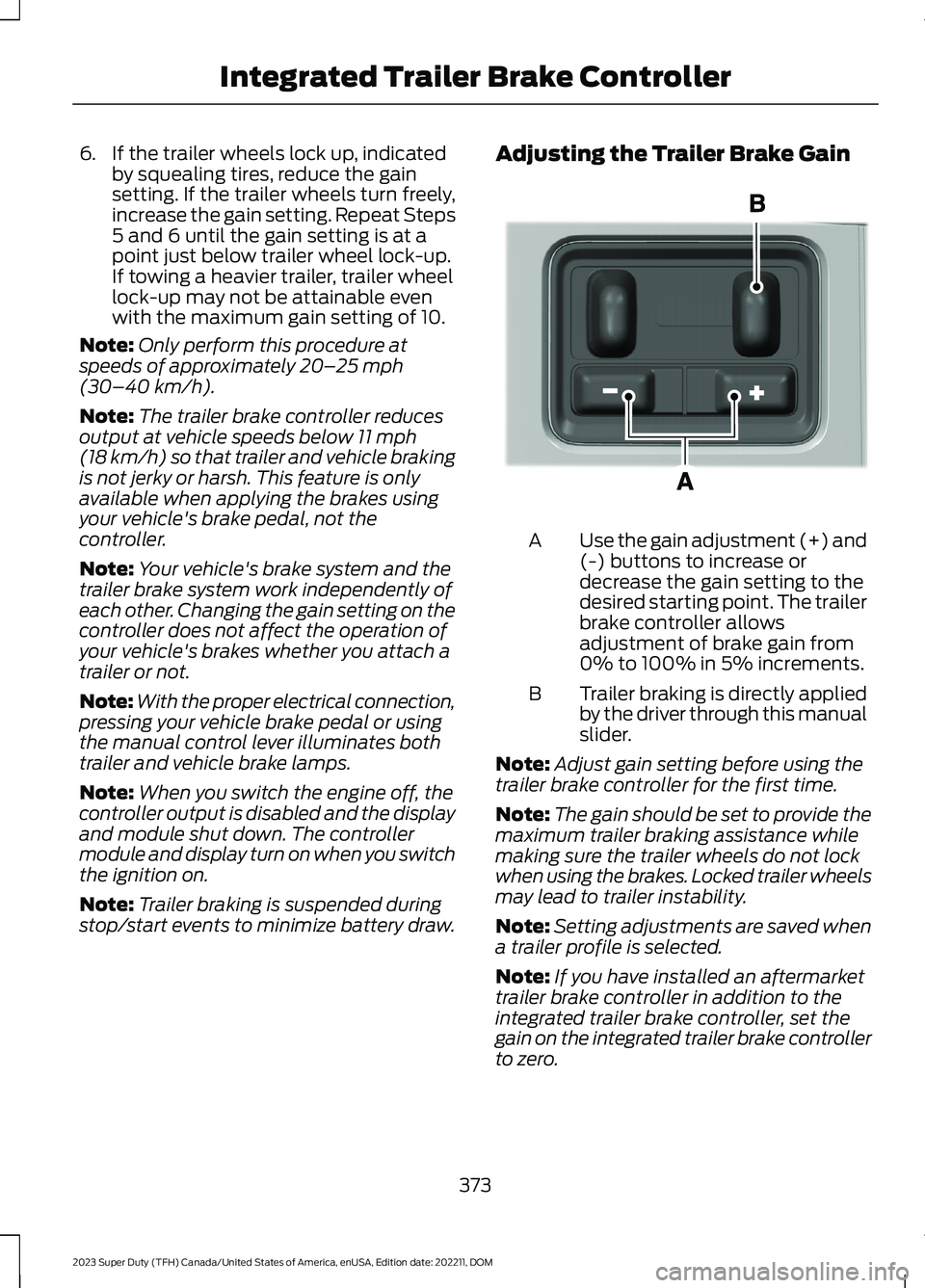
Adjusting the Trailer Brake Gain
Use the gain adjustment (+) and(-) buttons to increase ordecrease the gain setting to thedesired starting point. The trailerbrake controller allowsadjustment of brake gain from0% to 100% in 5% increments.
A
Trailer braking is directly appliedby the driver through this manualslider.
B
Note:Adjust gain setting before using thetrailer brake controller for the first time.
Note:The gain should be set to provide themaximum trailer braking assistance whilemaking sure the trailer wheels do not lockwhen using the brakes. Locked trailer wheelsmay lead to trailer instability.
Note:Setting adjustments are saved whena trailer profile is selected.
Note:If you have installed an aftermarkettrailer brake controller in addition to theintegrated trailer brake controller, set thegain on the integrated trailer brake controllerto zero.
373
2023 Super Duty (TFH) Canada/United States of America, enUSA, Edition date: 202211, DOMIntegrated Trailer Brake ControllerE333154
Page 427 of 738
POST-CRASH ALERT SYSTEM
WHAT IS THE POST-CRASHALERT SYSTEM
The system helps draw attention to yourvehicle in the event of a serious impact.
HOW DOES THE POST-CRASHALERT SYSTEM WORK
The system is designed to turn the hazardflashers on, turn the courtesy lamps on,intermittently sound the horn and unlockall doors in the event of a serious impactthat deploys an airbag or the seatbeltpretensioners.
POST-CRASH ALERT SYSTEMLIMITATIONS
Depending on applicable laws in thecountry your vehicle was built for, the horndoes not sound in the event of a seriousimpact.
SWITCHING THE POST-CRASHALERT SYSTEM OFF
Press the hazard flasher switch, the unlockbutton on the remote control, the panicbutton on the remote control or cycle theignition to switch the system off.
Note:The alert turns off when the vehiclebattery runs out of charge.
AUTOMATIC CRASH SHUTOFF
WHAT IS AUTOMATIC CRASHSHUTOFF
The automatic crash shutoff is designedto stop the fuel going to the engine in theevent of a moderate or severe crash.
Note:Not every impact causes a shutoff.
AUTOMATIC CRASH SHUTOFFPRECAUTIONS
WARNING: If your vehicle has beeninvolved in a crash, have the fuel systemchecked. Failure to follow this instructioncould result in fire, personal injury ordeath.
RE-ENABLING YOUR VEHICLE
1.Switch the ignition off.
2.Attempt to start your vehicle.
3.Switch the ignition off.
4.Attempt to start your vehicle.
Note:If your vehicle does not start after thethird attempt, have your vehicle checked assoon as possible.
RECOVERY TOWING
ACCESSING THE FRONT TOWINGPOINT
WARNING: Using recovery hooksis dangerous and should only be done bya person familiar with proper vehiclerecovery safety practices. Improper useof recovery hooks may cause hook failureor separation from the vehicle and couldresult in serious injury or death.
WARNING: Slowly remove theslack from the recovery strap prior topulling. Failure to do so can introducesignificantly higher loads which cancause the recovery hooks to break off, orthe recovery strap to fail which can causeserious injury or death.
423
2023 Super Duty (TFH) Canada/United States of America, enUSA, Edition date: 202211, DOMCrash and Breakdown Information
Page 727 of 738
Switching Predictive Speed Assist ModeOn and Off.......................................................307Predictive Speed Assist –Troubleshooting.......................................308Predictive Speed Assist – InformationMessages........................................................308Preparing Your Vehicle forStorage.........................................................476Programming the Garage DoorOpener..........................................................180Programming the Remote Control -Vehicles With: Flip Key...............................77Programming the Remote Control -Vehicles With: Push Button Start..........78Properly Adjusting the Driver and FrontPassenger Seats..........................................64Protecting the Environment......................30PunctureSee: Changing a Flat Tire...............................509Push Button Ignition Switch....................203
R
Radio Frequency CertificationLabels...........................................................626Blind Spot Information SystemSensors.............................................................626Body Control Module.......................................629Cruise Control Module......................................631Garage Door Opener........................................635Keys and Remote Controls............................636Near Field Communication...........................638Passive Anti-Theft System............................639Radio Transceiver Module..............................643SYNC......................................................................644Telematics Control Unit..................................650Tire Pressure Monitoring SystemSensors.............................................................652Wireless Accessory ChargingModule.............................................................666Rear Axle Fluid Capacity andSpecification..............................................542Rear Cross Traffic BrakingSee: Cross Traffic Braking...............................262Rear Exterior.....................................................35Rear Occupant Alert System AudibleWarnings.......................................................176
Rear Occupant Alert SystemIndicators.......................................................175Rear Occupant Alert SystemLimitations....................................................174Rear Occupant Alert SystemPrecautions..................................................174Rear Occupant Alert System....................174Rear Occupant Alert SystemSettings..........................................................175Rear Parking Aid...........................................283Locating the Rear Parking AidSensors.............................................................283Rear Parking Aid Audible Warnings............284Rear Parking Aid Limitations.........................283What is the Rear Parking Aid.........................283Rear Seats.......................................................170Heated Seats........................................................172Manual Seats.......................................................170Rear View Camera Guide Lines.............288Rear View Camera Precautions..............287Rear View Camera.......................................287Rear View Camera Settings..........................288Rear View Camera Settings....................288Switching Rear View Camera Delay On andOff......................................................................289Zooming the Rear View Camera In andOut.....................................................................288Rear View Camera Videos.......................289Rebooting the Center Display................564Recalling a Preset Position........................177Recovery Towing..........................................423Accessing the Front Towing Point...............423Recreationally Towing Your Vehicle -4x2.................................................................429Recreationally Towing Your Vehicle -4x4..................................................................427Refueling..........................................................218Refueling System Overview............................218Refueling Your Vehicle......................................218Releasing the Electric Parking Brake ifthe Vehicle Battery Has Run Out ofCharge...........................................................254Remote Control Limitations......................69Remotely Starting and Stopping theVehicle...........................................................149Remote Start Limitations..........................149Remote Start Precautions........................149
723
2023 Super Duty (TFH) Canada/United States of America, enUSA, Edition date: 202211, DOMIndex