traction control FORD SUPER DUTY 2023 Owner's Manual
[x] Cancel search | Manufacturer: FORD, Model Year: 2023, Model line: SUPER DUTY, Model: FORD SUPER DUTY 2023Pages: 738, PDF Size: 18.49 MB
Page 421 of 738
Mud
Be cautious of sudden changes in vehiclespeed or direction when you are driving inmud. Even all-wheel drive and four-wheeldrive vehicles can lose traction in mud. Ifyour vehicle slides, steer in the direction ofthe slide until you regain control of yourvehicle. After driving through mud, cleanoff residue stuck to rotating driveshaftsand tires. Excess residue can cause animbalance that could damage drivecomponents.
Water
If you must drive though deep water, driveslowly. The water could limit traction orbrake capability. See Driving ThroughWater Limitations (page 413).
FLOOR MATS
WARNING: Use a floor matdesigned to fit the footwell of yourvehicle that does not obstruct the pedalarea. Failure to follow this instructioncould result in the loss of control of yourvehicle, personal injury or death.
WARNING: Pedals that cannotmove freely can cause loss of vehiclecontrol and increase the risk of seriouspersonal injury.
WARNING: Secure the floor matto both retention devices so that itcannot slip out of position and interferewith the pedals. Failure to follow thisinstruction could result in the loss ofcontrol of your vehicle, personal injury ordeath.
WARNING: Do not place additionalfloor mats or any other covering on topof the original floor mats. This couldresult in the floor mat interfering with theoperation of the pedals. Failure to followthis instruction could result in the loss ofcontrol of your vehicle, personal injury ordeath.
WARNING: Always make sure thatobjects cannot fall into the driver footwell while your vehicle is moving. Objectsthat are loose can become trappedunder the pedals causing a loss ofvehicle control.
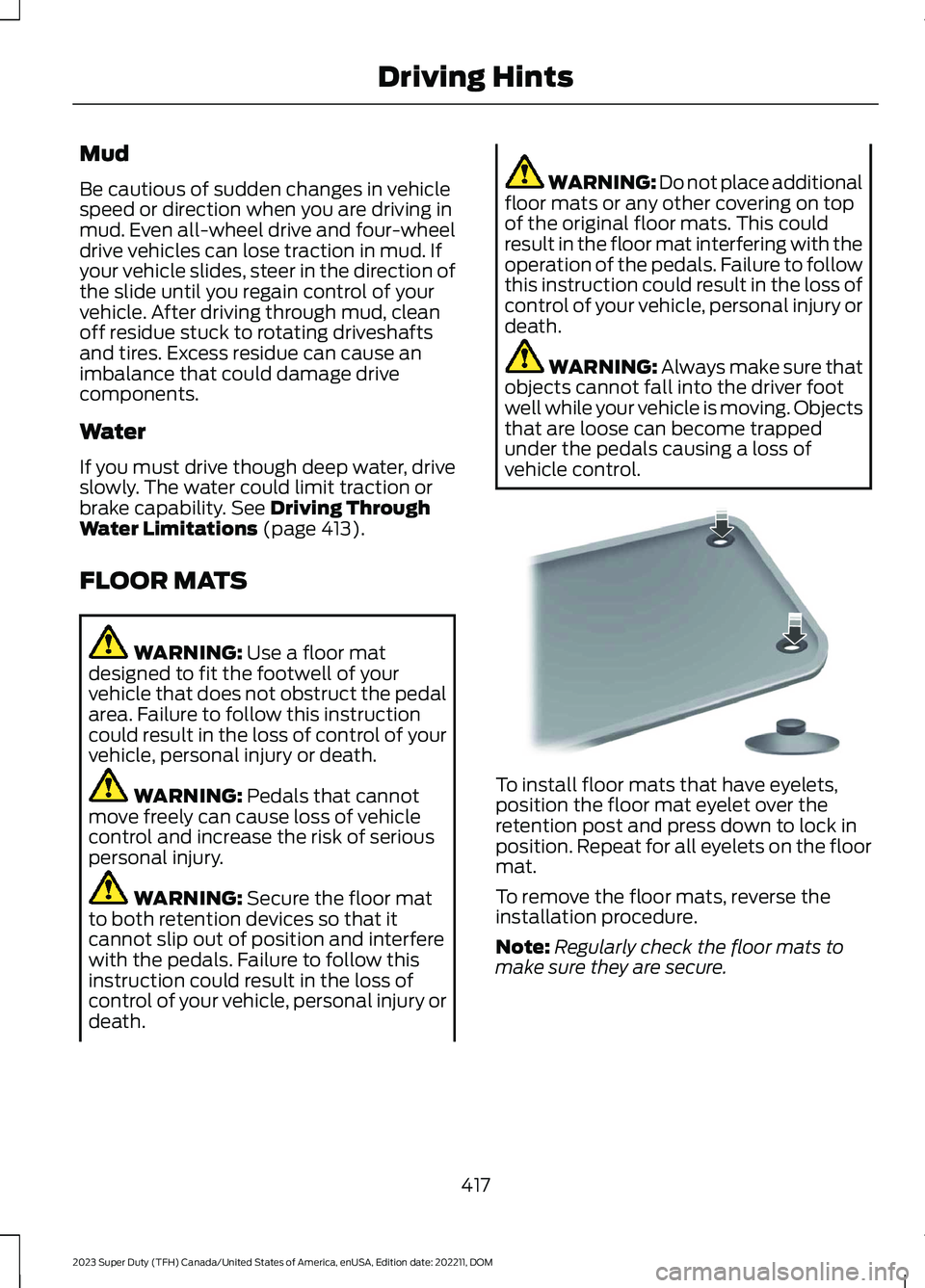
To install floor mats that have eyelets,position the floor mat eyelet over theretention post and press down to lock inposition. Repeat for all eyelets on the floormat.
To remove the floor mats, reverse theinstallation procedure.
Note:Regularly check the floor mats tomake sure they are secure.
417
2023 Super Duty (TFH) Canada/United States of America, enUSA, Edition date: 202211, DOMDriving HintsE142666
Page 482 of 738
LOCATING THE TIRE LABEL
You will find a Tire Labelcontaining tire inflation pressureby tire size and other importantinformation located on the B-Pillaror the edge of the driver's door.See Locating the SafetyCompliance CertificationLabels (page 352).
DEPARTMENT OF
TRANSPORTATION UNIFORM
TIRE QUALITY GRADES
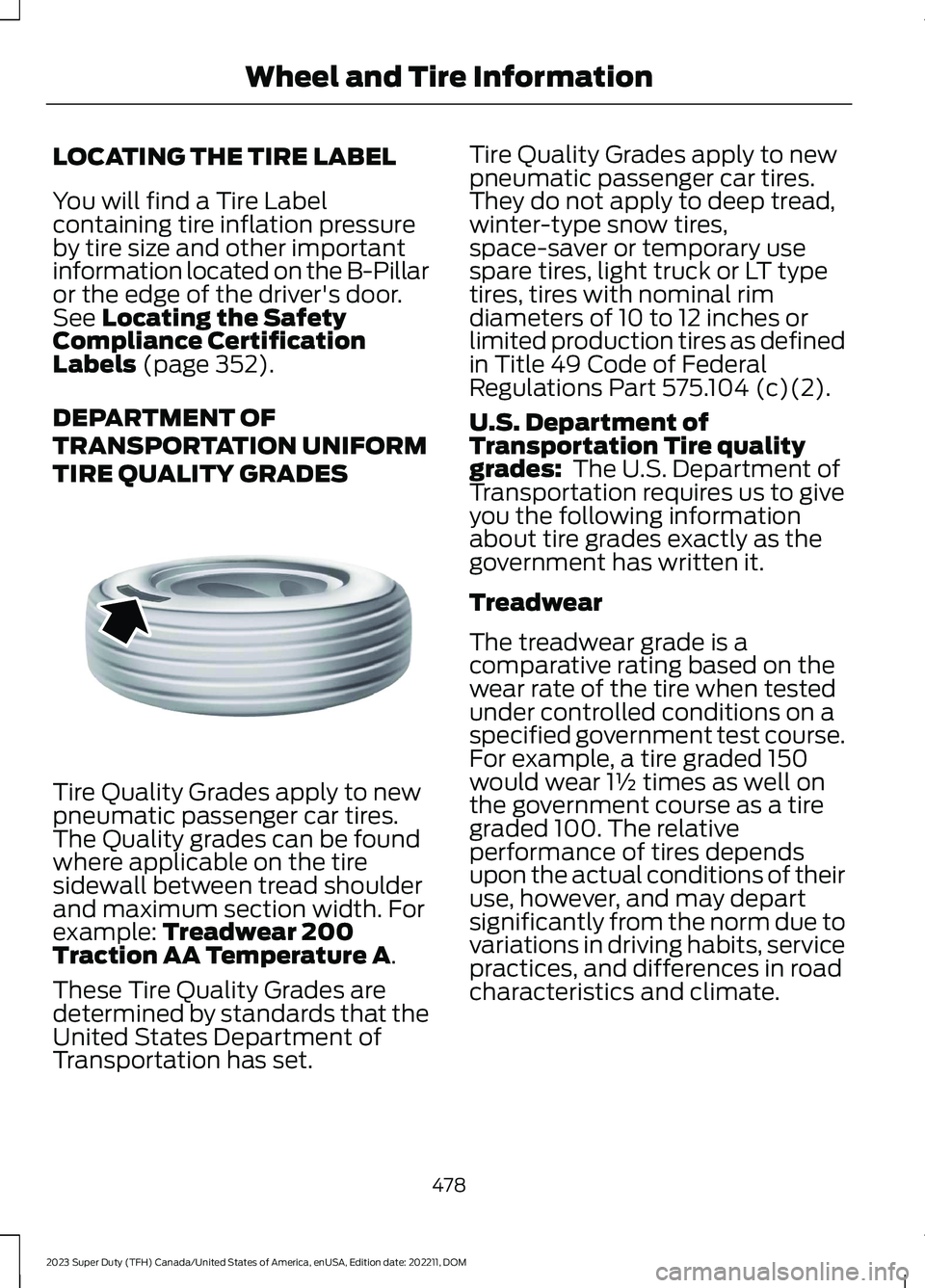
Tire Quality Grades apply to newpneumatic passenger car tires.The Quality grades can be foundwhere applicable on the tiresidewall between tread shoulderand maximum section width. Forexample: Treadwear 200Traction AA Temperature A.
These Tire Quality Grades aredetermined by standards that theUnited States Department ofTransportation has set.
Tire Quality Grades apply to newpneumatic passenger car tires.They do not apply to deep tread,winter-type snow tires,space-saver or temporary usespare tires, light truck or LT typetires, tires with nominal rimdiameters of 10 to 12 inches orlimited production tires as definedin Title 49 Code of FederalRegulations Part 575.104 (c)(2).
U.S. Department ofTransportation Tire qualitygrades: The U.S. Department ofTransportation requires us to giveyou the following informationabout tire grades exactly as thegovernment has written it.
Treadwear
The treadwear grade is acomparative rating based on thewear rate of the tire when testedunder controlled conditions on aspecified government test course.For example, a tire graded 150would wear 1½ times as well onthe government course as a tiregraded 100. The relativeperformance of tires dependsupon the actual conditions of theiruse, however, and may departsignificantly from the norm due tovariations in driving habits, servicepractices, and differences in roadcharacteristics and climate.
478
2023 Super Duty (TFH) Canada/United States of America, enUSA, Edition date: 202211, DOMWheel and Tire InformationE142542
Page 483 of 738
Traction AA A B C
WARNING: The tractiongrade assigned to this tire isbased on straight-ahead brakingtraction tests, and does notinclude acceleration, cornering,hydroplaning or peak tractioncharacteristics.
The traction grades, from highestto lowest are AA, A, B, and C. Thegrades represent the tire’s abilityto stop on wet pavement asmeasured under controlledconditions on specifiedgovernment test surfaces ofasphalt and concrete. A tiremarked C may have poor tractionperformance.
Temperature A B C
WARNING: Thetemperature grade for this tire isestablished for a tire that isproperly inflated and notoverloaded. Excessive speed,underinflation, or excessiveloading, either separately or incombination, can cause heatbuildup and possible tire failure.
The temperature grades are A(the highest), B and C,representing the tire’s resistanceto the generation of heat and itsability to dissipate heat when
tested under controlled conditionson a specified indoor laboratory
test wheel. Sustained hightemperature can cause thematerial of the tire to degenerateand reduce tire life, and excessivetemperature can lead to suddentire failure. The grade Ccorresponds to a level ofperformance which all passengercar tires must meet under theFederal Motor Vehicle SafetyStandard No. 139. Grades B and Arepresent higher levels ofperformance on the laboratorytest wheel than the minimumrequired by law.
INFORMATION ON THE TIRE
SIDEWALL
Both United States and CanadaFederal regulations require tiremanufacturers to placestandardized information on thesidewall of all tires. Thisinformation identifies anddescribes the fundamentalcharacteristics of the tire and alsoprovides a U.S. DOT TireIdentification Number for safetystandard certification and in caseof a recall.
479
2023 Super Duty (TFH) Canada/United States of America, enUSA, Edition date: 202211, DOMWheel and Tire Information
Page 486 of 738
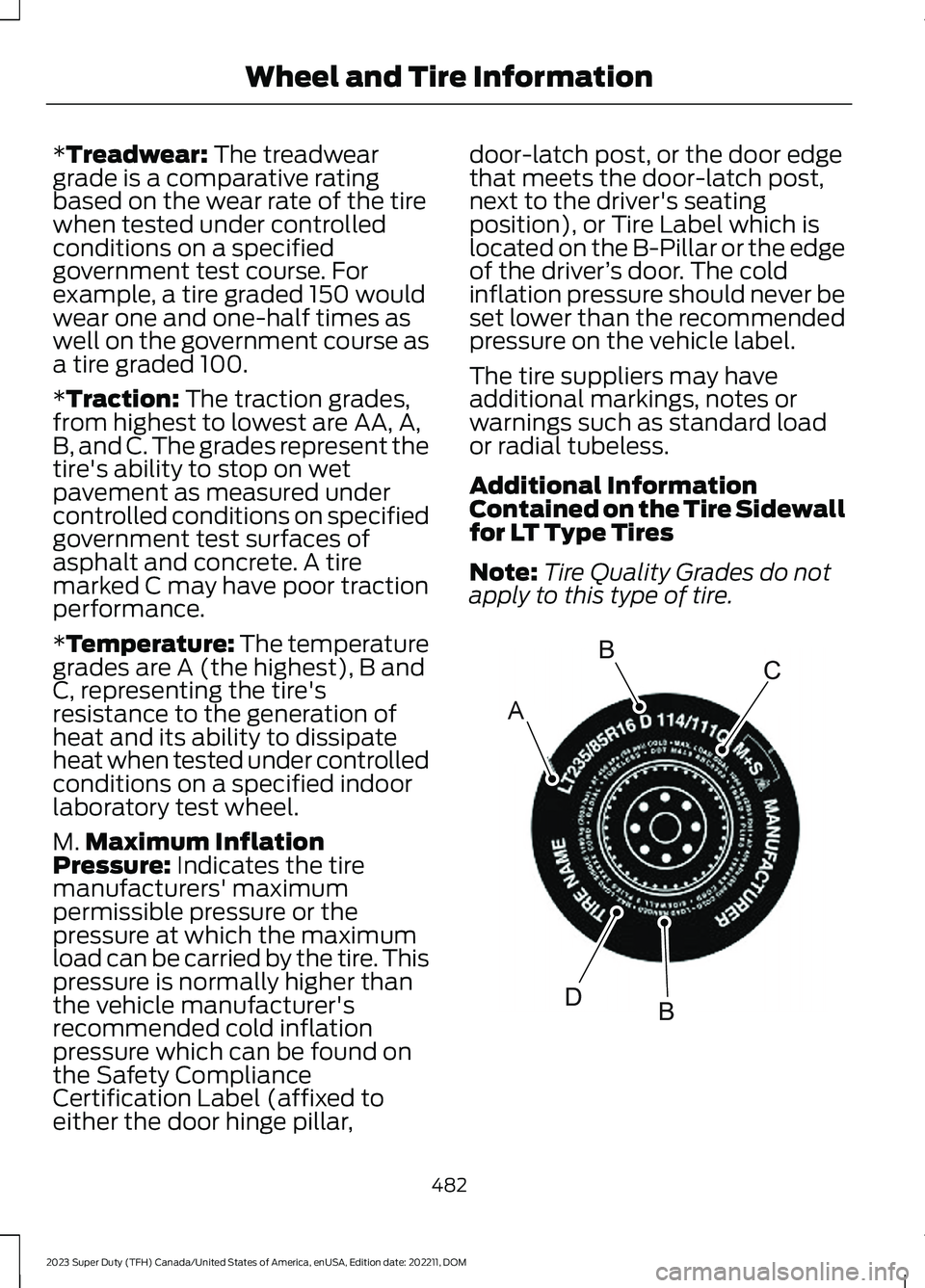
*Treadwear: The treadweargrade is a comparative ratingbased on the wear rate of the tirewhen tested under controlledconditions on a specifiedgovernment test course. Forexample, a tire graded 150 wouldwear one and one-half times aswell on the government course asa tire graded 100.
*Traction: The traction grades,from highest to lowest are AA, A,B, and C. The grades represent thetire's ability to stop on wetpavement as measured undercontrolled conditions on specifiedgovernment test surfaces ofasphalt and concrete. A tiremarked C may have poor tractionperformance.
*Temperature: The temperaturegrades are A (the highest), B andC, representing the tire'sresistance to the generation ofheat and its ability to dissipateheat when tested under controlledconditions on a specified indoorlaboratory test wheel.
M.Maximum InflationPressure: Indicates the tiremanufacturers' maximumpermissible pressure or thepressure at which the maximumload can be carried by the tire. Thispressure is normally higher thanthe vehicle manufacturer'srecommended cold inflationpressure which can be found onthe Safety Compliance
Certification Label (affixed toeither the door hinge pillar,
door-latch post, or the door edgethat meets the door-latch post,next to the driver's seatingposition), or Tire Label which islocated on the B-Pillar or the edgeof the driver’s door. The coldinflation pressure should never beset lower than the recommendedpressure on the vehicle label.
The tire suppliers may haveadditional markings, notes orwarnings such as standard loador radial tubeless.
Additional InformationContained on the Tire Sidewallfor LT Type Tires
Note:Tire Quality Grades do notapply to this type of tire.
482
2023 Super Duty (TFH) Canada/United States of America, enUSA, Edition date: 202211, DOMWheel and Tire InformationABCBDE142544
Page 492 of 738
cause steering, suspension, axle, transfercase or power transfer unit failure.Follow the recommended tire inflationpressures found on the SafetyCompliance Certification label, or theTire Label on the B-Pillar or the edge ofthe driver door. Failure to follow thisinstruction could result in loss of vehiclecontrol, vehicle rollover, or personal injuryor death.
Note:Do not use snow chains on vehicleswith LT275/65R20 or LT 285/75R18 sizedtires.
Note:The suspension insulation andbumpers will help prevent vehicle damage.Do not remove these components from yourvehicle when using snow tires and chains.
The tires on your vehicle have all-weathertreads to provide traction in rain and snow.However, in some climates, you may needto use snow tires and cables. If you needto use cables, we recommend that you usesteel wheels of the same size andspecification, as cables may chipaluminum wheels.
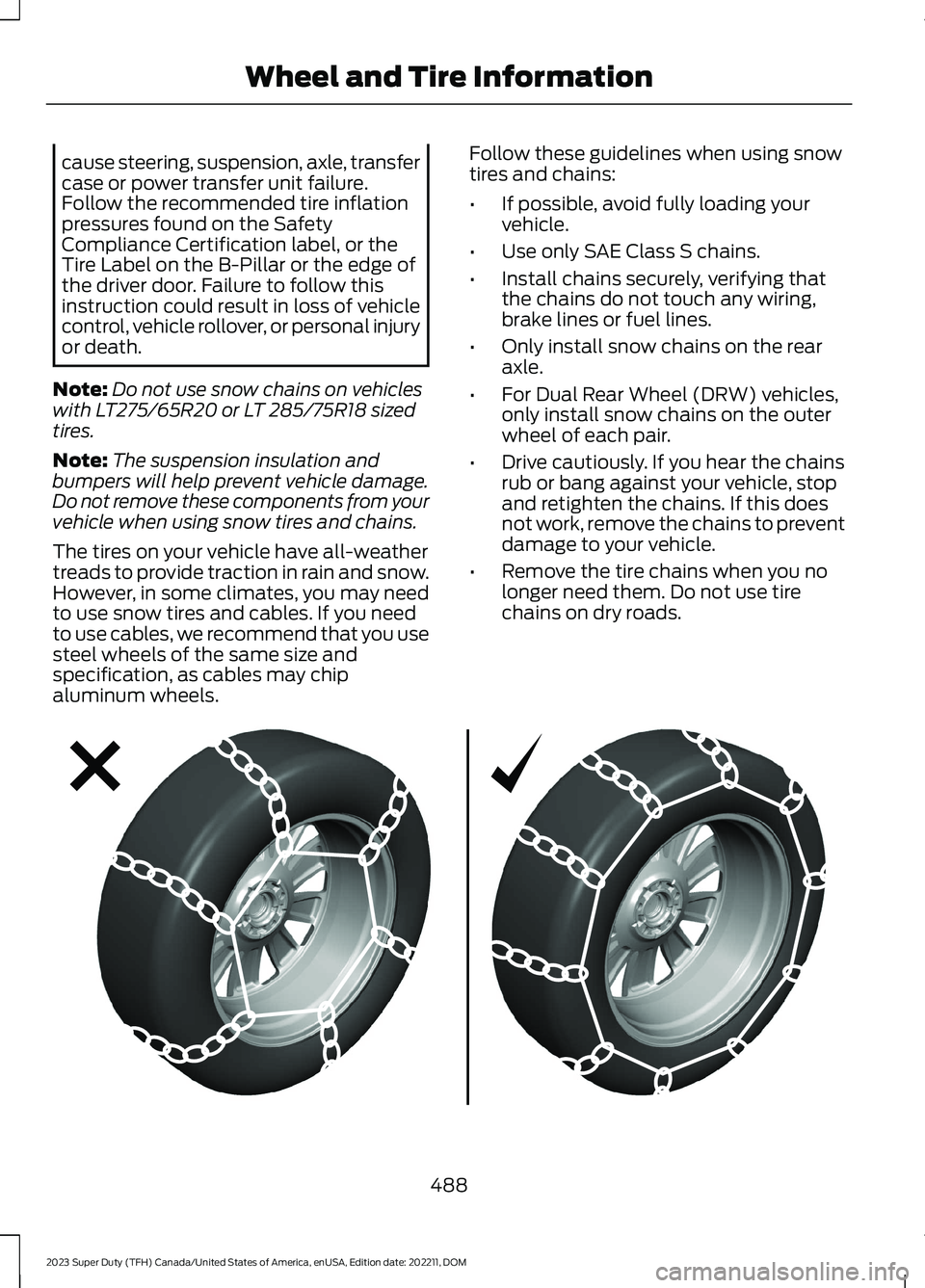
Follow these guidelines when using snowtires and chains:
•If possible, avoid fully loading yourvehicle.
•Use only SAE Class S chains.
•Install chains securely, verifying thatthe chains do not touch any wiring,brake lines or fuel lines.
•Only install snow chains on the rearaxle.
•For Dual Rear Wheel (DRW) vehicles,only install snow chains on the outerwheel of each pair.
•Drive cautiously. If you hear the chainsrub or bang against your vehicle, stopand retighten the chains. If this doesnot work, remove the chains to preventdamage to your vehicle.
•Remove the tire chains when you nolonger need them. Do not use tirechains on dry roads.
488
2023 Super Duty (TFH) Canada/United States of America, enUSA, Edition date: 202211, DOMWheel and Tire InformationE292547
Page 627 of 738
ROLLOVER WARNING
WARNING: Utility vehicles have asignificantly higher rollover rate thanother types of vehicles.
WARNING: Vehicles with a highercenter of gravity (utility and four-wheeldrive vehicles) handle differently thanvehicles with a lower center of gravity(passenger cars). Avoid sharp turns,excessive speed and abrupt steering inthese vehicles. Failure to drive cautiouslyincreases the risk of losing control of yourvehicle, vehicle rollover, personal injuryand death.
WARNING: In a rollover crash, anunbelted person is significantly morelikely to die than a person wearing aseatbelt.
WARNING: Do not becomeoverconfident in the ability of four-wheeldrive vehicles. Although a four-wheeldrive vehicle may accelerate better thana two-wheel drive vehicle in low tractionsituations, it won't stop any faster thantwo-wheel drive vehicles. Always driveat a safe speed.
Utility vehicles and trucks handledifferently than passenger cars in thevarious driving conditions that areencountered on streets, highways andoff-road. Utility vehicles and trucks are notdesigned for cornering at speeds as highas passenger cars any more than low-slungsports cars are designed to performsatisfactorily under off-road conditions.
THE BETTER BUSINESS
BUREAU AUTO LINE
PROGRAM
Your satisfaction is important to FordMotor Company and to your dealer. If awarranty concern has not been resolvedusing the three-step procedure outlinedearlier in this chapter in the Getting theServices you need section, you may beeligible to participate in the BBB AUTOLINE program.
The BBB AUTO LINE program consists oftwo parts – mediation and arbitration.During mediation, a representative of theBBB will contact both you and Ford MotorCompany to explore options for settlementof the claim. If an agreement is not reachedduring mediation or you do not want toparticipate in mediation, and if your claimis eligible, you may participate in thearbitration process. An arbitration hearingwill be scheduled so that you can presentyour case in an informal setting before animpartial person. The arbitrator considersthe testimony provided and makes adecision after the hearing.
Disputes submitted to the BBB AUTO LINEprogram are usually decided within 40days after you file your claim with the BBB.You are not bound by the decision, andmay reject the decision and proceed tocourt where all findings of the BBB AutoLine dispute, and decision, are admissiblein the court action. Should you choose toaccept the BBB AUTO LINE decision, Fordis then bound by the decision, and mustcomply with the decision within 30 daysof receipt of your acceptance letter.
BBB AUTO LINE Application: Using theinformation that follows, call or write torequest a program application. You will beasked for your name and address, generalinformation about your new vehicle,information about your warranty concerns,and any steps you have already taken to
623
2023 Super Duty (TFH) Canada/United States of America, enUSA, Edition date: 202211, DOMCustomer Information
Page 682 of 738
TRADEMARKS: This EULA does not grantyou any rights in connection with anytrademarks or service marks of FORDMOTOR COMPANY, its affiliates, and thirdparty software and service providers.
PRODUCT SUPPORT: Please refer toFORD MOTOR COMPANY instructionsprovided in the documentation for theDEVICES product support, such as thevehicle owner guide.
Should you have any questions concerningthis EULA, or if you desire to contact FORDMOTOR COMPANY for any other reason,please refer to the address provided in thedocumentation for the DEVICES.
No Liability for Certain Damages:EXCEPT AS PROHIBITED BY LAW, FORDMOTOR COMPANY, ANY THIRD PARTYSOFTWARE OR SERVICES SUPPLIERS,AND THEIR AFFILIATES SHALL HAVE NOLIABILITY FOR ANY INDIRECT, SPECIAL,CONSEQUENTIAL OR INCIDENTALDAMAGES ARISING FROM OR INCONNECTION WITH THE USE ORPERFORMANCE OF THE SOFTWARE. THISLIMITATION SHALL APPLY EVEN IF ANYREMEDY FAILS OF ITS ESSENTIALPURPOSE. THERE ARE NO WARRANTIESOTHER THAN THOSE THAT MAY BEEXPRESSLY PROVIDED FOR YOUR NEWVEHICLE.
SYNC® Automotive Important SafetyInformation Read and followinstructions:
•Before using your SYNC® system, readand follow all instructions and safetyinformation provided in this end usermanual ("Owner Guide".) Notfollowing precautions found in theOwner Guide can lead to an accidentor other serious injuries.
General Operation
•Voice Command Control: Certainfunctions within the SYNC® systemmay be accomplished using voicecommands. Using voice commandswhile driving helps you to operate thesystem without removing your handsfrom the wheel or eyes from the road.
•Prolonged Views of Screen: Do notaccess any function requiring aprolonged view of the screen while youare driving. Pull over in a safe and legalmanner before attempting to access afunction of the system requiringprolonged attention.
•Volume Setting: Do not raise thevolume excessively. Keep the volumeat a level where you can still hearoutside traffic and emergency signalswhile driving. Driving while unable tohear these sounds could cause anaccident.
•Navigation Features: Any navigationfeatures included in the system areintended to provide turn by turninstructions to get you to a desireddestination. Please make certain allpersons using this system carefullyread and follow instructions and safetyinformation fully.
•Distraction Hazard: Any navigationfeatures may require manual(non-verbal) setup. Attempting toperform such set-up or insert datawhile driving can distract your attentionand could cause an accident or otherserious injury. Stop the vehicle in a safeand legal manner before attemptingthese operations.
•Let Your Judgment Prevail: Anynavigation features are provided onlyas an aid. Make your driving decisionsbased on your observations of localconditions and existing trafficregulations. Any such feature is not a
678
2023 Super Duty (TFH) Canada/United States of America, enUSA, Edition date: 202211, DOMCustomer Information
Page 722 of 738
How Does the Selective CatalyticReduction System Work........................226How Does the Speed Limiter Work.......316How Does Traction Control Work.........268How Does Trailer Backup AssistanceWork..............................................................386How Does Trailer Hitching AssistanceWork...............................................................378How Does Trailer Reverse GuidanceWork...............................................................401How Does Trailer Sway ControlWork...............................................................377How Do Personal Profiles Work..............577How Do the Front Airbags Work...............57How Do the Side Airbags Work.................57Hydraulic Power Steering Fluid Capacityand Specification.....................................546Hydraulic Power Steering.........................279Checking the Hydraulic Power SteeringFluid...................................................................280Hydraulic Power Steering Guidelines.........279Locating the Hydraulic Power Steering FluidReservoir..........................................................280
I
Icon GlossarySee: Symbols Glossary.......................................23IconsSee: Symbols Glossary.......................................23Identifying Fuse Types...............................439Identifying the Audio Unit........................553Identifying the Auxiliary SwitchWiring............................................................587Identifying the Climate ControlUnit..................................................................152Idle Timer........................................................207How Does Idle Timer Work.............................207Idle Timer Precautions....................................208Idle Timer Settings...........................................208What is Idle Timer..............................................207Ignition Switch..............................................202Inflating the Tires........................................490Information On Demand Screen...........564Information on the Tire Sidewall...........479Inspecting the Tire for Damage.............494Inspecting the Tire for Wear....................494
Inspecting the Wheel ValveStems...........................................................498Installing Child Restraints..........................40Attaching the Front Seat Tether Strap........45Attaching the Rear Seat Tether Strap..........46Combining the Seatbelt and Lower Anchorsfor Attaching Child Restraints....................45Installing a Child Restraint in a CenterSeat......................................................................44Using Lower Anchors and Tethers forChildren...............................................................44Using Seatbelts....................................................40Using Tether Straps.............................................45Instrument Cluster Display.......................143Instrument Cluster Display Main Menu -Vehicles With: 12 Inch Screen...............144Instrument Cluster Display Main Menu -Vehicles With: 8 Inch Screen.................143Instrument Cluster Indicators..................140Instrument Cluster.......................................136Fuel Gauge.............................................................137Instrument Cluster Overview - VehiclesWith: 12 Inch Screen..................................137Instrument Cluster Overview - VehiclesWith: 8 Inch Screen...................................136Instrument Cluster WarningLamps............................................................139Instrument Panel............................................32Integrated Trailer Brake Controller.........372Integrated Trailer Brake Controller –Troubleshooting.............................................375Integrated Trailer Brake ControllerPrecautions..................................................372Integrated Trailer Brake Controller –Troubleshooting........................................375Integrated Trailer Brake Controller –Frequently Asked Questions.....................376Integrated Trailer Brake Controller –Information Messages.................................375Integrated Trailer Brake ControllerVideos............................................................376Intentionally Exceeding the Set SpeedLimit................................................................316Interior Air Quality........................................160Interior Bulbs................................................468Interior Bulb Specification Chart.................468Interior Fuse Box..........................................435Accessing the Interior Fuse Box...................435
718
2023 Super Duty (TFH) Canada/United States of America, enUSA, Edition date: 202211, DOMIndex
Page 731 of 738
Switching From Adaptive Cruise Controlto Cruise Control.......................................303Switching Generator Mode On andOff...................................................................190Switching Hill Descent Control On andOff...................................................................277Switching Hill Start Assist On andOff..................................................................265Switching Maximum Cooling On andOff....................................................................153Switching Maximum Defrost On andOff....................................................................152Switching Parking Aid On and Off -Vehicles With: Front Parking Aid.........282Switching Parking Aid On and Off -Vehicles With: Rear Parking Aid..........283Switching Pre-Collision Assist On andOff..................................................................340Switching Recirculated Air On andOff....................................................................152Switching Repeat Mode On andOff..................................................................554Switching Reverse Brake Assist On andOff..................................................................259Switching Shuffle Mode On andOff..................................................................554Switching Stability Control On andOff....................................................................271Switching Text Message Notification Onand Off..........................................................573Switching the Audio Unit On andOff..................................................................553Switching the Display On and Off........556Switching the Electronic LockingDifferential On and Off - 4x2................247Switching the Electronic LockingDifferential On and Off - 4x4...............245Switching the Front Interior Lamps Onand Off...........................................................126Switching the Hazard Flashers On andOff....................................................................421Switching the Head Up Display On andOff....................................................................147Switching the Heated Mirrors On andOff....................................................................153Switching the Heated Rear Window Onand Off...........................................................153
Switching the Heated Steering WheelOn and Off......................................................111Switching the Lane Keeping SystemMode..............................................................318Switching the Lane Keeping System Onand Off..........................................................318Switching the Outlets On and Off.........189Switching the Passenger Airbag On andOff....................................................................60Switching the Rear Interior Lamps Onand Off...........................................................126Switching the Speed Limiter On andOff...................................................................316Switching Traction Control On andOff..................................................................268Switching Trail Control On and Off.......273Switching Trailer Backup Assistance Onand Off..........................................................392Switching Trailer Hitching Assistance Onand Off..........................................................379Switching Trailer Reverse Guidance Onand Off.........................................................404Switching Trailer Sway Control On andOff...................................................................377Switching Trail Turn Assist On andOff...................................................................275Switching Utility Idle Mode On andOff...................................................................190Symbols Glossary..........................................23Symbols Used on Your Vehicle.................23System UpdateSee: Software Update Settings...................582See: Vehicle Software Updates...................582
T
Tachometer.....................................................137Tailgate Anchor Points..............................358Locating the Tailgate Anchor Points..........358Tailgate Anchor Point LoadCapacities........................................................358Tailgate Precautions......................................91Tailgate Step....................................................92Accessing the Tailgate Step.............................92Stowing the Tailgate Step................................93Tailgate...............................................................91Closing the Tailgate.............................................94Opening the Tailgate...........................................91
727
2023 Super Duty (TFH) Canada/United States of America, enUSA, Edition date: 202211, DOMIndex
Page 732 of 738
Tailgate Step..........................................................92Tailgate – Troubleshooting...............................97Tailgate – Troubleshooting.........................97Tailgate – Frequently AskedQuestions...........................................................98Tailgate – Information Messages...................97Tailgate Videos................................................93Technical SpecificationsSee: Capacities and Specifications............520The Better Business Bureau Auto LineProgram........................................................623The Mediation and ArbitrationProgram.......................................................624Tire Care.........................................................490Tire Pressure Monitoring SystemLimitations..................................................502Tire Pressure Monitoring SystemOverview.......................................................501Tire Pressure Monitoring SystemPrecautions.................................................502Tire Pressure Monitoring System...........501Tire Pressure Monitoring System –Troubleshooting...........................................506Tire Pressure Monitoring System –Troubleshooting.......................................506Tire Pressure Monitoring System –Information Messages...............................508Tire Pressure Monitoring System – WarningLamps...............................................................506Tire Pressure Monitoring SystemVideos...........................................................508Tire Replacement Requirements..........485Tire Rotation.................................................498Towing a Trailer Limitations....................366Towing a Trailer Precautions...................365Towing a Trailer............................................365Towing a Trailer – Troubleshooting............370Towing Weights and Dimensions................368Towing a Trailer –Troubleshooting........................................370Towing a Trailer – InformationMessages.........................................................370Towing a Trailer Videos...............................371Towing Weights and Dimensions.........368Calculating the Maximum Loaded TrailerWeight for Your Vehicle..............................369Recommended Towing Weights.................368
What Is the Maximum Loaded TrailerWeight..............................................................369Towing Your Vehicle Precautions...........427Towing Your Vehicle....................................427Towing Your Vehicle –Troubleshooting............................................429Towing Your Vehicle –Troubleshooting........................................429Towing Your Vehicle – InformationMessages.........................................................429Traction Control Indicator........................268Traction Control...........................................268Traction Control – Troubleshooting...........269Traction Control –Troubleshooting........................................269Traction Control – InformationMessages.........................................................269Trail Control Indicators...............................274Trail Control Limitations............................273Trail Control....................................................273Trail Control – Troubleshooting....................274Trail Control – Troubleshooting..............274Trail Control – InformationMessages..........................................................274Trailer Backup AssistancePrecautions................................................386Trailer Backup Assistance........................386Setting Up the Trailer Backup Assistancefor a Conventional Trailer..........................386Setting Up the Trailer Backup Assistancefor a Fifth-Wheel or GooseneckTrailer................................................................389Trailer Backup Assistance –Troubleshooting............................................395Trailer Backup Assistance –Troubleshooting........................................395Trailer Backup Assistance – FrequentlyAsked Questions...........................................398Trailer Backup Assistance – InformationMessages.........................................................395Trailer Brake Precautions..........................365Trailer Hitching AssistanceIndicators....................................................380Trailer Hitching AssistanceLimitations...................................................379Trailer Hitching AssistancePrecautions.................................................378Trailer Hitching Assistance.......................378
728
2023 Super Duty (TFH) Canada/United States of America, enUSA, Edition date: 202211, DOMIndex