tow FORD SUPER DUTY 2023 Service Manual
[x] Cancel search | Manufacturer: FORD, Model Year: 2023, Model line: SUPER DUTY, Model: FORD SUPER DUTY 2023Pages: 738, PDF Size: 18.49 MB
Page 239 of 738
MANUAL (M)
In manual (M) you can select a specificgear. See Manually Shifting Gears (page235).
Note:We recommend using this mode fordriving on hilly or mountainous roads orwhen towing a trailer. See Towing a Trailer(page 365).
SHIFTING YOUR VEHICLE INTO
GEAR
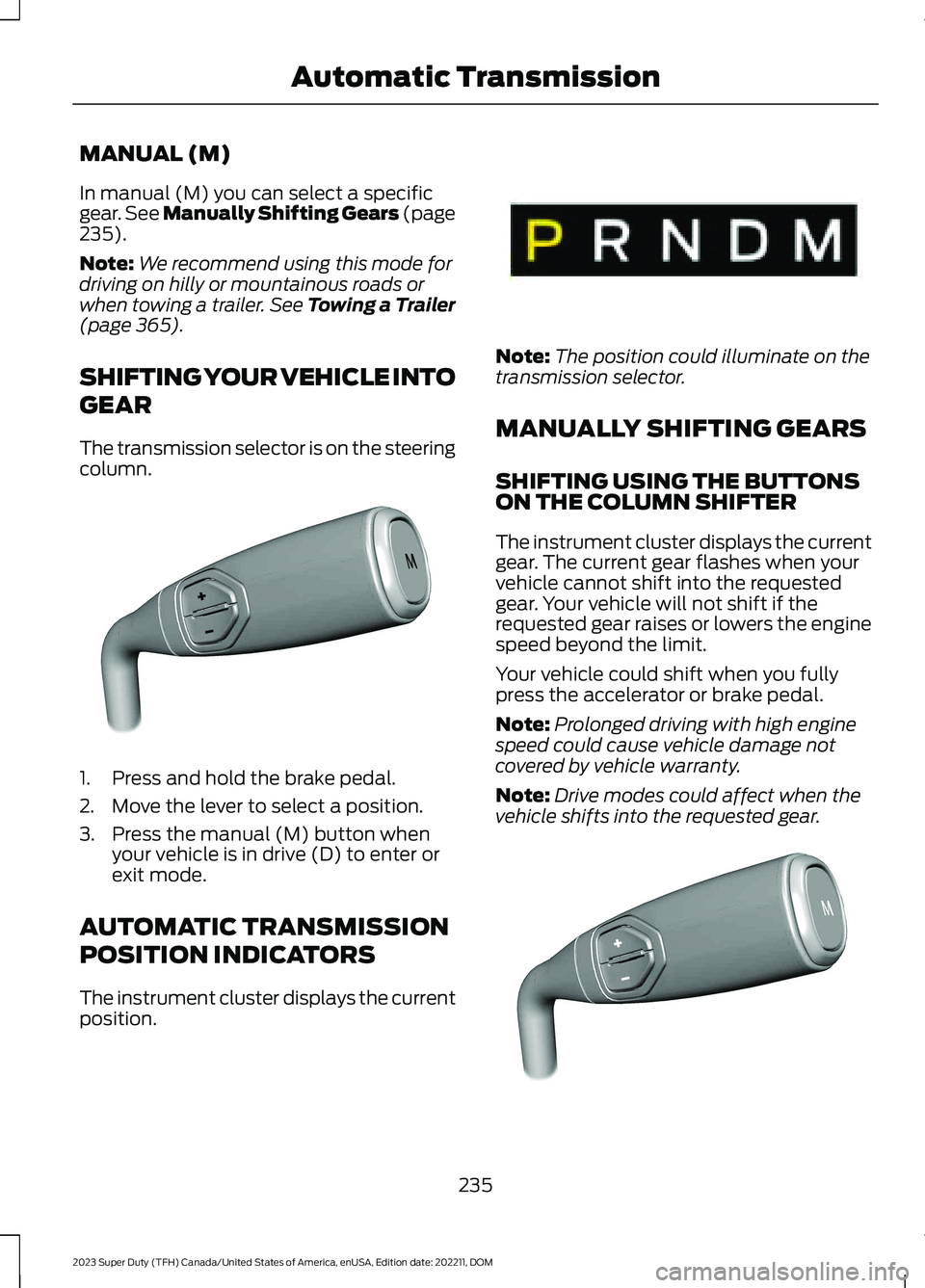
The transmission selector is on the steeringcolumn.
1.Press and hold the brake pedal.
2.Move the lever to select a position.
3.Press the manual (M) button whenyour vehicle is in drive (D) to enter orexit mode.
AUTOMATIC TRANSMISSION
POSITION INDICATORS
The instrument cluster displays the currentposition.
Note:The position could illuminate on thetransmission selector.
MANUALLY SHIFTING GEARS
SHIFTING USING THE BUTTONSON THE COLUMN SHIFTER
The instrument cluster displays the currentgear. The current gear flashes when yourvehicle cannot shift into the requestedgear. Your vehicle will not shift if therequested gear raises or lowers the enginespeed beyond the limit.
Your vehicle could shift when you fullypress the accelerator or brake pedal.
Note:Prolonged driving with high enginespeed could cause vehicle damage notcovered by vehicle warranty.
Note:Drive modes could affect when thevehicle shifts into the requested gear.
235
2023 Super Duty (TFH) Canada/United States of America, enUSA, Edition date: 202211, DOMAutomatic TransmissionE371381 E341776 E372904
Page 240 of 738
Manually Shifting Gears in Manual(M)
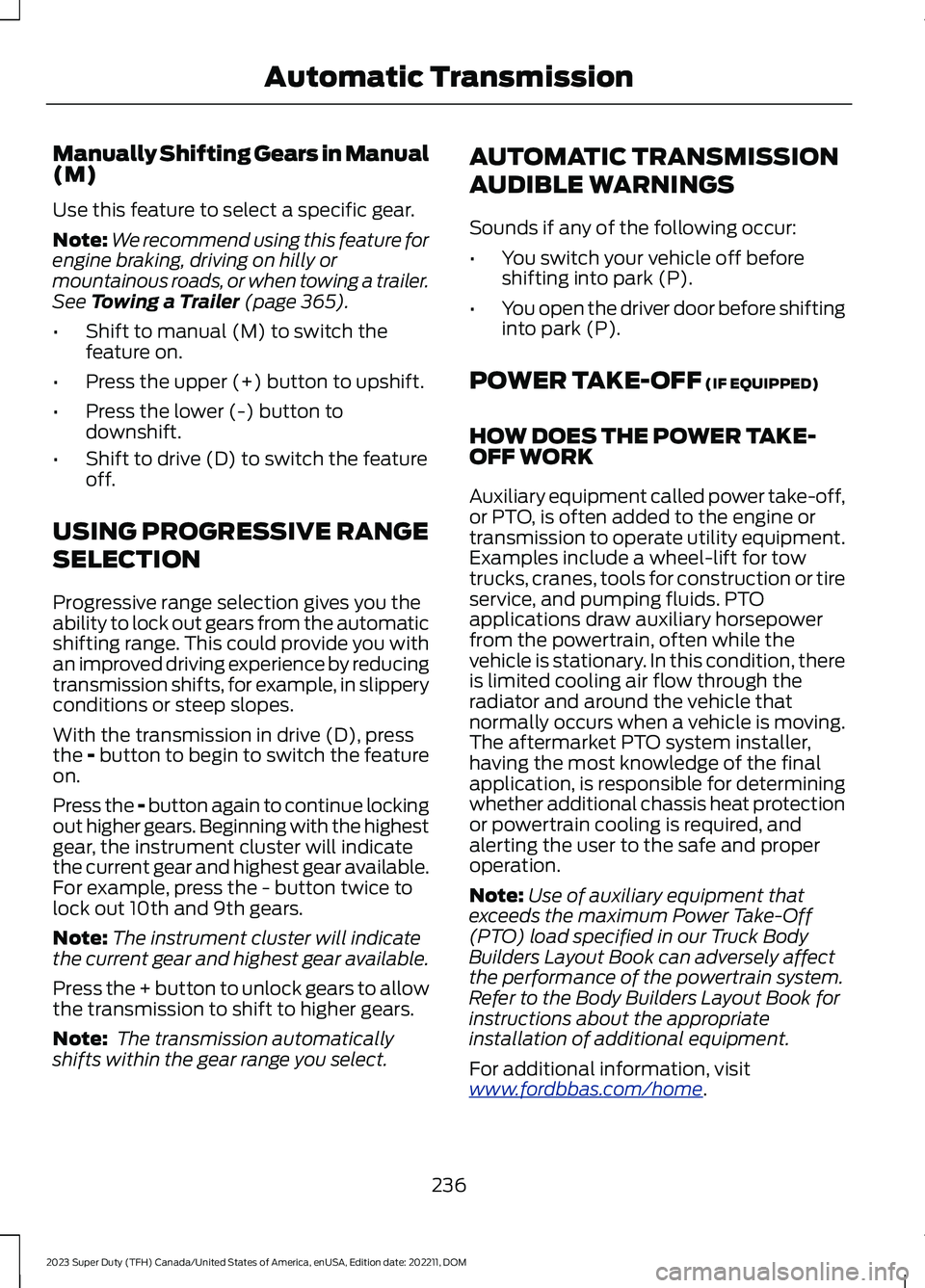
Use this feature to select a specific gear.
Note:We recommend using this feature forengine braking, driving on hilly ormountainous roads, or when towing a trailer.See Towing a Trailer (page 365).
•Shift to manual (M) to switch thefeature on.
•Press the upper (+) button to upshift.
•Press the lower (-) button todownshift.
•Shift to drive (D) to switch the featureoff.
USING PROGRESSIVE RANGE
SELECTION
Progressive range selection gives you theability to lock out gears from the automaticshifting range. This could provide you withan improved driving experience by reducingtransmission shifts, for example, in slipperyconditions or steep slopes.
With the transmission in drive (D), pressthe - button to begin to switch the featureon.
Press the - button again to continue lockingout higher gears. Beginning with the highestgear, the instrument cluster will indicatethe current gear and highest gear available.For example, press the - button twice tolock out 10th and 9th gears.
Note:The instrument cluster will indicatethe current gear and highest gear available.
Press the + button to unlock gears to allowthe transmission to shift to higher gears.
Note: The transmission automaticallyshifts within the gear range you select.
AUTOMATIC TRANSMISSION
AUDIBLE WARNINGS
Sounds if any of the following occur:
•You switch your vehicle off beforeshifting into park (P).
•You open the driver door before shiftinginto park (P).
POWER TAKE-OFF (IF EQUIPPED)
HOW DOES THE POWER TAKE-OFF WORK
Auxiliary equipment called power take-off,or PTO, is often added to the engine ortransmission to operate utility equipment.Examples include a wheel-lift for towtrucks, cranes, tools for construction or tireservice, and pumping fluids. PTOapplications draw auxiliary horsepowerfrom the powertrain, often while thevehicle is stationary. In this condition, thereis limited cooling air flow through theradiator and around the vehicle thatnormally occurs when a vehicle is moving.The aftermarket PTO system installer,having the most knowledge of the finalapplication, is responsible for determiningwhether additional chassis heat protectionor powertrain cooling is required, andalerting the user to the safe and properoperation.
Note:Use of auxiliary equipment thatexceeds the maximum Power Take-Off(PTO) load specified in our Truck BodyBuilders Layout Book can adversely affectthe performance of the powertrain system.Refer to the Body Builders Layout Book forinstructions about the appropriateinstallation of additional equipment.
For additional information, visitwww.fordbbas.com/home.
236
2023 Super Duty (TFH) Canada/United States of America, enUSA, Edition date: 202211, DOMAutomatic Transmission
Page 242 of 738
HOW DOES FOUR-WHEEL
DRIVE WORK
Using the Electronic Shift On theFly System (If Equipped)
This four-wheel drive system utilizes a2-speed Electronic Shift On the Fly (ESOF)transfer case which is also known as apart-time system. This system offers thedriver two-wheel drive high, four-wheeldrive high, and four-wheel drive low asavailable modes of operation. When youselect either four-wheel drive high orfour-wheel drive low, the system providesmechanically locked four-wheel drivepower to both the front and rear wheelsfor use in off-road or slippery conditionssuch as deep snow, sand or mud. Whenyou select four-wheel drive low, the systemprovides additional gearing for increasedtorque multiplication for conditions likedeep sand, steep slopes, or pulling heavyobjects. Additionally, the system is capableof recreational flat towing by putting thetransfer case into a neutral position. SeeRecreationally Towing Your Vehicle(page 427).
There is further information available ondriving in unique driving conditions. SeeOff-Road Driving (page 412).
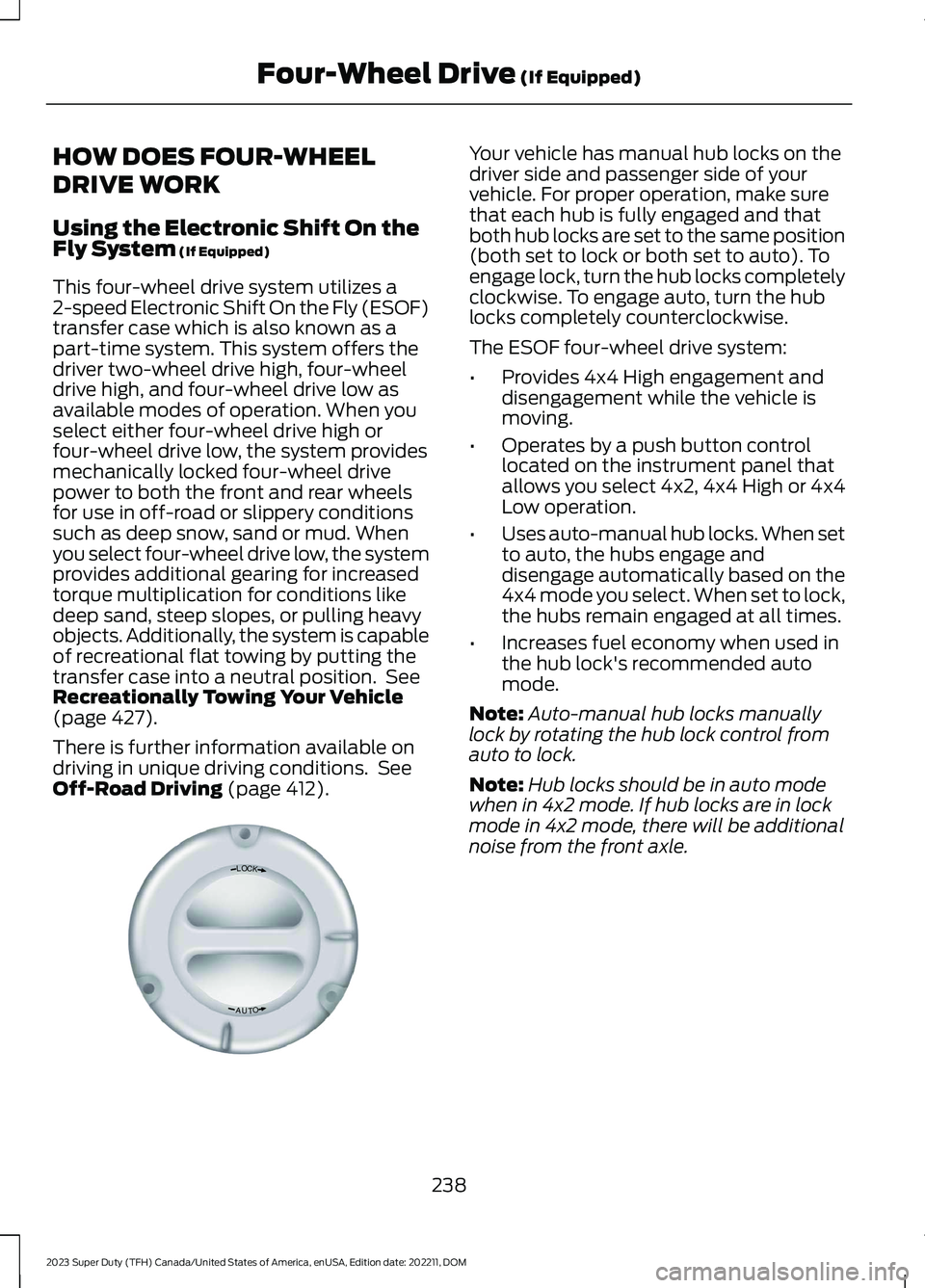
Your vehicle has manual hub locks on thedriver side and passenger side of yourvehicle. For proper operation, make surethat each hub is fully engaged and thatboth hub locks are set to the same position(both set to lock or both set to auto). Toengage lock, turn the hub locks completelyclockwise. To engage auto, turn the hublocks completely counterclockwise.
The ESOF four-wheel drive system:
•Provides 4x4 High engagement anddisengagement while the vehicle ismoving.
•Operates by a push button controllocated on the instrument panel thatallows you select 4x2, 4x4 High or 4x4Low operation.
•Uses auto-manual hub locks. When setto auto, the hubs engage anddisengage automatically based on the4x4 mode you select. When set to lock,the hubs remain engaged at all times.
•Increases fuel economy when used inthe hub lock's recommended automode.
Note:Auto-manual hub locks manuallylock by rotating the hub lock control fromauto to lock.
Note:Hub locks should be in auto modewhen in 4x2 mode. If hub locks are in lockmode in 4x2 mode, there will be additionalnoise from the front axle.
238
2023 Super Duty (TFH) Canada/United States of America, enUSA, Edition date: 202211, DOMFour-Wheel Drive (If Equipped)LOCKOTUAE339076
Page 250 of 738
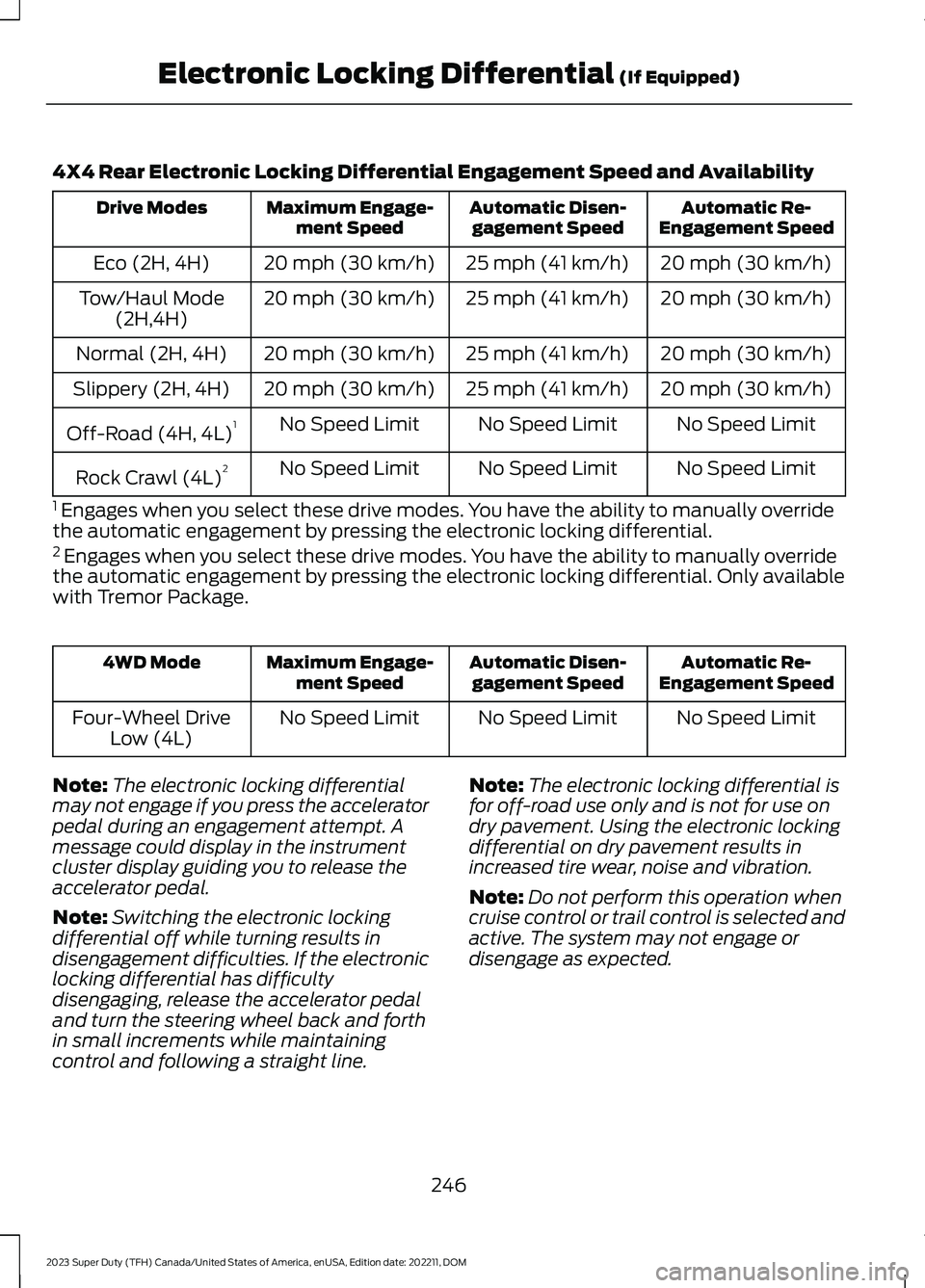
4X4 Rear Electronic Locking Differential Engagement Speed and Availability
Automatic Re-Engagement SpeedAutomatic Disen-gagement SpeedMaximum Engage-ment SpeedDrive Modes
20 mph (30 km/h)25 mph (41 km/h)20 mph (30 km/h)Eco (2H, 4H)
20 mph (30 km/h)25 mph (41 km/h)20 mph (30 km/h)Tow/Haul Mode(2H,4H)
20 mph (30 km/h)25 mph (41 km/h)20 mph (30 km/h)Normal (2H, 4H)
20 mph (30 km/h)25 mph (41 km/h)20 mph (30 km/h)Slippery (2H, 4H)
No Speed LimitNo Speed LimitNo Speed LimitOff-Road (4H, 4L)1
No Speed LimitNo Speed LimitNo Speed LimitRock Crawl (4L)2
1 Engages when you select these drive modes. You have the ability to manually overridethe automatic engagement by pressing the electronic locking differential.2 Engages when you select these drive modes. You have the ability to manually overridethe automatic engagement by pressing the electronic locking differential. Only availablewith Tremor Package.
Automatic Re-Engagement SpeedAutomatic Disen-gagement SpeedMaximum Engage-ment Speed4WD Mode
No Speed LimitNo Speed LimitNo Speed LimitFour-Wheel DriveLow (4L)
Note:The electronic locking differentialmay not engage if you press the acceleratorpedal during an engagement attempt. Amessage could display in the instrumentcluster display guiding you to release theaccelerator pedal.
Note:Switching the electronic lockingdifferential off while turning results indisengagement difficulties. If the electroniclocking differential has difficultydisengaging, release the accelerator pedaland turn the steering wheel back and forthin small increments while maintainingcontrol and following a straight line.
Note:The electronic locking differential isfor off-road use only and is not for use ondry pavement. Using the electronic lockingdifferential on dry pavement results inincreased tire wear, noise and vibration.
Note:Do not perform this operation whencruise control or trail control is selected andactive. The system may not engage ordisengage as expected.
246
2023 Super Duty (TFH) Canada/United States of America, enUSA, Edition date: 202211, DOMElectronic Locking Differential (If Equipped)
Page 253 of 738
BRAKE PRECAUTIONS
Wet brakes result in reduced brakingefficiency. Gently press the brake pedal afew times when leaving a car wash ordriving from standing water to dry thebrakes.
Note:Depending on applicable laws andregulations in the country where your vehiclewas originally built, the stoplamps couldflash during heavy braking. The hazardwarning flashers could also turn on whenyour vehicle comes to a stop.
ANTI-LOCK BRAKING SYSTEM
ANTI-LOCK BRAKING SYSTEMLIMITATIONS
The anti-lock braking system does noteliminate the risk of crash when:
•You drive too closely to the vehicle infront of you.
•Your vehicle is hydroplaning.
•You take corners too fast.
•The road surface is poor.
Note: If the system activates, the brakepedal could pulse and travel further.Maintain pressure on the brake pedal.
BRAKE OVER ACCELERATOR
In the event the accelerator pedalbecomes stuck or entrapped, apply steadyand firm pressure to the brake pedal toslow the vehicle and reduce engine power.If you experience this condition, apply thebrakes and bring your vehicle to a safestop. Move the transmission to park (P),switch the engine off and apply the parkingbrake. Inspect the accelerator pedal forany interference. If none are found and thecondition persists, have your vehicle towedto the nearest authorized dealer.
LOCATING THE BRAKE FLUID
RESERVOIR
See Under Hood Overview (page 441).
CHECKING THE BRAKE FLUID
WARNING: Do not use any fluidother than the recommended brake fluidas this will reduce brake efficiency. Useof incorrect fluid could result in the lossof vehicle control, serious personal injuryor death.
WARNING: Only use brake fluidfrom a sealed container. Contaminationwith dirt, water, petroleum products orother materials may result in brakesystem damage or failure. Failure toadhere to this warning could result in theloss of vehicle control, serious personalinjury or death.
WARNING: Do not allow the fluidto touch your skin or eyes. If thishappens, rinse the affected areasimmediately with plenty of water andcontact your physician.
WARNING: The brake systemcould be affected if the brake fluid levelis below the MIN mark or above the MAXmark on the brake fluid reservoir.
249
2023 Super Duty (TFH) Canada/United States of America, enUSA, Edition date: 202211, DOMBrakes
Page 257 of 738
WHAT IS THE ELECTRIC
PARKING BRAKE
The electric parking brake is used to holdyour vehicle on slopes and flat roads.
APPLYING THE ELECTRIC
PARKING BRAKE
WARNING: Apply the parkingbrake, shift into park (P), switch theignition off and remove the key beforeyou leave your vehicle. Failure to followthis instruction could result in personalinjury or death.
WARNING: If you drive extendeddistances with the parking brake applied,you could cause damage to the brakesystem.
WARNING: The electric parkingbrake does not operate if the vehiclebattery has run out of charge.
The switch is on the lower partof the instrument panel.
Pull the switch up to apply the electricparking brake. The red warning lampflashes, then steadily illuminates when theparking brake is applied.
Note:You can apply the electric parkingbrake when the ignition is off.
Note:The electric parking brake couldautomatically apply when park (P) isselected. See Park (P) (page 234).
APPLYING THE ELECTRIC
PARKING BRAKE IN AN
EMERGENCY
You can use the electric parking brake toslow or stop your vehicle in an emergency.
Pull the switch up and hold it.
The red warning lamp illuminates, a tonesounds and the stoplamps turn on whenyou use the electric parking brake in anemergency.
The electric parking brake continues toslow your vehicle down unless you releasethe switch.
Note:Do not apply the electric parkingbrake when your vehicle is moving, exceptin an emergency. If you repeatedly use theelectric parking brake to slow or stop yourvehicle, you could cause damage to thebrake system.
MANUALLY RELEASING THE
ELECTRIC PARKING BRAKE
1.Switch the ignition on.
2.Press and hold the brake pedal.
3.Push the switch down.
The red warning lamp turns off.
Pulling Away on a Hill When Towing aTrailer
1.Press and hold the brake pedal.
2.Pull the switch upward and hold it.
3.Shift into gear.
4.Press the accelerator pedal until enginehas developed sufficient torque toprevent your vehicle from rolling downthe hill.
5.Release the switch and pull away in anormal manner.
253
2023 Super Duty (TFH) Canada/United States of America, enUSA, Edition date: 202211, DOMElectric Parking BrakeE267156
Page 260 of 738
DIESEL ENGINE EXHAUST
BRAKE – PRECAUTIONS
WARNING: Do not use tow/haulwhen the road surface is slippery. Failureto follow this instruction could result inthe loss of control of your vehicle.
WARNING: Do not use dieselengine exhaust braking when the roadsurface is slippery. Failure to follow thisinstruction could result in the loss ofcontrol of your vehicle.
USING THE DIESEL ENGINE
EXHAUST BRAKE
This feature increases engine braking athigher engine speeds to provide bettergrade descent control with less brake andtransmission wear and tear.
Note:Use this when driving downhill andcarrying heavy loads or trailering.
Benefits of engine braking are:
•Lower brake temperature.
•Reduced brake fade.
•Longer brake life.
•Improved driving and trailering control.
Press the button on the switchbank next to the audio unit toswitch the system on or off.
There are two engine brake modes, manualand automatic.
The following conditions must be met touse exhaust brake:
•Your vehicle is in a forward gear.
•The engine speed is above 1300 RPM.
•Your foot is off the accelerator.
You can use this feature with tow/haul orprogressive range selection to providefurther increased engine braking. Thetransmission upshifts to prevent the enginefrom entering the red zone on thetachometer.
Manual Engine Braking
1.Press the button to switch on manualengine braking.
2.Release the accelerator pedal tomaximize engine braking.
3.Apply the brakes. The transmissiondownshifts to lower gears.
Note:The engine braking feature onlyfunctions when you release the accelerator.
Note:You can shift the transmission tolower gears with progressive range selectionor manual shifting independent of pressingthe brakes.
Note:You can also use manual enginebraking with cruise control to improve gradedescent control.
Note:If your vehicle has adaptive cruisecontrol, the speed control system uses theselected engine brake mode, transmissiongears, and brakes to maintain the set speedand distance to the vehicle being followed.
Automatic Engine Braking
1.Press the button twice to switch onautomatic engine braking.
2.Release the accelerator or brake pedal.The system remembers your vehiclespeed.
256
2023 Super Duty (TFH) Canada/United States of America, enUSA, Edition date: 202211, DOMDiesel Engine Exhaust BrakeE171217
Page 287 of 738
1.Press Settings on the touchscreen.
2.Press Driver Assistance.
3.Press Park Aid sensors.
4.Switch Front Sensors (Always) orRear Sensors (Always) on or off.
SWITCHING PARKING AID ON
AND OFF - VEHICLES WITH:
REAR PARKING AID
Muting the Audible Tone
Shift into reverse (R) and pressthe button on the rear viewcamera display screen to switchthe system's audible tone on and off.
Switching Parking Aid On and OffLong-Term
The system can be set to stay disabled inbetween ignition cycles.
1.Press Settings on the touchscreen.
2.Press Driver Assistance.
3.Press Park Aid sensors.
4.Switch Front Sensors (Always) orRear Sensors (Always) on or off.
REAR PARKING AID
WHAT IS THE REAR PARKING AID
Rear parking sensors detect objects behindyour vehicle when in reverse (R).
REAR PARKING AID LIMITATIONS
There is a decreased coverage area at theouter corners.
The rear parking aid sensors are activewhen your vehicle is in reverse (R) and thevehicle speed is less than 5 mph (8 km/h).
The sensor coverage area is up to 71 in(180 cm) from the rear bumper.
The rear parking aid detects large objectswhen you shift into reverse (R) and any ofthe following occur:
•Your vehicle is moving backward at alow speed.
•Your vehicle is stationary but an objectis approaching the rear of your vehicleat a low speed.
•Your vehicle is moving backward at alow speed and an object is movingtowards your vehicle, for exampleanother vehicle at a low speed.
The system shall provide no audiblewarning for the object behind the vehiclewhen in neutral (N) gear.
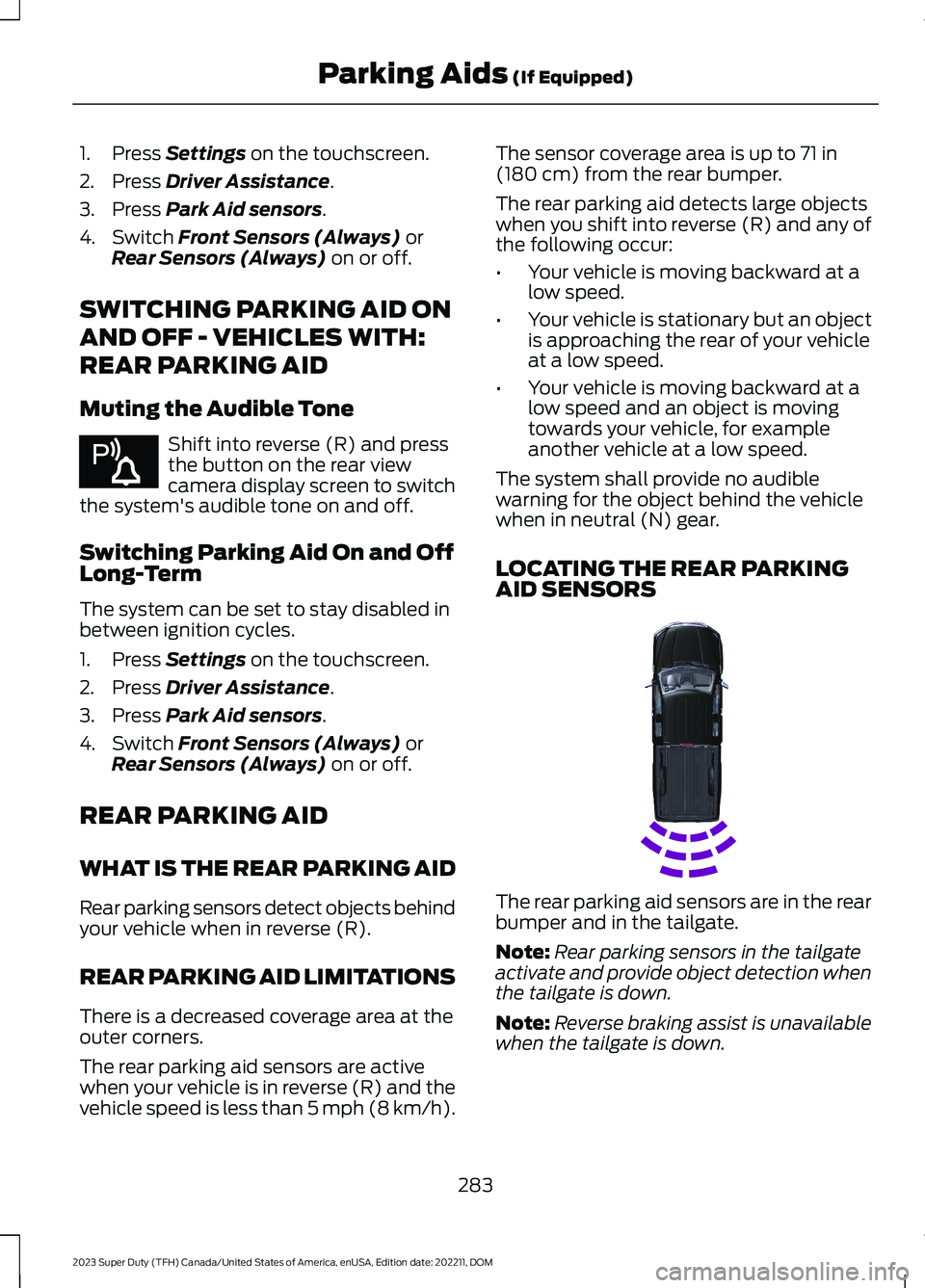
LOCATING THE REAR PARKINGAID SENSORS
The rear parking aid sensors are in the rearbumper and in the tailgate.
Note:Rear parking sensors in the tailgateactivate and provide object detection whenthe tailgate is down.
Note:Reverse braking assist is unavailablewhen the tailgate is down.
283
2023 Super Duty (TFH) Canada/United States of America, enUSA, Edition date: 202211, DOMParking Aids (If Equipped)E383616 E231381
Page 288 of 738
REAR PARKING AID AUDIBLEWARNINGS
A warning tone sounds when your vehicleapproaches an object. As your vehiclemoves closer to an object, the rate of thetone increases. The warning tonecontinuously sounds when an object is 12 in(30 cm) or less from the rear bumper.
If your vehicle remains stationary for a fewseconds, the audible warning turns off. Ifyour vehicle moves backward the tonesounds again.
Note:When the parking aid system soundsa tone, the audio system could reduce theset volume.
FRONT PARKING AID
WHAT IS THE FRONT PARKINGAID
Front parking sensors detect objects infront of your vehicle.
FRONT PARKING AIDLIMITATIONS
The front parking aid sensors are activewhen your vehicle is in any position otherthan park (P) and the vehicle speed is lessthan 5 mph (8 km/h).
The sensor coverage area is up to 47 in(120 cm) from the bumper.
If your vehicle is in reverse (R), the frontparking aid detects objects when yourvehicle is moving at a low speed or anobject is moving toward your vehicle andprovides an audible warning, for exampleanother vehicle at a low speed. If yourvehicle remains stationary for a fewseconds, the audible warning turns off.Visual indication is always active in reverse(R).
If your vehicle is in any forward gear, thefront parking aid provides audible warningsand visual indication when your vehicle ismoving at a speed of 5 mph (8 km/h) orbelow and the system detects an objectwithin the detection zone. If your vehicleremains stationary for a few seconds, thevisual indication and audible warning turnsoff.
If your vehicle is in neutral (N), the frontand rear sensors provide visual indicationonly when your vehicle is moving below aspeed of 5 mph (8 km/h) and obstaclesare detected inside the detection areas.Once your vehicle stops, the visualindication and audible warning stops aftera few seconds.
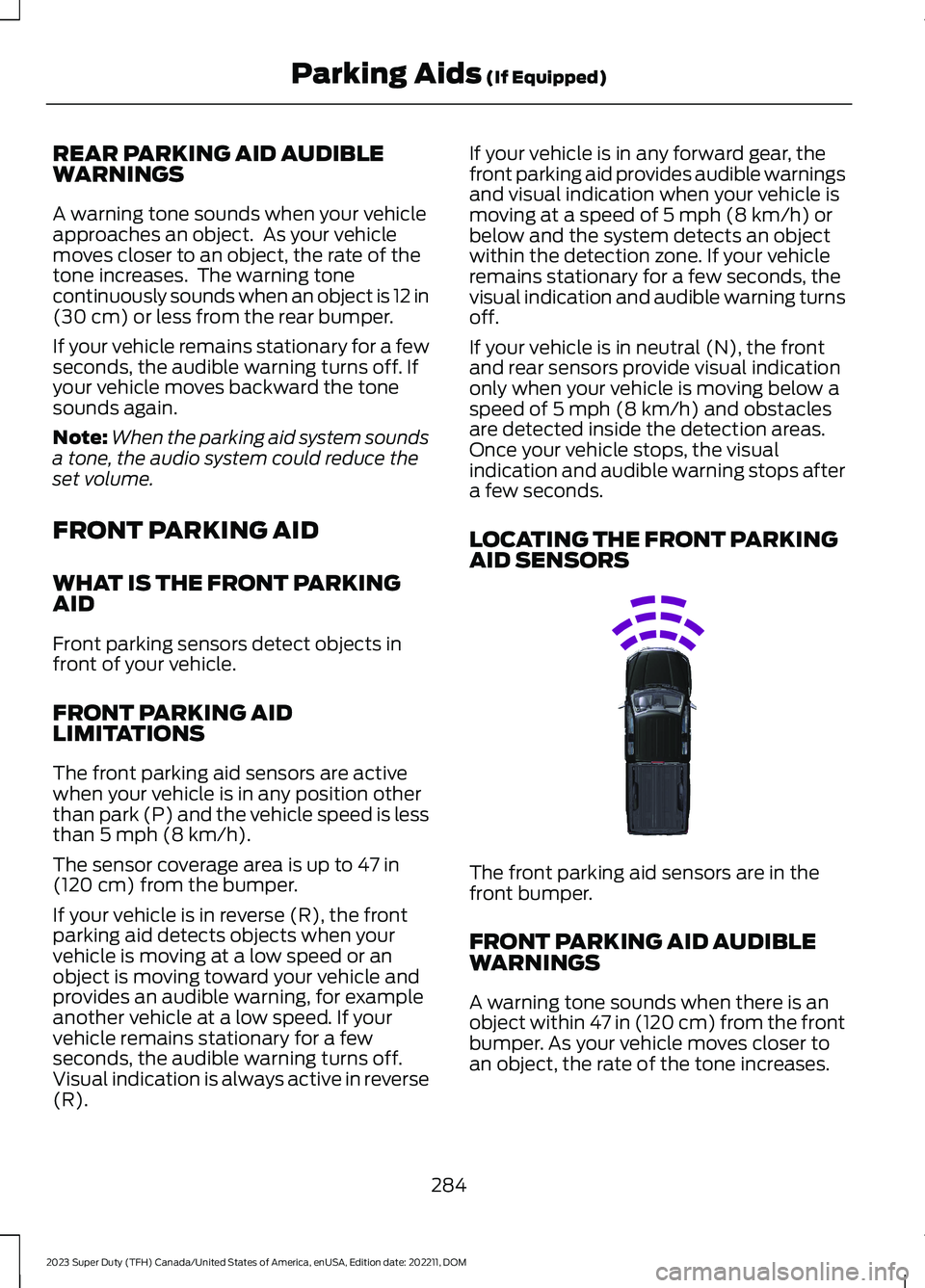
LOCATING THE FRONT PARKINGAID SENSORS
The front parking aid sensors are in thefront bumper.
FRONT PARKING AID AUDIBLEWARNINGS
A warning tone sounds when there is anobject within 47 in (120 cm) from the frontbumper. As your vehicle moves closer toan object, the rate of the tone increases.
284
2023 Super Duty (TFH) Canada/United States of America, enUSA, Edition date: 202211, DOMParking Aids (If Equipped)E310332
Page 289 of 738
The warning tone continuously soundswhen an object is 12 in (30 cm) or less fromthe front bumper.
Note:If the detected object is 12 in (30 cm)or less from your vehicle, visual indicationremains on.
PARKING AID INDICATORS
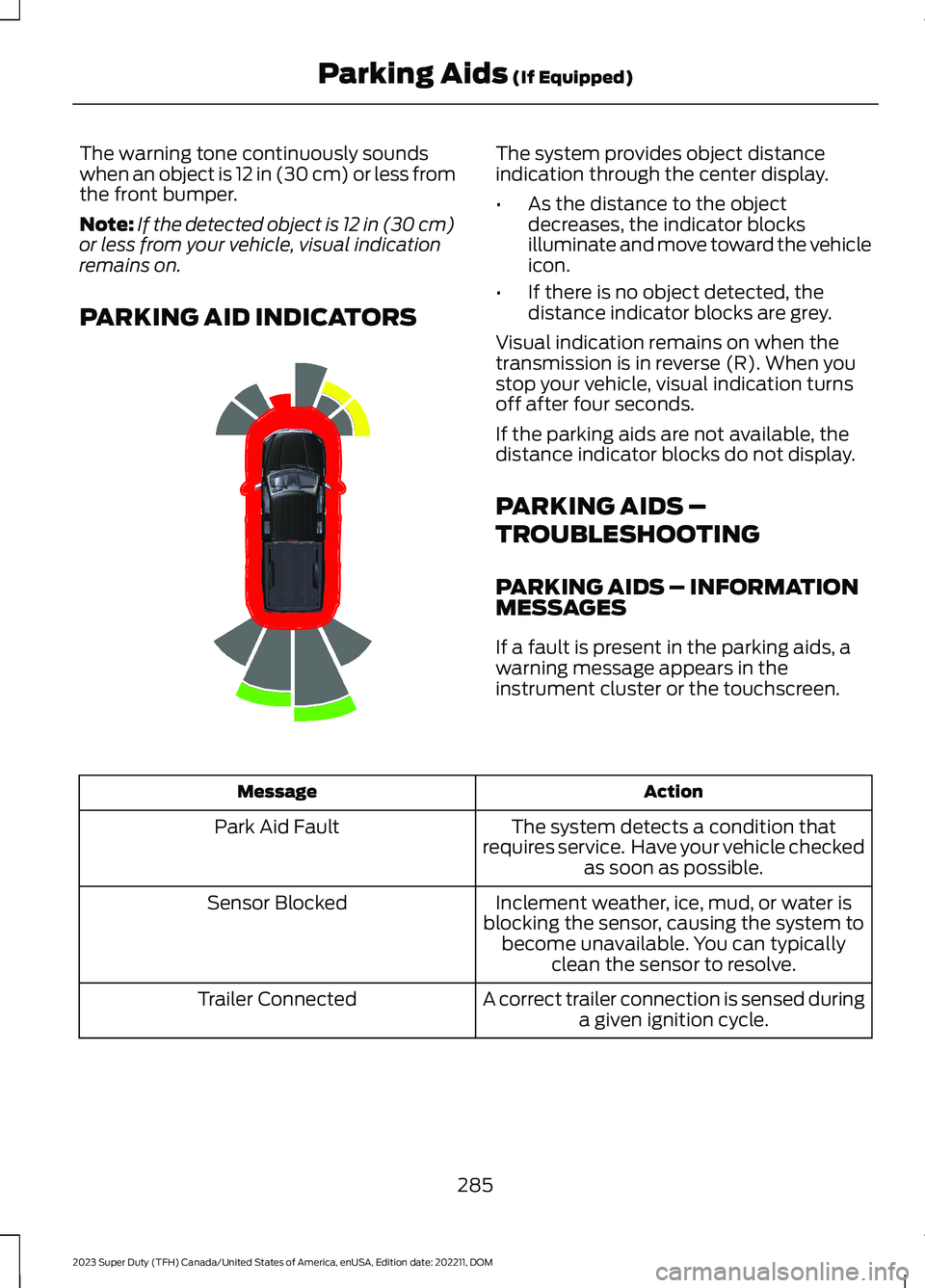
The system provides object distanceindication through the center display.
•As the distance to the objectdecreases, the indicator blocksilluminate and move toward the vehicleicon.
•If there is no object detected, thedistance indicator blocks are grey.
Visual indication remains on when thetransmission is in reverse (R). When youstop your vehicle, visual indication turnsoff after four seconds.
If the parking aids are not available, thedistance indicator blocks do not display.
PARKING AIDS –
TROUBLESHOOTING
PARKING AIDS – INFORMATIONMESSAGES
If a fault is present in the parking aids, awarning message appears in theinstrument cluster or the touchscreen.
ActionMessage
The system detects a condition thatrequires service. Have your vehicle checkedas soon as possible.
Park Aid Fault
Inclement weather, ice, mud, or water isblocking the sensor, causing the system tobecome unavailable. You can typicallyclean the sensor to resolve.
Sensor Blocked
A correct trailer connection is sensed duringa given ignition cycle.Trailer Connected
285
2023 Super Duty (TFH) Canada/United States of America, enUSA, Edition date: 202211, DOMParking Aids (If Equipped)E388639