ignition FORD SUPER DUTY 2023 Repair Manual
[x] Cancel search | Manufacturer: FORD, Model Year: 2023, Model line: SUPER DUTY, Model: FORD SUPER DUTY 2023Pages: 738, PDF Size: 18.49 MB
Page 315 of 738
WHAT IS DRIVE MODE
CONTROL
Your vehicle has various drive modes thatyou can select for different drivingconditions. Depending on the drive modethat you select, the system adjusts variousvehicle settings.
HOW DOES DRIVE MODE
CONTROL WORK
Drive mode control adjusts your vehicleconfiguration for each mode you select.
Changing the drive mode adjusts thesteering effort and feel of the steeringsystem.
The stability and traction control assistyour vehicle control in adverse conditionsor high-performance driving.
Throttle control enhances the powertrainresponse, transmission controls becomeoptimized with shift schedules, andfour-wheel drive settings are optimizedand tuned to each mode.
Changing the drive mode can engage ordisengage the electronic lockingdifferentials.
Changing the drive mode changes thefour-wheel drive mode to the defaultsetting for the selected drive mode.
Note:The system has diagnostic checksthat continuously monitor the system forproper operation. If a mode is unavailabledue to a system fault, the drive modesystem defaults to normal. When thesystem defaults to normal, the drivelinesettings remain the same as prior to thesystem fault.
Note:The system reverts to the normalmode each time you start your vehicle. Atstartup the system also displays a prompton the instrument cluster display that givesyou the option to return to the previouslyselected drive mode during the last ignitioncycle. If you select yes, the system returnsto the last selected drive mode and thedefault driveline settings associated withthat mode. If you select no, the systemremains in normal mode and the drivelinesettings remain the same as selected in theprior ignition cycle. If you do not select yesor no, the system stays in normal mode andthe driveline settings remain the same asselected in the prior ignition cycle.
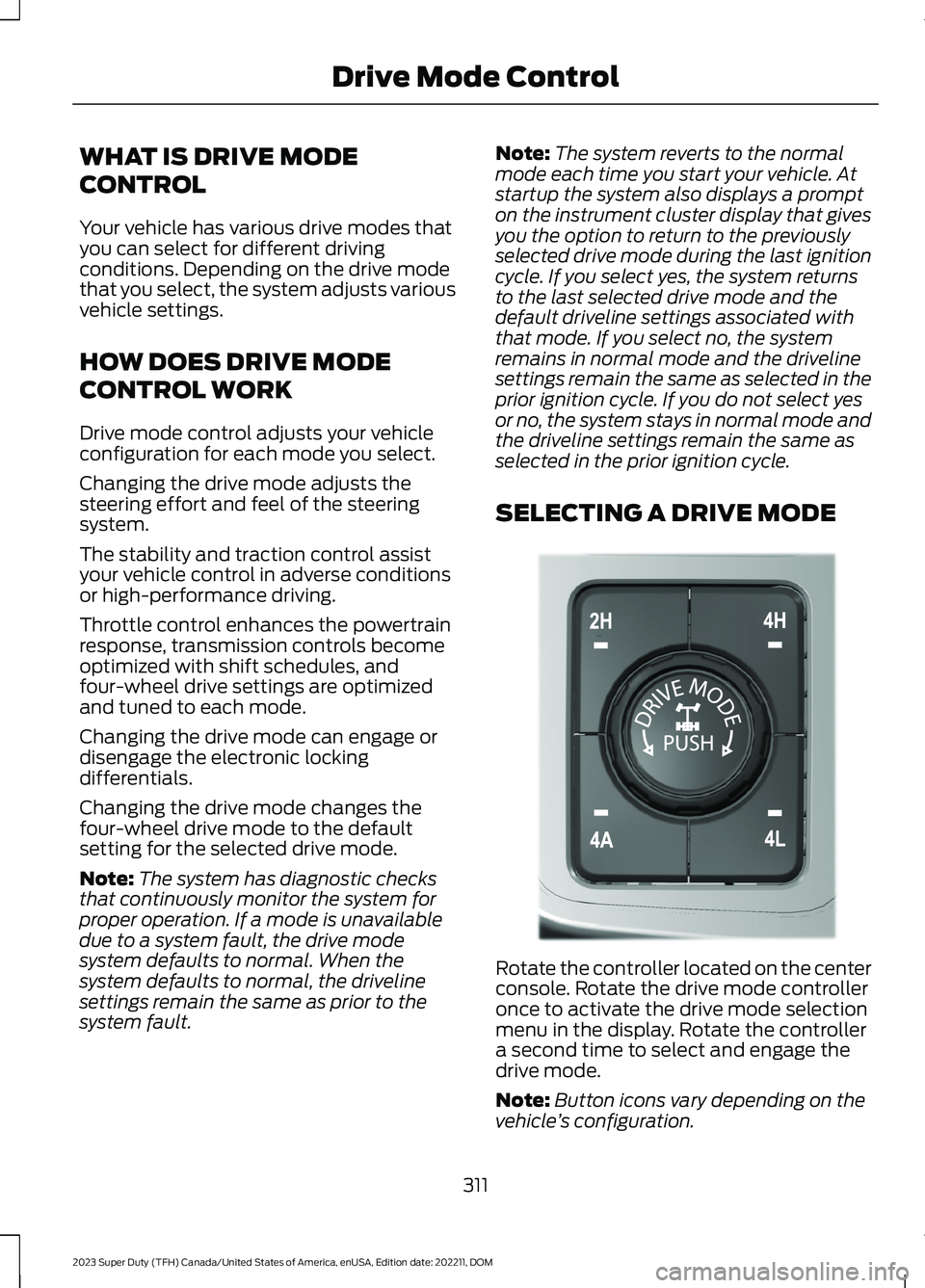
SELECTING A DRIVE MODE
Rotate the controller located on the centerconsole. Rotate the drive mode controlleronce to activate the drive mode selectionmenu in the display. Rotate the controllera second time to select and engage thedrive mode.
Note:Button icons vary depending on thevehicle’s configuration.
311
2023 Super Duty (TFH) Canada/United States of America, enUSA, Edition date: 202211, DOMDrive Mode ControlE308146
Page 316 of 738
DRIVE MODES
ECO - 4X4
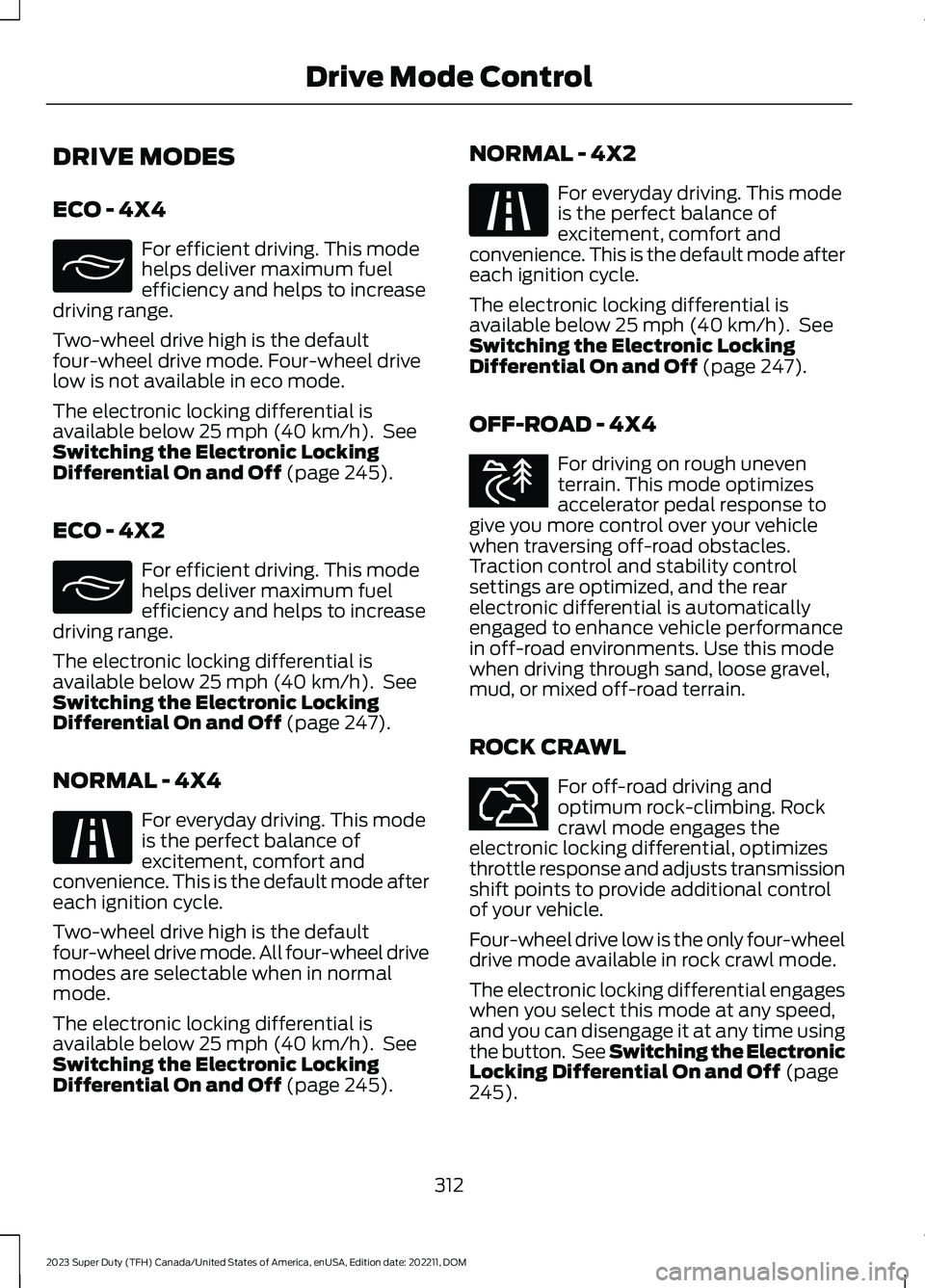
For efficient driving. This modehelps deliver maximum fuelefficiency and helps to increasedriving range.
Two-wheel drive high is the defaultfour-wheel drive mode. Four-wheel drivelow is not available in eco mode.
The electronic locking differential isavailable below 25 mph (40 km/h). SeeSwitching the Electronic LockingDifferential On and Off (page 245).
ECO - 4X2
For efficient driving. This modehelps deliver maximum fuelefficiency and helps to increasedriving range.
The electronic locking differential isavailable below 25 mph (40 km/h). SeeSwitching the Electronic LockingDifferential On and Off (page 247).
NORMAL - 4X4
For everyday driving. This modeis the perfect balance ofexcitement, comfort andconvenience. This is the default mode aftereach ignition cycle.
Two-wheel drive high is the defaultfour-wheel drive mode. All four-wheel drivemodes are selectable when in normalmode.
The electronic locking differential isavailable below 25 mph (40 km/h). SeeSwitching the Electronic LockingDifferential On and Off (page 245).
NORMAL - 4X2
For everyday driving. This modeis the perfect balance ofexcitement, comfort andconvenience. This is the default mode aftereach ignition cycle.
The electronic locking differential isavailable below 25 mph (40 km/h). SeeSwitching the Electronic LockingDifferential On and Off (page 247).
OFF-ROAD - 4X4
For driving on rough uneventerrain. This mode optimizesaccelerator pedal response togive you more control over your vehiclewhen traversing off-road obstacles.Traction control and stability controlsettings are optimized, and the rearelectronic differential is automaticallyengaged to enhance vehicle performancein off-road environments. Use this modewhen driving through sand, loose gravel,mud, or mixed off-road terrain.
ROCK CRAWL
For off-road driving andoptimum rock-climbing. Rockcrawl mode engages theelectronic locking differential, optimizesthrottle response and adjusts transmissionshift points to provide additional controlof your vehicle.
Four-wheel drive low is the only four-wheeldrive mode available in rock crawl mode.
The electronic locking differential engageswhen you select this mode at any speed,and you can disengage it at any time usingthe button. See Switching the ElectronicLocking Differential On and Off (page245).
312
2023 Super Duty (TFH) Canada/United States of America, enUSA, Edition date: 202211, DOMDrive Mode ControlE295413 E295413 E225310 E225310 E372640 E367349
Page 336 of 738
WHAT IS EXIT WARNING
Exit warning uses radar sensors to alertyou to traffic objects approaching youropen door.
HOW DOES EXIT WARNING
WORK
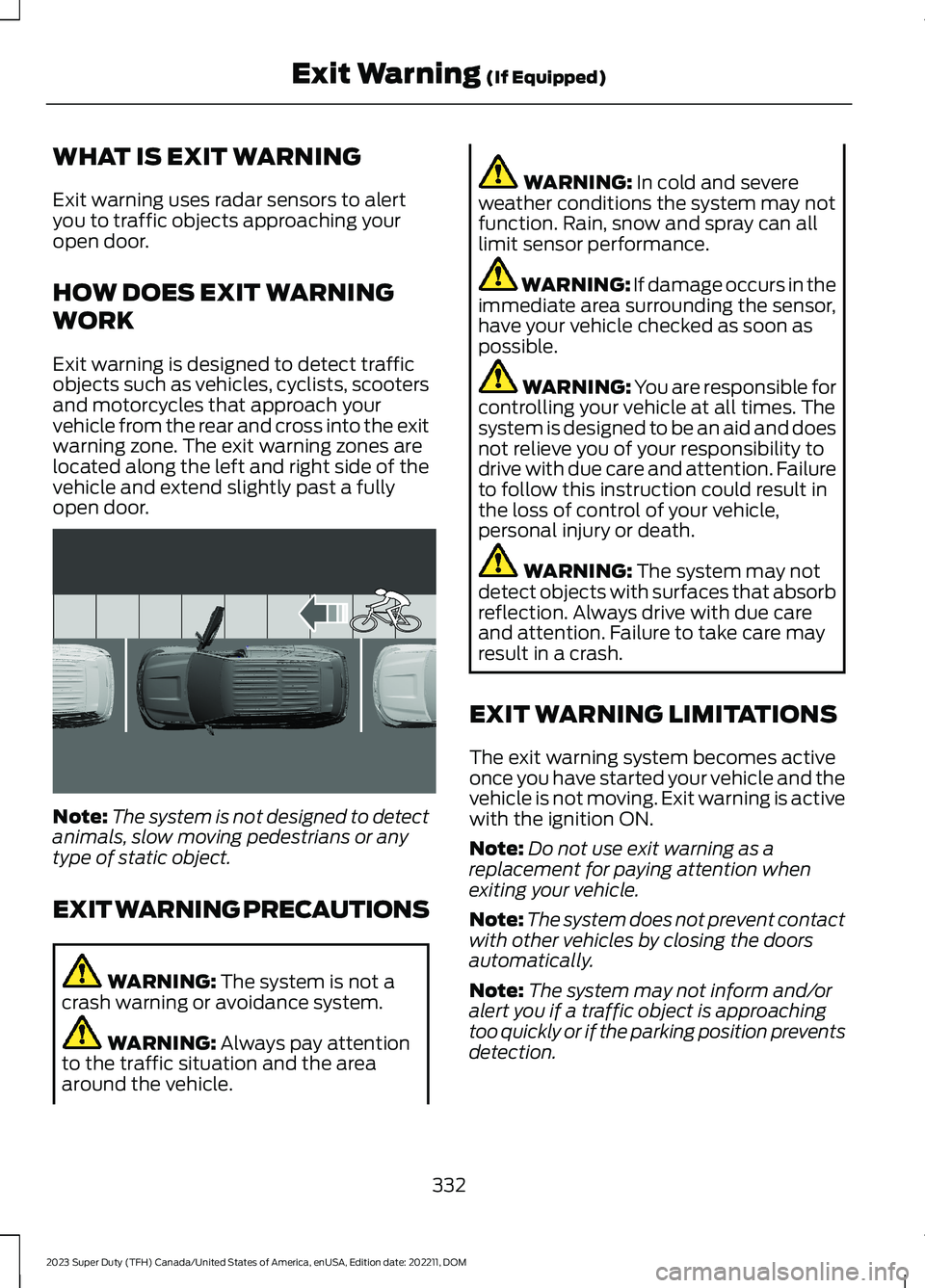
Exit warning is designed to detect trafficobjects such as vehicles, cyclists, scootersand motorcycles that approach yourvehicle from the rear and cross into the exitwarning zone. The exit warning zones arelocated along the left and right side of thevehicle and extend slightly past a fullyopen door.
Note:The system is not designed to detectanimals, slow moving pedestrians or anytype of static object.
EXIT WARNING PRECAUTIONS
WARNING: The system is not acrash warning or avoidance system.
WARNING: Always pay attentionto the traffic situation and the areaaround the vehicle.
WARNING: In cold and severeweather conditions the system may notfunction. Rain, snow and spray can alllimit sensor performance.
WARNING: If damage occurs in theimmediate area surrounding the sensor,have your vehicle checked as soon aspossible.
WARNING: You are responsible forcontrolling your vehicle at all times. Thesystem is designed to be an aid and doesnot relieve you of your responsibility todrive with due care and attention. Failureto follow this instruction could result inthe loss of control of your vehicle,personal injury or death.
WARNING: The system may notdetect objects with surfaces that absorbreflection. Always drive with due careand attention. Failure to take care mayresult in a crash.
EXIT WARNING LIMITATIONS
The exit warning system becomes activeonce you have started your vehicle and thevehicle is not moving. Exit warning is activewith the ignition ON.
Note:Do not use exit warning as areplacement for paying attention whenexiting your vehicle.
Note:The system does not prevent contactwith other vehicles by closing the doorsautomatically.
Note:The system may not inform and/oralert you if a traffic object is approachingtoo quickly or if the parking position preventsdetection.
332
2023 Super Duty (TFH) Canada/United States of America, enUSA, Edition date: 202211, DOMExit Warning (If Equipped)E371193
Page 340 of 738
Cross Traffic Alert Limitationswith a Trailer Attached
The system remains on when you attacha trailer in vehicles with blind spotinformation system with trailer tow underthe following conditions:
•You connect a trailer.
•The trailer is a bike rack or cargo rackwith a maximum length of 3 ft (1 m).
•You set the trailer length to 3 ft (1 m)in the instrument cluster display.
Note:The system may not correctly operatewhen towing a trailer. For vehicles with anapproved trailer tow module and tow bar,the system turns off when you attach atrailer. For vehicles with an aftermarkettrailer tow module or tow bar, werecommend that you switch the system offwhen you attach a trailer.
SWITCHING CROSS TRAFFIC
ALERT ON AND OFF
To switch cross traffic alert on or off usethe touchscreen.
1.Press Features on the touchscreen.
2.Press Driver Assistance.
3.Switch Cross Traffic Alert on or off.
Note:The system switches on every timeyou switch the ignition on. To permanentlyswitch the system off, contact an authorizeddealer.
SWITCHING CROSS TRAFFIC
ALERT ON AND OFF
To switch the system on or off, use theinstrument cluster display:
1.Select Driver Assist.
2.Select Cross Traffic Alert.
3.Switch the feature on or off.
Note:The system switches on every timeyou switch the ignition on. To permanentlyswitch the system off, contact an authorizeddealer.
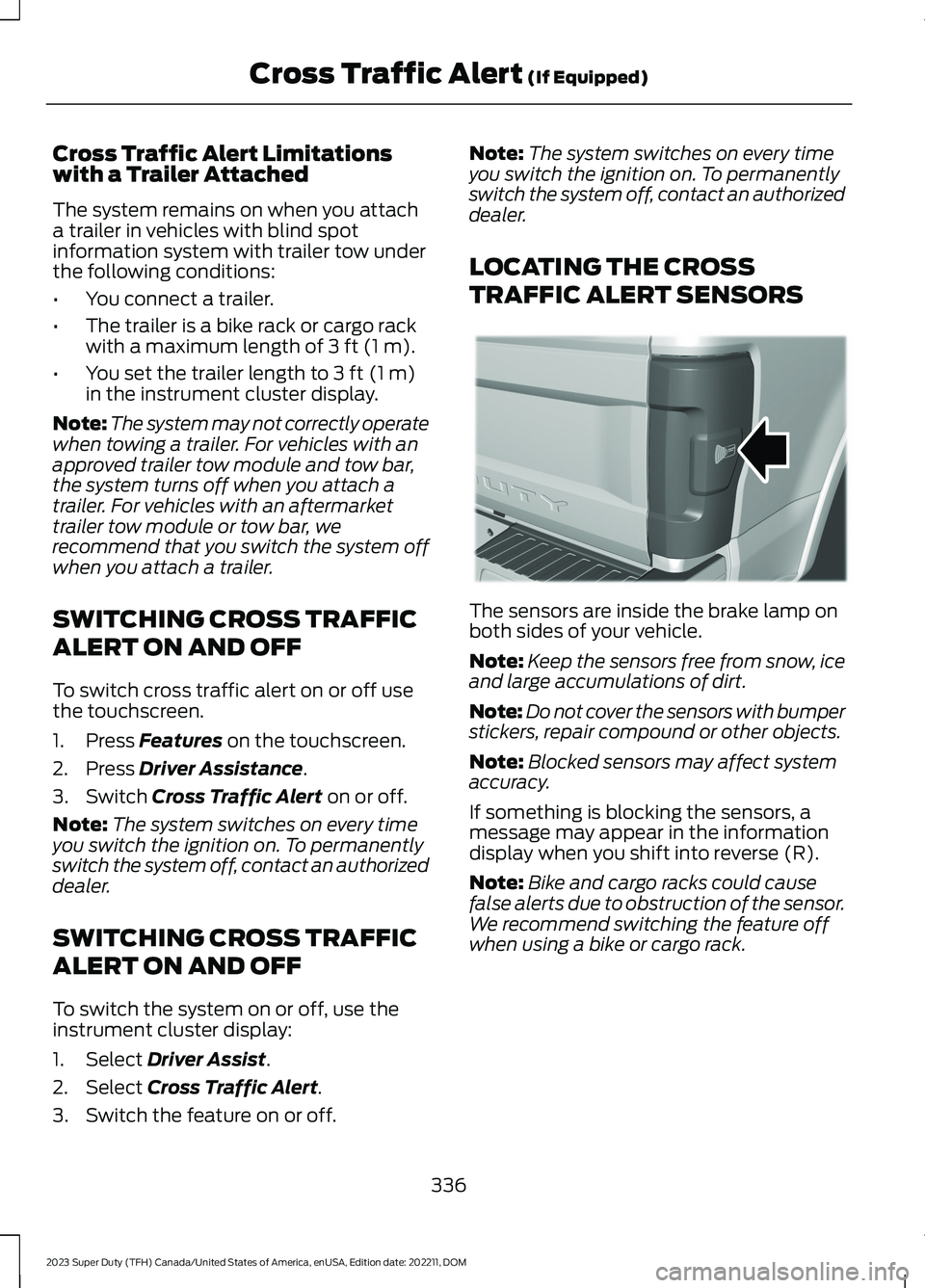
LOCATING THE CROSS
TRAFFIC ALERT SENSORS
The sensors are inside the brake lamp onboth sides of your vehicle.
Note:Keep the sensors free from snow, iceand large accumulations of dirt.
Note:Do not cover the sensors with bumperstickers, repair compound or other objects.
Note:Blocked sensors may affect systemaccuracy.
If something is blocking the sensors, amessage may appear in the informationdisplay when you shift into reverse (R).
Note:Bike and cargo racks could causefalse alerts due to obstruction of the sensor.We recommend switching the feature offwhen using a bike or cargo rack.
336
2023 Super Duty (TFH) Canada/United States of America, enUSA, Edition date: 202211, DOMCross Traffic Alert (If Equipped)E231384
Page 344 of 738
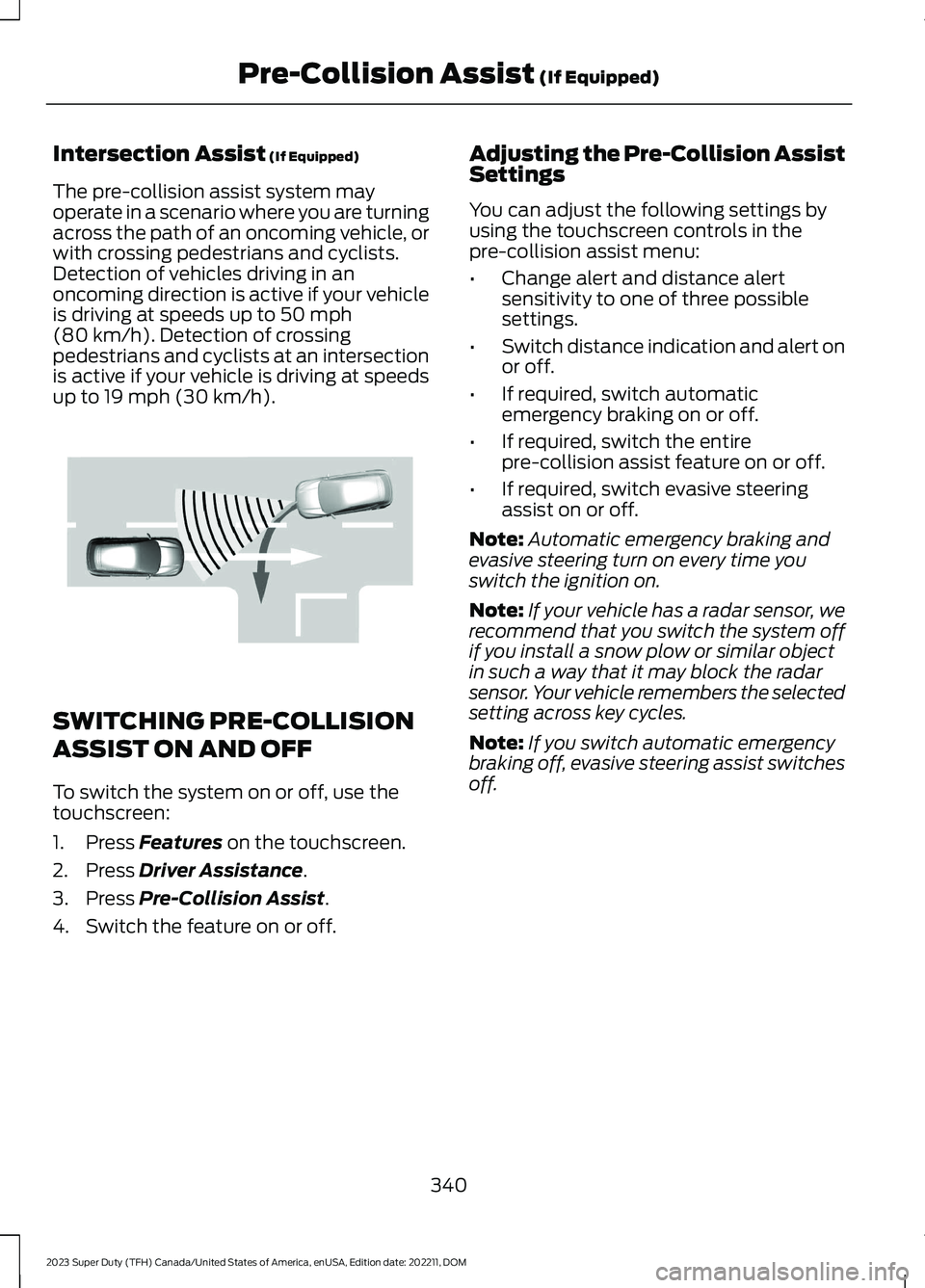
Intersection Assist (If Equipped)
The pre-collision assist system mayoperate in a scenario where you are turningacross the path of an oncoming vehicle, orwith crossing pedestrians and cyclists.Detection of vehicles driving in anoncoming direction is active if your vehicleis driving at speeds up to 50 mph(80 km/h). Detection of crossingpedestrians and cyclists at an intersectionis active if your vehicle is driving at speedsup to 19 mph (30 km/h).
SWITCHING PRE-COLLISION
ASSIST ON AND OFF
To switch the system on or off, use thetouchscreen:
1.Press Features on the touchscreen.
2.Press Driver Assistance.
3.Press Pre-Collision Assist.
4.Switch the feature on or off.
Adjusting the Pre-Collision AssistSettings
You can adjust the following settings byusing the touchscreen controls in thepre-collision assist menu:
•Change alert and distance alertsensitivity to one of three possiblesettings.
•Switch distance indication and alert onor off.
•If required, switch automaticemergency braking on or off.
•If required, switch the entirepre-collision assist feature on or off.
•If required, switch evasive steeringassist on or off.
Note:Automatic emergency braking andevasive steering turn on every time youswitch the ignition on.
Note:If your vehicle has a radar sensor, werecommend that you switch the system offif you install a snow plow or similar objectin such a way that it may block the radarsensor. Your vehicle remembers the selectedsetting across key cycles.
Note:If you switch automatic emergencybraking off, evasive steering assist switchesoff.
340
2023 Super Duty (TFH) Canada/United States of America, enUSA, Edition date: 202211, DOMPre-Collision Assist (If Equipped)E309750
Page 347 of 738
2.Press Driver Assistance.
3.Press Pre-Collision Assist.
4.Press Auto Emergency Braking.
5.Switch the feature on or off.
EVASIVE STEERING ASSIST
WHAT IS EVASIVE STEERINGASSIST
If your vehicle is rapidly approaching a roaduser, evasive steering assist helps you steeraround the road user.
After you turn the steering wheel in anattempt to avoid a crash with the roaduser, the system applies additional steeringtorque to help you steer around the roaduser. After you pass the road user, thesystem applies steering torque when youturn the steering wheel to steer back intothe lane. The system deactivates after youfully pass the road user.
Note:Road users are defined aspedestrians or bicyclists in your vehicle'spath or another stationary vehicle in thesame lane or a vehicle traveling in the samelane in the same direction as you. SeePre-Collision Assist Precautions (page338).
EVASIVE STEERING ASSISTLIMITATIONS
Evasive steering assist only activates whenall the following occur:
•Automatic emergency braking andevasive steering assist are on.
•The system detects a road user aheadand starts to apply the brakes.
•You significantly turn the steeringwheel to steer around a road user.
Note:Evasive steering assist does notautomatically steer around a road user. Ifyou do not turn the steering wheel, evasivesteering assist does not activate.
Note:Evasive steering assist does notactivate if the distance to the road userahead is too small and the system cannotavoid a crash.
SWITCHING EVASIVE STEERINGASSIST ON AND OFF
To switch the system on or off, use thetouchscreen:
1.Press Features on the touchscreen.
2.Press Driver Assistance.
3.Press Pre-Collision Assist.
4.Switch Evasive Steering on or off.
Note:If you switch automatic emergencybraking off, evasive steering assist turns off.
Note:Automatic emergency braking andevasive steering assist turn on every timeyou switch the ignition on.
PRE-COLLISION ASSIST –
TROUBLESHOOTING
PRE-COLLISION ASSIST –WARNING LAMPS
A telltale illuminates in theinstrument cluster display toindicate if the system is disabled,unavailable, or temporarily degraded dueto external environmental conditions.
Note:No action is needed if the telltaleilluminates without a correspondinginformation message. See Pre-CollisionAssist Precautions (page 338).
343
2023 Super Duty (TFH) Canada/United States of America, enUSA, Edition date: 202211, DOMPre-Collision Assist (If Equipped)E335612
Page 351 of 738
2.Press Driver Assistance.
3.Switch Driver Alert on or off.
Note:The system remains on or offdepending on how it was last set.
Resetting Driver Alert
You can reset the system by either:
•Switching the ignition off and on.
•Opening and closing the driver doorwhen your vehicle is stationary, and itis safe to do so.
DRIVER ALERT – TROUBLESHOOTING
DRIVER ALERT – INFORMATION MESSAGES
ActionMessage
Stop and rest as soon as it is safe to do so.Driver Alert Warning Rest Now
Take a rest soon.Driver Alert Warning Rest Suggested
347
2023 Super Duty (TFH) Canada/United States of America, enUSA, Edition date: 202211, DOMDriver Alert (If Equipped)
Page 368 of 738
CONNECTING A TRAILER – TROUBLESHOOTING
CONNECTING A TRAILER – INFORMATION MESSAGES
DescriptionMessage
The system senses a trailer connectionbecomes disconnected, either intentionallyor unintentionally, during a given ignitioncycle.
Trailer Disconnected
There are certain faults in your vehiclewiring and trailer wiring or brake system.Trailer Wiring Fault
The vehicle's battery voltage is low or thereis a fault with your trailer's battery. Yourtrailer's battery voltage is below 8 volts orit is connected in reverse polarity.
Trailer Battery Not Charging See Manual
One or more tires on your trailer is belowthe specified tire pressure.Trailer Tire Low Specified:
Displays when one or more tires on thetrailer is above the recommended temper-ature.
Trailer Tire Over Temperature
A trailer tire pressure sensor is malfunc-tioning. If the warning stays on or continuesto come on, have the system checked assoon as possible.
Trailer Tire Pressure Sensor Fault
The trailer tire pressure monitoring systemis malfunctioning. If the warning stays onor continues to come on, have the systemchecked.
Trailer Tire Pressure Monitor Fault
The system cannot detect the trailer tirepressure monitoring system.Trailer Tire Pressure Monitor Capability NotDetected
The trailer tire pressure monitoring systemis not set up.Trailer Tire Pressure Indication Not SetupSee Manual
CONNECTING A TRAILER
VIDEOS
Smart Trailer Tow Connector Video Link
364
2023 Super Duty (TFH) Canada/United States of America, enUSA, Edition date: 202211, DOMConnecting a Trailer
Page 377 of 738
6.If the trailer wheels lock up, indicatedby squealing tires, reduce the gainsetting. If the trailer wheels turn freely,increase the gain setting. Repeat Steps5 and 6 until the gain setting is at apoint just below trailer wheel lock-up.If towing a heavier trailer, trailer wheellock-up may not be attainable evenwith the maximum gain setting of 10.
Note:Only perform this procedure atspeeds of approximately 20–25 mph(30–40 km/h).
Note:The trailer brake controller reducesoutput at vehicle speeds below 11 mph(18 km/h) so that trailer and vehicle brakingis not jerky or harsh. This feature is onlyavailable when applying the brakes usingyour vehicle's brake pedal, not thecontroller.
Note:Your vehicle's brake system and thetrailer brake system work independently ofeach other. Changing the gain setting on thecontroller does not affect the operation ofyour vehicle's brakes whether you attach atrailer or not.
Note:With the proper electrical connection,pressing your vehicle brake pedal or usingthe manual control lever illuminates bothtrailer and vehicle brake lamps.
Note:When you switch the engine off, thecontroller output is disabled and the displayand module shut down. The controllermodule and display turn on when you switchthe ignition on.
Note:Trailer braking is suspended duringstop/start events to minimize battery draw.
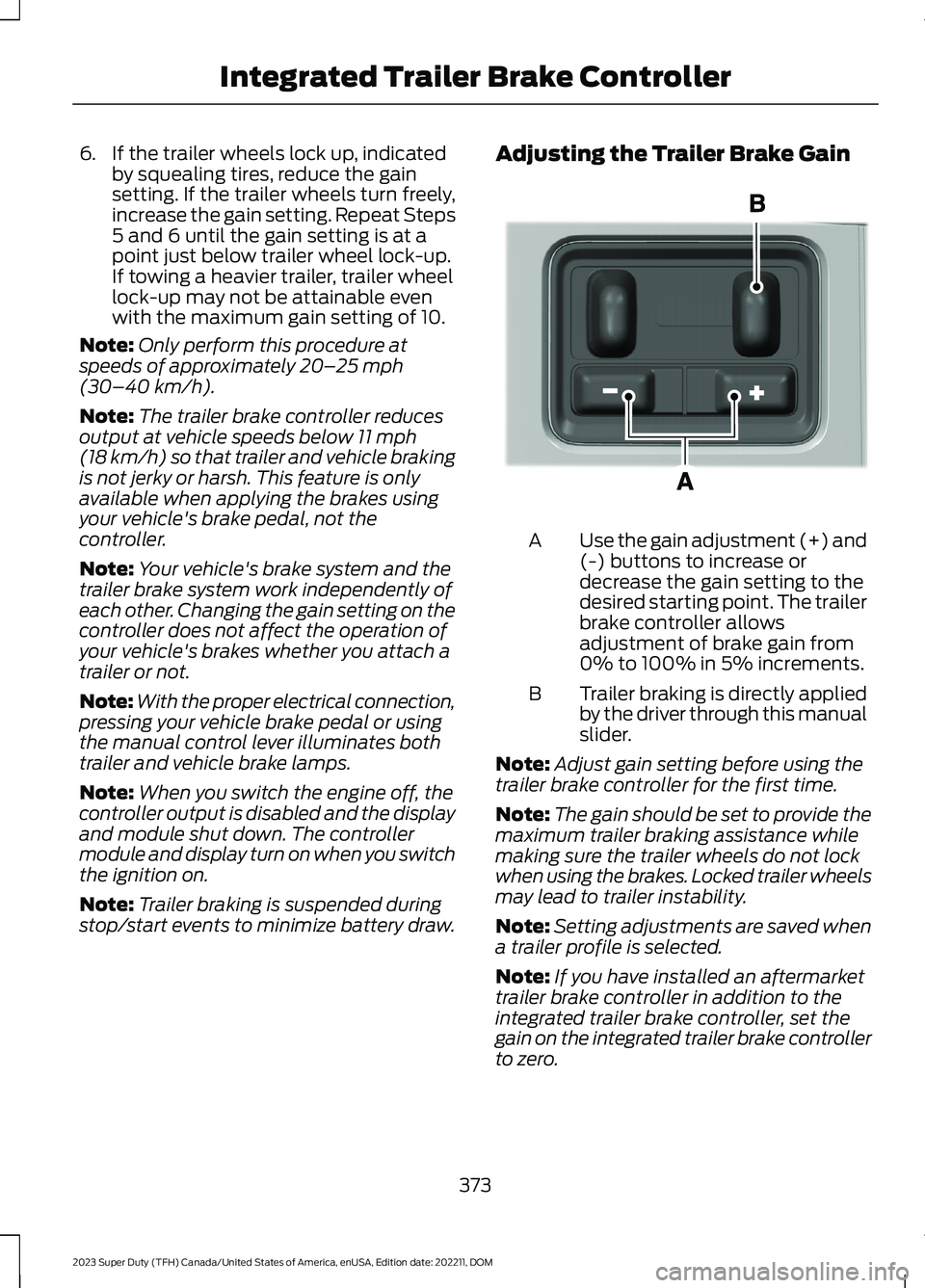
Adjusting the Trailer Brake Gain
Use the gain adjustment (+) and(-) buttons to increase ordecrease the gain setting to thedesired starting point. The trailerbrake controller allowsadjustment of brake gain from0% to 100% in 5% increments.
A
Trailer braking is directly appliedby the driver through this manualslider.
B
Note:Adjust gain setting before using thetrailer brake controller for the first time.
Note:The gain should be set to provide themaximum trailer braking assistance whilemaking sure the trailer wheels do not lockwhen using the brakes. Locked trailer wheelsmay lead to trailer instability.
Note:Setting adjustments are saved whena trailer profile is selected.
Note:If you have installed an aftermarkettrailer brake controller in addition to theintegrated trailer brake controller, set thegain on the integrated trailer brake controllerto zero.
373
2023 Super Duty (TFH) Canada/United States of America, enUSA, Edition date: 202211, DOMIntegrated Trailer Brake ControllerE333154
Page 379 of 738
INTEGRATED TRAILER BRAKE CONTROLLER –
TROUBLESHOOTING
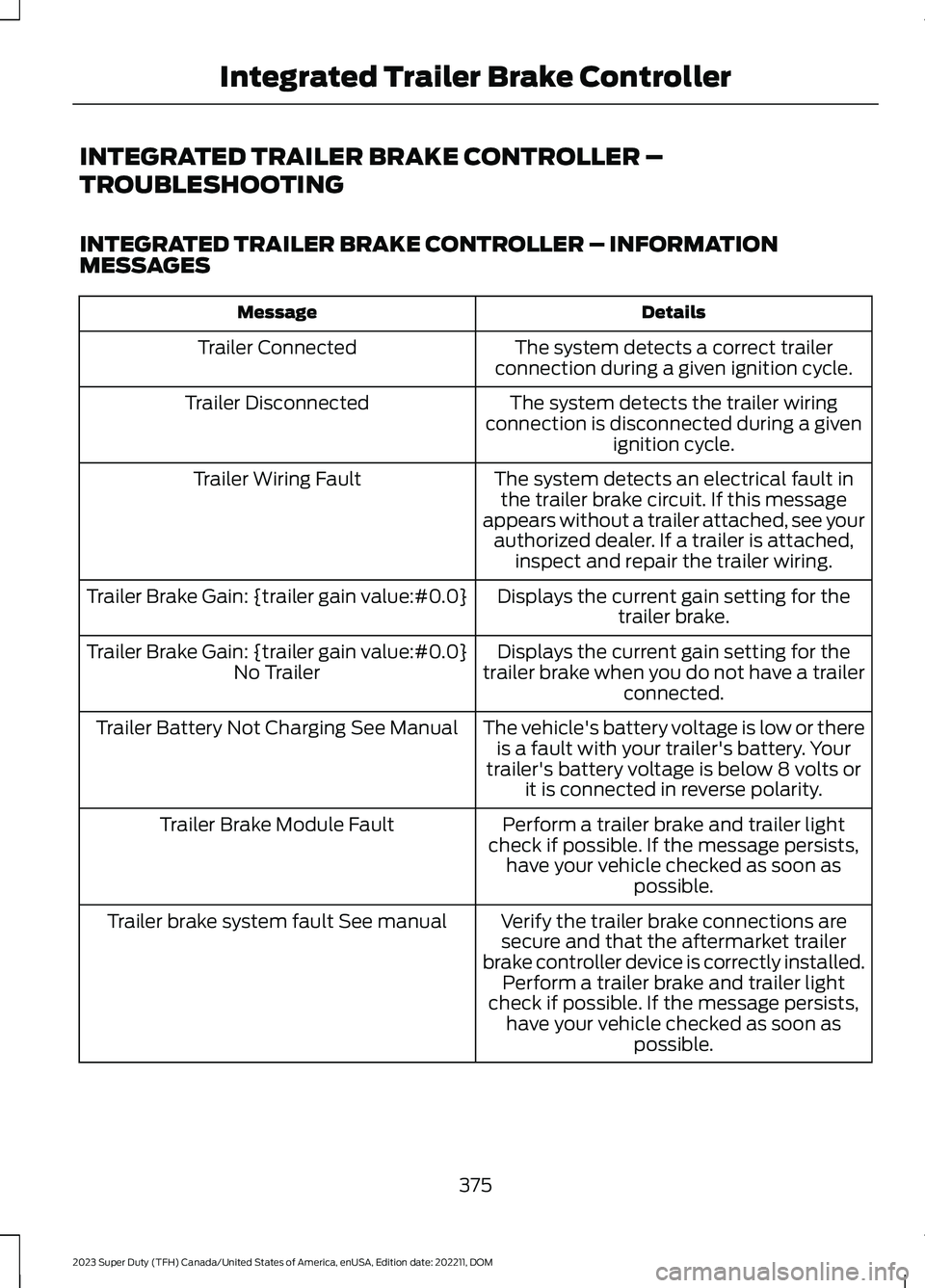
INTEGRATED TRAILER BRAKE CONTROLLER – INFORMATIONMESSAGES
DetailsMessage
The system detects a correct trailerconnection during a given ignition cycle.Trailer Connected
The system detects the trailer wiringconnection is disconnected during a givenignition cycle.
Trailer Disconnected
The system detects an electrical fault inthe trailer brake circuit. If this messageappears without a trailer attached, see yourauthorized dealer. If a trailer is attached,inspect and repair the trailer wiring.
Trailer Wiring Fault
Displays the current gain setting for thetrailer brake.Trailer Brake Gain: {trailer gain value:#0.0}
Displays the current gain setting for thetrailer brake when you do not have a trailerconnected.
Trailer Brake Gain: {trailer gain value:#0.0}No Trailer
The vehicle's battery voltage is low or thereis a fault with your trailer's battery. Yourtrailer's battery voltage is below 8 volts orit is connected in reverse polarity.
Trailer Battery Not Charging See Manual
Perform a trailer brake and trailer lightcheck if possible. If the message persists,have your vehicle checked as soon aspossible.
Trailer Brake Module Fault
Verify the trailer brake connections aresecure and that the aftermarket trailerbrake controller device is correctly installed.Perform a trailer brake and trailer lightcheck if possible. If the message persists,have your vehicle checked as soon aspossible.
Trailer brake system fault See manual
375
2023 Super Duty (TFH) Canada/United States of America, enUSA, Edition date: 202211, DOMIntegrated Trailer Brake Controller