brake FORD SUPER DUTY 2023 Owners Manual
[x] Cancel search | Manufacturer: FORD, Model Year: 2023, Model line: SUPER DUTY, Model: FORD SUPER DUTY 2023Pages: 738, PDF Size: 18.49 MB
Page 12 of 738
Four-Wheel Drive Precautions..............239
Four-Wheel Drive Limitations................239
Switching Four-Wheel Drive On and Off........................................................................240
Selecting a Four-Wheel Drive Mode.....241
Four-Wheel Drive Modes.........................242
Four-Wheel Drive Indicators...................242
Transfer Case Fluid Capacity andSpecification............................................242
Four-Wheel Drive – Troubleshooting........................................................................242
Electronic Locking Differential
What Is the Electronic LockingDifferential................................................245
How Does the Electronic LockingDifferential Work.....................................245
Electronic Locking DifferentialPrecautions...............................................245
Switching the Electronic LockingDifferential On and Off - 4x4.............245
Switching the Electronic LockingDifferential On and Off - 4x2..............247
Electronic Locking Differential Indicators........................................................................247
Electronic Locking Differential –Troubleshooting.....................................248
Brakes
Brake Precautions......................................249
Anti-Lock Braking System......................249
Brake Over Accelerator.............................249
Locating the Brake Fluid Reservoir......249
Checking the Brake Fluid.........................249
Brake Fluid Specification.........................250
Brakes – Troubleshooting.......................250
Electric Parking Brake
What Is the Electric Parking Brake.......253
Applying the Electric Parking Brake......253
Applying the Electric Parking Brake in anEmergency................................................253
Manually Releasing the Electric ParkingBrake............................................................253
Automatically Releasing the ElectricParking Brake...........................................254
Electric Parking Brake Audible Warning........................................................................254
Releasing the Electric Parking Brake ifthe Vehicle Battery Has Run Out ofCharge........................................................254
Electric Parking Brake – Troubleshooting........................................................................254
Diesel Engine Exhaust Brake
Diesel Engine Exhaust Brake –Precautions...............................................256
Using the Diesel Engine Exhaust Brake........................................................................256
Diesel Engine Exhaust Brake Indicators........................................................................257
Diesel Engine Exhaust Brake Gauge.....257
Diesel Engine Exhaust Brake –Troubleshooting......................................257
Diesel Engine Exhaust Brake Videos........................................................................257
Reverse Brake Assist
What Is Reverse Brake Assist.................258
How Does Reverse Brake Assist Work........................................................................258
Reverse Brake Assist Precautions........258
Switching Reverse Brake Assist On andOff................................................................259
Overriding Reverse Brake Assist...........259
Reverse Brake Assist Indicators............259
Reverse Brake Assist – Troubleshooting.......................................................................260
Cross Traffic Braking
What Is Cross Traffic Braking.................262
8
2023 Super Duty (TFH) Canada/United States of America, enUSA, Edition date: 202211, DOMTable of Contents
Page 16 of 738
Pre-Collision Assist Videos.....................345
Driver Alert
What Is Driver Alert....................................346
How Does Driver Alert Work...................346
Driver Alert Precautions...........................346
Driver Alert Limitations............................346
Switching Driver Alert On and Off.......346
Driver Alert – Troubleshooting...............347
Speed Sign Recognition
What Is Speed Sign Recognition..........348
How Does Speed Sign Recognition Work........................................................................348
Speed Sign Recognition Precautions........................................................................348
Speed Sign Recognition Limitations........................................................................348
Speed Sign Recognition Indicators......348
Setting the Speed Sign RecognitionSpeed Warning.......................................349
Setting the Speed Sign RecognitionSpeed Tolerance....................................349
Speed Sign Recognition –Troubleshooting.....................................349
Load Carrying
Load Carrying Precautions.......................351
Using a Slide-In Camper..........................352
Locating the Safety ComplianceCertification Labels................................352
What Is the Gross Axle Weight Rating........................................................................352
What Is the Gross Vehicle Weight Rating........................................................................352
What Is the Gross Combined WeightRating..........................................................352
Calculating Payload...................................353
Calculating the Load Limit......................353
Pickup Bed
Pickup Bed Precautions...........................356
Pickup Bed Anchor Points......................356
Tailgate Anchor Points.............................358
Pickup Bed Videos.....................................358
Connecting a Trailer
Connecting a Trailer Precautions.........359
Hitches...........................................................359
Connecting a Trailer....................................361
Trailer Lighting Check...............................363
Connecting a Trailer – Troubleshooting........................................................................364
Connecting a Trailer Videos...................364
Towing a Trailer
Towing a Trailer Precautions..................365
Trailer Brake Precautions........................365
Towing a Trailer Limitations...................366
Loading Your Trailer...................................366
Trailer Towing Hints...................................366
Launching or Retrieving a Boat orPersonal Watercraft..............................367
Towing Weights and Dimensions.........368
Towing a Trailer – Troubleshooting......370
Towing a Trailer Videos..............................371
Integrated Trailer BrakeController
What Is the Integrated Trailer BrakeController...................................................372
Integrated Trailer Brake ControllerPrecautions...............................................372
Using the Integrated Trailer BrakeController...................................................372
Adjusting the Integrated Trailer BrakeController Mode......................................374
Integrated Trailer Brake Controller –Troubleshooting......................................375
Integrated Trailer Brake ControllerVideos.........................................................376
12
2023 Super Duty (TFH) Canada/United States of America, enUSA, Edition date: 202211, DOMTable of Contents
Page 19 of 738
Wheel and Tire Information
Locating the Tire label..............................478
Department of Transportation UniformTire Quality Grades................................478
Information on the Tire Sidewall..........479
Glossary of Tire Terminology.................484
Tire Replacement Requirements.........485
Using Snow Chains....................................487
Tire Care
Checking the Tire Pressures..................490
Inflating the Tires.......................................490
Inspecting the Tire for Wear...................494
Inspecting the Tire for Damage............494
Inspecting the Wheel Valve Stems......498
Tire Rotation................................................498
Tire Pressure MonitoringSystem
What Is the Tire Pressure MonitoringSystem........................................................501
Tire Pressure Monitoring SystemOverview.....................................................501
Tire Pressure Monitoring SystemPrecautions..............................................502
Tire Pressure Monitoring SystemLimitations................................................502
Viewing the Tire Pressures.....................503
Resetting Tire Pressure MonitoringSystem.......................................................503
Tire Pressure Monitoring System –Troubleshooting.....................................506
Tire Pressure Monitoring System Videos.......................................................................508
Changing a Road Wheel
Changing a Flat Tire..................................509
Wheel Nuts....................................................519
Capacities and Specifications
Engine Specifications - 6.7L Diesel......520
Engine Specifications - 6.8L, Gasoline.........................................................................521
Engine Specifications - 7.3L, Gasoline........................................................................522
Motorcraft Parts - 6.7L Diesel................523
Motorcraft Parts - 6.8L, Gasoline.........524
Motorcraft Parts - 7.3L, Gasoline..........525
Engine Oil Capacity and Specification -6.7L Diesel.................................................526
Engine Oil Capacity and Specification -6.8L, Gasoline..........................................528
Engine Oil Capacity and Specification -7.3L, Gasoline...........................................530
Cooling System Capacity andSpecification - 6.7L Diesel...................532
Cooling System Capacity andSpecification - 6.8L, Gasoline............533
Cooling System Capacity andSpecification - 7.3L, Gasoline.............534
Fuel Tank Capacity - Diesel....................534
Fuel Tank Capacity - Gasoline...............535
Air Conditioning System Capacity andSpecification............................................536
Washer Fluid Specification.....................536
Diesel Exhaust Fluid Capacity andSpecification.............................................537
Automatic Transmission Fluid Capacityand Specification - Diesel...................538
Automatic Transmission Fluid Capacityand Specification - Gasoline.............538
Brake Fluid Specification.........................539
Transfer Case Fluid Capacity andSpecification............................................540
Front Axle Fluid Capacity andSpecification............................................540
Rear Axle Fluid Capacity andSpecification............................................542
Hydraulic Power Steering Fluid Capacityand Specification...................................546
15
2023 Super Duty (TFH) Canada/United States of America, enUSA, Edition date: 202211, DOMTable of Contents
Page 27 of 738
SYMBOLS USED ON YOUR
VEHICLE
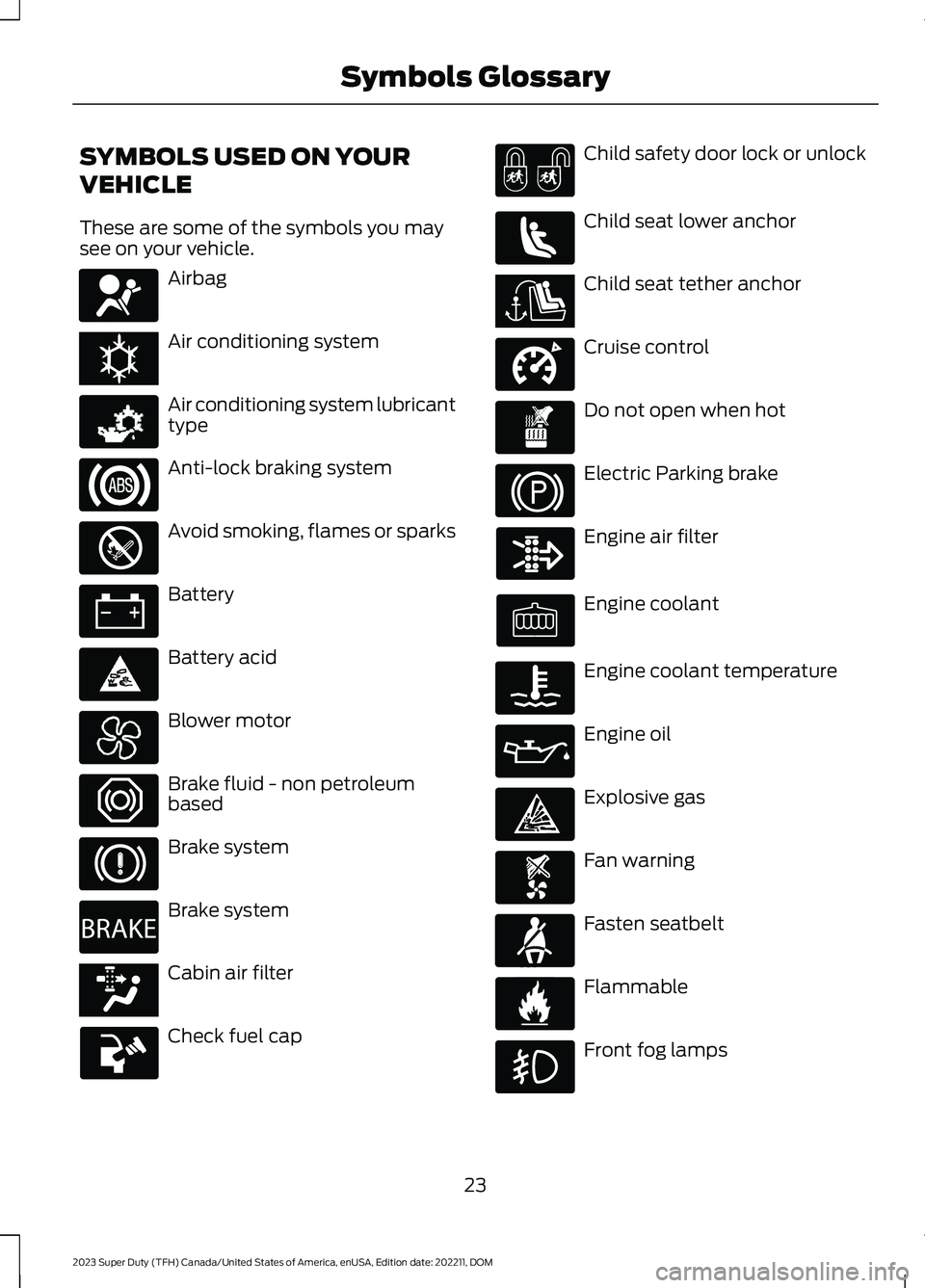
These are some of the symbols you maysee on your vehicle.
Airbag
Air conditioning system
Air conditioning system lubricanttype
Anti-lock braking system
Avoid smoking, flames or sparks
Battery
Battery acid
Blower motor
Brake fluid - non petroleumbased
Brake system
Brake system
Cabin air filter
Check fuel cap
Child safety door lock or unlock
Child seat lower anchor
Child seat tether anchor
Cruise control
Do not open when hot
Electric Parking brake
Engine air filter
Engine coolant
Engine coolant temperature
Engine oil
Explosive gas
Fan warning
Fasten seatbelt
Flammable
Front fog lamps
23
2023 Super Duty (TFH) Canada/United States of America, enUSA, Edition date: 202211, DOMSymbols GlossaryE67017 E162384 E231157 E67020 E139220 E67021 E139227 E139209 E67024 E270480 E139223 E139211 E141128 E332905 E139219 E139212 E103308 E67022 E139221 E139228 E71880 E231160
Page 30 of 738
WARNING: Do not connectwireless plug-in devices to the data linkconnector. Unauthorized third partiescould gain access to vehicle data andimpair the performance of safety relatedsystems. Only allow repair facilities thatfollow our service and repair instructionsto connect their equipment to the datalink connector.
We respect your privacy and arecommitted to protecting it. Theinformation contained in this publicationwas correct at the time of release, but astechnology rapidly changes, werecommend that you visit the local Fordwebsite for the latest information.
Your vehicle has electronic control unitsthat have data recording functionality andthe ability to permanently or temporarilystore data. This data could includeinformation on the condition and status ofyour vehicle, vehicle maintenancerequirements, events and malfunctions.The types of data that can be recorded aredescribed in this section. Some of the datarecorded is stored in event logs or errorlogs.
Note:Error logs are reset following a serviceor repair.
Note:We may provide information inresponse to requests from law enforcement,other government authorities and thirdparties acting with lawful authority orthrough a legal process. Such informationcould be used by them in legal proceedings.
Data recorded includes, for example:
•Operating states of systemcomponents, for example fuel level,tire pressure and battery charge level.
•Vehicle and component status, forexample wheel speed, deceleration,lateral acceleration and seatbeltstatus.
•Events or errors in essential systems,for example headlamps and brakes.
•System responses to driving situations,for example airbag deployment andstability control.
•Environmental conditions, for exampletemperature.
Some of this data, when used incombination with other information, forexample an accident report, damage to avehicle or eyewitness statements, couldbe associated with a specific person.
Services That We Provide
If you use our services, we collect and usedata, for example account information,vehicle location and driving characteristics,that could identify you. We transmit thisdata through a dedicated, protectedconnection. We only collect and use datato enable your use of our services to whichyou have subscribed, with your consent orwhere permitted by law. For additionalinformation, see the terms and conditionsof the services to which you havesubscribed.
For additional information about ourprivacy policy, refer to the local Fordwebsite.
Services That Third PartiesProvide
We recommend that you review the termsand conditions and data privacyinformation for any services equipped withyour vehicle or to which you subscribe. Wetake no responsibility for services that thirdparties provide.
Where equipped, SiriusXM with 360L coulduse the modem. To disable, turn off theSiriusXM with 360L or Vehicle Connectivitysetting. See Enabling and Disabling theModem (page 548).
26
2023 Super Duty (TFH) Canada/United States of America, enUSA, Edition date: 202211, DOMData Privacy
Page 31 of 738
SERVICE DATA
Service data recorders in your vehicle arecapable of collecting and storingdiagnostic information about your vehicle.This potentially includes information aboutthe performance or status of varioussystems and modules in the vehicle, suchas engine, throttle, steering or brakesystems. In order to properly diagnose andservice your vehicle, Ford Motor Company(Ford of Canada in Canada), and serviceand repair facilities may access or shareamong them vehicle diagnosticinformation received through a directconnection to your vehicle whendiagnosing or servicing your vehicle.Additionally, Ford Motor Company (Fordof Canada, in Canada) may, wherepermitted by law, use vehicle diagnosticinformation for vehicle improvement orwith other information we may have aboutyou, for example, your contact information,to offer you products or services that mayinterest you. Data may be provided to ourservice providers such as part suppliersthat may help diagnose malfunctions, andwho are similarly obligated to protect data.We retain this data only as long asnecessary to perform these functions or tocomply with law. We may provideinformation where required in response toofficial requests to law enforcement orother government authorities or thirdparties acting with lawful authority or courtorder, and such information may be usedin legal proceedings. For U.S. only (ifequipped), if you choose to use connectedapps and services, you consent that certaindiagnostic information may also beaccessed electronically by Ford MotorCompany and Ford authorized servicefacilities, and that the diagnosticinformation may be used to provideservices to you, personalizing yourexperience, troubleshoot, and to improveproducts and services and offer youproducts and services that may interest
you, where permitted by law. For Canadaonly, for more information, please reviewthe Ford of Canada privacy policy atwww.ford.ca, including our U.S. datastorage and use of service providers inother jurisdictions who may be subject tolegal requirements in Canada, the UnitedStates and other countries applicable tothem, for example, lawful requirements todisclose personal information togovernmental authorities in thosecountries.
EVENT DATA
This vehicle is equipped with an event datarecorder. The main purpose of an eventdata recorder is to record, in certain crashor near crash-like situations, such as anairbag deployment or hitting a roadobstacle; this data will assist inunderstanding how a vehicle’s systemsperformed. The event data recorder isdesigned to record data related to vehicledynamics and safety systems for a shortperiod of time, typically 30 seconds or less.
The event data recorder in this vehicle isdesigned to record such data as:
•How various systems in your vehiclewere operating.
•Whether or not the driver andpassenger seatbelts werebuckled/fastened.
•How far (if at all) the driver wasdepressing the accelerator and/or thebrake pedal.
•How fast the vehicle was traveling.
•Where the driver was positioning thesteering wheel.
This data can help provide a betterunderstanding of the circumstances inwhich crashes and injuries occur.
27
2023 Super Duty (TFH) Canada/United States of America, enUSA, Edition date: 202211, DOMData Privacy
Page 37 of 738
See Selecting a Four-Wheel Drive Mode (page 241).L
See Using the Integrated Trailer Brake Controller (page 372).M
See Exterior Lighting Control (page 117).N
VEHICLE INTERIOR
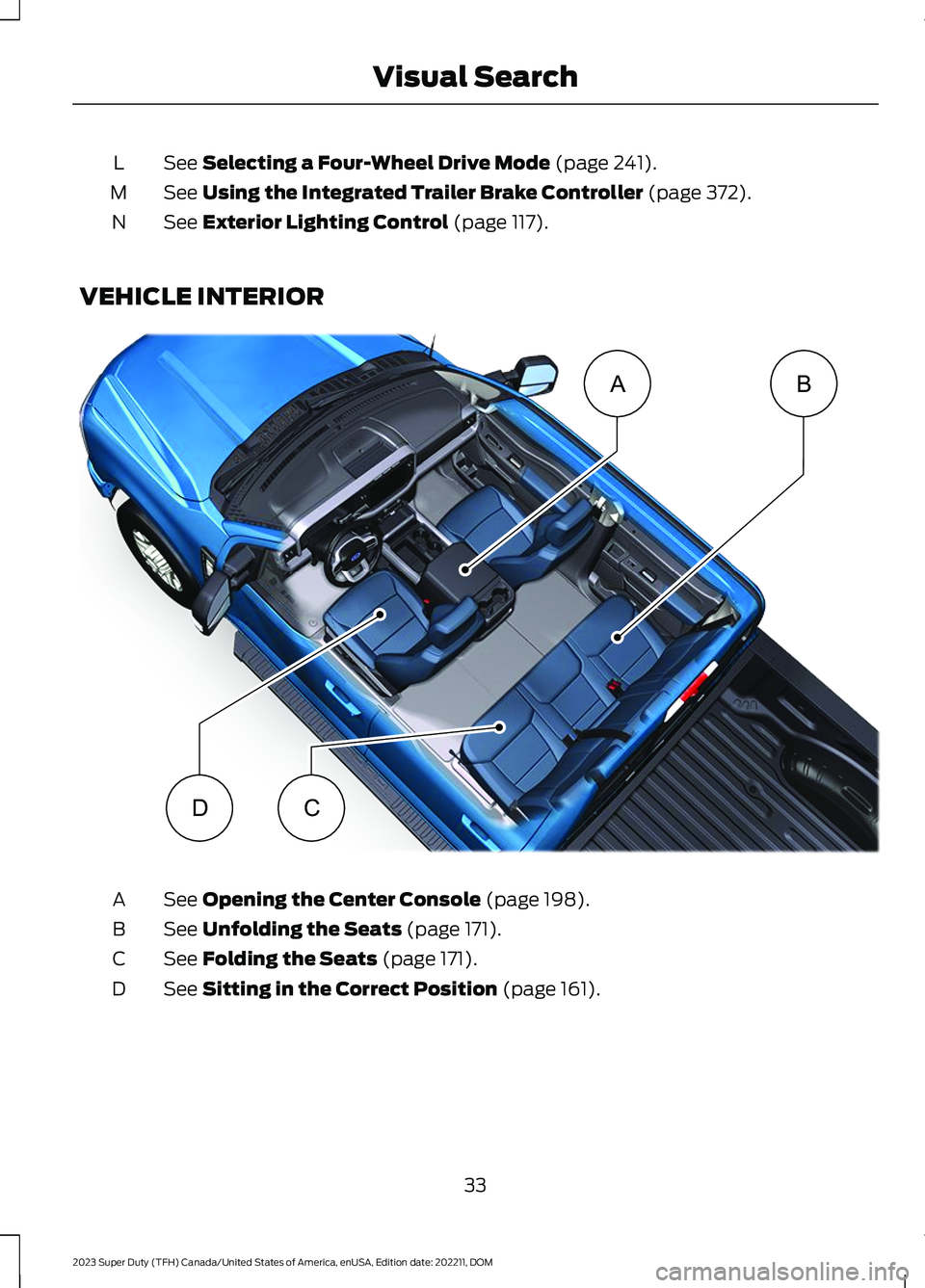
See Opening the Center Console (page 198).A
See Unfolding the Seats (page 171).B
See Folding the Seats (page 171).C
See Sitting in the Correct Position (page 161).D
33
2023 Super Duty (TFH) Canada/United States of America, enUSA, Edition date: 202211, DOMVisual SearchBADC E374896
Page 56 of 738
The cinch tongue slides up and down theseatbelt webbing when you stow theseatbelt or when you put the seatbelts on.When you buckle the seatbelt, the cinchtongue allows you to shorten the lapportion, but pinches the webbing to keepthe lap portion from getting longer. Thecinch tongue is designed to slip during acrash, so wear the shoulder belt properlyand do not allow any slack in either the lapor shoulder portions.
While you are fastened in the seatbelt, theseatbelt with a cinch tongue adjusts toyour movement. However, if you brakehard, turn hard, or if your vehicle receivesan impact of 5 mph (8 km/h) or more, theseatbelt locks and helps reduce yourforward movement.
SENSITIVE LOCKING MODE
WHAT IS SENSITIVE LOCKINGMODE
Sensitive locking mode is a seatbeltretractor feature that allows shoulder beltlength adjustment according to yourmovements and locking in response tovehicle movement.
HOW DOES SENSITIVE LOCKINGMODE WORK
If the driver suddenly brakes, turns a cornersharply, or the vehicle receives an impactof about 5 mph (8 km/h) or more, theseatbelts lock to help reduce forwardmovement of the driver and passengers.
In addition, the seatbelt retractor locks ifyou pull the seatbelt webbing out tooquickly. If the retractor locks, slowly lowerthe height adjuster to allow the seatbeltto retract.
If the retractor does not unlock, pull theseatbelt out slowly then feed a smalllength of webbing back toward the stowedposition.
AUTOMATIC LOCKING MODE
WHAT IS AUTOMATIC LOCKINGMODE
This feature keeps the seatbeltspre-locked. The belt still retracts to removeany slack in the shoulder belt.
WHEN TO USE AUTOMATICLOCKING MODE
Use this mode any time you install a childrestraint in a front or rear seating position.Properly restrain children 12 years old andunder in a rear seat whenever possible. SeeChild Safety (page 36).
Note:Automatic locking mode is notavailable on the driver seatbelt.
Note:Vehicles with optional front seatcenter may not have this function.
ENGAGING AUTOMATIC LOCKINGMODE
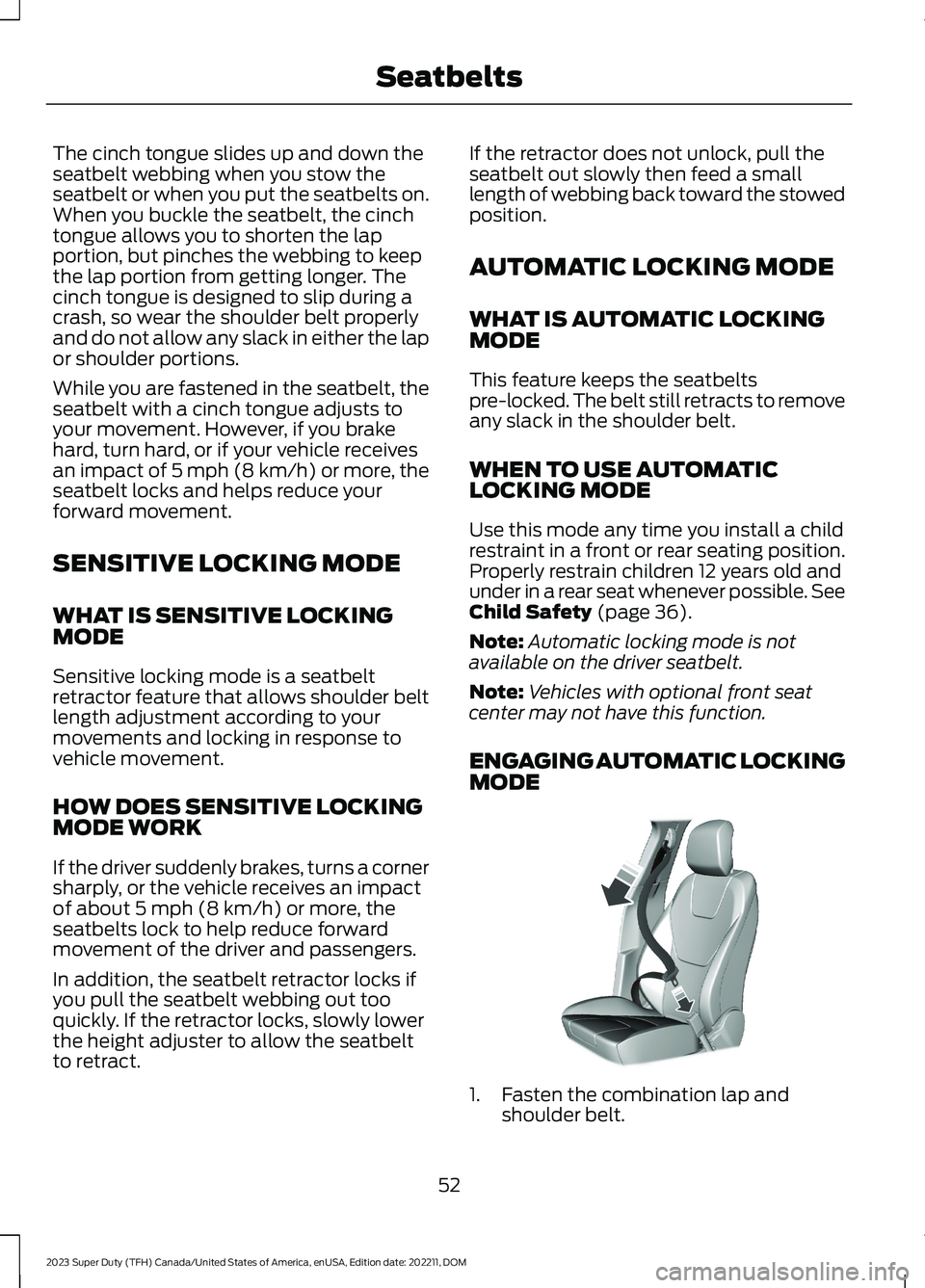
1.Fasten the combination lap andshoulder belt.
52
2023 Super Duty (TFH) Canada/United States of America, enUSA, Edition date: 202211, DOMSeatbeltsE142591
Page 59 of 738
•When the ignition is on, a warninginforms the driver about the status ofeach seat, following each seat buckleor unbuckle. You can acknowledge this,or the system will time out after 60seconds.
•If a seatbelt is unfastened, a secondwarning informs the driver about whichseatbelt was unfastened. A warningremains until all occupied seatbelts arefastened.
SEATBELT REMINDERINDICATORS
A warning lamp illuminates if the ignitionis on, a front seat is occupied and theseatbelt has not been fastened.
The warning lamp illuminatesuntil you fasten your seatbelt.
SEATBELT REMINDER AUDIBLEWARNINGS
A warning tone sounds and the warninglamp illuminates if you are not wearingyour seatbelt when your vehicle exceedsa relatively low speed.
The warning tone sounds for a short periodof time or until you fasten your seatbelt.
SWITCHING THE SEATBELTREMINDER ON AND OFF
WARNING: While the systemallows you to deactivate it, this systemis designed to improve your chances ofbeing safely belted and surviving anaccident. We recommend you leave thesystem activated for yourself and otherswho may use the vehicle.
Note:The driver and front passengerwarnings switch off independently. Whenyou perform this procedure for one seatingposition, do not buckle the other position asthis cancels the process.
Read Steps 1 - 4 before proceeding withthe programming procedure.
Make sure that:
•You set the parking brake.
•The transmission is in park (P).
•The ignition is off.
•You close all vehicle doors.
•You unfasten the driver and frontpassenger seatbelts.
1.Switch the ignition on. Do not start theengine.
2.Wait about one minute until theseatbelt warning light switches off.After Step 2, wait an additional fiveseconds before proceeding with Step3. Once you start Step 3, you mustcomplete the procedure within 30seconds.
3.For the seating position you areswitching off, fasten then unfasten theseatbelt three times at a moderatespeed, ending in the unfastened state.After Step 3, the seatbelt warning lightswitches on.
4.When the seatbelt warning light is on,fasten then unfasten the seatbelt. AfterStep 4, the seatbelt warning lightflashes for confirmation.
This switches the feature off for thatseating position if it is currently on.
This switches the feature on for thatseating position if it is currently off.
55
2023 Super Duty (TFH) Canada/United States of America, enUSA, Edition date: 202211, DOMSeatbeltsE71880
Page 74 of 738
Note:Do not leave a key card in hightemperatures. This can damage the keycard, causing it to no longer function.
Locking and Unlocking YourVehicle
Tap your key card on the exteriorkey reader, over the keyless entrykeypad, to lock or unlock thedriver door. If your vehicle is locked and youtap your key card on the key reader, yourvehicle unlocks. If your vehicle is unlockedand you tap your key card on the keyreader, your vehicle locks. See Locatingthe Key Readers (page 73).
Note:The key reader only works when usedin close proximity with a compatible keycard. The key reader may not function if youhold the key card more than 1.6 in (4 cm)away.
Note:Hold your key card over the exteriorkey reader for a few seconds to lock orunlock all doors.
Note:Only Ford issued key cards arecompatible with your vehicle.
Starting Your Vehicle
Using the Exterior Key Reader
You can start your vehicle without havingto tap your key card on the interior keyreader if you press the ignition switchwithin 60 seconds of unlocking yourvehicle using the exterior key reader.
1.Tap your key card on the exterior keyreader, over the keyless entry keypad,to unlock your vehicle. See Locatingthe Key Readers (page 73).
2.Enter your vehicle.
3.Fully press the brake pedal.
4.Press the push button ignition switch.See Starting and Stopping theEngine (page 202).
Using the Interior Key Reader
1.Tap your key card on the key reader. Atone sounds from your vehicle whenthe key reader recognizes the key card.See Locating the Key Readers (page73).
2.Fully press the brake pedal.
3.Press the push button ignition switch.See Starting and Stopping theEngine (page 202).
Adding and Deleting Key Cards
Your vehicle comes with two near fieldcommunication-enabled key cards,referred to as factory key cards.
You can purchase additional key cards andadd them to your vehicle at any time.These are considered user key cards andare not the same as factory key cards.Contact an authorized dealer to purchaseuser key cards.
Note:A single key card can be associatedwith multiple vehicles.
Note:You cannot add or delete factory keycards. Only authorized service technicianscan add or delete factory key cards.
Note:Make sure you install FordPass onyour mobile device and activate FordPassConnect on your vehicle.
Adding a Key Card
1.Start your vehicle with any key.
2.Press Settings on the touchscreen.
3.Press Vehicle.
4.Press Keys.
5.Press Add Key Card.
6.Follow the prompts on thetouchscreen.
70
2023 Super Duty (TFH) Canada/United States of America, enUSA, Edition date: 202211, DOMKeys and Remote ControlsE368487