lock FORD TAURUS 2015 6.G Service Manual
[x] Cancel search | Manufacturer: FORD, Model Year: 2015, Model line: TAURUS, Model: FORD TAURUS 2015 6.GPages: 558, PDF Size: 4.42 MB
Page 114 of 558
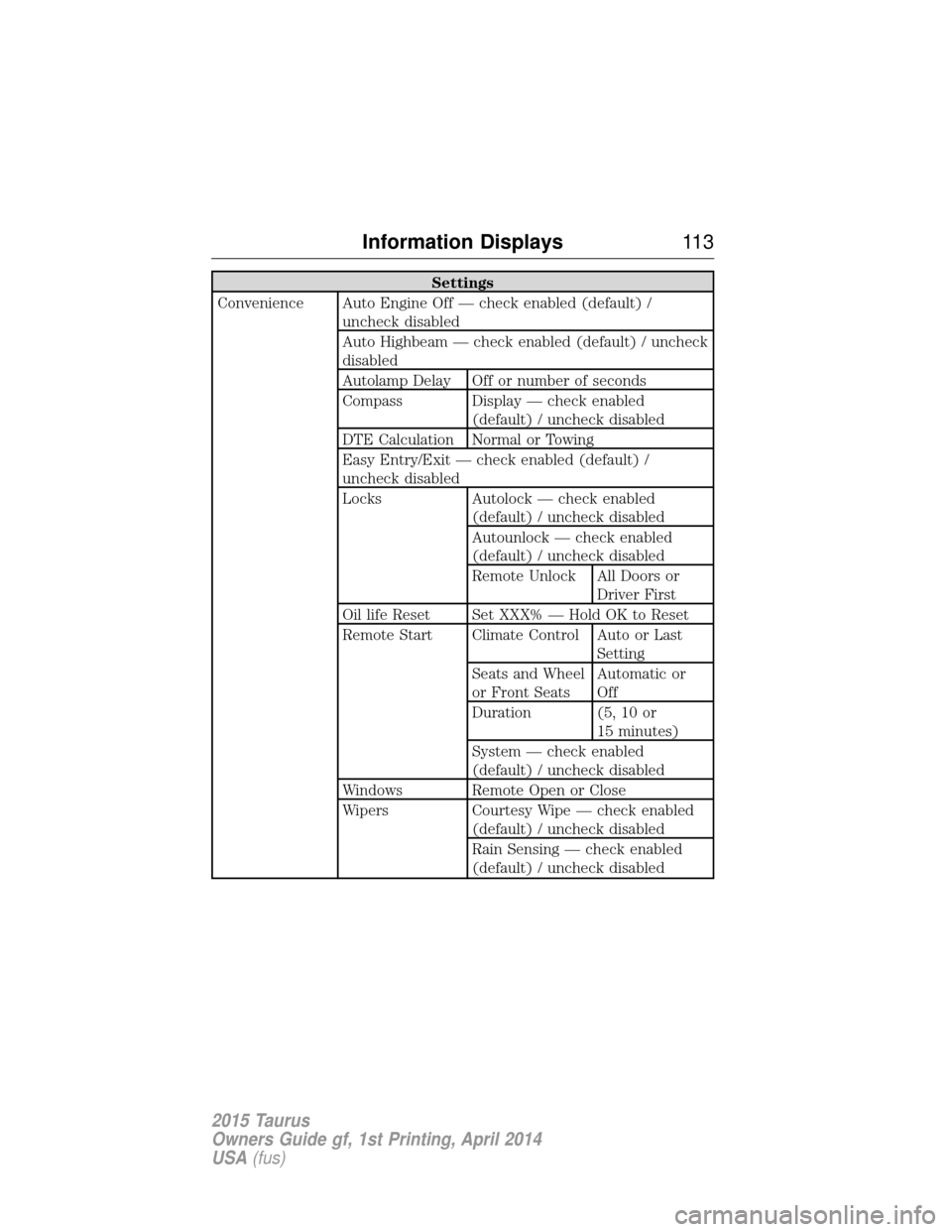
Settings
Convenience Auto Engine Off — check enabled (default) / uncheck disabled
Auto Highbeam — check enabled (default) / uncheck
disabled
Autolamp Delay Off or number of seconds
Compass Display — check enabled (default) / uncheck disabled
DTE Calculation Normal or Towing
Easy Entry/Exit — check enabled (default) /
uncheck disabled
Locks Autolock — check enabled (default) / uncheck disabled
Autounlock — check enabled
(default) / uncheck disabled
Remote Unlock All Doors orDriver First
Oil life Reset Set XXX% — Hold OK to Reset
Remote Start Climate Control Auto or Last Setting
Seats and Wheel
or Front Seats Automatic or
Off
Duration (5, 10 or 15 minutes)
System — check enabled
(default) / uncheck disabled
Windows Remote Open or Close
Wipers Courtesy Wipe — check enabled (default) / uncheck disabled
Rain Sensing — check enabled
(default) / uncheck disabled
Information Displays 11 3
2015 Taurus
Owners Guide gf, 1st Printing, April 2014
USA(fus)
Page 120 of 558
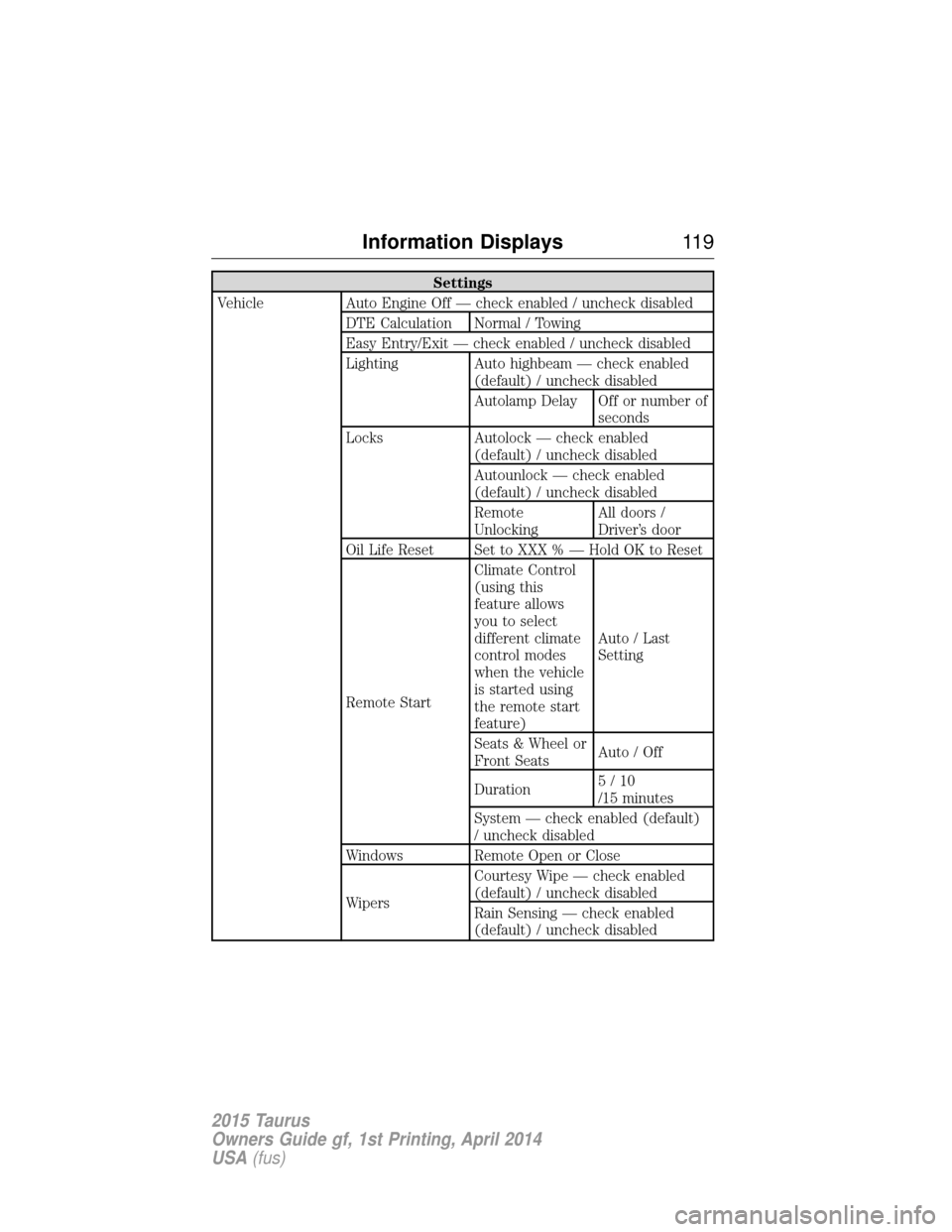
Settings
Vehicle Auto Engine Off — check enabled / uncheck disabled DTE Calculation Normal / Towing
Easy Entry/Exit — check enabled / uncheck disabled
Lighting Auto highbeam — check enabled(default) / uncheck disabled
Autolamp Delay Off or number ofseconds
Locks Autolock — check enabled (default) / uncheck disabled
Autounlock — check enabled
(default) / uncheck disabled
Remote
UnlockingAll doors /
Driver’s door
Oil Life Reset Set to XXX % — Hold OK to Reset
Remote Start Climate Control
(using this
feature allows
you to select
different climate
control modes
when the vehicle
is started using
the remote start
feature)
Auto / Last
Setting
Seats & Wheel or
Front Seats Auto / Off
Duration 5/10
/15 minutes
System — check enabled (default)
/ uncheck disabled
Windows Remote Open or Close
Wipers Courtesy Wipe — check enabled
(default) / uncheck disabled
Rain Sensing — check enabled
(default) / uncheck disabled
Information Displays
11 9
2015 Taurus
Owners Guide gf, 1st Printing, April 2014
USA(fus)
Page 122 of 558
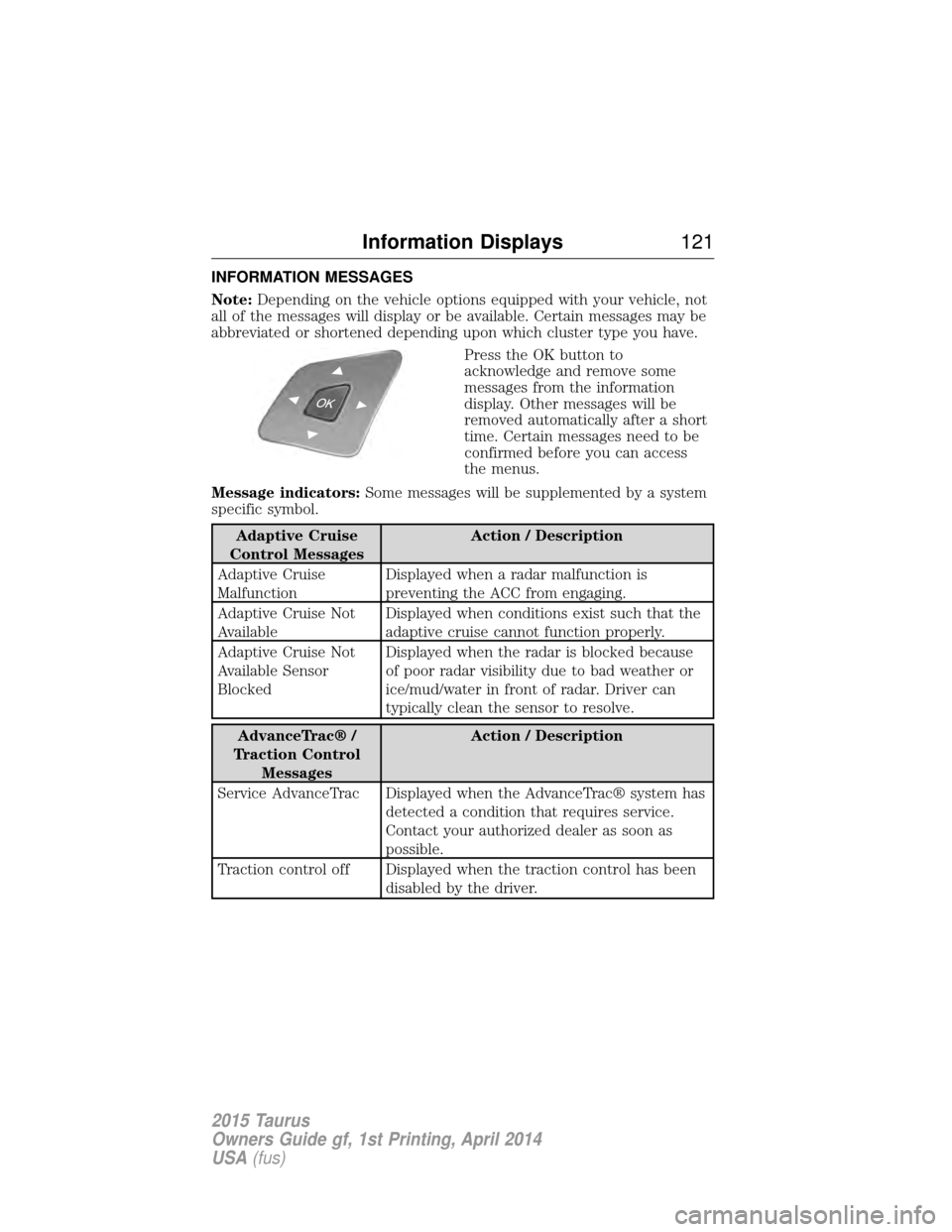
INFORMATION MESSAGES
Note:Depending on the vehicle options equipped with your vehicle, not
all of the messages will display or be available. Certain messages may be
abbreviated or shortened depending upon which cluster type you have.
Press the OK button to
acknowledge and remove some
messages from the information
display. Other messages will be
removed automatically after a short
time. Certain messages need to be
confirmed before you can access
the menus.
Message indicators: Some messages will be supplemented by a system
specific symbol.
Adaptive Cruise
Control Messages Action / Description
Adaptive Cruise
Malfunction Displayed when a radar malfunction is
preventing the ACC from engaging.
Adaptive Cruise Not
Available Displayed when conditions exist such that the
adaptive cruise cannot function properly.
Adaptive Cruise Not
Available Sensor
Blocked Displayed when the radar is blocked because
of poor radar visibility due to bad weather or
ice/mud/water in front of radar. Driver can
typically clean the sensor to resolve.
AdvanceTrac® /
Traction Control Messages Action / Description
Service AdvanceTrac Displayed when the AdvanceTrac® system has detected a condition that requires service.
Contact your authorized dealer as soon as
possible.
Traction control off Displayed when the traction control has been disabled by the driver.
Information Displays 121
2015 Taurus
Owners Guide gf, 1st Printing, April 2014
USA(fus)
Page 125 of 558
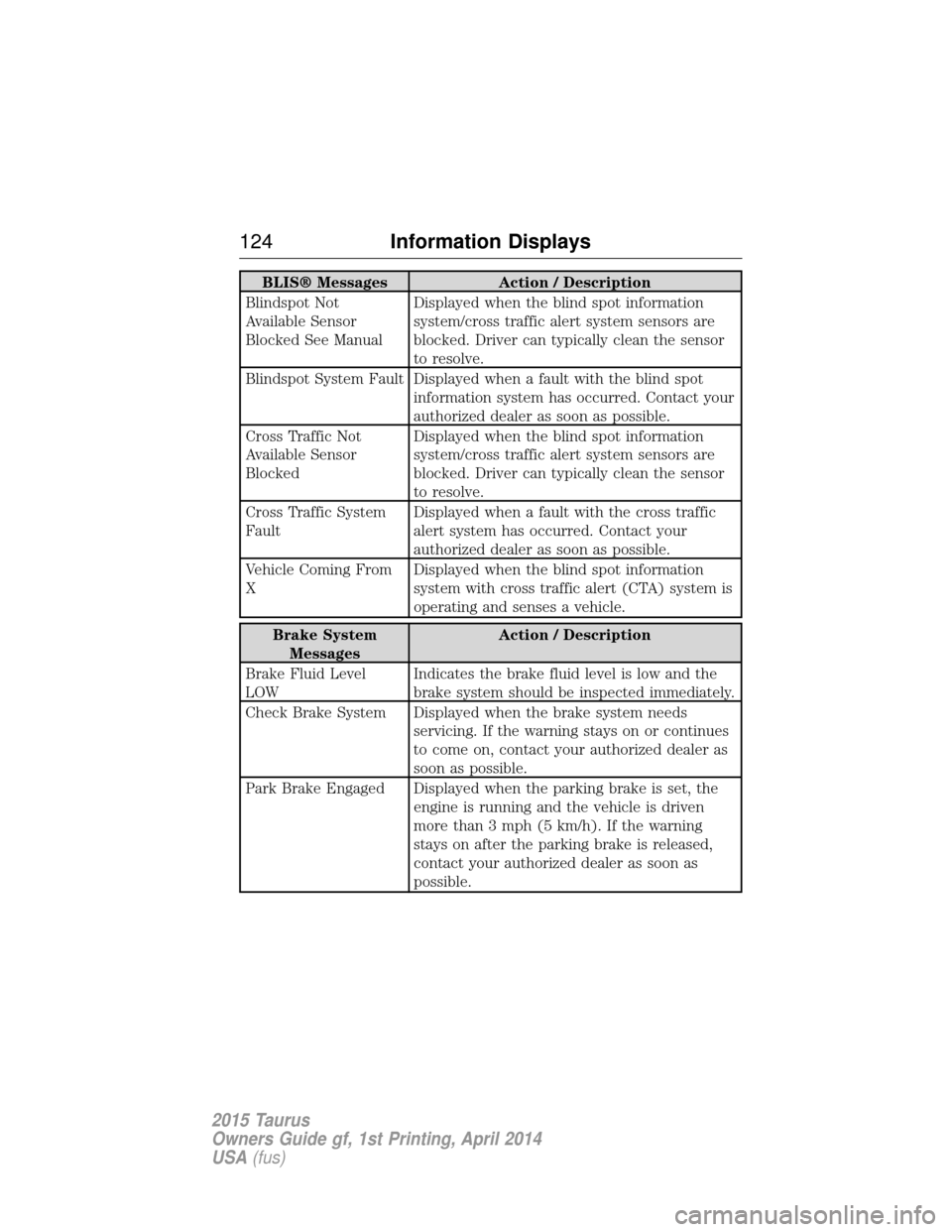
BLIS® MessagesAction / Description
Blindspot Not
Available Sensor
Blocked See Manual Displayed when the blind spot information
system/cross traffic alert system sensors are
blocked. Driver can typically clean the sensor
to resolve.
Blindspot System Fault Displayed when a fault with the blind spot information system has occurred. Contact your
authorized dealer as soon as possible.
Cross Traffic Not
Available Sensor
Blocked Displayed when the blind spot information
system/cross traffic alert system sensors are
blocked. Driver can typically clean the sensor
to resolve.
Cross Traffic System
Fault Displayed when a fault with the cross traffic
alert system has occurred. Contact your
authorized dealer as soon as possible.
Vehicle Coming From
X Displayed when the blind spot information
system with cross traffic alert (CTA) system is
operating and senses a vehicle.
Brake System
Messages Action / Description
Brake Fluid Level
LOW Indicates the brake fluid level is low and the
brake system should be inspected immediately.
Check Brake System Displayed when the brake system needs servicing. If the warning stays on or continues
to come on, contact your authorized dealer as
soon as possible.
Park Brake Engaged Displayed when the parking brake is set, the engine is running and the vehicle is driven
more than 3 mph (5 km/h). If the warning
stays on after the parking brake is released,
contact your authorized dealer as soon as
possible.
124Information Displays
2015 Taurus
Owners Guide gf, 1st Printing, April 2014
USA(fus)
Page 126 of 558
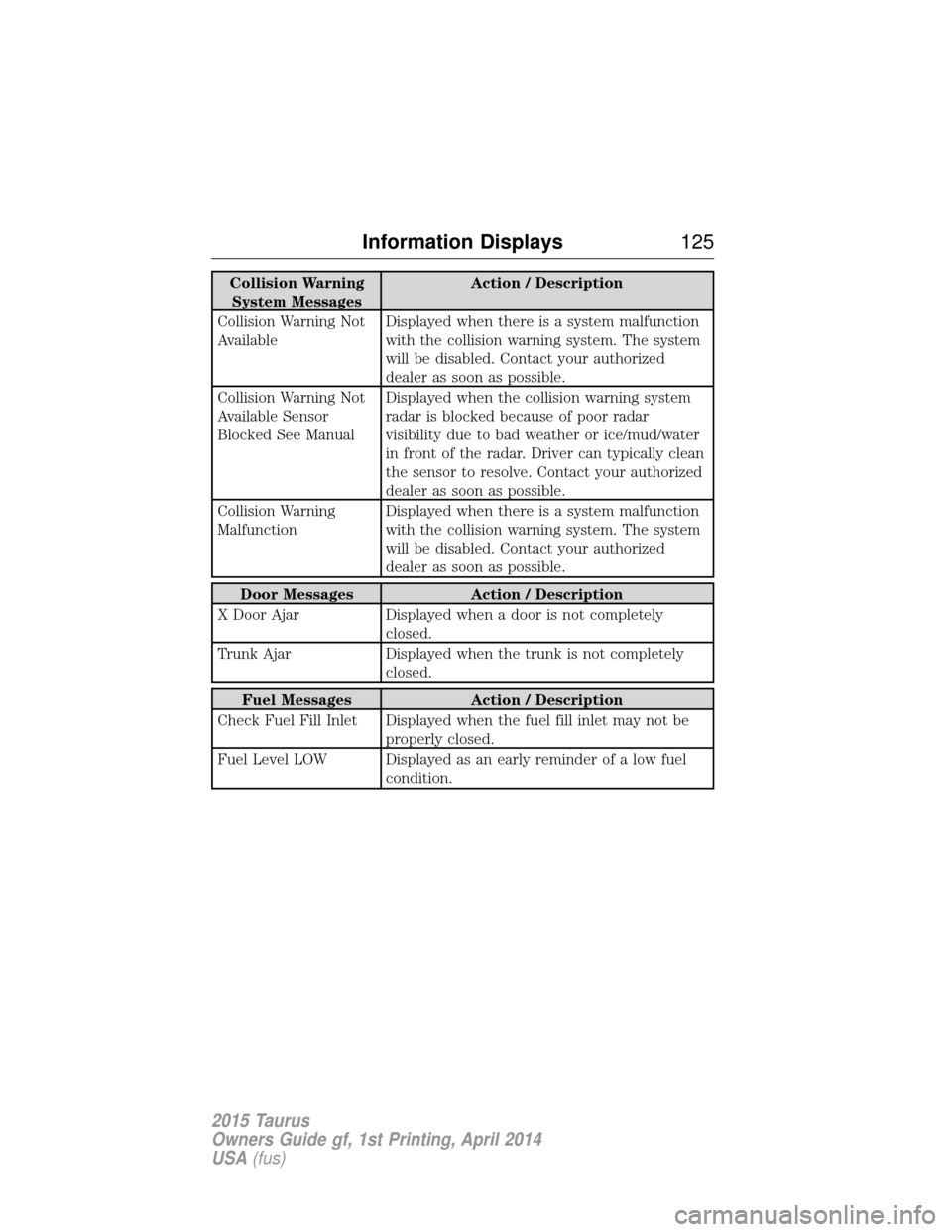
Collision WarningSystem Messages Action / Description
Collision Warning Not
Available Displayed when there is a system malfunction
with the collision warning system. The system
will be disabled. Contact your authorized
dealer as soon as possible.
Collision Warning Not
Available Sensor
Blocked See Manual Displayed when the collision warning system
radar is blocked because of poor radar
visibility due to bad weather or ice/mud/water
in front of the radar. Driver can typically clean
the sensor to resolve. Contact your authorized
dealer as soon as possible.
Collision Warning
Malfunction Displayed when there is a system malfunction
with the collision warning system. The system
will be disabled. Contact your authorized
dealer as soon as possible.
Door Messages
Action / Description
X Door Ajar Displayed when a door is not completely
closed.
Trunk Ajar Displayed when the trunk is not completely
closed.
Fuel Messages Action / Description
Check Fuel Fill Inlet Displayed when the fuel fill inlet may not be properly closed.
Fuel Level LOW Displayed as an early reminder of a low fuel condition.
Information Displays 125
2015 Taurus
Owners Guide gf, 1st Printing, April 2014
USA(fus)
Page 130 of 558
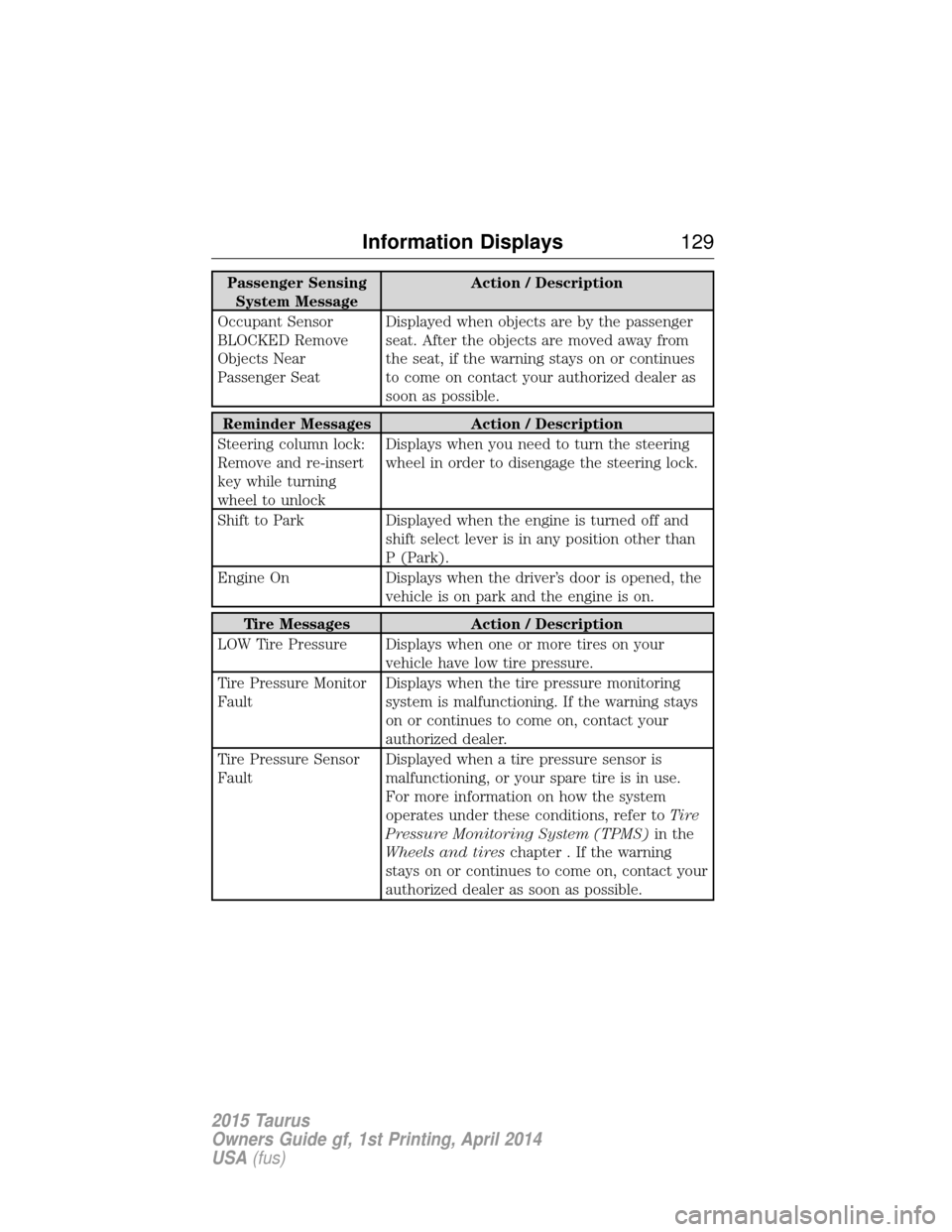
Passenger SensingSystem Message Action / Description
Occupant Sensor
BLOCKED Remove
Objects Near
Passenger Seat Displayed when objects are by the passenger
seat. After the objects are moved away from
the seat, if the warning stays on or continues
to come on contact your authorized dealer as
soon as possible.
Reminder Messages
Action / Description
Steering column lock:
Remove and re-insert
key while turning
wheel to unlock Displays when you need to turn the steering
wheel in order to disengage the steering lock.
Shift to Park Displayed when the engine is turned off and
shift select lever is in any position other than
P (Park).
Engine On Displays when the driver’s door is opened, the
vehicle is on park and the engine is on.
Tire Messages Action / Description
LOW Tire Pressure Displays when one or more tires on your vehicle have low tire pressure.
Tire Pressure Monitor
Fault Displays when the tire pressure monitoring
system is malfunctioning. If the warning stays
on or continues to come on, contact your
authorized dealer.
Tire Pressure Sensor
Fault Displayed when a tire pressure sensor is
malfunctioning, or your spare tire is in use.
For more information on how the system
operates under these conditions, refer to
Ti r e
Pressure Monitoring System (TPMS) in the
Wheels and tires chapter . If the warning
stays on or continues to come on, contact your
authorized dealer as soon as possible.
Information Displays 129
2015 Taurus
Owners Guide gf, 1st Printing, April 2014
USA(fus)
Page 145 of 558
Note:Before adjusting any head restraint, adjust the seat back to an
upright driving or riding position. Properly adjust the head restraint so
that the top of the head restraint is even with the top of your head and
positioned as close as possible to the back of your head. For occupants
of extremely tall stature, adjust the head restraint to its full up position.
To adjust the head restraint, do the following:
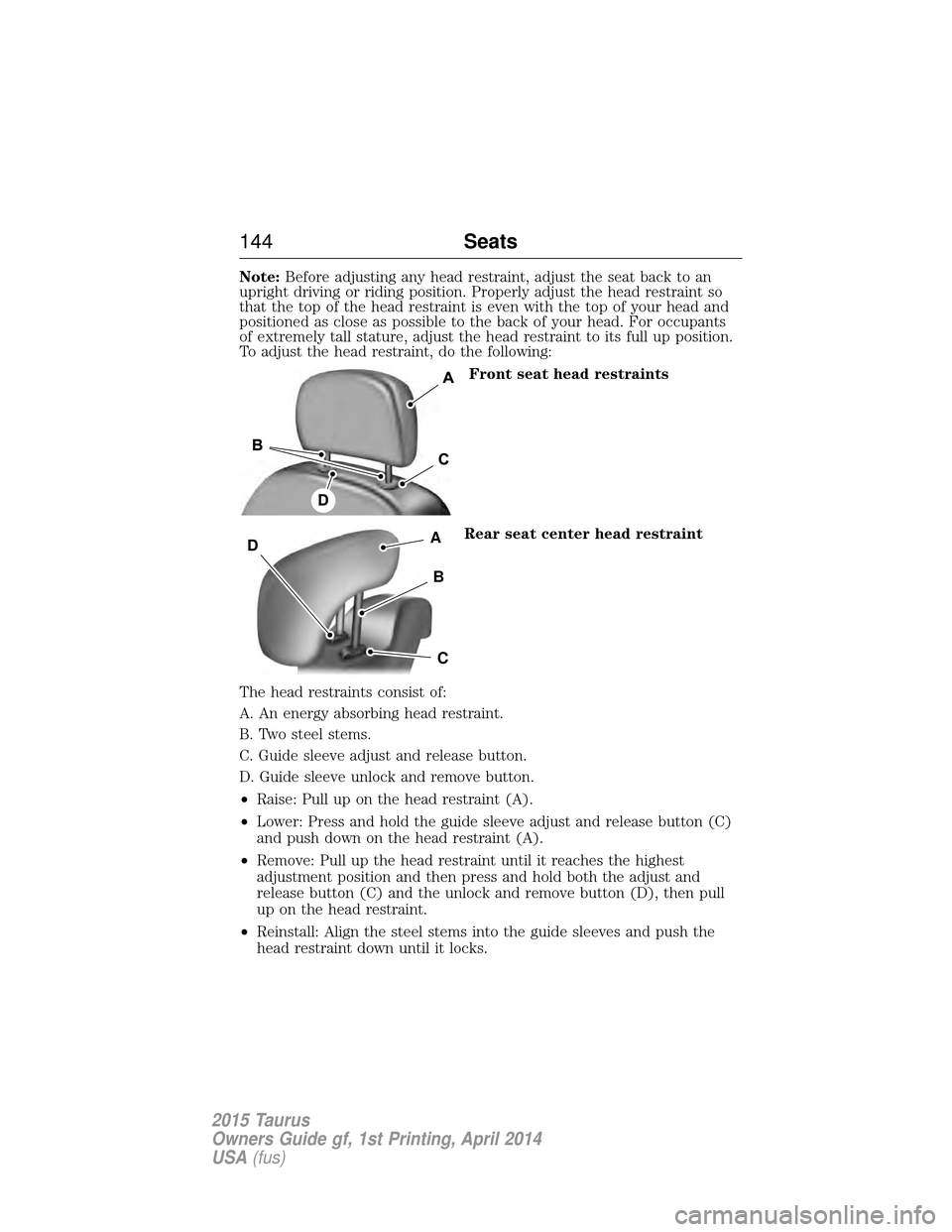
Front seat head restraints
Rear seat center head restraint
The head restraints consist of:
A. An energy absorbing head restraint.
B. Two steel stems.
C. Guide sleeve adjust and release button.
D. Guide sleeve unlock and remove button.
• Raise: Pull up on the head restraint (A).
• Lower: Press and hold the guide sleeve adjust and release button (C)
and push down on the head restraint (A).
• Remove: Pull up the head restraint until it reaches the highest
adjustment position and then press and hold both the adjust and
release button (C) and the unlock and remove button (D), then pull
up on the head restraint.
• Reinstall: Align the steel stems into the guide sleeves and push the
head restraint down until it locks.
A
B
C
D
144 Seats
2015 Taurus
Owners Guide gf, 1st Printing, April 2014
USA(fus)
Page 146 of 558
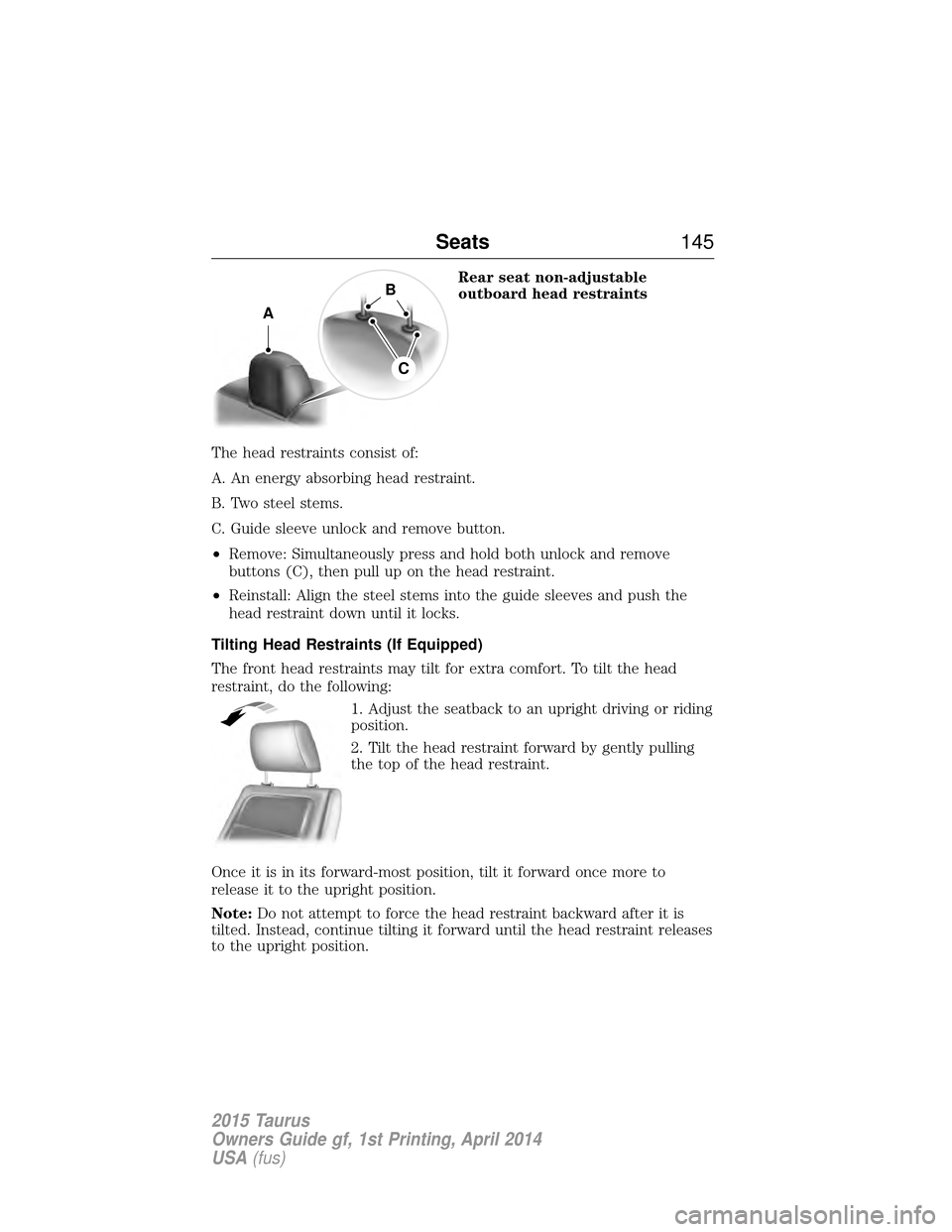
Rear seat non-adjustable
outboard head restraints
The head restraints consist of:
A. An energy absorbing head restraint.
B. Two steel stems.
C. Guide sleeve unlock and remove button.
• Remove: Simultaneously press and hold both unlock and remove
buttons (C), then pull up on the head restraint.
• Reinstall: Align the steel stems into the guide sleeves and push the
head restraint down until it locks.
Tilting Head Restraints (If Equipped)
The front head restraints may tilt for extra comfort. To tilt the head
restraint, do the following: 1. Adjust the seatback to an upright driving or riding
position.
2. Tilt the head restraint forward by gently pulling
the top of the head restraint.
Once it is in its forward-most position, tilt it forward once more to
release it to the upright position.
Note: Do not attempt to force the head restraint backward after it is
tilted. Instead, continue tilting it forward until the head restraint releases
to the upright position.
A
B
C
Seats 145
2015 Taurus
Owners Guide gf, 1st Printing, April 2014
USA(fus)
Page 151 of 558
Recalling a memory position with the remote control
The memory positions are also recalled when you press unlock on your
remote control (if the transmitter is programmed to a memory position)
or, when you enter a valid personal entry code that is programmed to a
memory position.
To program the memory feature to a remote control, see theKeys and
remote control chapter.
Easy Entry and Exit Feature (If Equipped)
This feature moves the seat rearward and the optional power steering
column up and forward to allow extra room to exit the vehicle.
This occurs when:
• You place the transmission in neutral (N) or park (P).
• You switch the keyless ignition off or take the key out of the ignition
switch.
The seat and steering wheel will move to their original positions when:
• You place the transmission in neutral (N) or park (P).
• You switch the keyless ignition off or take the key out of the ignition
switch.
Turn the Easy Entry/Exit feature on or off through the information
display settings menu. See the Information Displayschapter.
150 Seats
2015 Taurus
Owners Guide gf, 1st Printing, April 2014
USA(fus)
Page 154 of 558
Cooled Seats
The cooled seats will only function when the engine is running.
To operate the cooled seats:Press the cooled seat symbol to cycle through the various
cooling settings and off. Cooler settings are indicated by
more indicator lights.
If the engine falls below 350 RPM while the cooled seats
are on, the feature will turn itself off. You will need to
reactivate it.
Note: When the heated or cooled front seat is active, you will be able to
hear the fan operating inside the seat. This is normal.
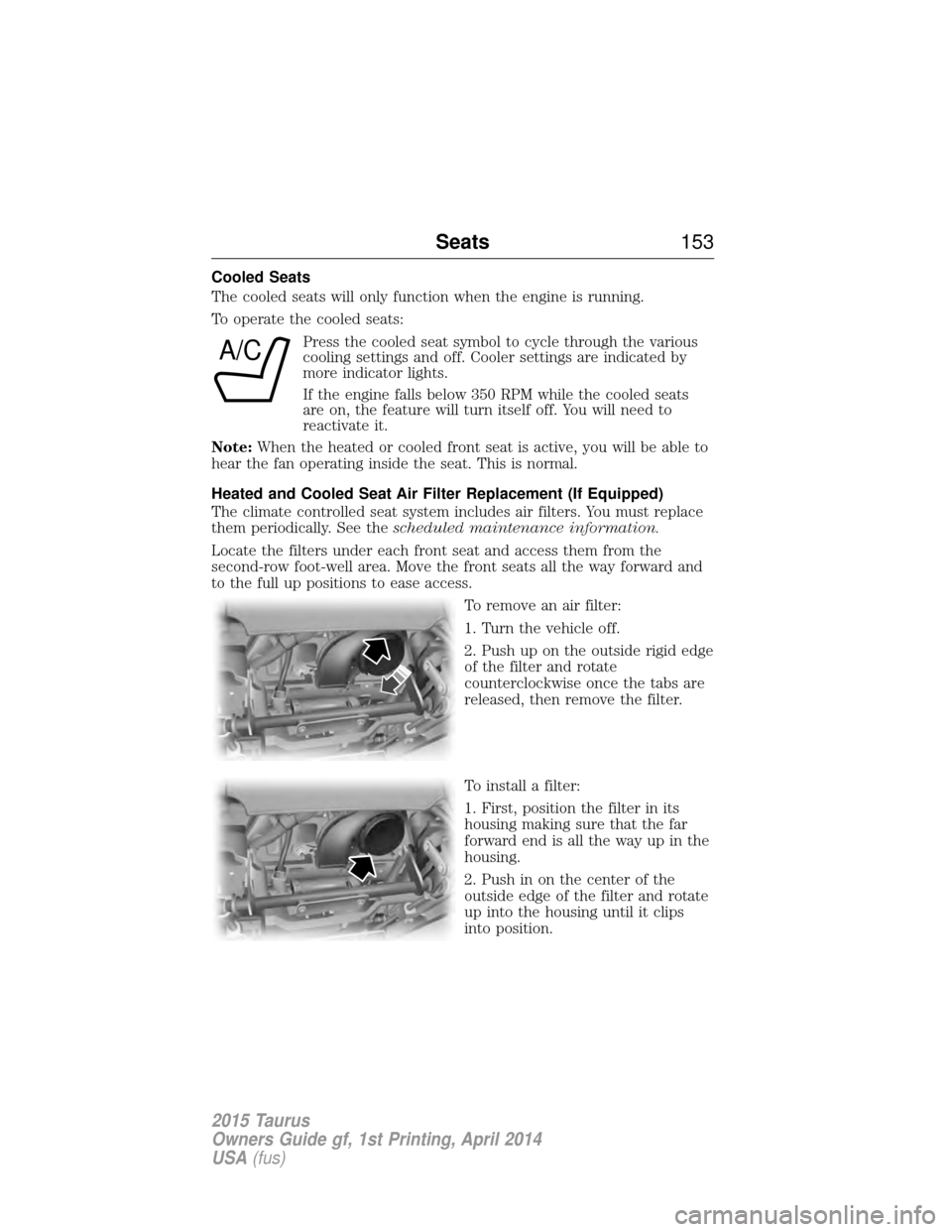
Heated and Cooled Seat Air Filter Replacement (If Equipped)
The climate controlled seat system includes air filters. You must replace
them periodically. See the scheduled maintenance information.
Locate the filters under each front seat and access them from the
second-row foot-well area. Move the front seats all the way forward and
to the full up positions to ease access. To remove an air filter:
1. Turn the vehicle off.
2. Push up on the outside rigid edge
of the filter and rotate
counterclockwise once the tabs are
released, then remove the filter.
To install a filter:
1. First, position the filter in its
housing making sure that the far
forward end is all the way up in the
housing.
2. Push in on the center of the
outside edge of the filter and rotate
up into the housing until it clips
into position.
A/C
Seats153
2015 Taurus
Owners Guide gf, 1st Printing, April 2014
USA(fus)