page 42 FORD TRANSIT 2015 5.G Owner's Manual
[x] Cancel search | Manufacturer: FORD, Model Year: 2015, Model line: TRANSIT, Model: FORD TRANSIT 2015 5.GPages: 461, PDF Size: 5.82 MB
Page 66 of 461
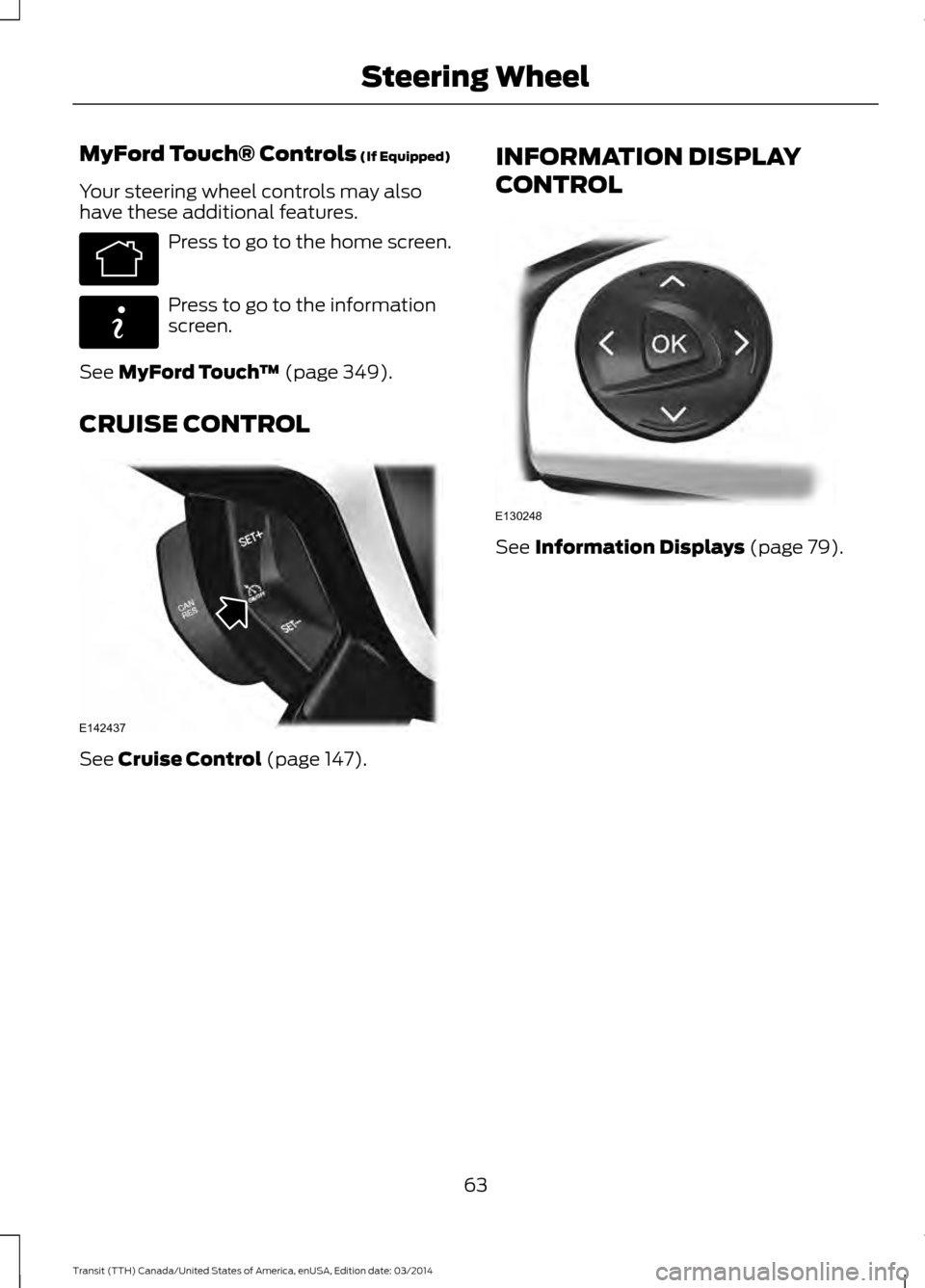
MyFord Touch® Controls (If Equipped)
Your steering wheel controls may also
have these additional features. Press to go to the home screen.
Press to go to the information
screen.
See
MyFord Touch ™ (page 349).
CRUISE CONTROL See
Cruise Control (page 147). INFORMATION DISPLAY
CONTROL See Information Displays (page 79).
63 Transit (TTH) Canada/United States of America, enUSA, Edition date: 03/2014 Steering WheelE142613 E142608 E142437 E130248
Page 71 of 461
Switching the Rain Lights On and Off
You can switch the rain light feature on
and off using the information display
control on the steering wheel. See
General Information (page 79). See
Information Messages (page 84).
To switch the rain lights feature on and off, scroll to: Action and Description
Message
Press the OK button.
Settings
Press the OK button.
Lighting
Choose your applicable setting.
Rain Light
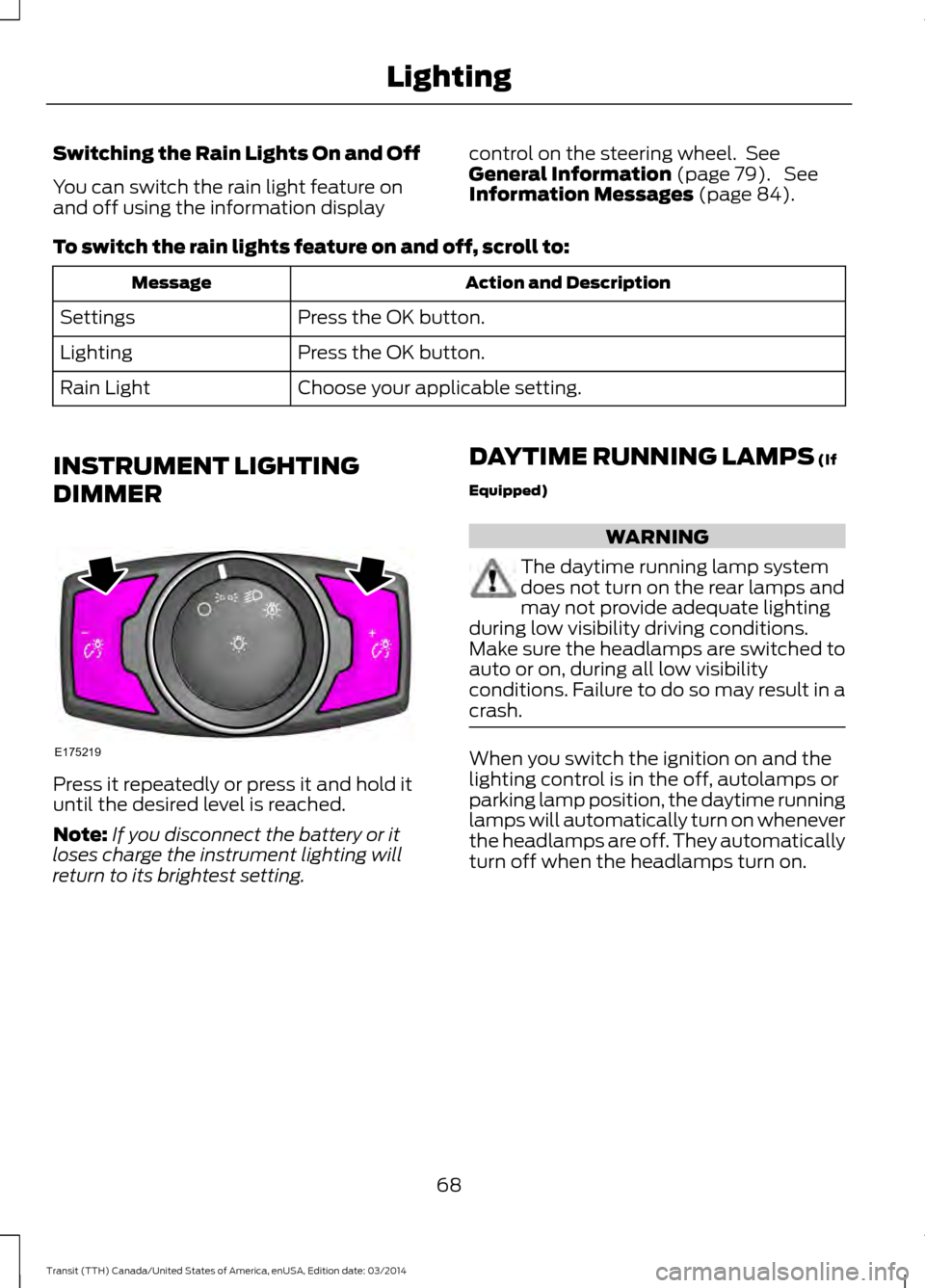
INSTRUMENT LIGHTING
DIMMER Press it repeatedly or press it and hold it
until the desired level is reached.
Note:
If you disconnect the battery or it
loses charge the instrument lighting will
return to its brightest setting. DAYTIME RUNNING LAMPS
(If
Equipped) WARNING
The daytime running lamp system
does not turn on the rear lamps and
may not provide adequate lighting
during low visibility driving conditions.
Make sure the headlamps are switched to
auto or on, during all low visibility
conditions. Failure to do so may result in a
crash. When you switch the ignition on and the
lighting control is in the off, autolamps or
parking lamp position, the daytime running
lamps will automatically turn on whenever
the headlamps are off. They automatically
turn off when the headlamps turn on.
68 Transit (TTH) Canada/United States of America, enUSA, Edition date: 03/2014 LightingE175219
Page 76 of 461
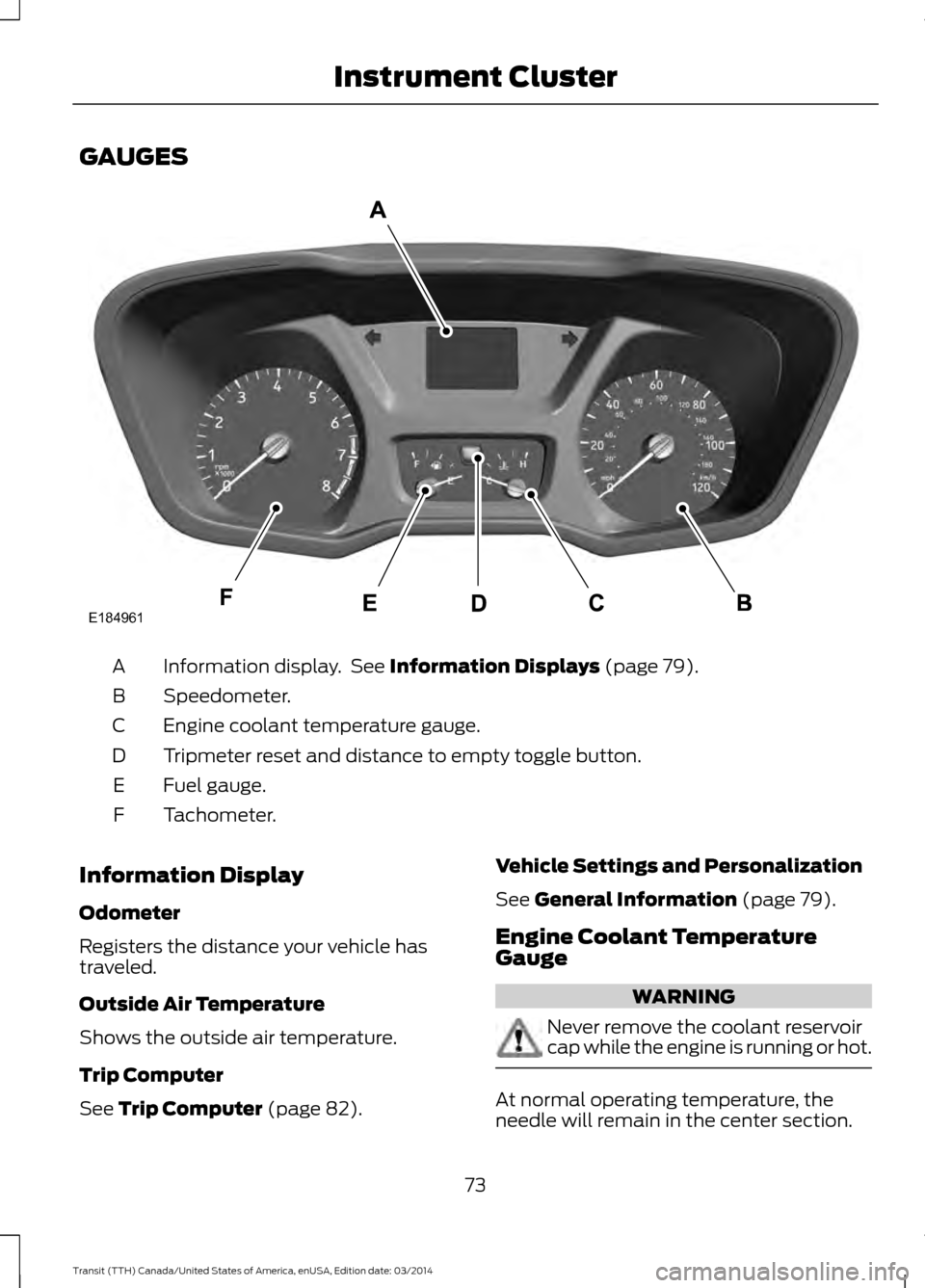
GAUGES
Information display. See Information Displays (page 79).
A
Speedometer.
B
Engine coolant temperature gauge.
C
Tripmeter reset and distance to empty toggle button.
D
Fuel gauge.
E
Tachometer.
F
Information Display
Odometer
Registers the distance your vehicle has
traveled.
Outside Air Temperature
Shows the outside air temperature.
Trip Computer
See
Trip Computer (page 82). Vehicle Settings and Personalization
See
General Information (page 79).
Engine Coolant Temperature
Gauge WARNING
Never remove the coolant reservoir
cap while the engine is running or hot.
At normal operating temperature, the
needle will remain in the center section.
73 Transit (TTH) Canada/United States of America, enUSA, Edition date: 03/2014 Instrument ClusterE184961
Page 77 of 461
If the needle enters the red section, the
engine is overheating. Stop your vehicle as
soon as it is safe to do so and switch the
engine off. Determine the cause once the
engine has cooled down. See Engine
Coolant Check (page 206).
Note: Do not restart the engine until the
cause of overheating has been determined
and resolved.
Tripmeter Reset and Distance to
Empty
(If Equipped)
Press the button to change between the
tripmeter and distance to empty
information. Press and hold the button to
reset the tripmeter.
Fuel Gauge
Note: The fuel gauge may vary slightly
when your vehicle is moving or on a gradient.
Switch the ignition on. The fuel gauge will
indicate approximately how much fuel is
in the fuel tank. The arrow adjacent to the
fuel pump symbol indicates on which side
of your vehicle the fuel filler door is located. The needle should move toward F when
you refuel your vehicle. If the needle points
to E after adding fuel, this indicates your
vehicle needs service soon.
After refueling some variability in needle
position is normal:
•
It may take a short time for the needle
to reach F after leaving the gas station.
This is normal and depends upon the
slope of pavement at the gas station.
• The fuel amount dispensed into the
tank is a little less or more than the
gauge indicated. This is normal and
depends upon the slope of pavement
at the gas station.
• If the gas station nozzle shuts off
before the tank is full, try a different
gas pump nozzle.
Low Fuel Reminder
A low fuel reminder triggers when the fuel
gauge needle is at 1/16th.
Variations: Distance-to-empty
Fuel gauge position
Driving type (fuel economy
conditions)
35 miles to 80 miles (56 kmto 129 km)
1/16th
Highway driving
35 miles (56km)
1/16th
Severe duty driving (trailer
towing, extended idle)
74Transit (TTH) Canada/United States of America, enUSA, Edition date: 03/2014 Instrument Cluster
Page 78 of 461
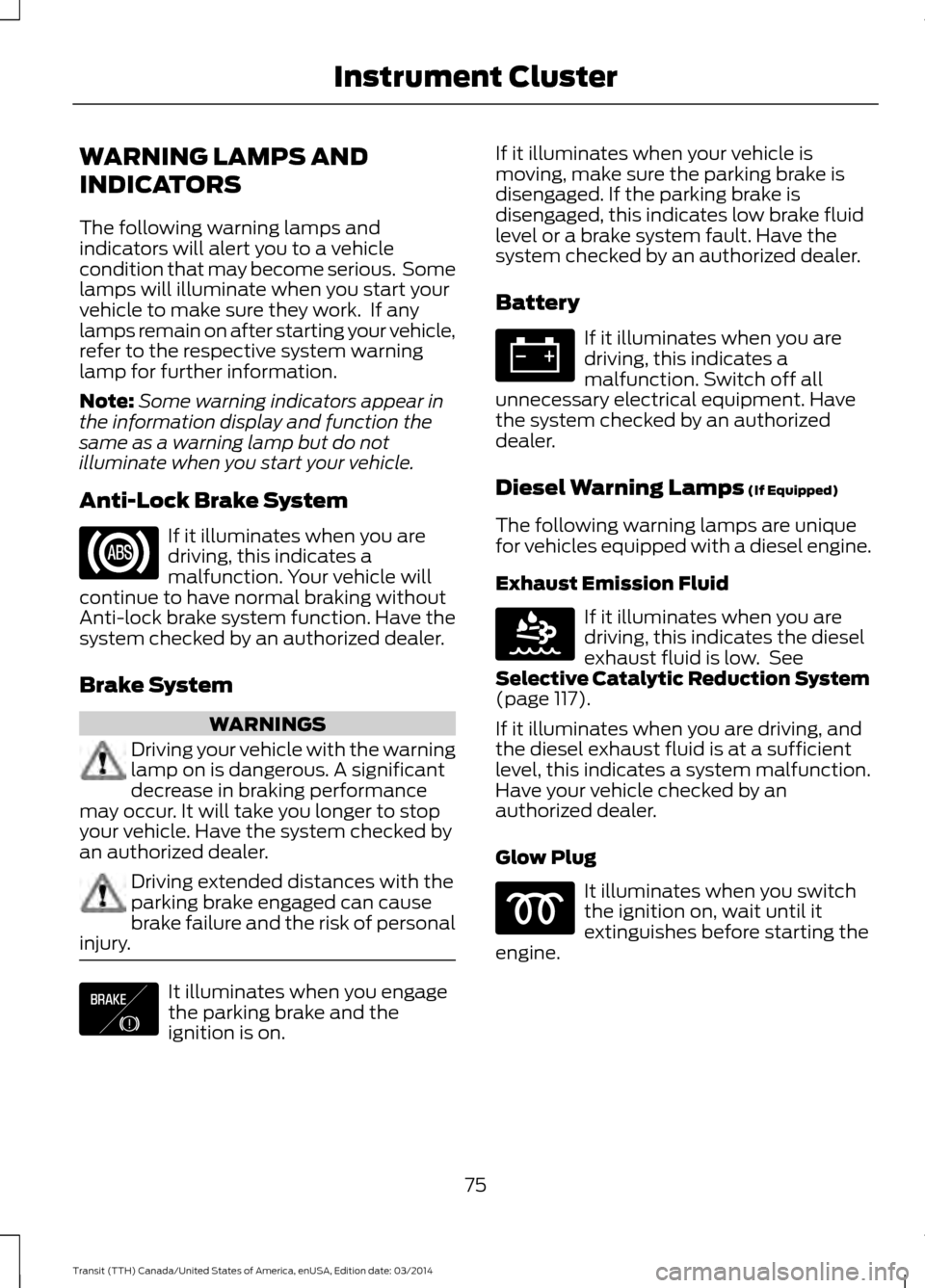
WARNING LAMPS AND
INDICATORS
The following warning lamps and
indicators will alert you to a vehicle
condition that may become serious. Some
lamps will illuminate when you start your
vehicle to make sure they work. If any
lamps remain on after starting your vehicle,
refer to the respective system warning
lamp for further information.
Note:
Some warning indicators appear in
the information display and function the
same as a warning lamp but do not
illuminate when you start your vehicle.
Anti-Lock Brake System If it illuminates when you are
driving, this indicates a
malfunction. Your vehicle will
continue to have normal braking without
Anti-lock brake system function. Have the
system checked by an authorized dealer.
Brake System WARNINGS
Driving your vehicle with the warning
lamp on is dangerous. A significant
decrease in braking performance
may occur. It will take you longer to stop
your vehicle. Have the system checked by
an authorized dealer. Driving extended distances with the
parking brake engaged can cause
brake failure and the risk of personal
injury. It illuminates when you engage
the parking brake and the
ignition is on. If it illuminates when your vehicle is
moving, make sure the parking brake is
disengaged. If the parking brake is
disengaged, this indicates low brake fluid
level or a brake system fault. Have the
system checked by an authorized dealer.
Battery If it illuminates when you are
driving, this indicates a
malfunction. Switch off all
unnecessary electrical equipment. Have
the system checked by an authorized
dealer.
Diesel Warning Lamps (If Equipped)
The following warning lamps are unique
for vehicles equipped with a diesel engine.
Exhaust Emission Fluid If it illuminates when you are
driving, this indicates the diesel
exhaust fluid is low. See
Selective Catalytic Reduction System
(page
117).
If it illuminates when you are driving, and
the diesel exhaust fluid is at a sufficient
level, this indicates a system malfunction.
Have your vehicle checked by an
authorized dealer.
Glow Plug It illuminates when you switch
the ignition on, wait until it
extinguishes before starting the
engine.
75 Transit (TTH) Canada/United States of America, enUSA, Edition date: 03/2014 Instrument Cluster E138644 E163176
Page 79 of 461
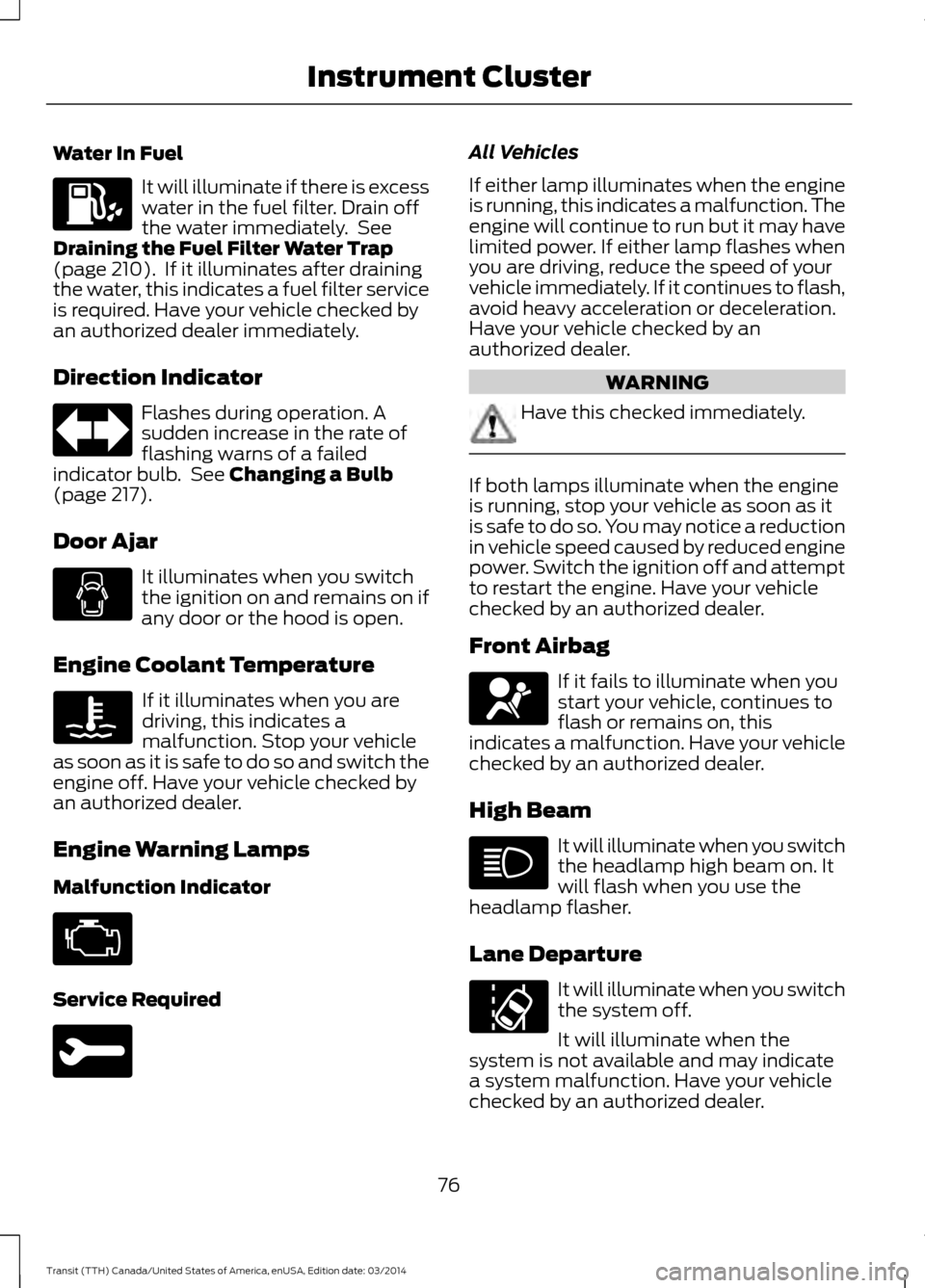
Water In Fuel
It will illuminate if there is excess
water in the fuel filter. Drain off
the water immediately. See
Draining the Fuel Filter Water Trap
(page 210). If it illuminates after draining
the water, this indicates a fuel filter service
is required. Have your vehicle checked by
an authorized dealer immediately.
Direction Indicator Flashes during operation. A
sudden increase in the rate of
flashing warns of a failed
indicator bulb. See
Changing a Bulb
(page 217).
Door Ajar It illuminates when you switch
the ignition on and remains on if
any door or the hood is open.
Engine Coolant Temperature If it illuminates when you are
driving, this indicates a
malfunction. Stop your vehicle
as soon as it is safe to do so and switch the
engine off. Have your vehicle checked by
an authorized dealer.
Engine Warning Lamps
Malfunction Indicator Service Required All Vehicles
If either lamp illuminates when the engine
is running, this indicates a malfunction. The
engine will continue to run but it may have
limited power. If either lamp flashes when
you are driving, reduce the speed of your
vehicle immediately. If it continues to flash,
avoid heavy acceleration or deceleration.
Have your vehicle checked by an
authorized dealer.
WARNING
Have this checked immediately.
If both lamps illuminate when the engine
is running, stop your vehicle as soon as it
is safe to do so. You may notice a reduction
in vehicle speed caused by reduced engine
power. Switch the ignition off and attempt
to restart the engine. Have your vehicle
checked by an authorized dealer.
Front Airbag
If it fails to illuminate when you
start your vehicle, continues to
flash or remains on, this
indicates a malfunction. Have your vehicle
checked by an authorized dealer.
High Beam It will illuminate when you switch
the headlamp high beam on. It
will flash when you use the
headlamp flasher.
Lane Departure It will illuminate when you switch
the system off.
It will illuminate when the
system is not available and may indicate
a system malfunction. Have your vehicle
checked by an authorized dealer.
76 Transit (TTH) Canada/United States of America, enUSA, Edition date: 03/2014 Instrument Cluster
Page 80 of 461
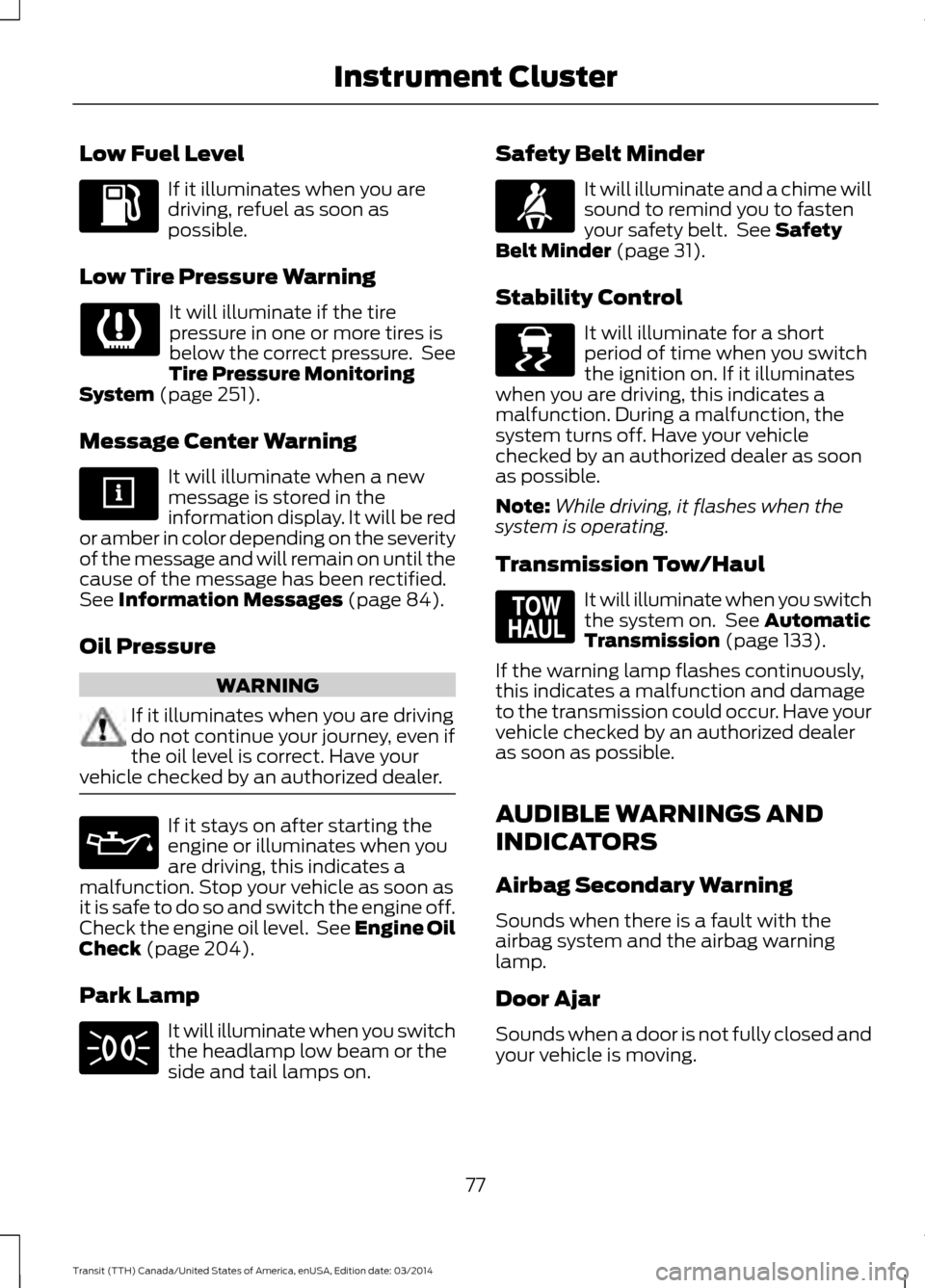
Low Fuel Level
If it illuminates when you are
driving, refuel as soon as
possible.
Low Tire Pressure Warning It will illuminate if the tire
pressure in one or more tires is
below the correct pressure. See
Tire Pressure Monitoring
System (page 251).
Message Center Warning It will illuminate when a new
message is stored in the
information display. It will be red
or amber in color depending on the severity
of the message and will remain on until the
cause of the message has been rectified.
See
Information Messages (page 84).
Oil Pressure WARNING
If it illuminates when you are driving
do not continue your journey, even if
the oil level is correct. Have your
vehicle checked by an authorized dealer. If it stays on after starting the
engine or illuminates when you
are driving, this indicates a
malfunction. Stop your vehicle as soon as
it is safe to do so and switch the engine off.
Check the engine oil level. See Engine Oil
Check
(page 204).
Park Lamp It will illuminate when you switch
the headlamp low beam or the
side and tail lamps on. Safety Belt Minder It will illuminate and a chime will
sound to remind you to fasten
your safety belt. See
Safety
Belt Minder (page 31).
Stability Control It will illuminate for a short
period of time when you switch
the ignition on. If it illuminates
when you are driving, this indicates a
malfunction. During a malfunction, the
system turns off. Have your vehicle
checked by an authorized dealer as soon
as possible.
Note: While driving, it flashes when the
system is operating.
Transmission Tow/Haul It will illuminate when you switch
the system on. See
Automatic
Transmission (page 133).
If the warning lamp flashes continuously,
this indicates a malfunction and damage
to the transmission could occur. Have your
vehicle checked by an authorized dealer
as soon as possible.
AUDIBLE WARNINGS AND
INDICATORS
Airbag Secondary Warning
Sounds when there is a fault with the
airbag system and the airbag warning
lamp.
Door Ajar
Sounds when a door is not fully closed and
your vehicle is moving.
77 Transit (TTH) Canada/United States of America, enUSA, Edition date: 03/2014 Instrument Cluster E138639 E161509
Page 83 of 461
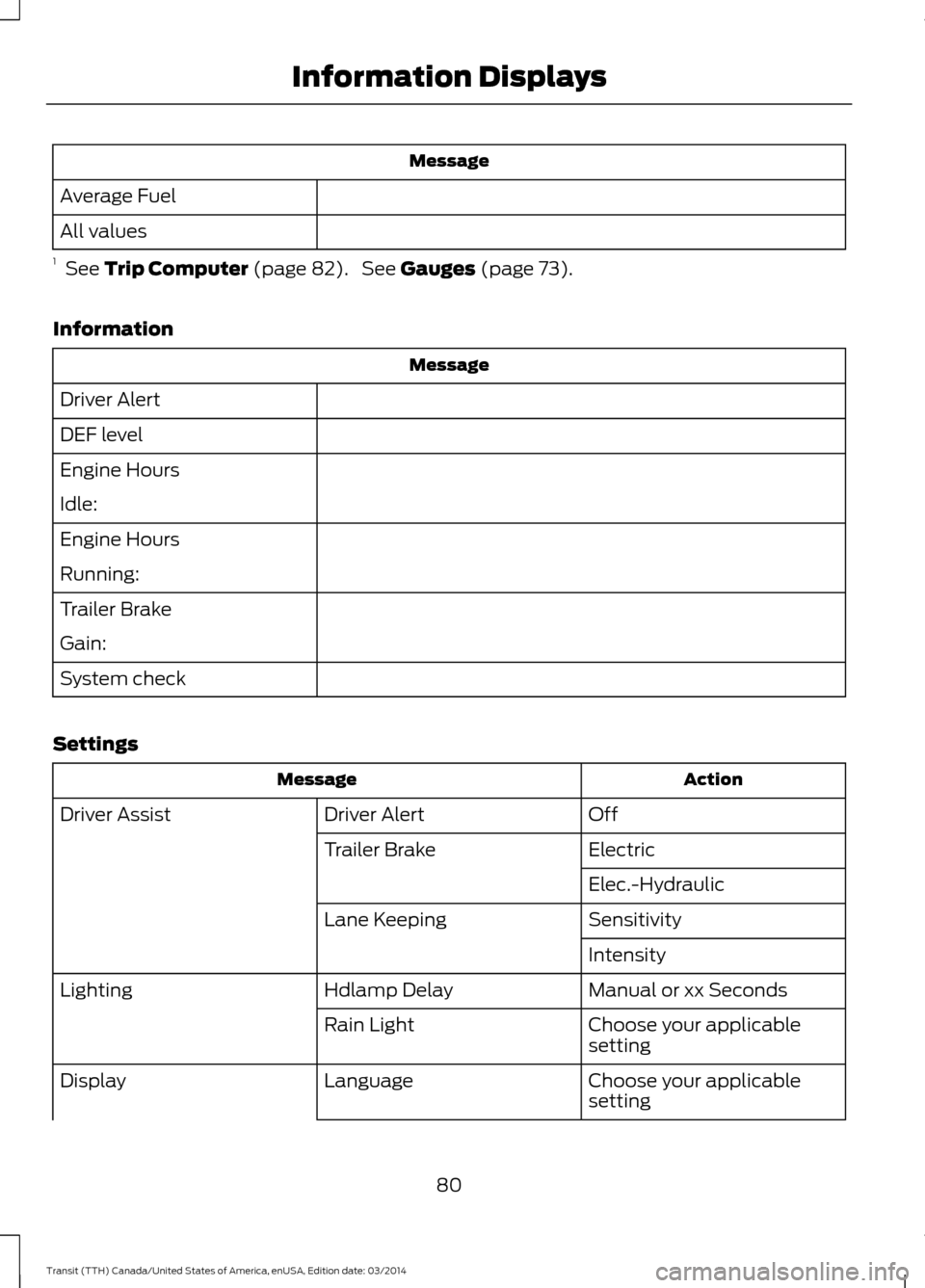
Message
Average Fuel
All values
1 See Trip Computer (page 82). See Gauges (page 73).
Information Message
Driver Alert
DEF level
Engine Hours
Idle:
Engine Hours
Running:
Trailer Brake
Gain:
System check
Settings Action
Message
Off
Driver Alert
Driver Assist
Electric
Trailer Brake
Elec.-Hydraulic
Sensitivity
Lane Keeping
Intensity
Manual or xx Seconds
Hdlamp Delay
Lighting
Choose your applicable
setting
Rain Light
Choose your applicable
setting
Language
Display
80Transit (TTH) Canada/United States of America, enUSA, Edition date: 03/2014 Information Displays
Page 84 of 461
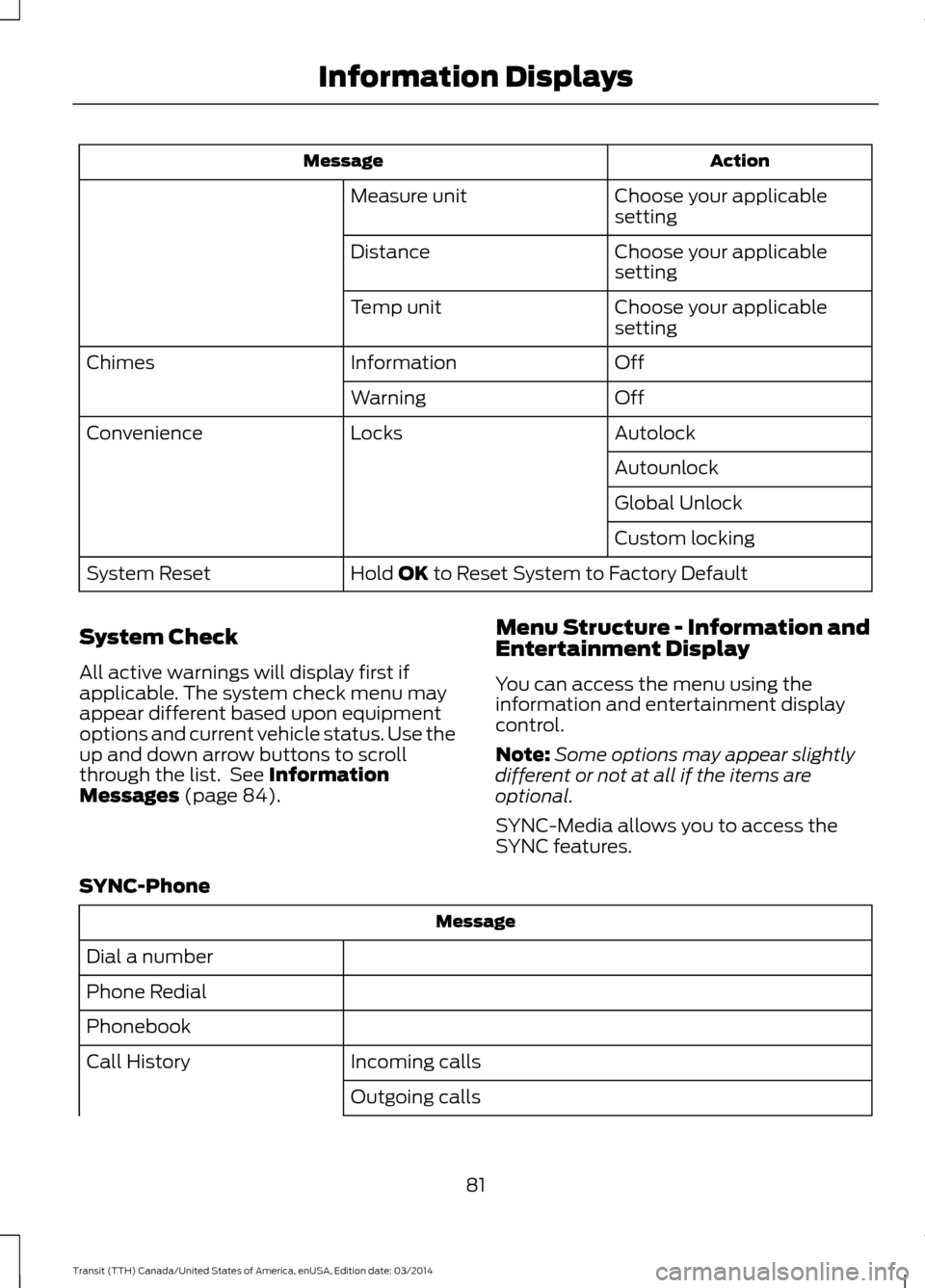
Action
Message
Choose your applicable
setting
Measure unit
Choose your applicable
setting
Distance
Choose your applicable
setting
Temp unit
Off
Information
Chimes
Off
Warning
Autolock
Locks
Convenience
Autounlock
Global Unlock
Custom locking
Hold OK to Reset System to Factory Default
System Reset
System Check
All active warnings will display first if
applicable. The system check menu may
appear different based upon equipment
options and current vehicle status. Use the
up and down arrow buttons to scroll
through the list. See
Information
Messages (page 84). Menu Structure - Information and
Entertainment Display
You can access the menu using the
information and entertainment display
control.
Note:
Some options may appear slightly
different or not at all if the items are
optional.
SYNC-Media allows you to access the
SYNC features.
SYNC-Phone Message
Dial a number
Phone Redial
Phonebook Incoming calls
Call History
Outgoing calls
81Transit (TTH) Canada/United States of America, enUSA, Edition date: 03/2014 Information Displays
Page 86 of 461
Distance to Empty
Indicates the approximate distance your
vehicle will travel on the fuel remaining in
the tank. Changes in driving pattern may
cause the value to vary.
Outside Air Temperature
Shows the outside air temperature.
Trip Odometer
Registers the distance traveled of
individual journeys.
Trip Timer
Registers the elapsed time of individual
journeys or the total time since the function
was last reset.
PERSONALIZED SETTINGS
Measure Units
You can choose personalized settings
using the information display control on
the steering wheel. See Information
Displays (page 79).
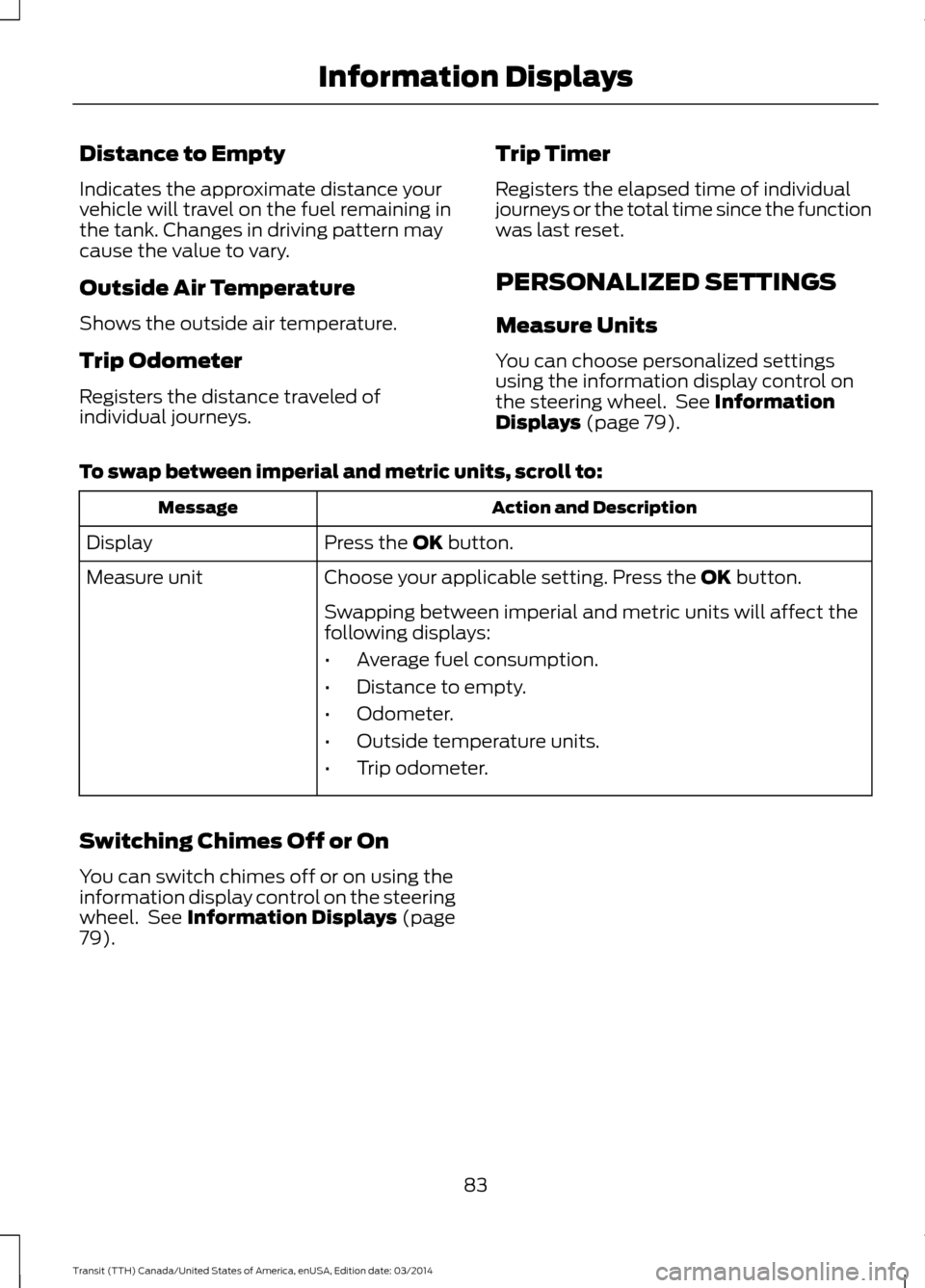
To swap between imperial and metric units, scroll to: Action and Description
Message
Press the
OK button.
Display
Choose your applicable setting. Press the
OK button.
Measure unit
Swapping between imperial and metric units will affect the
following displays:
•Average fuel consumption.
• Distance to empty.
• Odometer.
• Outside temperature units.
• Trip odometer.
Switching Chimes Off or On
You can switch chimes off or on using the
information display control on the steering
wheel. See
Information Displays (page
79).
83Transit (TTH) Canada/United States of America, enUSA, Edition date: 03/2014 Information Displays