warning FORD TRANSIT 2016 5.G Manual PDF
[x] Cancel search | Manufacturer: FORD, Model Year: 2016, Model line: TRANSIT, Model: FORD TRANSIT 2016 5.GPages: 411, PDF Size: 5.65 MB
Page 126 of 411
WARNINGS
Do not overfill the fuel tank. The
pressure in an overfilled tank may
cause leakage and lead to fuel spray
and fire. Do not attempt to start the engine if you
have refueled the fuel tank with the
incorrect fuel. This can cause damage not
covered by the vehicle warranty. Have your
vehicle checked by an authorized dealer
immediately.
If you use a high pressure spray to wash
your vehicle, only spray the fuel tank filler
door briefly from a distance not less than
8 in (200 mm).
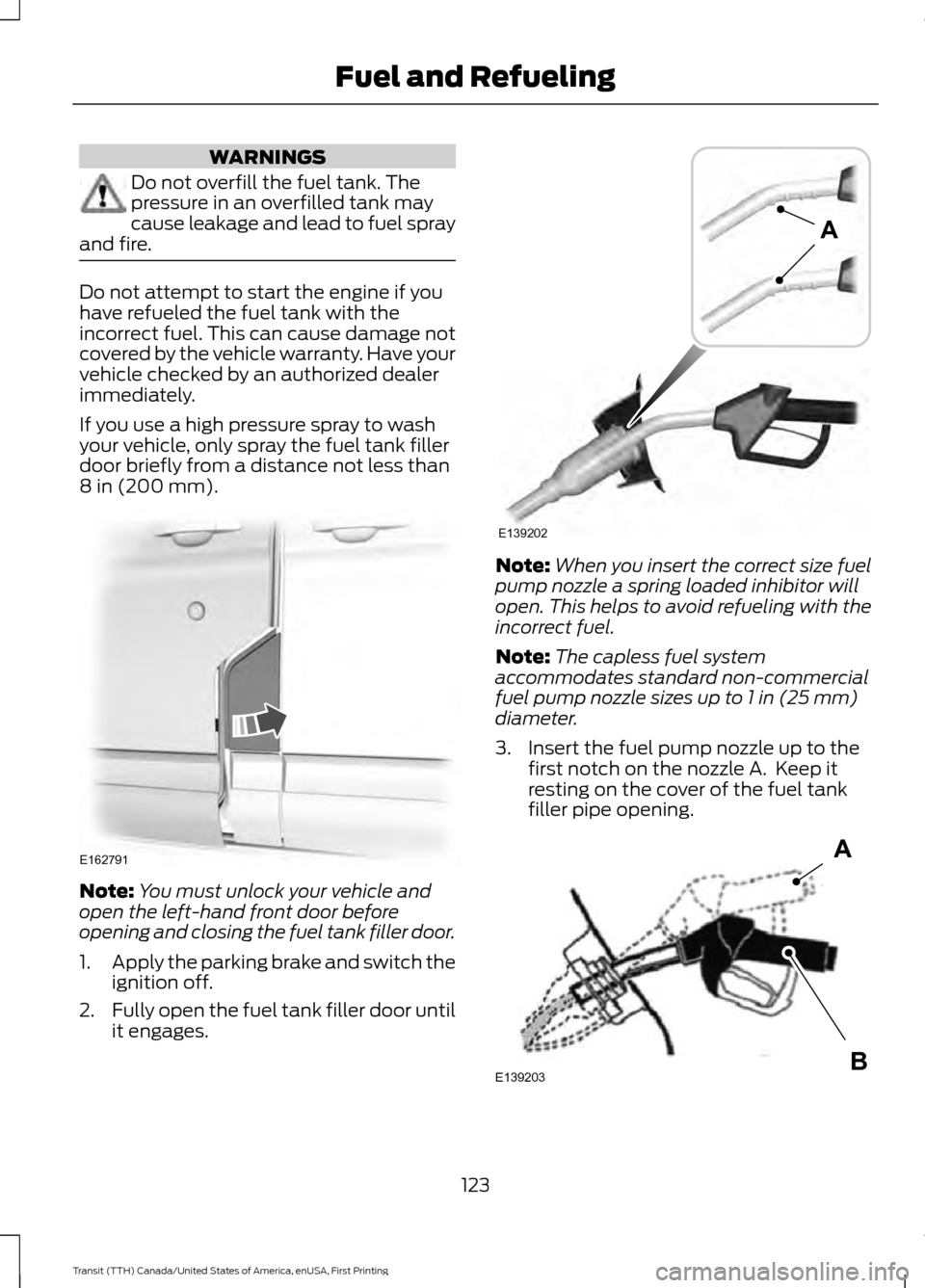
Note:
You must unlock your vehicle and
open the left-hand front door before
opening and closing the fuel tank filler door.
1. Apply the parking brake and switch the
ignition off.
2. Fully open the fuel tank filler door until
it engages. Note:
When you insert the correct size fuel
pump nozzle a spring loaded inhibitor will
open. This helps to avoid refueling with the
incorrect fuel.
Note: The capless fuel system
accommodates standard non-commercial
fuel pump nozzle sizes up to
1 in (25 mm)
diameter.
3. Insert the fuel pump nozzle up to the first notch on the nozzle A. Keep it
resting on the cover of the fuel tank
filler pipe opening. 123
Transit (TTH) Canada/United States of America, enUSA, First Printing Fuel and RefuelingE162791 E139202
A E139203
A
B
Page 127 of 411
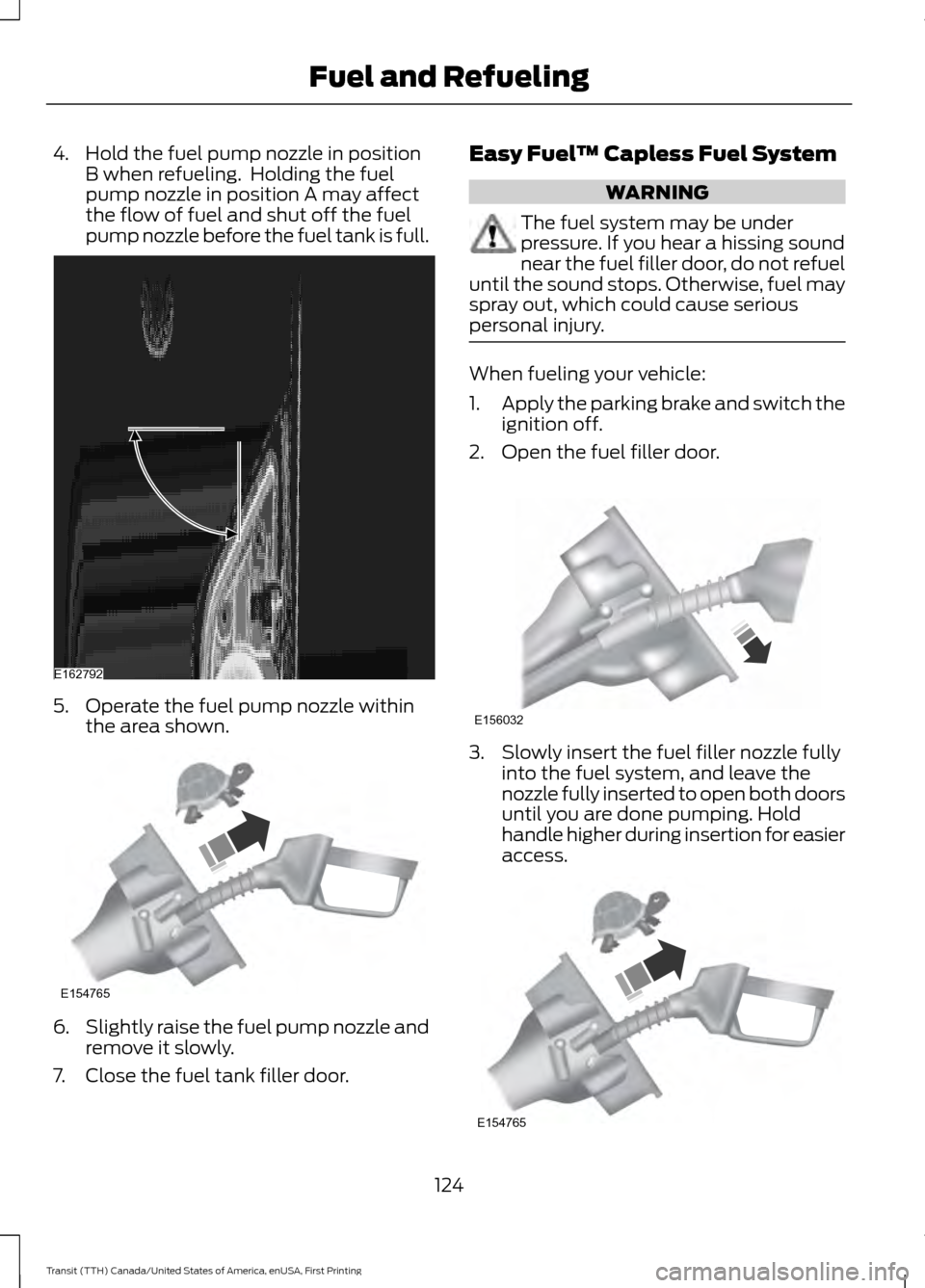
4. Hold the fuel pump nozzle in position
B when refueling. Holding the fuel
pump nozzle in position A may affect
the flow of fuel and shut off the fuel
pump nozzle before the fuel tank is full. 5. Operate the fuel pump nozzle within
the area shown. 6.
Slightly raise the fuel pump nozzle and
remove it slowly.
7. Close the fuel tank filler door. Easy Fuel
™ Capless Fuel System WARNING
The fuel system may be under
pressure. If you hear a hissing sound
near the fuel filler door, do not refuel
until the sound stops. Otherwise, fuel may
spray out, which could cause serious
personal injury. When fueling your vehicle:
1.
Apply the parking brake and switch the
ignition off.
2. Open the fuel filler door. 3. Slowly insert the fuel filler nozzle fully
into the fuel system, and leave the
nozzle fully inserted to open both doors
until you are done pumping. Hold
handle higher during insertion for easier
access. 124
Transit (TTH) Canada/United States of America, enUSA, First Printing Fuel and RefuelingE162792 E154765 E156032 E154765
Page 128 of 411
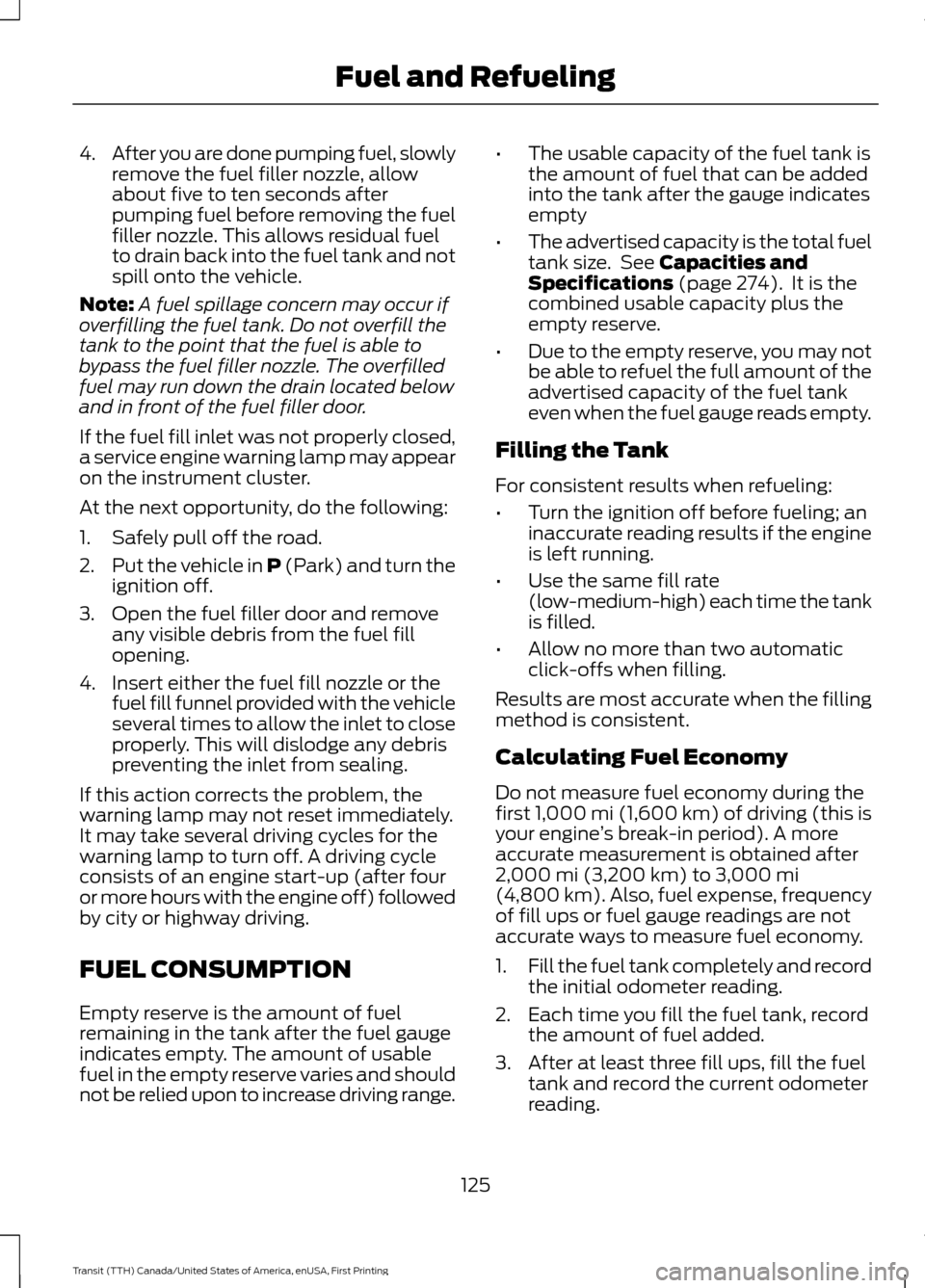
4.
After you are done pumping fuel, slowly
remove the fuel filler nozzle, allow
about five to ten seconds after
pumping fuel before removing the fuel
filler nozzle. This allows residual fuel
to drain back into the fuel tank and not
spill onto the vehicle.
Note: A fuel spillage concern may occur if
overfilling the fuel tank. Do not overfill the
tank to the point that the fuel is able to
bypass the fuel filler nozzle. The overfilled
fuel may run down the drain located below
and in front of the fuel filler door.
If the fuel fill inlet was not properly closed,
a service engine warning lamp may appear
on the instrument cluster.
At the next opportunity, do the following:
1. Safely pull off the road.
2. Put the vehicle in P (Park) and turn the
ignition off.
3. Open the fuel filler door and remove any visible debris from the fuel fill
opening.
4. Insert either the fuel fill nozzle or the fuel fill funnel provided with the vehicle
several times to allow the inlet to close
properly. This will dislodge any debris
preventing the inlet from sealing.
If this action corrects the problem, the
warning lamp may not reset immediately.
It may take several driving cycles for the
warning lamp to turn off. A driving cycle
consists of an engine start-up (after four
or more hours with the engine off) followed
by city or highway driving.
FUEL CONSUMPTION
Empty reserve is the amount of fuel
remaining in the tank after the fuel gauge
indicates empty. The amount of usable
fuel in the empty reserve varies and should
not be relied upon to increase driving range. •
The usable capacity of the fuel tank is
the amount of fuel that can be added
into the tank after the gauge indicates
empty
• The advertised capacity is the total fuel
tank size. See Capacities and
Specifications (page 274). It is the
combined usable capacity plus the
empty reserve.
• Due to the empty reserve, you may not
be able to refuel the full amount of the
advertised capacity of the fuel tank
even when the fuel gauge reads empty.
Filling the Tank
For consistent results when refueling:
• Turn the ignition off before fueling; an
inaccurate reading results if the engine
is left running.
• Use the same fill rate
(low-medium-high) each time the tank
is filled.
• Allow no more than two automatic
click-offs when filling.
Results are most accurate when the filling
method is consistent.
Calculating Fuel Economy
Do not measure fuel economy during the
first
1,000 mi (1,600 km) of driving (this is
your engine ’s break-in period). A more
accurate measurement is obtained after
2,000 mi (3,200 km)
to 3,000 mi
(4,800 km). Also, fuel expense, frequency
of fill ups or fuel gauge readings are not
accurate ways to measure fuel economy.
1. Fill the fuel tank completely and record
the initial odometer reading.
2. Each time you fill the fuel tank, record the amount of fuel added.
3. After at least three fill ups, fill the fuel tank and record the current odometer
reading.
125
Transit (TTH) Canada/United States of America, enUSA, First Printing Fuel and Refueling
Page 129 of 411
4. Subtract your initial odometer reading
from the current odometer reading.
To calculate L/100 km (liters per 100
kilometers) fuel consumption, multiply the
liters used by 100, then divide by kilometers
traveled. To calculate MPG (miles per
gallon) fuel consumption, divide miles
traveled by gallons used.
Keep a record for at least one month and
record the type of driving (city or highway).
This provides an accurate estimate of your
vehicle ’s fuel economy under current
driving conditions. Keeping records during
summer and winter will show how
temperature impacts fuel economy.
Conditions
• Heavily loading your vehicle reduces
fuel economy.
• Carrying unnecessary weight in your
vehicle may reduce fuel economy.
• Adding certain accessories to your
vehicle such as bug deflectors, rollbars
or light bars, running boards and ski
racks may reduce fuel economy.
• Using fuel blended with alcohol may
lower fuel economy.
• Fuel economy may decrease with lower
temperatures.
• Fuel economy may decrease when
driving short distances.
• You will get better fuel economy when
driving on flat terrain than when driving
on hilly terrain.
EMISSION CONTROL SYSTEM WARNINGS
Do not park, idle, or drive your vehicle
in dry grass or other dry ground cover.
The emission system heats up the
engine compartment and exhaust system,
which can start a fire. WARNINGS
An incorrectly operating or damaged
exhaust system may result in entry
of harmful and potentially lethal
fumes into the passenger compartment.
If you smell exhaust fumes inside your
vehicle, have an authorized dealer inspect
your vehicle immediately. Do not drive if
you smell exhaust fumes. Your vehicle has various emission control
components and a catalytic converter that
will enable your vehicle to comply with
applicable exhaust emission standards.
To make sure that the catalytic converter
and other emission control components
continue to work correctly:
•
Use only the specified fuel listed.
• Avoid running out of fuel.
• Do not switch the ignition off when your
vehicle is moving, especially at high
speeds.
• Have the items listed in scheduled
maintenance information carried out
according to the specified schedule.
The scheduled maintenance items listed
in scheduled maintenance information are
essential to the life and performance of
your vehicle and to its emissions system.
If you use parts other than Ford, Motorcraft
or Ford-authorized parts for maintenance
replacements, or for service of
components affecting emission control,
such non-Ford parts should be the
equivalent to genuine Ford Motor Company
parts in performance and durability.
Illumination of any of the following warning
lamps, indicators or vehicle symptoms
could indicate that the emission control
system is not working correctly.
• Coolant temperature warning lamp.
• Charging system warning lamp.
• Service engine soon indicator.
126
Transit (TTH) Canada/United States of America, enUSA, First Printing Fuel and Refueling
Page 133 of 411
Operator Commanded Regeneration
(If Equipped)
If your vehicle is operated with significant
stationary operation, low speed drive
cycles less than 25 mph (40 km/h), short
drive cycles, drive time less than 15 minutes
or the vehicle does not fully warm up,
passive and active regeneration may not
sufficiently clean the diesel particulate
filter system. Operator commanded
regeneration allows you to manually start
diesel particulate filter cleaning while the
engine is idling. If you are not sure whether
your vehicle is fitted with this feature,
contact an authorized dealer. When to Carry Out Operator Commanded
Regeneration
Use the operator commanded
regeneration feature when the following
message appears in the information
display and:
•
You are not able to drive in a manner
that allows effective automatic
cleaning.
• You choose to manually start cleaning
the diesel particulate filter while the
engine is idling.
System Message Action and Description
Message
You must maintain the diesel particulate filter for it to
continue to function correctly. Do not disregard a system
maintenance message. The Ford Warranty may not cover
damage caused to your vehicle as a result of disregarding
this message.
Exhaust filter overloaded
Drive to clean
Operator Commanded Regeneration
Precautions and Safe Exhaust Position WARNING
Failure to comply with the following
instructions for operator
commanded regeneration may result
in fire, serious injury, death or property
damage. Before you start operator commanded
regeneration, do the following:
•
You must park your vehicle outside of
any structure.
• Move the gearshift lever to park
(P)
with the parking brake set on stable,
level ground. •
Your vehicle must be
9.8 ft (3 m) -
16.4 ft (5 m) away from any
obstructions and must be away from
materials that can easily combust or
melt, for example, paper, leaves,
petroleum products, fuels, plastics and
other dry organic material.
• Make sure there is a minimum of 3.2 gal
(12 L)
of fuel in the fuel tank.
• Make sure all fluids are at the correct
levels.
• Make sure that the louvers located at
the tip of the exhaust are clear of any
obstructions as they are used to
introduce fresh air into the tailpipe to
cool the exhaust gas as it leaves.
130
Transit (TTH) Canada/United States of America, enUSA, First Printing Fuel and Refueling
Page 134 of 411
How to Start Operator Commanded
Regeneration
WARNING
Stay clear of exhaust tip during
regeneration. You or others can be
burned.
Note:
You cannot use the operator
commanded regeneration until the diesel
particulate filter load percentage has
reached 100 percent. The diesel particulate
filter load percentage will fluctuate up and
down when driving your vehicle due to active
and passive regenerations. Note:
During the use of operator
commanded regeneration, you may observe
a light amount of white smoke. This is
normal. You cannot use the operator
commanded regeneration if the
service engine soon light is
illuminated.
Using the Information Display
You can start operator commanded
regeneration using the information display.
See (page 82).
To start operator commanded regeneration, run the engine at normal operating
temperature and scroll to: Action and Description
Message
Press the
OK button.
Settings
Press the
OK button.
Exhaust Filter
Full
OK = Cleaning
Select one of the following:
Press the
OK button and then follow the prompts regarding
exhaust position as needed to initiate operator commanded
regeneration. Be sure to understand each prompt. If you are
not sure what is being asked by each prompt, contact an
authorized dealer. The display will confirm the operation has
started and when it has finished.
Exhaust Filter
Full
Press the
OK button and then follow the prompts regarding
exhaust position as needed to initiate operator commanded
regeneration. Be sure to understand each prompt. If you are
not sure what is being asked by each prompt, contact an
authorized dealer. The display will confirm the operation has
started and when it has finished.
Exhaust Filter
Overloaded
131
Transit (TTH) Canada/United States of America, enUSA, First Printing Fuel and Refueling
Page 136 of 411
Switching the Automatic Regeneration Control On and Off
To switch the automatic regeneration control on and off, scroll to:
Action and Description
Message
Press the OK button.
Information
Press the
OK button.
Driver Assist
Uncheck the box to switch automatic regeneration off.
Auto Exh.Clean
Check the box to switch automatic regeneration on.
When you switch automatic regeneration off, one of the following warning
messages may be displayed. The diesel particulate filter is full and you should switch the
automatic regeneration control on as soon as possible.
Exhaust Filter Full Clean
Soon
The diesel particulate filter is overloaded you must switch
the automatic regeneration control on as soon as possible.
Exhaust Filter Over-
loaded Clean Now
You must clean the diesel particulate filter immediately.
Failing to do so would cause the diesel particulate filter to
become blocked.
Exhaust filter at limit
Clean now
How to Interrupt or Cancel Operator
Commanded Regeneration
If you need to cancel the operator
commanded regeneration, press the brake
pedal or switch the ignition off to stop the
procedure. Depending on the amount of
time you allowed the operator
commanded regeneration to operate, soot
may not have had sufficient time to be
eliminated, but the exhaust system and
exhaust gas may still be hot. If you shut
your vehicle off during operator
commanded regeneration, you will notice
turbo flutter. This is a normal consequence
caused by shutting off a diesel engine
during boosted operation and is considered
normal. Filter Service and Maintenance
Over time, a slight amount of ash will build
up in the diesel particulate filter, which is
not removed during the regeneration
process. The filter may need to be removed
for ash cleaning at approximately
119,900 mi (193,000 km) or greater, actual
mileage can vary greatly depending upon
engine and vehicle operating conditions.
The filter may need to be replaced at
approximately
248,500 mi (400,000 km)
depending upon vehicle operating
conditions.
In both cases, the engine control system
will set a service light to inform you to have
your vehicle checked by an authorized
dealer.
If there are any issues with the diesel
particulate filter, the engine control system
will turn on a service light to inform you to
have your vehicle checked by an authorized
dealer.
133
Transit (TTH) Canada/United States of America, enUSA, First Printing Fuel and Refueling
Page 137 of 411
Powertrain fault indicator.
Service engine soon indicator.
Resonator and Tailpipe Assembly
Maintenance WARNINGS
Failure to maintain the functional
holes, in the tailpipe section of the
exhaust, clean and free of debris or
foreign material may result in the holes
becoming blocked or plugged. Do not
modify or remove the tail-pipe section.
Blocked or plugged holes or
removal/modification of the system could
result in elevated exhaust gas
temperatures which may result in
vehicle/property damage or personal
injury. The normal operating temperature
of the exhaust system is very high.
Never work around or attempt to
repair any part of the exhaust system until
it has cooled. Use special care when
working around the diesel oxidation
catalytic converter and/or the diesel
particulate filter (DPF). The diesel
oxidation catalytic converter and/or the
DPF heats up to a high temperature after
only a short period of engine operation and
can stay hot even after the engine is turned
off. Failure to follow these instructions may
result in personal injury. Note:
Additions of aftermarket devices or
modifications to the exhaust system can
reduce the effectiveness of the exhaust
system as well as cause damage to the
exhaust system or engine. These actions
may also affect your vehicle ’s warranty. See
the Warranty Guide for more information. The diesel resonator tail-pipe assembly is
a uniquely functioning device that
accompanies the diesel particulate filter
assembly. The tail-pipe assembly serves
multiple functions. First, it serves as an
acoustic device to attenuate exhaust noise.
Second, it provides an exit path for the
exhaust from your vehicle. It also helps
control the temperature of the exhaust
during diesel particulate filter regeneration
events. The visible holes in each leg of the
twin tip and the holes under the shield just
inboard of the right rear tire(s) are
functional. You need to keep the holes
clear of mud, debris or foreign material to
maintain proper function of the exhaust
system. Clean and remove debris or foreign
material if present as needed. Spraying
with a hose during regular washing of your
vehicle should help keep holes clean and
clear of debris or foreign material.
Emission Control System Laws
WARNING
Do not remove or alter the original
equipment floor covering or
insulation between it and the metal
floor of the vehicle. The floor covering and
insulation protect occupants of the vehicle
from the engine and exhaust system heat
and noise. On vehicles with no original
equipment floor covering insulation, do not
carry passengers in a manner that permits
prolonged skin contact with the metal
floor. Provide adequate insulation. Failure
to follow these instructions may result in
fire or personal injury. In the U.S. federal law and certain state
laws prohibit removing or rendering
inoperative emission control system(s).
Similar federal or provincial laws may
apply in Canada. Ford recommends
against any vehicle modification without
determining applicable law.
134
Transit (TTH) Canada/United States of America, enUSA, First Printing Fuel and Refueling
Page 139 of 411
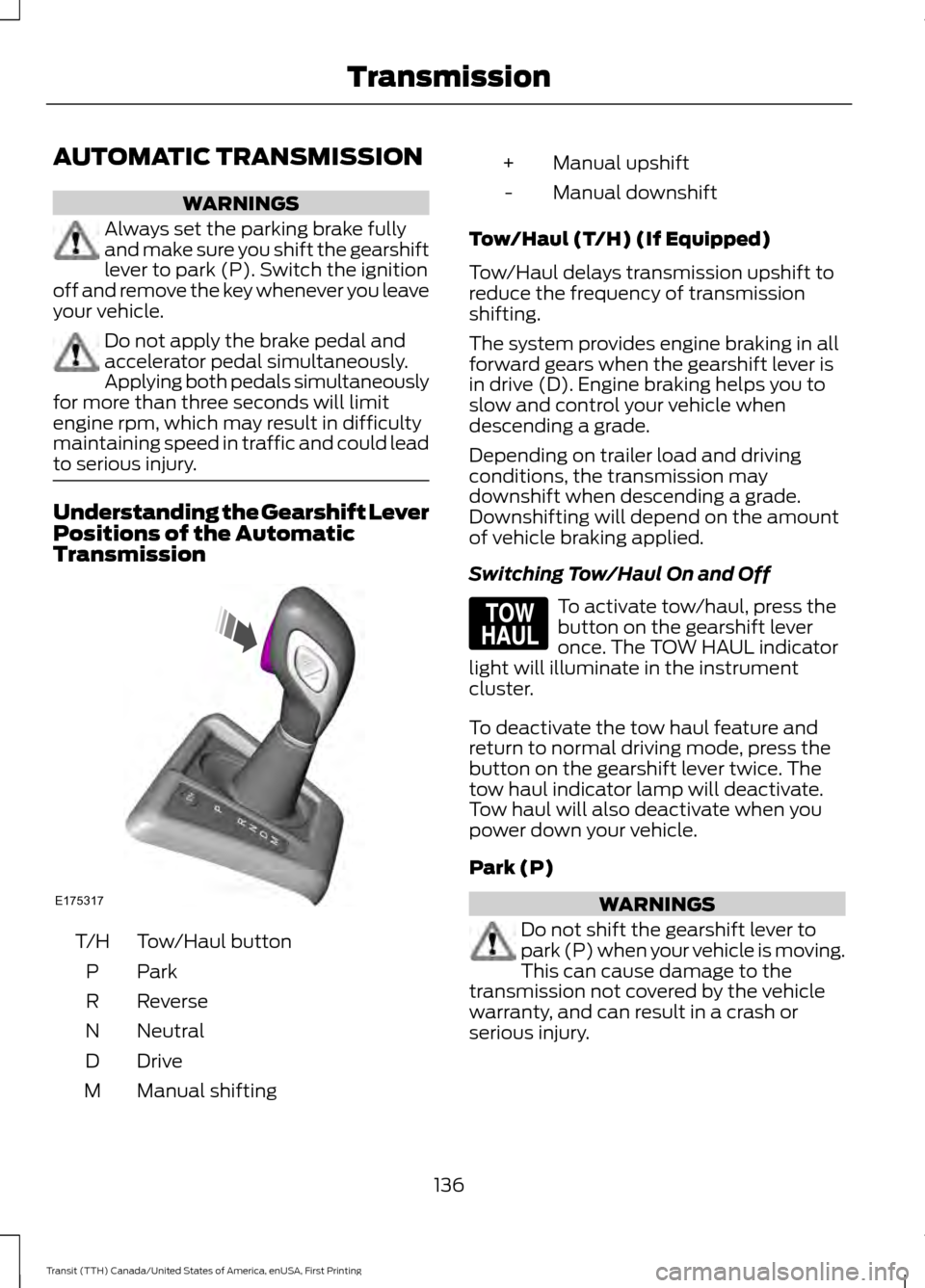
AUTOMATIC TRANSMISSION
WARNINGS
Always set the parking brake fully
and make sure you shift the gearshift
lever to park (P). Switch the ignition
off and remove the key whenever you leave
your vehicle. Do not apply the brake pedal and
accelerator pedal simultaneously.
Applying both pedals simultaneously
for more than three seconds will limit
engine rpm, which may result in difficulty
maintaining speed in traffic and could lead
to serious injury. Understanding the Gearshift Lever
Positions of the Automatic
Transmission
Tow/Haul button
T/H
ParkP
Reverse
R
Neutral
N
Drive
D
Manual shifting
M Manual upshift
+
Manual downshift
-
Tow/Haul (T/H) (If Equipped)
Tow/Haul delays transmission upshift to
reduce the frequency of transmission
shifting.
The system provides engine braking in all
forward gears when the gearshift lever is
in drive (D). Engine braking helps you to
slow and control your vehicle when
descending a grade.
Depending on trailer load and driving
conditions, the transmission may
downshift when descending a grade.
Downshifting will depend on the amount
of vehicle braking applied.
Switching Tow/Haul On and Off To activate tow/haul, press the
button on the gearshift lever
once. The TOW HAUL indicator
light will illuminate in the instrument
cluster.
To deactivate the tow haul feature and
return to normal driving mode, press the
button on the gearshift lever twice. The
tow haul indicator lamp will deactivate.
Tow haul will also deactivate when you
power down your vehicle.
Park (P) WARNINGS
Do not shift the gearshift lever to
park (P) when your vehicle is moving.
This can cause damage to the
transmission not covered by the vehicle
warranty, and can result in a crash or
serious injury.
136
Transit (TTH) Canada/United States of America, enUSA, First Printing TransmissionE175317 E161509
Page 140 of 411
WARNINGS
Apply the parking brake, shift the
gearshift lever to park (P) and switch
the ignition off before leaving your
vehicle. Make sure that the gearshift lever
fully latches into position. When the gearshift lever is in this position,
it will lock the transmission. The engine
does not transmit power to the driven
wheels. You can start the engine with the
gearshift lever in this position.
Note:
A warning tone will sound if you open
the driver door and you have not shifted the
gearshift lever to park (P).
Reverse (R) WARNINGS
Do not shift the gearshift lever to
reverse (R) when your vehicle is
moving. This can cause damage to
the transmission not covered by the vehicle
warranty, and can result in a crash or
serious injury. Always come to a complete stop
before shifting the gearshift lever out
of reverse (R).
Shift the gearshift lever to reverse (R) to
allow your vehicle to move backward.
Neutral (N)
When the gearshift lever is in this position,
the transmission does not lock. The engine
does not transmit power to the driven
wheels. You can start the engine with the
gearshift lever in this position.
Drive (D)
Shift the gearshift lever to drive (D) to
allow your vehicle to move forward and
shift automatically through the forward
gears. The transmission shifts to the appropriate
gear for optimum performance based on
ambient temperature, road gradient,
vehicle load and your input.
Note:
A shift will occur only when your
vehicle speed and the engine speed are
appropriate.
Note: You can temporarily override the
selected gear by pressing the + or - buttons
on the side of the gearshift lever.
Manual (M) WARNING
Do not hold the + or - buttons
permanently in. Shift the gearshift lever to manual (M) to
allow your vehicle to move forward and
allow you to shift manually through the
forward gears. Press the
+ or - buttons on
the side of the gearshift lever to shift
manually through the forward gears. The
instrument cluster will display the selected
gear, and a shift indicator arrow to assist
optimum shifting.
• Press the
+ button to upshift.
• Press the
- button to downshift.
You can skip gears by pressing a button
repeatedly at short intervals.
Upshift at the recommended shift
speeds according to the following
chart: Upshifts when accelerating (recom-
mended for best fuel economy)
Vehicle speed mph( km/h):
Upshift from:
15 (24)
1 - 2
25 (40)
2 - 3
40 (64)
3 - 4
137
Transit (TTH) Canada/United States of America, enUSA, First Printing Transmission