lock FORD TRANSIT 2017 5.G Workshop Manual
[x] Cancel search | Manufacturer: FORD, Model Year: 2017, Model line: TRANSIT, Model: FORD TRANSIT 2017 5.GPages: 484, PDF Size: 11.45 MB
Page 178 of 484
The controller shows gain setting, output bar graph and the trailer connectivity
status in the information display as follows:
Action and Description
Message
Displays the current gain setting during a given ignition cycle
and when adjusting the gain setting. This also displays if you
use the manual control lever or make gain adjustments with
no trailer connected.
Trailer Brake
Gain:
No Trailer
Displays when you press your vehicle's brake pedal, or upon
use of the manual control lever. Bar indicators illuminate in
the information display to indicate the amount of power going
to the trailer brakes relative to the brake pedal or manual
control input. One bar indicates the least amount of output;
six bars indicate maximum output.
Trailer Brake
Gain:
Output:
Displays when the system senses a correct trailer wiring
connection during a given ignition cycle. For example a trailer
with electric trailer brakes.
Trailer Connected
Displays when the system senses a trailer connection and
then a disconnection, either intentional or unintentional,
during a given ignition cycle, this is accompanied by a single
audible tone. It also displays if a vehicle or trailer-wiring fault
occurs causing the trailer to appear disconnected. This
message can also display if you use the manual control lever
without a trailer connected.
Trailer Disconnected
Procedure for Adjusting the Gain Setting
The gain setting sets the trailer brake
controller for the specific towing condition.
You should change the setting as towing
conditions change. Changes to towing
conditions include trailer load, vehicle load,
road conditions and weather.
The gain should be set to provide the
maximum trailer braking assistance while
making sure the trailer wheels do not lock
when using the brakes. Locked trailer
wheels may lead to trailer instability.
Note: Only carry out this procedure in a
traffic-free environment at speeds of
approximately 20-25 mph (30-40 km/h). 1.
Make sure the trailer brakes are in good
working condition, functioning normally
and correctly adjusted. See a trailer
dealer if necessary.
2. Hook up the trailer and make the electrical connections according to the
trailer manufacturer's instructions.
3. Use the gain adjustment + and -
buttons to increase or decrease the
gain setting to the desired starting
point. A gain setting of six is a good
starting point for heavier loads.
4. In a traffic-free environment, tow the trailer on a dry, level surface at a speed
of 20-25 mph (30-40 km/h) and slide
the manual control lever completely.
175
Transit (TTH) Canada/United States of America, HK3J 19A321 AA enUSA, Edition date: 04/2016, First Printing Towing
Page 179 of 484
5. If the trailer wheels lock, indicated by
squealing tires, reduce the gain setting.
If the trailer wheels turn freely, increase
the gain setting. Repeat steps four and
five until the gain setting is at a point just below trailer wheel lock. If towing
a heavier trailer, trailer wheel lock may
not be attainable even with the
maximum gain setting of 10.
System Warning Messages Action and Description
Message
Displays in response to faults sensed by the trailer brake
controller, accompanied by a single tone. If this message
appears, contact an authorized dealer as soon as possible
for diagnosis and repair. The controller may still function, but
performance may be degraded.
Trailer Brake Module
Fault
Displays when there is a short circuit on the electric brake
output wire. If the message displays, accompanied by a single
tone, with no trailer connected, the problem is with your
vehicle wiring between the trailer brake controller and the 7-
pin connector. If the message only displays with a trailer
connected, the problem is with the trailer wiring. Consult a
trailer dealer for assistance. This can be a short to ground,
for example a chaffed wire, short to voltage, for example a
pulled pin on trailer emergency breakaway battery or the
trailer brakes may be drawing too much current.
Wiring Fault on Trailer
Note: An authorized dealer can diagnose the trailer brake controller to determine exactly
which trailer fault has occurred. However, the Ford Warranty does not cover this diagnosis
if the fault is with the trailer.
Points to Remember
• Do not attempt removal of the trailer
brake controller without consulting the
Workshop Manual. Damage to the unit
may result.
• Adjust gain setting before using the
trailer brake controller for the first time.
• Adjust gain setting, using the procedure
above, whenever road, weather and
trailer or vehicle loading conditions
change from when the gain was initially
set. •
Only use the manual control lever for
correct adjustment of the gain during
trailer setup. Misuse, such as
application during trailer sway, could
cause instability of trailer or tow
vehicle.
• Avoid towing in adverse weather
conditions. The trailer brake controller
does not provide anti-lock control of
the trailer wheels. Trailer wheels can
lock up on slippery surfaces, resulting
in instability of trailer or tow vehicle.
176
Transit (TTH) Canada/United States of America, HK3J 19A321 AA enUSA, Edition date: 04/2016, First Printing Towing
Page 181 of 484
•
If your vehicle is fitted with
AdvanceTrac with roll stability control
(RSC), this system may turn on during
typical cornering maneuvers with a
heavily loaded trailer. This is normal.
Turning the corner at a slower speed
while towing may reduce this tendency.
• If you are towing a trailer frequently in
hot weather, hilly conditions, at the
gross combined weight rating (or any
combination of these factors), consider
refilling your vehicle's rear axle with
synthetic gear lubricant (if the axle is
not already filled with it). See
Capacities and Specifications (page
281).
• Allow more distance for stopping with
a trailer attached. Anticipate stops and
brake gradually.
• Avoid parking on a grade. However, if
you must park on a grade:
•Turn the steering wheel to point
your vehicle tires away from traffic
flow.
• Set your vehicle parking brake.
• Place the automatic transmission
in position park (
P).
• Place wheel chocks in front of and
at the back of the trailer wheels.
(Trailer wheel chocks are not
included with your vehicle.)
Launching or Retrieving a Boat or
Personal Water Craft (PWC)
When backing down a ramp during boat
launching or retrieval:
• Do not allow the static water level to
rise above the bottom edge of the rear
bumper.
• Do not allow waves to break higher
than
6 in (15 cm) above the bottom
edge of the rear bumper.
Note: Disconnect the wiring to the trailer
before backing the trailer into the water. Note:
Reconnect the wiring to the trailer
after the trailer is removed from the water.
Exceeding these limits may allow water to
enter vehicle components:
• Causing internal damage to the
components.
• Affecting driveability, emissions, and
reliability.
Replace the rear axle lubricant anytime
the rear axle has been submerged in water.
Water may have contaminated the rear
axle lubricant, which is not normally
checked or changed unless a leak is
suspected or other axle repair is required.
TOWING THE VEHICLE ON
FOUR WHEELS
Emergency Towing WARNING
If your vehicle has a steering wheel
lock make sure the ignition is in the
accessory or on position when being
towed. You can flat-tow (all wheels on the
ground, regardless of the powertrain or
transmission configuration) your disabled
vehicle (without access to wheel dollies
or vehicle transport trailer) under the
following conditions:
•
Your vehicle is facing forward so you
tow it in a forward direction.
• You shift into Neutral (N). If you cannot
shift into Neutral (N), you may need to
override the transmission. See
Transmission
(page 141).
• Maximum speed is 35 mph (56 km/h).
• Maximum distance is
50 mi (80 km).
178
Transit (TTH) Canada/United States of America, HK3J 19A321 AA enUSA, Edition date: 04/2016, First Printing Towing
Page 185 of 484
WARNINGS
Always make sure that the floor
mats are properly attached to the
retention posts in the carpet that are
supplied with your vehicle. Floor mats must
be properly secured to both retention posts
to make sure mats do not shift out of
position. Never place floor mats or any other
covering in the vehicle foot well that
cannot be properly secured to
prevent them from moving and interfering
with the pedals or the ability to control the
vehicle. Never place floor mats or any other
covering on top of already installed
floor mats. Floor mats should always
rest on top of vehicle carpeting surface and
not another floor mat or other covering.
Additional floor mats or any other covering
will reduce the pedal clearance and
potentially interfere with pedal operation. Check attachment of floor mats on
a regular basis. Always properly
reinstall and secure floor mats that
have been removed for cleaning or
replacement. Always make sure that objects
cannot fall into the driver foot well
while the vehicle is moving. Objects
that are loose can become trapped under
the pedals causing a loss of vehicle control. Failure to properly follow floor mat
installation or attachment
instructions can potentially cause
interference with pedal operation causing
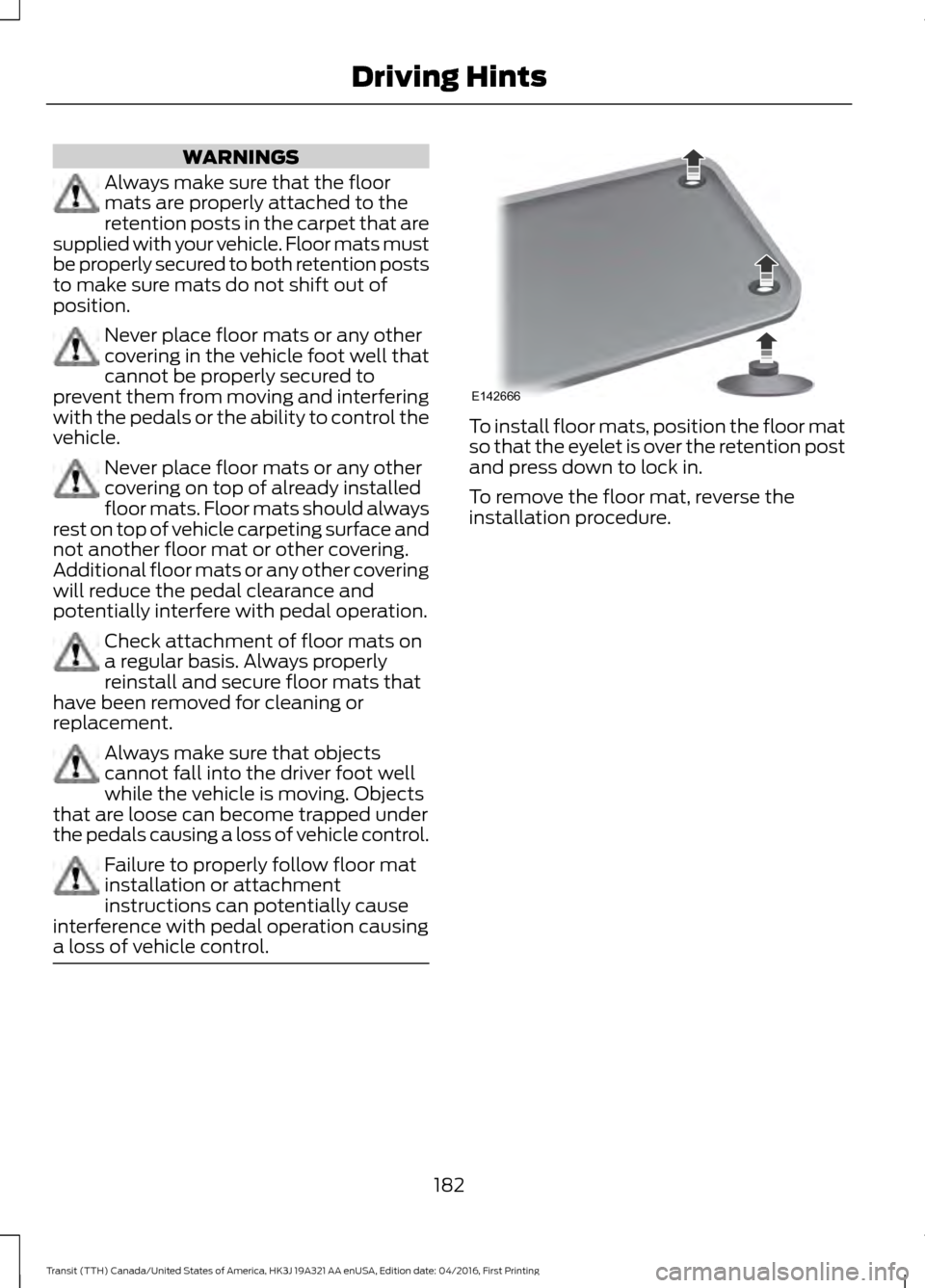
a loss of vehicle control. To install floor mats, position the floor mat
so that the eyelet is over the retention post
and press down to lock in.
To remove the floor mat, reverse the
installation procedure.
182
Transit (TTH) Canada/United States of America, HK3J 19A321 AA enUSA, Edition date: 04/2016, First Printing Driving HintsE142666
Page 186 of 484
ROADSIDE ASSISTANCE
Vehicles Sold in the United States:
Getting Roadside Assistance
To fully assist you should you have a
vehicle concern, Ford Motor Company
offers a complimentary roadside
assistance program. This program is
separate from the New Vehicle Limited
Warranty. The service is available:
•
24 hours a day, seven days a week.
• For the coverage period listed on the
Roadside Assistance Card included in
your Owner's Manual portfolio.
Roadside Assistance covers:
• A flat tire change with a good spare, if
provided with the vehicle (except
vehicles supplied with a tire inflation
kit).
• Battery jump start.
• Lock-out assistance (key replacement
cost is the customer's responsibility).
• Fuel delivery — independent service
contractors, if not prohibited by state,
local or municipal law, shall deliver up
to 2 gal (7.6 L) of gasoline or 5 gal
(18.9 L) of diesel fuel to a disabled
vehicle. Roadside Assistance limits fuel
delivery service to two no-charge
occurrences within a 12-month period.
• Winch out — available within
100 ft
(30.5 m) of a paved or county
maintained road, no recoveries.
• Towing — independent service
contractors, if not prohibited by state,
local or municipal law, shall tow Ford
eligible vehicles to an authorized dealer
within
35 mi (56 km) of the
disablement location or to the nearest authorized dealer. If a member
requests a tow to an authorized dealer
that is more than
35 mi (56 km) from
the disablement location, the member
shall be responsible for any mileage
costs in excess of
35 mi (56 km).
Roadside Assistance includes up to $200
for a towed trailer if the disabled eligible
vehicle requires service at the nearest
authorized dealer. If the towing vehicle is
operational but the trailer is not, then the
trailer does not qualify for any roadside
services.
Vehicles Sold in the United States:
Using Roadside Assistance
Complete the roadside assistance
identification card and place it in your
wallet for quick reference. This card is in
the owner's information portfolio in the
glove compartment.
United States Ford vehicle customers who
require Roadside Assistance, call
1-800-241-3673.
If you need to arrange roadside assistance
for yourself, Ford Motor Company
reimburses a reasonable amount for
towing to the nearest dealership within
35 mi (56 km)
. To obtain reimbursement
information, United States Ford vehicle
customers call 1-800-241-3673.
Customers need to submit their original
receipts.
Vehicles Sold in Canada: Getting
Roadside Assistance
To fully assist you should you have a
vehicle concern, Ford Motor Company of
Canada, Limited offers a complimentary
roadside assistance program. This program
is eligible within Canada or the continental
United States.
183
Transit (TTH) Canada/United States of America, HK3J 19A321 AA enUSA, Edition date: 04/2016, First Printing Roadside Emergencies
Page 201 of 484
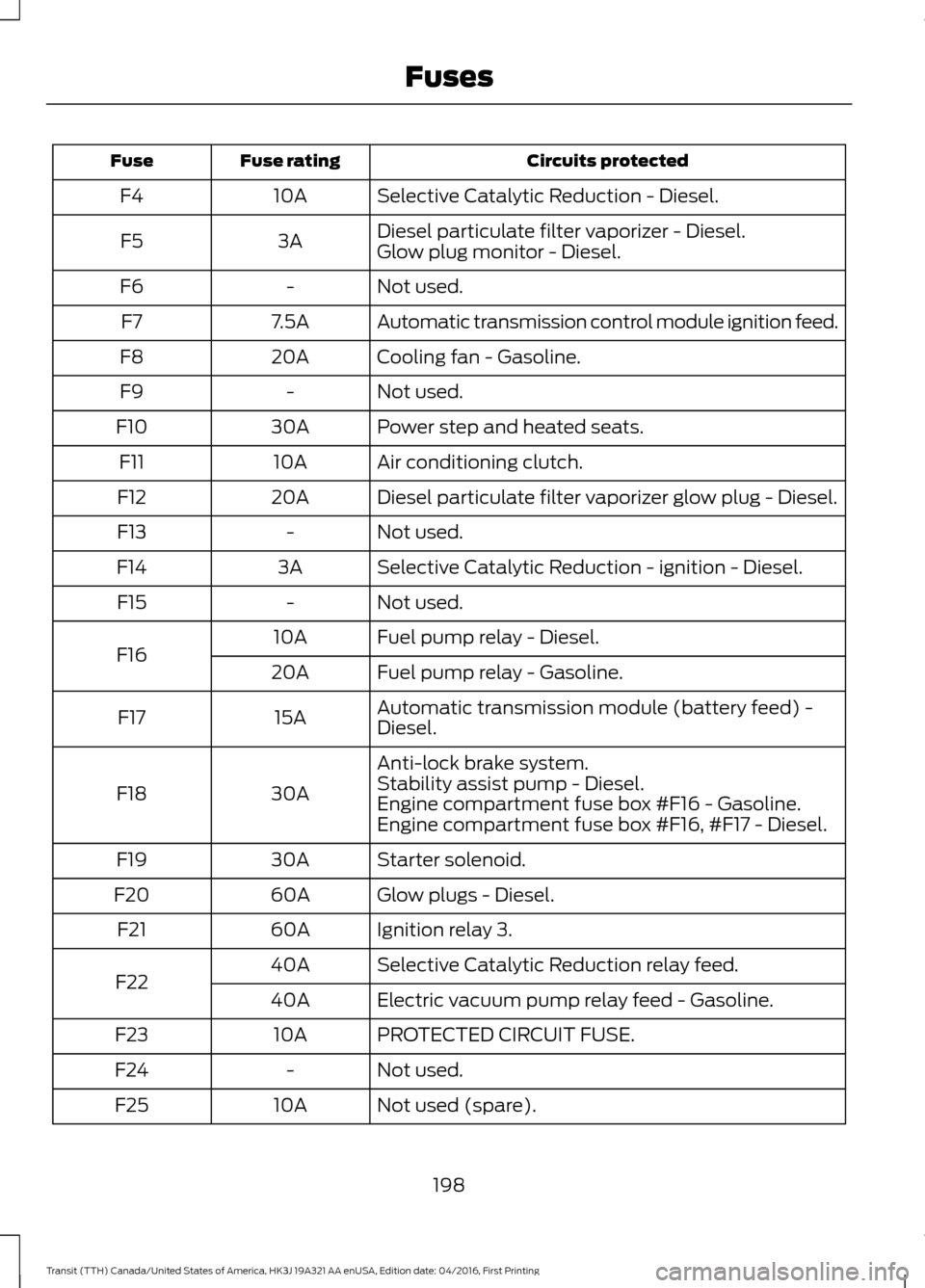
Circuits protected
Fuse rating
Fuse
Selective Catalytic Reduction - Diesel.
10A
F4
Diesel particulate filter vaporizer - Diesel.
3A
F5
Glow plug monitor - Diesel.
Not used.
-
F6
Automatic transmission control module ignition feed.
7.5A
F7
Cooling fan - Gasoline.
20A
F8
Not used.
-
F9
Power step and heated seats.
30A
F10
Air conditioning clutch.
10A
F11
Diesel particulate filter vaporizer glow plug - Diesel.
20A
F12
Not used.
-
F13
Selective Catalytic Reduction - ignition - Diesel.
3A
F14
Not used.
-
F15
Fuel pump relay - Diesel.
10A
F16 Fuel pump relay - Gasoline.
20A
Automatic transmission module (battery feed) -
Diesel.
15A
F17
Anti-lock brake system.
30A
F18 Stability assist pump - Diesel.
Engine compartment fuse box #F16 - Gasoline.
Engine compartment fuse box #F16, #F17 - Diesel.
Starter solenoid.
30A
F19
Glow plugs - Diesel.
60A
F20
Ignition relay 3.
60A
F21
Selective Catalytic Reduction relay feed.
40A
F22 Electric vacuum pump relay feed - Gasoline.
40A
PROTECTED CIRCUIT FUSE.
10A
F23
Not used.
-
F24
Not used (spare).
10A
F25
198
Transit (TTH) Canada/United States of America, HK3J 19A321 AA enUSA, Edition date: 04/2016, First Printing Fuses
Page 204 of 484
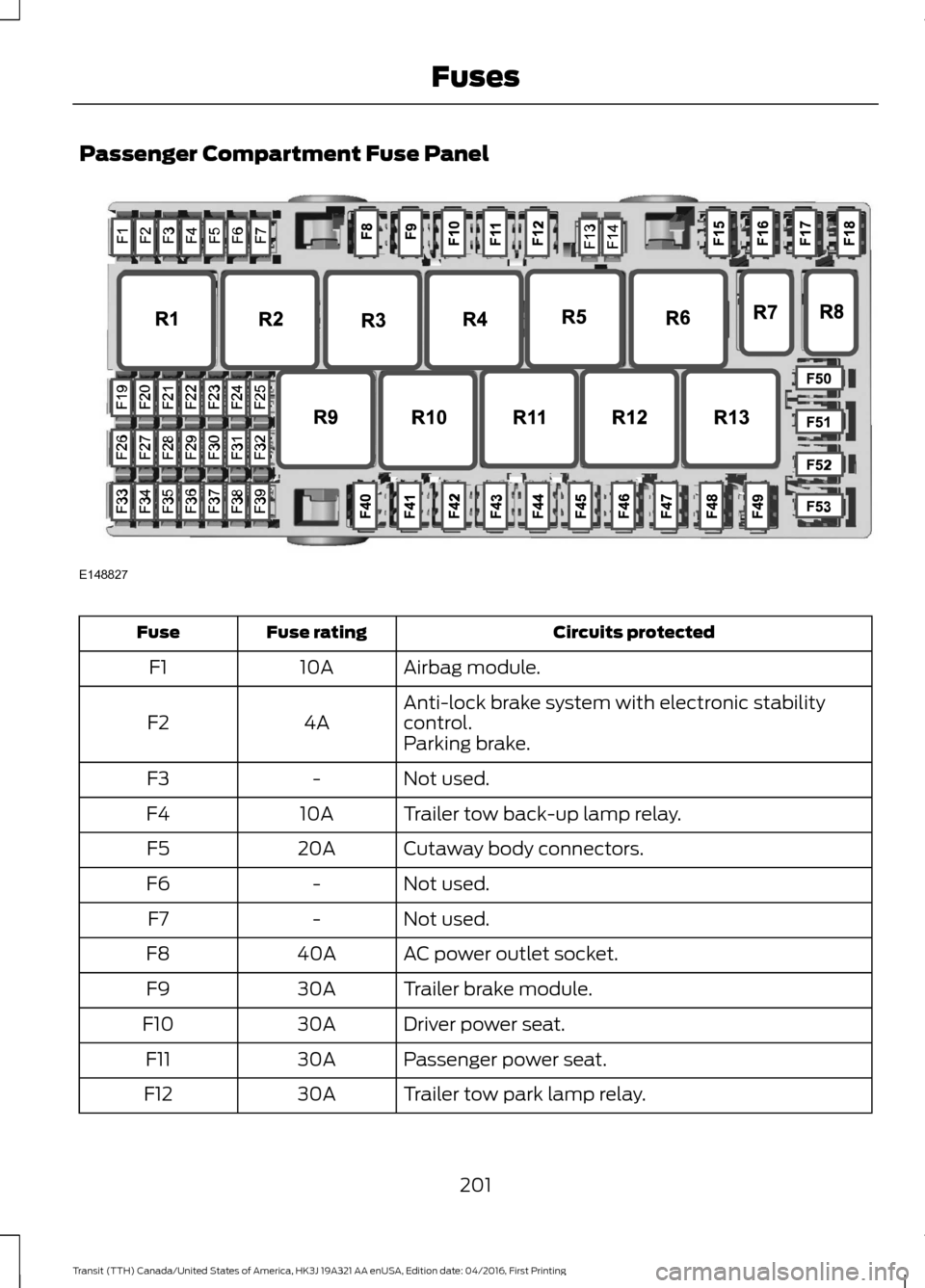
Passenger Compartment Fuse Panel
Circuits protected
Fuse rating
Fuse
Airbag module.
10A
F1
Anti-lock brake system with electronic stability
control.
4A
F2
Parking brake.
Not used.
-
F3
Trailer tow back-up lamp relay.
10A
F4
Cutaway body connectors.
20A
F5
Not used.
-
F6
Not used.
-
F7
AC power outlet socket.
40A
F8
Trailer brake module.
30A
F9
Driver power seat.
30A
F10
Passenger power seat.
30A
F11
Trailer tow park lamp relay.
30A
F12
201
Transit (TTH) Canada/United States of America, HK3J 19A321 AA enUSA, Edition date: 04/2016, First Printing FusesE148827
Page 205 of 484
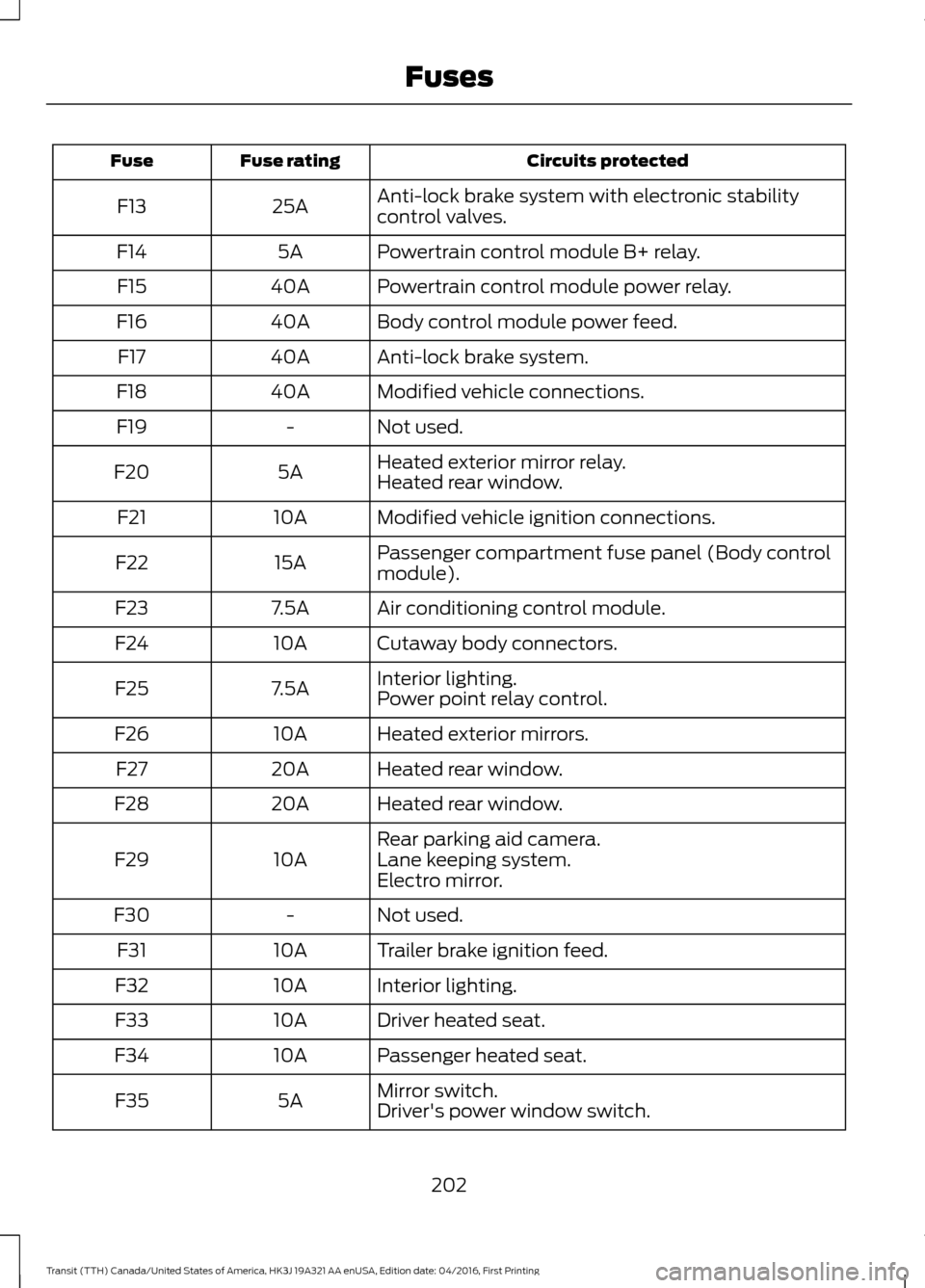
Circuits protected
Fuse rating
Fuse
Anti-lock brake system with electronic stability
control valves.
25A
F13
Powertrain control module B+ relay.
5A
F14
Powertrain control module power relay.
40A
F15
Body control module power feed.
40A
F16
Anti-lock brake system.
40A
F17
Modified vehicle connections.
40A
F18
Not used.
-
F19
Heated exterior mirror relay.
5A
F20
Heated rear window.
Modified vehicle ignition connections.
10A
F21
Passenger compartment fuse panel (Body control
module).
15A
F22
Air conditioning control module.
7.5A
F23
Cutaway body connectors.
10A
F24
Interior lighting.
7.5A
F25
Power point relay control.
Heated exterior mirrors.
10A
F26
Heated rear window.
20A
F27
Heated rear window.
20A
F28
Rear parking aid camera.
10A
F29 Lane keeping system.
Electro mirror.
Not used.
-
F30
Trailer brake ignition feed.
10A
F31
Interior lighting.
10A
F32
Driver heated seat.
10A
F33
Passenger heated seat.
10A
F34
Mirror switch.
5A
F35
Driver's power window switch.
202
Transit (TTH) Canada/United States of America, HK3J 19A321 AA enUSA, Edition date: 04/2016, First Printing Fuses
Page 211 of 484
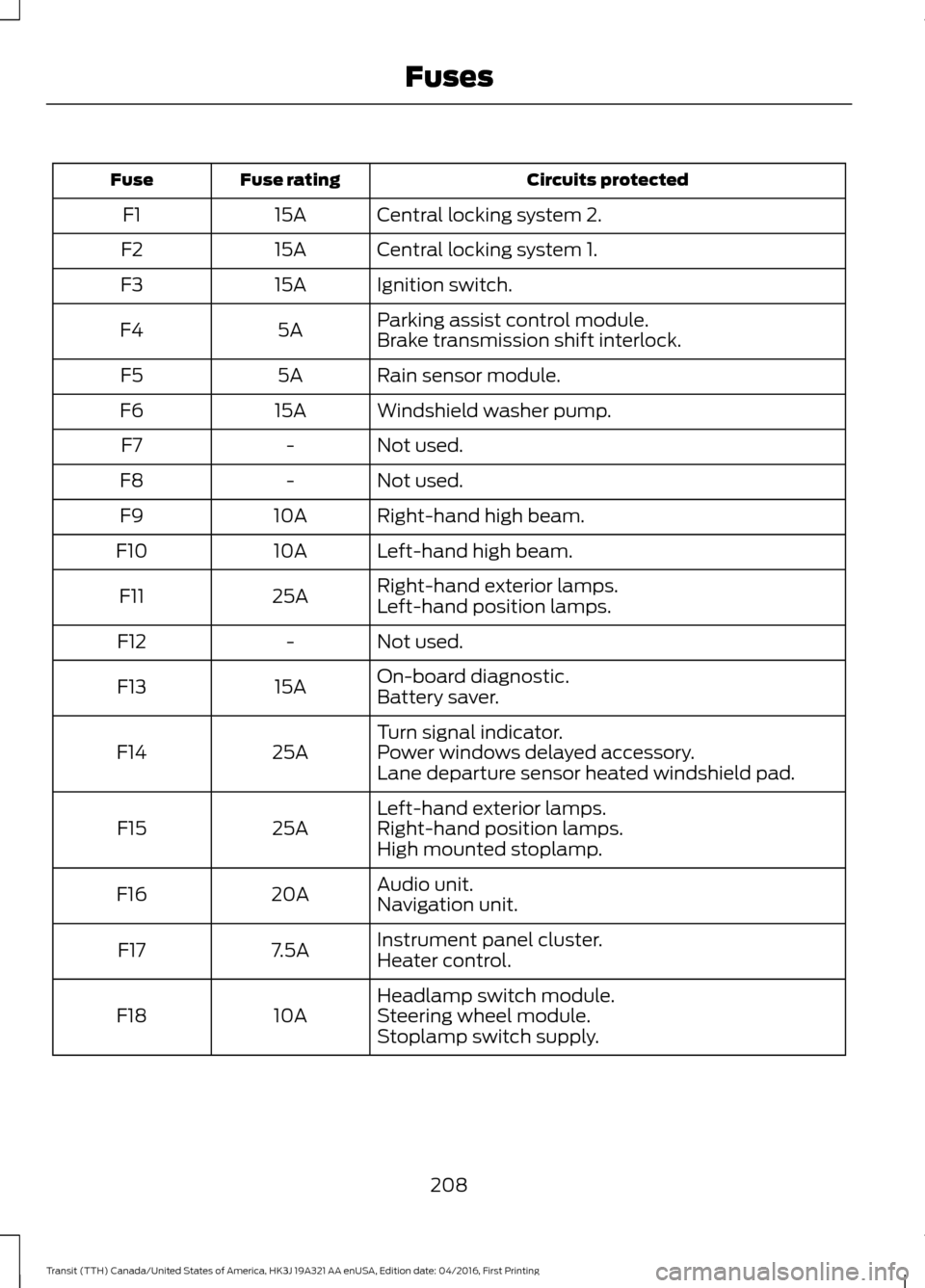
Circuits protected
Fuse rating
Fuse
Central locking system 2.
15A
F1
Central locking system 1.
15A
F2
Ignition switch.
15A
F3
Parking assist control module.
5A
F4
Brake transmission shift interlock.
Rain sensor module.
5A
F5
Windshield washer pump.
15A
F6
Not used.
-
F7
Not used.
-
F8
Right-hand high beam.
10A
F9
Left-hand high beam.
10A
F10
Right-hand exterior lamps.
25A
F11
Left-hand position lamps.
Not used.
-
F12
On-board diagnostic.
15A
F13
Battery saver.
Turn signal indicator.
25A
F14 Power windows delayed accessory.
Lane departure sensor heated windshield pad.
Left-hand exterior lamps.
25A
F15 Right-hand position lamps.
High mounted stoplamp.
Audio unit.
20A
F16
Navigation unit.
Instrument panel cluster.
7.5A
F17
Heater control.
Headlamp switch module.
10A
F18 Steering wheel module.
Stoplamp switch supply.
208
Transit (TTH) Canada/United States of America, HK3J 19A321 AA enUSA, Edition date: 04/2016, First Printing Fuses
Page 214 of 484
GENERAL INFORMATION
Have your vehicle serviced regularly to help
maintain its roadworthiness and resale
value. There is a large network of
authorized dealers that are there to help
you with their professional servicing
expertise. We believe that their specially
trained technicians are best qualified to
service your vehicle properly and expertly.
They are supported by a wide range of
highly specialized tools developed
specifically for servicing your vehicle.
If your vehicle requires professional service,
an authorized dealer can provide the
necessary parts and service. Check your
warranty information to find out which
parts and services are covered.
Use only recommended fuels, lubricants,
fluids and service parts conforming to
specifications. Motorcraft® parts are
designed and built to provide the best
performance in your vehicle.
Precautions
•
Do not work on a hot engine.
• Make sure that nothing gets caught in
moving parts.
• Do not work on a vehicle with the
engine running in an enclosed space,
unless you are sure you have enough
ventilation.
• Keep all open flames and other burning
material (such as cigarettes) away
from the battery and all fuel related
parts.
Working with the Engine Off
1. Set the parking brake and shift to park
(P).
2. Switch off the engine.
3. Block the wheels. Working with the Engine On WARNING
To reduce the risk of vehicle damage
and/or personal burn injuries, do not
start your engine with the air cleaner
removed and do not remove it while the
engine is running. 1.
Set the parking brake and shift to park
(P).
2. Block the wheels.
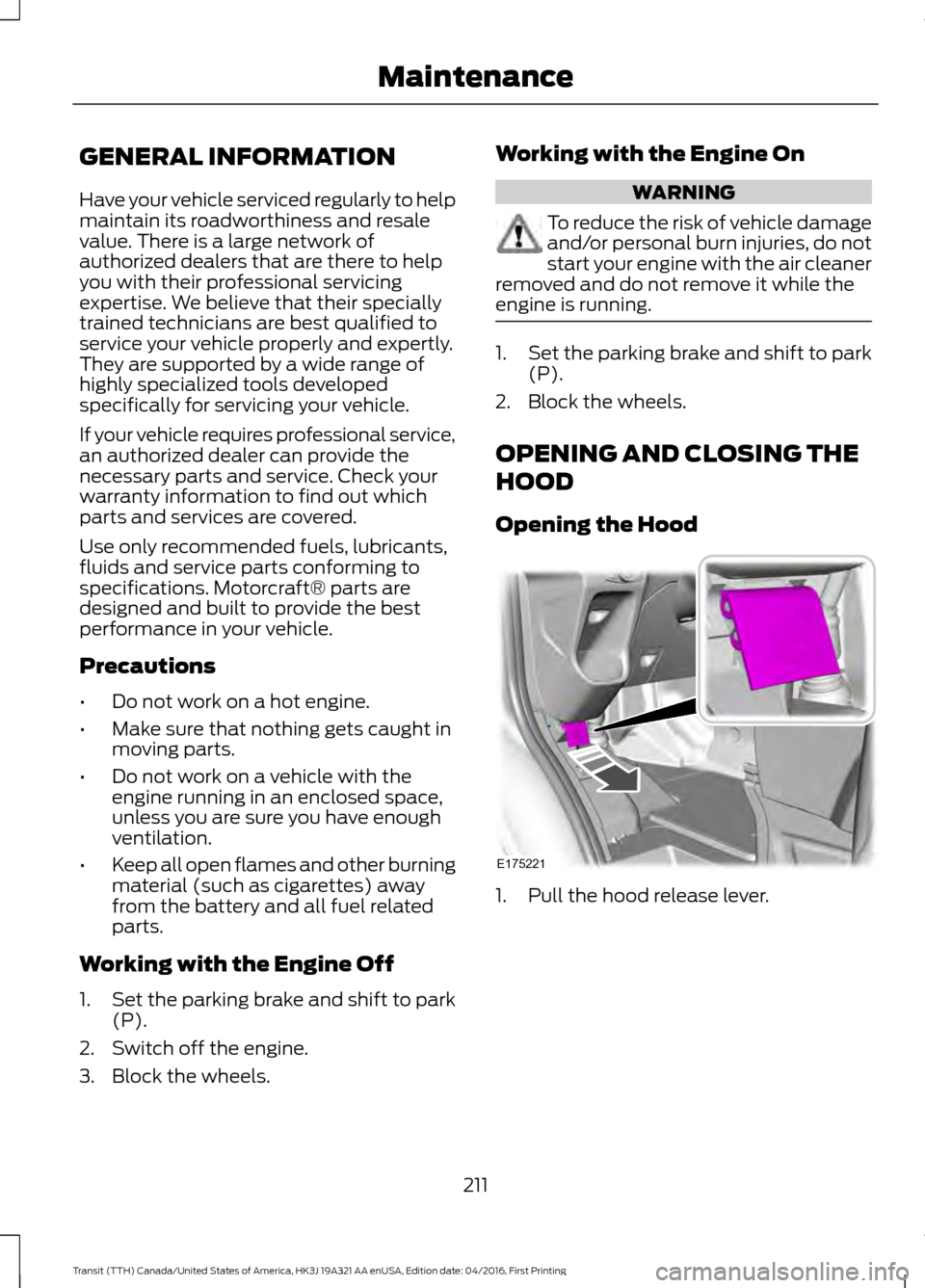
OPENING AND CLOSING THE
HOOD
Opening the Hood 1. Pull the hood release lever.
211
Transit (TTH) Canada/United States of America, HK3J 19A321 AA enUSA, Edition date: 04/2016, First Printing MaintenanceE175221