lock FORD TRANSIT 2017 5.G Manual PDF
[x] Cancel search | Manufacturer: FORD, Model Year: 2017, Model line: TRANSIT, Model: FORD TRANSIT 2017 5.GPages: 484, PDF Size: 11.45 MB
Page 273 of 484
Carrying Out the System Reset
Procedure
Read the entire procedure before carrying
out a system reset.
1. Drive your vehicle above 20 mph (32
km/h) for at least two minutes and
then park in a safe location where you
can easily get to all four tires and have
access to a tire inflation pump.
2. Switch the ignition off.
3. Switch the ignition on with the engine off.
4. Turn the hazard flashers on then off three times, this must be completed
within 10 seconds. If the reset mode
has been entered successfully, the horn
will chirp once and the system indicator
will flash. If this does not occur, repeat
the procedure from step 2. If after
repeated attempts to enter the reset
mode, the horn does not chirp and the
system indicator does not flash, have
your vehicle checked by an authorized
dealer as soon as possible.
5. Train the system sensors in the tires using the following reset sequence
starting with the left front tire and
following a clockwise order: Left front,
right front, right rear, left rear.
6. Remove the valve cap from the valve stem on the left front tire. Decrease the
air pressure until the horn chirps.
Note: The single horn chirp confirms that
the sensor identification code has been
learned by your vehicle for this position. If a
double horn chirp is heard, the reset
procedure was unsuccessful and must be
repeated.
7. Remove the valve cap from the valve stem on the right front tire. Decrease
the air pressure until the horn chirps.
8. Remove the valve cap from the valve stem on the right rear tire. Decrease the
air pressure until the horn chirps. 9. Remove the valve cap from the valve
stem on the left rear tire. Decrease the
air pressure until the horn chirps.
Training is complete when the horn
chirps after the last system sensor (left
rear) has been trained and the system
indicator stops flashing.
10. Switch the ignition off. If two short horn chirps are heard, the reset
procedure was unsuccessful and
must be repeated.
Note: If after repeating the procedure two
short horn chirps are heard again, have your
vehicle checked by an authorized dealer as
soon as possible.
11. Set all four tires to the correct pressure See Maintenance (page
211). or the tire inflation pressure label
(located on the edge of driver door or
the B-Pillar).
CHANGING A ROAD WHEEL WARNINGS
The use of tire sealant may damage
your tire pressure monitoring system
and should only be used in roadside
emergencies. If you must use a sealant, the
Ford Tire Mobility Kit sealant should be
used. The tire pressure monitoring system
sensor and valve stem on the wheel must
be replaced by an authorized dealer after
use of the sealant. If the tire pressure monitor sensor
becomes damaged, it will no longer
function. See
Tire Pressure
Monitoring System (page 266). Note:
The tire pressure monitoring system
indicator light will illuminate when the spare
tire is in use. To restore the full function of
the monitoring system, all road wheels
equipped with tire pressure monitoring
sensors must be mounted on this vehicle.
270
Transit (TTH) Canada/United States of America, HK3J 19A321 AA enUSA, Edition date: 04/2016, First Printing Wheels and Tires
Page 275 of 484
The usage of a full-size dissimilar spare
wheel and tire assembly can lead to
impairment of the following:
•
Handling, stability and braking
performance.
• Comfort and noise.
• Ground clearance and parking at curbs.
• Winter weather driving capability.
• Wet weather driving capability.
• All-wheel driving capability
When driving with the full-size dissimilar
spare wheel and tire assembly additional
caution should be given to:
• Towing a trailer.
• Driving vehicles equipped with a
camper body.
• Driving vehicles with a load on the
cargo rack.
Drive cautiously when using a full-size
dissimilar spare wheel and tire assembly
and seek service as soon as possible.
Locking Lug Nuts
You can obtain replacement locking lug
nuts or a locking lug nut key using the
reference number certificate.
Vehicles With a Spare Wheel
Van, Bus or Wagon
The spare wheel is under the rear of your
vehicle.
If the spare wheel is the same type and
size as your vehicle road wheel, you can fit
the spare wheel and continue to drive in
the normal manner.
If the spare wheel is not the same type and
size as your vehicle road wheel, it has a
label showing the maximum driving speed
limit. Note:
If your vehicle is fitted with a tire
pressure monitoring system, the warning
indicator will flash if you fit the spare wheel
to your vehicle. To restore the correct
operation of the tire pressure monitoring
system, you must have the repaired road
wheel and tire assembly refitted to your
vehicle. See Tire Pressure Monitoring
System (page 266). To prevent damage
occurring to the tire pressure monitoring
system sensors, make sure you have a
damage tire repaired or replaced by a tire
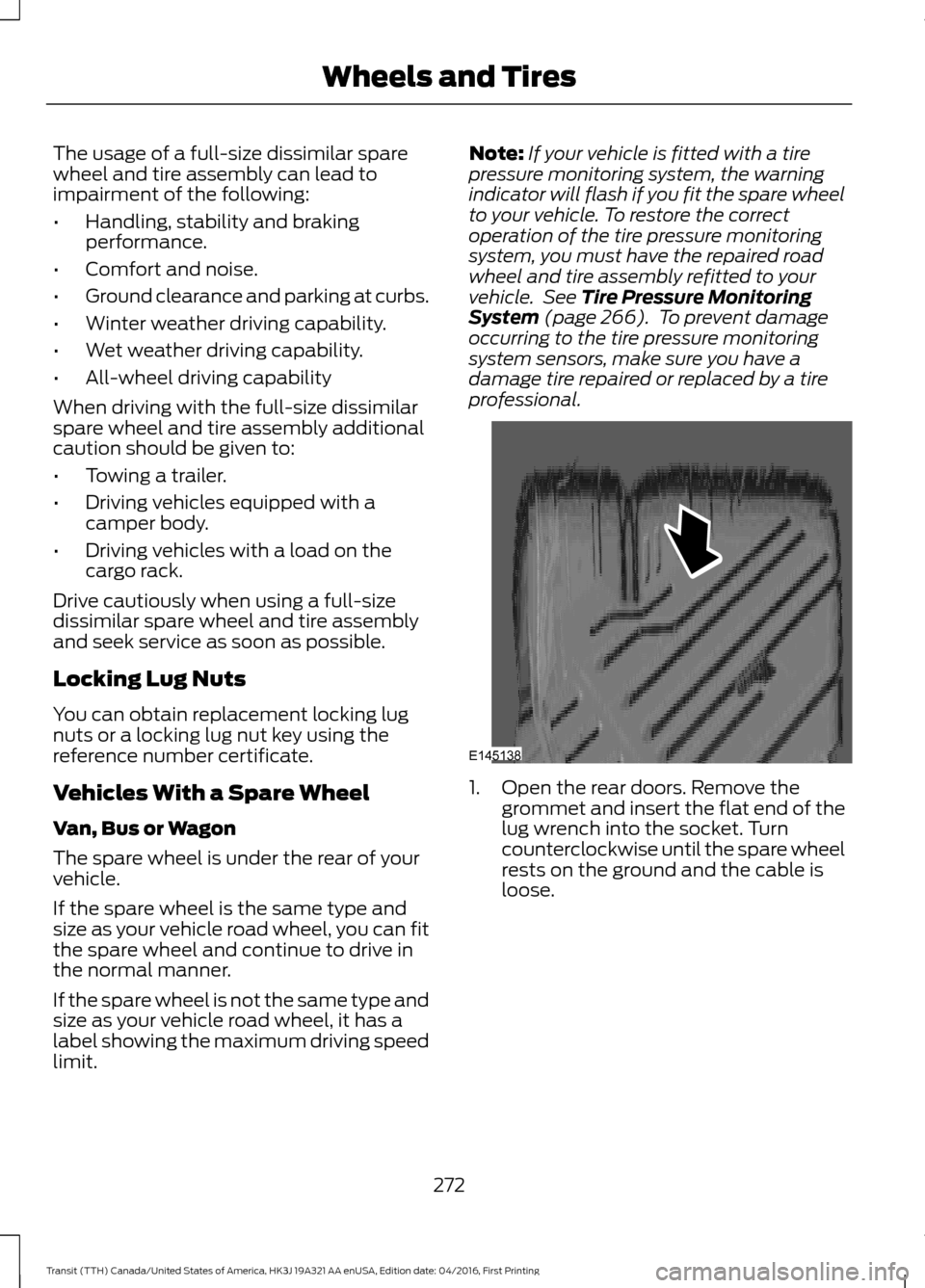
professional. 1. Open the rear doors. Remove the
grommet and insert the flat end of the
lug wrench into the socket. Turn
counterclockwise until the spare wheel
rests on the ground and the cable is
loose.
272
Transit (TTH) Canada/United States of America, HK3J 19A321 AA enUSA, Edition date: 04/2016, First Printing Wheels and TiresE145138
Page 277 of 484
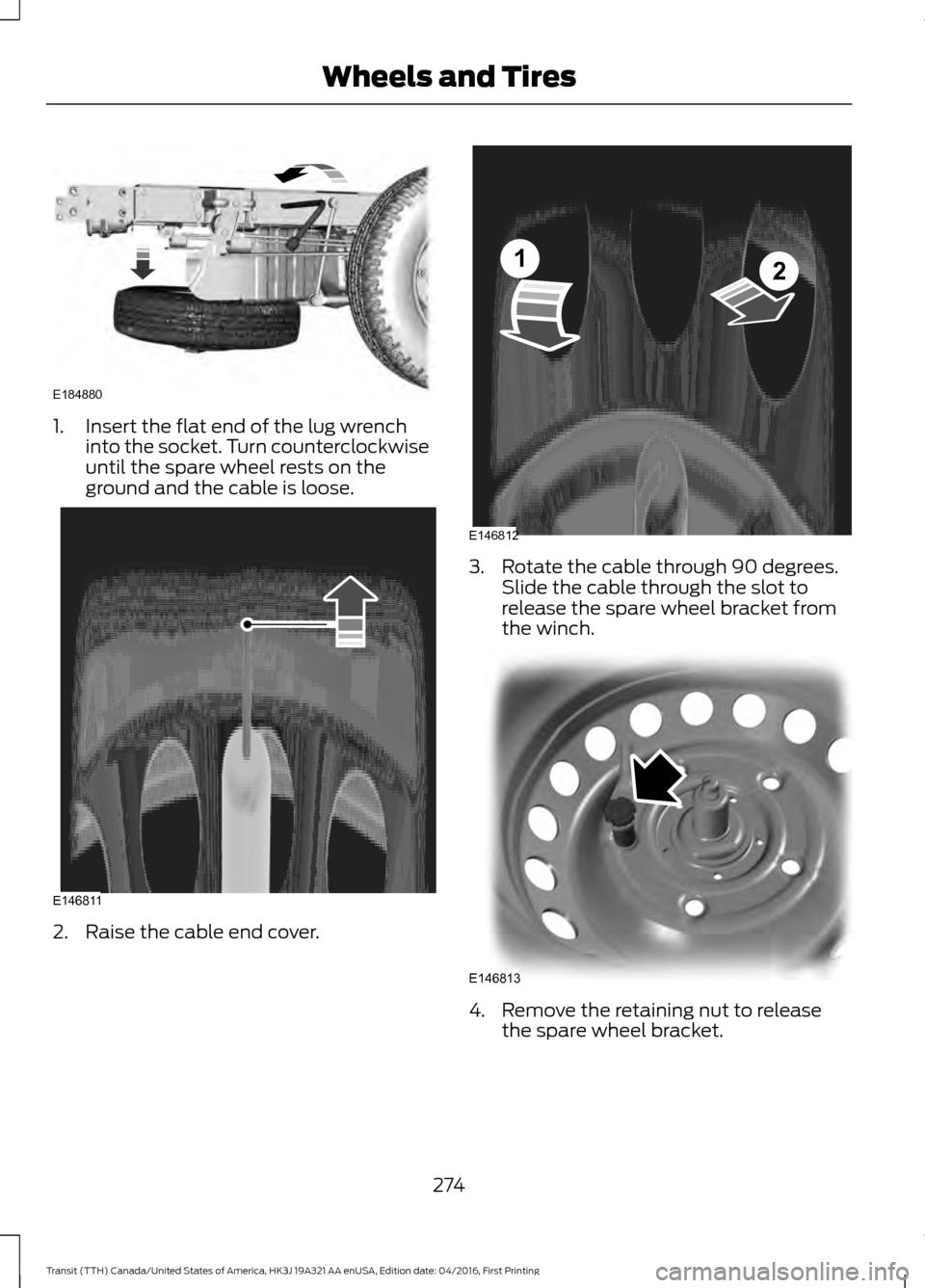
1. Insert the flat end of the lug wrench
into the socket. Turn counterclockwise
until the spare wheel rests on the
ground and the cable is loose. 2. Raise the cable end cover. 3. Rotate the cable through 90 degrees.
Slide the cable through the slot to
release the spare wheel bracket from
the winch. 4. Remove the retaining nut to release
the spare wheel bracket.
274
Transit (TTH) Canada/United States of America, HK3J 19A321 AA enUSA, Edition date: 04/2016, First Printing Wheels and TiresE184880 E146811 E146812
12 E146813
Page 278 of 484
Vehicle Jack
WARNINGS
When one of the front wheels is off
the ground, the transmission alone
will not prevent the vehicle from
moving or slipping off the jack. To help prevent the vehicle from
moving when you change a tire, be
sure to place the transmission in park
(P), set the parking brake and block (in
both directions) the wheel that is
diagonally opposite (other side and end of
the vehicle) to the tire being changed. Never get underneath a vehicle that
is supported only by a jack. If the
vehicle slips off the jack, you or
someone else could be seriously injured. Do not attempt to change a tire on
the side of the vehicle close to
moving traffic. Pull far enough off the
road to avoid the danger of being hit when
operating the jack or changing the wheel. Always use the jack provided as
original equipment with your vehicle.
If using a jack other than the one
provided as original equipment with your
vehicle, make sure the jack capacity is
adequate for the vehicle weight, including
any vehicle cargo or modifications. Disable the power running boards
before jacking, lifting, or placing any
object under the vehicle. Never place
your hand between the power running
board and the vehicle as extended power
running boards will retract when the doors
are closed. Failure to follow these
instructions may result in personal injury. Note:
Passengers should not remain in the
vehicle when the vehicle is being jacked.
Note: Vehicles with a Temporary Mobility
Kit do not have a vehicle jack or a lug
wrench. Vehicle Jack Storage
275
Transit (TTH) Canada/United States of America, HK3J 19A321 AA enUSA, Edition date: 04/2016, First Printing Wheels and TiresE218058
Page 279 of 484
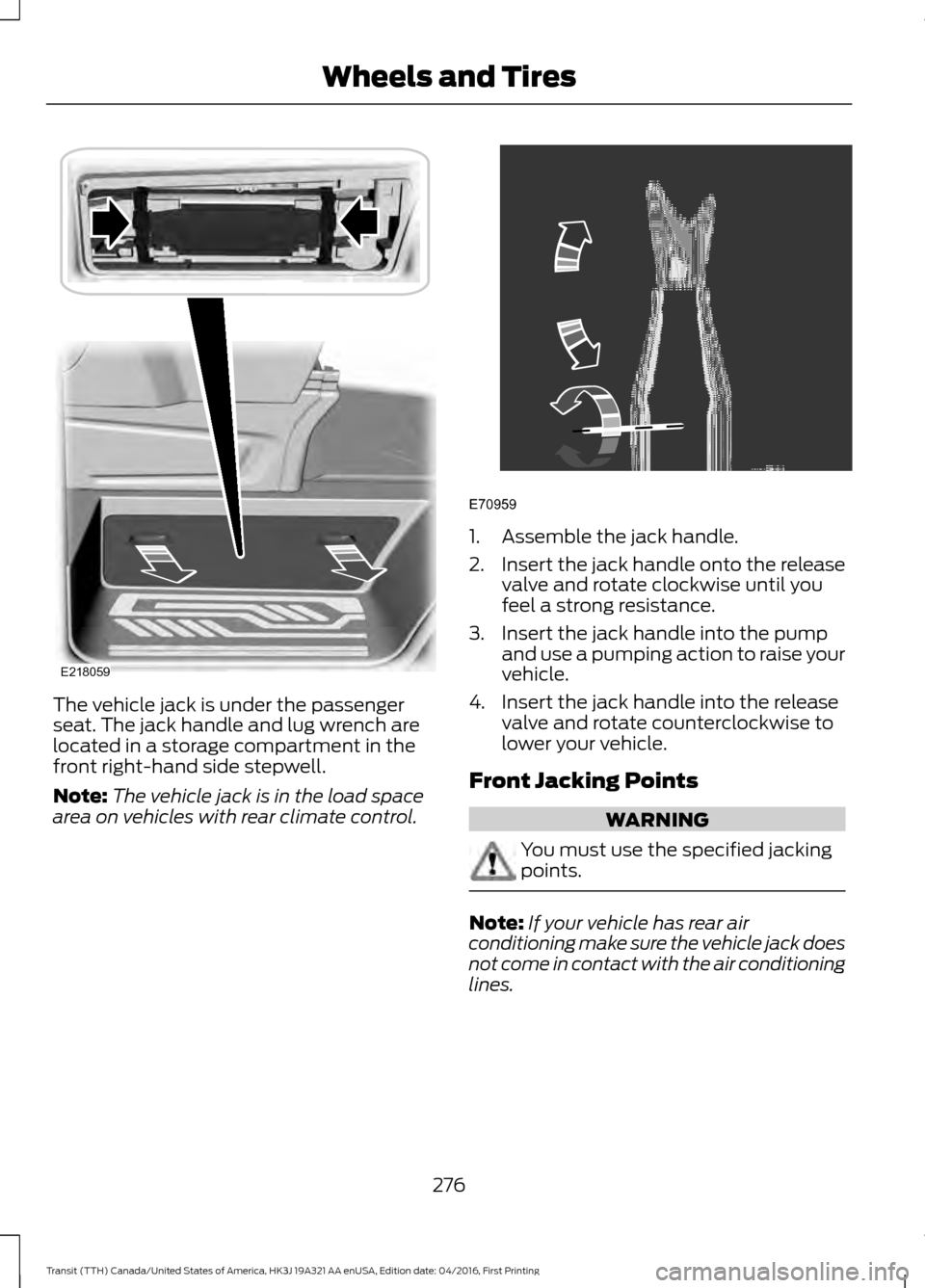
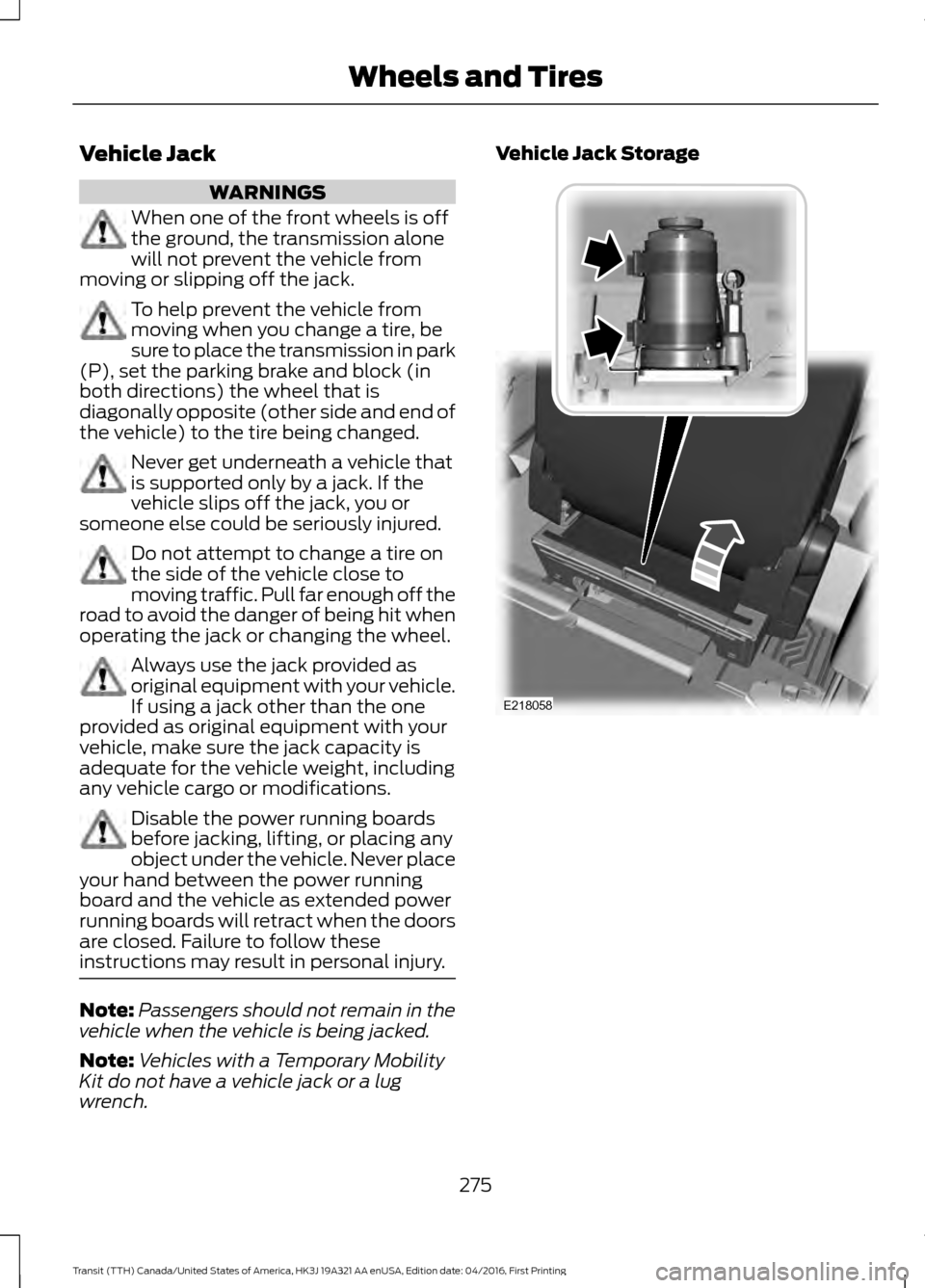
The vehicle jack is under the passenger
seat. The jack handle and lug wrench are
located in a storage compartment in the
front right-hand side stepwell.
Note:
The vehicle jack is in the load space
area on vehicles with rear climate control. 1. Assemble the jack handle.
2.
Insert the jack handle onto the release
valve and rotate clockwise until you
feel a strong resistance.
3. Insert the jack handle into the pump and use a pumping action to raise your
vehicle.
4. Insert the jack handle into the release valve and rotate counterclockwise to
lower your vehicle.
Front Jacking Points WARNING
You must use the specified jacking
points.
Note:
If your vehicle has rear air
conditioning make sure the vehicle jack does
not come in contact with the air conditioning
lines.
276
Transit (TTH) Canada/United States of America, HK3J 19A321 AA enUSA, Edition date: 04/2016, First Printing Wheels and TiresE218059 E70959
Page 281 of 484
WARNINGS
Chock the diagonally opposite wheel
to the punctured tire with an
appropriate block or wheel chock. A
wheel chock may be located in the B-pillar
or in a storage compartment in the front
right-hand side stepwell. Make sure that the arrows on
directional tires point in the direction
of rotation when your vehicle is
moving forward. If you have to fit a spare
tire with the arrows pointing in the opposite
direction have the tire refitted as soon as
possible. 1. Insert the flat end of the lug wrench
between the wheel rim and the wheel
trim and carefully remove the wheel
trim.
2. Use the locking lug nut key to loosen the locking lug nut.
3. Loosen the remaining lug nuts, but do not remove them.
4. Raise your vehicle until the tire is clear of the ground.
5. Remove the lug nuts and the road wheel.
Note: Do not lay alloy road wheels face
down on the ground.
Installing a Road Wheel WARNINGS
Use only approved wheel and tire
sizes. Using other wheel and tire sizes
could damage your vehicle and will
make the National Type Approval invalid. Make sure there is no lubrication
(grease or oil) on the threads or the
surface between the wheel lugs and
nuts. This can cause the lug nuts to loosen
while driving. WARNINGS
Make sure the wheel and hub
contact surfaces are free from
foreign material.
Never use wheels or lug nuts
different than the original equipment
as this could damage the wheel or
mounting system. This damage could
allow the wheels to come off when your
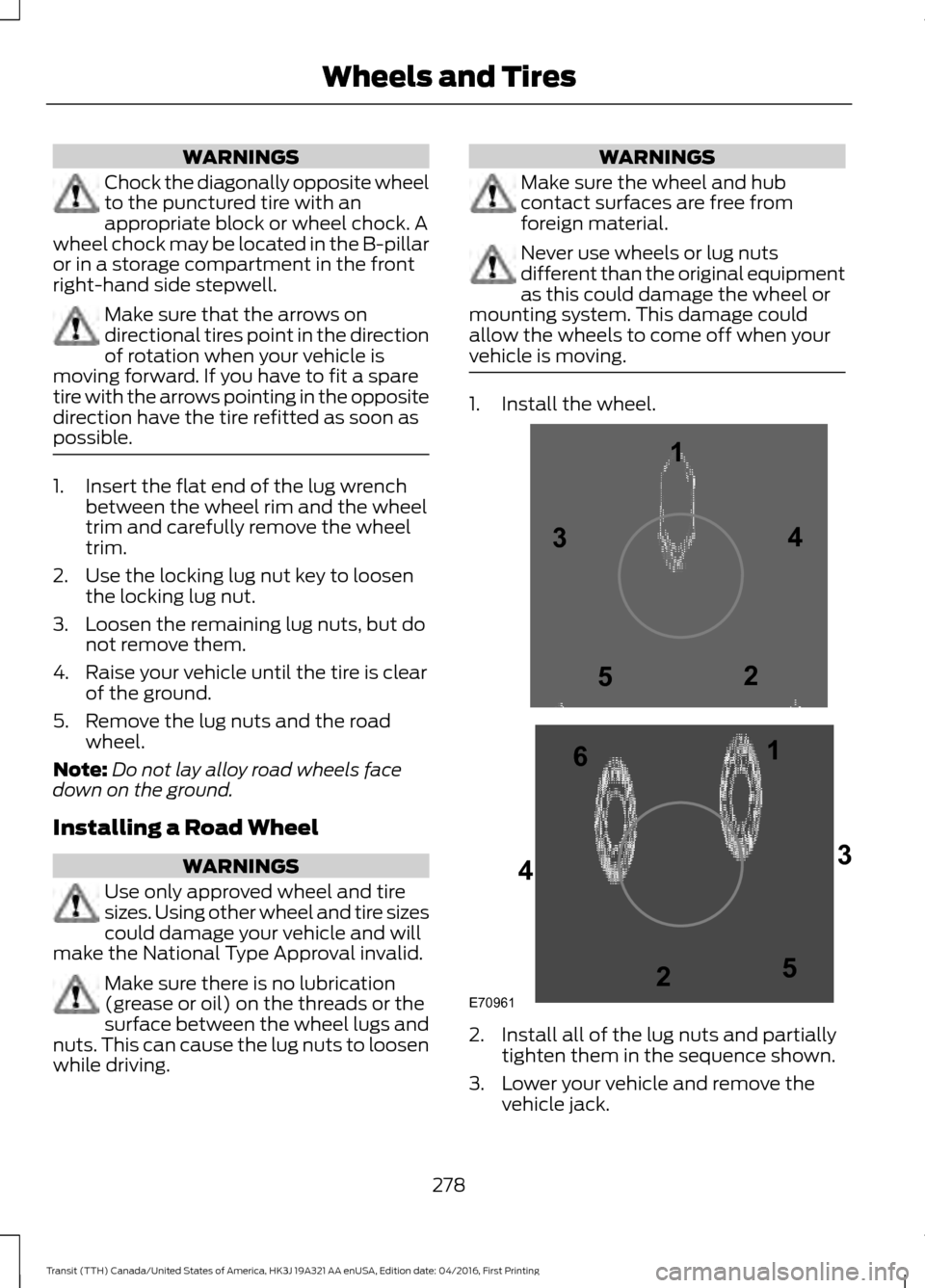
vehicle is moving. 1. Install the wheel.
2. Install all of the lug nuts and partially
tighten them in the sequence shown.
3. Lower your vehicle and remove the vehicle jack.
278
Transit (TTH) Canada/United States of America, HK3J 19A321 AA enUSA, Edition date: 04/2016, First Printing Wheels and TiresE709611
1
2 3
4
5
6
2
3
4
5
Page 282 of 484

4. Fully tighten all of the lug nuts in the
sequence shown.
5. Install the wheel trim.
Note: Make sure that the cones on the lug
nuts are against the wheel.
Note: Alloy wheel lug nuts are suitable for
use on a steel spare wheel.
Note: If the spare wheel is not the same
type and size as your vehicle road wheel
replace it as soon as possible.
Note: Check the lug nuts for correct
tightness and check the tire pressure as
soon as possible.
Stowing the Wheel and Vehicle
Jack
Note: Do not raise the spare wheel bracket
without a wheel attached. Damage can
occur to the winch mechanism if the spare
wheel bracket is lowered without a wheel
attached. 1. Attach the spare wheel bracket to the
wheel using the retaining nut.
2. Slide the cable through the slot and attach the spare wheel bracket to the
winch.
3. Rotate the cable through 90 degrees and lower the cable end cover.
4. Insert the flat end of the lug wrench into the socket. Turn it clockwise until
you feel a strong resistance. Make sure
the wheel is secure.
5. Stow the vehicle jack, jack handle and lug wrench in their correct locations
and secure them with the straps.
TECHNICAL SPECIFICATIONS
Wheel Lug Nut Torque Specifications WARNING
When a wheel is installed, always remove any corrosion, dirt or foreign materials
present on the mounting surfaces of the wheel or the surface of the wheel hub,
brake drum or brake disc that contacts the wheel. Make sure that any fasteners
that attach the rotor to the hub are secured so they do not interfere with the mounting
surfaces of the wheel. Installing wheels without correct metal-to-metal contact at the
wheel mounting surfaces can cause the wheel nuts to loosen and the wheel to come off
while your vehicle is in motion, resulting in loss of control. Ib-ft (Nm)
*
Bolt size
148 lb.ft (200 Nm)
M14 x 1.5
* Torque specifications are for nut and bolt threads free of dirt and rust. Use only Ford
recommended replacement fasteners.
Retighten the lug nuts to the specified torque within 100 miles (160 kilometers) after any
wheel disturbance, for example tire rotation, changing a flat tire or wheel removal.
279
Transit (TTH) Canada/United States of America, HK3J 19A321 AA enUSA, Edition date: 04/2016, First Printing Wheels and Tires
Page 303 of 484
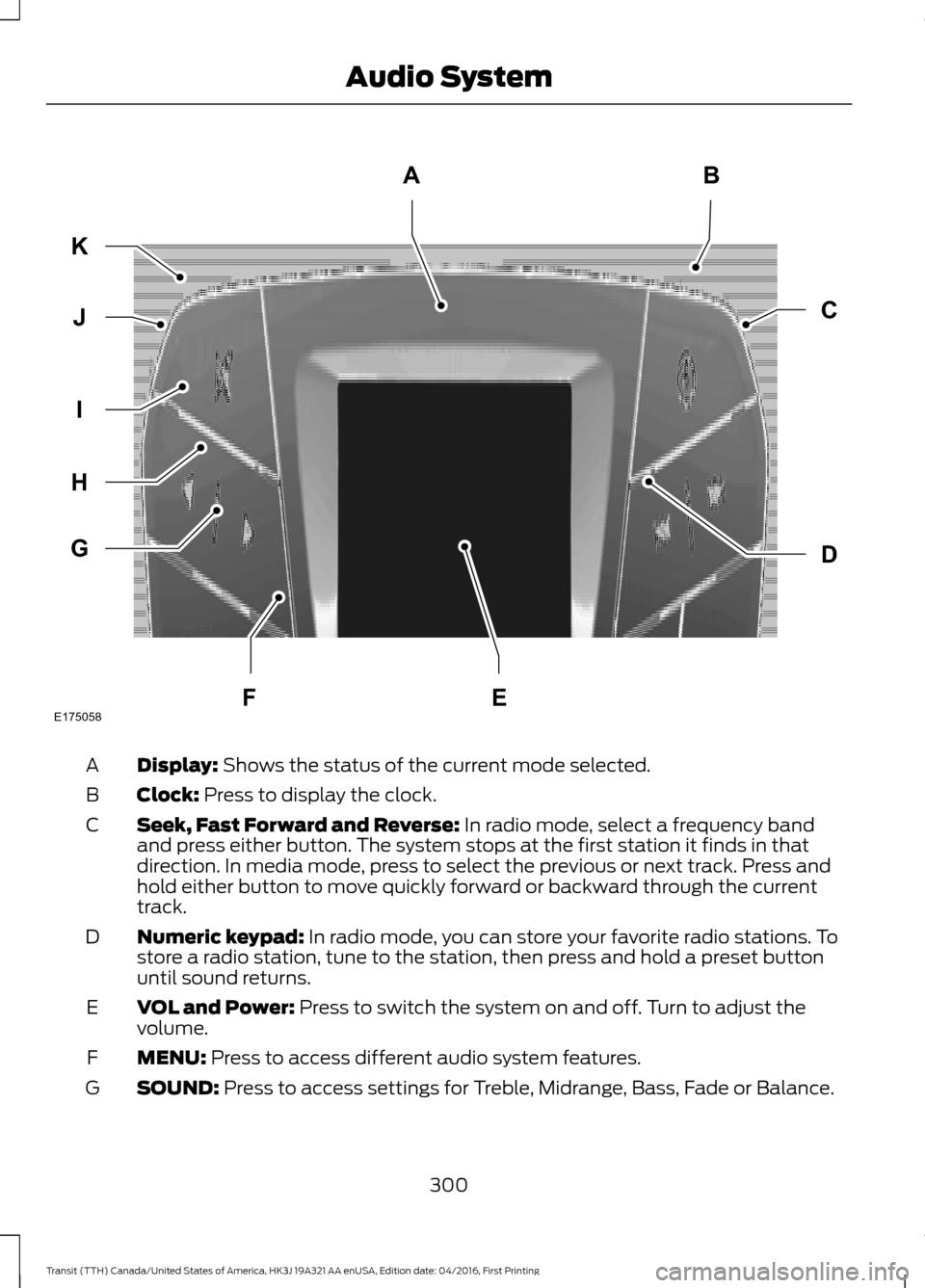
Display: Shows the status of the current mode selected.
A
Clock:
Press to display the clock.
B
Seek, Fast Forward and Reverse:
In radio mode, select a frequency band
and press either button. The system stops at the first station it finds in that
direction. In media mode, press to select the previous or next track. Press and
hold either button to move quickly forward or backward through the current
track.
C
Numeric keypad:
In radio mode, you can store your favorite radio stations. To
store a radio station, tune to the station, then press and hold a preset button
until sound returns.
D
VOL and Power:
Press to switch the system on and off. Turn to adjust the
volume.
E
MENU:
Press to access different audio system features.
F
SOUND:
Press to access settings for Treble, Midrange, Bass, Fade or Balance.
G
300
Transit (TTH) Canada/United States of America, HK3J 19A321 AA enUSA, Edition date: 04/2016, First Printing Audio SystemE175058
AB
D
C
G
H
I
J
K
FE
Page 304 of 484
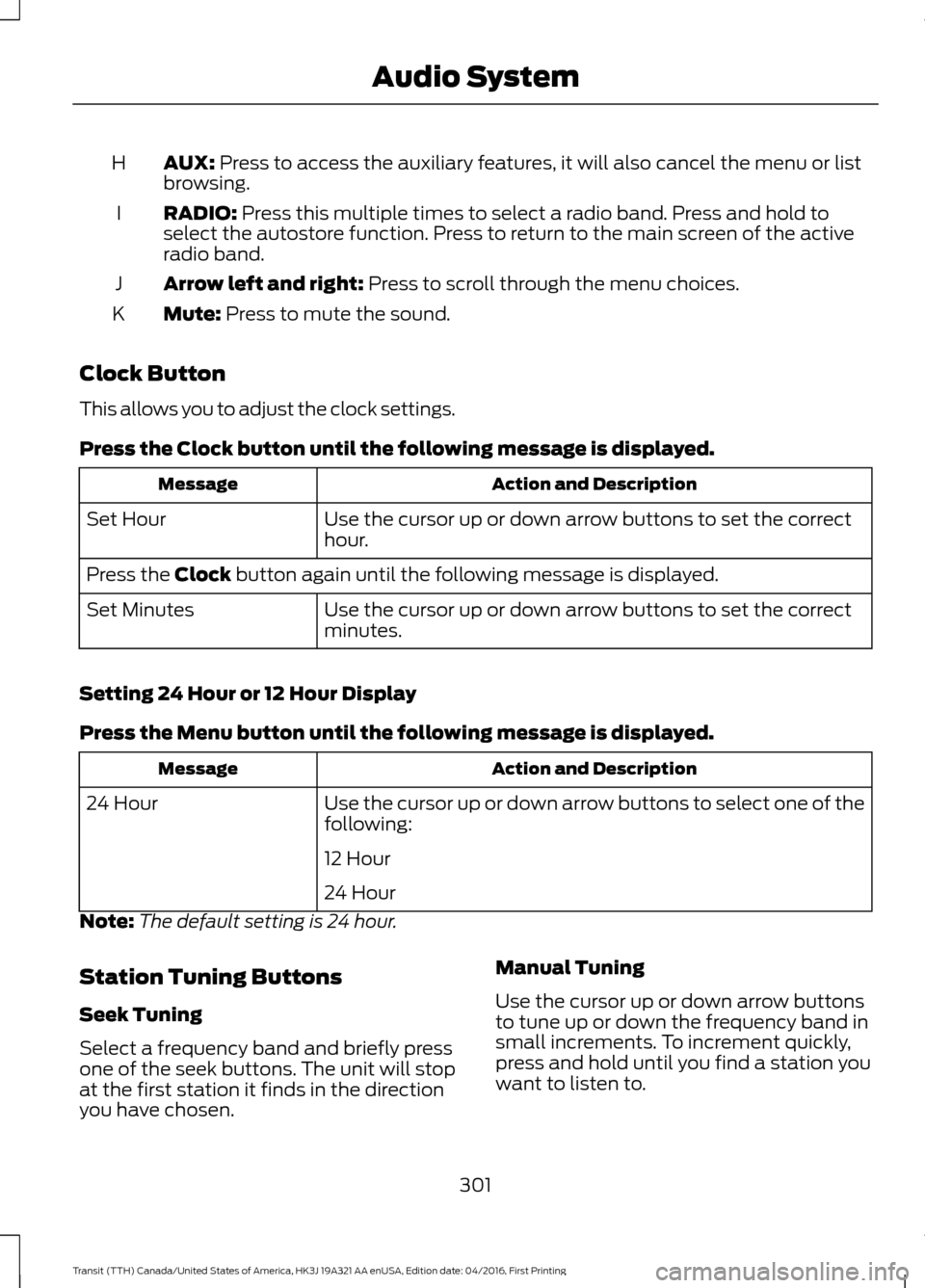
AUX: Press to access the auxiliary features, it will also cancel the menu or list
browsing.
H
RADIO:
Press this multiple times to select a radio band. Press and hold to
select the autostore function. Press to return to the main screen of the active
radio band.
I
Arrow left and right:
Press to scroll through the menu choices.
J
Mute:
Press to mute the sound.
K
Clock Button
This allows you to adjust the clock settings.
Press the
Clock button until the following message is displayed. Action and Description
Message
Use the cursor up or down arrow buttons to set the correct
hour.
Set Hour
Press the
Clock button again until the following message is displayed.
Use the cursor up or down arrow buttons to set the correct
minutes.
Set Minutes
Setting 24 Hour or 12 Hour Display
Press the
Menu button until the following message is displayed. Action and Description
Message
Use the cursor up or down arrow buttons to select one of the
following:
24 Hour
12 Hour
24 Hour
Note: The default setting is 24 hour.
Station Tuning Buttons
Seek Tuning
Select a frequency band and briefly press
one of the seek buttons. The unit will stop
at the first station it finds in the direction
you have chosen. Manual Tuning
Use the cursor up or down arrow buttons
to tune up or down the frequency band in
small increments. To increment quickly,
press and hold until you find a station you
want to listen to.
301
Transit (TTH) Canada/United States of America, HK3J 19A321 AA enUSA, Edition date: 04/2016, First Printing Audio System
Page 305 of 484
Station Preset Buttons
This feature allows you to store your
favorite stations. They can be recalled by
selecting the appropriate frequency band
and pressing one of the preset buttons.
1. Select a frequency band.
2. Tune to the station required.
3. Press and hold one of the preset
buttons. The audio unit will also mute
momentarily as confirmation.
You can repeat this on each frequency
band and for each preset button.
Menu Button
This allows you to adjust all of the audio
system settings. Press the button
repeatedly until the required setting is
displayed. Use the cursor up or down arrow
buttons to adjust the following settings:
• Clock hour.
• Clock minutes.
• 24 hour, 12 hour.
• Bass.
• Treble.
• Balance.
• Fade.
• RDS.
Sound Button
This allows you to adjust the sound
settings for bass, treble, balance or fade.
1. Press the sound button until the required setting is displayed. 2. Use the cursor up or down arrow
buttons to select the required level.
Note: Fade settings are only adjustable if
there are speakers in the rear of your vehicle.
AUX Button
Connect your media device to the audio
unit. See USB Port (page 313).
Select your media device as the audio
source by pressing the
AUX button. After
connecting your media device, the first
track will start to play automatically.
AUDIO UNIT - VEHICLES WITH:
PREMIUM AM/FM/CD WARNING
Driving while distracted can result in
loss of vehicle control, crash and
injury. We strongly recommend that
you use extreme caution when using any
device that may take your focus off the
road. Your primary responsibility is the safe
operation of your vehicle. We recommend
against the use of any hand-held device
while driving and encourage the use of
voice-operated systems when possible.
Make sure you are aware of all applicable
local laws that may affect the use of
electronic devices while driving. Note:
The touchscreen system controls
most of the audio features. See your SYNC
information.
302
Transit (TTH) Canada/United States of America, HK3J 19A321 AA enUSA, Edition date: 04/2016, First Printing Audio System