reset FORD TRANSIT 2021 User Guide
[x] Cancel search | Manufacturer: FORD, Model Year: 2021, Model line: TRANSIT, Model: FORD TRANSIT 2021Pages: 509, PDF Size: 8.21 MB
Page 109 of 509
CARGO LAMPS
Switching the Cargo Lamps Off
Press the button to switch the cargo lamps
off when a door is open.
Note:
The cargo lamps switch only
operates when the ignition is off.
The switch is inside the cargo area, behind
the left-hand rear door.
The cargo lamps turn off after a short
period of time to prevent the battery from
running out of charge.
Switching the Cargo Lamps On
Press the button to switch the cargo lamps
on.
If the cargo lamps turned off to prevent
the battery from running out of charge or
you switched them off by pressing the
button, reset the switch first.
Resetting the Switch
To reset the switch, do one of the
following:
• Lock or unlock a door.
• Open or close a front door.
• Switch the ignition on then off.
Press the button to switch the cargo lamps
on.
106
2021 Transit (TTH) Canada/United States of America, MK3J 19A321 AA enUSA, Edition date: 202010, Second-Printing Lighting
Page 110 of 509
POWER WINDOWS
Opening and Closing the Windows
WARNING: Do not leave children
unattended in your vehicle and do not
let them play with the power windows.
Failure to follow this instruction could
result in personal injury. WARNING:
When closing the
power windows, verify they are free of
obstruction and make sure that children
and pets are not in the proximity of the
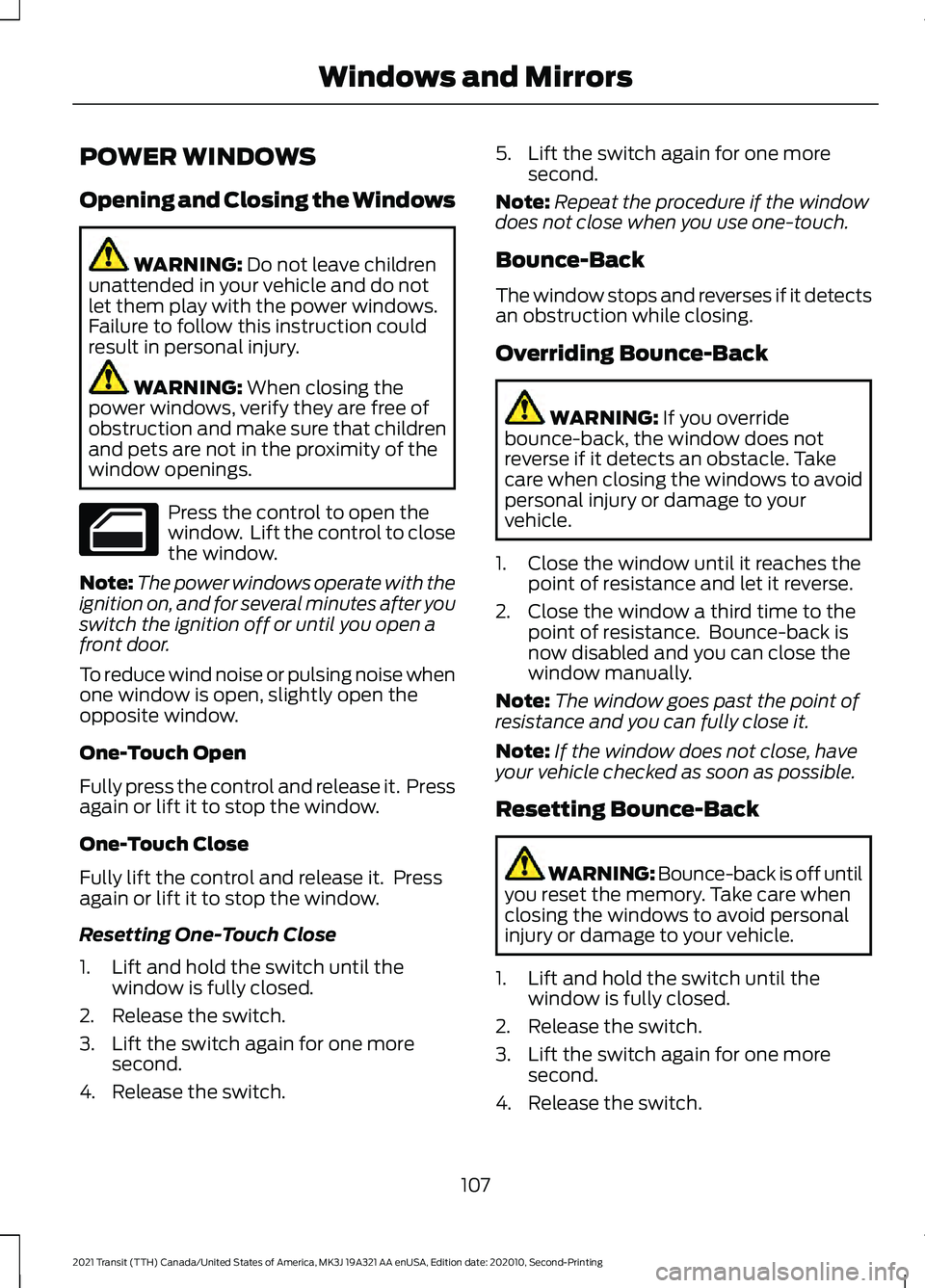
window openings. Press the control to open the
window. Lift the control to close
the window.
Note: The power windows operate with the
ignition on, and for several minutes after you
switch the ignition off or until you open a
front door.
To reduce wind noise or pulsing noise when
one window is open, slightly open the
opposite window.
One-Touch Open
Fully press the control and release it. Press
again or lift it to stop the window.
One-Touch Close
Fully lift the control and release it. Press
again or lift it to stop the window.
Resetting One-Touch Close
1. Lift and hold the switch until the window is fully closed.
2. Release the switch.
3. Lift the switch again for one more second.
4. Release the switch. 5. Lift the switch again for one more
second.
Note: Repeat the procedure if the window
does not close when you use one-touch.
Bounce-Back
The window stops and reverses if it detects
an obstruction while closing.
Overriding Bounce-Back WARNING:
If you override
bounce-back, the window does not
reverse if it detects an obstacle. Take
care when closing the windows to avoid
personal injury or damage to your
vehicle.
1. Close the window until it reaches the point of resistance and let it reverse.
2. Close the window a third time to the point of resistance. Bounce-back is
now disabled and you can close the
window manually.
Note: The window goes past the point of
resistance and you can fully close it.
Note: If the window does not close, have
your vehicle checked as soon as possible.
Resetting Bounce-Back WARNING: Bounce-back is off until
you reset the memory. Take care when
closing the windows to avoid personal
injury or damage to your vehicle.
1. Lift and hold the switch until the window is fully closed.
2. Release the switch.
3. Lift the switch again for one more second.
4. Release the switch.
107
2021 Transit (TTH) Canada/United States of America, MK3J 19A321 AA enUSA, Edition date: 202010, Second-Printing Windows and Mirrors
Page 111 of 509
5. Lift the switch again for one more
second.
Note: Repeat the procedure if the window
does not close when you use one-touch.
Note: If you have disconnected the battery,
you must reset the bounce-back memory.
EXTERIOR MIRRORS
Power Exterior Mirrors WARNING: Do not adjust the
mirrors when your vehicle is moving. This
could result in the loss of control of your
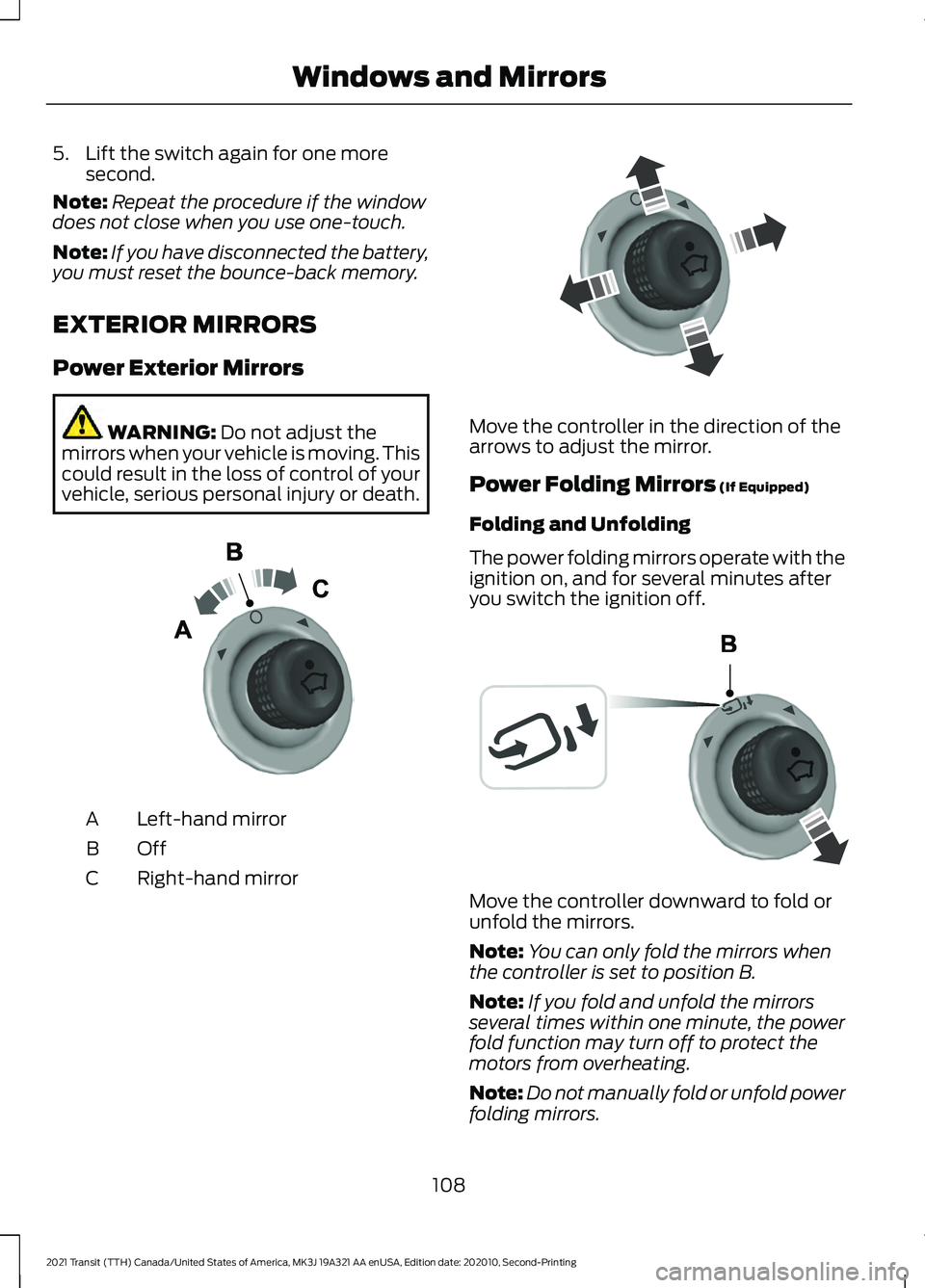
vehicle, serious personal injury or death. Left-hand mirror
A
OffB
Right-hand mirror
C Move the controller in the direction of the
arrows to adjust the mirror.
Power Folding Mirrors
(If Equipped)
Folding and Unfolding
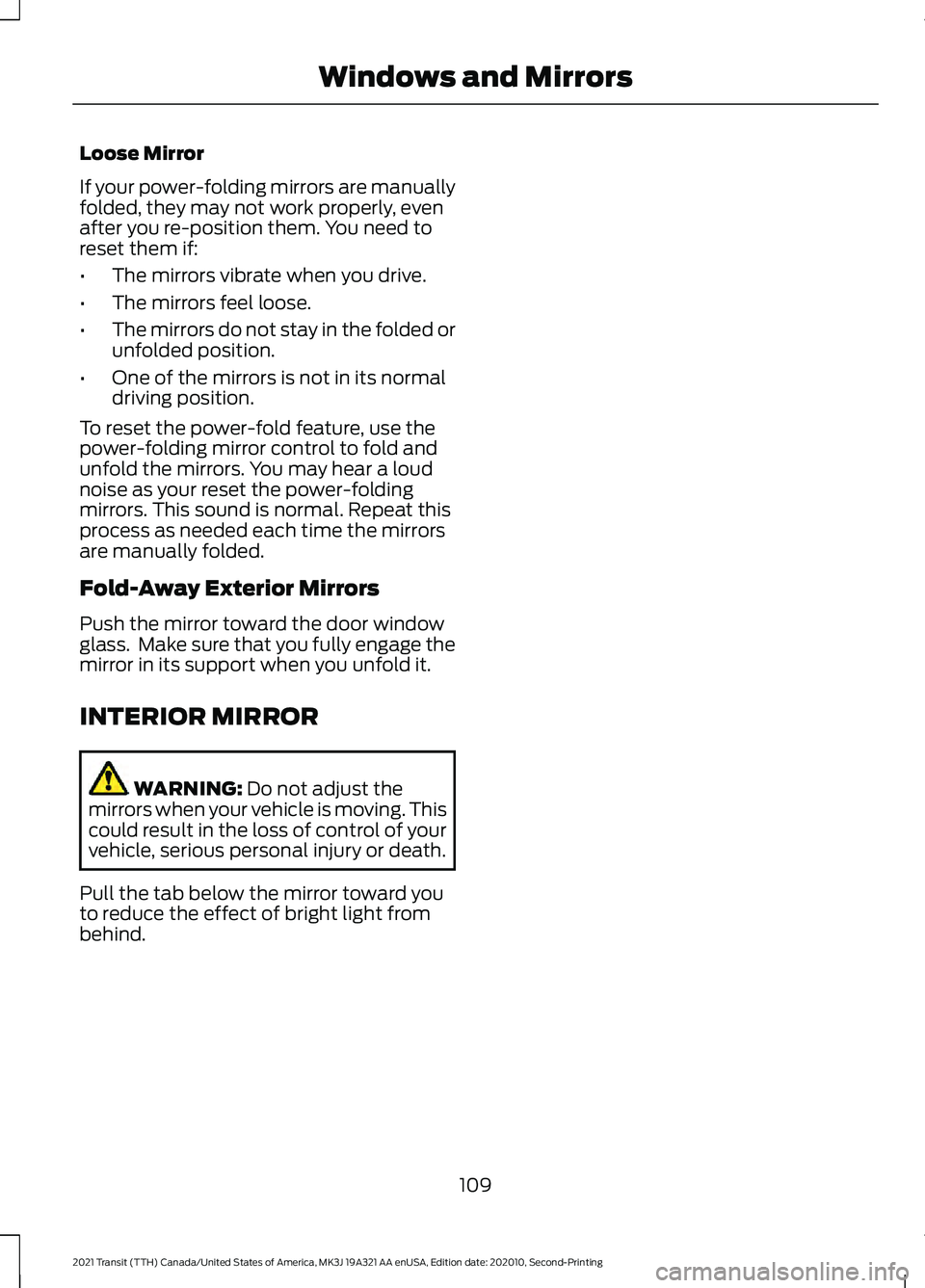
The power folding mirrors operate with the
ignition on, and for several minutes after
you switch the ignition off. Move the controller downward to fold or
unfold the mirrors.
Note:
You can only fold the mirrors when
the controller is set to position B.
Note: If you fold and unfold the mirrors
several times within one minute, the power
fold function may turn off to protect the
motors from overheating.
Note: Do not manually fold or unfold power
folding mirrors.
108
2021 Transit (TTH) Canada/United States of America, MK3J 19A321 AA enUSA, Edition date: 202010, Second-Printing Windows and MirrorsE71280 E71281 E72184
Page 112 of 509
Loose Mirror
If your power-folding mirrors are manually
folded, they may not work properly, even
after you re-position them. You need to
reset them if:
•
The mirrors vibrate when you drive.
• The mirrors feel loose.
• The mirrors do not stay in the folded or
unfolded position.
• One of the mirrors is not in its normal
driving position.
To reset the power-fold feature, use the
power-folding mirror control to fold and
unfold the mirrors. You may hear a loud
noise as your reset the power-folding
mirrors. This sound is normal. Repeat this
process as needed each time the mirrors
are manually folded.
Fold-Away Exterior Mirrors
Push the mirror toward the door window
glass. Make sure that you fully engage the
mirror in its support when you unfold it.
INTERIOR MIRROR WARNING: Do not adjust the
mirrors when your vehicle is moving. This
could result in the loss of control of your
vehicle, serious personal injury or death.
Pull the tab below the mirror toward you
to reduce the effect of bright light from
behind.
109
2021 Transit (TTH) Canada/United States of America, MK3J 19A321 AA enUSA, Edition date: 202010, Second-Printing Windows and Mirrors
Page 119 of 509
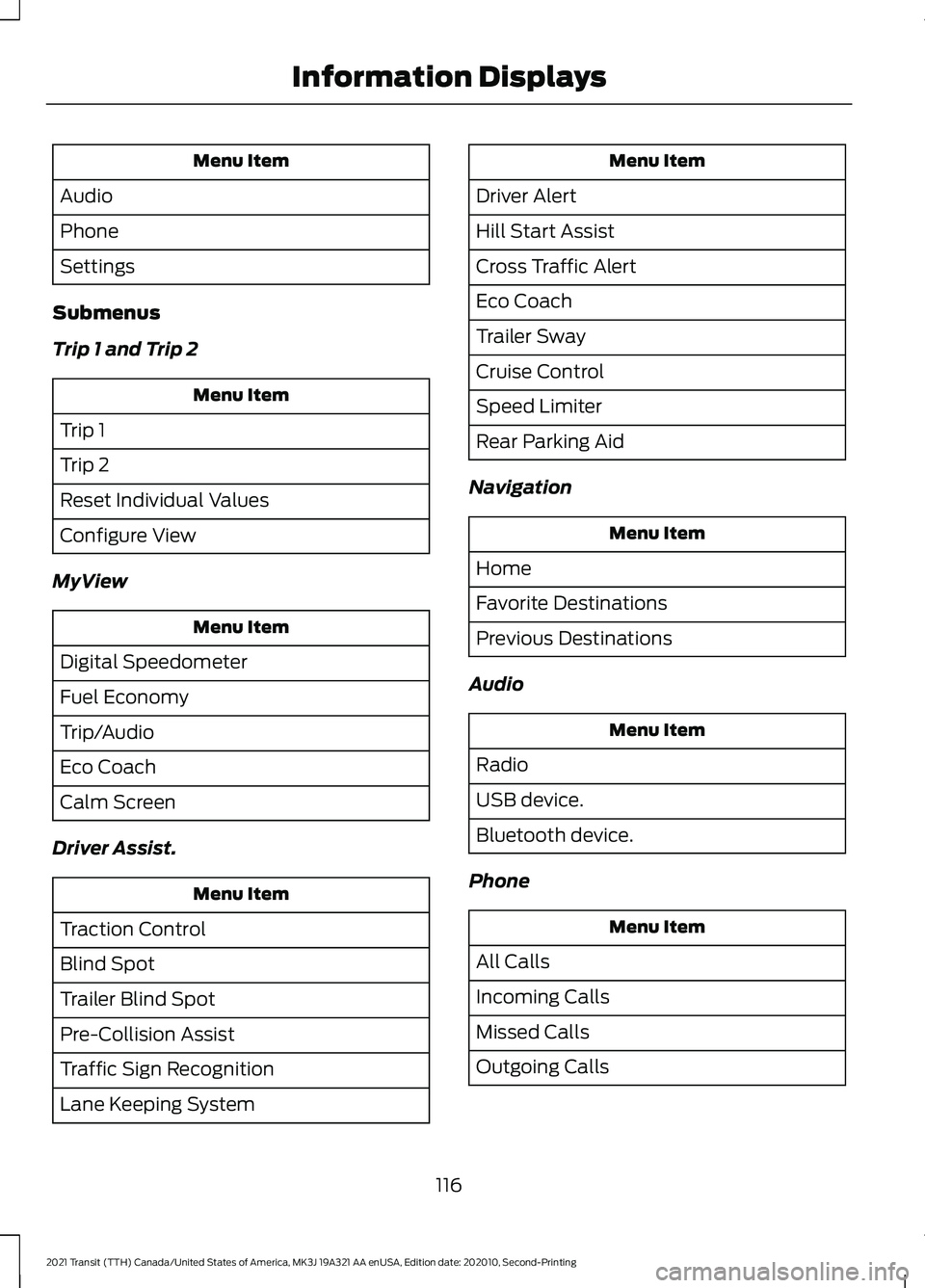
Menu Item
Audio
Phone
Settings
Submenus
Trip 1 and Trip 2 Menu Item
Trip 1
Trip 2
Reset Individual Values
Configure View
MyView Menu Item
Digital Speedometer
Fuel Economy
Trip/Audio
Eco Coach
Calm Screen
Driver Assist. Menu Item
Traction Control
Blind Spot
Trailer Blind Spot
Pre-Collision Assist
Traffic Sign Recognition
Lane Keeping System Menu Item
Driver Alert
Hill Start Assist
Cross Traffic Alert
Eco Coach
Trailer Sway
Cruise Control
Speed Limiter
Rear Parking Aid
Navigation Menu Item
Home
Favorite Destinations
Previous Destinations
Audio Menu Item
Radio
USB device.
Bluetooth device.
Phone Menu Item
All Calls
Incoming Calls
Missed Calls
Outgoing Calls
116
2021 Transit (TTH) Canada/United States of America, MK3J 19A321 AA enUSA, Edition date: 202010, Second-Printing Information Displays
Page 120 of 509
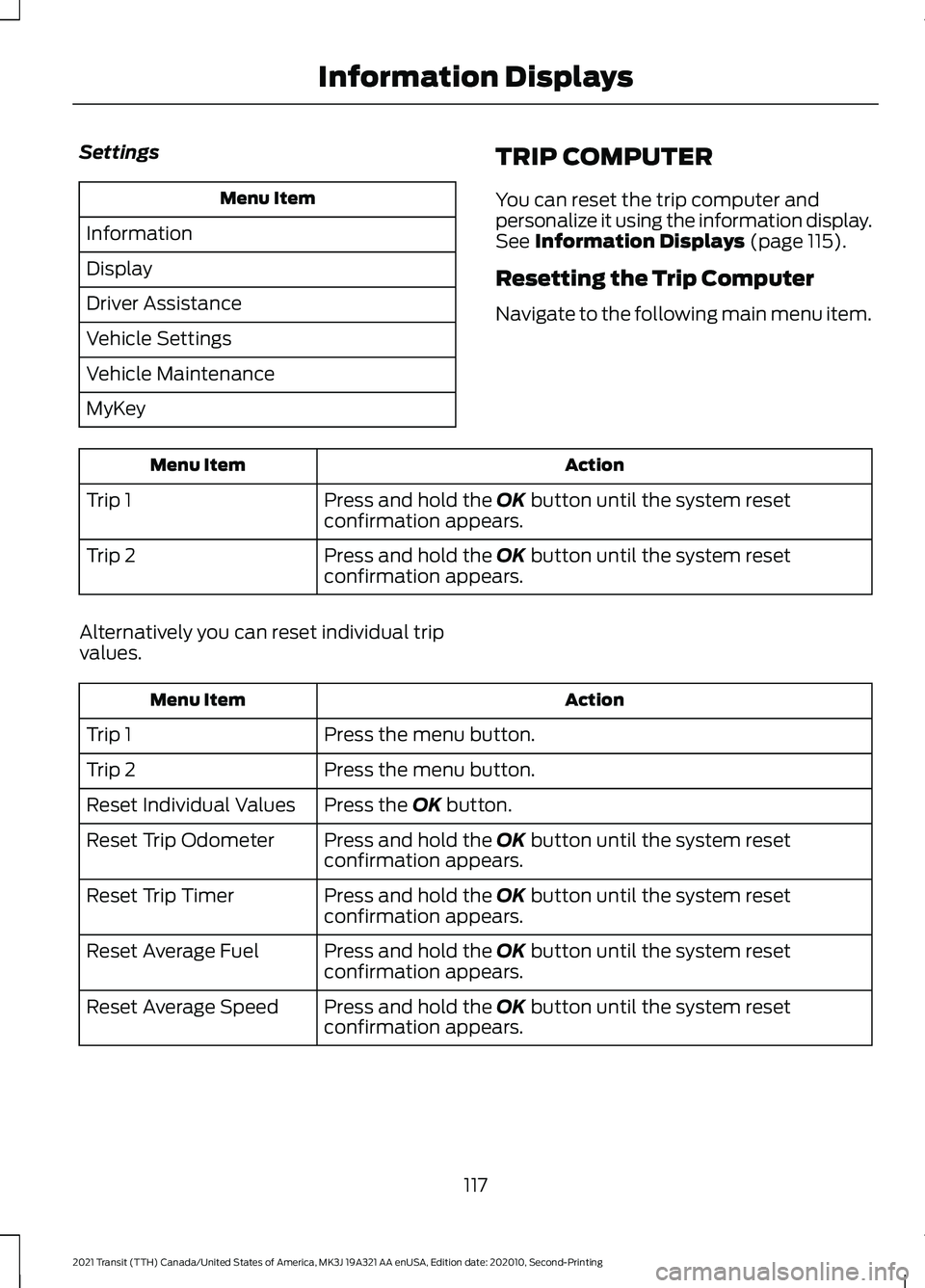
Settings
Menu Item
Information
Display
Driver Assistance
Vehicle Settings
Vehicle Maintenance
MyKey TRIP COMPUTER
You can reset the trip computer and
personalize it using the information display.
See Information Displays (page 115).
Resetting the Trip Computer
Navigate to the following main menu item. Action
Menu Item
Press and hold the
OK button until the system reset
confirmation appears.
Trip 1
Press and hold the
OK button until the system reset
confirmation appears.
Trip 2
Alternatively you can reset individual trip
values. Action
Menu Item
Press the menu button.
Trip 1
Press the menu button.
Trip 2
Press the
OK button.
Reset Individual Values
Press and hold the
OK button until the system reset
confirmation appears.
Reset Trip Odometer
Press and hold the
OK button until the system reset
confirmation appears.
Reset Trip Timer
Press and hold the
OK button until the system reset
confirmation appears.
Reset Average Fuel
Press and hold the
OK button until the system reset
confirmation appears.
Reset Average Speed
117
2021 Transit (TTH) Canada/United States of America, MK3J 19A321 AA enUSA, Edition date: 202010, Second-Printing Information Displays
Page 121 of 509
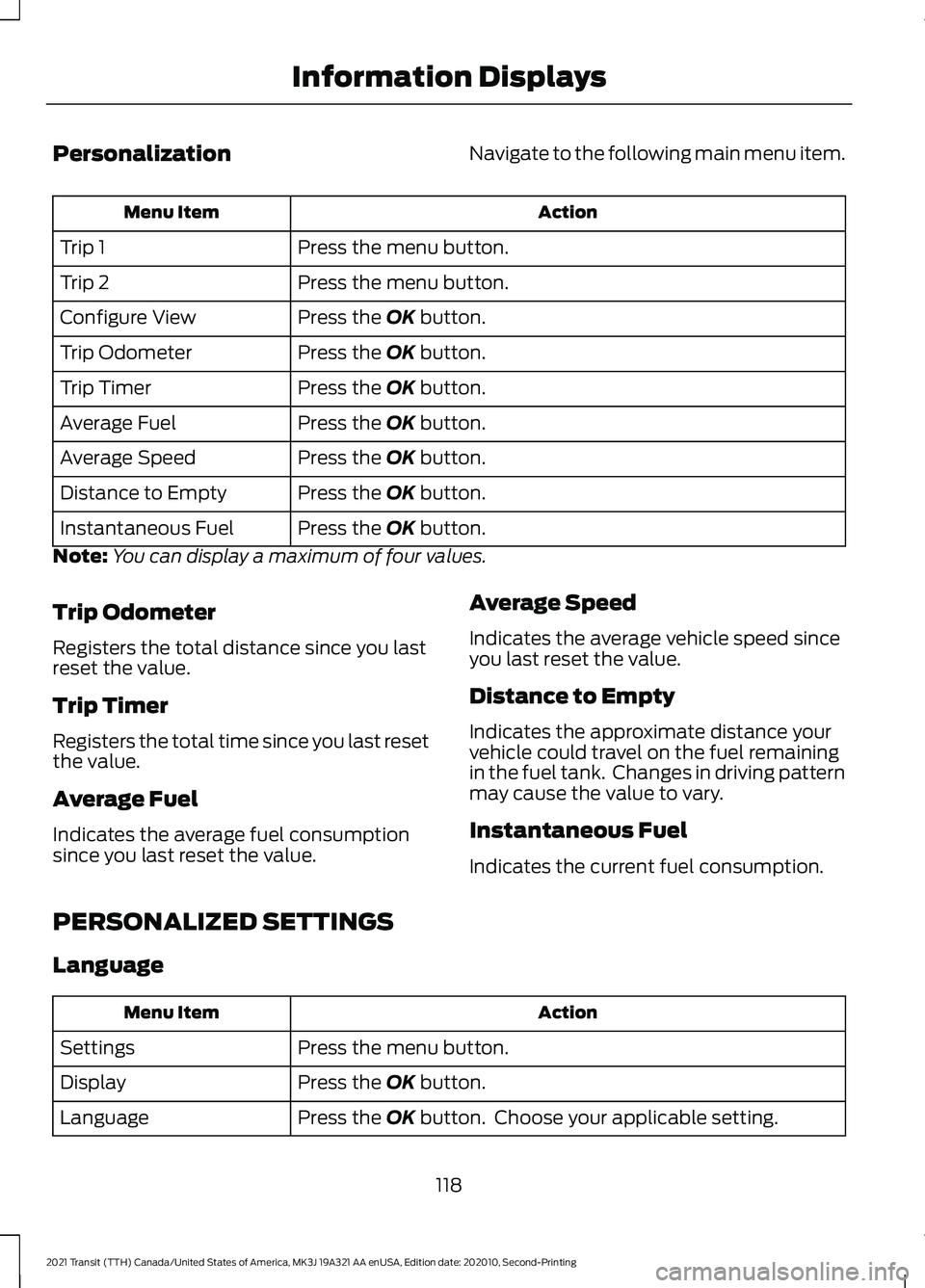
Personalization
Navigate to the following main menu item. Action
Menu Item
Press the menu button.
Trip 1
Press the menu button.
Trip 2
Press the OK button.
Configure View
Press the
OK button.
Trip Odometer
Press the
OK button.
Trip Timer
Press the
OK button.
Average Fuel
Press the
OK button.
Average Speed
Press the
OK button.
Distance to Empty
Press the
OK button.
Instantaneous Fuel
Note: You can display a maximum of four values.
Trip Odometer
Registers the total distance since you last
reset the value.
Trip Timer
Registers the total time since you last reset
the value.
Average Fuel
Indicates the average fuel consumption
since you last reset the value. Average Speed
Indicates the average vehicle speed since
you last reset the value.
Distance to Empty
Indicates the approximate distance your
vehicle could travel on the fuel remaining
in the fuel tank. Changes in driving pattern
may cause the value to vary.
Instantaneous Fuel
Indicates the current fuel consumption.
PERSONALIZED SETTINGS
Language Action
Menu Item
Press the menu button.
Settings
Press the
OK button.
Display
Press the
OK button. Choose your applicable setting.
Language
118
2021 Transit (TTH) Canada/United States of America, MK3J 19A321 AA enUSA, Edition date: 202010, Second-Printing Information Displays
Page 140 of 509
SWITCHING REAR OCCUPANT
ALERT SYSTEM ON AND OFF -
VEHICLES WITH: SYNC 3
1. Press Settings on the touchscreen.
2. Press
Vehicle.
3. Switch
Rear Occupant Alert on or off.
Note: The default setting is on.
Note: Performing a master reset causes the
system to switch on again.
Semiannual Reminder
(If Equipped)
When you switch the system off, a
message appears every six months as a
reminder that the system is off. You can
switch the system back on or leave it off.
REAR OCCUPANT ALERT
SYSTEM INDICATORS -
VEHICLES WITH: SYNC Message
Check rear seats for occupants.
Displays when you switch the vehicle off
after the alert conditions are met. The message displays for a short
period of time. Press the
OK
button to acknowledge and
remove some messages from the
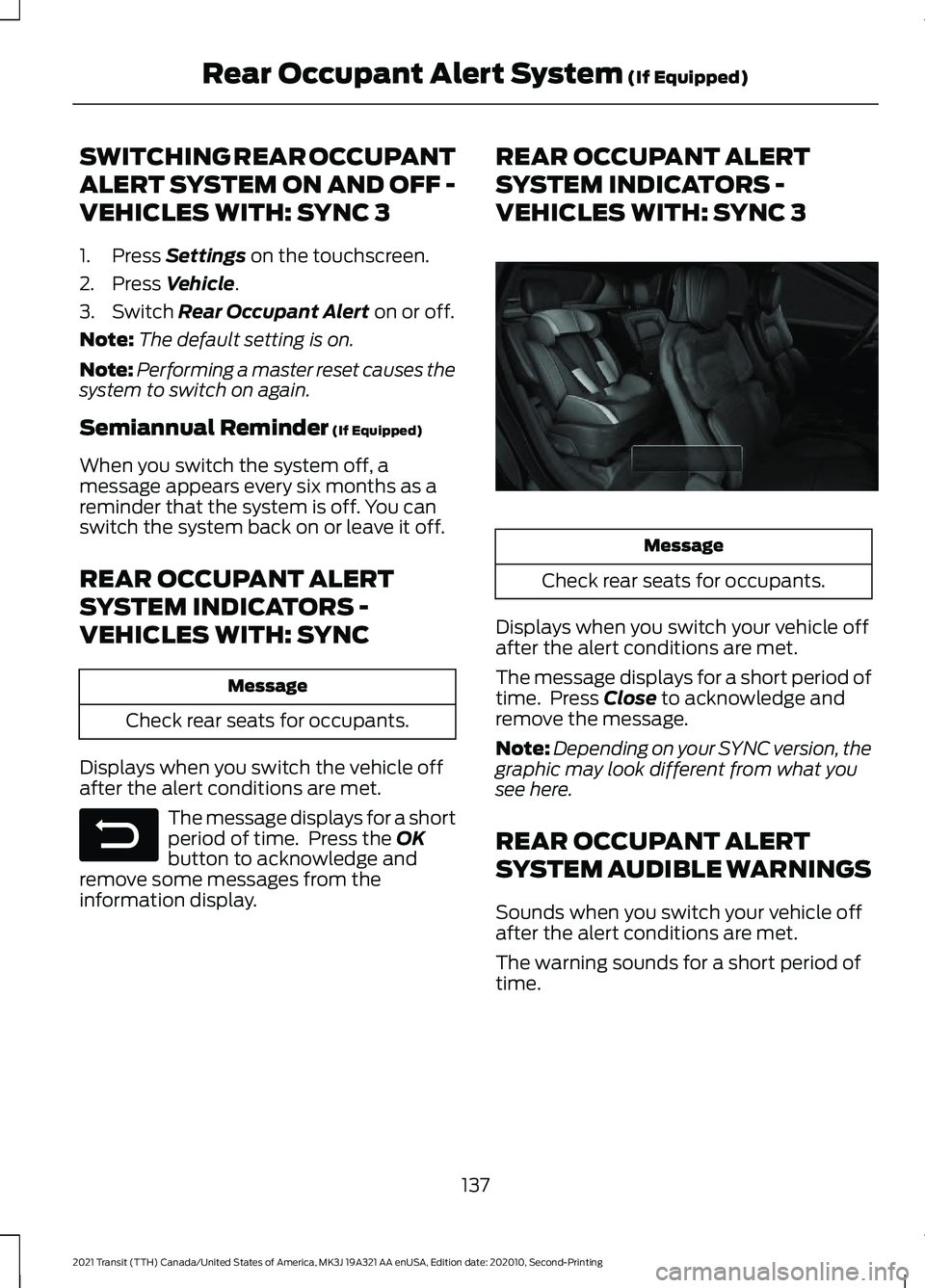
information display. REAR OCCUPANT ALERT
SYSTEM INDICATORS -
VEHICLES WITH: SYNC 3
Message
Check rear seats for occupants.
Displays when you switch your vehicle off
after the alert conditions are met.
The message displays for a short period of
time. Press
Close to acknowledge and
remove the message.
Note: Depending on your SYNC version, the
graphic may look different from what you
see here.
REAR OCCUPANT ALERT
SYSTEM AUDIBLE WARNINGS
Sounds when you switch your vehicle off
after the alert conditions are met.
The warning sounds for a short period of
time.
137
2021 Transit (TTH) Canada/United States of America, MK3J 19A321 AA enUSA, Edition date: 202010, Second-Printing Rear Occupant Alert System
(If Equipped)E281480 E350472
Page 142 of 509
The power outlet temporarily turns off
power when in fault mode if the device
exceeds the 150 watt limit. Unplug your
device and switch the ignition off. Open
the driver door to reset the power outlet.
Switch the ignition back on and make sure
the indicator light remains on. Do not plug
your device back in if it exceeds the
maximum outlet output.
Do not use the power point for certain
electric devices, including:
•
Cathode-ray, tube-type televisions.
• Motor loads, such as vacuum cleaners,
electric saws and other electric power
tools or compressor-driven
refrigerators.
• Measuring devices, which process
precise data, such as medical
equipment or measuring equipment.
• Other appliances requiring an
extremely stable power supply such as
microcomputer-controlled electric
blankets or touch-sensor lamps.
110 Volt - 400 Watt Capacity AC
Power Outlet WARNING: Do not keep electrical
devices plugged in the power point
whenever the device is not in use. Do not
use any extension cord with the 110 volt
AC power point, since it will defeat the
safety protection design. Doing so may
cause the power point to overload due
to powering multiple devices that can
reach beyond the 400 watt load limit
and could result in fire or serious injury.
Note: This feature has a maximum output
of 400 watts when the vehicle is in park (P).
Note: While in drive (D), the maximum
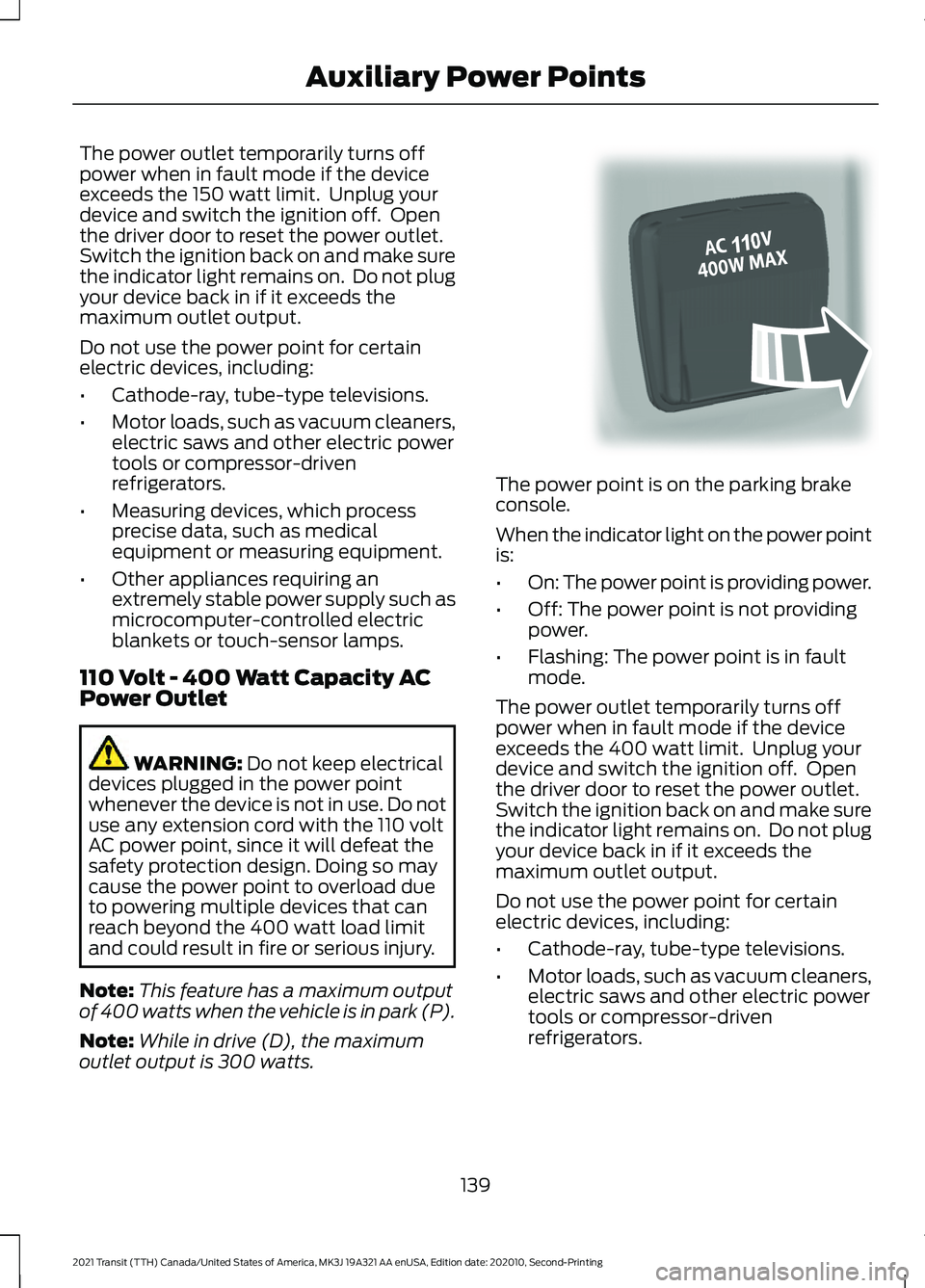
outlet output is 300 watts. The power point is on the parking brake
console.
When the indicator light on the power point
is:
•
On: The power point is providing power.
• Off: The power point is not providing
power.
• Flashing: The power point is in fault
mode.
The power outlet temporarily turns off
power when in fault mode if the device
exceeds the 400 watt limit. Unplug your
device and switch the ignition off. Open
the driver door to reset the power outlet.
Switch the ignition back on and make sure
the indicator light remains on. Do not plug
your device back in if it exceeds the
maximum outlet output.
Do not use the power point for certain
electric devices, including:
• Cathode-ray, tube-type televisions.
• Motor loads, such as vacuum cleaners,
electric saws and other electric power
tools or compressor-driven
refrigerators.
139
2021 Transit (TTH) Canada/United States of America, MK3J 19A321 AA enUSA, Edition date: 202010, Second-Printing Auxiliary Power PointsE305822
Page 160 of 509
1. Stop your vehicle as soon as it is safe
to do so and switch the engine off.
2. Shift into park (P) or neutral (N).
3. Apply the parking brake.
4. Open the left-hand front door.
5. Fully open the fuel filler door.
6. Check the fuel filler inlet and the area around it for any items or debris that
may be obstructing its movement.
7. Fully insert a fuel pump nozzle or the fuel filler funnel provided with your
vehicle into the fuel filler inlet. See
Fuel Filler Funnel Location (page
153). This action should dislodge any
debris that may be preventing the fuel
filler inlet from fully closing.
8. Remove the fuel pump nozzle or fuel filler funnel from the fuel filler inlet.
9. Fully close the fuel filler door.
Note: If this action corrects the problem
the message may not immediately reset. If
the message remains and the service engine
soon warning lamp illuminates, have your
vehicle checked as soon as possible.
Low Fuel Level Warning Lamp If it illuminates when you are
driving, refuel as soon as
possible.
Low Fuel Level Audible Warning
A warning tone sounds and a message
appears in the information display when
the distance to empty reaches
50 mi
(80 km). A warning tone sounds and a
message appears in the information
display again at the following distance to
empty parameters:
• 20 mi (40 km)
• 10 mi (20 km)
• 0 mi (0 km) Note:
The low fuel reminder appears at
different fuel gauge positions depending on
fuel economy conditions. This variation is
normal.
157
2021 Transit (TTH) Canada/United States of America, MK3J 19A321 AA enUSA, Edition date: 202010, Second-Printing Fuel and Refueling