fuel cap FORD TRANSIT CONNECT 2015 2.G User Guide
[x] Cancel search | Manufacturer: FORD, Model Year: 2015, Model line: TRANSIT CONNECT, Model: FORD TRANSIT CONNECT 2015 2.GPages: 428, PDF Size: 6.27 MB
Page 168 of 428
WARNINGS
Batteries contain sulfuric acid which
can burn skin, eyes and clothing, if
contacted.
Use only an adequate-sized cable
with insulated clamps.
Note:
Do not disconnect the battery from
your vehicle ’s electrical system.
Preparing Your Vehicle
Note: Do not attempt to push-start your
automatic transmission vehicle. Automatic
transmissions do not have push-start
capability. Attempting to push-start a
vehicle with an automatic transmission may
cause transmission damage.
Note: Use only a 12-volt supply to start your
vehicle.
Note: Do not disconnect the battery of the
disabled vehicle as this could damage the
vehicle's electrical system.
Park the booster vehicle close to the hood
of the disabled vehicle, making sure the
two vehicles do not touch, and switch off
all accessories.
Connecting the Jumper Cables WARNING
Do not attach the cables to fuel lines,
engine rocker covers, the intake
manifold or electrical components
as grounding points. Stay clear of moving
parts. To avoid reverse polarity
connections, make sure that you correctly
identify the positive (+) and negative (-)
terminals on both the disabled and booster
vehicles before connecting the cables. Note:
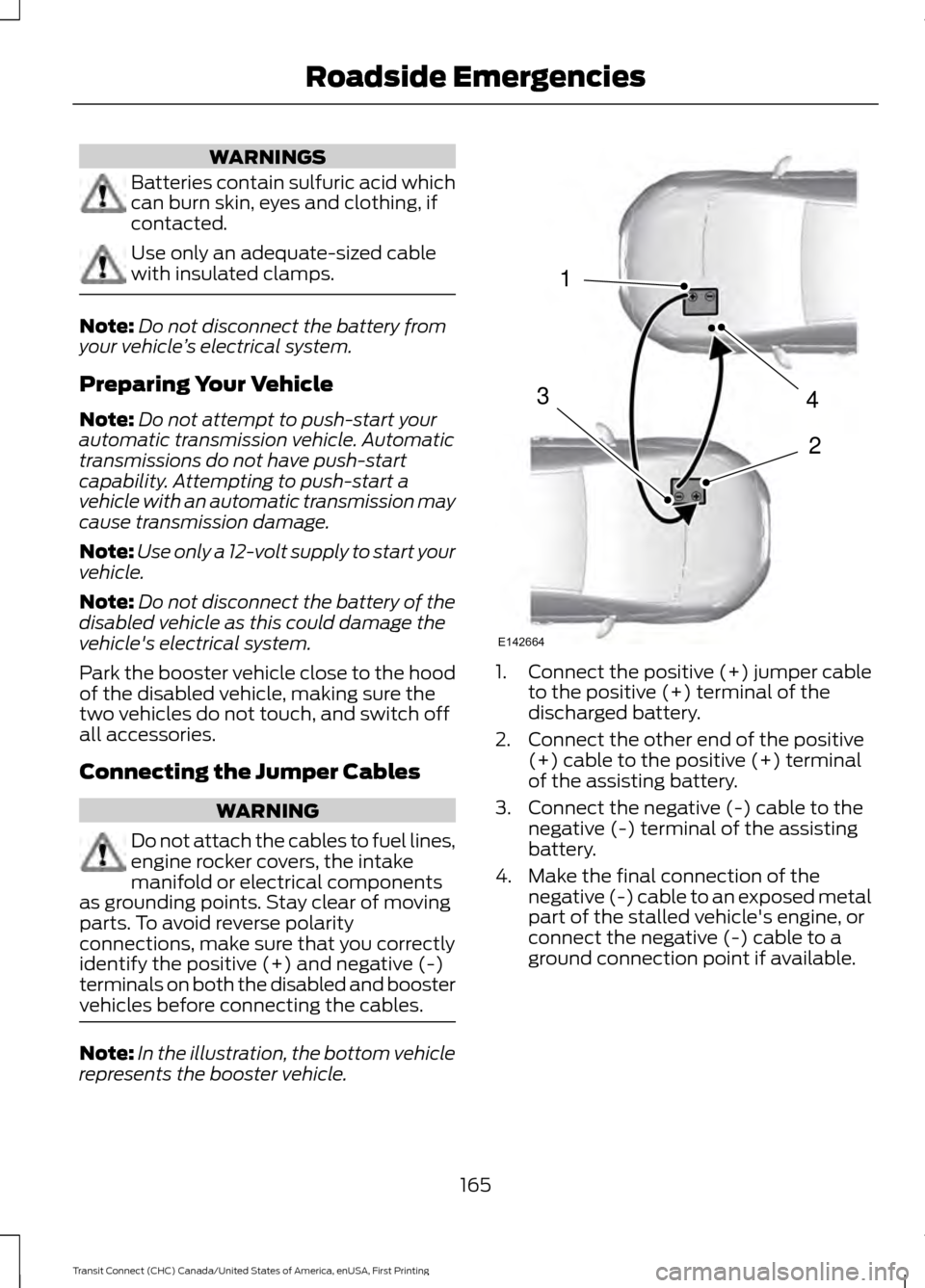
In the illustration, the bottom vehicle
represents the booster vehicle. 1.
Connect the positive (+) jumper cable
to the positive (+) terminal of the
discharged battery.
2. Connect the other end of the positive (+) cable to the positive (+) terminal
of the assisting battery.
3. Connect the negative (-) cable to the negative (-) terminal of the assisting
battery.
4. Make the final connection of the negative (-) cable to an exposed metal
part of the stalled vehicle's engine, or
connect the negative (-) cable to a
ground connection point if available.
165
Transit Connect (CHC) Canada/United States of America, enUSA, First Printing Roadside Emergencies4
2
1
3
E142664
Page 192 of 428
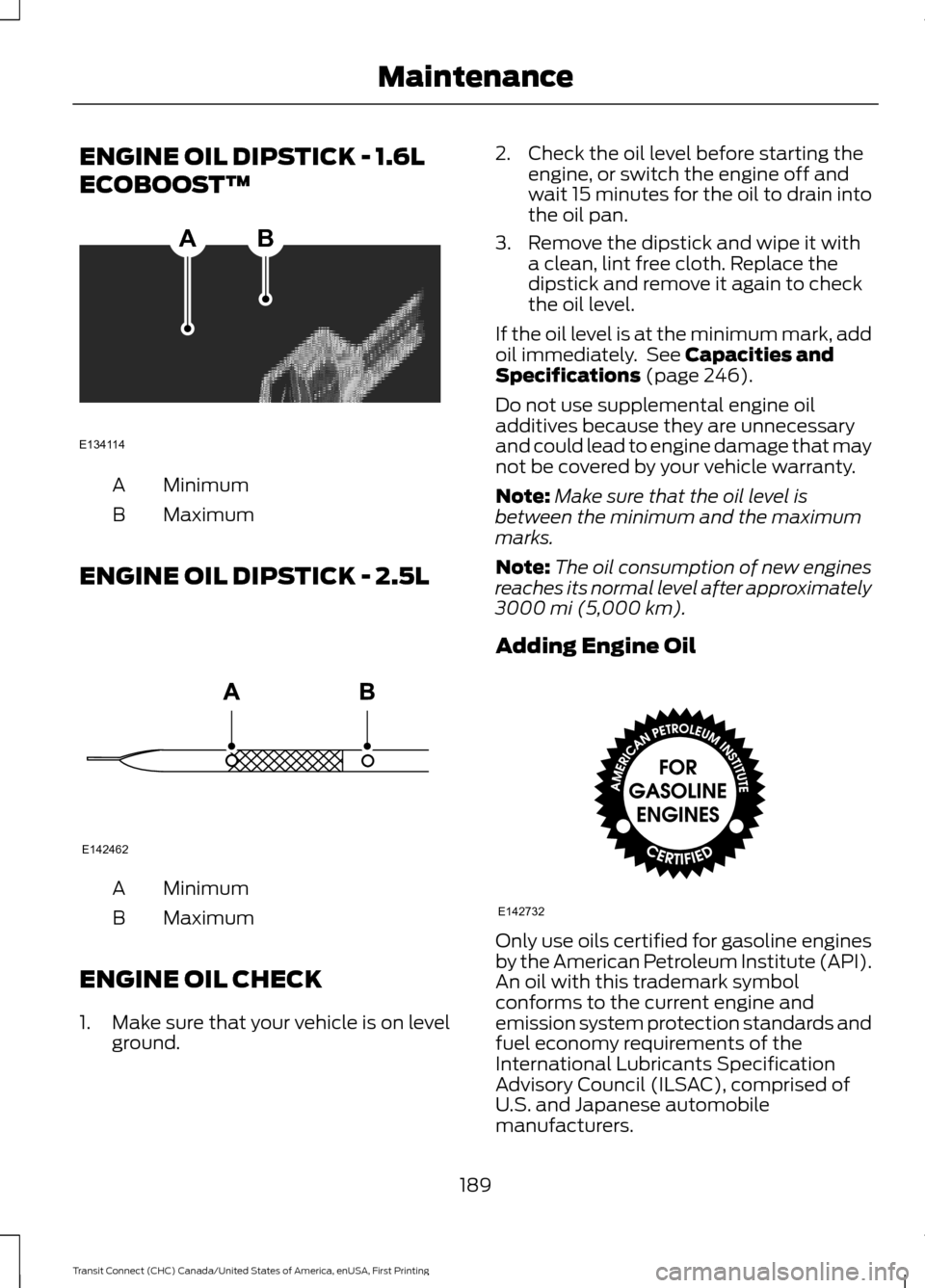
ENGINE OIL DIPSTICK - 1.6L
ECOBOOST™
Minimum
A
Maximum
B
ENGINE OIL DIPSTICK - 2.5L Minimum
A
Maximum
B
ENGINE OIL CHECK
1. Make sure that your vehicle is on level ground. 2. Check the oil level before starting the
engine, or switch the engine off and
wait 15 minutes for the oil to drain into
the oil pan.
3. Remove the dipstick and wipe it with a clean, lint free cloth. Replace the
dipstick and remove it again to check
the oil level.
If the oil level is at the minimum mark, add
oil immediately. See Capacities and
Specifications (page 246).
Do not use supplemental engine oil
additives because they are unnecessary
and could lead to engine damage that may
not be covered by your vehicle warranty.
Note: Make sure that the oil level is
between the minimum and the maximum
marks.
Note: The oil consumption of new engines
reaches its normal level after approximately
3000 mi (5,000 km)
.
Adding Engine Oil Only use oils certified for gasoline engines
by the American Petroleum Institute (API).
An oil with this trademark symbol
conforms to the current engine and
emission system protection standards and
fuel economy requirements of the
International Lubricants Specification
Advisory Council (ILSAC), comprised of
U.S. and Japanese automobile
manufacturers.
189
Transit Connect (CHC) Canada/United States of America, enUSA, First Printing MaintenanceAB
E134114 E142462 E142732
Page 196 of 428
CHANGING THE 12V BATTERY
WARNINGS
Batteries normally produce explosive
gases which can cause personal
injury. Therefore, do not allow
flames, sparks or lighted substances to
come near the battery. When working near
the battery, always shield your face and
protect your eyes. Always provide proper
ventilation. When lifting a plastic-cased battery,
excessive pressure on the end walls
could cause acid to flow through the
vent caps, resulting in personal injury and
damage to the vehicle or battery. Lift the
battery with a battery carrier or with your
hands on opposite corners. Keep batteries out of reach of
children. Batteries contain sulfuric
acid. Avoid contact with skin, eyes or
clothing. Shield your eyes when working
near the battery to protect against possible
splashing of acid solution. In case of acid
contact with skin or eyes, flush
immediately with water for a minimum of
15 minutes and get prompt medical
attention. If acid is swallowed, call a
physician immediately. Your vehicle is equipped with a
Motorcraft® maintenance-free battery
which normally does not require additional
water during its life of service.
Note:
If your battery has a cover/shield,
make sure it is reinstalled after the battery
has been cleaned or replaced.
Note: See an authorized dealer for low
voltage battery access, testing, or
replacement. When a low voltage battery replacement
is necessary, see an authorized dealer to
replace the low voltage battery with a Ford
recommended replacement low voltage
battery that matches the electrical
requirements of the vehicle
To ensure proper operation of the battery
management system (BMS), do not allow
a technician to connect any electrical
device ground connection directly to the
low voltage battery negative post. A
connection at the low voltage battery
negative post can cause inaccurate
measurements of the battery condition
and potential incorrect system operation.
Note:
If a person adds electrical or
electronic accessories or components to the
vehicle, the accessories or components may
adversely affect the low voltage battery
performance and durability and may also
affect the performance of other electrical
systems in the vehicle.
For longer, trouble-free operation, keep the
top of the battery clean and dry. Also,
make certain the battery cables are always
tightly fastened to the battery terminals.
If you see any corrosion on the battery or
terminals, remove the cables from the
terminals and clean with a wire brush. You
can neutralize the acid with a solution of
baking soda and water.
When a battery replacement is required,
the battery should only be replaced with
a Ford recommended replacement battery
that matches the electrical requirements
of the vehicle.
Because your vehicle ’s engine is
electronically-controlled by a computer,
some engine control settings are
maintained by power from the low voltage
battery. Some engine computer settings,
like the idle trim and fuel trim strategy,
optimize the driveability and performance
of the engine. Some other computer
settings, like the clock and radio station
193
Transit Connect (CHC) Canada/United States of America, enUSA, First Printing Maintenance
Page 209 of 428
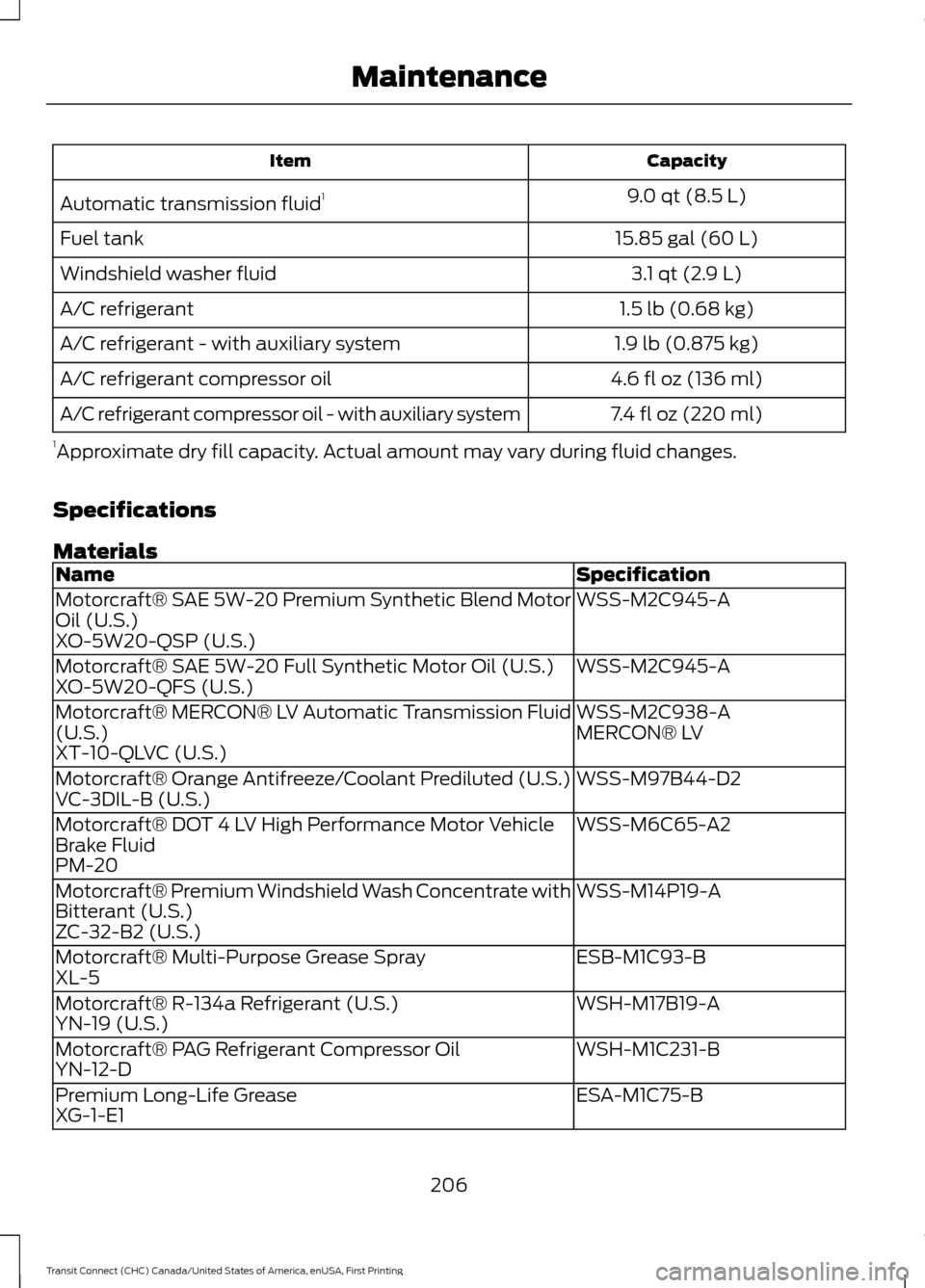
Capacity
Item
9.0 qt (8.5 L)
Automatic transmission fluid 1
15.85 gal (60 L)
Fuel tank
3.1 qt (2.9 L)
Windshield washer fluid
1.5 lb (0.68 kg)
A/C refrigerant
1.9 lb (0.875 kg)
A/C refrigerant - with auxiliary system
4.6 fl oz (136 ml)
A/C refrigerant compressor oil
7.4 fl oz (220 ml)
A/C refrigerant compressor oil - with auxiliary system
1 Approximate dry fill capacity. Actual amount may vary during fluid changes.
Specifications
Materials Specification
Name
WSS-M2C945-A
Motorcraft® SAE 5W-20 Premium Synthetic Blend Motor
Oil (U.S.)
XO-5W20-QSP (U.S.)
WSS-M2C945-A
Motorcraft® SAE 5W-20 Full Synthetic Motor Oil (U.S.)
XO-5W20-QFS (U.S.)
WSS-M2C938-A
Motorcraft® MERCON® LV Automatic Transmission Fluid
(U.S.) MERCON® LV
XT-10-QLVC (U.S.)
WSS-M97B44-D2
Motorcraft® Orange Antifreeze/Coolant Prediluted (U.S.)
VC-3DIL-B (U.S.)
WSS-M6C65-A2
Motorcraft® DOT 4 LV High Performance Motor Vehicle
Brake Fluid
PM-20
WSS-M14P19-A
Motorcraft® Premium Windshield Wash Concentrate with
Bitterant (U.S.)
ZC-32-B2 (U.S.)
ESB-M1C93-B
Motorcraft® Multi-Purpose Grease Spray
XL-5
WSH-M17B19-A
Motorcraft® R-134a Refrigerant (U.S.)
YN-19 (U.S.)
WSH-M1C231-B
Motorcraft® PAG Refrigerant Compressor Oil
YN-12-D
ESA-M1C75-B
Premium Long-Life Grease
XG-1-E1
206
Transit Connect (CHC) Canada/United States of America, enUSA, First Printing Maintenance
Page 211 of 428
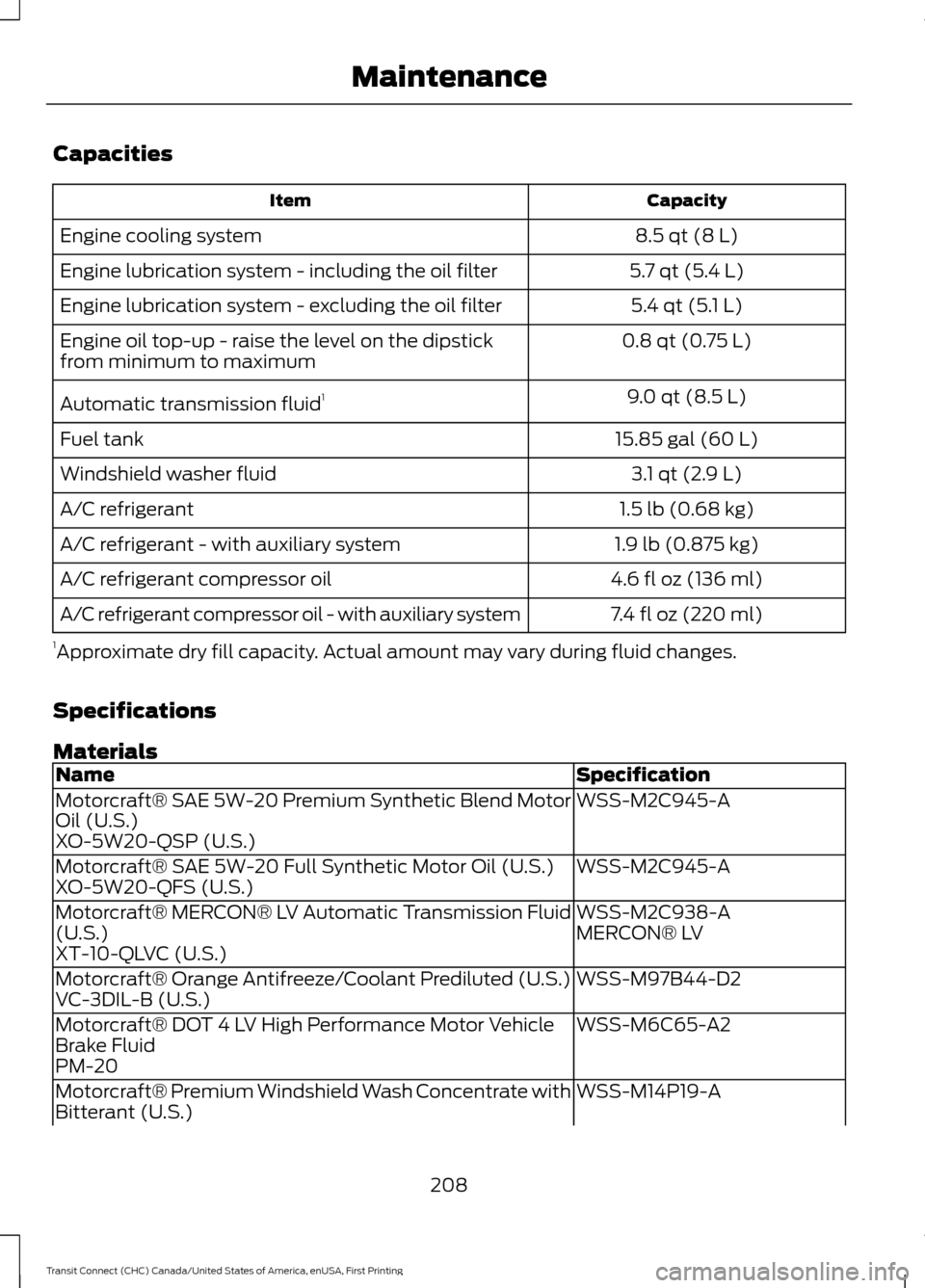
Capacities
Capacity
Item
8.5 qt (8 L)
Engine cooling system
5.7 qt (5.4 L)
Engine lubrication system - including the oil filter
5.4 qt (5.1 L)
Engine lubrication system - excluding the oil filter
0.8 qt (0.75 L)
Engine oil top-up - raise the level on the dipstick
from minimum to maximum
9.0 qt (8.5 L)
Automatic transmission fluid 1
15.85 gal (60 L)
Fuel tank
3.1 qt (2.9 L)
Windshield washer fluid
1.5 lb (0.68 kg)
A/C refrigerant
1.9 lb (0.875 kg)
A/C refrigerant - with auxiliary system
4.6 fl oz (136 ml)
A/C refrigerant compressor oil
7.4 fl oz (220 ml)
A/C refrigerant compressor oil - with auxiliary system
1 Approximate dry fill capacity. Actual amount may vary during fluid changes.
Specifications
Materials Specification
Name
WSS-M2C945-A
Motorcraft® SAE 5W-20 Premium Synthetic Blend Motor
Oil (U.S.)
XO-5W20-QSP (U.S.)
WSS-M2C945-A
Motorcraft® SAE 5W-20 Full Synthetic Motor Oil (U.S.)
XO-5W20-QFS (U.S.)
WSS-M2C938-A
Motorcraft® MERCON® LV Automatic Transmission Fluid
(U.S.) MERCON® LV
XT-10-QLVC (U.S.)
WSS-M97B44-D2
Motorcraft® Orange Antifreeze/Coolant Prediluted (U.S.)
VC-3DIL-B (U.S.)
WSS-M6C65-A2
Motorcraft® DOT 4 LV High Performance Motor Vehicle
Brake Fluid
PM-20
WSS-M14P19-A
Motorcraft® Premium Windshield Wash Concentrate with
Bitterant (U.S.)
208
Transit Connect (CHC) Canada/United States of America, enUSA, First Printing Maintenance
Page 249 of 428
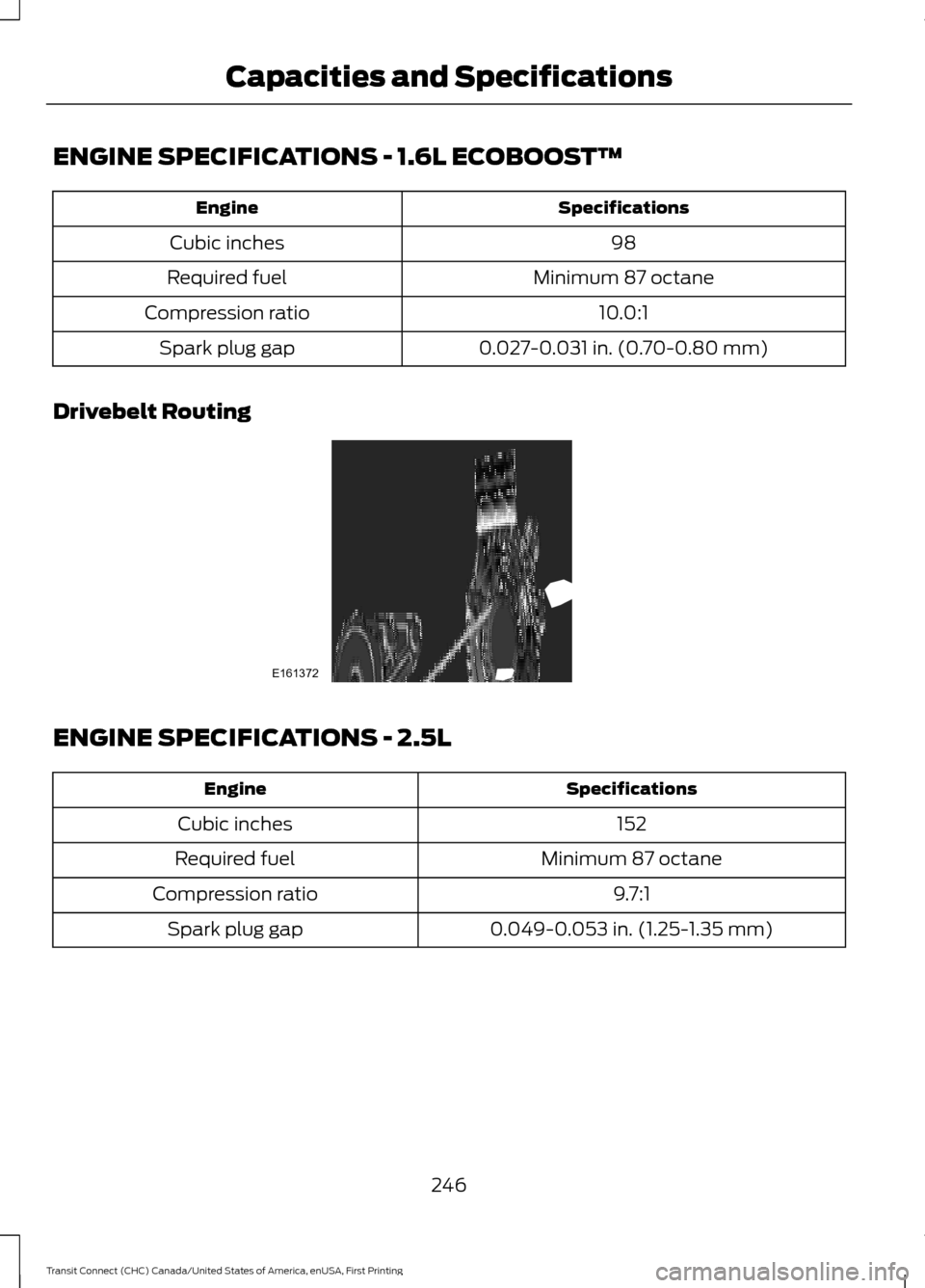
ENGINE SPECIFICATIONS - 1.6L ECOBOOST™
Specifications
Engine
98
Cubic inches
Minimum 87 octane
Required fuel
10.0:1
Compression ratio
0.027-0.031 in. (0.70-0.80 mm)
Spark plug gap
Drivebelt Routing ENGINE SPECIFICATIONS - 2.5L
Specifications
Engine
152
Cubic inches
Minimum 87 octane
Required fuel
9.7:1
Compression ratio
0.049-0.053 in. (1.25-1.35 mm)
Spark plug gap
246
Transit Connect (CHC) Canada/United States of America, enUSA, First Printing Capacities and SpecificationsE161372
Page 289 of 428
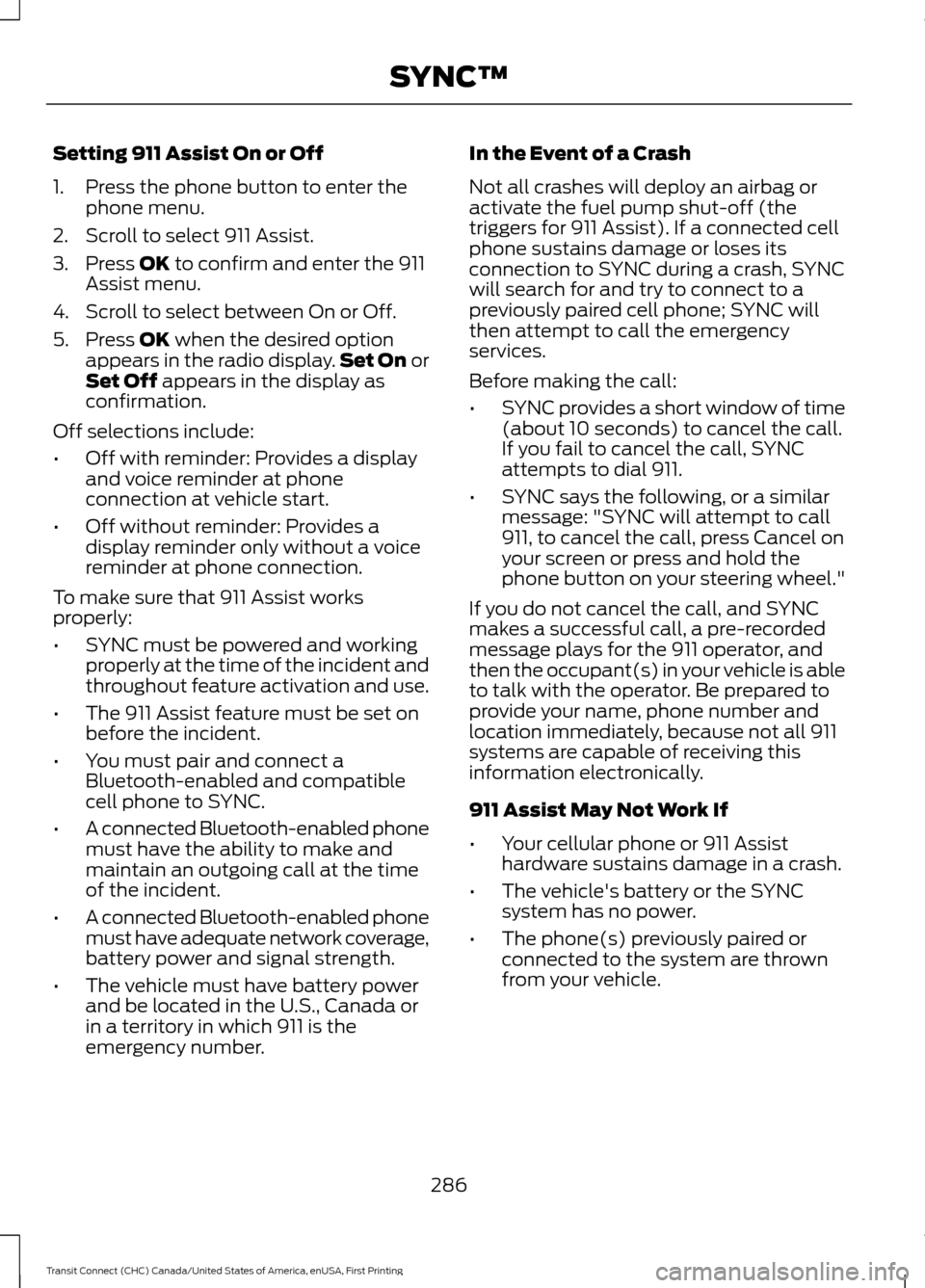
Setting 911 Assist On or Off
1. Press the phone button to enter the
phone menu.
2. Scroll to select 911 Assist.
3. Press OK to confirm and enter the 911
Assist menu.
4. Scroll to select between On or Off.
5. Press
OK when the desired option
appears in the radio display. Set On or
Set Off
appears in the display as
confirmation.
Off selections include:
• Off with reminder: Provides a display
and voice reminder at phone
connection at vehicle start.
• Off without reminder: Provides a
display reminder only without a voice
reminder at phone connection.
To make sure that 911 Assist works
properly:
• SYNC must be powered and working
properly at the time of the incident and
throughout feature activation and use.
• The 911 Assist feature must be set on
before the incident.
• You must pair and connect a
Bluetooth-enabled and compatible
cell phone to SYNC.
• A connected Bluetooth-enabled phone
must have the ability to make and
maintain an outgoing call at the time
of the incident.
• A connected Bluetooth-enabled phone
must have adequate network coverage,
battery power and signal strength.
• The vehicle must have battery power
and be located in the U.S., Canada or
in a territory in which 911 is the
emergency number. In the Event of a Crash
Not all crashes will deploy an airbag or
activate the fuel pump shut-off (the
triggers for 911 Assist). If a connected cell
phone sustains damage or loses its
connection to SYNC during a crash, SYNC
will search for and try to connect to a
previously paired cell phone; SYNC will
then attempt to call the emergency
services.
Before making the call:
•
SYNC provides a short window of time
(about 10 seconds) to cancel the call.
If you fail to cancel the call, SYNC
attempts to dial 911.
• SYNC says the following, or a similar
message: "SYNC will attempt to call
911, to cancel the call, press Cancel on
your screen or press and hold the
phone button on your steering wheel."
If you do not cancel the call, and SYNC
makes a successful call, a pre-recorded
message plays for the 911 operator, and
then the occupant(s) in your vehicle is able
to talk with the operator. Be prepared to
provide your name, phone number and
location immediately, because not all 911
systems are capable of receiving this
information electronically.
911 Assist May Not Work If
• Your cellular phone or 911 Assist
hardware sustains damage in a crash.
• The vehicle's battery or the SYNC
system has no power.
• The phone(s) previously paired or
connected to the system are thrown
from your vehicle.
286
Transit Connect (CHC) Canada/United States of America, enUSA, First Printing SYNC™
Page 290 of 428
911 Assist Privacy Notice
When you turn on 911 Assist, it may
disclose to emergency services that your
vehicle has been in a crash involving the
deployment of an airbag or activation of
the fuel pump shut-off. Certain versions or
updates to 911 Assist may also be capable
of electronically or verbally disclosing to
911 operators your vehicle location or other
details about your vehicle or crash to assist
911 operators to provide the most
appropriate emergency services. If you do
not want to disclose this information, do
not turn the feature on.
Vehicle Health Report
WARNING
Always follow scheduled
maintenance instructions, regularly
inspect your vehicle, and seek repair
for any damage or problem you suspect.
Vehicle Health Report supplements, but
cannot replace, normal maintenance and
vehicle inspection. Vehicle Health Report
only monitors certain systems
electronically monitored by your vehicle
and will not monitor or report the status
of any other system, (such as brake lining
wear). Failure to perform scheduled
maintenance and regularly inspect your
vehicle may result in vehicle damage and
serious injury. Note:
This feature is only available in the
United States.
Note: Your Vehicle Health Report feature
requires activation before use. Visit
www.SYNCMyRide.com to register. There
is no fee or subscription associated with
Vehicle Health Report, but you must register
to use this feature. Note:
This feature may not function
properly if you have enabled caller ID
blocking on your cellular phone. Before
running a report, review the Vehicle Health
Report Privacy Notice.
Note: In order to allow a break-in period for
your vehicle, you may not be able to create
a Vehicle Health Report until your vehicle
odometer has reached 200 miles.
Note: Cellular phone and SMS charges may
apply when making a report.
Register for Vehicle Health Report and set
your report preferences at
www.SYNCMyRide.com. After registering,
you can request a Vehicle Health Report
(inside your vehicle). Return to your
account at www.SYNCMyRide.com to view
your report. You can also choose for SYNC
to remind you automatically to run reports
at specific mileage intervals.
The system allows you to check your
vehicle's overall health in the form of a
diagnostic report card. The Vehicle Health
Report contains valuable information such
as:
• Vehicle diagnostic information
• Scheduled maintenance
• Open recalls and Field Service Actions
• Items noted during vehicle inspections
by an authorized dealer that still need
servicing.
You can run a report (after your vehicle has
been running a minimum of 60 seconds)
by pressing the voice button and saying
"Vehicle Health Report", or pressing the
phone button.
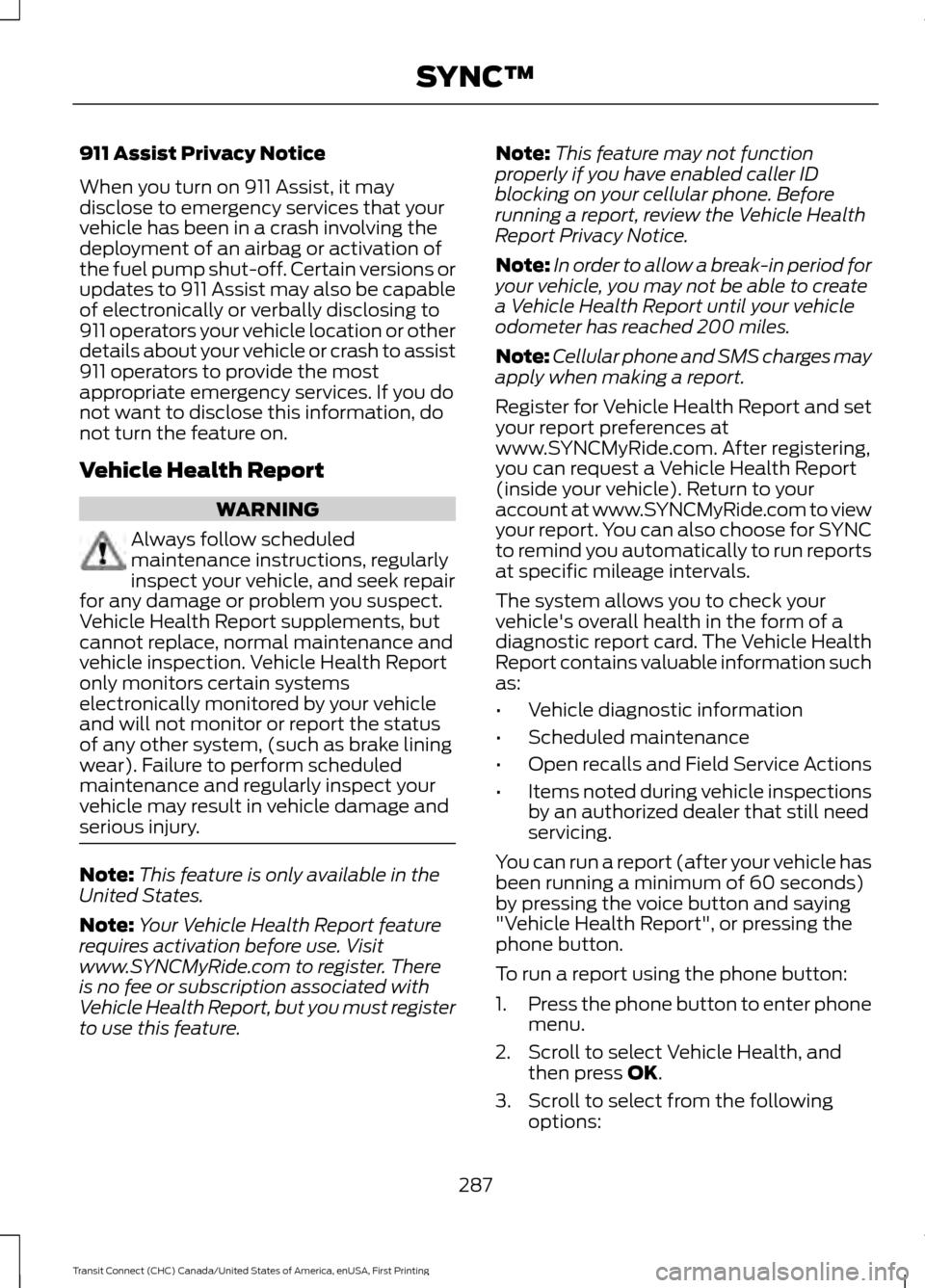
To run a report using the phone button:
1. Press the phone button to enter phone
menu.
2. Scroll to select Vehicle Health, and then press OK.
3. Scroll to select from the following options:
287
Transit Connect (CHC) Canada/United States of America, enUSA, First Printing SYNC™
Page 369 of 428
•
You must pair and connect a
Bluetooth-enabled and compatible
phone to SYNC.
• A connected Bluetooth-enabled phone
must have the ability to make and
maintain an outgoing call at the time
of the incident.
• A connected Bluetooth-enabled phone
must have adequate network coverage,
battery power and signal strength.
• The vehicle must have battery power
and be located in the United States,
Canada or in a territory in which 911 is
the emergency number.
In the Event of a Crash
Not all crashes deploy an airbag or activate
the fuel pump shut-off (which would
trigger 911 Assist); however, SYNC tries to
contact emergency services if 911 Assist
triggers. If a connected phone sustains
damage or loses connection to SYNC,
SYNC searches for, and tries to connect
to, any available previously paired phone
and tries to make the call to 911.
Before making the call:
• SYNC provides a short window of time
(approximately 10 seconds) to cancel
the call. If you fail to cancel the call,
SYNC attempts to dial 911.
• SYNC says the following, or a similar
message: "SYNC will attempt to call
911, to cancel the call, press Cancel on
your screen or press and hold the
phone button on your steering wheel."
If you do not cancel the call, and SYNC
makes a successful call, a pre-recorded
message plays for the 911 operator, and
then the occupant(s) in your vehicle is able
to talk with the operator. Be prepared to
provide your name, phone number and
location immediately, because not all 911
systems are capable of receiving this
information electronically. 911 Assist May Not Work If:
•
Your cellular phone or 911 Assist
hardware sustains damage in a crash.
• The vehicle's battery or the SYNC
system has no power.
• The phones(s) previously paired or
connected to the system are thrown
from the vehicle.
911 Assist Privacy Notice
When you turn on 911 Assist, it may
disclose to emergency services that your
vehicle has been in a crash involving the
deployment of an airbag or activation of
the fuel pump shut-off. Certain versions or
updates to 911 Assist may also be capable
of electronically or verbally disclosing to
911 operators your vehicle location or other
details about your vehicle or crash to assist
911 operators to provide the most
appropriate emergency services. If you do
not want to disclose this information, do
not turn the feature on.
Vehicle Health Report WARNING
Always follow scheduled
maintenance instructions, regularly
inspect your vehicle, and seek repair
for any damage or problem you suspect.
Vehicle Health Report supplements, but
cannot replace, normal maintenance and
vehicle inspection. Vehicle Health Report
only monitors certain systems
electronically monitored by your vehicle
and will not monitor or report the status
of any other system, (such as brake lining
wear). Failure to perform scheduled
maintenance and regularly inspect your
vehicle may result in vehicle damage and
serious injury. Note:
This feature is only available in the
United States.
366
Transit Connect (CHC) Canada/United States of America, enUSA, First Printing MyFord Touch
™
Page 424 of 428
Rear Seats.......................................................107
Vehicles With Five Seats.................................. 107
Vehicles With Seven Seats............................. 109
Rear Under Floor Storage...........................141 Adjustable Load Floor........................................ 141
Passenger Compartment Floor...................... 141
Rear View Camera........................................137 Switching the Rear View Camera Off.........138
Switching the Rear View Camera On..........137
Using the Display................................................. 137
Vehicles With Parking Aid............................... 138
Rear View Camera See: Rear View Camera.................................... 137
Rear Window Wiper and Washers...........65 Rear Window Washer......................................... 66
Rear Window Wiper............................................ 65
Recommended Towing Weights............153
Calculating the Maximum Loaded Trailer
Weight................................................................ 154
Reduced Engine Performance
................160
Refueling...........................................................121 Easy Fuel ™ Capless Fuel System.................122
Remote Control...............................................47 Car Finder................................................................ 48
Integrated Keyhead Transmitter..................... 47
Programming a New Remote Control..........47
Replacing the Battery......................................... 48
Reprogramming the Unlocking Function.............................................................. 48
Repairing Minor Paint Damage................215
Replacement Parts Recommendation.........................................11
Collision Repairs..................................................... 11
Scheduled Maintenance and Mechanical Repairs................................................................... 11
Warranty on Replacement Parts..................... 12
Replacing a Lost Key or Remote Control............................................................48
Reporting Safety Defects (Canada Only)...............................................................173
Reporting Safety Defects (U.S. Only)
................................................................172 Roadside Assistance
...................................163
Vehicles Sold in Canada: Getting Roadside
Assistance........................................................ 163
Vehicles Sold in Canada: Using Roadside Assistance........................................................ 163
Vehicles Sold in the United States: Getting Roadside Assistance.................................... 163
Vehicles Sold in the United States: Using Roadside Assistance.................................... 163
Roadside Emergencies...............................163
Roof Racks and Load Carriers
.................143
Maximum Load Weights.................................. 143
Running-In See: Breaking-In................................................. 160
Running Out of Fuel....................................120 Refilling With a Portable Fuel
Container.......................................................... 120
S
Safety Belt Height Adjustment.................33
Safety Belt Minder.........................................34 Belt-Minder™........................................................ 34
Safety Belts......................................................30 Principle of Operation........................................ 30
Safety Belt Warning Lamp and Indicator Chime..............................................................34
Conditions of operation..................................... 34
Safety Canopy ™
............................................44
Safety Precautions........................................119
Satellite Radio..............................................262 Satellite Radio Electronic Serial Number
(ESN)................................................................ 263
Satellite Radio Reception Factors...............263
SIRIUS® Satellite Radio Service.................. 263
Troubleshooting................................................. 264
Scheduled Maintenance Record...........407
Scheduled Maintenance
..........................399
Seats.................................................................103
Security..............................................................59
Settings.............................................................321 Clock........................................................................\
321
Display.................................................................... 322
Settings.................................................................. 325
Sound..................................................................... 323
Vehicle.................................................................... 323
Side Airbags
.....................................................43
Sitting in the Correct Position..................103
421
Transit Connect (CHC) Canada/United States of America, enUSA, First Printing Index