steering wheel FORD TRANSIT CONNECT 2019 User Guide
[x] Cancel search | Manufacturer: FORD, Model Year: 2019, Model line: TRANSIT CONNECT, Model: FORD TRANSIT CONNECT 2019Pages: 493, PDF Size: 7.43 MB
Page 64 of 493
CLEARING ALL MYKEYS
When you clear all MyKeys, you remove all
restrictions and return all MyKeys to their
original admin key status.
Switch the ignition on using an admin key.
To clear all MyKeys, use the information display controls on the steering wheel
to select the following: Action
Menu Item
Press the menu button.
Settings
Press the OK button.
MyKey
Press and hold the
OK button until a confirmation message
appears in the information display.
Clear MyKeys
MyKey Information Messages Description
Message
Displays when clearing all MyKeys.
Hold OK to Clear MyKeys
Displays to confirm that all MyKeys have been cleared.
All MyKeys Cleared
CHECKING MYKEY SYSTEM
STATUS
Switch the ignition on.
To find information about the distance traveled using a MyKey and also the number
of admin keys and MyKeys created for your vehicle, use the information display
controls on the steering wheel to select the following: Action
Menu Item
Press the menu button.
Settings
Press the
OK button.
MyKey
Press the
OK button.
MyKey Info
60
2019 Transit Connect (CHC) Canada/United States of America, CG3739en enUSA, Edition date: 201804, First-Printing MyKey
™
Page 69 of 493
If both front doors are closed, you can lock
your vehicle by any method, regardless of
whether the key is in the ignition or not.
Autolock
Autolock locks all the doors and liftgate
when all of the following occur:
•
All doors are closed.
• The ignition is on.
• Your vehicle is moving at a speed
greater than 4 mph (7 km/h) for more
than two seconds. Autounlock
Autounlock unlocks all the doors when all
of the following occur:
•
The ignition is on, all doors are closed,
and your vehicle is moving at a speed
greater than
4 mph (7 km/h) for more
than two seconds.
• Your vehicle has come to a stop and
you switch the ignition off or to the
accessory position.
• The driver door is opened within 10
minutes of you switching the ignition
off or to the accessory position.
Note: The doors will not autounlock if your
vehicle has been electronically locked after
you switch the ignition off and before you
open the driver door.
Switching Autounlock On or Off
To switch autounlock on or off, use the information display controls on the steering
wheel to select the following: Action
Menu Item
Press the menu button.
Settings
Press the
OK button.
Vehicle Settings
Press the
OK button.
Locks
Press the
OK button.
Autounlock
Emergency Locking with the Key
Note: If the child safety locks are on and
you pull the interior handle, you only switch
off the emergency locking, not the child
safety lock. You can only open the doors
using the external door handle.
Note: When the doors have been unlocked
using this method, the doors must be locked
individually until the central locking function
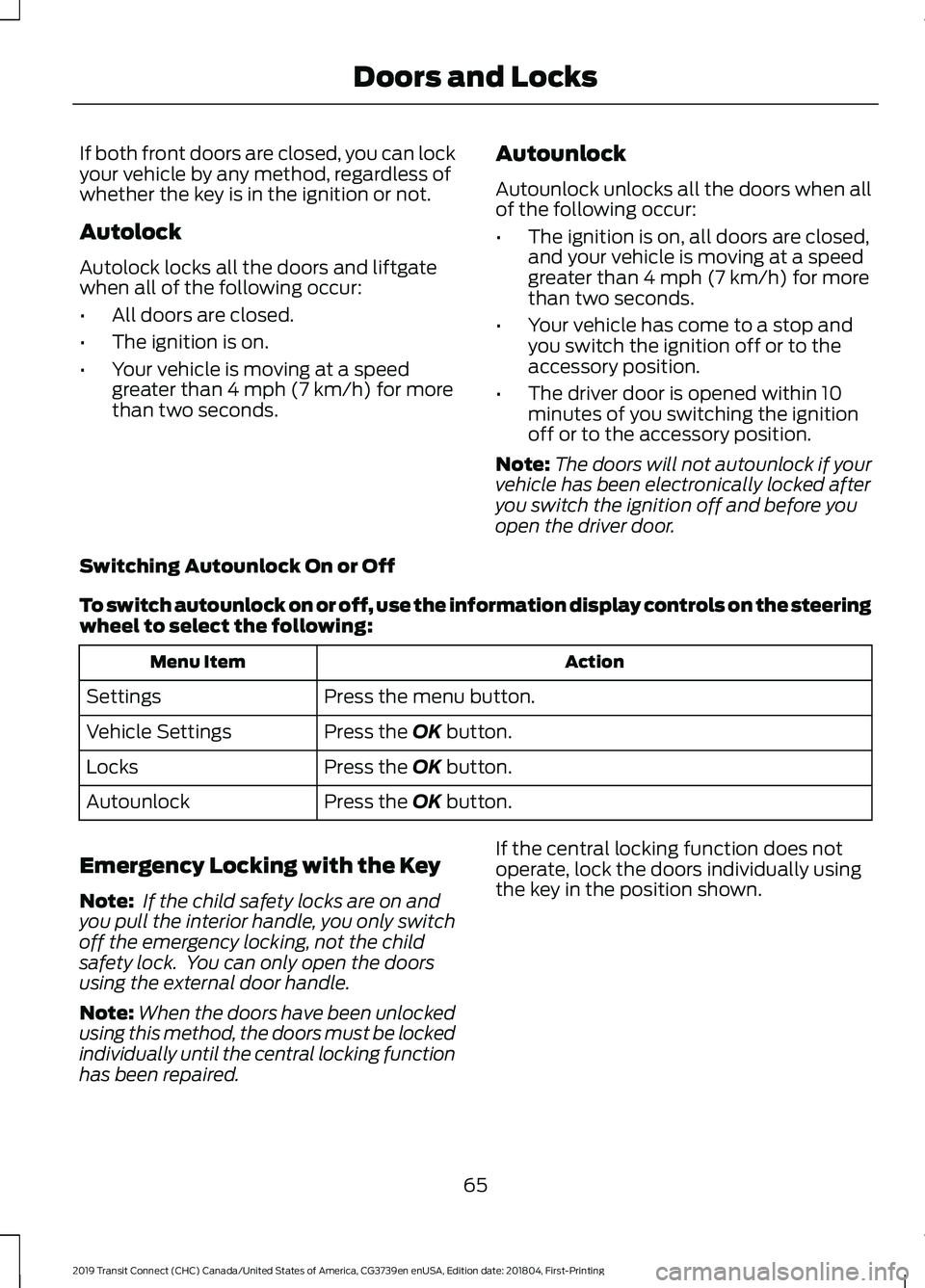
has been repaired. If the central locking function does not
operate, lock the doors individually using
the key in the position shown.
65
2019 Transit Connect (CHC) Canada/United States of America, CG3739en enUSA, Edition date: 201804, First-Printing Doors and Locks
Page 78 of 493
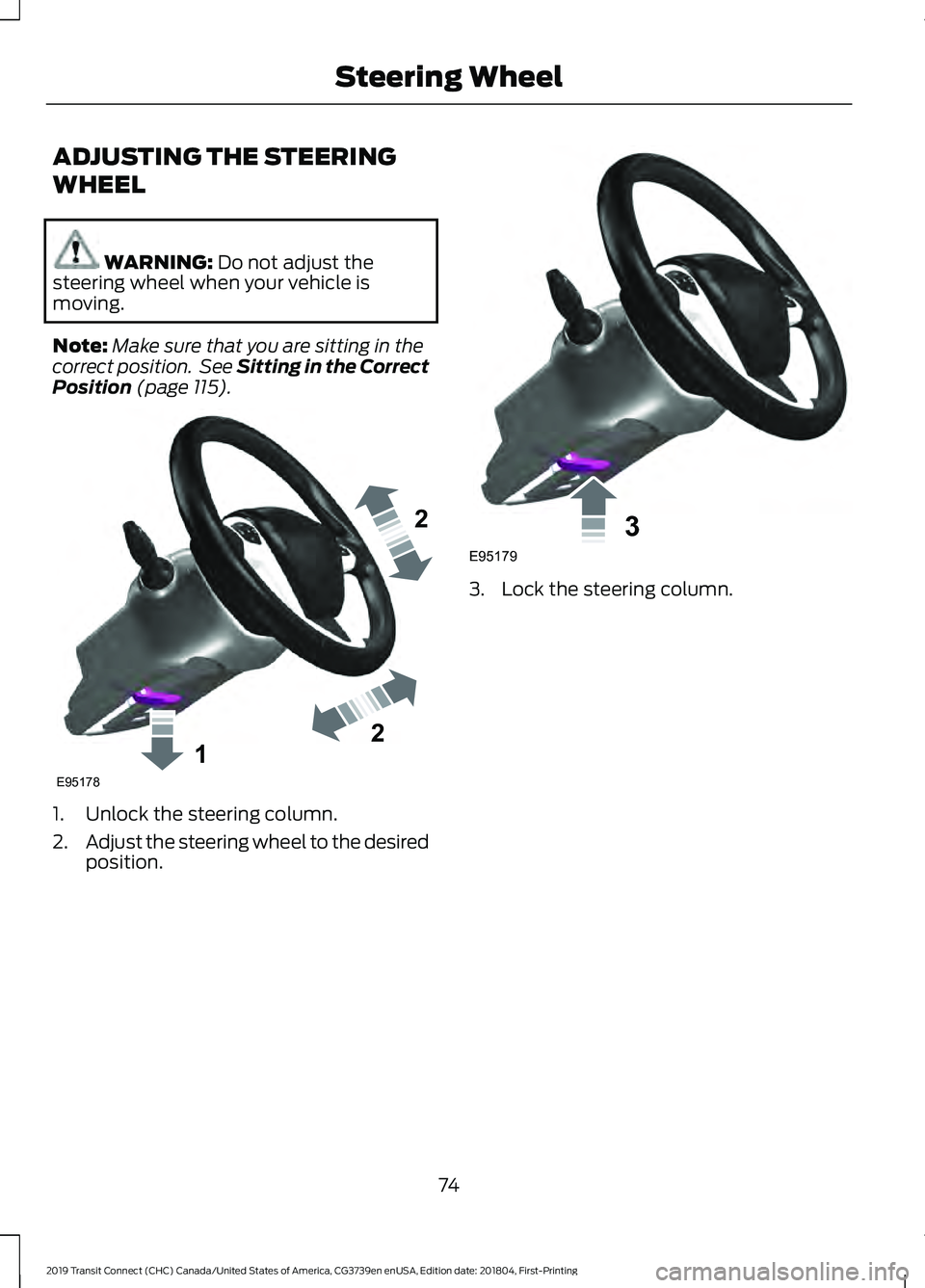
ADJUSTING THE STEERING
WHEEL
WARNING: Do not adjust the
steering wheel when your vehicle is
moving.
Note: Make sure that you are sitting in the
correct position. See Sitting in the Correct
Position
(page 115). 1. Unlock the steering column.
2.
Adjust the steering wheel to the desired
position. 3. Lock the steering column.
74
2019 Transit Connect (CHC) Canada/United States of America, CG3739en enUSA, Edition date: 201804, First-Printing Steering Wheel122E95178 3E95179
Page 85 of 493

Switch the lighting control to the
autolamps position. See Autolamps
(page 79).
Overriding the System
Push the lever away from you to switch
between high beam and low beam.
Automatic High Beam Indicator
(If
Equipped) The indicator illuminates to
confirm when the system is
ready to assist.
FRONT FOG LAMPS
Only switch the front fog lamps on during
reduced visibility.
You can switch the front fog lamps on
when the lighting control is in any position
except off.
If you switch the autolamps on, you can
only switch the front fog lamps on when
the headlamps are on.
The front fog lamps button is on the
lighting control. Press the button to switch the
front fog lamps on and off.
CORNERING LAMPS Headlamp beam.
A
Cornering lamp beam.
B The cornering lamps illuminate the inside
of a corner when you are turning the
steering wheel.
81
2019 Transit Connect (CHC) Canada/United States of America, CG3739en enUSA, Edition date: 201804, First-Printing Lighting E72898
Page 119 of 493
SITTING IN THE CORRECT
POSITION
WARNING: Do not recline the
seatback too far as this can cause the
occupant to slide under the seatbelt,
resulting in serious injury in the event of a
collision. WARNING:
Always sit upright
against your seatback with your feet on
the floor. WARNING:
Do not place objects
higher than the top of the seat backrest.
Failure to follow this instruction could
result in personal injury or death in the
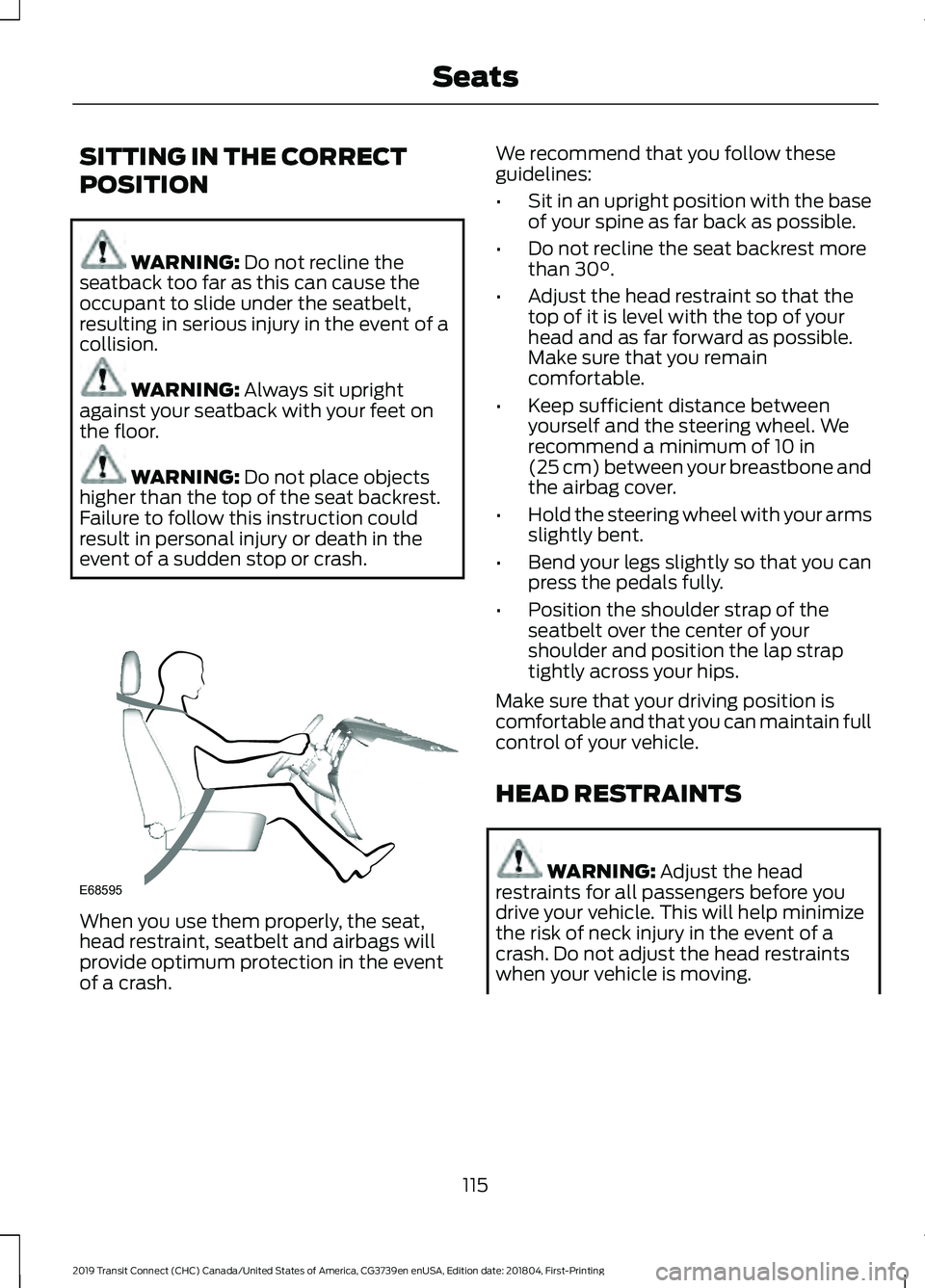
event of a sudden stop or crash. When you use them properly, the seat,
head restraint, seatbelt and airbags will
provide optimum protection in the event
of a crash. We recommend that you follow these
guidelines:
•
Sit in an upright position with the base
of your spine as far back as possible.
• Do not recline the seat backrest more
than
30°.
• Adjust the head restraint so that the
top of it is level with the top of your
head and as far forward as possible.
Make sure that you remain
comfortable.
• Keep sufficient distance between
yourself and the steering wheel. We
recommend a minimum of
10 in
(25 cm) between your breastbone and
the airbag cover.
• Hold the steering wheel with your arms
slightly bent.
• Bend your legs slightly so that you can
press the pedals fully.
• Position the shoulder strap of the
seatbelt over the center of your
shoulder and position the lap strap
tightly across your hips.
Make sure that your driving position is
comfortable and that you can maintain full
control of your vehicle.
HEAD RESTRAINTS WARNING:
Adjust the head
restraints for all passengers before you
drive your vehicle. This will help minimize
the risk of neck injury in the event of a
crash. Do not adjust the head restraints
when your vehicle is moving.
115
2019 Transit Connect (CHC) Canada/United States of America, CG3739en enUSA, Edition date: 201804, First-Printing SeatsE68595
Page 139 of 493
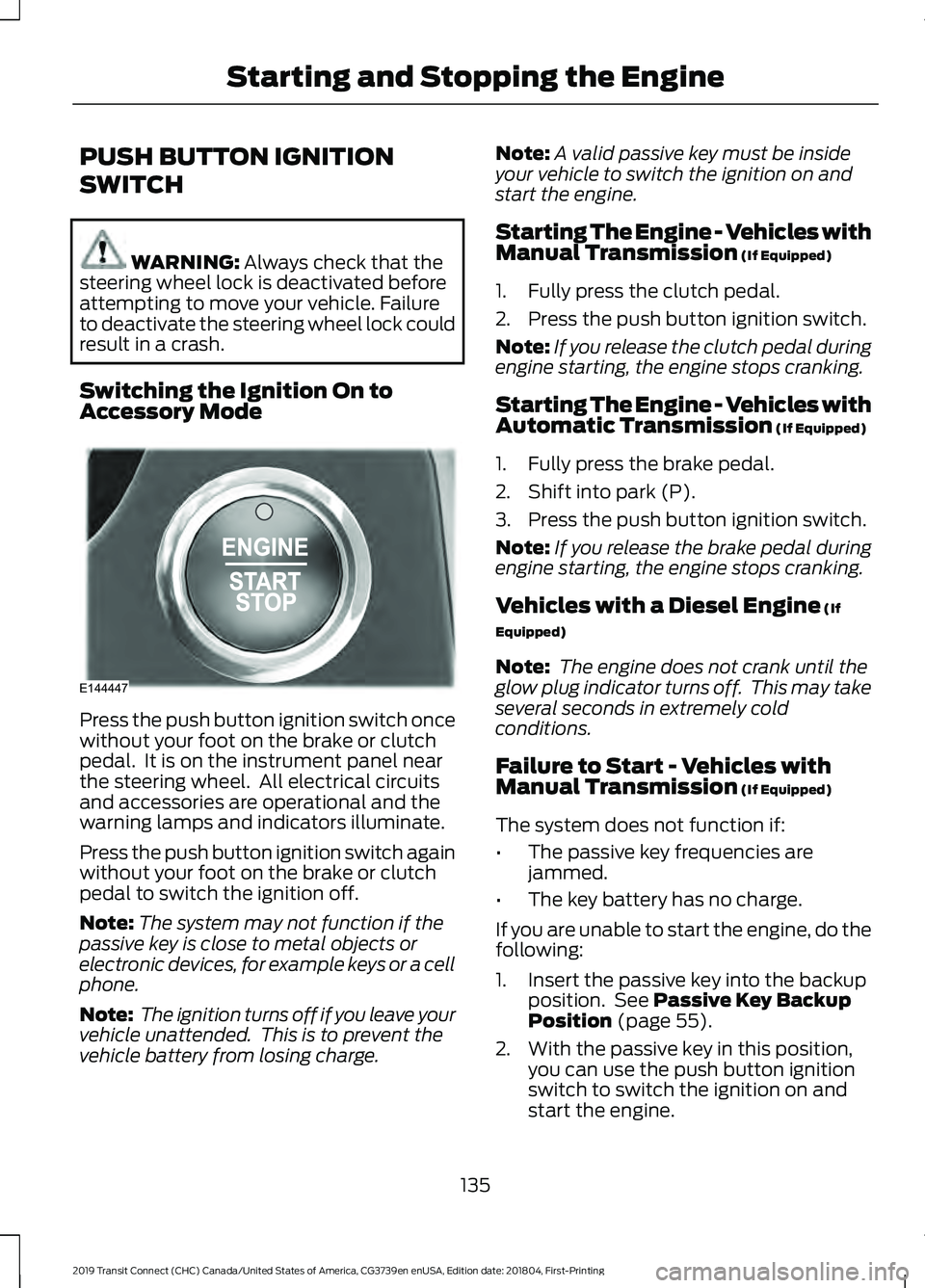
PUSH BUTTON IGNITION
SWITCH
WARNING: Always check that the
steering wheel lock is deactivated before
attempting to move your vehicle. Failure
to deactivate the steering wheel lock could
result in a crash.
Switching the Ignition On to
Accessory Mode Press the push button ignition switch once
without your foot on the brake or clutch
pedal. It is on the instrument panel near
the steering wheel. All electrical circuits
and accessories are operational and the
warning lamps and indicators illuminate.
Press the push button ignition switch again
without your foot on the brake or clutch
pedal to switch the ignition off.
Note:
The system may not function if the
passive key is close to metal objects or
electronic devices, for example keys or a cell
phone.
Note: The ignition turns off if you leave your
vehicle unattended. This is to prevent the
vehicle battery from losing charge. Note:
A valid passive key must be inside
your vehicle to switch the ignition on and
start the engine.
Starting The Engine - Vehicles with
Manual Transmission (If Equipped)
1. Fully press the clutch pedal.
2. Press the push button ignition switch.
Note: If you release the clutch pedal during
engine starting, the engine stops cranking.
Starting The Engine - Vehicles with
Automatic Transmission
(If Equipped)
1. Fully press the brake pedal.
2. Shift into park (P).
3. Press the push button ignition switch.
Note: If you release the brake pedal during
engine starting, the engine stops cranking.
Vehicles with a Diesel Engine
(If
Equipped)
Note: The engine does not crank until the
glow plug indicator turns off. This may take
several seconds in extremely cold
conditions.
Failure to Start - Vehicles with
Manual Transmission
(If Equipped)
The system does not function if:
• The passive key frequencies are
jammed.
• The key battery has no charge.
If you are unable to start the engine, do the
following:
1. Insert the passive key into the backup position. See
Passive Key Backup
Position (page 55).
2. With the passive key in this position, you can use the push button ignition
switch to switch the ignition on and
start the engine.
135
2019 Transit Connect (CHC) Canada/United States of America, CG3739en enUSA, Edition date: 201804, First-Printing Starting and Stopping the EngineE144447
Page 142 of 493
Vehicles with an Ignition Key
1. Fully press the brake pedal.
Note:
Do not touch the accelerator pedal.
2. Turn the key to position III.
Note: The engine may continue cranking
for up to 15 seconds or until it starts.
Note: The engine takes longer to start at
lower temperatures. It may crank for several
seconds when very cold.
Vehicles with a Push Button
Ignition Switch
See
Push Button Ignition Switch (page
135).
Failure to Start
Vehicles with an Ignition Key
If you cannot start the engine after 3
attempts, wait 10 seconds and do the
following:
1. Fully press the brake pedal.
2. Apply the parking brake.
3. Shift into park (P).
4. Fully press the accelerator pedal and hold it there.
5. Turn the key to position
III until the
engine starts. Vehicles with a Push Button Ignition
Switch
See
Push Button Ignition Switch (page
135).
Automatic Engine Shutdown
For vehicles with a push button ignition
switch, the engine shuts down if it has been
idling for an extended period. The ignition
also turns off to save battery power.
Before your vehicle shuts down, a message
appears in the information display showing
a timer counting down. If you do not
intervene within 30 seconds, your vehicle
shuts down. Another message appears in
the information display to inform you that
your vehicle has shut down to save fuel.
Start your vehicle as normal.
Automatic Engine Shutdown Override
You can stop the shutdown, or reset the
timer, at any point before the 30-second
countdown has expired by doing any of the
following:
• Pressing the brake or accelerator pedal.
• Switching off the automatic engine
shutdown in the information display.
• Pressing the
OK or RESET button
during the 30-second countdown.
Switching the Automatic Engine Shutdown On or Off
To switch the automatic engine shutdown on or off, use the information display
controls on the steering wheel to select the following: Action
Menu Item
Press the menu button.
Settings
Press the
OK button.
Vehicle Settings
Press the
OK button.
Auto Engine Off
138
2019 Transit Connect (CHC) Canada/United States of America, CG3739en enUSA, Edition date: 201804, First-Printing Starting and Stopping the Engine
Page 150 of 493
AUTO-START-STOP
WARNING: Always switch the
ignition off and fully apply the parking
brake before carrying out any maintenance
or leaving your vehicle. Failure to follow
this instruction could result in personal
injury or death if the engine restarts.
Principle of Operation
The system is designed to help reduce fuel
consumption and CO 2 emissions by
stopping the engine when it is idling, for
example at traffic lights. Your vehicle has
an enhanced starter motor that is designed
for an increased number of engine starts.
The system does not stop the engine under
certain conditions, for example:
• If you have opened the driver door.
• If you have unfastened the driver
seatbelt.
• If your vehicle is at high altitude.
• If you have switched the heated
windshield on.
• If you have shifted into manual (M).
• If your vehicle is on a steep grade.
• If the engine is warming up.
• If the outside temperature is too low
or too high.
• If the battery charge is low or the
battery temperature is outside the
optimal operating range.
• To maintain the interior climate or
reduce fogging.
• If you have turned the steering more
than 270 degrees. The system restarts the engine under
certain conditions, for example:
•
If you have opened the driver door.
• If you have unfastened the driver
seatbelt.
• If you switch the heated windshield on.
• If you switch maximum defrost on.
• If you turn the steering wheel.
• If your vehicle starts to roll downhill in
neutral.
• To maintain adequate brake
assistance.
• To maintain the interior climate or
reduce fogging.
Note: The blower motor speed could
change when the system restarts the engine.
Using Auto-Start-Stop WARNING: Apply the parking brake
and shift into park (P) before leaving your
vehicle.
Stopping the Engine
Stop your vehicle and keep your foot on
the brake pedal and the transmission in
drive (D).
Note: The engine stops if you shift into park
(P) or neutral (N) regardless of whether you
have your foot on the brake pedal or not.
Note: Power assist steering turns off when
the engine is off.
Restarting the Engine
• Release the brake pedal.
• Press the accelerator pedal.
• Shift into drive (D), reverse (R) or
manual (M).
146
2019 Transit Connect (CHC) Canada/United States of America, CG3739en enUSA, Edition date: 201804, First-Printing Unique Driving Characteristics
Page 177 of 493
GENERAL INFORMATION
Wet brakes result in reduced braking
efficiency. Gently press the brake pedal a
few times when driving from a car wash or
standing water to dry the brakes.
Note:
Occasional brake noise is normal. If
a metal-to-metal, continuous grinding or
continuous squeal sound is present, the
brake linings may be worn-out. Have the
system checked by an authorized dealer. If
your vehicle has continuous vibration or
shudder in the steering wheel while braking,
have it checked by an authorized dealer.
Note: Brake dust may accumulate on the
wheels, even under normal driving
conditions. Some dust is inevitable as the
brakes wear and does not contribute to
brake noise. See Cleaning the Wheels
(page 292).
Note: Depending on applicable laws and
regulations in the country for which your
vehicle was originally built, the brake lamps
could flash during heavy braking. Following
this, the hazard lights could also flash when
your vehicle comes to a stop.
Brake Over Accelerator
In the event that the accelerator pedal
becomes stuck or entrapped, apply steady
and firm pressure to the brake pedal to
slow your vehicle and reduce engine
power. If you experience this condition,
apply the brakes and bring your vehicle to
a safe stop. Move the transmission to park
(P), switch the engine off and apply the
parking brake. Inspect the accelerator
pedal for any interference. If none are
found and the condition persists, have your
vehicle towed to the nearest authorized
dealer. Brake Assist
Brake assist detects when you rapidly
brake by measuring the rate at which you
press the brake pedal. It provides
maximum braking efficiency as long as you
press the pedal, and can reduce stopping
distances in critical situations
Anti-Lock Brake System
This system helps you maintain steering
control during emergency stops by keeping
the brakes from locking.
If it illuminates when you are
driving, this indicates a
malfunction. Your vehicle
continues to have normal braking without
the anti-lock brake system function. Have
your vehicle checked as soon as possible.
It also momentarily illuminates when you
switch the ignition on to confirm the lamp
is functional. If it does not illuminate when
you switch the ignition on, or begins to
flash at any time, have the system checked
by an authorized dealer. It illuminates when you engage
the parking brake and the
ignition is on.
If it illuminates when your vehicle is
moving, make sure the parking brake is
disengaged. If the parking brake is
disengaged, this indicates low brake fluid
level or a brake system fault. Have your
vehicle immediately checked.
It also momentarily illuminates when you
switch the ignition on to confirm the lamp
is functional. If it does not illuminate when
you switch the ignition on, or begins to
flash at any time, have the system checked
by an authorized dealer.
173
2019 Transit Connect (CHC) Canada/United States of America, CG3739en enUSA, Edition date: 201804, First-Printing Brakes E138644
Page 178 of 493
HINTS ON DRIVING WITH
ANTI-LOCK BRAKES
The anti-lock braking system does not
eliminate the risks when:
•
You drive too closely to the vehicle in
front of you.
• Your vehicle is hydroplaning.
• You take corners too fast.
• The road surface is poor.
Note: If the system activates, the brake
pedal may pulse and may travel further.
Maintain pressure on the brake pedal. You
may also hear a noise from the system. This
is normal.
PARKING BRAKE WARNING: Always fully apply the
parking brake and make sure you shift into
park (P). Switch the ignition off and
remove the key whenever you leave your
vehicle.
To apply the parking brake:
1. Firmly press the brake pedal.
2. Pull the parking brake lever upward to its fullest extent.
Note: Do not press the release button when
pulling the parking brake lever upward.
Note: If you park your vehicle on a hill and
facing uphill, shift into park (P) and turn the
steering wheel away from the curb.
Note: If you park your vehicle on a hill and
facing downhill, shift into park (P) and turn
the steering wheel toward the curb.
To release the parking brake:
1. Firmly press the brake pedal.
2. Slightly pull the parking brake lever upward. 3. Press the release button and push the
parking brake lever downward.
HILL START ASSIST WARNING:
The system does not
replace the parking brake. When you leave
your vehicle, always apply the parking
brake. Failure to leave your vehicle securely
parked may lead to a crash or injury. See
Parking Brake
(page 174). WARNING:
You must remain in your
vehicle once the system activates. Failure
to follow this warning could result in
serious personal injury or death. WARNING:
During all times, you are
responsible for controlling your vehicle,
supervising the system and intervening, if
required. Failure to take care may result in
the loss of control of your vehicle, serious
personal injury or death. WARNING:
The system will turn off
if a malfunction is apparent or if you rev
the engine excessively. Failure to take care
may result in the loss of control of your
vehicle, serious personal injury or death.
The system makes it easier to pull away
when your vehicle is on a slope without the
need to use the parking brake.
When the system is active, your vehicle will
remain stationary on the slope for two to
three seconds after you release the brake
pedal. This allows time to move your foot
from the brake to the accelerator pedal.
The brakes are released automatically
174
2019 Transit Connect (CHC) Canada/United States of America, CG3739en enUSA, Edition date: 201804, First-Printing Brakes