door lock GENESIS G80 2021 User Guide
[x] Cancel search | Manufacturer: GENESIS, Model Year: 2021, Model line: G80, Model: GENESIS G80 2021Pages: 604, PDF Size: 11.47 MB
Page 145 of 604
05
5 -7
Information
• The side view mirror will unfold if
‘Enable on Door Unlock’ is selected
from the Settings menu in the
infotainment system screen. Select:
-Setup → Vehicle Settings →
Convenience → Welcome Mirror/
Light → Enable on Door Unlock
• The door handle touch sensor will only
operate when the smart key is within
28~40 in. (0.7 ~1 m) from the outside
door handle
• The doors may lock or unlock if the
touch sensor of the outer door handle is
recognized while washing your car or
due to heavy rain.
• To prevent unintentional door lock or
unlock:
You may prevent the doors from
locking or unlocking unintentionally.
Press the lock button on the smart
key and immediately press the unlock
button along with the lock button
for more than 4 seconds. The hazard
warning lights will blink four times.
At this time, the doors will not lock or
unlock even though the touch sensor is
touched on the outside door handle.
To deactivate the function, press the
door lock or unlock button on the
smart key.
• The doors may not lock or unlock in
the following situations.
-If the touch sensor is touched with
gloves on
-If the door is suddenly approached
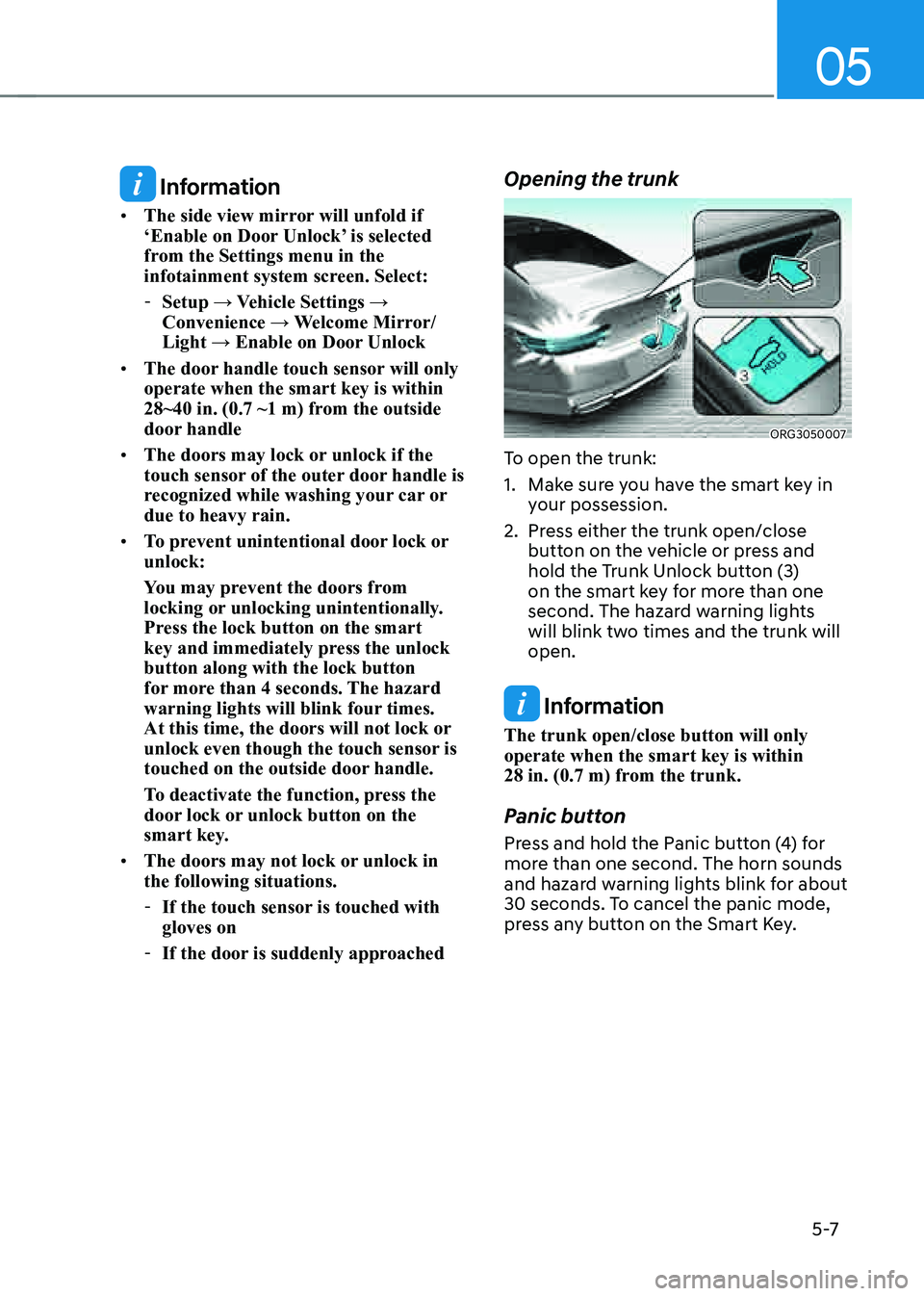
Opening the trunk
ORG3050007
To open the trunk:
1. Make sure you have the smart key in
your possession.
2. Press either the trunk open/close
button on the vehicle or press and
hold the Trunk Unlock button (3)
on the smart key for more than one
second. The hazard warning lights
will blink two times and the trunk will
open.
Information
The trunk open/close button will only
operate when the smart key is within
28 in. (0.7 m) from the trunk.
Panic button
Press and hold the Panic button (4) for
more than one second. The horn sounds
and hazard warning lights blink for about
30 seconds. To cancel the panic mode,
press any button on the Smart Key.
Page 146 of 604
Convenient Features
5-8
Remotely starting vehicle
You can start the vehicle using the
Remote Start button (5) on the smart key.
To start the vehicle remotely:
1. Press the door lock button on the
smart key within 32 feet (10 m) from
the vehicle.
2. Press the Remote Start button (5) for
more than 2 seconds within 4 seconds
after pressing the door lock button.
3. The hazard warning lights will blink
and the engine will start.
4. To turn off the remote start function,
press the Remote Start button (5)
once.
Information
• The vehicle must be in P (Park) for the
remote start function to start.
• The engine turns off if you enter the
vehicle without a registered smart key.
• The engine turns off if you do not get
on the vehicle within 10 minutes after
remotely starting the vehicle.
• The Remote Start button (5) may not
operate if the smart key is not within
32 feet (10 m).
• The vehicle will not remotely start if the
engine hood or trunk is opened.
• Do not idle the engine for a long period.
• Do not operate remote start in closed
areas where there is no adequate
ventilation for the engine exhaust.
Turning on the lamps
If the lamp on button (6) is pushed, the
headlamps and tail lamps are turned
on. However, it works only when the
following conditions are satisfied:
• The vehicle is turned off.
• The doors are locked.
• The light control switch is in the AUTO
headlamp position (The headlamps
and tail lamps will turn on when it is
dark.) or in the Headlamp position.
Remotely moving vehicle forward or
rearward (if equipped)
With the smart key, the driver can move
the vehicle forward or rearward using
the Forward/Backward button (7) on the
smart key.
For more details, refer to “Remote
Smart Parking Assist (RSPA)” section in
chapter 7.
Start-up
You can start the vehicle without
inserting the key.
For more details, refer to the “Engine
Start/Stop Button” section in chapter 6.
Information
If the smart key is not moved for some
time, the detection function for smart key
operation will pause. Lift the smart key to
activate the detection again.
NOTICE
To prevent damaging the smart key:
• Keep the smart key in a cool,
dry place to avoid damage or
malfunction. Exposure to moisture
or high temperature may cause
the internal circuit of the smart key
to malfunction which may not be
covered under warranty.
• Avoid dropping or throwing the
smart key.
• Protect the smart key from extreme
temperatures.
Page 147 of 604
05
5-9
Mechanical key
If the Smart Key does not operate
normally, you can lock or unlock the
driver’s door by using the mechanical
key.
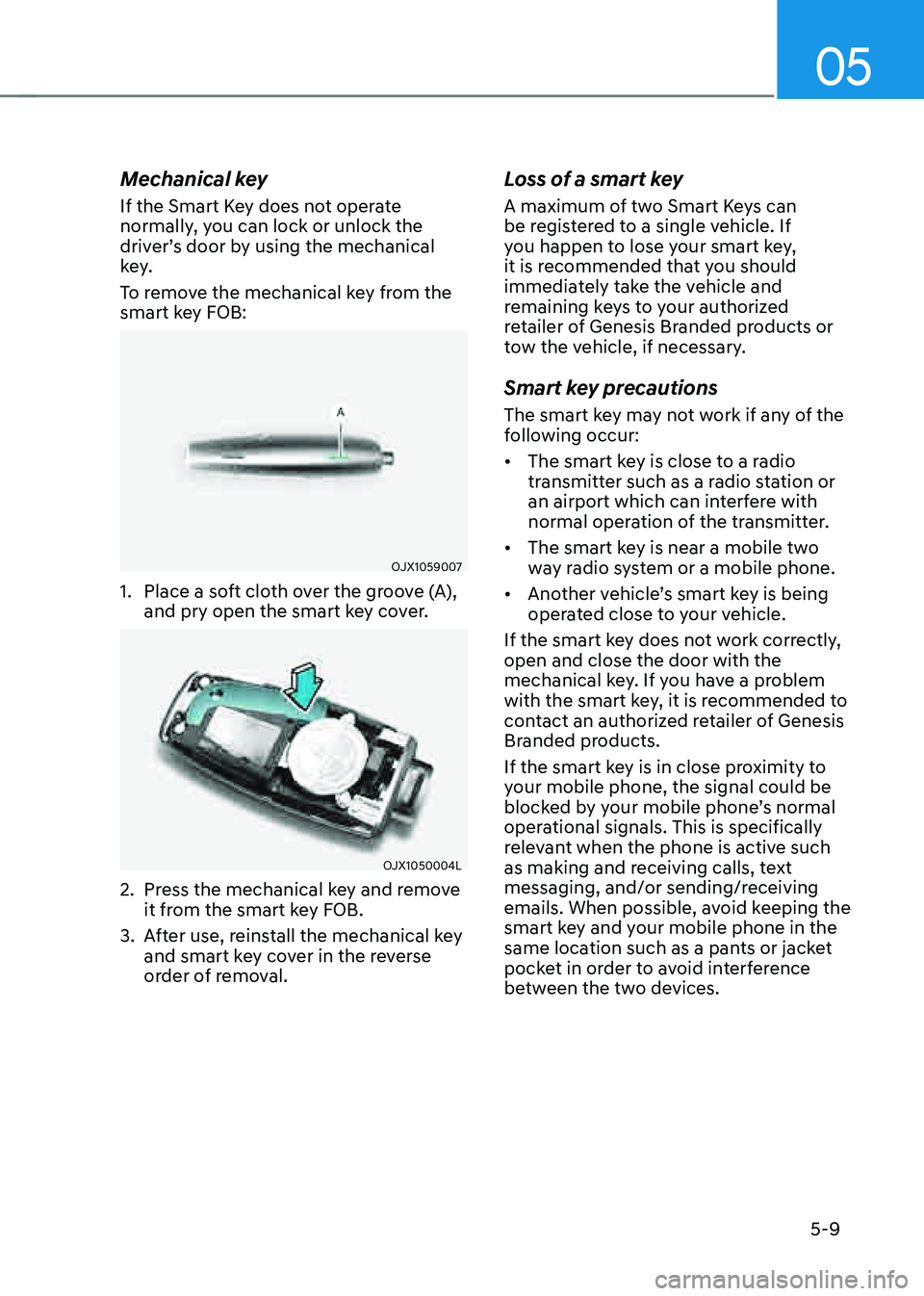
To remove the mechanical key from the
smart key FOB:
OJX1059007
1. Place a soft cloth over the groove (A),
and pry open the smart key cover.
OJX1050004L
2. Press the mechanical key and remove
it from the smart key FOB.
3. After use, reinstall the mechanical key
and smart key cover in the reverse
order of removal.
Loss of a smart key
A maximum of two Smart Keys can
be registered to a single vehicle. If
you happen to lose your smart key,
it is recommended that you should
immediately take the vehicle and
remaining keys to your authorized
retailer of Genesis Branded products or
tow the vehicle, if necessary.
Smart key precautions
The smart key may not work if any of the
following occur:
• The smart key is close to a radio
transmitter such as a radio station or
an airport which can interfere with
normal operation of the transmitter.
• The smart key is near a mobile two
way radio system or a mobile phone.
• Another vehicle’s smart key is being
operated close to your vehicle.
If the smart key does not work correctly,
open and close the door with the
mechanical key. If you have a problem
with the smart key, it is recommended to
contact an authorized retailer of Genesis
Branded products.
If the smart key is in close proximity to
your mobile phone, the signal could be
blocked by your mobile phone’s normal
operational signals. This is specifically
relevant when the phone is active such
as making and receiving calls, text
messaging, and/or sending/receiving
emails. When possible, avoid keeping the
smart key and your mobile phone in the
same location such as a pants or jacket
pocket in order to avoid interference
between the two devices.
Page 150 of 604
Convenient Features5-12
GENESIS DIGITAL KEY
Genesis digital key provides convenience
to the driver, which the driver can use to
lock or unlock the driver and passenger
doors or the trunk and turn on the
engine.
Digital Key (Smart Phone)
How to register Digital Key (Smart
phone)
To use the smart phone as a digital key
follow the following procedure.
This service is only available for Android
smart phones that passed the internal
usability test. The driver can confirm
supported/compatible devices on our
website (https://owners.genesis.com ).
In case of iPhone, Apple does not assist
any of the NFC services. (Services are
expected to be provided according to
policy change.)
Genesis Digital Key App
1. Search ‘Genesis digital key’ from the
Google Play Store and download
the app. Please refer to the detailed
manual of the digital key app or
Genesis website. The option can be
found under the following app menu:
Menu → Application Info → Tutorial.
Please note the manual before using
the app.
2. After downloading the app, sign up for
a Genesis account and service.
Smart phone set up
• The driver can use the Digital Key NFC
(Near Field Communication) feature
after enabling it on the smart phone’s
setting menu. To change the NFC
setting of the smart phone, please
refer to the smart phone manual or
contact the customer service center
of smart phone manufacturers.
• The driver should unlock and turn on
the smart phone screen. (Unlock the
screen lock such as password, pattern
or fingerprint, etc.) Smart phone registration
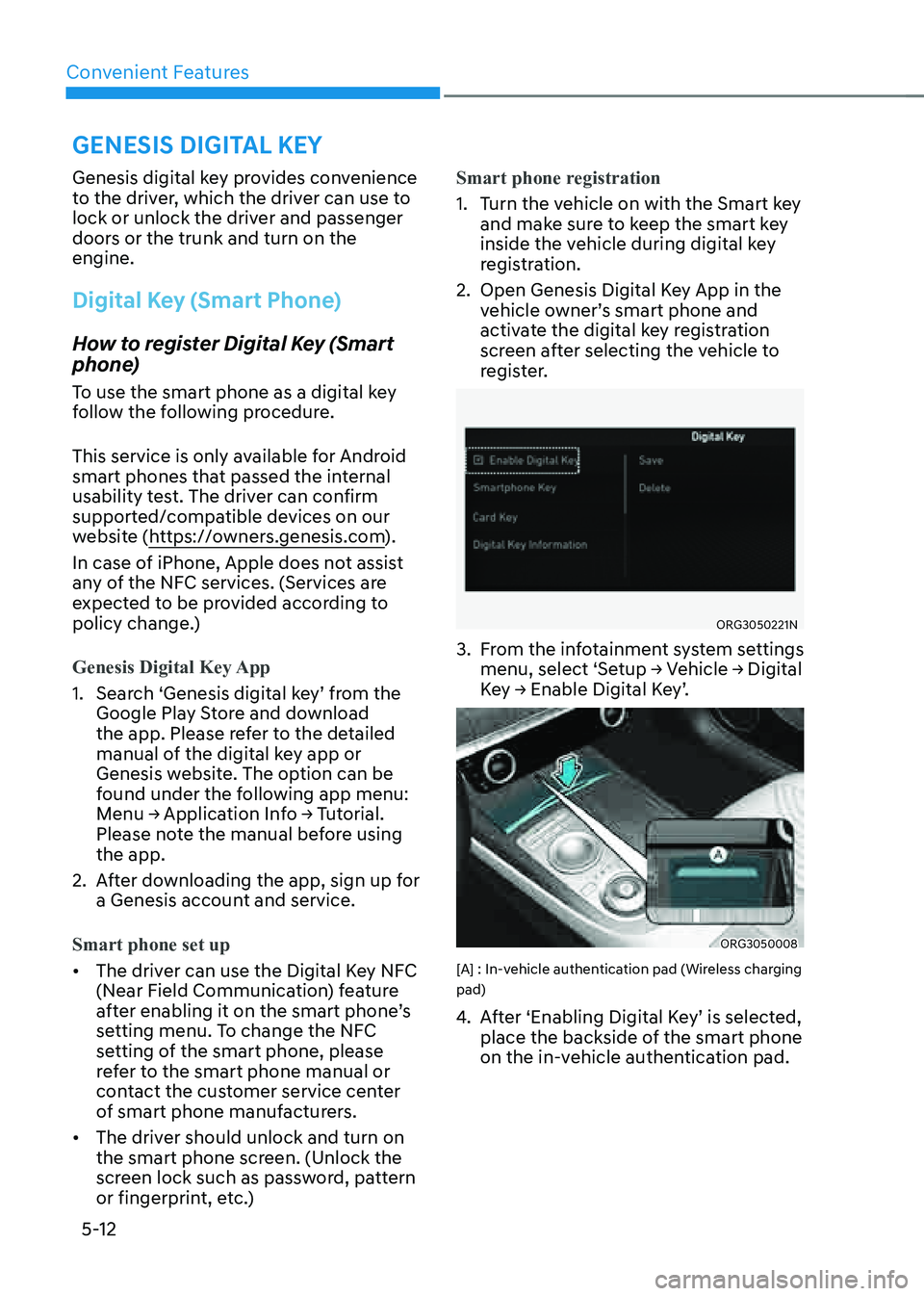
1. Turn the vehicle on with the Smart key
and make sure to keep the smart key
inside the vehicle during digital key
registration.
2. Open Genesis Digital Key App in the
vehicle owner’s smart phone and
activate the digital key registration
screen after selecting the vehicle to
register.
ORG3050221N
3. From the infotainment system settings
menu, select ‘Setup → Vehicle → Digital
Key → Enable Digital Key’.
ORG3050008
[A] : In-vehicle authentication pad (Wireless charging
pad)
4. After ‘Enabling Digital Key’ is selected,
place the backside of the smart phone
on the in-vehicle authentication pad.
Page 152 of 604
Convenient Features
5-14
How to Use the Digital Key (Smart
phone)
Smart phone touch control
The driver can lock and unlock the door
by touching the smart phone on the door
handle without activating the Digital
Key App. Also, the engine can be started
by placing the smart phone on the
in-vehicle authentication pad (wireless
charging pad).
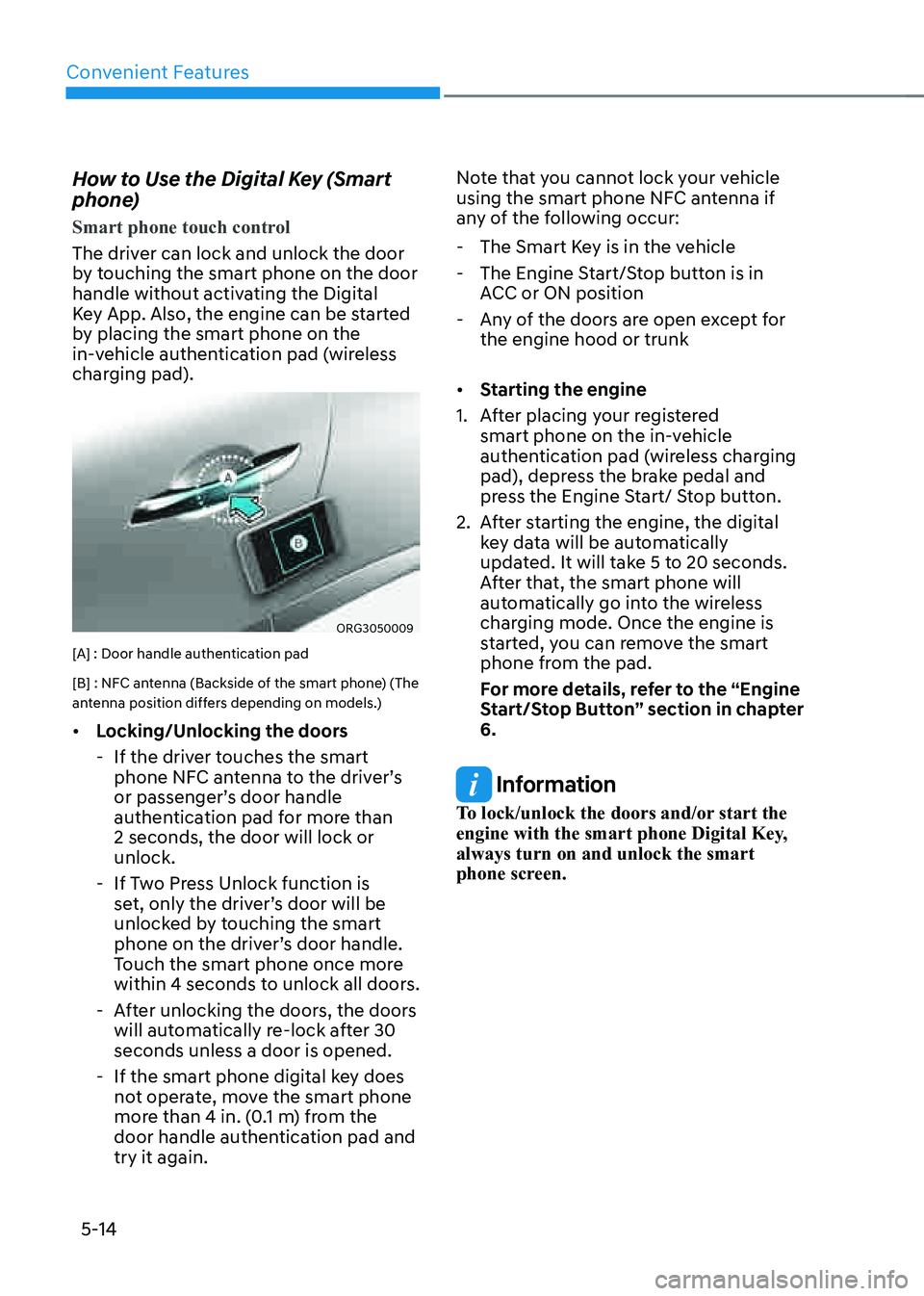
ORG3050009
[A] : Door handle authentication pad
[B] : NFC antenna (Backside of the smart phone) (The
antenna position differs depending on models.)
• Locking/Unlocking the doors
-If the driver touches the smart
phone NFC antenna to the driver’s
or passenger’s door handle
authentication pad for more than
2 seconds, the door will lock or
unlock.
-If Two Press Unlock function is
set, only the driver’s door will be
unlocked by touching the smart
phone on the driver’s door handle.
Touch the smart phone once more
within 4 seconds to unlock all doors.
-After unlocking the doors, the doors
will automatically re-lock after 30
seconds unless a door is opened.
-If the smart phone digital key does
not operate, move the smart phone
more than 4 in. (0.1 m) from the
door handle authentication pad and
try it again. Note that you cannot lock your vehicle
using the smart phone NFC antenna if
any of the following occur:
-
The Smart Key is in the vehicle
-The Engine Start/Stop button is in
ACC or ON position
-Any of the doors are open except for
the engine hood or trunk
• Starting the engine
1. After placing your registered
smart phone on the in-vehicle
authentication pad (wireless charging
pad), depress the brake pedal and
press the Engine Start/ Stop button.
2. After starting the engine, the digital
key data will be automatically
updated. It will take 5 to 20 seconds.
After that, the smart phone will
automatically go into the wireless
charging mode. Once the engine is
started, you can remove the smart
phone from the pad.
For more details, refer to the “Engine
Start/Stop Button” section in chapter
6.
Information
To lock/unlock the doors and/or start the
engine with the smart phone Digital Key,
always turn on and unlock the smart
phone screen.
Page 153 of 604
05
5-15
Information
• After the battery has been reconnected
or the battery has been recharged,
it will take time for the digital key
(smart phone) to operate due to remote
security update. When locking or
unlocking the door with the smart
phone NFC antenna, touch and hold
the smart phone on the door handle
until the door(s) is locked or unlocked.
• If the mobile data connection of the
smart phone is weak, remote security
information update may fail. At this
time, use the card key to lock or unlock
the doors, or start the engine. When
you are in a place where the mobile
data connection of your smart phone
is available, place your smart phone
on the in-vehicle authentication pad
(wireless charger pad) and start your
vehicle, or touch the digital key on the
door handle to lock or unlock the door,
the remote security information will be
automatically updated. Even though
the engine is not started, wait until the
remote security information is updated
and the in-vehicle authentication pad
(wireless charging pad) changes to
charging mode.
WARNING
The engine can be started when the
registered smart phone is placed on the
in-vehicle authentication pad (wireless
charging pad). Therefore, do not leave
unsupervised children or people who
are not aware of the system since it
can result in serious injury or death. In
addition, always have the registered
smart phone with you to prevent
vehicle theft when leaving the vehicle.Digital key App remote control
Various control functions such as Door
Lock/Unlock, Remote Start, Panic and
Trunk Open/Close are available using
the Digital Key App. To use the Digital
Key App functions, the smart phone’s
Bluetooth must be activated, and must
be approximately within 32 ft. (10 m)
from the vehicle.
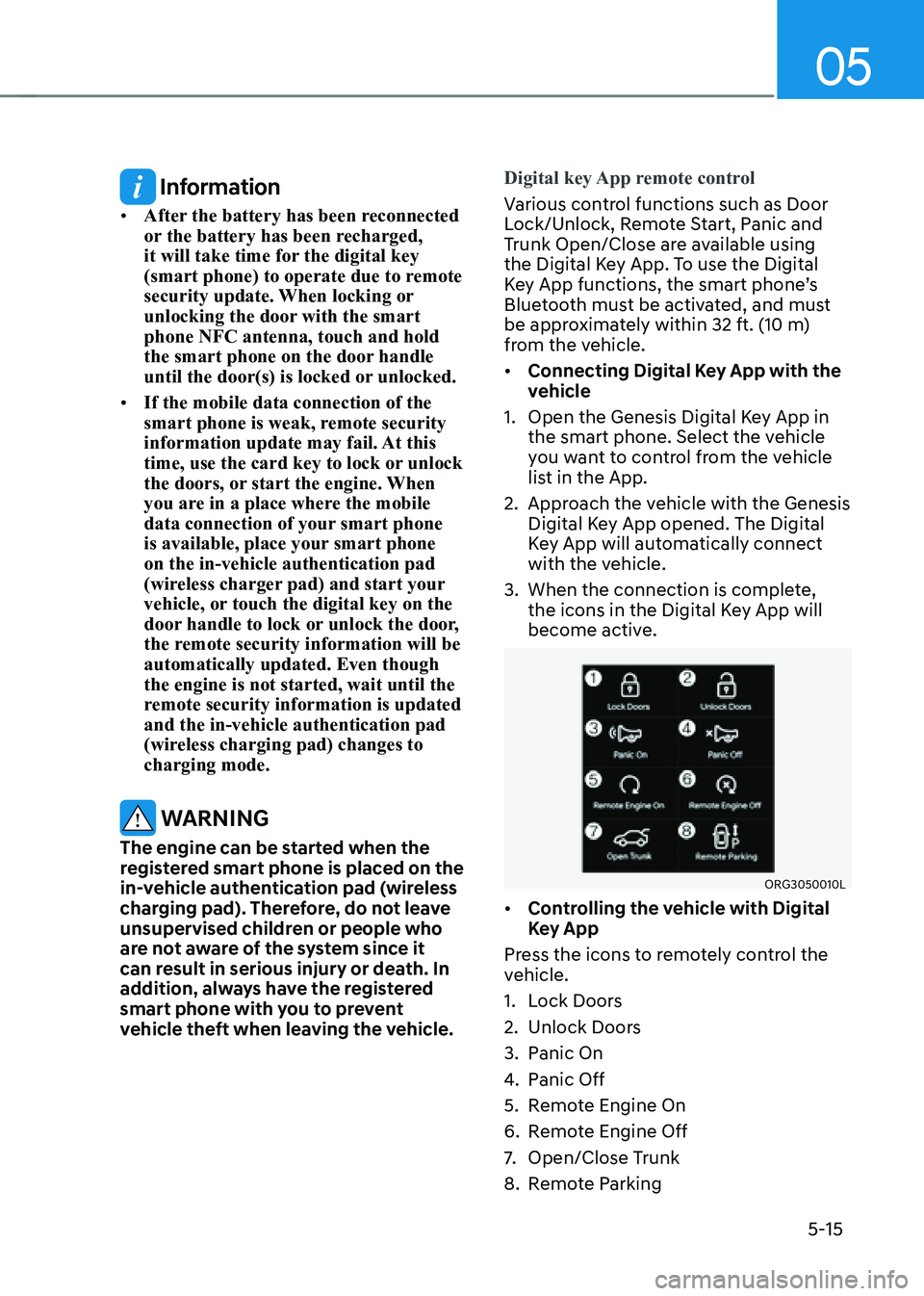
• Connecting Digital Key App with the
vehicle
1. Open the Genesis Digital Key App in
the smart phone. Select the vehicle
you want to control from the vehicle
list in the App.
2. Approach the vehicle with the Genesis
Digital Key App opened. The Digital
Key App will automatically connect
with the vehicle.
3. When the connection is complete,
the icons in the Digital Key App will
become active.
ORG3050010L
• Controlling the vehicle with Digital
Key App
Press the icons to remotely control the
vehicle.
1. Lock Doors
2. Unlock Doors
3. Panic On
4. Panic Off
5. Remote Engine On
6. Remote Engine Off
7. Open/Close Trunk
8. Remote Parking
Page 154 of 604
Convenient Features
5-16
The icon will be highlighted or an alarm
and vibration will also be provided when
the selected icon function is being
performed.
After the Digital Key App and vehicle are
connected, if Digital Key App remote
control is not used over 5 minutes, the
connection between the app and vehicle
will disconnect automatically.
Note that you cannot lock your vehicle
using Genesis Digital Key APP if any of
the following occurs:
-The Engine Start/Stop button is in the
ACC or ON position
-Door(s) is open
• Remotely starting vehicle with the
Digital Key App
1. Press the Door Lock button in Genesis
Digital Key App.
2. Press the Remote Engine On icon
within 4 seconds.
3. The hazard warning lights will blink
and the engine will start.
-Unless the driver puts the
registered digital key (smart phone)
on the in-vehicle authentication
pad (wireless charging pad) when
the Remote Start function is on, the
engine will turn off.
-If the driver does not get in the
vehicle within 10 minutes after
the engine is remotely started, the
engine will turn off.
CAUTION
• If the vehicle windows are tinted
with a film containing metallic
substances, it may cause poor
Bluetooth connection and poor
performance of the Digital Key App.
• If multiple users use the digital key
at the same time, the functions of
the Digital Key App may not work
properly. Only the necessary user
should operate the Digital Key App
remote control.
• When using the Digital Key App
remote control, the driver (the
remote control user) should leave
the vehicle after checking that the
doors are locked. When the doors are
locked, the chime will sound and the
hazard warning lights will blink once.
• The remote functions of the Digital
Key App enables the vehicle to be
controlled when the user is within
operating range. If the digital key
is out of the operating range, the
remote control function may not
operate properly.
• If the smart phone is moved away
from the vehicle while the smart
phone and the vehicle is connected,
Digital Key App remote control may
not operate properly.
• When using Digital Key App
remote control via Bluetooth,
communication may be slow or the
operating range may be reduced in
the following circumstances:
-Smart phone mobile data is weak
-Bluetooth connection is weak due
to many Bluetooth devices
-There is an object such as metal or
concrete between the vehicle and
smart phone
-The smart phone is wrapped in
your hand or other electronic
devices that cause interference is
placed near the smart phone
• If Digital Key App remote control
does not operate properly, use the
smart phone’s NFC function to lock
and unlock the doors.
Page 157 of 604
05
5-19
Information
• When there is a digital key (card key)
already saved in the vehicle, the ‘Save’
menu is disabled. If you want to save
a digital key again, refer to “How to
delete Digital Key (Card key)” and
follow the deleting procedure first
before saving a digital key.
• When registering a digital key (card
key), authentication is required once
through a smart phone. Complete the
registration within 5 minutes after
authentication.
• To register the digital key (card key),
the smart key must be in the vehicle.
• The registered digital key (card key)
cannot be used for another vehicle.
• The previously saved digital key (card
key) can be not used if a new digital key
(card key) is registered.
How to use the Digital key (Card key)
Card key touch control
The driver can lock and unlock the door
by touching the card key on the door
handle. Also, the engine can be started
by placing the card key on the in-vehicle
authentication pad (wireless charging
pad).
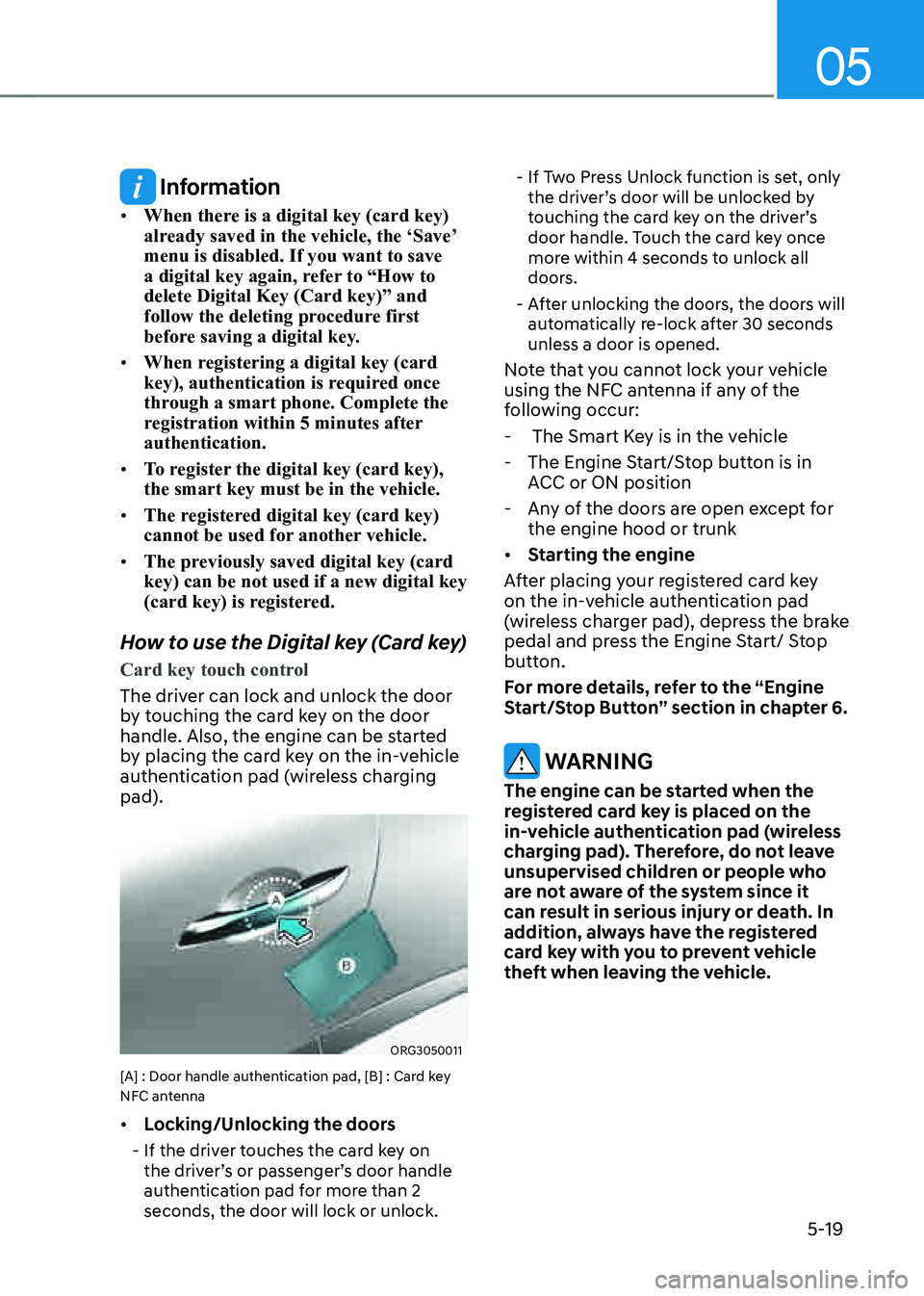
ORG3050011
[A] : Door handle authentication pad, [B] : Card key
NFC antenna
• Locking/Unlocking the doors
-If the driver touches the card key on
the driver’s or passenger’s door handle
authentication pad for more than 2
seconds, the door will lock or unlock.
-If Two Press Unlock function is set, only
the driver’s door will be unlocked by
touching the card key on the driver’s
door handle. Touch the card key once
more within 4 seconds to unlock all
doors.
-After unlocking the doors, the doors will
automatically re-lock after 30 seconds
unless a door is opened.
Note that you cannot lock your vehicle
using the NFC antenna if any of the
following occur:
- The Smart Key is in the vehicle
-The Engine Start/Stop button is in
ACC or ON position
-Any of the doors are open except for
the engine hood or trunk
• Starting the engine
After placing your registered card key
on the in-vehicle authentication pad
(wireless charger pad), depress the brake
pedal and press the Engine Start/ Stop
button.
For more details, refer to the “Engine
Start/Stop Button” section in chapter 6.
WARNING
The engine can be started when the
registered card key is placed on the
in-vehicle authentication pad (wireless
charging pad). Therefore, do not leave
unsupervised children or people who
are not aware of the system since it
can result in serious injury or death. In
addition, always have the registered
card key with you to prevent vehicle
theft when leaving the vehicle.
Page 158 of 604
Convenient Features
5-20
CAUTION
• The digital key (card key) may not
work under the following conditions:
-The card key is not touching
the center of the door handle
authentication pad or in-vehicle
authentication pad (wireless
charging pad) correctly.
-The card key is used overlapped
with NFC-enabled cards such as
credit card or smart phone.
-If the card key does not work,
move the card key approximately
4 in. (10 cm) away from the
authentication pad and then touch
it again.
• The card key can be damaged by
impacts. If the key is damaged,
replace the card key with a new one
and register it again.
• Long-time exposure to high
temperature may cause the card
key to malfunction. Be careful not to
expose the key to direct sunlight or
high temperature.
• The card key is a consumable and
it is not covered by your warranty.
Therefore, the result of misuse by
customers such as breakage or loss is
not subject to guarantee.
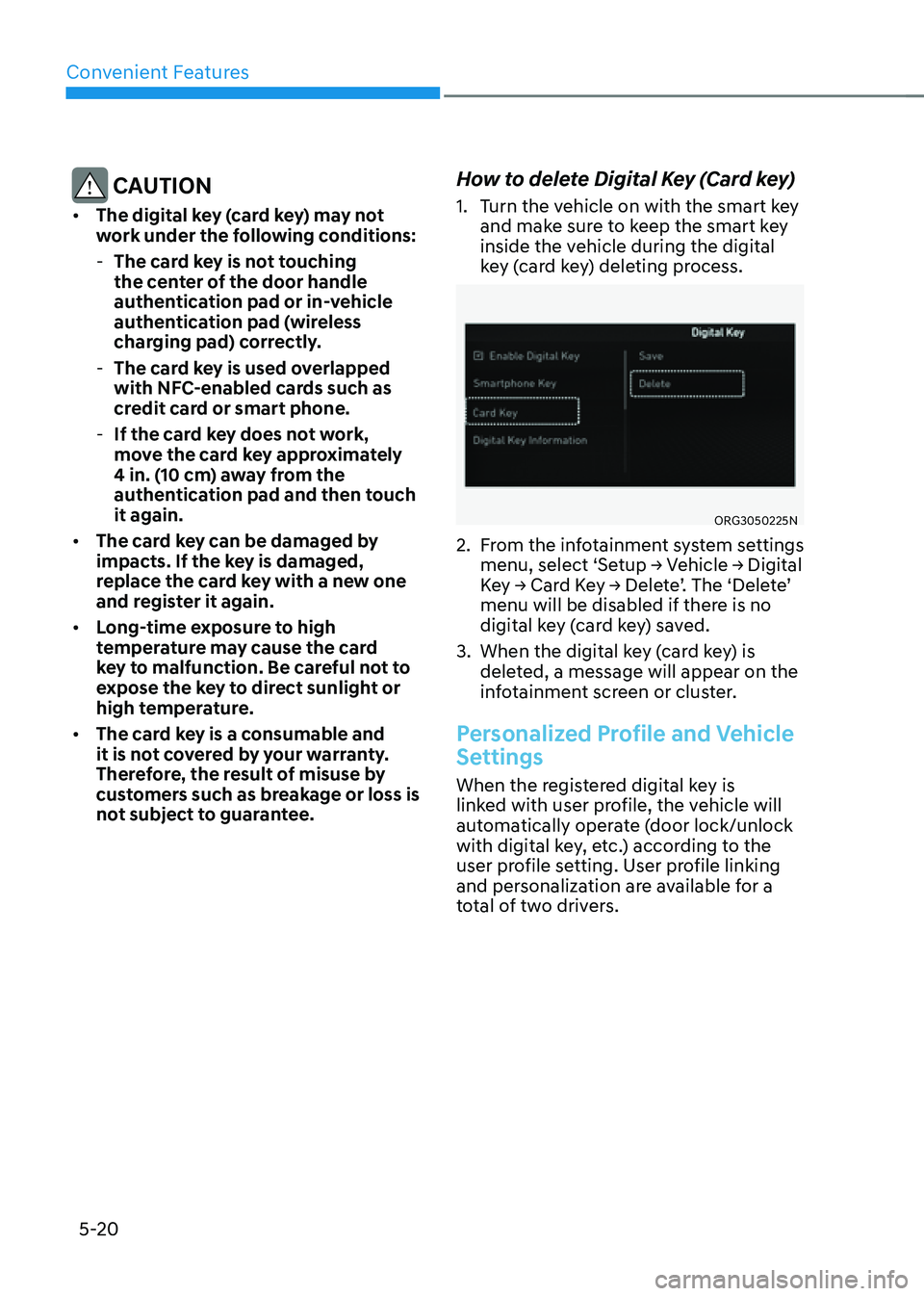
How to delete Digital Key (Card key)
1. Turn the vehicle on with the smart key
and make sure to keep the smart key
inside the vehicle during the digital
key (card key) deleting process.
ORG3050225N
2. From the infotainment system settings
menu, select ‘Setup → Vehicle → Digital
Key → Card Key → Delete’. The ‘Delete’
menu will be disabled if there is no
digital key (card key) saved.
3. When the digital key (card key) is
deleted, a message will appear on the
infotainment screen or cluster.
Personalized Profile and Vehicle
Settings
When the registered digital key is
linked with user profile, the vehicle will
automatically operate (door lock/unlock
with digital key, etc.) according to the
user profile setting. User profile linking
and personalization are available for a
total of two drivers.
Page 160 of 604
Convenient Features
5-22
Vehicle personalization operation
The personalization function linked with
digital key works under the following
conditions:
• Touch the driver’s door handle with
the profile linked smart phone to lock
or unlock the doors (Personalization
does not operate when locking or
unlocking the front passenger door.).
• When the remote door unlock with
the profile linked smart phone digital
key app works, the user profile linked
with digital key can be changed
manually from the infotainment
system settings.
Information
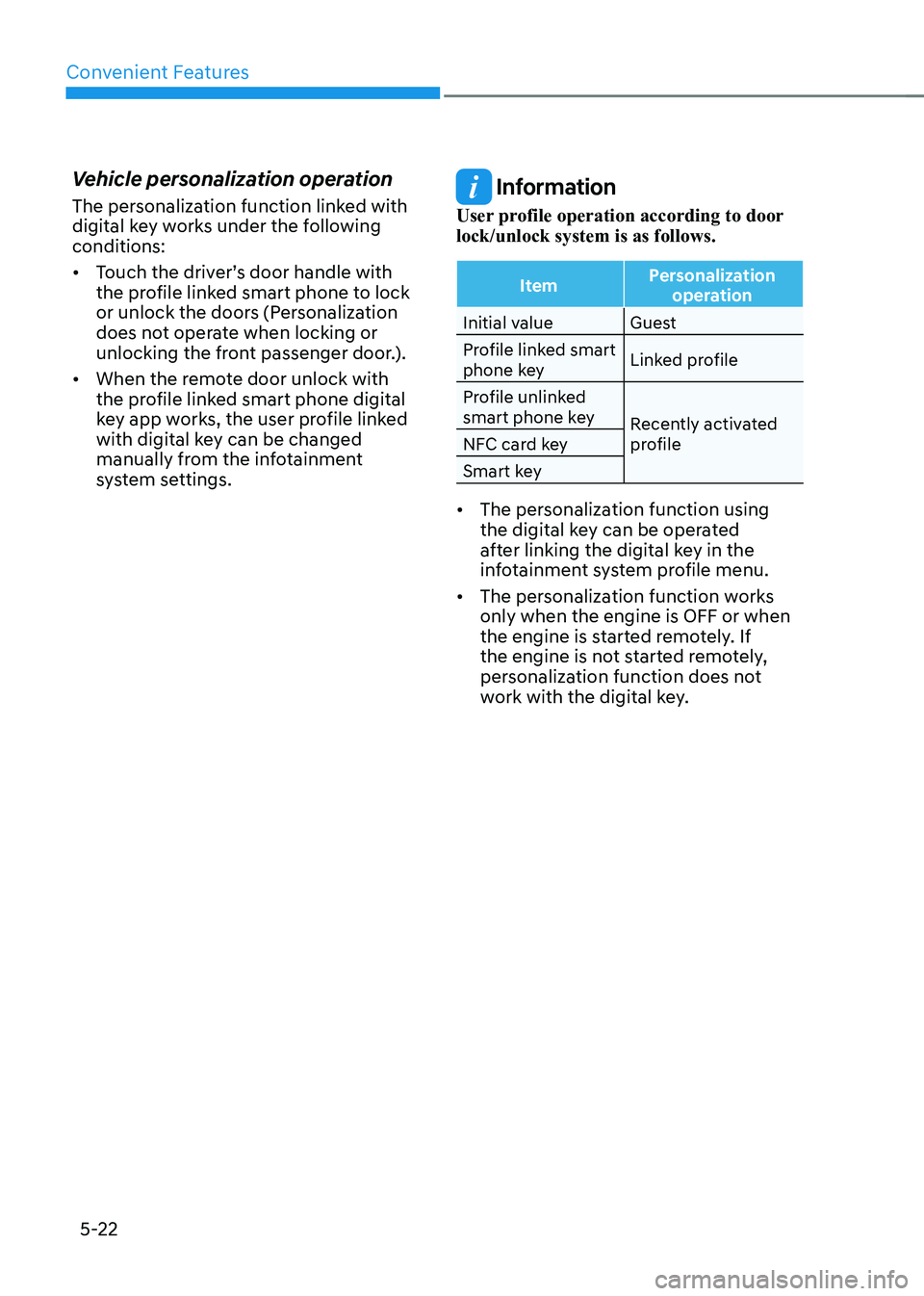
User profile operation according to door
lock/unlock system is as follows.
ItemPersonalization
operation
Initial value Guest
Profile linked smart
phone key Linked profile
Profile unlinked
smart phone key Recently activated
profile
NFC card key
Smart key
• The personalization function using
the digital key can be operated
after linking the digital key in the
infotainment system profile menu.
• The personalization function works
only when the engine is OFF or when
the engine is started remotely. If
the engine is not started remotely,
personalization function does not
work with the digital key.