door lock GENESIS G80 2021 Workshop Manual
[x] Cancel search | Manufacturer: GENESIS, Model Year: 2021, Model line: G80, Model: GENESIS G80 2021Pages: 604, PDF Size: 11.47 MB
Page 269 of 604
Driving Your Vehicle
6-4
Before Entering the Vehicle
• Be sure all windows, outside mirror(s),
and outside lights are clean and
unobstructed.
• Remove frost, snow, or ice.
• Visually check the tires for uneven
wear and damage.
• Check under the vehicle for any sign
of leaks.
• Be sure there are no obstacles behind
you if you intend to back up.
Before Starting
• Make sure the hood, the trunk, and
the doors are securely closed and
locked.
• Adjust the position of the seat and
steering wheel.
• Adjust the inside and outside rearview
mirrors.
• Verify all the lights work.
• Fasten your seat belt. Check that all
passengers have fastened their seat
belts.
• Check the gauges and indicators
in the instrument panel and the
messages on the instrument display
when the ignition switch is in the ON
position.
• Check that any items you are carrying
are stored properly or fastened down
securely.
WARNING
To reduce the risk of SERIOUS INJURY or
DEATH, take the following precautions:
• ALWAYS wear your seat belt. All
passengers must be properly belted
whenever the vehicle is moving.
For more information, refer to “Seat
Belts” section in chapter 3.
• Always drive defensively. Assume
other drivers or pedestrians may be
careless and make mistakes.
• Stay focused on the task of driving.
Driver distraction can cause
accidents.
• Leave plenty of space between you
and the vehicle in front of you.
WARNING
NEVER drink or take drugs and drive.
Drinking or taking drugs and driving
is dangerous and may result in an
accident and SERIOUS INJURY or
DEATH.
Drunk driving is the number one
contributor to the highway death
toll each year. Even a small amount
of alcohol will affect your reflexes,
perceptions and judgment. Just
one drink can reduce your ability to
respond to changing conditions and
emergencies and your reaction time
gets worse with each additional drink.
Driving while under the influence
of drugs is as dangerous or more
dangerous than driving under the
influence of alcohol.
You are much more likely to have a
serious accident if you drink or take
drugs and drive. If you are drinking or
taking drugs, don’t drive. Do not ride
with a driver who has been drinking
or taking drugs. Choose a designated
driver or call a taxi.
BEFORE DRIVING
Page 274 of 604
06
6-9
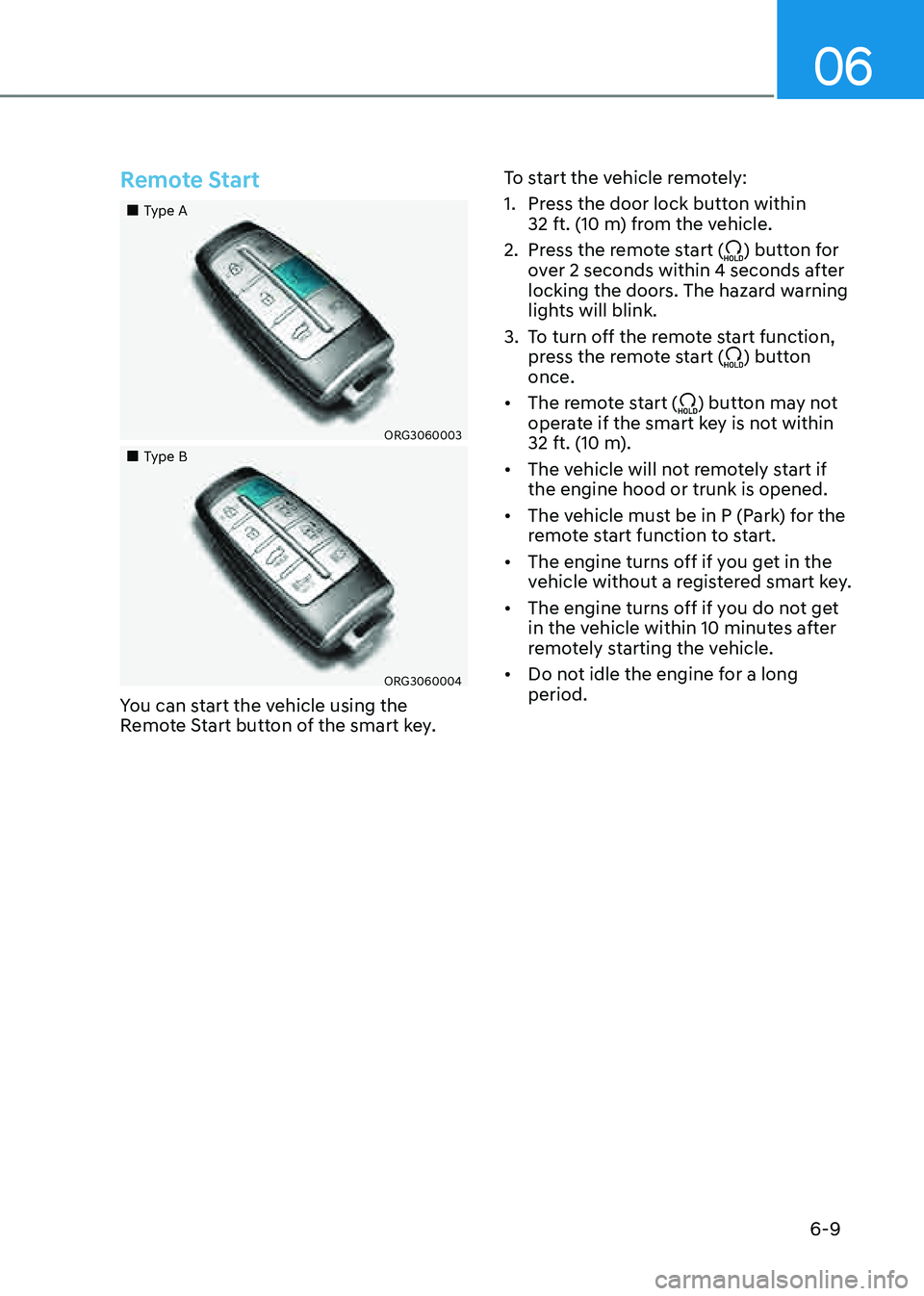
Remote Start
„„Type A
ORG3060003
„„Type B
ORG3060004
You can start the vehicle using the
Remote Start button of the smart key.To start the vehicle remotely:
1. Press the door lock button within
32 ft. (10 m) from the vehicle.
2. Press the remote start () button for
over 2 seconds within 4 seconds after
locking the doors. The hazard warning
lights will blink.
3. To turn off the remote start function,
press the remote start () button
once.
• The remote start () button may not
operate if the smart key is not within
32 ft. (10 m).
• The vehicle will not remotely start if
the engine hood or trunk is opened.
• The vehicle must be in P (Park) for the
remote start function to start.
• The engine turns off if you get in the
vehicle without a registered smart key.
• The engine turns off if you do not get
in the vehicle within 10 minutes after
remotely starting the vehicle.
• Do not idle the engine for a long
period.
Page 277 of 604

Driving Your Vehicle
6-12
R (Reverse)
Use this position to drive the vehicle
rearward.
ORG3060006
To shift the gear to R (Rear), rotate
the shift dial counterclockwise while
depressing the brake pedal.
When the vehicle is stopped in the
R (Reverse) position, if you open
the driver's door with the seat belt
unfastened, the gear will automatically
shift to P (Park).
However, if the vehicle is in motion, the
gear may not automatically shift to P
(Park) to prevent automatic transmission
damage.
NOTICE
Always come to a complete stop before
shifting into or out of R (Reverse); you
may damage the transmission if you
shift into R (Reverse) while the vehicle is
in motion.N (Neutral)
The wheels and transmission are not
engaged.
ORG3060007
To shift the gear to N (Neutral), rotate the
shift dial clockwise from R (Reverse) or
counterclockwise from D (Drive) while
depressing the brake pedal.
Always depress the brake pedal when
you are shifting from N (Neutral) to
another gear.
If you turn the engine off in N (Neutral),
the gear will automatically shift to P
(Park).
However, if you need to stay in N
(Neutral) with the engine off, refer to “To
stay in N (Neutral) when vehicle is OFF”
in the following page.
CAUTION
The engine can be started with the gear
in N (Neutral), but for you safety, be
sure to start the engine with the gear in
P (Park).
Page 278 of 604

06
6-13
To stay in N (Neutral) when vehicle is
OFF
OJX1069009L
ORG3060009
If you want to stay in N (Neutral) after the
engine is OFF (in the ACC state), do the
following.
1. Turn off Auto Hold and release
Electronic Parking Brake when the
engine is running.
2. Rotate the shift dial to N (neutral)
while depressing the brake pedal.
3. When you take your foot off the brake
pedal, the message ‘Press and hold
OK button to stay in Neutral when
vehicle is Off’ will appear on the
cluster LCD display.
4. Press and hold the OK button on
the steering wheel for more than 1
second.
5. When the message ‘Vehicle will stay in
(N). Change gear to cancel’ (or ‘N will
stay engaged when the vehicle is Off’)
will appear on the cluster LCD display,
press the Engine Start/Stop button
while depressing the brake pedal.
However, if you open the driver's
door, the gear will automatically
shift to P (Park) and the Engine Start/
Stop button will change to the OFF
position.
NOTICE
With the gear in N (Neutral) the Engine
Start/Stop button will be in the ACC
position. Note that the doors cannot
be locked in the ACC position or the
battery may discharge if left in the ACC
position for a long period.
Page 279 of 604
Driving Your Vehicle
6-14
D (Drive)
This is the normal driving position.
The transmission will automatically shift
through an 8-gear sequence, providing
the best fuel economy and power.
For extra power when passing another
vehicle or driving uphill, depress the
accelerator pedal further until you feel
the transmission downshift to a lower
gear.
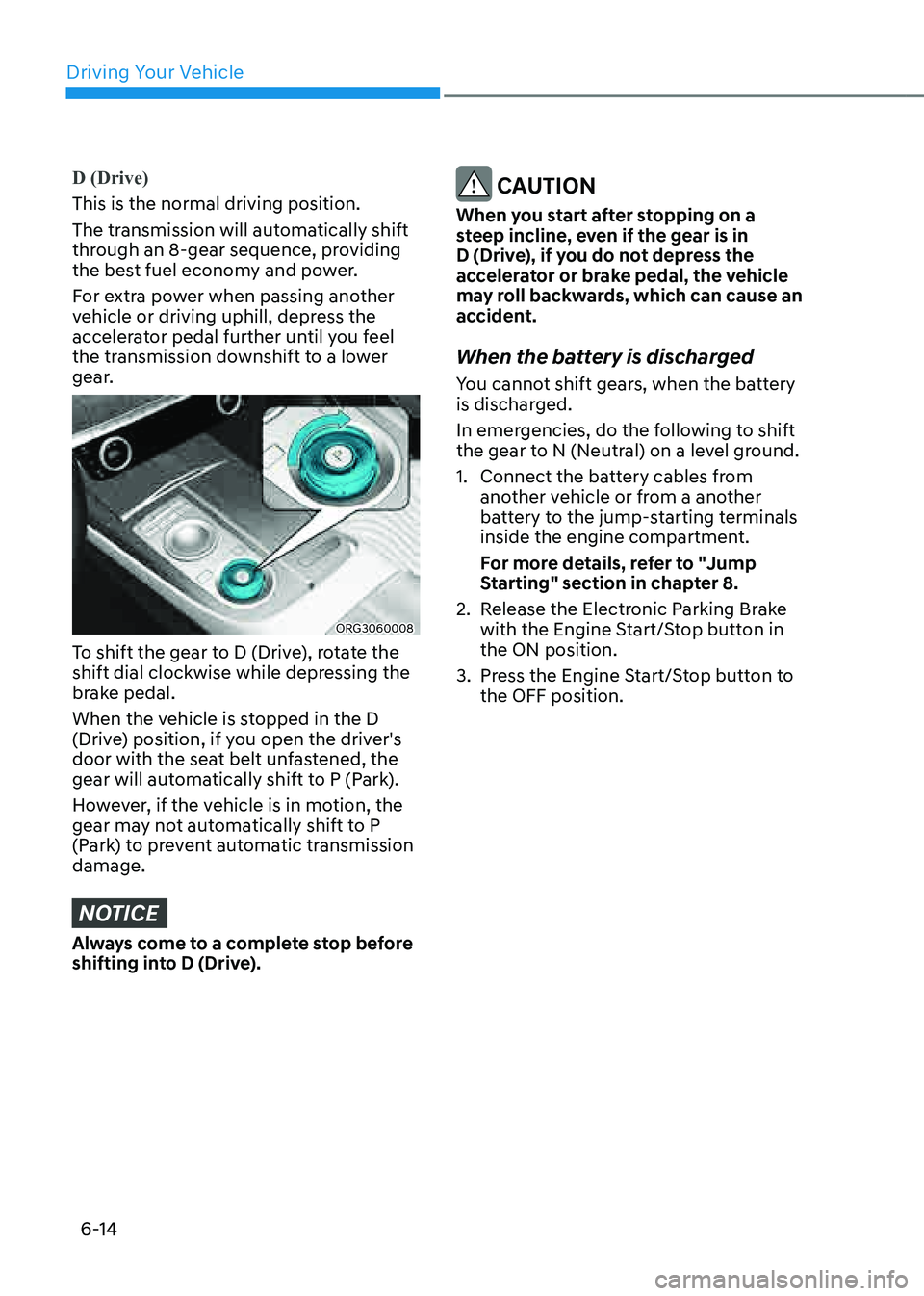
ORG3060008
To shift the gear to D (Drive), rotate the
shift dial clockwise while depressing the
brake pedal.
When the vehicle is stopped in the D
(Drive) position, if you open the driver's
door with the seat belt unfastened, the
gear will automatically shift to P (Park).
However, if the vehicle is in motion, the
gear may not automatically shift to P
(Park) to prevent automatic transmission
damage.
NOTICE
Always come to a complete stop before
shifting into D (Drive).
CAUTION
When you start after stopping on a
steep incline, even if the gear is in
D (Drive), if you do not depress the
accelerator or brake pedal, the vehicle
may roll backwards, which can cause an
accident.
When the battery is discharged
You cannot shift gears, when the battery
is discharged.
In emergencies, do the following to shift
the gear to N (Neutral) on a level ground.
1. Connect the battery cables from
another vehicle or from a another
battery to the jump-starting terminals
inside the engine compartment.
For more details, refer to "Jump
Starting" section in chapter 8.
2. Release the Electronic Parking Brake
with the Engine Start/Stop button in
the ON position.
3. Press the Engine Start/Stop button to
the OFF position.
Page 376 of 604

Driver Assistance system
7-48
WARNING
Take the following precautions when
using Safe Exit Warning:
• For your safety, change the Settings
after parking the vehicle at a safe
location.
• If any other system’s warning
message is displayed or audible
warning is generated, Safe Exit
Warning warning message may not
be displayed and audible warning
may not be generated.
• You may not hear the warning
sound of Safe Exit Warning if the
surrounding is noisy.
• Safe Exit Warning does not operate
in all situations or cannot prevent all
collisions.
• Safe Exit Warning may warn the
driver late or may not warn the driver
depending on the road and driving
conditions. Always check vehicle
surroundings.
• The driver and passengers are
responsible for accidents that occurs
while exiting the vehicle. Always
check the surroundings before you
exit the vehicle.
• Never deliberately operate Safe
Exit Warning. Doing so may lead to
serious injury or death.
• Safe Exit Warning does not operate
if there is a problem with Blind-Spot
Safety system. The warning message
of Blind-Spot Safety system will
appear when:
-Blind-Spot Safety system sensor or
the sensor surrounding is polluted
or covered
-Blind-Spot Safety system fails to
warn passengers or falsely warn
passengers
Information
After the engine is turned off, Safe Exit
Warning operates approximately for 3
minutes, but turns off immediately if the
doors are locked.
Page 377 of 604

07
7-49
SAFE EXIT ASSIST (SEA) (IF EQUIPPED)
ORG3070032
After the vehicle stops, when an
approaching vehicle from the rear area is
detected as soon as a passenger opens a
door, Safe Exit Assist will warn the driver
with a warning message and an audible
warning to help prevent a collision.
ORG3050019
In addition, when the electronic child
safety lock button is in the LOCK position
and an approaching vehicle from the
rear area is detected, the electronic child
safety lock button will not unlock even if
the driver presses the button to prevent
the rear doors from opening.
CAUTION
Warning timing may vary depending on
the speed of the approaching vehicle.
Detecting sensor
ORG3070165L[1] : Rear corner radar
The rear corner radars are sensors
located inside the rear bumper to detect
the side and rear areas. Always keep the
rear bumper clean for proper operation
of Safe Exit Assist.
NOTICE
For more details on the precautions of
the rear corner radars, refer to “Blind-
Spot Collision Assist (BCA)” section in
chapter 7.
Page 380 of 604

Driver Assistance system
7-52
OJX1070247L
System linked with Electronic child safety
lock
• When Electric child safety lock is
operating and an approaching vehicle
from the rear area is detected, the
rear doors cannot be unlocked even
if the driver tries to unlock the rear
doors using the electronic child safety
lock button. The ‘Check surroundings
then try again’ warning message will
appear on the cluster.
• Safe Exit Assist will warn the driver
when vehicle speed is below
2 mph (3 km/h) and the speed of the
approaching vehicle from the rear is
above 3 mph (5 km/h).
• For more details on electric child
safety lock button, refer to “Electronic
Child Safety Lock” section in chapter
5.
CAUTION
If the driver presses the electronic child
lock button again within 10 seconds
after the warning message appears,
Safe Exit Assist judges that the driver
has unlocked the doors acknowledging
the rear status. The electronic child
safety lock will turn off (button
indicator OFF) and the rear doors will
unlock. Always check the surroundings
before turning off the electronic child
safety lock button.
Page 381 of 604
07
7-53
WARNING
Take the following precautions when
using Safe Exit Assist:
• If any other system’s warning
message is displayed or audible
warning is generated, Safe Exit
Assist warning message may not be
displayed and audible warning may
not be generated.
• You may not hear the warning sound
of Safe Exit Assist if the surrounding
is noisy.
• Safe Exit Assist does not operate in
all situations or cannot prevent all
collisions.
• Safe Exit Assist may warn the driver
late or may not warn the driver
depending on the road and driving
conditions. Always check vehicle
surroundings.
• The driver and passengers are
responsible for accidents that occurs
while exiting the vehicle. Always
check the surroundings before you
exit the vehicle.
• Never deliberately operate Safe Exit
Assist. Doing so may lead to serious
injury or death.
• Safe Exit Assist does not operate if
there is a problem with Blind-Spot
Safety system. The warning message
of Blind-Spot Safety system will
appear when:
-Blind-Spot Safety system sensor or
the sensor surrounding is polluted
or covered
-Blind-Spot Safety system fails to
warn passengers or falsely warn
passengers
Information
After the engine is turned off, Safe Exit
Assist operates approximately for 3
minutes, but turns off immediately if the
doors are locked.
Page 472 of 604
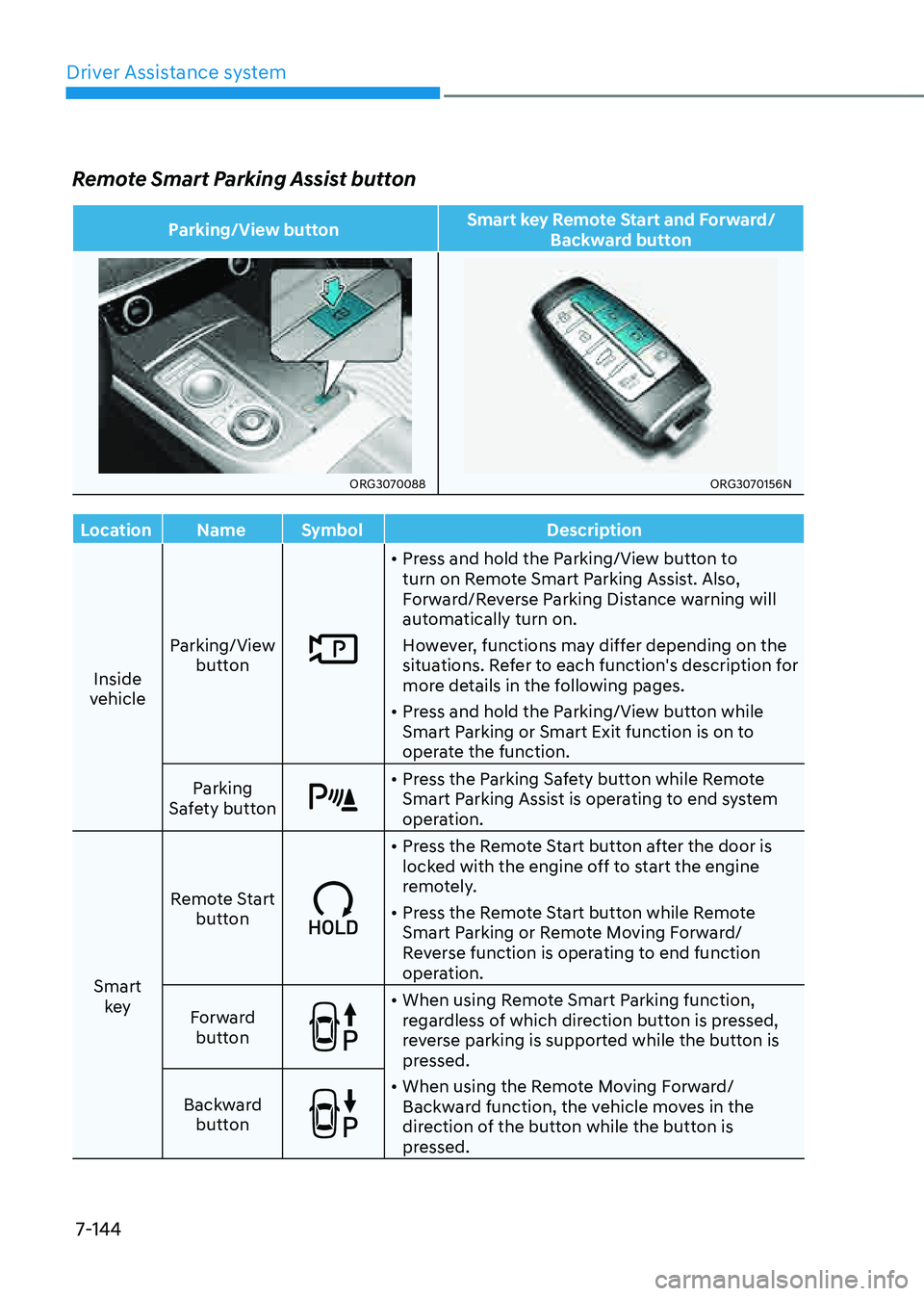
Driver Assistance system
7-144
Remote Smart Parking Assist button
Parking/View buttonSmart key Remote Start and Forward/
Backward button
ORG3070088ORG3070156N
Location NameSymbol Description
Inside
vehicle Parking/View
button
• Press and hold the Parking/View button to
turn on Remote Smart Parking Assist. Also,
Forward/Reverse Parking Distance warning will
automatically turn on.
However, functions may differ depending on the
situations. Refer to each function's description for
more details in the following pages.
• Press and hold the Parking/View button while
Smart Parking or Smart Exit function is on to
operate the function.
Parking
Safety button
• Press the Parking Safety button while Remote
Smart Parking Assist is operating to end system
operation.
Smart key Remote Start
button
• Press the Remote Start button after the door is
locked with the engine off to start the engine
remotely.
• Press the Remote Start button while Remote
Smart Parking or Remote Moving Forward/
Reverse function is operating to end function
operation.
Forward button
• When using Remote Smart Parking function,
regardless of which direction button is pressed,
reverse parking is supported while the button is
pressed.
• When using the Remote Moving Forward/
Backward function, the vehicle moves in the
direction of the button while the button is
pressed.
Backward
button