manual transmission GENESIS G80 2021 Owner's Manual
[x] Cancel search | Manufacturer: GENESIS, Model Year: 2021, Model line: G80, Model: GENESIS G80 2021Pages: 604, PDF Size: 11.47 MB
Page 6 of 604
Introduction
1-2
INTRODUCTION
Congratulations, and thank you for choosing this Genesis Branded Vehicle. We are
pleased to welcome you to the growing number of discerning people who drive the
Genesis Branded Vehicle. We are very proud of the advanced engineering and high-
quality construction of each Genesis Branded Vehicle we build.
Your Owner’s Manual will introduce you to the features and operation of your new
Genesis Branded Vehicle. To become familiar with your new Genesis Branded Vehicle,
so that you can fully enjoy it, read this Owner’s Manual carefully before driving your
new vehicle.
This manual contains important safety information and instructions intended to
familiarize you with your vehicle’s controls and safety features so you can safely
operate your vehicle.
This manual also contains information on maintenance designed to enhance safe
operation of the vehicle. It is recommended that all service and maintenance on your
car be performed by an authorized retailer of Genesis Branded products. Retailers of
Genesis Branded products are prepared to provide high-quality service, maintenance
and any other assistance that may be required.
This Owner’s Manual should be considered a permanent part of your vehicle, and
should be kept in the vehicle so you can refer to it at any time. The manual should stay
with the vehicle if you sell it to provide the next owner with important operating, safety
and maintenance information.
GENESIS CUSTOMER CARE
CAUTION
Severe engine and transmission damage may result from the use of poor quality
fuels and lubricants that do not meet Genesis Branded Vehicle specifications. You
must always use high quality fuels and lubricants that meet the specifications listed
on Page 2-12 in the Vehicle Specifications section of the Owner’s Manual.
Copyright 2020 Genesis Customer Care. All rights reserved. No part of this publication
may be reproduced, stored in any retrieval system or transmitted in any form or by any
means without the prior written permission of Genesis Customer Care.
Page 266 of 604

6
Before Driving ........................................................................\
...........................6-4Before Entering the Vehicle ........................................................................\
................6-4
Before Starting ........................................................................\
....................................6-4
Engine Start/Stop Button ........................................................................\
.........6-5Engine Stop/Start Button Positions ........................................................................\
...6-6
Starting the Engine ........................................................................\
..............................6 -7
Smart Key Slot - Emergency Starting ........................................................................\
6-8
Turning Off the Engine ........................................................................\
........................6-8
Remote Start ........................................................................\
........................................6-9
Automatic Transmission ........................................................................\
..........6-10Automatic Transmission Operation ........................................................................\
...6-10
LCD Display Messages (Cluster) ........................................................................\
........6-16
Paddle Shifter (Manual Shift Mode) ........................................................................\
..6-19
Good Driving Practices ........................................................................\
......................6-19
Braking System ........................................................................\
........................6-21Power-Assist brakes ........................................................................\
...........................6-21
Disc Brakes Wear Indicator ........................................................................\
................ 6-21
Electronic Parking Brake (EPB)
........................................................................\
..........6-22
Auto Hold ........................................................................\
............................................6-26
Anti-Lock Brake System (ABS) ........................................................................\
..........6-30
Electronic Stability Control (ESC) ........................................................................\
.....6-31
Vehicle Stability Management (VSM) .......................................................................6-34
Hill-Start Assist Control (HAC) ........................................................................\
...........6-35
Good Braking Practices ........................................................................\
....................6-36
All Wheel Drive (AWD) ........................................................................\
............6-37All Wheel Drive (AWD) Operation ........................................................................\
......6-37
Emergency Precautions ........................................................................\
.....................6-39
Electronic Control Suspension ........................................................................\
6-41System Malfunction ........................................................................\
...........................6-41
Electronically Controlled Suspension with Road Preview .......................................6-41
System Malfunction ........................................................................\
..........................6-42
Limitations of the System ........................................................................\
.................6-42
6. Driving Your Vehicle
Driving Your Vehicle
Page 284 of 604
06
6-19
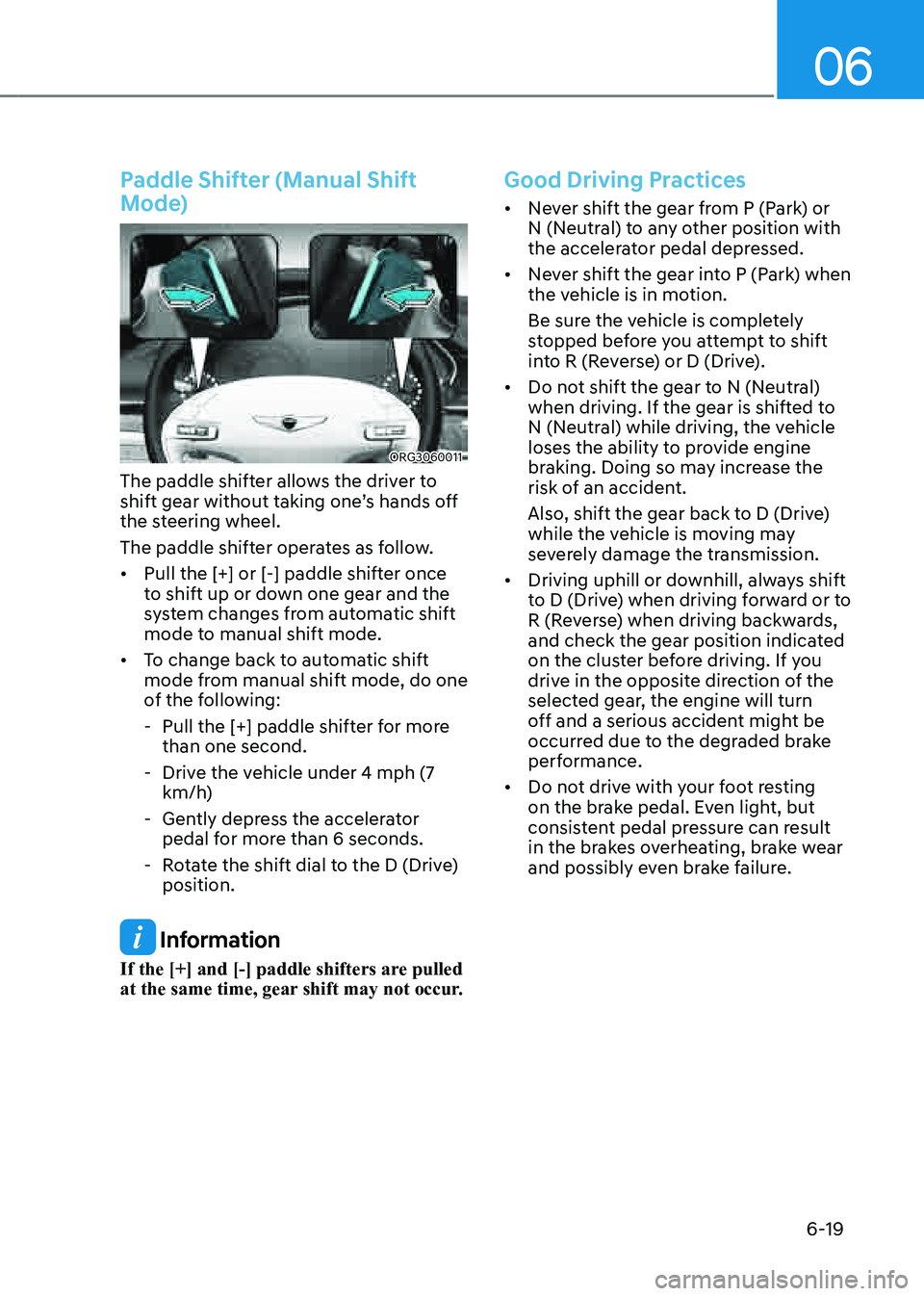
Paddle Shifter (Manual Shift
Mode)
ORG3060011
The paddle shifter allows the driver to
shift gear without taking one’s hands off
the steering wheel.
The paddle shifter operates as follow.
• Pull the [+] or [-] paddle shifter once
to shift up or down one gear and the
system changes from automatic shift
mode to manual shift mode.
• To change back to automatic shift
mode from manual shift mode, do one
of the following:
-Pull the [+] paddle shifter for more
than one second.
-Drive the vehicle under 4 mph (7
km/h)
-Gently depress the accelerator
pedal for more than 6 seconds.
-Rotate the shift dial to the D (Drive)
position.
Information
If the [+] and [-] paddle shifters are pulled
at the same time, gear shift may not occur.
Good Driving Practices
• Never shift the gear from P (Park) or
N (Neutral) to any other position with
the accelerator pedal depressed.
• Never shift the gear into P (Park) when
the vehicle is in motion.
Be sure the vehicle is completely
stopped before you attempt to shift
into R (Reverse) or D (Drive).
• Do not shift the gear to N (Neutral)
when driving. If the gear is shifted to
N (Neutral) while driving, the vehicle
loses the ability to provide engine
braking. Doing so may increase the
risk of an accident.
Also, shift the gear back to D (Drive)
while the vehicle is moving may
severely damage the transmission.
• Driving uphill or downhill, always shift
to D (Drive) when driving forward or to
R (Reverse) when driving backwards,
and check the gear position indicated
on the cluster before driving. If you
drive in the opposite direction of the
selected gear, the engine will turn
off and a serious accident might be
occurred due to the degraded brake
performance.
• Do not drive with your foot resting
on the brake pedal. Even light, but
consistent pedal pressure can result
in the brakes overheating, brake wear
and possibly even brake failure.
Page 312 of 604

06
6-47
When certain conditions are met, the
engine is automatically decoupled from
the transmission while gear remains in D
(Drive). When Coasting is operating, the
engine stays at idling speed to reduce
fuel consumption and increase coasting
distance.
Coasting Setting
OJX1069045L
• The Coasting function must be turned
ON from the Settings menu in the
infotainment system screen. Select:
-Setup → Vehicle Settings → Drive
Mode → Coasting
For detailed information, refer to the
separately supplied manual.
• When Coasting is turned ON and
the conditions are met, the function
operates with a ‘Coasting’ message
illuminated on the instrument cluster.
Coasting Operating Conditions
The Coasting function will operate when
the accelerator pedal is depressed and
released under the following conditions.
• ECO is selected for driving mode
• ECO or Smart is selected for
Powertrain in the CUSTOM menu from
the infotainment system screen. If
Smart is selected, driver acceleration
should be mild
• The gear is in D (Drive)
• The Smart Cruise Control button is
OFF
• The accelerator or brake pedal is not
depressed
• The vehicle’s speed is within 30~100
mph (50~160 km/h) range
• The road gradient is within -5~+5%
range
Information
• If the front radar for smart cruise
control system cannot operate
normally, the inter-vehicle distance
and relative speed condition are
automatically ignored.
• The Coasting function works after the
engine is turned on, the transmission is
warmed up, and the engine sensor self-
diagnosis is completed.
• Depending on the driving situation,
Coasting operation may be temporarily
delayed even if the above conditions are
met.
COASTING (IF EQUIPPED)
Page 477 of 604
07
7-149
• When operating Remote Smart
Parking function, make sure all
smart keys are outside of the
vehicle.
• Remote Smart Parking function will
operate only when the smart key is
within 13 ft. (4 m) from the vehicle.
If there is no vehicle movement
even when the Remote Forward or
Backward button is pressed on the
smart key, check the distance to the
vehicle and press the button again.
• The detecting range of the smart
key may vary depending on the
surroundings that are affected by
radio waves such as transmission
tower, broadcast station.
• The parking location indicator is
displayed on Surround View Monitor
screen and is displayed until the
vehicle enters the parking space
for the first time by Remote Smart
Parking function.
• When parking is completed, the
vehicle automatically shifts to P
(Park) and engages EPB (Electronic
Parking Brake).
• Depending on parking
environments, if the vehicle is
stopped by a stopper, parking may
be completed.
• If you need to change the vehicle's
position or location, manually
complete parking your vehicle.
CAUTION
• When using Remote Smart Parking
function, make sure that all
passengers have gotten out of the
vehicle.
• Before leaving the vehicle, close
windows and sunroofs, and make
sure the engine is off before locking
the doors.How to turn off Parking function while
operating
• Press the Parking/View () button
in the following stage:
- Searching for parking space
-Select parking type
• Shift the gear to R (Reverse) in the
following stage:
-Searching for parking space
-Select parking type
-Select operating mode
• Press the Parking Safety () button
or select ‘Cancel’ on the infotainment
system screen to turn off Parking
function.
• While Smart Parking function is
operating:
- If the vehicle is stopped by
depressing the brake pedal, and the
gear is shifted, Parking function will
turn off. At this time, EPB (Electronic
Parking Brake) will not be engaged.
• While Remote Smart Parking function
is operating:
-Press the Remote Start () button
on the smart key. Parking function
will turn off.
- Get on the vehicle with the smart
key. Parking function will turn off. At
this time, the engine will remain on.
Page 511 of 604

08
8-19
Jack Label
OHYK065011
The actual Jack label in the vehicle may differ from the illustration.
For more detailed specifications, refer to the label attached to the jack.
1. Model Name
2. Maximum allowable load
3. When using the jack, set your parking brake.
4. When using the jack, stop the engine.
5. Do not get under a vehicle that is supported by a jack.
6. The designated locations under the frame
7. When supporting the vehicle, the base plate of jack must be vertical under the
lifting point.
8. Shift into Reverse gear on vehicles with manual transmission or shift the gear to the
P position on vehicles with automatic transmission.
9. The jack should be used on firm level ground.
10. Jack manufacture
11. Production date
12. Representative company and address
Page 591 of 604

Index
I-2
A
Accessing Your Vehicle
........................................................................\
.................5-4
Immobilizer System
........................................................................\
................5-11
Smart Key ........................................................................\
.................................. 5-4
Active Hood Lift System
........................................................................\
............3-69
System Activation
........................................................................\
...................3-69
System Limitation
........................................................................\
...................3-70
System Malfunction
........................................................................\
................3-71
Active Sound Design
........................................................................\
...................6-51
Air Bag - Supplemental Restraint System
...........................................................3-46
Additional Safety Precautions
........................................................................\
.3-68
Air Bag Warning Labels
........................................................................\
..........3-68
How does the Air Bags System Operate?
.......................................................3-52
Occupant Classification System (OCS)
..........................................................3-57
SRS Care
........................................................................\
.................................3-67
What to Expect After an Air Bag Inflates
.......................................................3-56
Where are the Air Bags?
........................................................................\
.........3-48
Why Didn’t My Air Bag Go Off in a Collision?
.............................................3-62
Air Cleaner ........................................................................\
................................... 9-23
Filter Replacement
........................................................................\
..................9-23
Air Conditioner Compressor Label
.....................................................................2-15
Air Conditioning System
........................................................................\
.............2-11
All Wheel Drive (AWD)
........................................................................\
.............6-37
All Wheel Drive (AWD) Operation
................................................................6-37
Emergency Precautions
........................................................................\
...........6-39
Appearance Care
........................................................................\
..........................9-63
Exterior Care
........................................................................\
...........................9-63
Interior Care
........................................................................\
............................9-69
Automatic Climate Control System
.....................................................................5-93
Automatic Temperature Control Mode
...........................................................5-96
Manual Temperature Control Mode
................................................................5-97
System Maintenance
........................................................................\
.............5-106
System Operation
........................................................................\
..................5-105
Automatic Transmission
........................................................................\
..............6-10
Automatic Transmission Operation ................................................................. 6-10
Good Driving Practices
........................................................................\
...........6-19
LCD Display Messages (Cluster) .................................................................... 6-16
Paddle Shifter (Manual Shift Mode)
...............................................................6-19