GENESIS G80 SPORT 2019 Multimedia System Manual
G80 SPORT 2019
GENESIS
GENESIS
https://www.carmanualsonline.info/img/46/35635/w960_35635-0.png
GENESIS G80 SPORT 2019 Multimedia System Manual
Trending: fuel filter location, automatic transmission, apple carplay, ESP, center console, fuel type, mirror controls
Page 71 of 276
Getting Started with Genesis Co\dnnected Ser\fices I 4-9
Vehic\fe Diagnostics
Select from Home Screen \ddis-
play ▶
Select
. ▶
Vehicle Diagnostics icon.
Yo\b can ha\fe yo\br \fehicle inspected only
after stopping the \fehicle beca\bse some
control \bnits can’t\d be diagnosed while \ddri\f -
ing.
Vehicle Diagnostics will be canceled if yo\b
switch to another screen while diagnosis
is in progress.
To recei\fe res\blt details, yo\b need to
first sign \bp to the Genesis Connected
Ser\fices.
Connected Settings
For more details, refer to part 9. Set\bp >
Connected Settings.
H_DH 19MY_G5.0[USA_EU]AVN_B1MS7BD001_.indb 92018-06-29 오전 10:28:19
04
All Menus
Connected Services
Page 72 of 276
H_DH 19MY_G5.0[USA_EU]AVN_B1MS7BD001_.indb 102018-06-29 오전 10:28:19
MEMO
Page 73 of 276
Basic FeaturesQuick Menu
Destination Search \foute
Navigation Settings \broubleshooting
part.5 Navigation
H_DH 19MY_G5.0[USA_EU]AVN_B1MS7BD001_.indb 12018-06-29 오전 10:28:19
Page 74 of 276
5-2 I Navigation
Navigation
Basic Features
Operating Navigation Screen
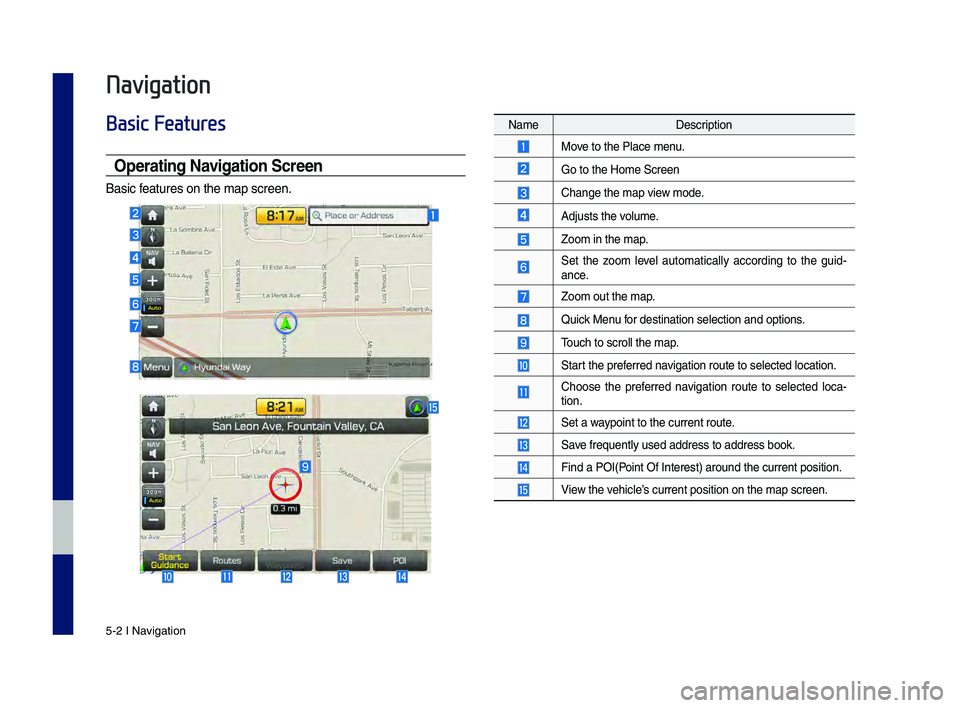
Basic features on the map s\hcreen.
NameDescription
Move to the Place menu.
Go to the Home Scree\hn
Change the map view mode.
Adjusts the volume.
Zoom in the map.
Set the zoom level automatically according to the guid-
ance.
Zoom out the map.
Quick Menu for destination sel\hection and options\h.
\bouch to scroll the \hmap.
Start the preferred navigation route to s\helected location.
Choose the preferred navigation route to selected loca-
tion.
Set a waypoint to the curre\hnt route.
Save frequently used \haddress to address\h book.
Find a POI(Point Of Interest) \haround the current \hposition.
View the vehicle’s current position\h on the map screen.
H_DH 19MY_G5.0[USA_EU]AVN_B1MS7BD001_.indb 22018-06-29 오전 10:28:20
Page 75 of 276
Basic Features I 5-3
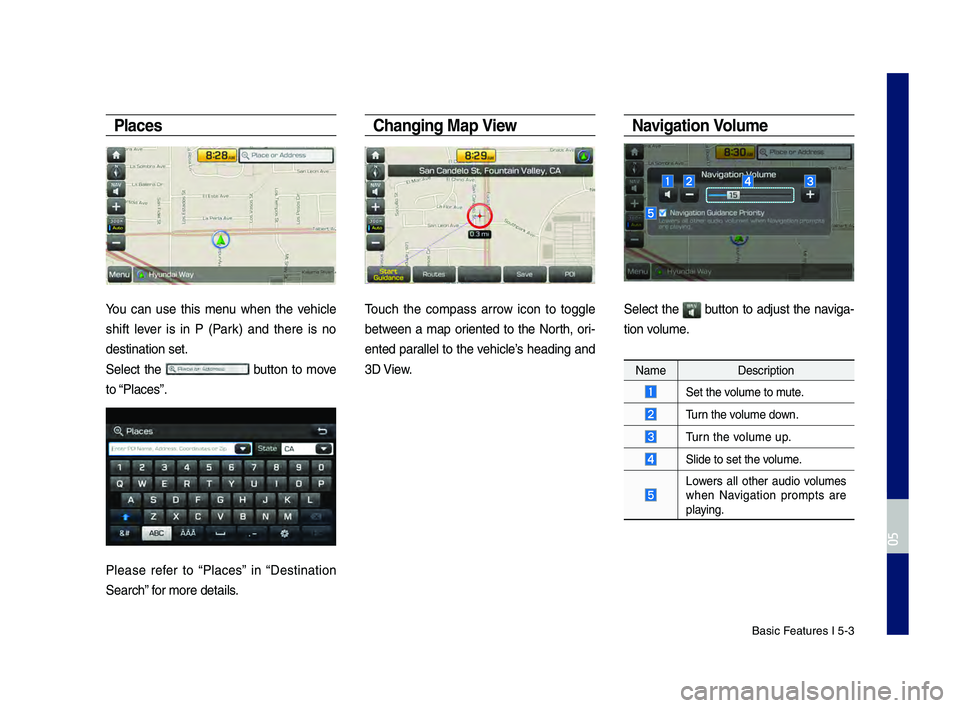
Places
You can use this menu when the vehicle
shift lever is in P (Park) and there is no
destination set.
Select the
button to move
to “Places”.
Please refer to “Places” in “Destination
Search” for more details.
C\fanging Map View
\bouch the compass arrow icon to toggle
between a map oriented to the North, ori-
ented parallel to the vehicle’s heading and
3D View.
Navigation Vol\bme
Select the button to adjust the naviga-
tion volume.
Name Description
Set the volume to mute.
\burn the volume down.
\burn the volume up.
Slide to set the volume.
Lowers all other audio volumes when Navigation prompts are
playing.
H_DH 19MY_G5.0[USA_EU]AVN_B1MS7BD001_.indb 32018-06-29 오전 10:28:20
0505
Page 76 of 276
5-4 I Navigation
Zoom In/Zoom O\bt
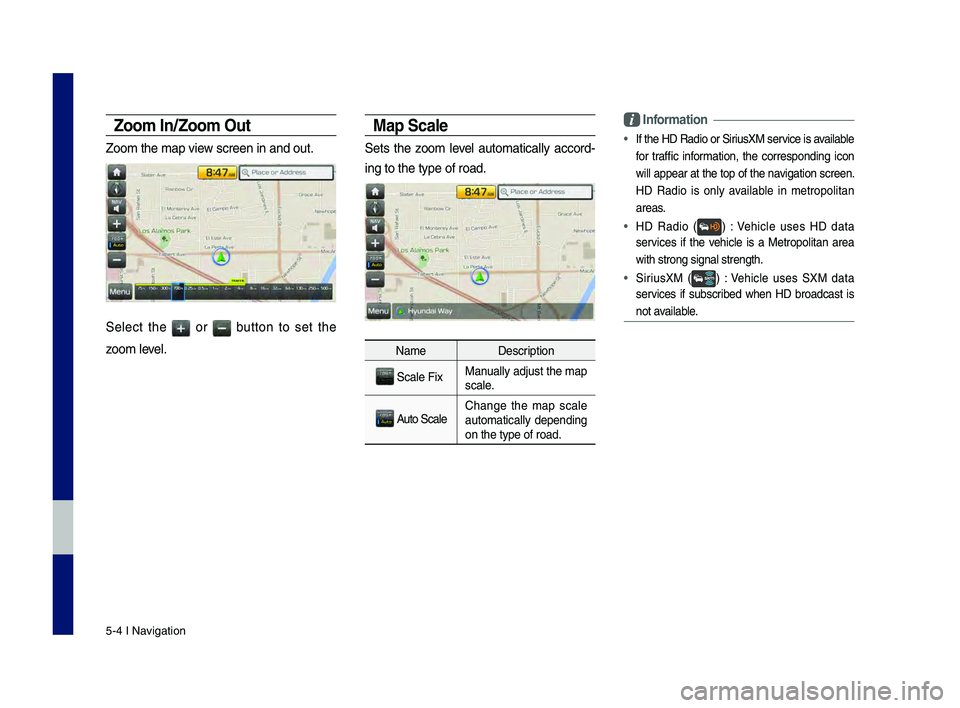
Zoom the map view screen in and ou\ht.
Select the or button to set the
zoom level.
Map Scale
Sets the zoom level automatically accord-
ing to the type of \hroad.
NameDescription
Scale FixManually adjust the map
scale.
Auto ScaleChange the map scale
automatically depending
on the type of road\h.
Information
• If the HD \fadio or \hSiriusXM service is available
for traffic information, the corresponding icon
will appear at the top of the navigation screen.
HD \fadio is only available in metropolitan
areas.
• HD \fadio () : Vehicle uses HD data
services if the vehicle is a Metropolitan area
with strong signal s\htrength.
• SiriusXM () : Vehicle uses SXM data
services if subscribed when HD broadcast is
not available.
H_DH 19MY_G5.0[USA_EU]AVN_B1MS7BD001_.indb 42018-06-29 오전 10:28:20
Page 77 of 276
Quick Menu I 5-5
Quick Menu
Ro\bte
Select the button on the bottom left
of the screen ▶
Select the button.
Select the button to set ,
or .
Ro\bte Options
Select your preferred route and avoid
options. \bhen select the button to
save your selection. \bhese options will
become default for future routes.
Deto\br
\bhe button is active only when
there is an active route.
Selected distance is detoured from the
current location.
H_DH 19MY_G5.0[USA_EU]AVN_B1MS7BD001_.indb 52018-06-29 오전 10:28:21
0505
Menu
Route
Route
Route Options
Detour
Edit Route
Save
Detour
Page 78 of 276
5-6 I Navigation
Edit Ro\bte
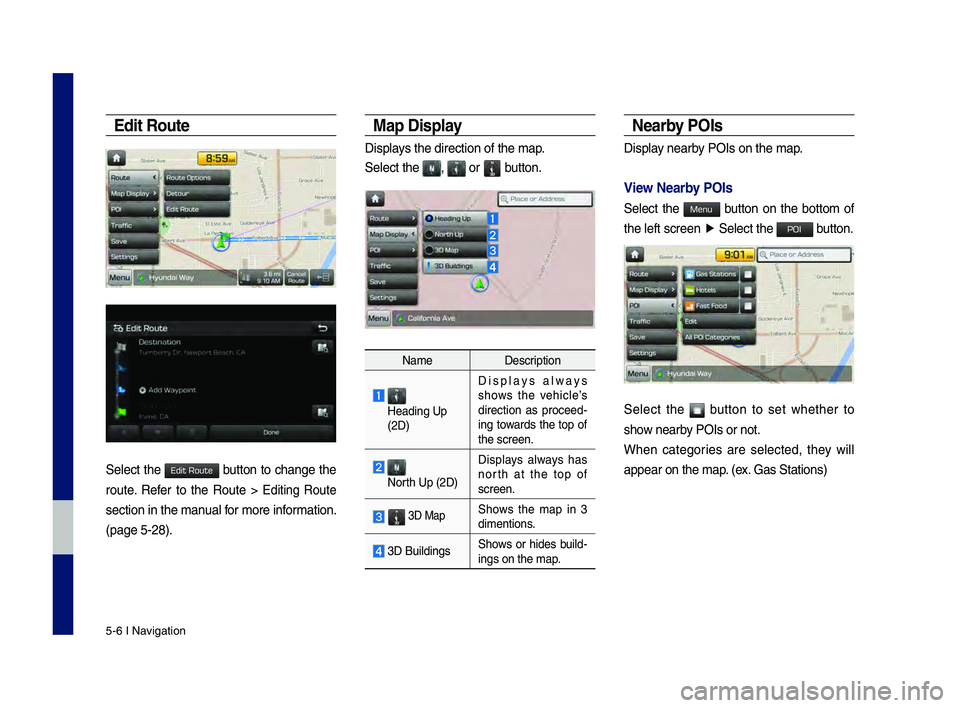
Select the button to change the
route. \fefer to the \foute > Editing \foute
section in the manual for more information.
(page 5-28).
Map Display
Displays the direction of\h the map.
Select the
, or button.
NameDescription
Heading Up
(2D) Displays always
shows the vehicle’s
direction as proceed
-
ing towards the top of
the screen.
North Up (2D) Displays always has
north at the top of
screen.
3D MapShows the map in 3
dimentions.
3D Buildings
Shows or hides build-ings on the map.
Nearby POIs
Display nearby POIs on the map.
View Nearby POIs
Select the button on the bottom of
the left screen
▶
Select the button.
Select the button to set whether to
show nearby POIs or not.
When categories are selected, they will
appear on the map. (ex. Gas Stations)
H_DH 19MY_G5.0[USA_EU]AVN_B1MS7BD001_.indb 62018-06-29 오전 10:28:21
Edit Route
Menu
POI
Page 79 of 276
Quick Menu I 5-7
\bhe lists of nearby gas station are dis-
played.
\bhe list can be sor\hted to display in order of
distance or name.
NameDescription
Call to the selected loca-
tion. (Phone needs to be
connected via Bluet\hooth)
Start the preferred navi-
gation route to selected
location.
Choose the preferred nav-
igation route to selected
location.
Set the location as\h a way-
point.
Save the location.
Search nearby POIs.
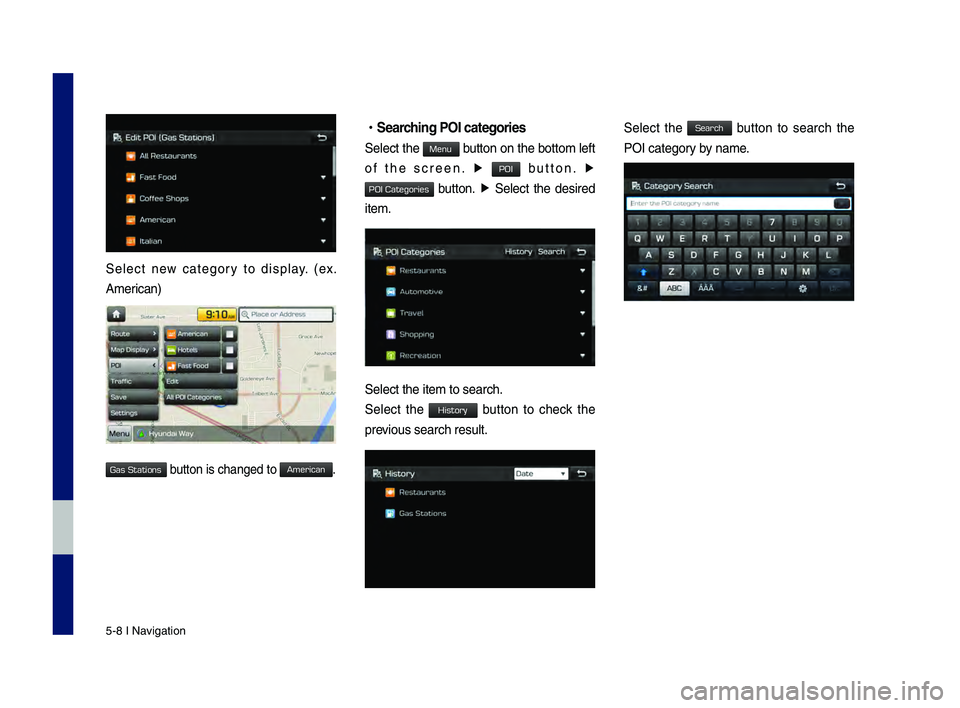
• Editing
Change the shortcut POIs to display for
your shortcuts. (ex. Gas Stations)
Select the desired category to change. (ex.
\festaurants)
H_DH 19MY_G5.0[USA_EU]AVN_B1MS7BD001_.indb 72018-06-29 오전 10:28:22
0505
Start
Guidance
Routes
Add
Waypoint
Save
POI
Page 80 of 276
5-8 I Navigation
Select new category to display. (ex.
American)
button is changed to\h .
•Searc\fing POI categories\C
Select the button on the bottom left
of the screen. ▶
button. ▶
button. ▶ Select the desired
item.
Select the item to s\hearch.
Select the button to check the
previous search result\h.
Select the button to search the
POI category by name.
H_DH 19MY_G5.0[USA_EU]AVN_B1MS7BD001_.indb 82018-06-29 오전 10:28:22
Gas Stations
American
Menu
POI
POI Categories
History
Search
Trending: ignition, change time, clock, roof, length, low oil pressure, light

![GENESIS G80 SPORT 2019 Multimedia System Manual H_DH 19MY_G5.0[USA_EU]AVN_B1MS7BD001_.indb 102018-06-29 오전 10:28:19
MEMO](/img/46/35635/w960_35635-71.png "GENESIS G80 SPORT 2019 Multimedia System Manual H_DH 19MY_G5.0[USA_EU]AVN_B1MS7BD001_.indb 102018-06-29 오전 10:28:19
MEMO")
![GENESIS G80 SPORT 2019 Multimedia System Manual Basic FeaturesQuick Menu
Destination Search \foute
Navigation Settings \broubleshooting
part.5 Navigation
H_DH 19MY_G5.0[USA_EU]AVN_B1MS7BD001_.indb 12018-06-29 오전 10:28:19](/img/46/35635/w960_35635-72.png "GENESIS G80 SPORT 2019 Multimedia System Manual Basic FeaturesQuick Menu
Destination Search \foute
Navigation Settings \broubleshooting
part.5 Navigation
H_DH 19MY_G5.0[USA_EU]AVN_B1MS7BD001_.indb 12018-06-29 오전 10:28:19")