GENESIS GV70 2023 Owners Manual
Manufacturer: GENESIS, Model Year: 2023, Model line: GV70, Model: GENESIS GV70 2023Pages: 637
Page 461 of 637
Driver Assistance System
7-110
Information
• For more details on setting the
functions in the infotainment system,
refer to “Vehicle Settings” section in
chapter 4.
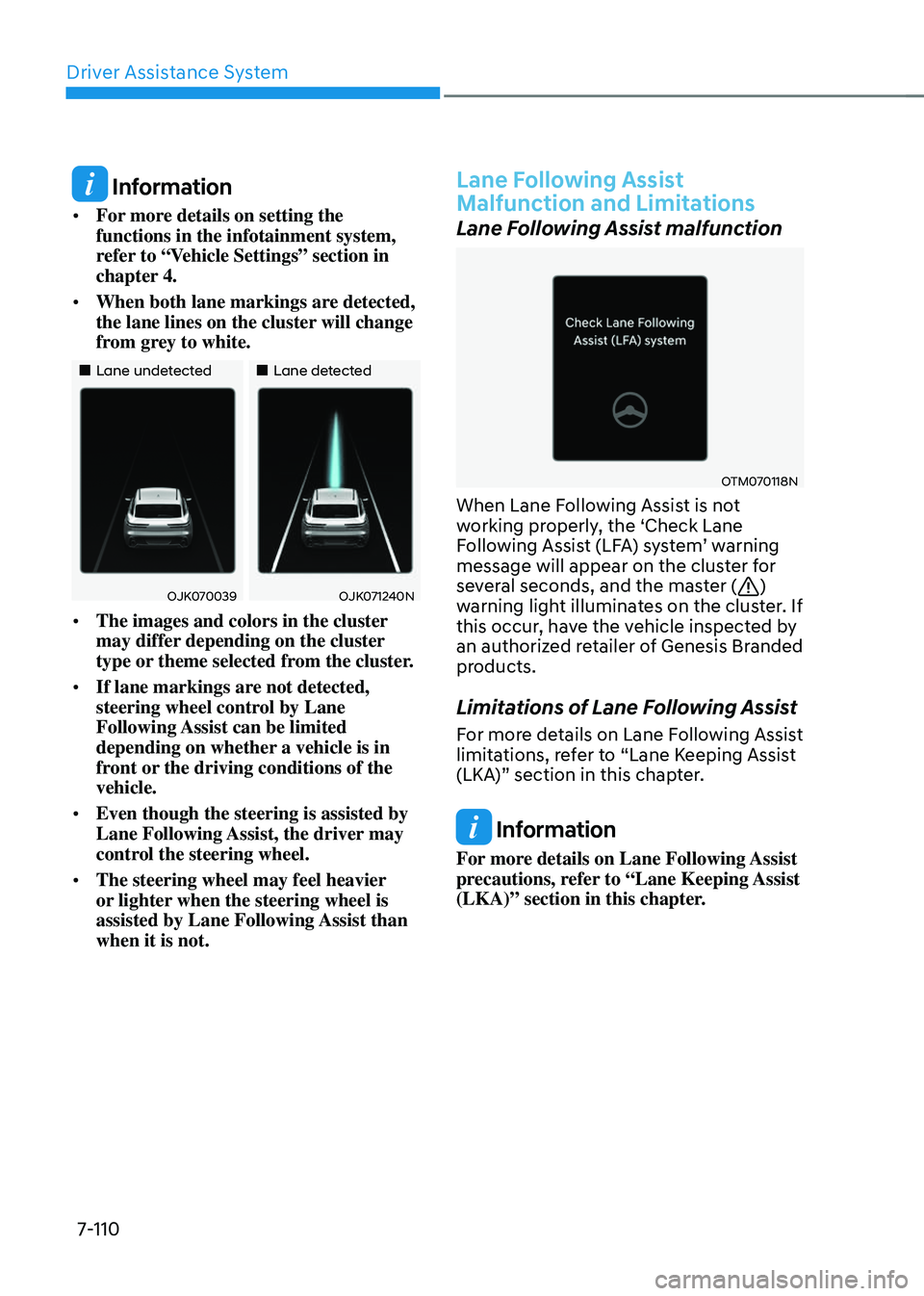
• When both lane markings are detected,
the lane lines on the cluster will change
from grey to white.
Page 462 of 637
07
7-111
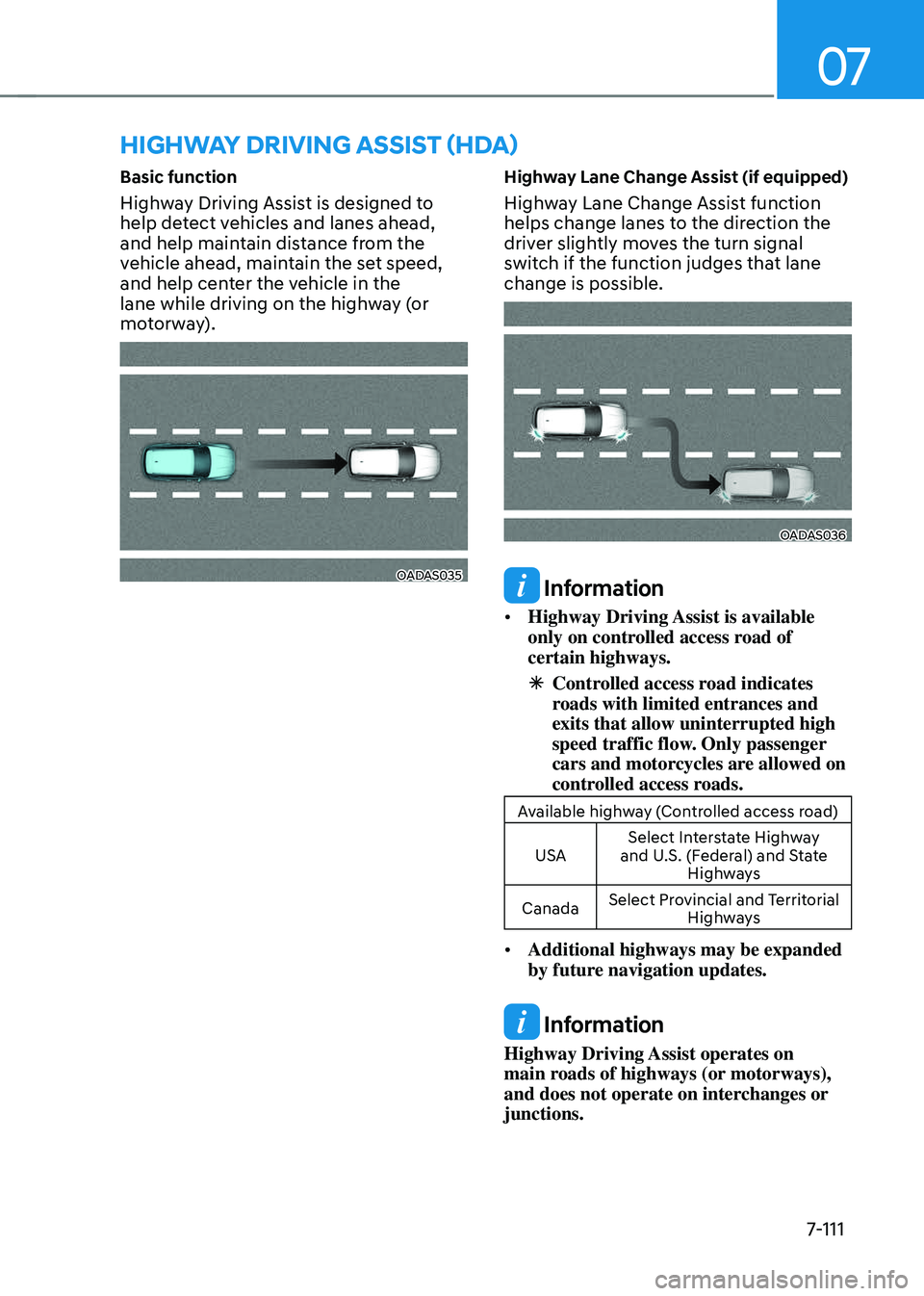
Basic function
Highway Driving Assist is designed to
help detect vehicles and lanes ahead,
and help maintain distance from the
vehicle ahead, maintain the set speed,
and help center the vehicle in the
lane while driving on the highway (or
motorway).
OADAS035OADAS035
Highway Lane Change Assist (if equipped)
Highway Lane Change Assist function
helps change lanes to the direction the
driver slightly moves the turn signal
switch if the function judges that lane
change is possible.
OADAS036OADAS036
Information
• Highway Driving Assist is available
only on controlled access road of
certain highways.
ÃControlled access road indicates
roads with limited entrances and
exits that allow uninterrupted high
speed traffic flow. Only passenger
cars and motorcycles are allowed on
controlled access roads.
Available highway (Controlled access road)
USA Select Interstate Highway
and U.S. (Federal) and State Highways
Canada Select Provincial and Territorial
Highways
• Additional highways may be expanded
by future navigation updates.
Information
Highway Driving Assist operates on
main roads of highways (or motorways),
and does not operate on interchanges or
junctions.
HIGHWAY DRIVING ASSIST (HDA)
Page 463 of 637
![GENESIS GV70 2023 Owners Manual Driver Assistance System
7-112
Detecting sensor
OJK071223NOJK071223N
OJK071022NOJK071022N
OJK1071247L OJK1071247L [1] : Front view camera, [2]: Front radar,
[3] : Front corner radar (if equipped),
[](/img/46/58827/w960_58827-462.png "GENESIS GV70 2023 Owners Manual Driver Assistance System
7-112
Detecting sensor
OJK071223NOJK071223N
OJK071022NOJK071022N
OJK1071247L OJK1071247L [1] : Front view camera, [2]: Front radar,
[3] : Front corner radar (if equipped),
[")
Driver Assistance System
7-112
Detecting sensor
OJK071223NOJK071223N
OJK071022NOJK071022N
OJK1071247L OJK1071247L [1] : Front view camera, [2]: Front radar,
[3] : Front corner radar (if equipped),
[4] : Rear corner radar (if equipped)
Refer to the picture above for the
detailed location of the detecting
sensors.
CAUTION
For more details on the precautions of
the detecting sensors, refer to “Forward
Collision-Avoidance Assist (FCA)”
section in this chapter.
Highway Driving Assist Settings
Setting features
OJK071226NOJK071226N
Basic function
With the engine on, select or
deselect ‘Driver Assistance → Driving
Convenience’ from the Settings menu to
set whether use each function.
-If ‘Highway Driving Assist’ is selected,
it helps maintain distance from the
vehicle ahead, maintain the set speed,
and helps center the vehicle in the
lane.
Highway Lane Change Assist (if equipped)
- If ‘Highway Lane Change Assist’ is
selected, it helps the driver change
lanes.
Page 464 of 637
07
7-113
Information
• When ‘Highway Driving Assist’ is
deselected, the setting for ‘Highway
Lane Change Assist’ cannot be
changed.
• If there is a problem with the functions,
the settings cannot be changed. Have
the vehicle inspected by an authorized
retailer of Genesis Branded products.
• If the engine is restarted, the functions
will maintain the last setting.
WARNING
For your safety, change the Settings
after parking the vehicle at a safe
location.
OJK071003NOJK071003N
Warning Volume
With the engine on, select ‘Driver
Assistance → Warning volume’ or ‘Sound
→ Driver Assist Warning → Warning
Volume’ from the Settings menu to
change the Warning Volume to ‘High’,
‘Medium’, ‘Low’ or ‘Off’ for Highway
Driving Assist.
However, even if ‘Off’ is selected, the
Hands-off Warning Volume will not turn
off but the volume will sound as ‘Low’.
If you change the Warning Volume,
the warning volume of other Driver
Assistance systems may change.
Highway Driving Assist
Operation
Basic function
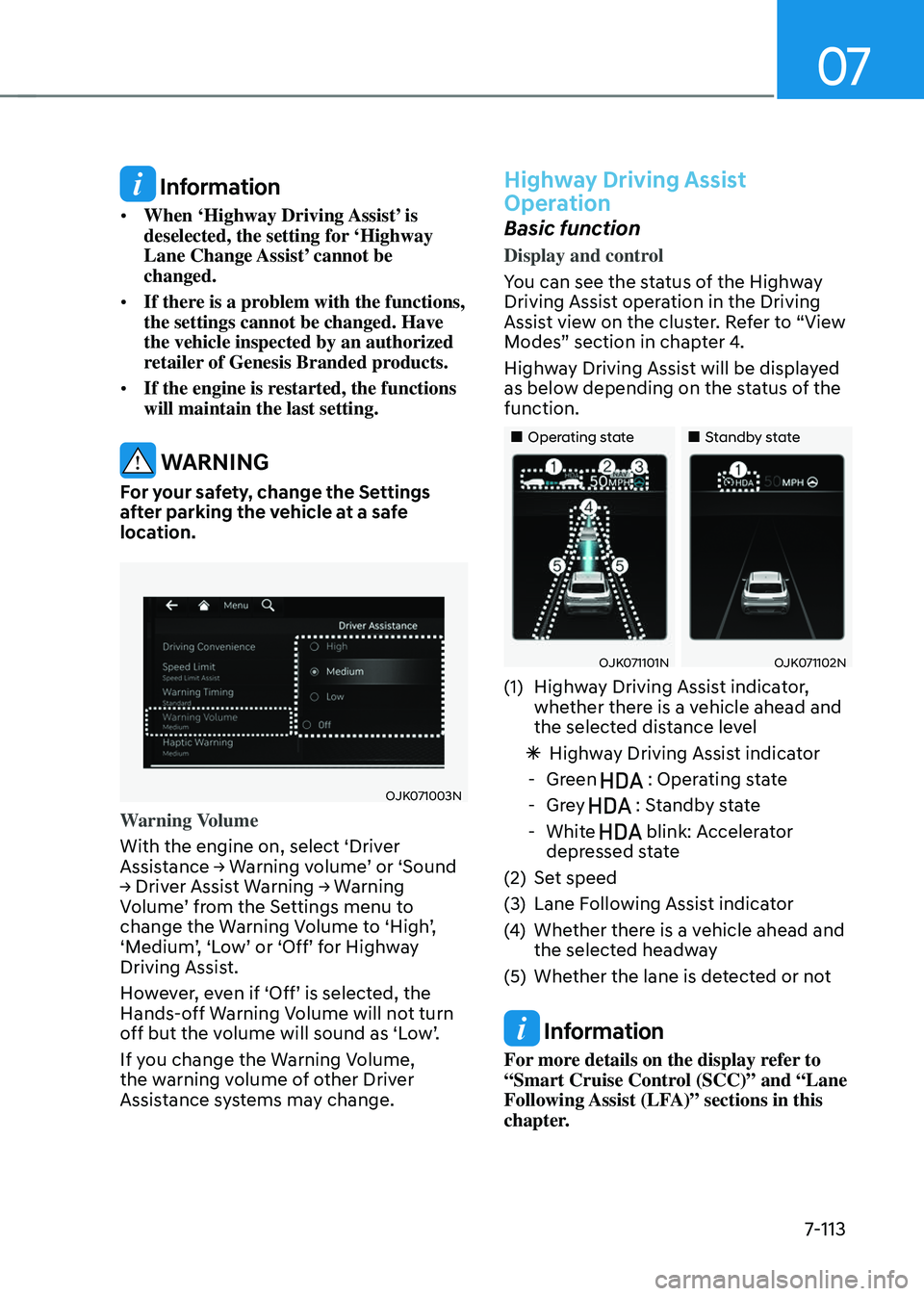
Display and control
You can see the status of the Highway
Driving Assist operation in the Driving
Assist view on the cluster. Refer to “View
Modes” section in chapter 4.
Highway Driving Assist will be displayed
as below depending on the status of the
function.
Page 465 of 637
Driver Assistance System
7-114
Highway Driving Assist operating
Highway Driving Assist will operate when
entering or driving on the main road of
highways (or motorways), and satisfying
all the following conditions:
-Lane Following Assist is operating
-Smart Cruise Control is operating
Information
• While driving on the highway (or
motorway), if Smart Cruise Control
starts operating, Highway Driving
Assist will operate.
• When entering the main roads of
highways (or motorways) while
Smart Cruise Control is operating,
Driving Assist will not turn on if Lane
Following Assist is turned off.
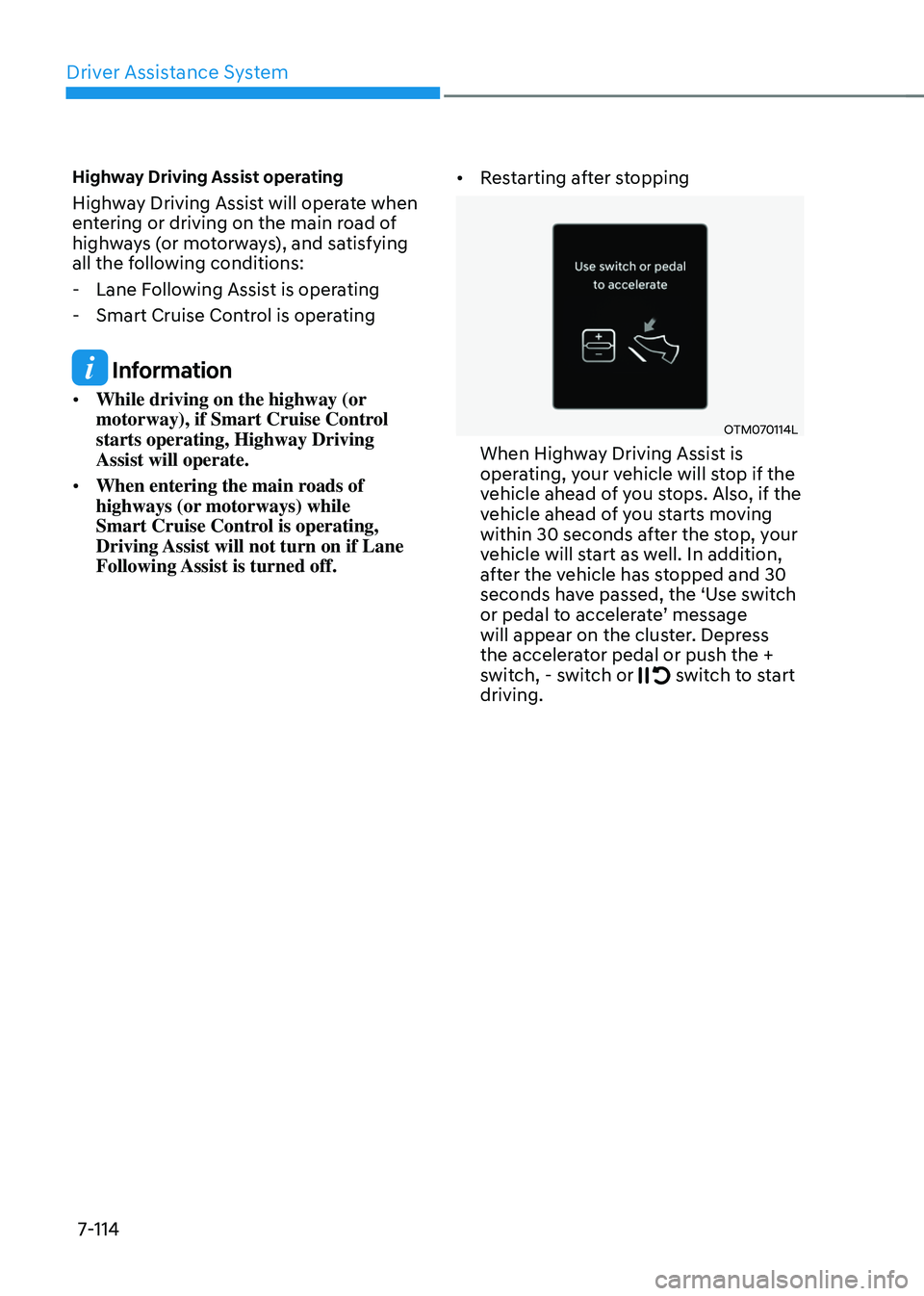
• Restarting after stopping
OTM070114L OTM070114L
When Highway Driving Assist is
operating, your vehicle will stop if the
vehicle ahead of you stops. Also, if the
vehicle ahead of you starts moving
within 30 seconds after the stop, your
vehicle will start as well. In addition,
after the vehicle has stopped and 30
seconds have passed, the ‘Use switch
or pedal to accelerate’ message
will appear on the cluster. Depress
the accelerator pedal or push the +
switch, - switch or
switch to start driving.
Page 466 of 637
07
7-115
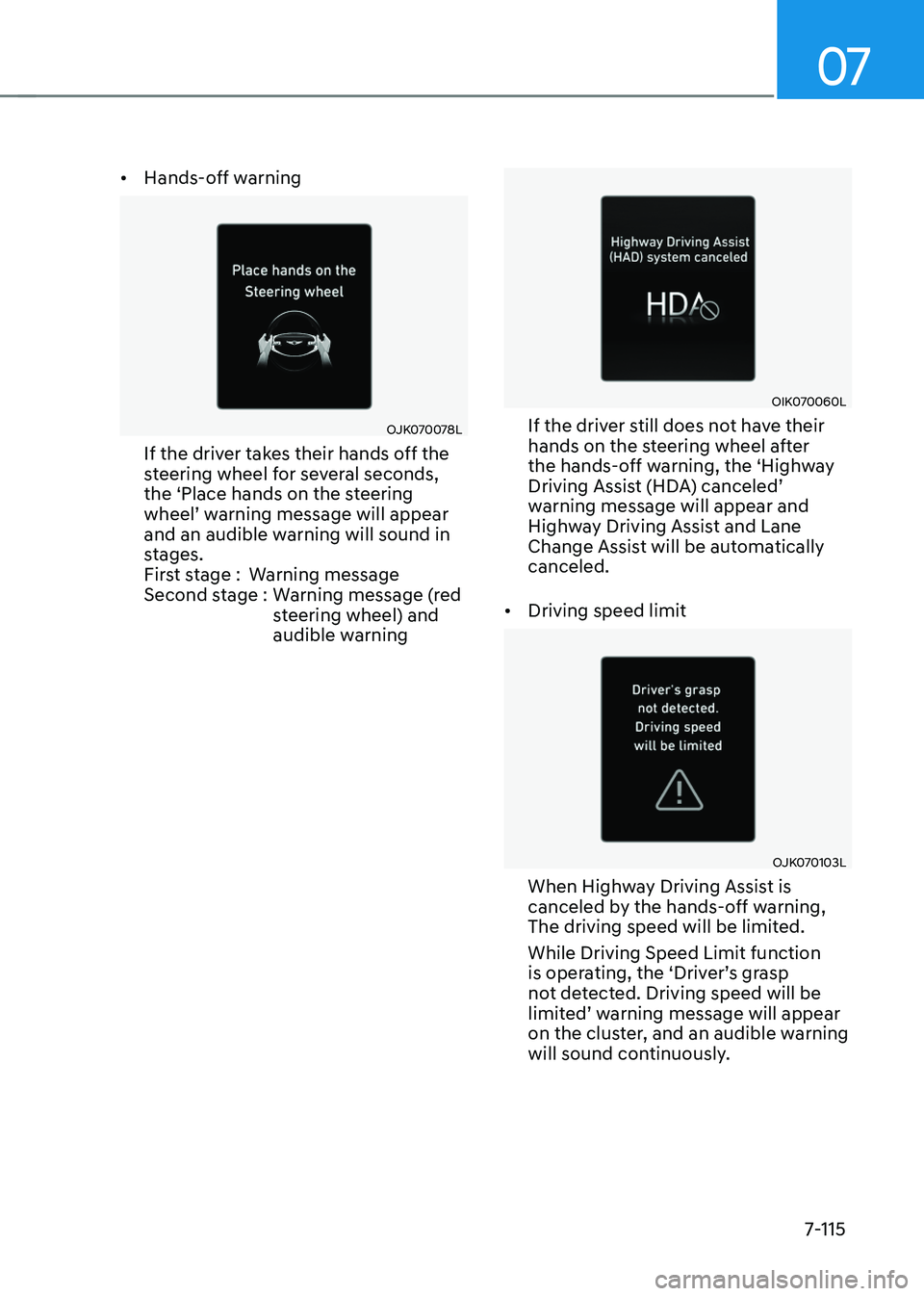
• Hands-off warning
OJK070078LOJK070078L
If the driver takes their hands off the
steering wheel for several seconds,
the ‘Place hands on the steering
wheel’ warning message will appear
and an audible warning will sound in
stages.
First stage :Warning message
Second stage : Warning message (red
steering wheel) and
audible warning
OIK070060LOIK070060L
If the driver still does not have their
hands on the steering wheel after
the hands-off warning, the ‘Highway
Driving Assist (HDA) canceled’
warning message will appear and
Highway Driving Assist and Lane
Change Assist will be automatically
canceled.
• Driving speed limit
OJK070103LOJK070103L
When Highway Driving Assist is
canceled by the hands-off warning,
The driving speed will be limited.
While Driving Speed Limit function
is operating, the ‘Driver’s grasp
not detected. Driving speed will be
limited’ warning message will appear
on the cluster, and an audible warning
will sound continuously.
Page 467 of 637
Driver Assistance System
7-116
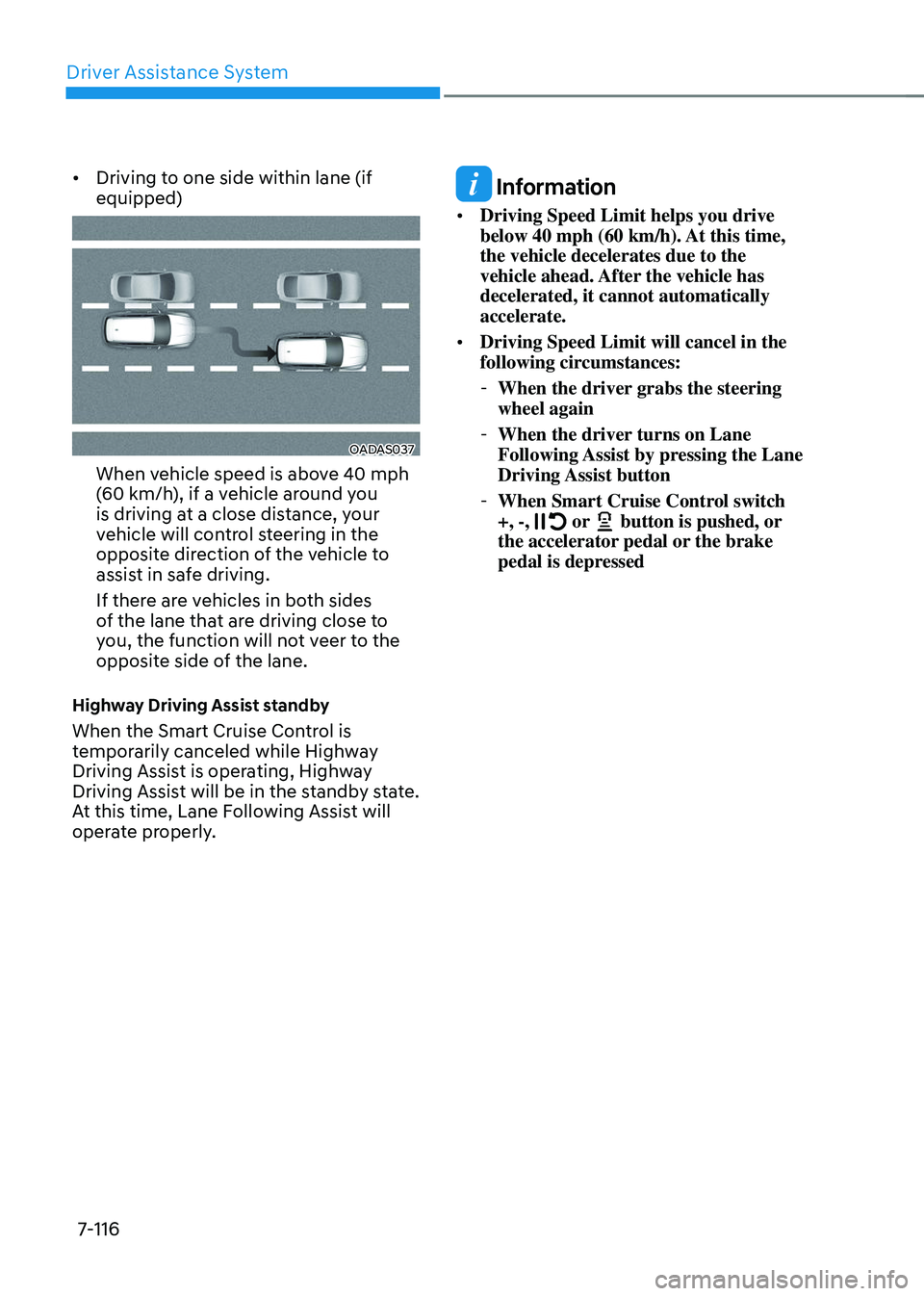
• Driving to one side within lane (if
equipped)
OADAS037OADAS037
When vehicle speed is above 40 mph
(60 km/h), if a vehicle around you
is driving at a close distance, your
vehicle will control steering in the
opposite direction of the vehicle to
assist in safe driving.
If there are vehicles in both sides
of the lane that are driving close to
you, the function will not veer to the
opposite side of the lane.
Highway Driving Assist standby
When the Smart Cruise Control is
temporarily canceled while Highway
Driving Assist is operating, Highway
Driving Assist will be in the standby state.
At this time, Lane Following Assist will
operate properly.
Information
• Driving Speed Limit helps you drive
below 40 mph (60 km/h). At this time,
the vehicle decelerates due to the
vehicle ahead. After the vehicle has
decelerated, it cannot automatically
accelerate.
• Driving Speed Limit will cancel in the
following circumstances:
-When the driver grabs the steering
wheel again
-When the driver turns on Lane
Following Assist by pressing the Lane
Driving Assist button
-When Smart Cruise Control switch
+, -, or button is pushed, or the accelerator pedal or the brake
pedal is depressed
Page 468 of 637
07
7-117
Highway Lane Change Assist (if
equipped)
Display and control
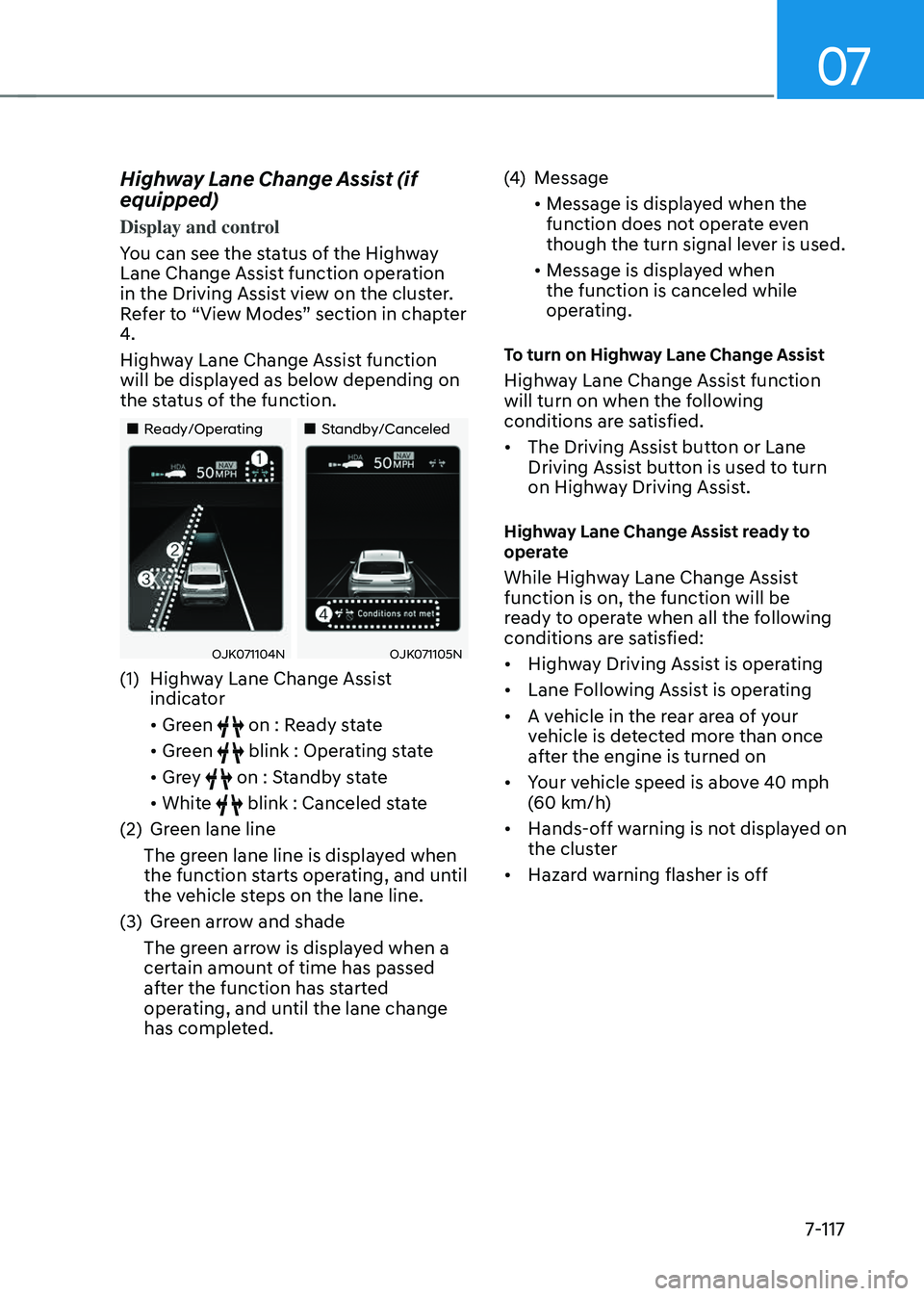
You can see the status of the Highway
Lane Change Assist function operation
in the Driving Assist view on the cluster.
Refer to “View Modes” section in chapter
4.
Highway Lane Change Assist function
will be displayed as below depending on
the status of the function.
Page 469 of 637
Driver Assistance System
7-118
Information
• While Lane Change Assist function
is turned on (indicator on), Lane
Following Assist will not cancel even
if the turn signal indicator or hazard
warning flasher is operating.
• Lane Change Assist function turns
off automatically when driven in the
following road conditions:
-One driving lane
-A road with a intersection or
crosswalk ahead
-A road with no structure, such as a
medium strip, guardrails, etc.
-There is a pedestrian or cyclist on the
road ahead
• When the function is in the ready state,
and vehicle speed is below 35 mph (55
km/h), the function will change to the
standby state.
WARNING
When Highway Lane Change Assist
function turns off while operating,
steering assist will be temporarily
canceled. Always be cautious while
driving.
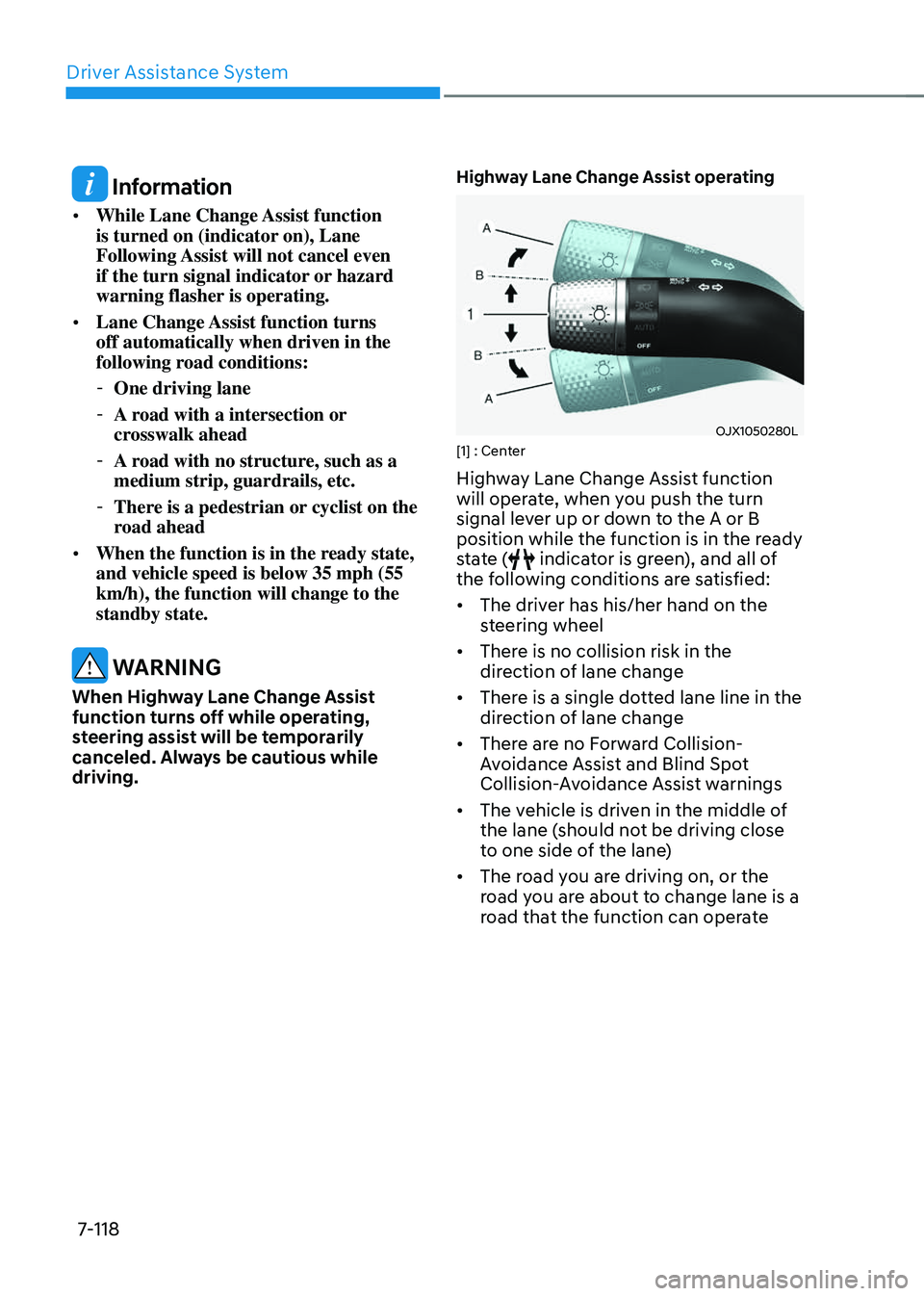
Highway Lane Change Assist operating
OJX1050280LOJX1050280L[1] : Center
Highway Lane Change Assist function
will operate, when you push the turn
signal lever up or down to the A or B
position while the function is in the ready
state (
indicator is green), and all of
the following conditions are satisfied:
• The driver has his/her hand on the
steering wheel
• There is no collision risk in the
direction of lane change
• There is a single dotted lane line in the
direction of lane change
• There are no Forward Collision-
Avoidance Assist and Blind Spot
Collision-Avoidance Assist warnings
• The vehicle is driven in the middle of
the lane (should not be driving close
to one side of the lane)
• The road you are driving on, or the
road you are about to change lane is a
road that the function can operate
Page 470 of 637
07
7-119
Information
• Highway Lane Change Assist operates
when the turn signal lever is positioned
at A. If the turn signal lever is released
to the center (1) before stepping on
the lane, Highway Lane Change Assist
cancels. If the turn signal lever is
released to the center (1) after stepping
on the lane, Highway Lane Change
Assist changes the lane and turns off
the turn signal after lane change is
complete.
• When the turn signal lever is placed at
B position for a certain period of time,
the green arrow will appear. At this
time, even when the lever is released
and returns to it’s original position (1),
lane change will still be assisted.
• While lane change is being made by the
function, the turn signal indicator will
blink even when the turn signal lever is
not held, and the turn signal indicator
will turn off when lane change is
complete.
Highway Lane Change Assist standby
Highway Lane Change Assist function
will be in the standby state when one of
the ready state condition is not satisfied,
or when entering or driving on one of the
following roads:
• Road within a certain distance from
the tollgate on the main road of the
highway (or motorway)
• The road ahead ends without an
interchange or junction
• Road with sharp curves
• Road with narrow lanes
Highway Lane Change Assist cancel
The function will be canceled when:
• Releasing the turn signal lever from
position A to the center before
stepping on the lane
• The turn signal lever is turned on in
the opposite direction of lane change
• The steering wheel is steered sharply
WARNING
• While Highway Driving Assist is
operating, the function will cancel if
one of the following occurs:
-Highway Driving Assist is turned
off
-Lane Following Assist or Smart
Cruise Control is turned off or
temporarily canceled
-Hands-off warning message is
displayed on the cluster
-The hazard warning flasher is
turned on
-Forward Collision-Avoidance
Assist or Blind-Spot Collision-
Avoidance Assist warning message
is displayed
-Possible collision is detected in the
next lane, even though there are
no Forward Collision-Avoidance
Assist and Blind Spot Collision-
Avoidance Assist warning
-The target lane to make a lane
change disappears
-The target lane to make a lane
change is not detected
-There is a problem with turn signal
lamps