GENESIS GV80 2023 Owners Manual
Manufacturer: GENESIS, Model Year: 2023, Model line: GV80, Model: GENESIS GV80 2023Pages: 650
Page 421 of 650
07
7-65
FORWARD ATTENTION WARNING (FAW) (IF EQUIPPED)
Forward Attention Warning can warn
the driver to help prevent the driver
from being distracted using the interior
view camera installed in the instrument
cluster.
Forward Attention Warning
Settings
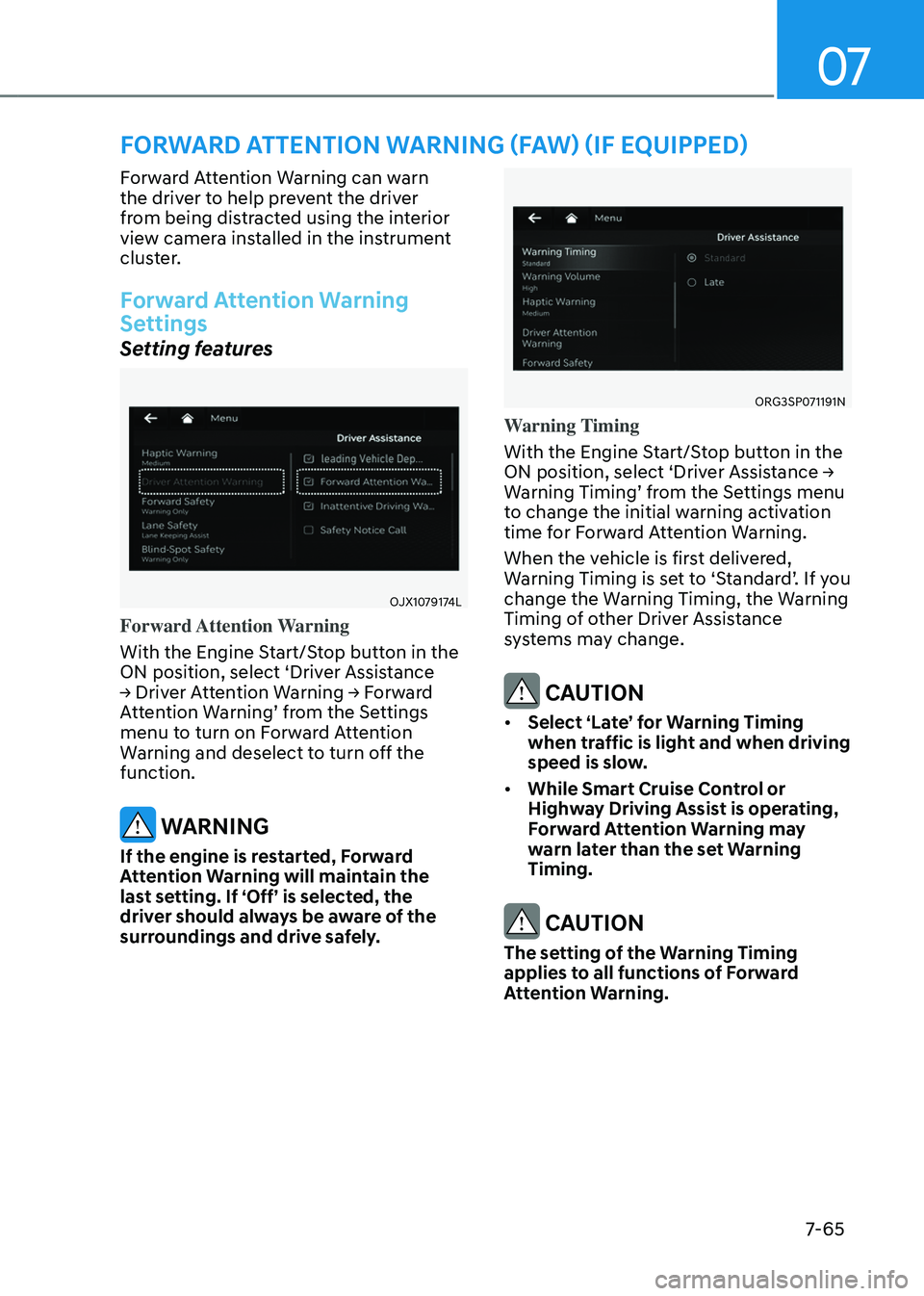
Setting features
OJX1079174LOJX1079174L
Forward Attention Warning
With the Engine Start/Stop button in the
ON position, select ‘Driver Assistance
→ Driver Attention Warning → Forward
Attention Warning’ from the Settings
menu to turn on Forward Attention
Warning and deselect to turn off the
function.
WARNING
If the engine is restarted, Forward
Attention Warning will maintain the
last setting. If ‘Off’ is selected, the
driver should always be aware of the
surroundings and drive safely.
ORG3SP071191NORG3SP071191N
Warning Timing
With the Engine Start/Stop button in the
ON position, select ‘Driver Assistance →
Warning Timing’ from the Settings menu
to change the initial warning activation
time for Forward Attention Warning.
When the vehicle is first delivered,
Warning Timing is set to ‘Standard’. If you
change the Warning Timing, the Warning
Timing of other Driver Assistance
systems may change.
CAUTION
• Select ‘Late’ for Warning Timing
when traffic is light and when driving
speed is slow.
• While Smart Cruise Control or
Highway Driving Assist is operating,
Forward Attention Warning may
warn later than the set Warning
Timing.
CAUTION
The setting of the Warning Timing
applies to all functions of Forward
Attention Warning.
Page 422 of 650
Driver Assistance System
7-66
Forward Attention Warning
Operation
Operating conditions
Forward Attention Warning will operate
when the following conditions are
satisfied:
-Vehicle speed is above 0.6 mph
(1 km/h)
-The gear is in D (Drive) or N (Neutral)
Warning
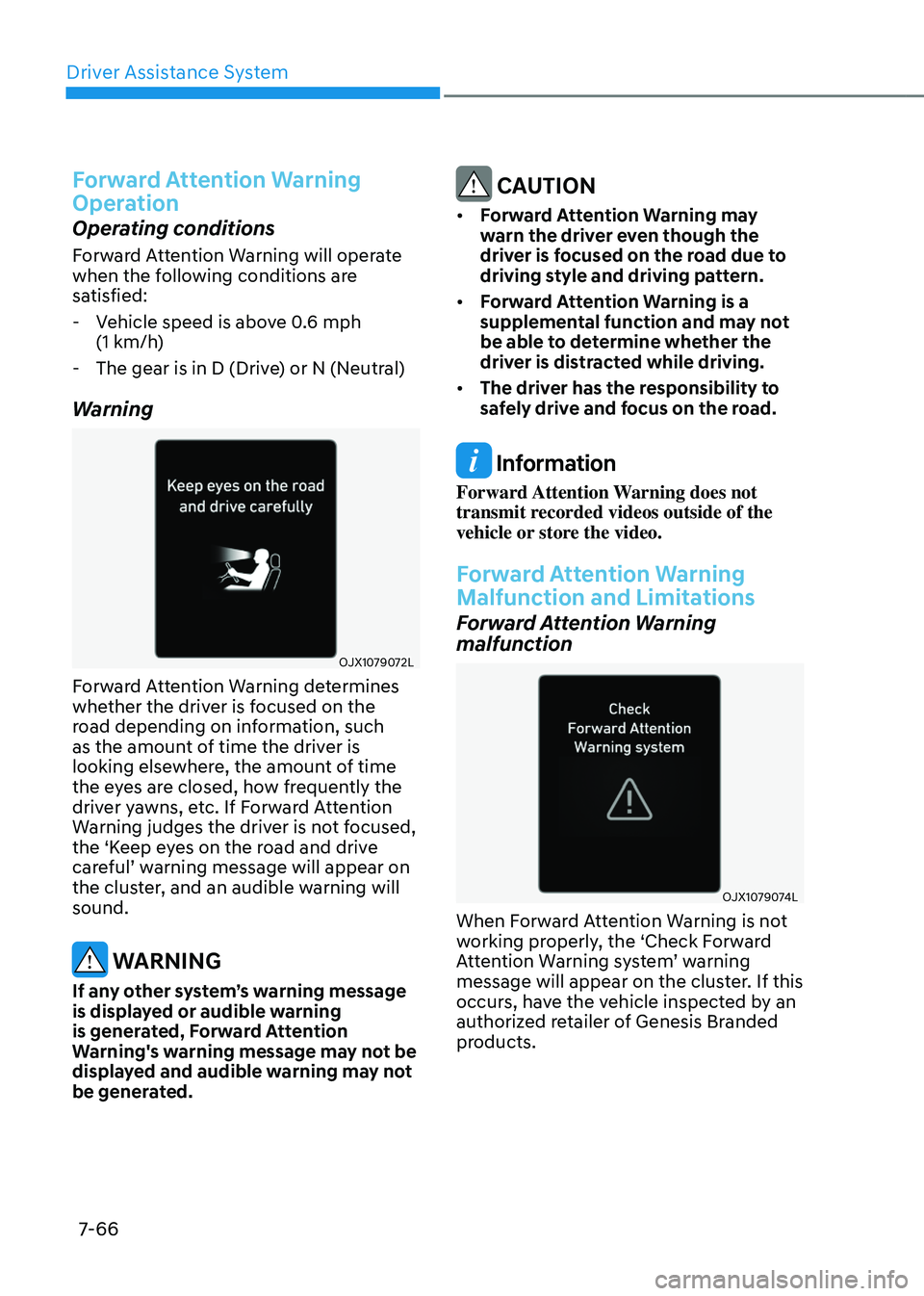
OJX1079072LOJX1079072L
Forward Attention Warning determines
whether the driver is focused on the
road depending on information, such
as the amount of time the driver is
looking elsewhere, the amount of time
the eyes are closed, how frequently the
driver yawns, etc. If Forward Attention
Warning judges the driver is not focused,
the ‘Keep eyes on the road and drive
careful’ warning message will appear on
the cluster, and an audible warning will
sound.
WARNING
If any other system’s warning message
is displayed or audible warning
is generated, Forward Attention
Warning's warning message may not be
displayed and audible warning may not
be generated.
CAUTION
• Forward Attention Warning may
warn the driver even though the
driver is focused on the road due to
driving style and driving pattern.
• Forward Attention Warning is a
supplemental function and may not
be able to determine whether the
driver is distracted while driving.
• The driver has the responsibility to
safely drive and focus on the road.
Information
Forward Attention Warning does not
transmit recorded videos outside of the
vehicle or store the video.
Forward Attention Warning
Malfunction and Limitations
Forward Attention Warning
malfunction
OJX1079074LOJX1079074L
When Forward Attention Warning is not
working properly, the ‘Check Forward
Attention Warning system’ warning
message will appear on the cluster. If this
occurs, have the vehicle inspected by an
authorized retailer of Genesis Branded
products.
Page 423 of 650
07
7-67
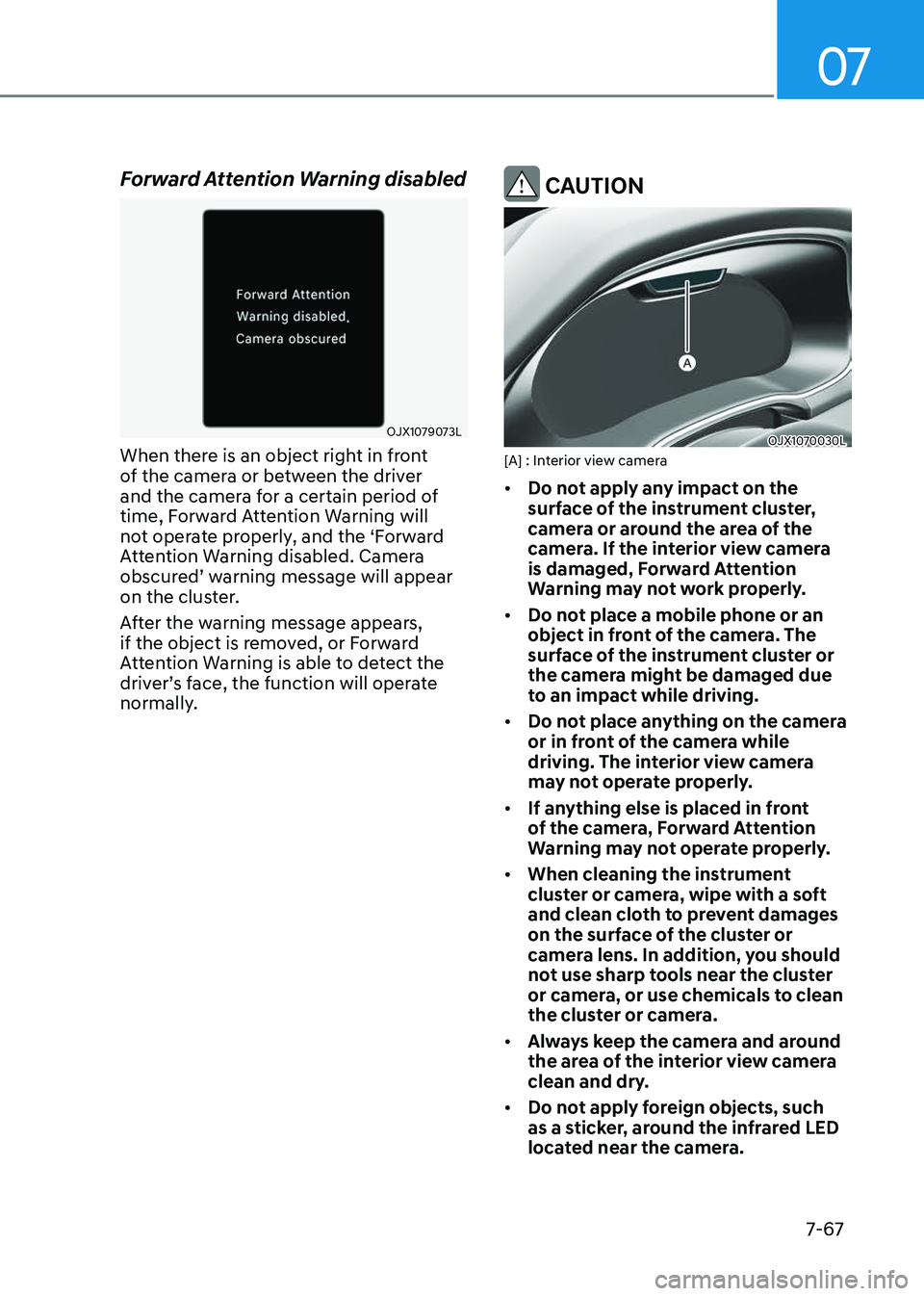
Forward Attention Warning disabled
OJX1079073LOJX1079073L
When there is an object right in front
of the camera or between the driver
and the camera for a certain period of
time, Forward Attention Warning will
not operate properly, and the ‘Forward
Attention Warning disabled. Camera
obscured’ warning message will appear
on the cluster.
After the warning message appears,
if the object is removed, or Forward
Attention Warning is able to detect the
driver’s face, the function will operate
normally.
CAUTION
OJX1070030LOJX1070030L[A] : Interior view camera
• Do not apply any impact on the
surface of the instrument cluster,
camera or around the area of the
camera. If the interior view camera
is damaged, Forward Attention
Warning may not work properly.
• Do not place a mobile phone or an
object in front of the camera. The
surface of the instrument cluster or
the camera might be damaged due
to an impact while driving.
• Do not place anything on the camera
or in front of the camera while
driving. The interior view camera
may not operate properly.
• If anything else is placed in front
of the camera, Forward Attention
Warning may not operate properly.
• When cleaning the instrument
cluster or camera, wipe with a soft
and clean cloth to prevent damages
on the surface of the cluster or
camera lens. In addition, you should
not use sharp tools near the cluster
or camera, or use chemicals to clean
the cluster or camera.
• Always keep the camera and around
the area of the interior view camera
clean and dry.
• Do not apply foreign objects, such
as a sticker, around the infrared LED
located near the camera.
Page 424 of 650
Driver Assistance System
7-68
Information
• Two red lights may appear on the
camera in the following conditions
when:
-The outside brightness is dim or
driving at night
-The vehicle drives inside a building,
such as a basement parking lot,
garage or tunnel
-The camera case of the instrument
cluster is partially broken
• The 3D cluster may flicker when
adjusting to the driver's eyes or when
the instrument cluster’s camera view is
blocked by the steering wheel or other
objects.
WARNING
Do not look toward the camera within
8 in. (20 cm) for longer than a minute.
Limitations of Forward Attention
Warning
Forward Attention Warning may be
limited or may not operate properly in
the following circumstances:
• The driver is wearing sunglasses,
special glasses, infrared cutoff
glasses, refracting glasses or thick
glasses
• The driver has heavy eye makeup
(eyeliner, mascara, color makeup,
false eyelash) or eye piercing
• The driver’s view is blocked by their
hair, hat, etc.
• The driver is winking or wearing an
eye patch on one eye
• The driver’s face is covered partially
by a mask, muffler, etc.
• The driver’s view is blocked by
incoming light from outside of the
vehicle
• Light from outside, sunlight or infrared
LED light of the camera is reflected by
glasses or sunglasses
• The driver turns or lowers his/her
head so that the face or an eye is
hidden from the camera
• The camera is out of the range to
monitor or close within 8 in. (20 cm)
• The driver shakes his/her head up
and down, or adverse road conditions
cause excessive vehicle vibrations
while driving
• The driver is improperly positioned in
the driver's seat so that the driver’s
face is not detected
• The driver is too tall or short
• The camera is blocked by the adjusted
steering wheel height or the turned
steering wheel
• More than two people are looking at
the instrument cluster simultaneously
from the driver’s seat
• The driver’s eyes are narrowed due to
laughing or sun glare
• There are other devices using infrared
light in the vehicle
Page 425 of 650
07
7-69
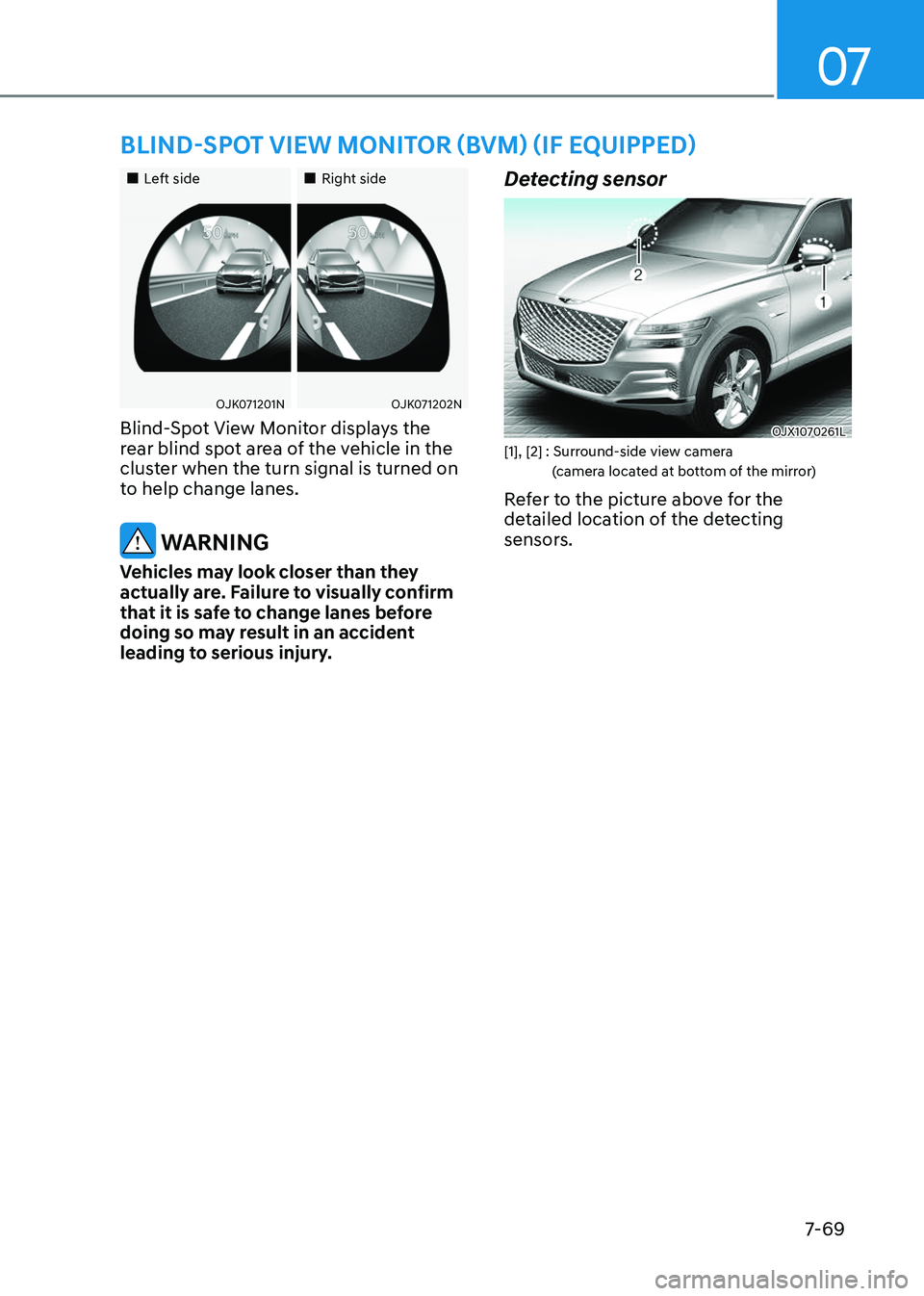
BLIND-SPOT VIEW MONITOR (BVM) (IF EQUIPPED)
Page 426 of 650
Driver Assistance System
7-7 0
Blind-Spot View Monitor
Settings
Setting features
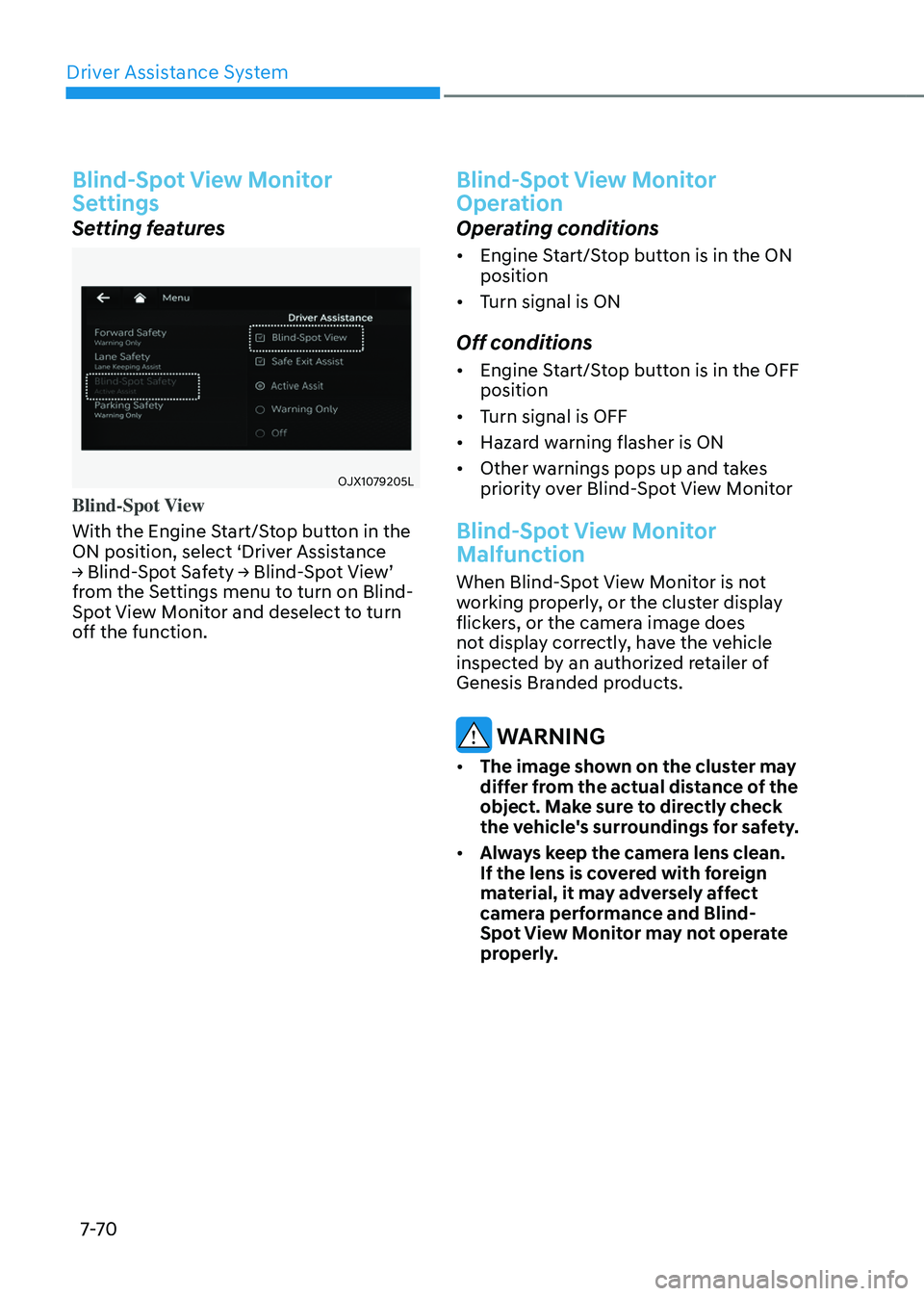
OJX1079205LOJX1079205L
Blind-Spot View
With the Engine Start/Stop button in the
ON position, select ‘Driver Assistance
→ Blind-Spot Safety → Blind-Spot View’
from the Settings menu to turn on Blind-
Spot View Monitor and deselect to turn
off the function.
Blind-Spot View Monitor
Operation
Operating conditions
• Engine Start/Stop button is in the ON
position
• Turn signal is ON
Off conditions
• Engine Start/Stop button is in the OFF
position
• Turn signal is OFF
• Hazard warning flasher is ON
• Other warnings pops up and takes
priority over Blind-Spot View Monitor
Blind-Spot View Monitor
Malfunction
When Blind-Spot View Monitor is not
working properly, or the cluster display
flickers, or the camera image does
not display correctly, have the vehicle
inspected by an authorized retailer of
Genesis Branded products.
WARNING
• The image shown on the cluster may
differ from the actual distance of the
object. Make sure to directly check
the vehicle's surroundings for safety.
• Always keep the camera lens clean.
If the lens is covered with foreign
material, it may adversely affect
camera performance and Blind-
Spot View Monitor may not operate
properly.
Page 427 of 650
07
7-7 1
SMART CRUISE CONTROL (SCC)
Smart Cruise Control is designed to
detect the vehicle ahead and help
maintain the desired speed and
minimum distance between the vehicle
ahead.
Overtaking Acceleration Assist
While Smart Cruise Control is operating,
if the function judges that the driver is
determined to overtake the vehicle in
front, acceleration will be assisted.
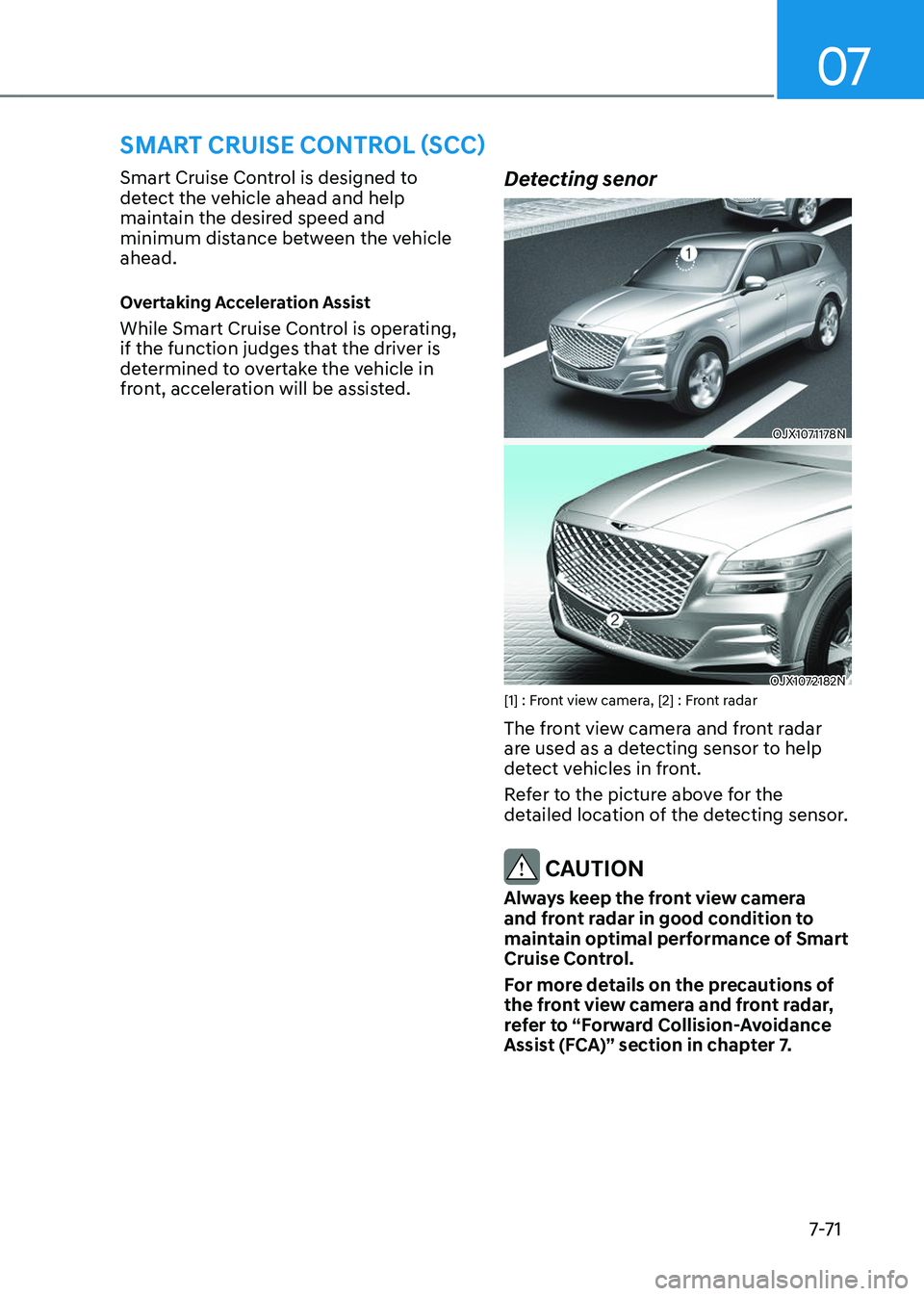
Detecting senor
OJX1071178NOJX1071178N
OJX1072182NOJX1072182N[1] : Front view camera, [2] : Front radar
The front view camera and front radar
are used as a detecting sensor to help
detect vehicles in front.
Refer to the picture above for the
detailed location of the detecting sensor.
CAUTION
Always keep the front view camera
and front radar in good condition to
maintain optimal performance of Smart
Cruise Control.
For more details on the precautions of
the front view camera and front radar,
refer to “Forward Collision-Avoidance
Assist (FCA)” section in chapter 7.
DRIVING CONVENIENCE
Page 428 of 650
Driver Assistance System
7-7 2
Smart Cruise Control settings
Setting features
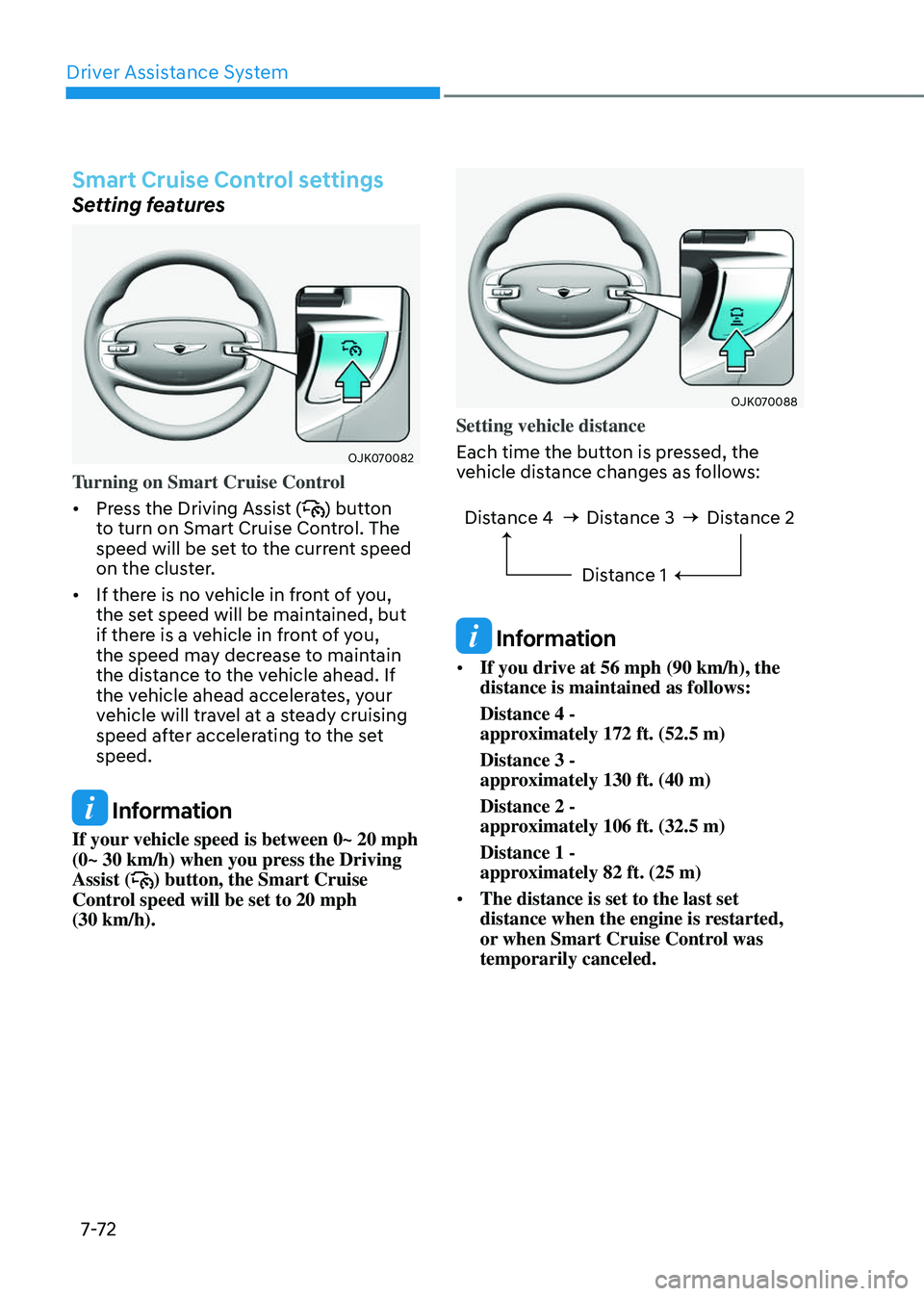
OJK070082OJK070082
Turning on Smart Cruise Control
• Press the Driving Assist () button
to turn on Smart Cruise Control. The
speed will be set to the current speed
on the cluster.
• If there is no vehicle in front of you,
the set speed will be maintained, but
if there is a vehicle in front of you,
the speed may decrease to maintain
the distance to the vehicle ahead. If
the vehicle ahead accelerates, your
vehicle will travel at a steady cruising
speed after accelerating to the set
speed.
Information
If your vehicle speed is between 0~ 20 mph
(0~ 30 km/h) when you press the Driving
Assist (
) button, the Smart Cruise
Control speed will be set to 20 mph
(30 km/h).
OJK070088OJK070088
Setting vehicle distance
Each time the button is pressed, the
vehicle distance changes as follows:
Distance 4 Distance 3
Distance 1Distance 2
Information
• If you drive at 56 mph (90 km/h), the
distance is maintained as follows:
Distance 4 -
approximately 172 ft. (52.5 m)
Distance 3 -
approximately 130 ft. (40 m)
Distance 2 -
approximately 106 ft. (32.5 m)
Distance 1 -
approximately 82 ft. (25 m)
• The distance is set to the last set
distance when the engine is restarted,
or when Smart Cruise Control was
temporarily canceled.
Page 429 of 650
07
7-7 3
OJX1079077OJX1079077
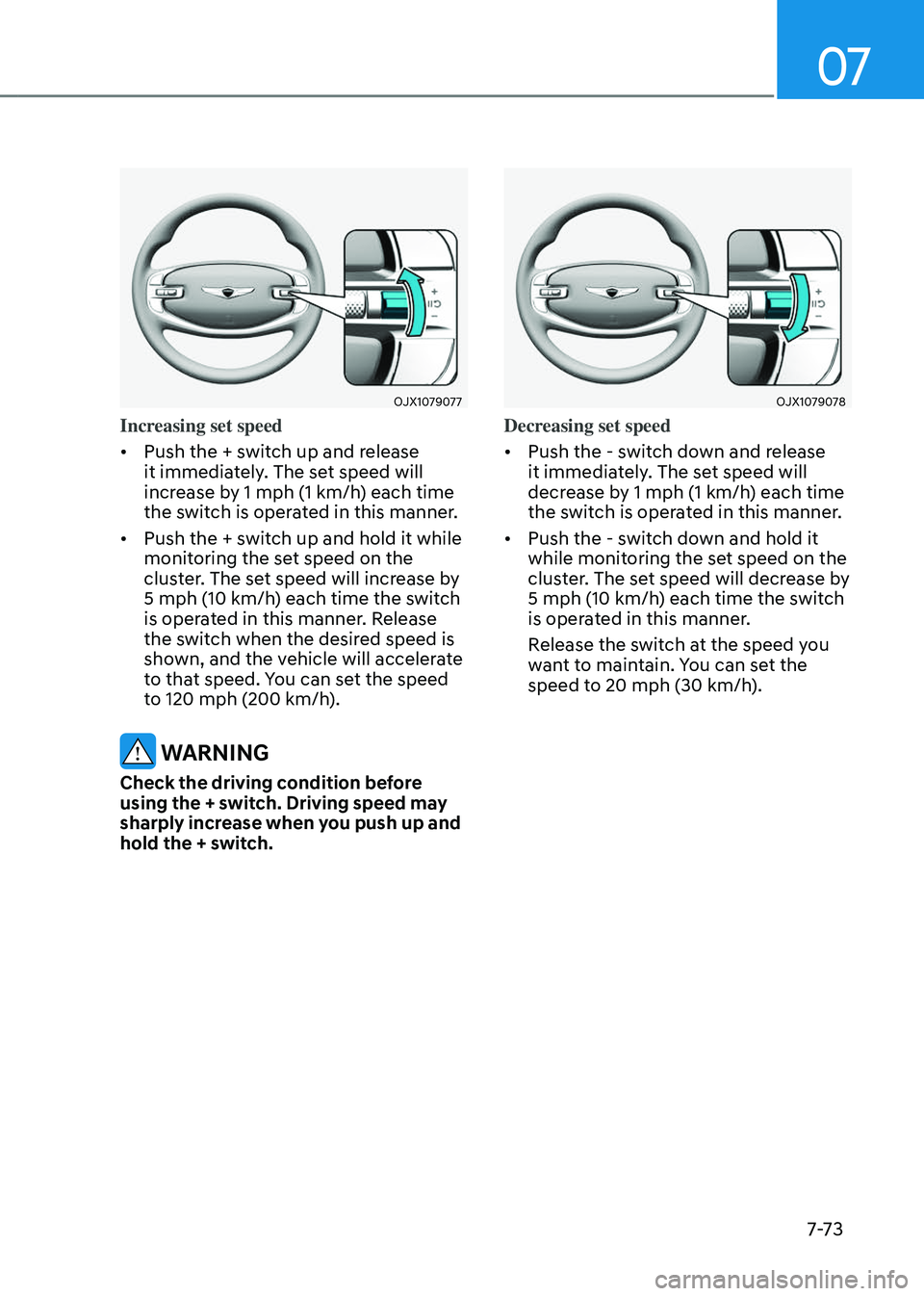
Increasing set speed
• Push the + switch up and release
it immediately. The set speed will
increase by 1 mph (1 km/h) each time
the switch is operated in this manner.
• Push the + switch up and hold it while
monitoring the set speed on the
cluster. The set speed will increase by
5 mph (10 km/h) each time the switch
is operated in this manner. Release
the switch when the desired speed is
shown, and the vehicle will accelerate
to that speed. You can set the speed
to 120 mph (200 km/h).
WARNING
Check the driving condition before
using the + switch. Driving speed may
sharply increase when you push up and
hold the + switch.
OJX1079078OJX1079078
Decreasing set speed
• Push the - switch down and release
it immediately. The set speed will
decrease by 1 mph (1 km/h) each time
the switch is operated in this manner.
• Push the - switch down and hold it
while monitoring the set speed on the
cluster. The set speed will decrease by
5 mph (10 km/h) each time the switch
is operated in this manner.
Release the switch at the speed you
want to maintain. You can set the
speed to 20 mph (30 km/h).
Page 430 of 650
Driver Assistance System
7-74
OJX1070278LOJX1070278L
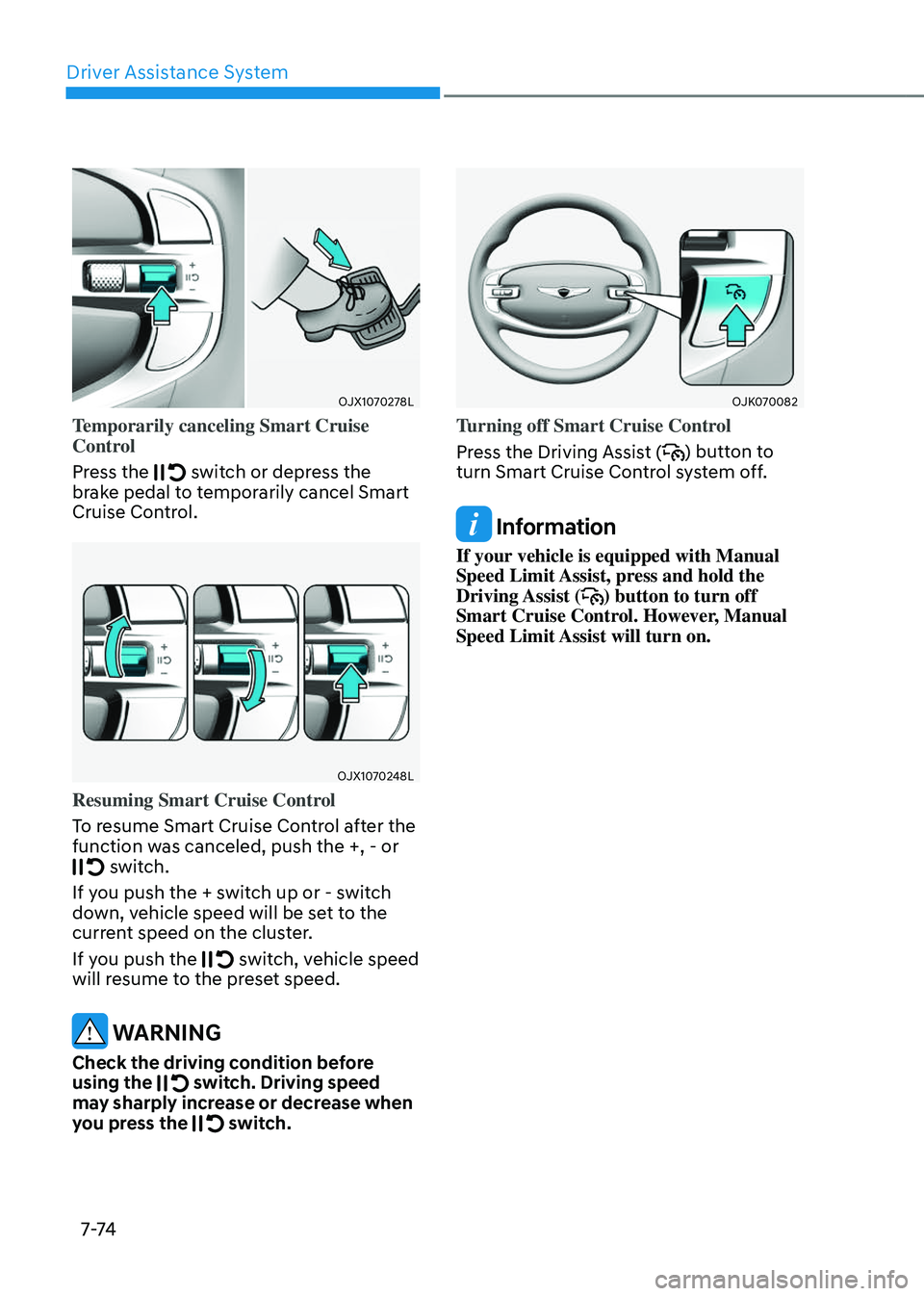
Temporarily canceling Smart Cruise
Control
Press the
switch or depress the brake pedal to temporarily cancel Smart
Cruise Control.
OJX1070248LOJX1070248L
Resuming Smart Cruise Control
To resume Smart Cruise Control after the
function was canceled, push the +, - or
switch.
If you push the + switch up or - switch
down, vehicle speed will be set to the
current speed on the cluster.
If you push the
switch, vehicle speed will resume to the preset speed.
WARNING
Check the driving condition before
using the switch. Driving speed may sharply increase or decrease when
you press the switch.
OJK070082OJK070082
Turning off Smart Cruise Control
Press the Driving Assist (
) button to
turn Smart Cruise Control system off.
Information
If your vehicle is equipped with Manual
Speed Limit Assist, press and hold the
Driving Assist (
) button to turn off
Smart Cruise Control. However, Manual
Speed Limit Assist will turn on.