door lock GMC ACADIA 2009 Owner's Guide
[x] Cancel search | Manufacturer: GMC, Model Year: 2009, Model line: ACADIA, Model: GMC ACADIA 2009Pages: 420, PDF Size: 2.23 MB
Page 134 of 420
Instrument Panel
Brightness
D
(Instrument Panel
Brightness):The knob with this
symbol on it is located next to
the exterior lamps control to the left
of the steering wheel. Push the
knob in all the way until it extends
out and then turn the knob clockwise
or counterclockwise to brighten or
dim the lights. Push the knob back
in when nished.
Courtesy Lamps
When a door is opened, the
courtesy lamps automatically come
on. They make it easier when
entering and exiting the vehicle.
The lamps can also be turned
on manually by fully turning the
instrument panel brightness control
clockwise.The reading lamps, located on the
headliner above the rearview
mirror, can be turned on or off
independent of the automatic
courtesy lamps, when the doors
are closed.
Dome Lamps
The dome lamps automatically
come on when a door is opened,
unless the dome lamp override
button is pressed in.
The lamps can also be turned on
and off by turning the instrument
panel brightness control clockwise to
the farthest position.
Dome Lamp Override
The dome lamp override button is
located next to the exterior lamps
control.
The dome lamp override sets the
dome lamps to remain off or come on
automatically when a door is opened.
E(Dome Lamp Override):Press
the button in and the dome lamps
remain off when a door is opened.
Press the button again to return it to
the extended position so that the
dome lamps come on when a door
is opened.
Entry Lighting
For vehicles with courtesy lamps,
they come on and stay on for a set
time whenever the unlock symbol
is pressed on the Remote Keyless
Entry (RKE) Transmitter, if the
vehicle has one.
If a door is opened, the lamps stay
on while it is open and then turn
off automatically about 25 seconds
after the door is closed. If the
unlock symbol is pressed and no
door is opened, the lamps turn
off after about 20 seconds.
Entry lighting includes a feature
called theater dimming. With theater
dimming, the lamps do not turn off at
the end of the delay time. Instead,
3-14 Instrument Panel
Page 135 of 420
they slowly dim after the delay time
until they go out. The delay time is
canceled if the ignition key is turned
to ON/RUN or the power door lock
switch is pressed. The lamps will dim
right away.
When the ignition is on, illuminated
entry is inactive, which means
the courtesy lamps will not come on
unless a door is opened.
Delayed Entry Lighting
Delayed entry lighting illuminates the
interior for a period of time after
all the doors have been closed.
The ignition must be off for delayed
entry lighting to work. Immediately
after all the doors have been closed,
the delayed entry lighting feature
will continue to work until one of the
following occurs:
The ignition is in ON/RUN.
The doors are locked.
An illumination period of
25 seconds has elapsed.If during the illumination period a
door is opened, the timed
illumination period will be canceled
and the interior lamps will remain
on because a door is open.
Delayed Exit Lighting
This feature illuminates the interior
for a period of time after the key
is removed from the ignition.
The ignition must be off for delayed
exit lighting to work. When the
key is removed, interior illumination
will activate and remain on until
one of the following occurs:
The ignition is in ON/RUN.
The power door locks are
activated.
An illumination period of
20 seconds has elapsed.
If during the illumination period a
door is opened, the timed
illumination period will be canceled
and the interior lamps will remain
on because a door is open.
Parade Dimming
Parade mode automatically prohibits
the dimming of the instrument panel
displays during the daylight while the
headlamps are on so that the
displays are still able to be seen.
Reading Lamps
The vehicle has reading lamps that
also act as the dome lamp. Press
the button to turn them on and off.
Electric Power
Management
The vehicle has Electric Power
Management (EPM) that estimates
the battery’s temperature and
state of charge. It then adjusts the
voltage for best performance
and extended life of the battery.
When the battery’s state of charge
is low, the voltage is raised
slightly to quickly bring the charge
back up. When the state of charge
is high, the voltage is lowered
slightly to prevent overcharging.
Instrument Panel 3-15
Page 186 of 420
AUTO DOOR LOCK
This feature allows you to
select when the vehicle’s doors
will automatically lock. See
Programmable Automatic Door
Locks on page 2-9for more
information.
Press the customization button until
AUTO DOOR LOCK appears on
the DIC display. Press the set/reset
button once to access the settings
for this feature. Then press the
customization button to scroll
through the following settings:
SHIFT OUT OF PARK (default):
The doors will automatically lock
when the vehicle is shifted out
of P (Park).
AT VEHICLE SPEED:The doors
will automatically lock when the
vehicle speed is above 8 mph
(13 km/h) for three seconds.
NO CHANGE:No change will be
made to this feature. The current
setting will remain.To select a setting, press the
set/reset button while the desired
setting is displayed on the DIC.
AUTO DOOR UNLOCK
This feature allows you to select
whether or not to turn off the
automatic door unlocking feature.
It also allows you to select which
doors and when the doors will
automatically unlock. See
Programmable Automatic Door
Locks on page 2-9for more
information.
Press the customization button until
AUTO DOOR UNLOCK appears
on the DIC display. Press the
set/reset button once to access the
settings for this feature. Then
press the customization button to
scroll through the following settings:
OFF:None of the doors will
automatically unlock.
DRIVER AT KEY OUT:Only the
driver’s door will unlock when
the key is taken out of the ignition.DRIVER IN PARK:Only the
driver’s door will unlock when the
vehicle is shifted into P (Park).
ALL AT KEY OUT:All of the doors
will unlock when the key is taken
out of the ignition.
ALL IN PARK (default):All of the
doors will unlock when the
vehicle is shifted into P (Park).
NO CHANGE:No change will be
made to this feature. The current
setting will remain.
To select a setting, press the
set/reset button while the desired
setting is displayed on the DIC.
REMOTE DOOR LOCK
This feature allows you to select the
type of feedback you will receive
when locking the vehicle with
the Remote Keyless Entry (RKE)
transmitter. You will not receive
feedback when locking the vehicle
with the RKE transmitter if the doors
are open. SeeRemote Keyless
Entry (RKE) System Operation on
page 2-3for more information.
3-66 Instrument Panel
Page 187 of 420
Press the customization button until
REMOTE DOOR LOCK appears
on the DIC display. Press the
set/reset button once to access the
settings for this feature. Then
press the customization button to
scroll through the following settings:
OFF:There will be no feedback
when you press the lock button on
the RKE transmitter.
LIGHTS ONLY:The exterior lamps
will ash when you press the
lock button on the RKE transmitter.
HORN ONLY:The horn will
sound on the second press of the
lock button on the RKE transmitter.
HORN & LIGHTS (default):The
exterior lamps will ash when
you press the lock button on the
RKE transmitter, and the horn
will sound when the lock button is
pressed again within ve seconds of
the previous command.NO CHANGE:No change will be
made to this feature. The current
setting will remain.
To select a setting, press the
set/reset button while the desired
setting is displayed on the DIC.
REMOTE DOOR UNLOCK
This feature allows you to select the
type of feedback you will receive
when unlocking the vehicle with the
Remote Keyless Entry (RKE)
transmitter. You will not receive
feedback when unlocking the vehicle
with the RKE transmitter if the
doors are open. SeeRemote
Keyless Entry (RKE) System
Operation on page 2-3for more
information.
Press the customization button
until REMOTE DOOR UNLOCK
appears on the DIC display.
Press the set/reset button once to
access the settings for this feature.Then press the customization button
to scroll through the following
settings:
LIGHTS OFF:The exterior lamps
will not ash when you press
the unlock button on the RKE
transmitter.
LIGHTS ON (default):The exterior
lamps will ash when you press
the unlock button on the RKE
transmitter.
NO CHANGE:No change will be
made to this feature. The current
setting will remain.
To select a setting, press the
set/reset button while the desired
setting is displayed on the DIC.
DELAY DOOR LOCK
This feature allows you to select
whether or not the locking of
the vehicle’s doors and liftgate will
be delayed. When locking the
doors and liftgate with the power
door lock switch and a door or
the liftgate is open, this feature will
Instrument Panel 3-67
Page 188 of 420
delay locking the doors and liftgate
until ve seconds after the last
door is closed. You will hear
three chimes to signal that the
delayed locking feature is in use.
The key must be out of the ignition
for this feature to work. You can
temporarily override delayed locking
by pressing the power door lock
switch twice or the lock button
on the RKE transmitter twice.
SeeDelayed Locking on page 2-8
for more information.
Press the customization button until
DELAY DOOR LOCK appears
on the DIC display. Press the
set/reset button once to access the
settings for this feature. Then
press the customization button to
scroll through the following settings:
OFF:There will be no delayed
locking of the vehicle’s doors.
ON (default):The doors will not
lock until ve seconds after the last
door or the liftgate is closed.NO CHANGE:No change will be
made to this feature. The current
setting will remain.
To select a setting, press the
set/reset button while the desired
setting is displayed on the DIC.
EXIT LIGHTING
This feature allows you to select the
amount of time you want the exterior
lamps to remain on when it is dark
enough outside. This happens after
the key is turned from ON/RUN to
LOCK/OFF.
Press the customization button until
EXIT LIGHTING appears on the
DIC display. Press the set/reset
button once to access the settings
for this feature. Then press the
customization button to scroll
through the following settings:
OFF:The exterior lamps will not
turn on.
30 SECONDS (default):The
exterior lamps will stay on for
30 seconds.1 MINUTE:The exterior lamps will
stay on for one minute.
2 MINUTES:The exterior lamps will
stay on for two minutes.
NO CHANGE:No change will be
made to this feature. The current
setting will remain.
To select a setting, press the
set/reset button while the desired
setting is displayed on the DIC.
APPROACH LIGHTING
This feature allows you to select
whether or not to have the exterior
lights turn on briey during low
light periods after unlocking
the vehicle using the Remote
Keyless Entry (RKE) transmitter.
Press the customization button until
APPROACH LIGHTING appears
on the DIC display. Press the
set/reset button once to access the
settings for this feature.
3-68 Instrument Panel
Page 258 of 420
Loading the Vehicle
It is very important to know how
much weight your vehicle can
carry. This weight is called the
vehicle capacity weight and
includes the weight of all
occupants, cargo, and all
nonfactory-installed options.
Two labels on your vehicle show
how much weight it may properly
carry, the Tire and Loading
Information label and the
Certication/Tire label.{CAUTION
Do not load the vehicle any
heavier than the Gross Vehicle
Weight Rating (GVWR), or
either the maximum front or
rear Gross Axle Weight Rating
(GAWR). If you do, parts on
the vehicle can break, and it
can change the way your
vehicle handles. These could
cause you to lose control and
crash. Also, overloading can
shorten the life of the vehicle.Tire and Loading Information
Label
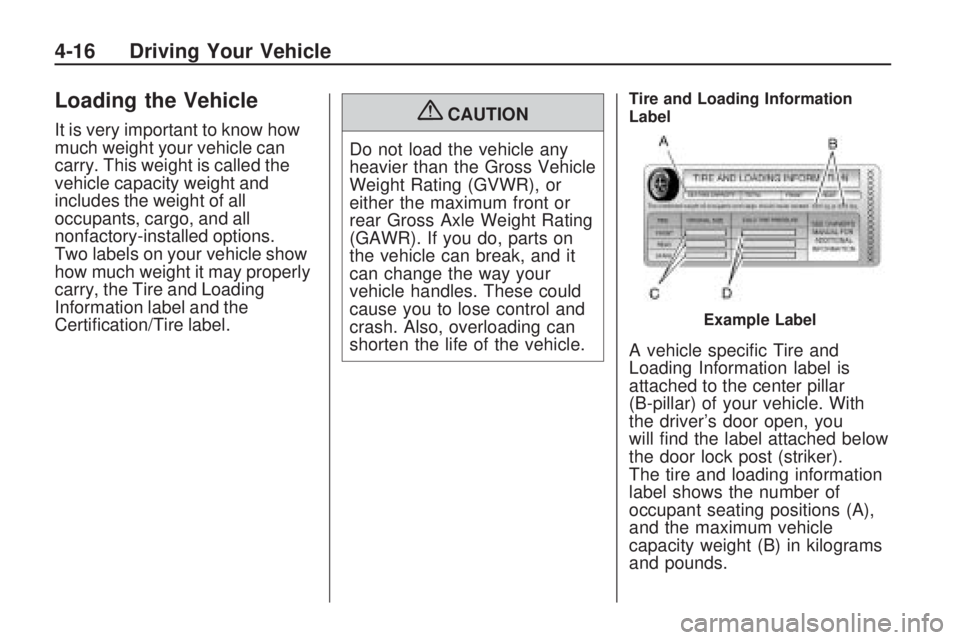
A vehicle specic Tire and
Loading Information label is
attached to the center pillar
(B-pillar) of your vehicle. With
the driver’s door open, you
will nd the label attached below
the door lock post (striker).
The tire and loading information
label shows the number of
occupant seating positions (A),
and the maximum vehicle
capacity weight (B) in kilograms
and pounds.
Example Label
4-16 Driving Your Vehicle
Page 283 of 420
Filling the Tank
{CAUTION
Fuel vapor burns violently and a
fuel re can cause bad injuries.
To help avoid injuries to you and
others, read and follow all the
instructions on the pump island.
Turn off the engine when you are
refueling. Do not smoke if you are
near fuel or refueling the vehicle.
Do not use cellular phones. Keep
sparks, ames, and smoking
materials away from fuel. Do not
leave the fuel pump unattended
when refueling the vehicle. This is
against the law in some places.
Do not re-enter the vehicle while
pumping fuel. Keep children away
from the fuel pump; never let
children pump fuel.
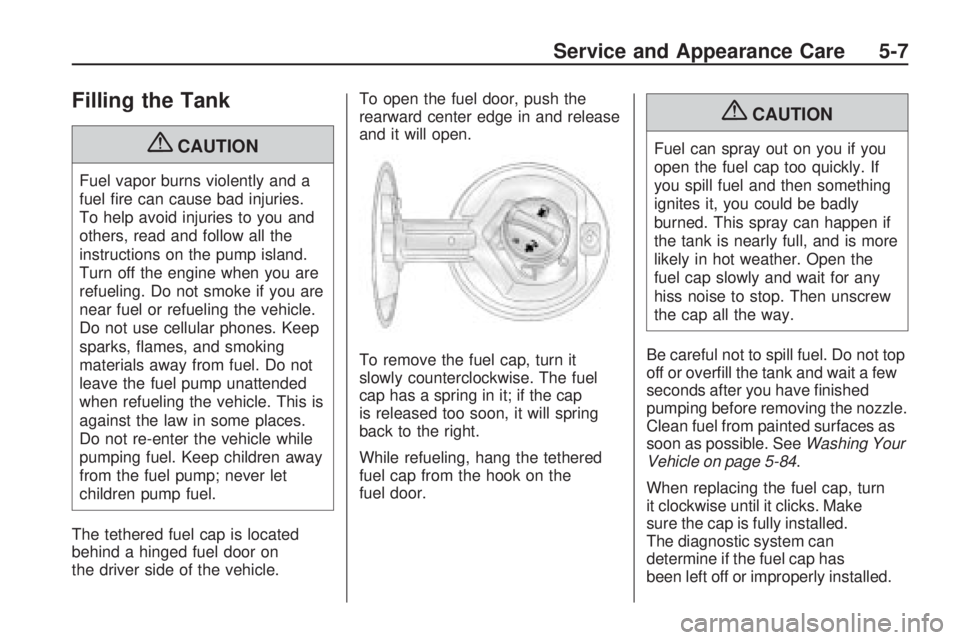
The tethered fuel cap is located
behind a hinged fuel door on
the driver side of the vehicle.To open the fuel door, push the
rearward center edge in and release
and it will open.
To remove the fuel cap, turn it
slowly counterclockwise. The fuel
cap has a spring in it; if the cap
is released too soon, it will spring
back to the right.
While refueling, hang the tethered
fuel cap from the hook on the
fuel door.
{CAUTION
Fuel can spray out on you if you
open the fuel cap too quickly. If
you spill fuel and then something
ignites it, you could be badly
burned. This spray can happen if
the tank is nearly full, and is more
likely in hot weather. Open the
fuel cap slowly and wait for any
hiss noise to stop. Then unscrew
the cap all the way.
Be careful not to spill fuel. Do not top
off or overll the tank and wait a few
seconds after you have nished
pumping before removing the nozzle.
Clean fuel from painted surfaces as
soon as possible. SeeWashing Your
Vehicle on page 5-84.
When replacing the fuel cap, turn
it clockwise until it clicks. Make
sure the cap is fully installed.
The diagnostic system can
determine if the fuel cap has
been left off or improperly installed.
Service and Appearance Care 5-7
Page 338 of 420
When using the tire sealant and
compressor kit during cold
temperatures, warm the kit in a
heated environment for 5 minutes.
This will help to inate the tire faster.
Always do a safety check rst.
SeeIf a Tire Goes Flat on
page 5-55. Do not remove any
objects that have penetrated the tire.
1. Remove the tire sealant and
compressor kit from its storage
location. SeeTire Sealant
and Compressor Kit Storage
on page 5-68.
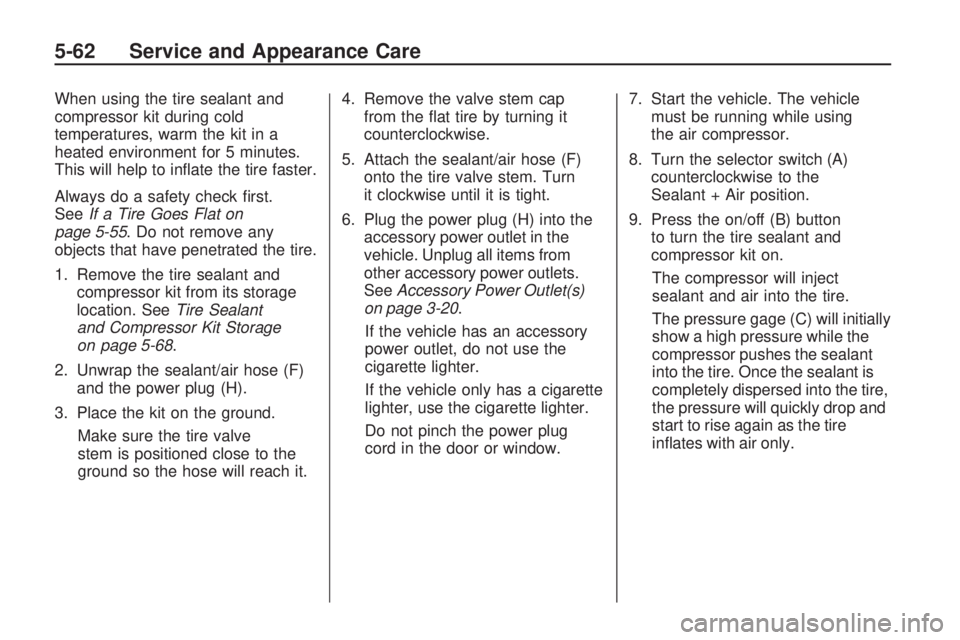
2. Unwrap the sealant/air hose (F)
and the power plug (H).
3. Place the kit on the ground.
Make sure the tire valve
stem is positioned close to the
ground so the hose will reach it.4. Remove the valve stem cap
from the at tire by turning it
counterclockwise.
5. Attach the sealant/air hose (F)
onto the tire valve stem. Turn
it clockwise until it is tight.
6. Plug the power plug (H) into the
accessory power outlet in the
vehicle. Unplug all items from
other accessory power outlets.
SeeAccessory Power Outlet(s)
on page 3-20.
If the vehicle has an accessory
power outlet, do not use the
cigarette lighter.
If the vehicle only has a cigarette
lighter, use the cigarette lighter.
Do not pinch the power plug
cord in the door or window.7. Start the vehicle. The vehicle
must be running while using
the air compressor.
8. Turn the selector switch (A)
counterclockwise to the
Sealant + Air position.
9. Press the on/off (B) button
to turn the tire sealant and
compressor kit on.
The compressor will inject
sealant and air into the tire.
The pressure gage (C) will initially
show a high pressure while the
compressor pushes the sealant
into the tire. Once the sealant is
completely dispersed into the tire,
the pressure will quickly drop and
start to rise again as the tire
inates with air only.
5-62 Service and Appearance Care
Page 343 of 420
Always do a safety check rst. See
If a Tire Goes Flat on page 5-55.
1. Remove the tire sealant and
compressor kit from its storage
location. SeeTire Sealant
and Compressor Kit Storage
on page 5-68.
2. Unwrap the air only hose (G)
and the power plug (H).
3. Place the kit on the ground.
Make sure the tire valve
stem is positioned close to the
ground so the hose will reach it.
4. Remove the tire valve stem cap
from the at tire by turning it
counterclockwise.
5. Attach the air only hose (G) onto
the tire valve stem by turning it
clockwise until it is tight.
6. Plug the power plug (H) into the
accessory power outlet in the
vehicle. Unplug all items from
other accessory power outlets.
SeeAccessory Power Outlet(s)
on page 3-20.If the vehicle has an accessory
power outlet, do not use the
cigarette lighter.
If the vehicle only has a cigarette
lighter, use the cigarette lighter.
Do not pinch the power plug
cord in the door or window.
7. Start the vehicle. The vehicle
must be running while using
the air compressor.
8. Turn the selector switch (A)
clockwise to the Air Only position.
9. Press the on/off (B) button to turn
the compressor on.
The compressor will inate the
tire with air only.
10. Inate the tire to the
recommended ination pressure
using the pressure gage (C).
The recommended ination
pressure can be found on the
Tire and Loading Information
label. SeeInflation - Tire
Pressure on page 5-41.The pressure gage (C) may
read higher than the actual tire
pressure while the compressor
is on. Turn the compressor
off to get an accurate reading.
The compressor may be
turned on/off until the correct
pressure is reached.
If you inate the tire higher than
the recommended pressure you
can adjust the excess pressure
by pressing the pressure
deation button (D), if equipped,
until the proper pressure reading
is reached. This option is only
functional when using the air
only hose (G).
11. Press the on/off button (B) to
turn the tire sealant and
compressor kit off.
Be careful while handling the tire
sealant and compressor kit as it
could be warm after usage.
12. Unplug the power plug (H) from
the accessory power outlet in
the vehicle.
Service and Appearance Care 5-67
Page 346 of 420
A. Tool Bag
B. Wing Bolt
C. Jack
2. Remove the wing bolt (B) by
turning it counterclockwise
3. Push the jack (C) up out of the
holding bracket.
4. Turn the jack on its side, with the
bottom facing toward you.
5. Pull the jack straight out,
bottom rst.The tools you will be using include
the jack (A) and lug wrench (B).
Removing the Spare Tire
The compact spare tire is located
under the vehicle, in front of the rear
bumper. SeeCompact Spare Tire
on page 5-81for more information
about the compact spare.A. Rear Convenience Center
B. Lug Wrench
C. Storage Compartment Cap Hole
D. Hoist Shaft
E. Compact Spare Tire
F. Retainer
G. Hoist Shaft Assembly
1. Open the storage compartment
door of the convenience center
that is nearest the liftgate and
remove the cap on the bottom
of the storage compartment.
5-70 Service and Appearance Care