seat GMC ACADIA 2011 Owner's Manual
[x] Cancel search | Manufacturer: GMC, Model Year: 2011, Model line: ACADIA, Model: GMC ACADIA 2011Pages: 478, PDF Size: 5.52 MB
Page 243 of 478
Black plate (43,1)GMC Acadia/Acadia Denali Owner Manual - 2011
Infotainment System 7-43
How to Change the RSE Video
Screen Settings
The screen display mode (normal,
full, and zoom), screen brightness,
and setup menu language can be
changed from the on screen setup
menu by using the remote control.
To change a setting:
1. Press
z.
2. Use
n,q,p,oandrto
navigate and use the
setup menu.
3. Press
zagain to remove the
setup menu from the screen.
Audio Output
Audio from the DVD player or
auxiliary inputs can be heard
through the following sources:
.Wireless headphones
.Vehicle speakers
.Vehicle‐wired headphone jacks
on the RSA system, if the
vehicle has this feature. The RSE system always
transmits the audio signal to the
wireless headphones, if there is
audio available. See
“Headphones”
earlier in this section for more
information.
The DVD player is capable of
outputting audio to the wired
headphone jacks on the RSA
system, if the vehicle has this
feature. The DVD player can be
selected as an audio source on
the RSA system. See Rear Seat
Audio (RSA) System on page 7‑48
for more information.
When a device is connected to the
A/V jacks, or the radio's auxiliary
input jack, if the vehicle has this
feature, the rear seat passengers
are able to hear audio from the
auxiliary device through the wireless
or wired headphones. The front seat
passengers are able to listen to
playback from this device through
the vehicle speakers by selecting
AUX as the source on the radio.
Video Screen
The video screen is located in the
overhead console. When the video
screen is not in use, push it up into
its locked position.
To use the video screen:
1. Push the release button located on the overhead console.
2. Move the screen to the desired position.
If a DVD is playing and the screen
is raised to its locked position, the
screen remains on; this is normal,
and the DVD continues to play
through the previous audio source.
Press
Pon the remote control or
eject the disc to turn off the screen.
Page 248 of 478
Black plate (48,1)GMC Acadia/Acadia Denali Owner Manual - 2011
7-48 Infotainment System
DVD Distortion
Video distortion can occur when
operating cellular phones, scanners,
CB radios, Global Position Systems
(GPS)*, two-way radios, mobile fax,
or walkie talkies.
It might be necessary to turn off the
DVD player when operating one of
these devices in or near the vehicle.
*Excludes the OnStar
®System.
Cleaning the RSE Overhead
Console
When cleaning the RSE overhead
console surface, use only a clean
cloth dampened with clean water.
Cleaning the Video Screen
Use only a clean cloth dampened
with clean water. Use care when
directly touching or cleaning the
screen, as damage could result.
Rear Seat Audio (RSA)
System
For vehicles with Rear Seat
Audio (RSA), rear seat passengers
can listen to and control any of
the music sources: radio, CDs,
DVDs, or other auxiliary sources.
The rear seat passengers can only
control the music sources the front
seat passengers are not listening to
(except on some radios where dual
control is allowed). For example,
rear seat passengers can control
a CD and listen to it through the
headphones, while the driver
listens to the radio through the
front speakers. The rear seat
passengers have control of the
volume for each set of headphones.The RSA functions operate even
when the main radio is off. The front
audio system displaysXwhen the
RSA is on, and disappears from the
display when it is off.
Audio can be heard through wired
headphones (not included) plugged
into the jacks on the RSA. If the
vehicle has this feature, audio can
also be heard on Channel 2 of the
wireless headphones.
The audio system mutes the rear
speakers when the RSA audio is
active through the headphones.
To listen to an iPod or portable
audio device through the RSA,
attach the iPod or portable audio
device to the front auxiliary input
(if available), located on the front
audio system. Turn the iPod on,
then choose the front auxiliary input
with the RSA SRCE button.
Page 249 of 478
Black plate (49,1)GMC Acadia/Acadia Denali Owner Manual - 2011
Infotainment System 7-49
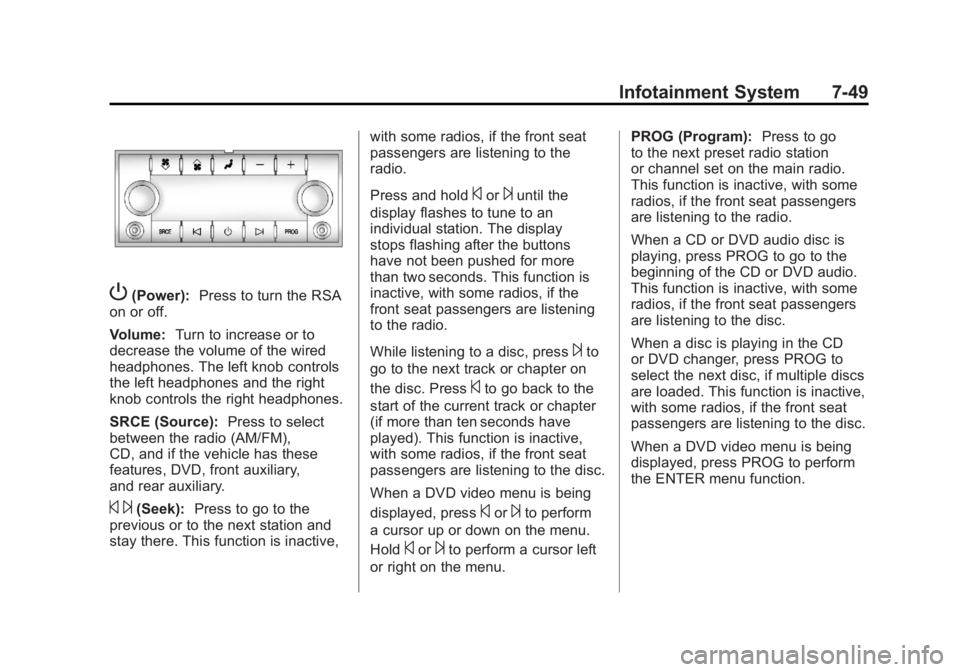
P(Power):Press to turn the RSA
on or off.
Volume: Turn to increase or to
decrease the volume of the wired
headphones. The left knob controls
the left headphones and the right
knob controls the right headphones.
SRCE (Source): Press to select
between the radio (AM/FM),
CD, and if the vehicle has these
features, DVD, front auxiliary,
and rear auxiliary.
© ¨(Seek): Press to go to the
previous or to the next station and
stay there. This function is inactive, with some radios, if the front seat
passengers are listening to the
radio.
Press and hold
©or¨until the
display flashes to tune to an
individual station. The display
stops flashing after the buttons
have not been pushed for more
than two seconds. This function is
inactive, with some radios, if the
front seat passengers are listening
to the radio.
While listening to a disc, press
¨to
go to the next track or chapter on
the disc. Press
©to go back to the
start of the current track or chapter
(if more than ten seconds have
played). This function is inactive,
with some radios, if the front seat
passengers are listening to the disc.
When a DVD video menu is being
displayed, press
©or¨to perform
a cursor up or down on the menu.
Hold
©or¨to perform a cursor left
or right on the menu. PROG (Program):
Press to go
to the next preset radio station
or channel set on the main radio.
This function is inactive, with some
radios, if the front seat passengers
are listening to the radio.
When a CD or DVD audio disc is
playing, press PROG to go to the
beginning of the CD or DVD audio.
This function is inactive, with some
radios, if the front seat passengers
are listening to the disc.
When a disc is playing in the CD
or DVD changer, press PROG to
select the next disc, if multiple discs
are loaded. This function is inactive,
with some radios, if the front seat
passengers are listening to the disc.
When a DVD video menu is being
displayed, press PROG to perform
the ENTER menu function.
Page 259 of 478
Black plate (1,1)GMC Acadia/Acadia Denali Owner Manual - 2011
Climate Controls 8-1
Climate Controls
Climate Control Systems
Climate Control Systems . . . . . . 8-1
Dual Automatic Climate ControlSystem . . . . . . . . . . . . . . . . . . . . . . 8-4
Rear Climate Control System (Rear Climate
Control Only) . . . . . . . . . . . . . . . 8-10
Rear Climate Control System (Rear Climate with
Rear Seat Audio) . . . . . . . . . . . 8-11
Air Vents
Air Vents . . . . . . . . . . . . . . . . . . . . . 8-12
Maintenance
Passenger Compartment AirFilter . . . . . . . . . . . . . . . . . . . . . . . 8-13
Climate Control Systems
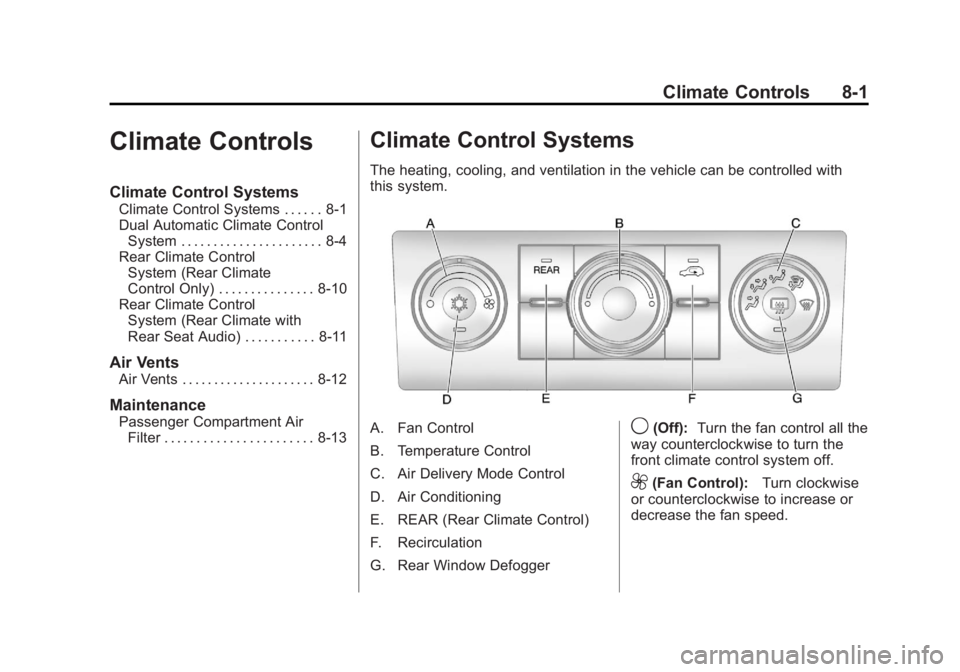
The heating, cooling, and ventilation in the vehicle can be controlled with
this system.
A. Fan Control
B. Temperature Control
C. Air Delivery Mode Control
D. Air Conditioning
E. REAR (Rear Climate Control)
F. Recirculation
G. Rear Window Defogger9(Off): Turn the fan control all the
way counterclockwise to turn the
front climate control system off.
9(Fan Control): Turn clockwise
or counterclockwise to increase or
decrease the fan speed.
Page 261 of 478
Black plate (3,1)GMC Acadia/Acadia Denali Owner Manual - 2011
Climate Controls 8-3
For quicker cool down on hot days:
1. Open the windows to let hot airescape.
2. Select
Hmode.
3. Select
#.
4. Select the coolest temperature.
5. Select the highest fan speed.
6. Close the windows after the hot air has escaped.
7. Once the vehicle's interior temperature is below the outside
temperature, select
@mode
for faster cooling.
Using recirculation for long periods
of time could cause the air inside
of the vehicle to become too dry. To
prevent this from happening, after
the inside of the vehicle has cooled,
turn the recirculation mode off.
The air conditioning system
removes moisture from the air,
so water might drip under the
vehicle while idling or after turning
off the engine. This is normal.
@(Recirculation): Press to turn
the recirculation mode on or off.
An indicator light comes on when
recirculation is on. When the engine
is turned off, the recirculation mode
automatically turns off and must
be re‐selected when the engine
is turned on again.
This mode recirculates and helps
to quickly cool the air inside the
vehicle. It can be used to prevent
outside air and odors from entering
the vehicle.
The recirculation mode cannot be
used with floor, defrost, or defogging
modes. If recirculation is selected in
these modes, the indicator flashes
three times and turns off. The air
conditioning also comes on when
this mode is activated unless the
outside air temperature is less than
4°C (40°F). While in recirculation
mode the windows can fog when
the weather is cold and damp.
To clear the fog, select either the
defog or defrost mode and increase
the fan speed. REAR (Rear Climate Control):
Press to turn the rear heating
and air conditioning on or off.
See
Rear Climate Control System
(Rear Climate Control Only) on
page 8‑10 orRear Climate Control
System (Rear Climate with Rear
Seat Audio) on page 8‑11.
Rear Window Defogger
The rear window defogger uses a
warming grid to remove fog from
the rear window.
<(Rear Window Defogger):
Press to turn the rear window
defogger on or off. The rear
window defogger stays on
for about 10 minutes, before
automatically turning off.
The defogger will also turn off
when the engine is turned off.
Do not drive the vehicle until all the
windows are clear.
Page 266 of 478
Black plate (8,1)GMC Acadia/Acadia Denali Owner Manual - 2011
8-8 Climate Controls
The air conditioning system
removes moisture from the air, so
water might drip under the vehicle
while idling or after turning off the
engine. This is normal.
@(Recirculation):Press to turn
the recirculation mode on or off.
An indicator light comes on when
recirculation is on. When the engine
is turned off, the recirculation mode
automatically turns off and must
be re‐selected when the engine is
turned on again.
This mode recirculates and helps
to quickly cool the air inside the
vehicle. It can be used to prevent
outside air and odors from entering
the vehicle. The recirculation mode cannot be
used with floor, defog, or defrosting
modes. If recirculation is selected in
these modes, the indicator flashes
three times and turns off. The air
conditioning compressor also comes
on when this mode is activated.
While in recirculation mode the
windows can fog when the weather
is cold and damp. To clear the fog,
select either the defog or defrost
mode and increase the fan speed.
REAR:
Press to turn the rear
heating and air conditioning on
or off. See Rear Climate Control
System (Rear Climate Control Only)
on page 8‑10 orRear Climate
Control System (Rear Climate with
Rear Seat Audio) on page 8‑11.
Rear Window Defogger
The rear window defogger uses a
warming grid to remove fog from the
rear window.
<(Rear Window Defogger):
Press to turn the rear window
defogger on or off. The rear
window defogger stays on for
about 10 minutes, before turning
off. The defogger also turns off
when the engine is turned off.
Do not drive the vehicle until
all the windows are clear.
For vehicles with heated outside
rearview mirrors, fog or frost is
cleared from the surface of the
mirror when the rear window
defog button is pressed.
Notice: Do not use a razor blade
or sharp object to clear the inside
rear window. Do not adhere
anything to the defogger grid
lines in the rear glass. These
actions may damage the rear
defogger. Repairs would not be
covered by your warranty.
Page 268 of 478
Black plate (10,1)GMC Acadia/Acadia Denali Owner Manual - 2011
8-10 Climate Controls
Rear Climate Control System (Rear Climate
Control Only)
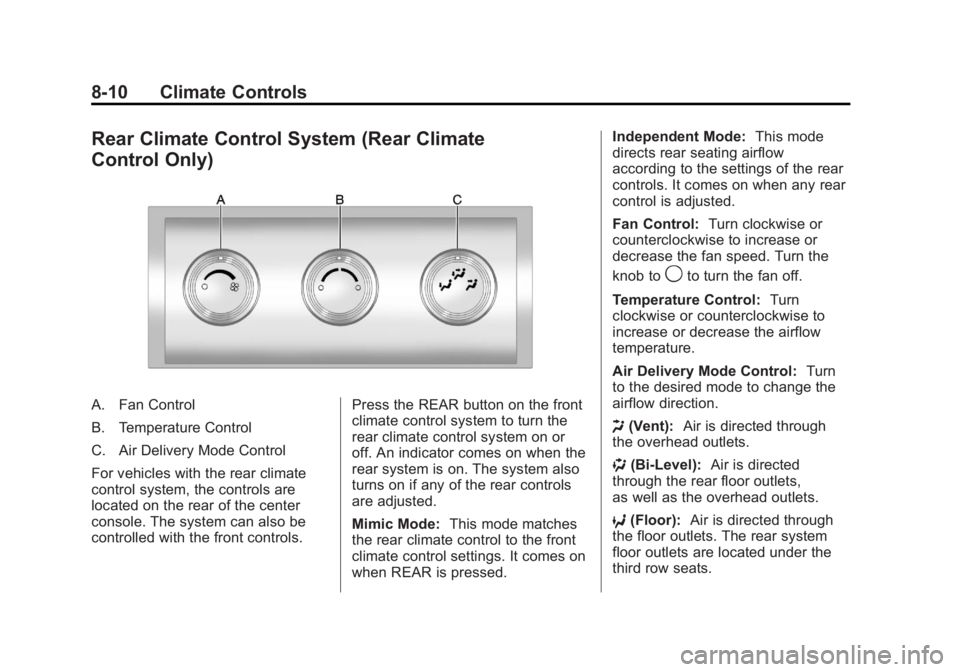
A. Fan Control
B. Temperature Control
C. Air Delivery Mode Control
For vehicles with the rear climate
control system, the controls are
located on the rear of the center
console. The system can also be
controlled with the front controls.Press the REAR button on the front
climate control system to turn the
rear climate control system on or
off. An indicator comes on when the
rear system is on. The system also
turns on if any of the rear controls
are adjusted.
Mimic Mode:
This mode matches
the rear climate control to the front
climate control settings. It comes on
when REAR is pressed. Independent Mode:
This mode
directs rear seating airflow
according to the settings of the rear
controls. It comes on when any rear
control is adjusted.
Fan Control: Turn clockwise or
counterclockwise to increase or
decrease the fan speed. Turn the
knob to
9to turn the fan off.
Temperature Control: Turn
clockwise or counterclockwise to
increase or decrease the airflow
temperature.
Air Delivery Mode Control: Turn
to the desired mode to change the
airflow direction.
H (Vent): Air is directed through
the overhead outlets.
) (Bi-Level): Air is directed
through the rear floor outlets,
as well as the overhead outlets.
6 (Floor): Air is directed through
the floor outlets. The rear system
floor outlets are located under the
third row seats.
Page 269 of 478
Black plate (11,1)GMC Acadia/Acadia Denali Owner Manual - 2011
Climate Controls 8-11
Rear Climate Control System (Rear Climate with Rear
Seat Audio)
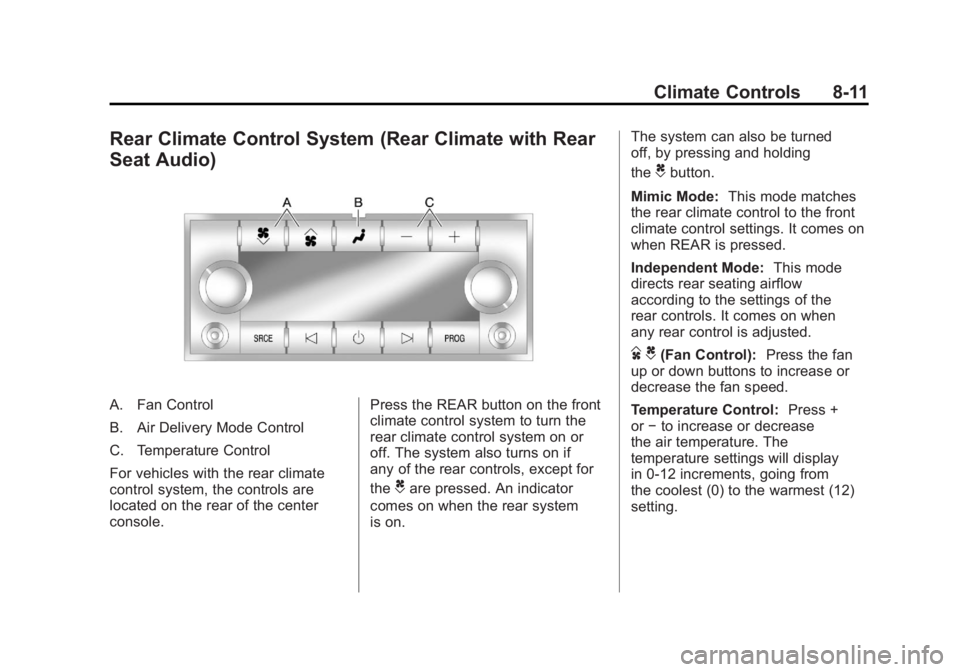
A. Fan Control
B. Air Delivery Mode Control
C. Temperature Control
For vehicles with the rear climate
control system, the controls are
located on the rear of the center
console.Press the REAR button on the front
climate control system to turn the
rear climate control system on or
off. The system also turns on if
any of the rear controls, except for
the
Care pressed. An indicator
comes on when the rear system
is on. The system can also be turned
off, by pressing and holding
the
Cbutton.
Mimic Mode: This mode matches
the rear climate control to the front
climate control settings. It comes on
when REAR is pressed.
Independent Mode: This mode
directs rear seating airflow
according to the settings of the
rear controls. It comes on when
any rear control is adjusted.
D C(Fan Control): Press the fan
up or down buttons to increase or
decrease the fan speed.
Temperature Control: Press +
or −to increase or decrease
the air temperature. The
temperature settings will display
in 0‐12 increments, going from
the coolest (0) to the warmest (12)
setting.
Page 270 of 478
Black plate (12,1)GMC Acadia/Acadia Denali Owner Manual - 2011
8-12 Climate Controls
N(Air Delivery Mode Control):
Press to manually change the
direction of the airflow. Repeatedly
press the button until the desired
mode appears on the display.
H(Vent): Air is directed through
the overhead outlets.
)(Bi-Level): Air is directed
through the rear floor outlets, as
well as the overhead outlets.
6(Floor): Air is directed through
the floor outlets. The rear system
floor outlets are located under the
third row seats.
Air Vents
Use the slider switch in the center of
the outlet, to change the direction
of the air flow. Use the thumbwheel
near the outlet to control the amount
of air flow or to shut off the airflow.
Keep all outlets open whenever
possible for best system
performance.
Operation Tips
.Clear away any ice, snow,
or leaves from the air inlets at
the base of the windshield that
can block the flow of air into the
vehicle.
.Use of non-GM approved hood
deflectors can adversely affect
the performance of the system.
.Keep the path under all seats
clear of objects to help circulate
the air inside the vehicle more
effectively.
.If fogging reoccurs while in
vent or bi-level modes with
mild temperature throughout
the vehicle, turn on the air
conditioner to reduce windshield
fogging.
Page 285 of 478
Black plate (13,1)GMC Acadia/Acadia Denali Owner Manual - 2011
Driving and Operating 9-13
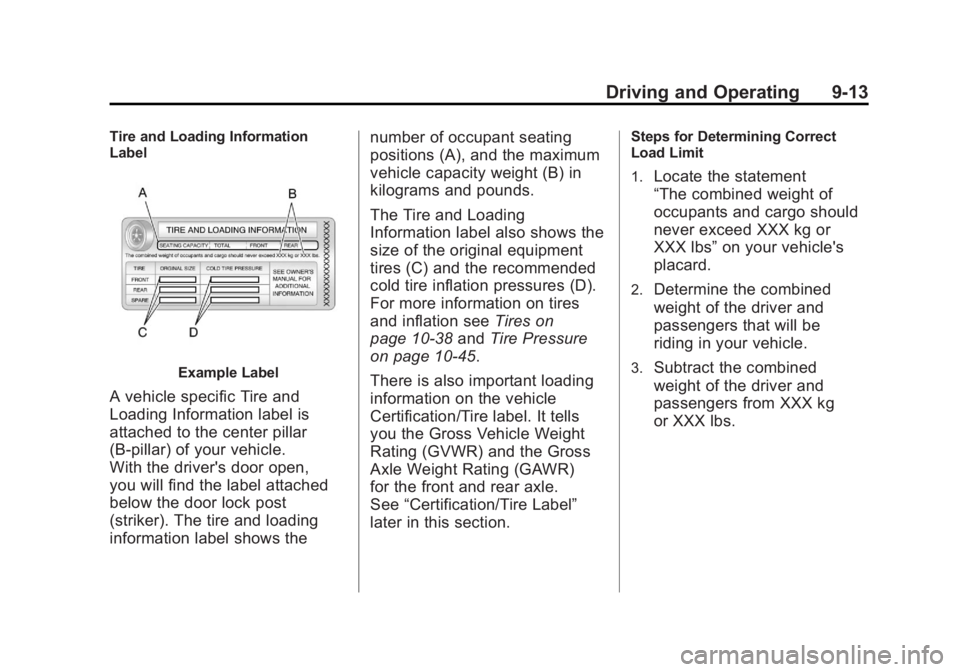
Tire and Loading Information
Label
Example Label
A vehicle specific Tire and
Loading Information label is
attached to the center pillar
(B-pillar) of your vehicle.
With the driver's door open,
you will find the label attached
below the door lock post
(striker). The tire and loading
information label shows thenumber of occupant seating
positions (A), and the maximum
vehicle capacity weight (B) in
kilograms and pounds.
The Tire and Loading
Information label also shows the
size of the original equipment
tires (C) and the recommended
cold tire inflation pressures (D).
For more information on tires
and inflation see
Tires on
page 10‑38 andTire Pressure
on page 10‑45.
There is also important loading
information on the vehicle
Certification/Tire label. It tells
you the Gross Vehicle Weight
Rating (GVWR) and the Gross
Axle Weight Rating (GAWR)
for the front and rear axle.
See “Certification/Tire Label”
later in this section.
Steps for Determining Correct
Load Limit
1.
Locate the statement
“The combined weight of
occupants and cargo should
never exceed XXX kg or
XXX lbs” on your vehicle's
placard.
2.Determine the combined
weight of the driver and
passengers that will be
riding in your vehicle.
3.Subtract the combined
weight of the driver and
passengers from XXX kg
or XXX lbs.