light GMC CANYON 2006 User Guide
[x] Cancel search | Manufacturer: GMC, Model Year: 2006, Model line: CANYON, Model: GMC CANYON 2006Pages: 434, PDF Size: 2.64 MB
Page 85 of 434
Restraint System Check
Checking the Restraint Systems
Now and then, make sure the safety belt reminder light
and all your belts, buckles, latch plates, retractors
and anchorages are working properly. Look for any other
loose or damaged safety belt system parts. If you see
anything that might keep a safety belt system from doing
its job, have it repaired.
Torn or frayed safety belts may not protect you in a
crash. They can rip apart under impact forces. If a belt
is torn or frayed, get a new one right away.
Also look for any opened or broken airbag covers, and
have them repaired or replaced. (The airbag system
does not need regular maintenance.)Notice:If you damage the covering for the driver’s
or the right front passenger’s airbag, or the side
impact airbag covering (if equipped) on the ceiling
near the side windows, the airbag may not work
properly. You may have to replace the airbag
module in the steering wheel, both the airbag
module and the instrument panel for the right front
passenger’s airbag, or side impact airbag module
and ceiling covering for roof-mounted side impact
airbags (if equipped.) Do not open or break the
airbag coverings.
1-79
Page 86 of 434
Replacing Restraint System Parts
After a Crash
{CAUTION:
A crash can damage the restraint systems in
your vehicle. A damaged restraint system may
not properly protect the person using it,
resulting in serious injury or even death in a
crash. To help make sure your restraint
systems are working properly after a crash,
have them inspected and any necessary
replacements made as soon as possible.
If you have had a crash, do you need new belts or
LATCH system parts?
After a very minor collision, nothing may be necessary.
But if the belts were stretched, as they would be if
worn during a more severe crash, then you need
new parts.
If the LATCH system was being used during a more
severe crash, you may need new LATCH system parts.If belts are cut or damaged, replace them. Collision
damage also may mean you will need to have LATCH
system, safety belt or seat parts repaired or replaced.
New parts and repairs may be necessary even if the belt
or LATCH system was not being used at the time of
the collision.
If an airbag inates, you will need to replace airbag
system parts. See the part on the airbag system earlier
in this section.
If the frontal airbags inate, you will also need to
replace the driver’s and right front passenger’s safety
belt retractor assembly. Be sure to do so. Then the new
retractor assembly will be there to help protect you in
a collision.
After a crash you may need to replace the driver and
front passenger’s safety belt retractor assemblies, even
if the frontal airbags have not deployed. The driver
and front passenger’s safety belt retractor assemblies
contain the safety belt pretensioners. Have your
safety belt pretensioners checked if your vehicle has
been in a collision, or if your airbag readiness light stays
on after you start your vehicle or while you are driving.
SeeAirbag Readiness Light on page 3-26.
1-80
Page 96 of 434
Removing the Tailgate
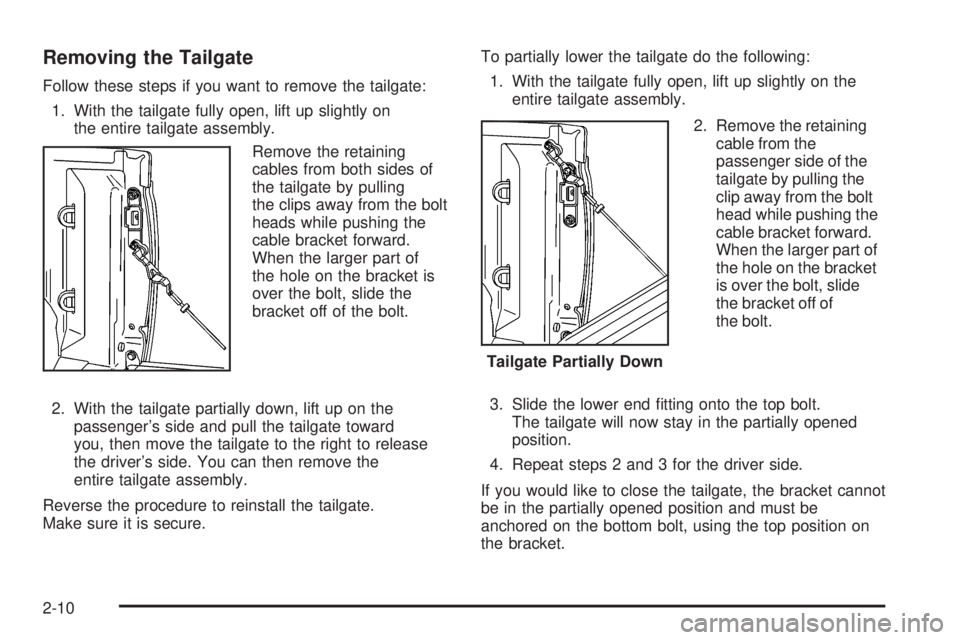
Follow these steps if you want to remove the tailgate:
1. With the tailgate fully open, lift up slightly on
the entire tailgate assembly.
Remove the retaining
cables from both sides of
the tailgate by pulling
the clips away from the bolt
heads while pushing the
cable bracket forward.
When the larger part of
the hole on the bracket is
over the bolt, slide the
bracket off of the bolt.
2. With the tailgate partially down, lift up on the
passenger’s side and pull the tailgate toward
you, then move the tailgate to the right to release
the driver’s side. You can then remove the
entire tailgate assembly.
Reverse the procedure to reinstall the tailgate.
Make sure it is secure.To partially lower the tailgate do the following:
1. With the tailgate fully open, lift up slightly on the
entire tailgate assembly.
2. Remove the retaining
cable from the
passenger side of the
tailgate by pulling the
clip away from the bolt
head while pushing the
cable bracket forward.
When the larger part of
the hole on the bracket
is over the bolt, slide
the bracket off of
the bolt.
3. Slide the lower end tting onto the top bolt.
The tailgate will now stay in the partially opened
position.
4. Repeat steps 2 and 3 for the driver side.
If you would like to close the tailgate, the bracket cannot
be in the partially opened position and must be
anchored on the bottom bolt, using the top position on
the bracket.
Tailgate Partially Down
2-10
Page 99 of 434
Sliding Rear Window
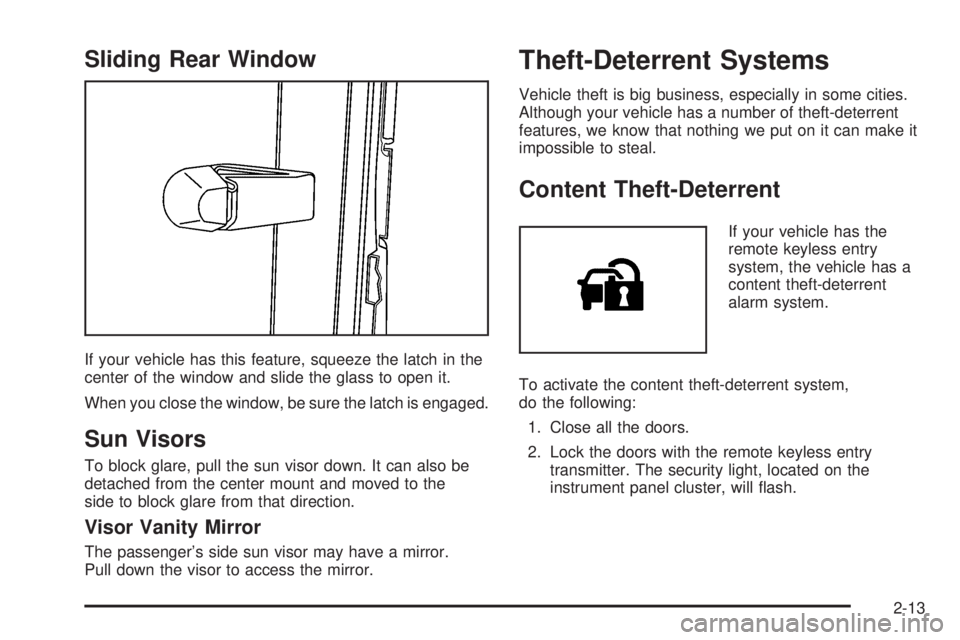
If your vehicle has this feature, squeeze the latch in the
center of the window and slide the glass to open it.
When you close the window, be sure the latch is engaged.
Sun Visors
To block glare, pull the sun visor down. It can also be
detached from the center mount and moved to the
side to block glare from that direction.
Visor Vanity Mirror
The passenger’s side sun visor may have a mirror.
Pull down the visor to access the mirror.
Theft-Deterrent Systems
Vehicle theft is big business, especially in some cities.
Although your vehicle has a number of theft-deterrent
features, we know that nothing we put on it can make it
impossible to steal.
Content Theft-Deterrent
If your vehicle has the
remote keyless entry
system, the vehicle has a
content theft-deterrent
alarm system.
To activate the content theft-deterrent system,
do the following:
1. Close all the doors.
2. Lock the doors with the remote keyless entry
transmitter. The security light, located on the
instrument panel cluster, will ash.
2-13
Page 100 of 434
If the lock button on the remote keyless entry transmitter
is pressed, but a door is open, the horn will chirp
six times. Press the lock button again, within
three seconds, and the doors will lock. Close the
open door and the system will be activated.
If a locked door is not opened using the remote keyless
entry transmitter, or by OnStar
®, the pre-alarm will go
off. If the engine is not started or unlock not pressed
within 10 seconds, the front turn signal lamps will
ash for two minutes, and the horn will sound for
two minutes, then will turn off to save the battery power.
Remember, the theft-deterrent system will not activate
if you lock the doors with a key, the manual door lock, or
power door lock switch. The system can only be
activated using the remote keyless entry transmitter, or
by OnStar
®. SeeOnStar®System on page 2-38for
additional information. You should also remember that
you can start your vehicle with the correct ignition key if
the alarm has been set off.
Here is how to avoid setting off the alarm by accident:
If you do not want to activate the theft-deterrent
system, the vehicle should be locked with the
door key after the doors are closed.
Always unlock a door with the remote keyless entry
transmitter. Unlocking a door any other way will set
off the alarm.If you set off the alarm by accident, you can turn off the
alarm by pressing unlock on the remote keyless
entry transmitter. The alarm will not stop if you try to
unlock a door any other way.
Testing the Alarm
The alarm can be tested by following these steps:
1. From inside the vehicle, activate the system by
locking the doors with the remote keyless entry
transmitter.
2. Unlock the door with the manual door lock and
open the door. This should set off the alarm.
3. To turn the alarm off, press the unlock button on
the remote keyless entry transmitter or start the
engine.
If the alarm does not sound when it should but the lights
ash, check to see if the horn works. The horn fuse
may be blown. To replace the fuse, seeFuses
and Circuit Breakers on page 5-102.
If the alarm does not sound or the front turn signal
lamps do not ash, see your dealer for service.
2-14
Page 101 of 434
Passlock®
Your vehicle has the Passlock®theft-deterrent system.
Passlock
®is a passive theft-deterrent system.
Passlock®enables fuel if the ignition lock cylinder is
turned with a valid key. If an incorrect key is used or the
ignition lock cylinder is tampered with, the fuel system
is disabled and the vehicle will not start.
During normal operation, the security light will turn off
approximately ve seconds after the engine is started.
SeeSecurity Light on page 3-37.
If the engine stalls and the security light ashes, wait
about 10 minutes until the light stops ashing before
trying to restart the engine. Remember to release
the key from START as soon as the engine starts.
If the engine does not start after three tries, the vehicle
needs service.
If the engine is running and the security light comes on,
you will be able to restart the engine if you turn the
engine off. However, your Passlock
®system is
not working properly and must be serviced by your
dealer. Your vehicle is not protected by Passlock
®at this
time. See your dealer for service.
In an emergency, call the Roadside Assistance Center.
SeeRoadside Assistance Program on page 7-6.
Starting and Operating Your
Vehicle
New Vehicle Break-In
Notice:Your vehicle does not need an elaborate
break-in. But it will perform better in the long run if
you follow these guidelines:
Keep your speed at 55 mph (88 km/h) or less for
the rst 500 miles (805 km).
Do not drive at any one constant speed, fast or
slow, for the rst 500 miles (805 km). Do not
make full-throttle starts. Avoid downshifting to
brake, or slow, the vehicle.
Avoid making hard stops for the rst 200 miles
(322 km) or so. During this time your new
brake linings are not yet broken in. Hard stops
with new linings can mean premature wear
and earlier replacement. Follow this breaking-in
guideline every time you get new brake
linings.
Do not tow a trailer during break-in. SeeTowing
a Trailer on page 4-56for the trailer towing
capabilities of your vehicle and more
information.
Following break-in, engine speed and load can be
gradually increased.
2-15
Page 102 of 434
Ignition Positions
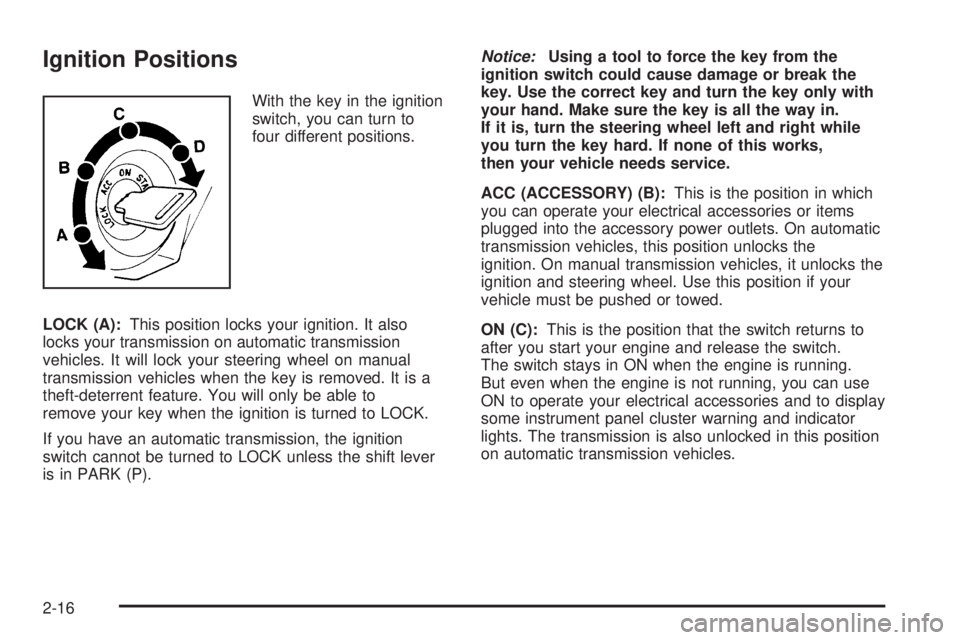
With the key in the ignition
switch, you can turn to
four different positions.
LOCK (A):This position locks your ignition. It also
locks your transmission on automatic transmission
vehicles. It will lock your steering wheel on manual
transmission vehicles when the key is removed. It is a
theft-deterrent feature. You will only be able to
remove your key when the ignition is turned to LOCK.
If you have an automatic transmission, the ignition
switch cannot be turned to LOCK unless the shift lever
is in PARK (P).Notice:Using a tool to force the key from the
ignition switch could cause damage or break the
key. Use the correct key and turn the key only with
your hand. Make sure the key is all the way in.
If it is, turn the steering wheel left and right while
you turn the key hard. If none of this works,
then your vehicle needs service.
ACC (ACCESSORY) (B):This is the position in which
you can operate your electrical accessories or items
plugged into the accessory power outlets. On automatic
transmission vehicles, this position unlocks the
ignition. On manual transmission vehicles, it unlocks the
ignition and steering wheel. Use this position if your
vehicle must be pushed or towed.
ON (C):This is the position that the switch returns to
after you start your engine and release the switch.
The switch stays in ON when the engine is running.
But even when the engine is not running, you can use
ON to operate your electrical accessories and to display
some instrument panel cluster warning and indicator
lights. The transmission is also unlocked in this position
on automatic transmission vehicles.
2-16
Page 109 of 434
THIRD, FOURTH AND FIFTH (3, 4 and 5):Shift into
THIRD (3), FOURTH (4) and FIFTH (5) the same
way you do for SECOND (2). Slowly let up on the clutch
pedal as you press the accelerator pedal.
To stop, let up on the accelerator pedal and press the
brake pedal. Just before the vehicle stops, press
the clutch pedal and the brake pedal, and shift to
NEUTRAL.
NEUTRAL:Use this position when you start or idle
your engine.
REVERSE (R):To back up, press the clutch pedal. After
the vehicle stops, shift into REVERSE (R). Slowly let up
on the clutch pedal as you press the accelerator pedal.
If it is hard to shift, let the shift lever return to NEUTRAL
and release the clutch pedal. Then press the clutch again
and shift into REVERSE (R). Do not attempt to shift into
the fth gear position prior to shifting into REVERSE (R).
Your transmission has a lock out feature which prevents
a fth gear to reverse gear shift.
Notice:Shifting to REVERSE (R) while your vehicle
is moving forward could damage the transmission.
The repairs would not be covered by your warranty.
Shift to REVERSE (R) only after your vehicle is
stopped.
Use REVERSE (R), along with the parking brake,
for parking your vehicle.Up-Shift Light
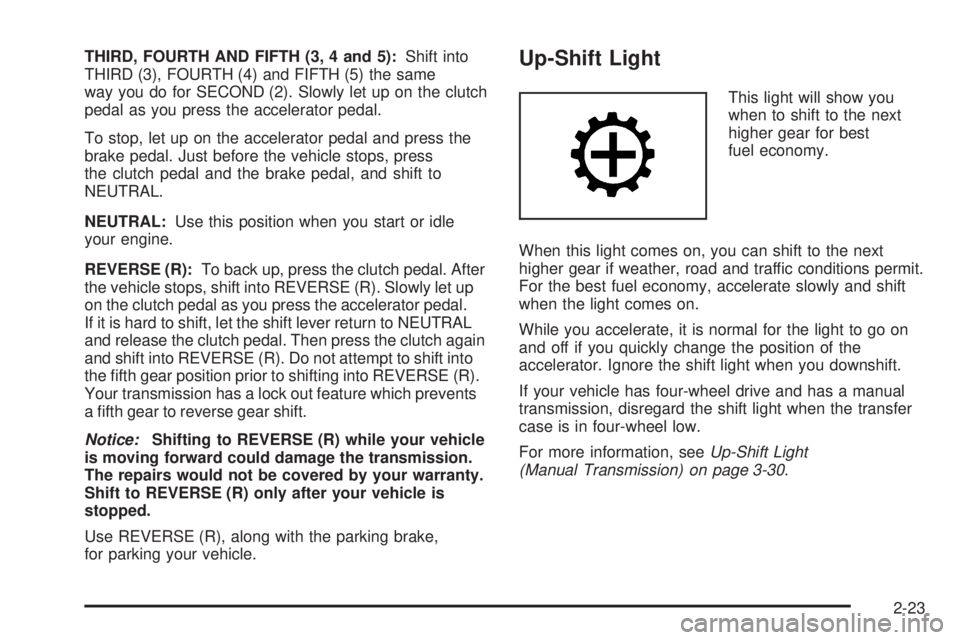
This light will show you
when to shift to the next
higher gear for best
fuel economy.
When this light comes on, you can shift to the next
higher gear if weather, road and traffic conditions permit.
For the best fuel economy, accelerate slowly and shift
when the light comes on.
While you accelerate, it is normal for the light to go on
and off if you quickly change the position of the
accelerator. Ignore the shift light when you downshift.
If your vehicle has four-wheel drive and has a manual
transmission, disregard the shift light when the transfer
case is in four-wheel low.
For more information, seeUp-Shift Light
(Manual Transmission) on page 3-30.
2-23
Page 111 of 434
Use these buttons to shift into and out of four-wheel
drive. You can choose from the following:
2
m(Two-Wheel High):This setting is for driving in
most street and highway situations. Your front axle is not
engaged in two-wheel drive.
{CAUTION:
Shifting the transfer case to NEUTRAL can
cause your vehicle to roll even if the
transmission is in PARK (P), or if you have a
manual transmission, even if you are in gear.
You or someone else could be seriously
injured. Be sure to set the parking brake
before placing the transfer case in NEUTRAL.
SeeParking Brake on page 2-28.N (NEUTRAL):Shift the vehicle’s transfer case to
NEUTRAL only when towing your vehicle.
4
m(Four-Wheel High):This setting engages your
front axle to help drive your vehicle. Use four-wheel high
when you need extra traction, such as on snowy or
icy roads, or in most off-road situations.
4
n(Four-Wheel Low):This setting also engages
your front axle to give you extra traction. It sends
the maximum power to all four wheels. You might
choose four-wheel low if you were driving off-road in
sand, mud, or deep snow and while climbing or
descending steep hills.
Indicator lights in the buttons show you which setting
you are in. The indicator lights will come on briey when
you turn on the ignition and one will stay on the
selected setting. If the lights do not come on, you should
take your vehicle in for service. An indicator light will
ash while shifting. It will stay on when the shift is
completed.
If for some reason the transfer case does not shift,
it will return to the last chosen setting.
2-25
Page 112 of 434
Shifting from Two-Wheel High to
Four-Wheel High
Press and release the Four-Wheel High button.
This can be done at any speed, and the front axle
will lock automatically.
Shifting from Four-Wheel High to
Two-Wheel High
Press and release the Two-Wheel High button. This can
be done at any speed, and the front axle will unlock
automatically.
It is normal to hear and feel your vehicle’s transfer case
shift into Four-Wheel High. If you shift with the vehicle
stopped, the indicator light may still ash slowly. It may be
necessary to shift the transmission momentarily into
REVERSE (R) and DRIVE (D), for an automatic
transmission, or REVERSE (R) and FIRST (1) for a
manual transmission to have the light stop ashing.
Shifting from Two-Wheel High or
Four-Wheel High to Four-Wheel Low
To shift from Two-Wheel High or Four-Wheel High to
Four-Wheel Low, the vehicle must be stopped or moving
less than 3 mph (5 km/h) with the transmission in
NEUTRAL (N) for an automatic transmission or the
clutch pedal engaged for a manual transmission.
The preferred method for shifting into Four-Wheel Low
is to have your vehicle moving 1 to 2 mph
(1.6 to 3.2 km/h).Press and release the Four-Wheel Low button.
You must wait for the Four-Wheel Low indicator light
to stop ashing and stay on before shifting the
transmission into gear or releasing the clutch pedal.
If the Four-Wheel Low button is pressed when your
vehicle is in gear and/or moving faster than 3 mph
(5 km/h), the four-wheel low indicator light will ash for
30 seconds and not complete the shift.
Shifting from Four-Wheel Low to
Two-Wheel High or Four-Wheel High
To shift from Four-Wheel Low to Two-Wheel High or
Four-Wheel High, your vehicle must be stopped
or moving less than 3 mph (5 km/h) with the
transmission in NEUTRAL (N) for an automatic
transmission or the clutch pedal engaged for a manual
transmission. The preferred method for shifting out
of four-wheel low is to have your vehicle moving
1 to 2 mph (1.6 to 3.2 km/h).
Press and release the Four-Wheel High or Two-Wheel
High button. You must wait for the Four-Wheel High
or Two-Wheel High indicator light to stop ashing and
stay on before shifting the transmission into gear or
releasing the clutch pedal.
If the Four-Wheel High or Two-Wheel High button is
pressed when your vehicle is in gear and/or moving
faster than 3 mph (5km/h), the Four-Wheel High or
Two Wheel High indicator light will ash for 30 seconds
but not complete the shift.
2-26