light GMC CANYON 2008 Workshop Manual
[x] Cancel search | Manufacturer: GMC, Model Year: 2008, Model line: CANYON, Model: GMC CANYON 2008Pages: 428, PDF Size: 5.82 MB
Page 168 of 428
Emissions Inspection and Maintenance
Programs
Some state/provincial and local governments have or
might begin programs to inspect the emission control
equipment on your vehicle. Failure to pass this
inspection could prevent you from getting a vehicle
registration.
Here are some things you need to know to help your
vehicle pass an inspection:
Your vehicle will not pass this inspection if the check
engine light is on or not working properly.
Your vehicle will not pass this inspection if the OBD
(on-board diagnostic) system determines that critical
emission control systems have not been completely
diagnosed by the system. The vehicle would be
considered not ready for inspection. This can happen if
you have recently replaced the battery or if the battery
has run down. The diagnostic system is designed to
evaluate critical emission control systems during normal
driving. This can take several days of routine driving.
If you have done this and your vehicle still does not pass
the inspection for lack of OBD system readiness, your
dealer/retailer can prepare the vehicle for inspection.
Oil Pressure Light
{CAUTION:
Do not keep driving if the oil pressure is low.
If you do, your engine can become so hot that
it catches re. You or others could be burned.
Check your oil as soon as possible and have
your vehicle serviced.
Notice:Lack of proper engine oil maintenance may
damage the engine. The repairs would not be covered
by your warranty. Always follow the maintenance
schedule in this manual for changing engine oil.
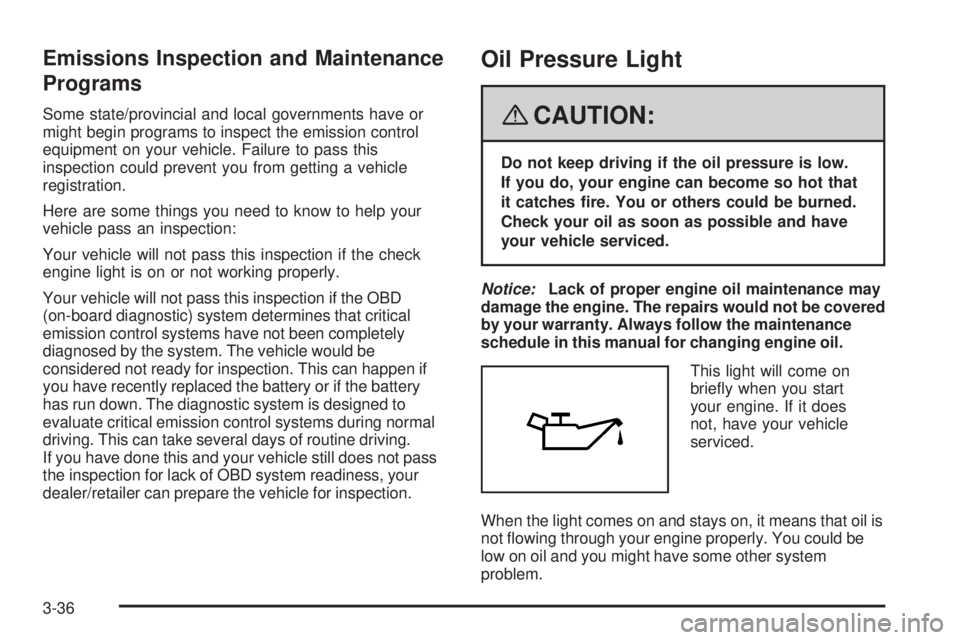
This light will come on
briey when you start
your engine. If it does
not, have your vehicle
serviced.
When the light comes on and stays on, it means that oil is
not owing through your engine properly. You could be
low on oil and you might have some other system
problem.
3-36
Page 169 of 428
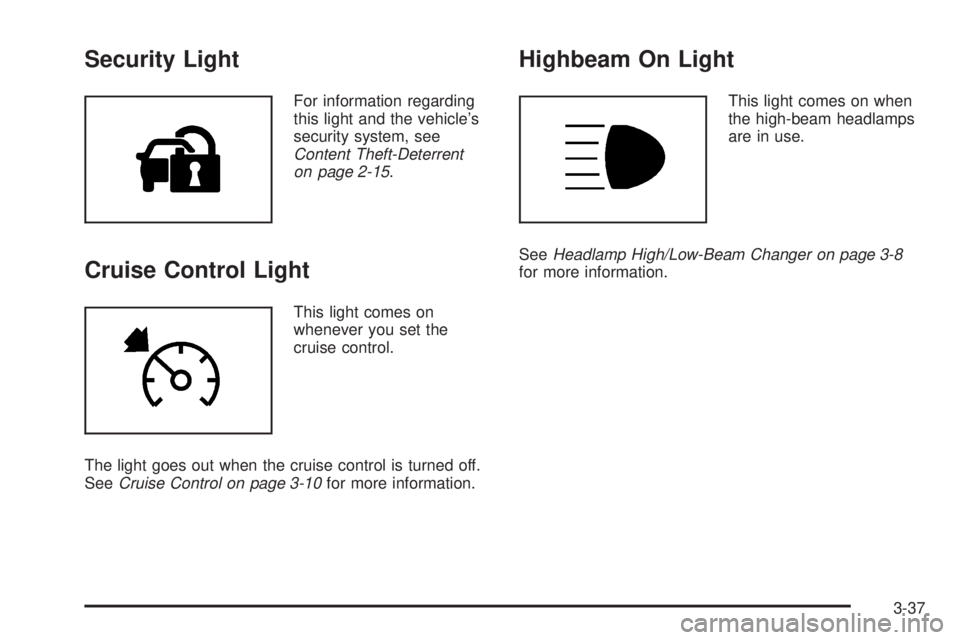
Security Light
For information regarding
this light and the vehicle’s
security system, see
Content Theft-Deterrent
on page 2-15.
Cruise Control Light
This light comes on
whenever you set the
cruise control.
The light goes out when the cruise control is turned off.
SeeCruise Control on page 3-10for more information.
Highbeam On Light
This light comes on when
the high-beam headlamps
are in use.
SeeHeadlamp High/Low-Beam Changer on page 3-8
for more information.
3-37
Page 174 of 428
DIC Warnings and Messages
Messages are displayed on the DIC to notify the
driver that the status of the vehicle has changed
and that some action may be needed by the driver
to correct the condition. Multiple messages may appear
one after another. The messages are displayed for
several seconds each.
Some messages may not require immediate action, but
you should press and release the trip odometer reset
stem to acknowledge that you received the messages
and to clear them from the display. Each message must
be acknowledged individually.
Some messages cannot be cleared from the DIC
display because they are more urgent. These messages
require action before they can be cleared. You should
take any messages that appear on the display seriously
and remember that clearing the messages only makes
the messages disappear, not correct the problem.
The following are the possible messages that can be
displayed and some information about them.
AC (Air Conditioning) OFF
This message displays when the engine coolant
temperature is too high and the air conditioning in your
vehicle needs to be turned off. SeeEngine Overheating
on page 5-29andClimate Control System on page 3-20
for more information. This message displays along with
the ENG HOT message.
ABS (Antilock Brake System) FAULT
This message displays if there is a problem with the
Antilock Brake System (ABS). Check the ABS as soon as
possible and have your vehicle serviced by your dealer/
retailer. SeeBrakes on page 5-38andAntilock Brake
System Warning Light on page 3-32for more information.
Press and release the reset stem to acknowledge the
message and clear it from the display.
BRAKES
This message displays if there is a problem with the
brakes. Check the brakes as soon as possible and have
your vehicle serviced by your dealer/retailer. SeeBrakes
on page 5-38andBrake System Warning Light on
page 3-31for more information. Press and release the
reset stem to acknowledge the message and clear it from
the display.
CHANGE OIL
This message displays when the oil needs to be
changed. Check the oil in your vehicle as soon as
possible and have your vehicle serviced by your dealer/
retailer. SeeEngine Oil on page 5-15andScheduled
Maintenance on page 6-4for more information. Press
and release the reset stem to acknowledge the message
and clear it from the display.
3-42
Page 175 of 428
DOORS
This message displays when one or more of the doors
is ajar. Check all the doors on your vehicle to make
sure they are closed. The message clears from
the display after all of the doors are closed.
ENG (Engine) HOT
This message displays when the engine coolant
temperature is hot. Check the engine coolant
temperature gage. SeeEngine Coolant Temperature
Gage on page 3-33. Have your vehicle serviced by your
dealer/retailer as soon as possible if you suspect the
engine is overheating. SeeEngine Overheating on
page 5-29for more information.
FLUID
This message displays if the brake uid is low. Check
the brake uid as soon as possible and have your
vehicle serviced by your dealer/retailer. SeeBrakes on
page 5-38for more information. Press and release the
reset stem to acknowledge the message and clear it
from the display.
FUEL CAP
This message displays if the vehicle’s fuel cap is either off
or loose. Pull over as soon as possible and check to see
if the fuel cap is secure. You may also see the check
engine light on the instrument panel cluster. If the check
engine light does come on when the fuel cap was loose,
it may take a few driving trips before the light turns off.
SeeMalfunction Indicator Lamp on page 3-34for more
information if the light still remains on. Press and release
the reset stem to acknowledge the message and clear it
from the display.
LOW FUEL
This message displays if the level of fuel in the vehicle
is low. Also check the fuel gage. SeeFuel Gage on
page 3-38for more information. Rell the fuel tank
as soon as possible.
LOW TIRE
This message displays if a low tire pressure is detected in
any of the vehicle’s tires. Press and release the reset
stem to acknowledge the message and clear it from the
display. The message appears at each ignition cycle until
the tires are inated to the correct ination pressure.
SeeTires on page 5-56andInflation - Tire Pressure on
page 5-62for more information on tires and the correct
ination pressures.
3-43
Page 176 of 428
LOW TRAC (Traction)
If your vehicle has the Traction Control System (TCS),
this message displays when a low traction condition
is detected. SeeTraction Control System (TCS)
on page 4-5for more information. Press and release
the reset stem to acknowledge the message and clear
it from the display.
OIL
This message displays when the oil pressure is low.
SeeOil Pressure Light on page 3-36andEngine Oil
on page 5-15for more information.
PARK BRK (Brake)
This message displays when the parking brake is set.
SeeParking Brake on page 2-32andBrake System
Warning Light on page 3-31for more information.
The message clears from the display after the parking
brake is released or by pressing and releasing the
reset stem.
REDUCED POWER
This message displays when the vehicle’s engine power
is reduced. Reduced engine power can affect the
vehicle’s ability to accelerate. If this message is on, but
there is no reduction in performance, proceed to your
destination. The performance may be reduced the next
time the vehicle is driven. The vehicle may be driven at areduced speed while this message is on, but acceleration
and speed may be reduced. Anytime this message stays
on, the vehicle should be taken to your dealer/retailer for
service as soon as possible. Press and release the reset
stem to acknowledge the message and clear it from the
display.
SERV (Service) 4WD
(Four-Wheel Drive)
This message displays when there is a problem with the
transfer case control system. Check the transfer case on
your vehicle and have it serviced by your dealer/retailer.
SeeFour-Wheel Drive on page 2-28for more information
about the transfer case. Press and release the reset stem
to acknowledge the message and clear it from the
display.
SERV (Service) TPM
(Tire Pressure Monitor)
This message displays if a part on the Tire Pressure
Monitor System (TPMS) is not working properly. The tire
pressure light also ashes and then remains on during
the same ignition cycle. SeeTire Pressure Light on
page 3-33. Several conditions may cause this message
to appear. SeeTire Pressure Monitor Operation on
page 5-66for more information. If the warning comes on
and stays on, there may be a problem with the TPMS.
See your dealer/retailer.
3-44
Page 177 of 428
SERV (Service) VEH (Vehicle)
This message displays if your vehicle needs service.
Have your vehicle serviced by your dealer/retailer
as soon as possible.
SERVICE CHARG (Charge) SYS
(System)
This message displays if there is a problem with the
battery charging system. Under certain conditions, the
battery warning light may also turn on in the instrument
panel cluster. SeeCharging System Light on page 3-30.
The battery will not be charging at an optimal rate and
the vehicle will lose the ability to enter the fuel economy
mode. The vehicle is safe to drive, however have the
electrical system checked by your dealer/retailer. Press
and release the reset stem to acknowledge the message
and clear it from the display.
TRAC (Traction) OFF
If your vehicle has the Traction Control System (TCS),
this message displays when the Traction Control
System (TCS) is turned off by pressing the TCS button.
SeeTraction Control System (TCS) on page 4-5for
more information.
TRACTION FAULT
If your vehicle has the Traction Control System (TCS),
this message may display if there is a problem with the
TCS. Check the TCS as soon as possible and have your
vehicle serviced by your dealer/retailer. SeeTraction
Control System (TCS) on page 4-5for more information.
Press and release the reset stem to acknowledge the
message and clear it from the display.
TURN SIGNAL
This message displays when the turn signal is on for
about 0.75 miles (1.2 km) of travel. Press and release
the reset stem to acknowledge the message and clear it
from the display.
3-45
Page 182 of 428
Playing the Radio
PWR (Power):Press to turn the system on and off.
opVOL/VOLUME:Turn to increase or to decrease
the volume.
RCL (Recall) (AM-FM Radio):Press to switch the
display between the radio station frequency, band,
and the time. When the ignition is off, press to display
the time.
DISPL (Display) (Radio with CD):When the ignition is
turned off, press to display the time.
For RDS, press the DISPL knob to change what
displays while using RDS. The display options are
station name, RDS station frequency, PTY (program
type), and the name of the program (if available).
For XM™ (if equipped), press the DISPL knob while
in XM™ mode to retrieve four different categories of
information related to the current song or channel:
Artist, Song Title, Category or PTY, Channel Number/
Channel Name.
To change the default on the display, press the DISPL
knob until you see the desired display, then press and
hold this knob for two seconds. The radio produces
one beep. The selected display is now the default.INFO (Information) (XM™ Satellite Radio Service and
RDS Features) (Radio with Six-Disc CD):When the
ignition is off, press to display the time.
Press the INFO button to display additional text
information related to the current FM-RDS or XM™
station. A choice of additional information such as:
Channel, Song, Artist, and PTY (program type) may
appear. Continue pressing the information button to
highlight the desired label, and the information about
that label displays.
When information is not available, No Info displays.
To change the default on the display, press the INFO
knob until you see the desired display, then press and
hold the knob until a beep sounds. The selected display
becomes the default.
AUTO VOL (Automatic Volume):Automatic volume
automatically adjusts the audio system to make up
for road and wind noise as you drive.
Set the volume at the desired level. Depending on the
radio and displays, press to select MIN, MED, MAX
AUTO VOL, or LOW, MEDIUM, and HIGH. AVOL
displays. Each higher setting allows for more volume
compensation at faster vehicle speeds. Then as you
drive, automatic volume increases the volume, as
necessary, to overcome noise at any speed. The volume
level should always sound the same to you as you drive.
For the Radio with CD, NONE displays if the radio cannot
determine the vehicle speed. To turn automatic volume
off, press until OFF or AUTO VOL OFF displays.
3-50
Page 189 of 428
Radio Messages for XM™ Only
SeeXM Radio Messages on page 3-68later in this
section for further detail.
Playing a CD (Radio with
Single CD Player)
Insert a CD partway into the slot, label side up.
The player pulls it in, and READING displays. The CD
should begin playing. If you want to insert a CD with
the ignition off, rst press the
Z(eject) button or the
DISPL knob.
If the ignition or radio is turned off with a CD in the
player it stays in the player. When the ignition or radio
is turned on, the CD starts to play where it stopped,
if it was the last selected audio source.
When the CD is inserted, the CD symbol displays. As
each new track starts to play, the track number displays.
The CD player can play the smaller 3 inch (8 cm)
single CDs with an adapter ring. Full-size CDs and
the smaller CDs are loaded in the same manner.
Care of Your CDs
If playing a CD-R, the sound quality can be reduced due
to CD-R quality, the method of recording, the quality of
the music that has been recorded, and the way the CD-R
has been handled. Handle them carefully. Store CD-R(s)
in their original cases or other protective cases and away
from direct sunlight and dust. The CD player scans the
bottom surface of the disc. If the surface of a CD is
damaged, such as cracked, broken, or scratched, the
CD does not play properly or not at all. Do not touch the
bottom side of a CD while handling it; this could damage
the surface. Pick up CDs by grasping the outer edges or
the edge of the hole and the outer edge.
If the surface of a CD is soiled, take a soft, lint free
cloth or dampen a clean, soft cloth in a mild, neutral
detergent solution mixed with water, and clean it.
Make sure the wiping process starts from the center
to the edge.
3-57
Page 191 of 428
qSEEKr:Press the left arrow to go to the start of
the current or the previous track. Press the right arrow to
go to the start of the next track. Pressing either arrow for
more than two seconds scans the next tracks, playing
the rst eight seconds of each track until all of the tracks
have been previewed. Press either arrow again to stop
scanning and to play the track.
oTUNEp:Turning this knob fast tracks reverse or
advances through tracks. The track number displays
for each track.
DISPL (Display):Press to see how long the current
track has been playing. ET and the elapsed time of the
track displays. To change the default on the display (track
or elapsed time), press until you see the desired display,
then press and hold for two seconds. The radio produces
one beep. The selected display is now the default.
BAND:Press to listen to the radio when a CD is
playing. The inactive CD remains inside the radio for
future listening.
CD AUX (Auxiliary):Press to play a CD when listening
to the radio. The CD symbol displays when a CD is
loaded.
Z(Eject):Press to eject a CD. Eject can be activated
with either the ignition or radio off. CDs can be loaded
with the ignition and radio off if this button is pressed rst.
Playing a CD(s) (Radio with
Six-Disc CD Player)
LOAD:Press to load CDs into the CD player. This CD
player holds up to six CDs.
To insert one CD, do the following:
1. Turn the ignition on.
2. Press and release the LOAD button.
3. Wait for the indicator light, located to the right of the
slot, to turn green.
4. Load a CD. Insert the CD partway into the slot,
label side up. The player pulls the CD in.
To insert multiple CDs, do the following:
1. Turn the ignition on.
2. Press and hold the LOAD button for two seconds.
A beep sound and the indicator light, located to the
right of the slot, begins to ash and MULTI LOAD #
displays.
3. Once the light stops ashing and turns green,
INSERT CD # displays, load a CD. Insert
the CD partway into the slot, label side up.
The player pulls the CD in.
Once the CD is loaded, the indicator light begins
ashing again. Once the light stops ashing and
turns green, you can load another CD. The CD player
takes up to six CDs. Do not try to load more than six.
3-59
Page 192 of 428
To load more than one CD but less than six, complete
Steps 1 through 3. When nished loading CDs, press the
LOAD button to cancel the loading function. The radio
begins to play the last CD loaded.
If more than one CD has been loaded, a number for
each CD displays.
Playing a Specic Loaded CD
For every CD loaded, a number displays. To play a
specic CD, rst press the CD AUX button (if not already
in CD mode), then press the numbered pushbutton that
corresponds to the CD. A small bar appears under the
CD number that is playing and the track number displays.
CD
Z(Eject):Press to eject CD(s).
To eject the CD that is currently playing, press and
release this button.
To eject multiple CDs, do the following:
1. Press and hold the
Zbutton for ve seconds.
A beep sounds and the indicator light, located to
the right of the slot, begins to ash and EJECT ALL
displays.
2. Once the light stops ashing, REMOVE CD #
displays. The CD ejects and can be removed.
Once the CD is removed, the indicator light begins
ashing again and another CD ejects.
To stop ejecting the CDs, press the LOAD or the
eject button.If the CD is not removed, after 25 seconds, the CD
automatically pulls back into the player. If CD is pushed
back into the player, before the 25 second time period
is complete, the player senses an error and tries to eject
the CD several times before stopping.
Do not repeatedly press the CD eject button to eject a
CD after you have tried to push it in manually. The
player’s 25-second eject timer resets at each press of
eject, causing the player to not eject the CD until the
25-second time period has elapsed.
{REV (Fast Reverse):Press and hold to reverse
quickly within a track. You will hear sound at a reduced
volume. The elapsed time of the track displays.
Release to play the passage.
FWD
|(Fast Forward):Press and hold to advance
quickly within a track. You will hear sound at a reduced
volume. The elapsed time of the track displays.
Release to play the passage.
RPT (Repeat):With repeat, one track or an entire CD
can be repeated.
3-60