light GMC CANYON 2008 Owner's Guide
[x] Cancel search | Manufacturer: GMC, Model Year: 2008, Model line: CANYON, Model: GMC CANYON 2008Pages: 428, PDF Size: 5.82 MB
Page 112 of 428
7. Turn the engine off by turning the key to ACC.
8. Place the transmission shift lever in PARK (P), or
FIRST (1) for vehicles that have a manual
transmission.
9. Turn the ignition to LOCK.
Shifting Out of NEUTRAL
After towing your vehicle, you will have to shift out of
NEUTRAL in order to drive. To shift out of NEUTRAL, do
the following:
1. Set the parking brake and apply the regular
brake pedal.
2. Start a vehicle with an automatic transmission in
PARK (P). Use FIRST (1) for vehicles with a
manual transmission.
3. Shift the transmission to NEUTRAL (N), or press
the clutch pedal for vehicles with a manual
transmission.
4. Press the button for the desired transfer case shift
position (Two-Wheel High, Four-Wheel High, or
Four-Wheel Low).
5. After the transfer case has shifted out of NEUTRAL,
the indicator light will go out.
6. Release the parking brake.
7. Shift the transmission to the desired position.
Parking Brake
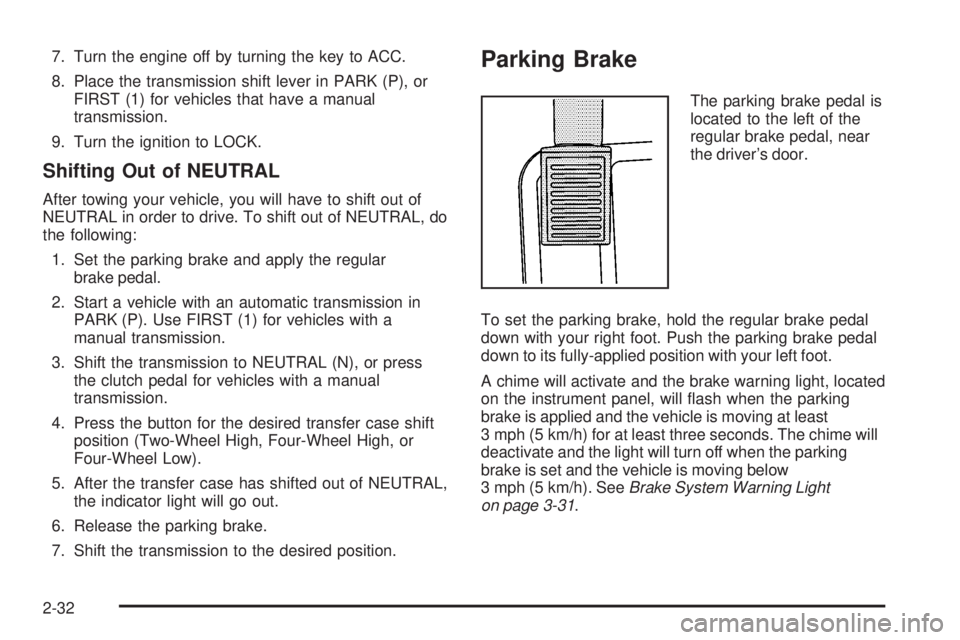
The parking brake pedal is
located to the left of the
regular brake pedal, near
the driver’s door.
To set the parking brake, hold the regular brake pedal
down with your right foot. Push the parking brake pedal
down to its fully-applied position with your left foot.
A chime will activate and the brake warning light, located
on the instrument panel, will ash when the parking
brake is applied and the vehicle is moving at least
3 mph (5 km/h) for at least three seconds. The chime will
deactivate and the light will turn off when the parking
brake is set and the vehicle is moving below
3 mph (5 km/h). SeeBrake System Warning Light
on page 3-31.
2-32
Page 113 of 428
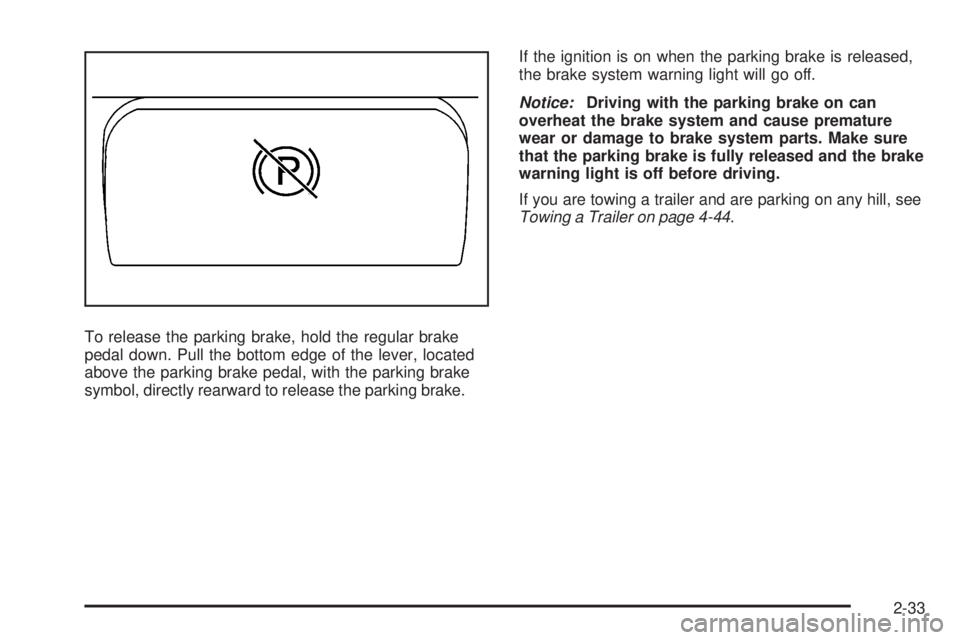
To release the parking brake, hold the regular brake
pedal down. Pull the bottom edge of the lever, located
above the parking brake pedal, with the parking brake
symbol, directly rearward to release the parking brake.If the ignition is on when the parking brake is released,
the brake system warning light will go off.
Notice:Driving with the parking brake on can
overheat the brake system and cause premature
wear or damage to brake system parts. Make sure
that the parking brake is fully released and the brake
warning light is off before driving.
If you are towing a trailer and are parking on any hill, see
Towing a Trailer on page 4-44.
2-33
Page 120 of 428
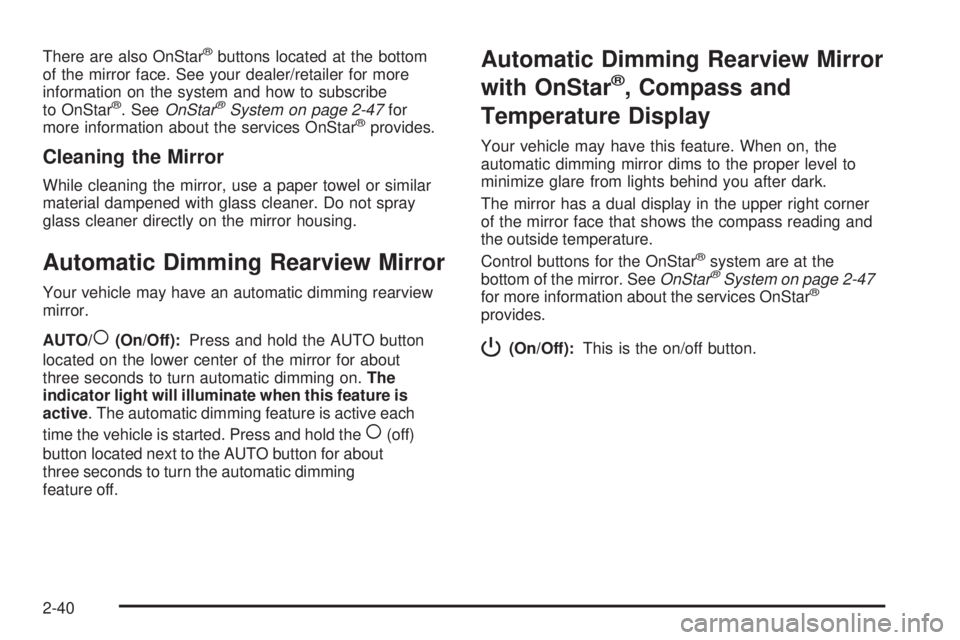
There are also OnStar®buttons located at the bottom
of the mirror face. See your dealer/retailer for more
information on the system and how to subscribe
to OnStar
®. SeeOnStar®System on page 2-47for
more information about the services OnStar®provides.
Cleaning the Mirror
While cleaning the mirror, use a paper towel or similar
material dampened with glass cleaner. Do not spray
glass cleaner directly on the mirror housing.
Automatic Dimming Rearview Mirror
Your vehicle may have an automatic dimming rearview
mirror.
AUTO/
((On/Off):Press and hold the AUTO button
located on the lower center of the mirror for about
three seconds to turn automatic dimming on.The
indicator light will illuminate when this feature is
active. The automatic dimming feature is active each
time the vehicle is started. Press and hold the
((off)
button located next to the AUTO button for about
three seconds to turn the automatic dimming
feature off.
Automatic Dimming Rearview Mirror
with OnStar
®, Compass and
Temperature Display
Your vehicle may have this feature. When on, the
automatic dimming mirror dims to the proper level to
minimize glare from lights behind you after dark.
The mirror has a dual display in the upper right corner
of the mirror face that shows the compass reading and
the outside temperature.
Control buttons for the OnStar
®system are at the
bottom of the mirror. SeeOnStar®System on page 2-47
for more information about the services OnStar®
provides.
P(On/Off):This is the on/off button.
2-40
Page 121 of 428
Temperature and Compass Display
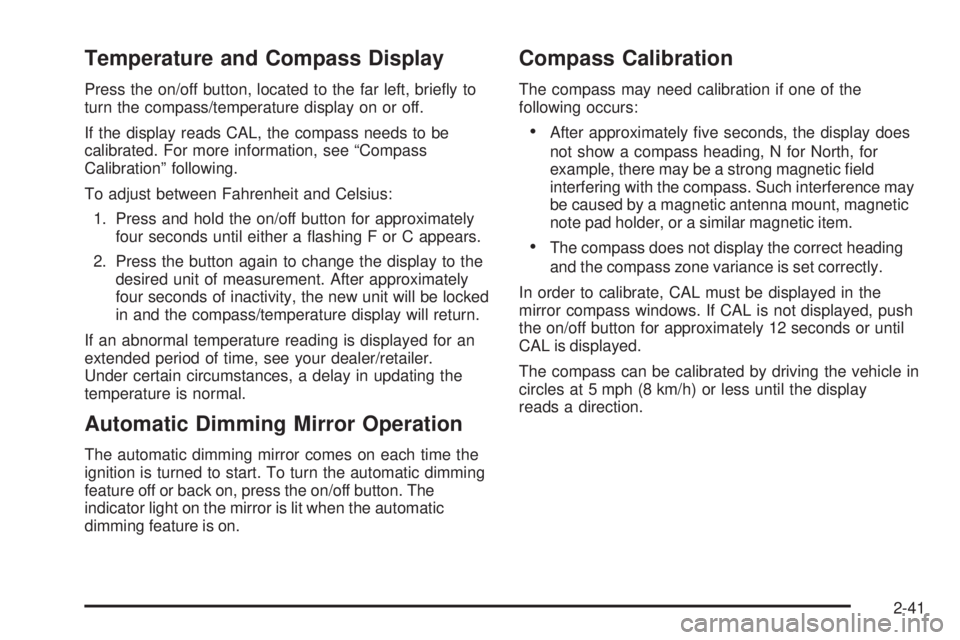
Press the on/off button, located to the far left, briey to
turn the compass/temperature display on or off.
If the display reads CAL, the compass needs to be
calibrated. For more information, see “Compass
Calibration” following.
To adjust between Fahrenheit and Celsius:
1. Press and hold the on/off button for approximately
four seconds until either a ashing F or C appears.
2. Press the button again to change the display to the
desired unit of measurement. After approximately
four seconds of inactivity, the new unit will be locked
in and the compass/temperature display will return.
If an abnormal temperature reading is displayed for an
extended period of time, see your dealer/retailer.
Under certain circumstances, a delay in updating the
temperature is normal.
Automatic Dimming Mirror Operation
The automatic dimming mirror comes on each time the
ignition is turned to start. To turn the automatic dimming
feature off or back on, press the on/off button. The
indicator light on the mirror is lit when the automatic
dimming feature is on.
Compass Calibration
The compass may need calibration if one of the
following occurs:
After approximately ve seconds, the display does
not show a compass heading, N for North, for
example, there may be a strong magnetic eld
interfering with the compass. Such interference may
be caused by a magnetic antenna mount, magnetic
note pad holder, or a similar magnetic item.
The compass does not display the correct heading
and the compass zone variance is set correctly.
In order to calibrate, CAL must be displayed in the
mirror compass windows. If CAL is not displayed, push
the on/off button for approximately 12 seconds or until
CAL is displayed.
The compass can be calibrated by driving the vehicle in
circles at 5 mph (8 km/h) or less until the display
reads a direction.
2-41
Page 123 of 428
Cleaning the Mirror
When cleaning the mirror, use a paper towel or similar
material dampened with glass cleaner. Do not spray
glass cleaner directly on the mirror as that may cause
the liquid cleaner to enter the mirror housing.
Automatic Dimming Rearview Mirror
with Compass and Temperature
Display
Your vehicle may have this mirror. When on, an
automatic dimming mirror will dim to the proper level to
minimize glare from lights behind you after dark.
The mirror also includes a dual display in the upper
right corner of the mirror with the compass reading and
the outside temperature.
Yb:Briey press this button to turn the display
on or off.
Temperature Display
The temperature can be displayed by pressing the
compass/temperature button. Pressing the
compass/temperature button once briey, will toggle the
display reading on and off. To alternate the temperature
reading between Fahrenheit and Celsius, press and
hold the compass/temperature button for approximately
three seconds until the display blinks F and C. After
approximately ve seconds of inactivity, the display will
stop blinking and display the last selection made.
If an abnormal reading is displayed, see your
dealer/retailer.
Automatic Dimming Mirror Operation
O
:Press this button to turn the automatic dimming
feature on or off. The indicator light to the left of
the button will turn on to indicate when the feature is on.
Once the mirror is turned off, it will remain off until it
is turned back on, or until the vehicle is restarted.
2-43
Page 130 of 428
Your Responsibility
You may need to increase the volume of your radio
to hear the OnStar advisor. If the light next to the
OnStar buttons is red, this means that your system is
not functioning properly and should be checked by a
dealer/retailer. If the light appears clear (no light is
appearing), your OnStar subscription has expired. You
can always press the blue OnStar button to conrm that
your OnStar equipment is active.
Storage Areas
Glove Box
To open the glove box, lift up on the lever.
Cupholder(s)
Your vehicle may have two cupholders located on the
lower part of the front doors as well as two cupholders
located at the front end of the console. Vehicles with
bench seats may have cupholders attached to the front of
the center seat.If your vehicle is an extended cab or crew cab model,
your vehicle also has two rear cupholders. On crew cab
models, the cupholders are located at the front end
of the rear center seat cushion. On extended cab
models, the rear seat cupholders are located on top of
the rear center console.
If you have an ashtray, it will use one of the cupholders.
Center Console Storage
For vehicles with bench seats, you may have a center
armrest storage area. Lift up on the upper tab located at
the front of the armrest to release the latch. Lift the lid
to open the storage area.
For vehicles with bucket seats or uplevel packages,
your vehicle may have a two-tiered center armrest
storage area. Lift up on the upper tab located at the front
of the armrest to release the latch. Lift the lid to the top
storage area. A second tab is located below the top one
and allows you to access the bottom storage area. Lift up
on the lower tab to release the latch. Then, raise the lid of
the lower storage area. The upper storage area will lift up
with the lid of the lower storage area.
To close the storage area(s), lower the lid(s) until you
feel the latch close.
2-50
Page 133 of 428
Instrument Panel Overview...............................3-4
Hazard Warning Flashers................................3-6
Other Warning Devices...................................3-6
Horn.............................................................3-6
Tilt Wheel.....................................................3-7
Turn Signal/Multifunction Lever.........................3-7
Turn and Lane-Change Signals........................3-8
Headlamp High/Low-Beam Changer..................3-8
Flash-to-Pass.................................................3-9
Windshield Wipers..........................................3-9
Windshield Washer.......................................3-10
Cruise Control..............................................3-10
Exterior Lamps.............................................3-13
Headlamps on Reminder................................3-14
Daytime Running Lamps (DRL).......................3-14
Automatic Headlamp System..........................3-15
Fog Lamps..................................................3-16
Exterior Cargo Lamps....................................3-16
Interior Lamps..............................................3-16
Instrument Panel Brightness...........................3-17Dome Lamp.................................................3-17
Dome Lamp Override....................................3-17
Exit Lighting.................................................3-17
Electric Power Management...........................3-18
Battery Run-Down Protection..........................3-18
Accessory Power Outlet(s).............................3-18
Ashtray(s) and Cigarette Lighter......................3-19
Climate Controls............................................3-20
Climate Control System.................................3-20
Outlet Adjustment.........................................3-22
Warning Lights, Gages, and Indicators............3-23
Instrument Panel Cluster................................3-24
Speedometer and Odometer...........................3-25
Trip Odometer.............................................
.3-25
Tachometer.................................................3-25
Safety Belt Reminders...................................3-26
Airbag Readiness Light..................................3-27
Passenger Airbag Status Indicator...................3-28
Charging System Light..................................3-30
Section 3 Instrument Panel
3-1
Page 134 of 428
Up-Shift Light...............................................3-30
Brake System Warning Light..........................3-31
Antilock Brake System Warning Light...............3-32
Traction Control System (TCS)
Warning Light...........................................3-32
Engine Coolant Temperature Gage..................3-33
Tire Pressure Light.......................................3-33
Malfunction Indicator Lamp.............................3-34
Oil Pressure Light.........................................3-36
Security Light...............................................3-37
Cruise Control Light......................................3-37
Highbeam On Light.......................................3-37
Fuel Gage...................................................3-38Driver Information Center (DIC).......................3-38
DIC Operation and Displays...........................3-38
DIC Warnings and Messages.........................3-42
Audio System(s).............................................3-46
Setting the Time...........................................3-47
Radio(s)......................................................3-48
Using an MP3..............................................3-64
XM Radio Messages.....................................3-68
Theft-Deterrent Feature..................................3-69
Radio Reception...........................................3-69
Fixed Mast Antenna......................................3-70
XM™ Satellite Radio Antenna System..............3-70
Chime Level Adjustment................................3-70
Section 3 Instrument Panel
3-2
Page 137 of 428
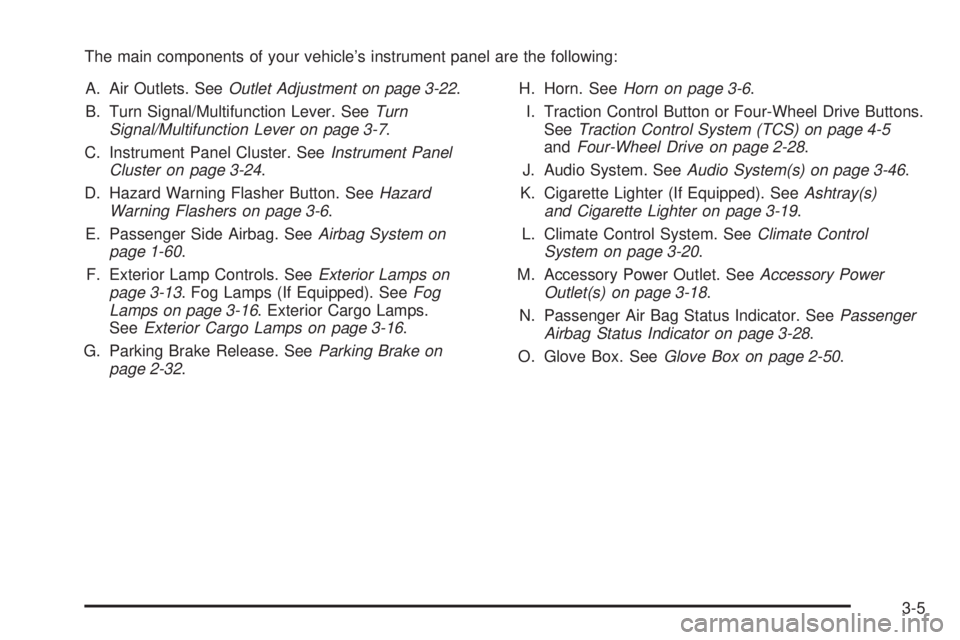
The main components of your vehicle’s instrument panel are the following:
A. Air Outlets. SeeOutlet Adjustment on page 3-22.
B. Turn Signal/Multifunction Lever. SeeTurn
Signal/Multifunction Lever on page 3-7.
C. Instrument Panel Cluster. SeeInstrument Panel
Cluster on page 3-24.
D. Hazard Warning Flasher Button. SeeHazard
Warning Flashers on page 3-6.
E. Passenger Side Airbag. SeeAirbag System on
page 1-60.
F. Exterior Lamp Controls. SeeExterior Lamps on
page 3-13. Fog Lamps (If Equipped). SeeFog
Lamps on page 3-16. Exterior Cargo Lamps.
SeeExterior Cargo Lamps on page 3-16.
G. Parking Brake Release. SeeParking Brake on
page 2-32.H. Horn. SeeHorn on page 3-6.
I. Traction Control Button or Four-Wheel Drive Buttons.
SeeTraction Control System (TCS) on page 4-5
andFour-Wheel Drive on page 2-28.
J. Audio System. SeeAudio System(s) on page 3-46.
K. Cigarette Lighter (If Equipped). SeeAshtray(s)
and Cigarette Lighter on page 3-19.
L. Climate Control System. SeeClimate Control
System on page 3-20.
M. Accessory Power Outlet. SeeAccessory Power
Outlet(s) on page 3-18.
N. Passenger Air Bag Status Indicator. SeePassenger
Airbag Status Indicator on page 3-28.
O. Glove Box. SeeGlove Box on page 2-50.
3-5
Page 140 of 428
Turn and Lane-Change Signals
The turn signal has two upward (for right) and two
downward (for left) positions. These positions allow
you to signal a turn or a lane change.
To signal a turn, move the lever all the way up or down.
When the turn is nished, the lever will automatically
return to the off position.
To signal a lane change, raise or lower the lever until
the arrow starts to ash. Hold it there until the change is
completed. The lever will return by itself when released.
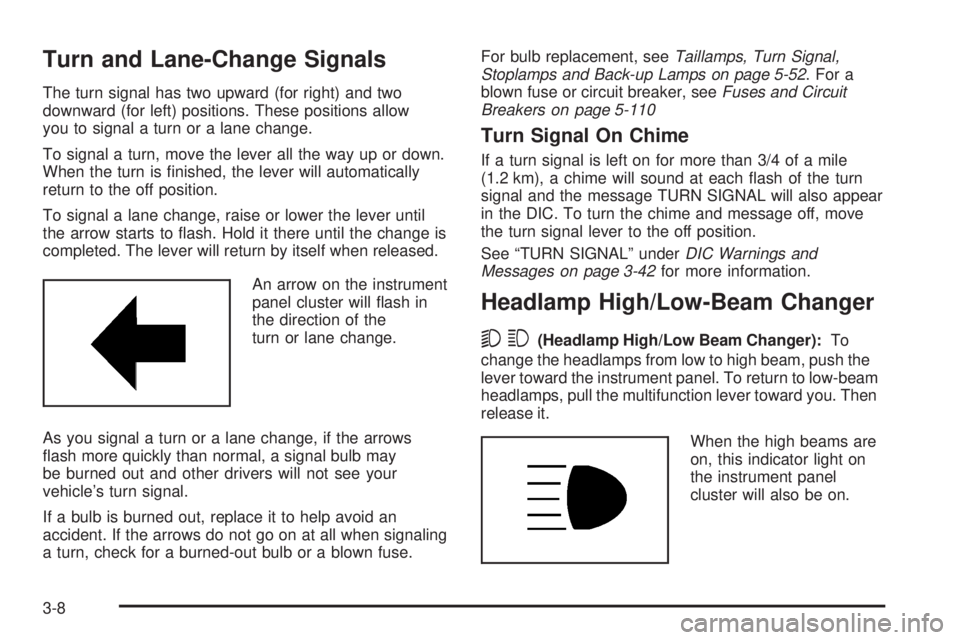
An arrow on the instrument
panel cluster will ash in
the direction of the
turn or lane change.
As you signal a turn or a lane change, if the arrows
ash more quickly than normal, a signal bulb may
be burned out and other drivers will not see your
vehicle’s turn signal.
If a bulb is burned out, replace it to help avoid an
accident. If the arrows do not go on at all when signaling
a turn, check for a burned-out bulb or a blown fuse.For bulb replacement, seeTaillamps, Turn Signal,
Stoplamps and Back-up Lamps on page 5-52. For a
blown fuse or circuit breaker, seeFuses and Circuit
Breakers on page 5-110
Turn Signal On Chime
If a turn signal is left on for more than 3/4 of a mile
(1.2 km), a chime will sound at each ash of the turn
signal and the message TURN SIGNAL will also appear
in the DIC. To turn the chime and message off, move
the turn signal lever to the off position.
See “TURN SIGNAL” underDIC Warnings and
Messages on page 3-42for more information.
Headlamp High/Low-Beam Changer
53(Headlamp High/Low Beam Changer):To
change the headlamps from low to high beam, push the
lever toward the instrument panel. To return to low-beam
headlamps, pull the multifunction lever toward you. Then
release it.
When the high beams are
on, this indicator light on
the instrument panel
cluster will also be on.
3-8