page 33 GMC ENVOY 2006 Workshop Manual
[x] Cancel search | Manufacturer: GMC, Model Year: 2006, Model line: ENVOY, Model: GMC ENVOY 2006Pages: 524, PDF Size: 3.36 MB
Page 132 of 524
Universal Home Remote System
Operation
Do not use the Universal Home Remote with any
garage door opener that does not have the stop and
reverse feature. This includes any garage door opener
model manufactured before April 1, 1982. If you
have a newer garage door opener with rolling codes,
please be sure to follow Steps 6 through 8 to complete
the programming of your Universal Home Remote
Transmitter.
Read the instructions completely before attempting to
program the Universal Home Remote. Because of
the steps involved, it may be helpful to have another
person available to assist you in the programming steps.Keep the original hand-held transmitter for use in other
vehicles as well as for future Universal Home Remote
programming. It is also recommended that upon the sale
of the vehicle, the programmed Universal Home
Remote buttons should be erased for security purposes.
See “Erasing Universal Home Remote Buttons” later
in this section or, for assistance, seeCustomer
Assistance Offices on page 7-4.
Be sure that people and objects are clear of the garage
door or gate operator you are programming. When
programming a garage door, it is advised to park outside
of the garage.
It is recommended that a new battery be installed in
your hand-held transmitter for quicker and more
accurate transmission of the radio-frequency signal.
2-52
Page 135 of 524
Using Universal Home Remote
Press and hold the appropriate Universal Home Remote
button for at least half of a second. The indicator light
will come on while the signal is being transmitted.
Erasing Universal Home
Remote Buttons
To erase programming from the three Universal Home
Remote buttons do the following:
1. Press and hold down the two outside buttons until
the indicator light begins to ash, after 20 seconds.
Do not hold the two outside buttons for longer
than 30 seconds.
2. Release both buttons.
The Universal Home Remote is now in the training
(learning) mode and can be programmed at any time
beginning with Step 2 under “Programming Universal
Home Remote” shown earlier in this section.
Individual buttons cannot be erased, but they can be
reprogrammed. See “Reprogramming a Single Universal
Home Remote Button” following this section.
Reprogramming a Single Universal
Home Remote Button
To program a device to Universal Home Remote using
a Universal Home Remote button previously trained,
follow these steps:
1. Press and hold the desired Universal Home
Remote button. Do not release the button.
2. The indicator light will begin to ash after
20 seconds. While still holding the Universal Home
Remote button, proceed with Step 2 under
“Programming Universal Home Remote” shown
earlier in this section.
For additional information on Universal Home Remote,
seeCustomer Assistance Offices on page 7-4.
2-55
Page 136 of 524
Storage Areas
Glove Box
Open the glove box by pulling up on the handle.
Overhead Console
Your vehicle may have this feature. The overhead
console may include reading lamps, a Universal Home
Remote and a sunroof switch. SeeSunroof on
page 2-62andUniversal Home Remote System on
page 2-51for more information.
If your vehicle has a third row seat, and has a power
operated rear quarter glass, the switches for operating
the rear quarter glass are also located in the overhead
console. These switches allow the driver to open
and close each third row seat window separately. See
Power Rear Quarter Windows on page 2-16for
more information.
Center Console Storage Area
If equipped, squeeze the front lever while lifting the top
to open it.
Your vehicle’s console will be equipped with cupholders
located on the front and rear of the storage compartment.
The console may also contain one or more of the
following components:
Rear Seat Audio Controls
Rear Seat Accessory Power Outlets
Rear Climate Control
If your vehicle has the center armrest compartment, lift
the cover by pulling up on the latch handle located
underneath the front edge of the armrest.
2-56
Page 137 of 524
Luggage Carrier
{CAUTION:
If you try to carry something on top of your
vehicle that is longer or wider than the luggage
carrier — like paneling, plywood, a mattress
and so forth — the wind can catch it as you
drive along. This can cause you to lose
control. What you are carrying could be
violently torn off, and this could cause you or
other drivers to have a collision, and of course
damage your vehicle. You may be able to carry
something like this inside. But, never carry
something longer or wider than the luggage
carrier on top of your vehicle.
A luggage carrier, if equipped, allows you to load things
on top of your vehicle. The luggage carrier has side rails
attached to the roof, sliding crossrails, if equipped, and
places to use for tying things down. These let you load
some other things on top of your vehicle, as long as they
are not wider or longer than the luggage carrier.To slide the crossrails to where you want them, pull up
on the lever on each side of the crossrail. This will
release the crossrail and allow you to slide it. When the
crossrail is where you want it, press down on the
levers to lock it into place.
Notice:Loading cargo on the luggage carrier that
weighs more than 220 lbs (100 kg) or hangs over the
rear or sides of the vehicle may damage your
vehicle. Load cargo so that it rests on the slats as
far forward as possible and against the side
rails, making sure to fasten it securely.
Don’t exceed the maximum vehicle capacity when
loading your vehicle. For more information on vehicle
capacity and loading, seeLoading Your Vehicle on
page 4-45.
To prevent damage or loss of cargo as you are driving,
check now and then to make sure the luggage carrier
is locked and cargo is still securely fastened.
When the luggage carrier is not in use, place the
crossrails at the following positions for wind noise
reduction. Place one crossrail at the rear most point of
the vehicle and the other crossrail above the opening
of the rear door.
2-57
Page 142 of 524
Sunroof
The vehicle may be equipped with a power sliding
sunroof. To open or close the sunroof, the ignition must
be on or accessory, or Retained Accessory Power (RAP)
must be active. SeeRetained Accessory Power (RAP) on
page 2-20.
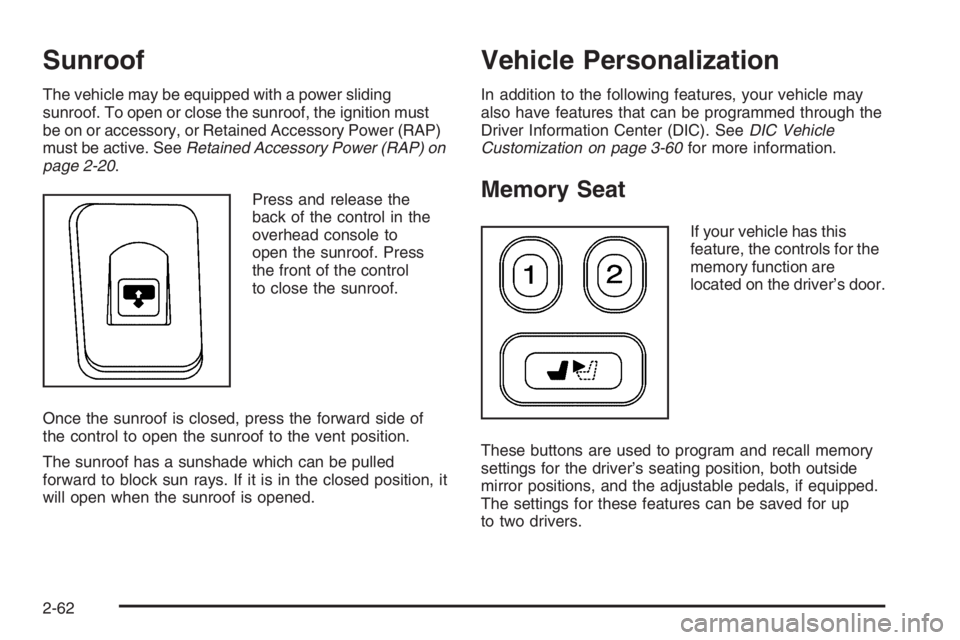
Press and release the
back of the control in the
overhead console to
open the sunroof. Press
the front of the control
to close the sunroof.
Once the sunroof is closed, press the forward side of
the control to open the sunroof to the vent position.
The sunroof has a sunshade which can be pulled
forward to block sun rays. If it is in the closed position, it
will open when the sunroof is opened.
Vehicle Personalization
In addition to the following features, your vehicle may
also have features that can be programmed through the
Driver Information Center (DIC). SeeDIC Vehicle
Customization on page 3-60for more information.
Memory Seat
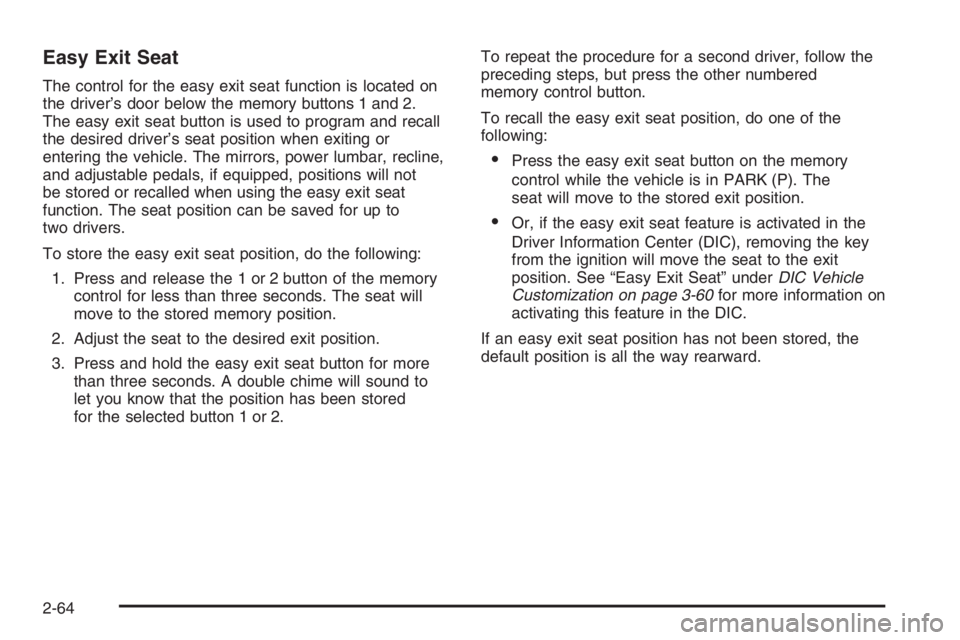
If your vehicle has this
feature, the controls for the
memory function are
located on the driver’s door.
These buttons are used to program and recall memory
settings for the driver’s seating position, both outside
mirror positions, and the adjustable pedals, if equipped.
The settings for these features can be saved for up
to two drivers.
2-62
Page 143 of 524

To store the memory settings, do the following:
1. Adjust the driver’s seat, including the seatback
recliner and lumbar, both of the outside mirrors,
and the adjustable pedals, if equipped, to the
desired position.
SeeAdjustable Throttle and Brake Pedal on
page 2-22for more information.
2. Press and hold the 1 or 2 button of the memory
control for three seconds. A double chime will
sound to let you know that the position has
been stored.
To repeat the procedure for a second driver, follow the
preceding steps, but press the other numbered
memory control button.
To recall the memory settings, do one of the following:
Press and release button 1 or 2 while the vehicle
is in PARK (P). A single chime will sound and
the memory position will be recalled.
If programmed to do so through the Driver
Information Center (DIC), pressing the unlock button
on the remote keyless entry transmitter will recall
the preset driver’s memory seat, mirrors, and
adjustable pedals position. The numbers on the
back of the transmitters, 1 or 2, correspond to the
numbers on the memory controls.
If programmed to do so through the DIC, placing
the key in the ignition will recall the driver’s
memory seat, mirrors, and adjustable pedals
positions.
See “Seat Recall” underDIC Vehicle Customization on
page 3-60for more information.
To stop recall movement of the memory seat feature at
any time, press one of the memory buttons or power
seat controls.
2-63
Page 144 of 524
Easy Exit Seat
The control for the easy exit seat function is located on
the driver’s door below the memory buttons 1 and 2.
The easy exit seat button is used to program and recall
the desired driver’s seat position when exiting or
entering the vehicle. The mirrors, power lumbar, recline,
and adjustable pedals, if equipped, positions will not
be stored or recalled when using the easy exit seat
function. The seat position can be saved for up to
two drivers.
To store the easy exit seat position, do the following:
1. Press and release the 1 or 2 button of the memory
control for less than three seconds. The seat will
move to the stored memory position.
2. Adjust the seat to the desired exit position.
3. Press and hold the easy exit seat button for more
than three seconds. A double chime will sound to
let you know that the position has been stored
for the selected button 1 or 2.To repeat the procedure for a second driver, follow the
preceding steps, but press the other numbered
memory control button.
To recall the easy exit seat position, do one of the
following:
Press the easy exit seat button on the memory
control while the vehicle is in PARK (P). The
seat will move to the stored exit position.
Or, if the easy exit seat feature is activated in the
Driver Information Center (DIC), removing the key
from the ignition will move the seat to the exit
position. See “Easy Exit Seat” underDIC Vehicle
Customization on page 3-60for more information on
activating this feature in the DIC.
If an easy exit seat position has not been stored, the
default position is all the way rearward.
2-64
Page 149 of 524
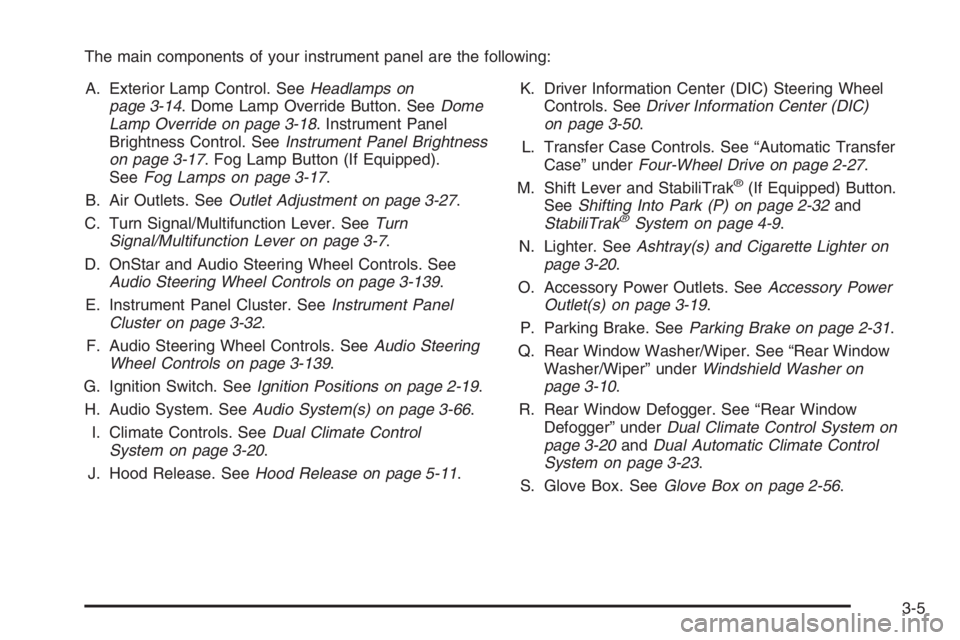
The main components of your instrument panel are the following:
A. Exterior Lamp Control. SeeHeadlamps on
page 3-14. Dome Lamp Override Button. SeeDome
Lamp Override on page 3-18. Instrument Panel
Brightness Control. SeeInstrument Panel Brightness
on page 3-17. Fog Lamp Button (If Equipped).
SeeFog Lamps on page 3-17.
B. Air Outlets. SeeOutlet Adjustment on page 3-27.
C. Turn Signal/Multifunction Lever. SeeTurn
Signal/Multifunction Lever on page 3-7.
D. OnStar and Audio Steering Wheel Controls. See
Audio Steering Wheel Controls on page 3-139.
E. Instrument Panel Cluster. SeeInstrument Panel
Cluster on page 3-32.
F. Audio Steering Wheel Controls. SeeAudio Steering
Wheel Controls on page 3-139.
G. Ignition Switch. SeeIgnition Positions on page 2-19.
H. Audio System. SeeAudio System(s) on page 3-66.
I. Climate Controls. SeeDual Climate Control
System on page 3-20.
J. Hood Release. SeeHood Release on page 5-11.K. Driver Information Center (DIC) Steering Wheel
Controls. SeeDriver Information Center (DIC)
on page 3-50.
L. Transfer Case Controls. See “Automatic Transfer
Case” underFour-Wheel Drive on page 2-27.
M. Shift Lever and StabiliTrak
®(If Equipped) Button.
SeeShifting Into Park (P) on page 2-32and
StabiliTrak
®System on page 4-9.
N. Lighter. SeeAshtray(s) and Cigarette Lighter on
page 3-20.
O. Accessory Power Outlets. SeeAccessory Power
Outlet(s) on page 3-19.
P. Parking Brake. SeeParking Brake on page 2-31.
Q. Rear Window Washer/Wiper. See “Rear Window
Washer/Wiper” underWindshield Washer on
page 3-10.
R. Rear Window Defogger. See “Rear Window
Defogger” underDual Climate Control System on
page 3-20andDual Automatic Climate Control
System on page 3-23.
S. Glove Box. SeeGlove Box on page 2-56.
3-5
Page 152 of 524
If a bulb is burned out, replace it to help avoid an
accident. If the arrows don’t go on at all when you signal
a turn, check the fuse. SeeFuses and Circuit Breakers
on page 5-103and check for burned-out bulbs.
If you have a trailer towing option with added wiring for
the trailer lamps, a turn signal asher is used. With
this asher installed, the signal indicator will ash even
if a turn signal bulb is burned out. Check the front
and rear turn signal lamps regularly to make sure they
are working.
Turn Signal On Chime
If your turn signal is left on for more than 3/4 of a mile
(1.2 km), a chime will sound at each ash of the
turn signal. To turn off the chime, move the turn signal
lever to the off position.
Headlamp High/Low-Beam Changer
To change the headlamps from low to high beam,
push the lever toward the instrument panel. To return to
low-beam headlamps, pull the multifunction lever
toward you. Then release it.When the high beams are
on, this indicator light on
the instrument panel
cluster will also be on.
Flash-to-Pass
This feature lets you use your high-beam headlamps to
signal a driver in front of you that you want to pass.
It works even if your headlamps are in the automatic
position.
To use it, pull the turn signal lever toward you, then
release it.
If your headlamps are in the automatic position or on
low beam, your high-beam headlamps will turn on.
They’ll stay on as long as you hold the lever toward you.
The high-beam indicator on the instrument panel
cluster will come on. Release the lever to return to
normal operation.
3-8
Page 175 of 524

z\y(Mode):Press this button to change the
direction of airow (panel, bi-level or oor) to the
rear seat area.
zby(Temperature):Press this button to increase
and decrease the temperature setting.
Warning Lights, Gages, and
Indicators
This part describes the warning lights and gages that
may be on your vehicle. The pictures will help you
locate them.
Warning lights and gages can signal that something is
wrong before it becomes serious enough to cause
an expensive repair or replacement. Paying attention to
your warning lights and gages could also save you
or others from injury.Warning lights come on when there may be or is a
problem with one of your vehicle’s functions. As you will
see in the details on the next few pages, some
warning lights come on briey when you start the
engine just to let you know they’re working. If you are
familiar with this section, you should not be alarmed
when this happens.
Gages can indicate when there may be or is a problem
with one of your vehicle’s functions. Often gages
and warning lights work together to let you know when
there’s a problem with your vehicle.
When one of the warning lights comes on and stays on
when you are driving, or when one of the gages
shows there may be a problem, check the section that
tells you what to do about it. Please follow this
manual’s advice.
Waiting to do repairs can be costly—and even
dangerous. So please get to know your warning lights
and gages. They’re a big help.
Your vehicle may also have a Driver Information Center
(DIC) that works along with the warning lights and
gages. SeeDriver Information Center (DIC) on
page 3-50.
3-31