warning GMC ENVOY 2007 Owner's Guide
[x] Cancel search | Manufacturer: GMC, Model Year: 2007, Model line: ENVOY, Model: GMC ENVOY 2007Pages: 562, PDF Size: 3 MB
Page 218 of 562
Driver Information Center (DIC)
Your vehicle may have this feature. The Driver
Information Center (DIC) display is located on the
instrument panel cluster, below the speedometer.
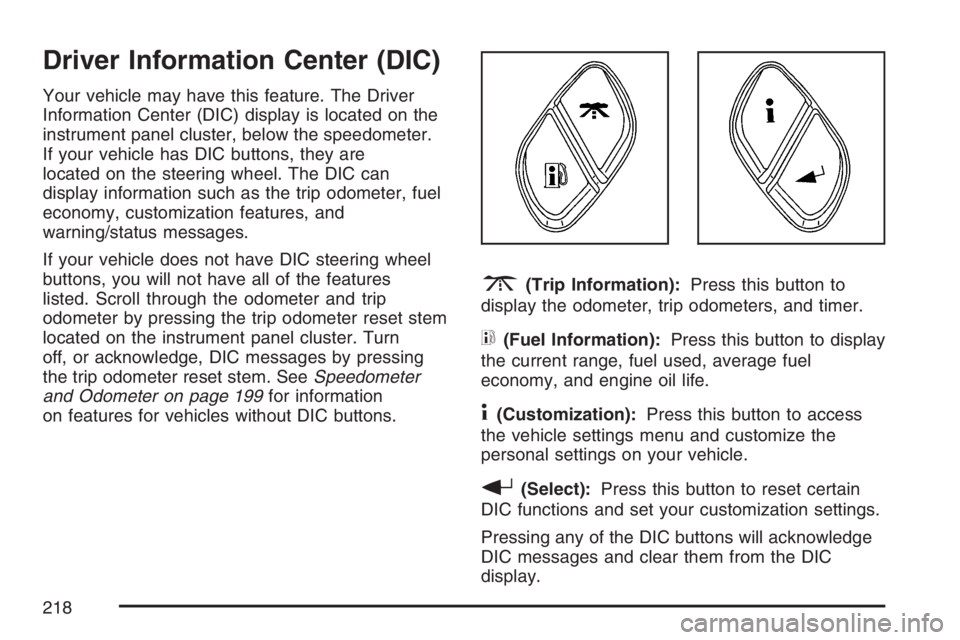
If your vehicle has DIC buttons, they are
located on the steering wheel. The DIC can
display information such as the trip odometer, fuel
economy, customization features, and
warning/status messages.
If your vehicle does not have DIC steering wheel
buttons, you will not have all of the features
listed. Scroll through the odometer and trip
odometer by pressing the trip odometer reset stem
located on the instrument panel cluster. Turn
off, or acknowledge, DIC messages by pressing
the trip odometer reset stem. SeeSpeedometer
and Odometer on page 199for information
on features for vehicles without DIC buttons.
3(Trip Information):Press this button to
display the odometer, trip odometers, and timer.
t(Fuel Information):Press this button to display
the current range, fuel used, average fuel
economy, and engine oil life.
4(Customization):Press this button to access
the vehicle settings menu and customize the
personal settings on your vehicle.
r(Select):Press this button to reset certain
DIC functions and set your customization settings.
Pressing any of the DIC buttons will acknowledge
DIC messages and clear them from the DIC
display.
218
Page 219 of 562
DIC Operation and Displays
The DIC comes on when the ignition is on. After a
short delay the DIC will display the information
that was last displayed before the engine
was turned off.
If a problem is detected, a warning message will
appear on the display. Pressing the trip stem
will acknowledge any warning or service
messages. Pressing any of the DIC steering wheel
buttons — trip information, fuel information,
customization, or select button — will also
acknowledge any warnings or service messages.
You should take any message that appears on
the display seriously and remember that clearing
the message will only make the message
disappear, not correct the problem.
The DIC has different modes which can be
accessed by pressing the four DIC buttons located
on the steering wheel. These buttons are trip
information, fuel information, customization, and
select. The button functions are detailed in
the following pages.
Trip Information Button
3
(Trip Information):Press the trip
information button to scroll through the
ODOMETER, TRIP A, TRIP B, TIRE
PRESSURES, and TIMER.
Odometer:Press the trip information button until
ODOMETER appears on the display. This
mode shows the total distance the vehicle has
been driven in either miles or kilometers. Pressing
the reset stem located on the instrument cluster
with the vehicle off will also display the odometer.
Trip A:Press the trip information button until
TRIP A appears on the display. This mode shows
the current distance traveled since the last
reset for TRIP A in either miles or kilometers.
Trip B:Press the trip information button
until TRIP B appears on the display. This mode
shows the current distance traveled since the last
reset for TRIP B in either miles or kilometers.
219
Page 222 of 562
Select Button
r
(Select):Press the select button to reset
certain DIC functions, turn off or acknowledge
messages on the DIC display, and set your
customization settings. For example, this button
will allow you to reset the trip odometers, turn
off the FUEL LEVEL LOW message, and enables
you to scroll through and select the language
in which the DIC information will appear.
DIC Warnings and Messages
Messages are displayed on the DIC to notify the
driver that the status of the vehicle has changed
and that some action may be needed to correct the
condition. Multiple messages may appear one
after another.
Some messages may not require immediate
action. Press any of the DIC buttons on the
steering wheel or the trip odometer reset stem on
the instrument panel cluster to acknowledge
that you received the messages and to clear them
from the display.Some messages cannot be cleared from the
display because they are more urgent. These
messages require action before they can be
removed from the DIC display. Take any messages
that appear on the display seriously and remember
that clearing the messages will only make the
messages disappear, not correct the problem.
The following are the possible messages that can
be displayed and some information about them.
CHANGE ENGINE OIL
This message displays when the engine oil needs
to be changed and service is required for your
vehicle. SeeScheduled Maintenance on page 507
andEngine Oil on page 394for more information.
Also seeEngine Oil Life System on page 398
for information on how to reset the message. This
message clears itself after 10 seconds until the
next ignition cycle.
CHECK TIRE PRESSURE
This message displays when the tire pressure in
one of the vehicle’s tires needs to be checked.
Press any of the DIC buttons, or the trip stem, to
acknowledge this message and clear it from
the DIC display.
222
Page 223 of 562

If this message appears on the DIC, stop as soon
as you can. Have the tire pressures checked
and set to those shown on the Tire Loading
Information Label. SeeTires on page 439,Loading
Your Vehicle on page 349, andInation - Tire
Pressure on page 447. If the tire pressure is low,
the low tire pressure warning light comes on.
SeeTire Pressure Light on page 209.
CHECK WASHER FLUID
This message displays if the washer uid level is
low. Adding washer uid to the windshield
washer uid reservoir clears this message. See
Windshield Washer Fluid on page 418. This
message clears itself after 10 seconds, or you can
press any of the DIC buttons, or the trip stem,
to acknowledge this message and clear it from the
DIC display.
CURB VIEW ACTIVATED
This message displays when the passenger
outside rearview mirror moves into the curb view
position. SeeOutside Curb View Assist Mirror
on page 144for more information.
DRIVER DOOR AJAR
This message displays and a chime sounds if the
driver’s door is not fully closed. Stop and turn
off the vehicle, check the door for obstructions, and
close the door again. Check to see if the
message still appears on the DIC. Press any of
the DIC buttons, or the trip stem, to acknowledge
this message and clear it from the DIC display.
223
Page 224 of 562
ENGINE COOLANT HOT/ENGINE
OVERHEATED
Notice:If you drive your vehicle while the
engine is overheating, severe engine damage
may occur. If an overheat warning appears on
the instrument panel cluster and/or DIC, stop
the vehicle as soon as possible. Do not increase
the engine speed above normal idling speed.
SeeEngine Overheating on page 408for more
information.
This message displays and a chime sounds if the
cooling system temperature gets hot. See
Engine Overheating on page 408for the proper
course of action. This message clears when
the coolant temperature drops to a safe operating
temperature.
FUEL LEVEL LOW
This message displays and a chime sounds if the
fuel level is low in the vehicle’s fuel tank. Refuel as
soon as possible. Press any of the DIC buttons, or
the trip stem, to acknowledge this message and
clear it from the DIC display. SeeLow Fuel Warning
Light on page 217,Filling the Tank on page 385,
andFuel on page 382for more information.
ICE POSSIBLE
This message may display if the outside
temperature reaches a level where ice could form
on the roadway. If the temperature rises to a safe
level, the message clears. This message clears
itself after 10 seconds, or you can press any of the
DIC buttons, or the trip stem, to acknowledge this
message and clear it from the DIC display.
KEY FOB # BATTERY LOW
This message displays if a Remote Keyless Entry
(RKE) transmitter battery is low. Replace the
battery in the transmitter. See “Battery
Replacement” underRemote Keyless Entry (RKE)
System Operation on page 98. Press any of the
DIC buttons, or the trip stem, to acknowledge this
message and clear it from the DIC display.
LEFT REAR DOOR AJAR
This message displays and a chime sounds if the
driver’s side rear door is not fully closed. Stop and
turn off the vehicle, check the door for obstructions,
and close the door again. Check to see if the
message still appears on the DIC. Press any of the
DIC buttons, or the trip stem, to acknowledge this
message and clear it from the DIC display.
224
Page 225 of 562

OIL PRESSURE LOW/STOP ENGINE
Notice:If you drive your vehicle while
the engine oil pressure is low, severe engine
damage may occur. If a low oil pressure
warning appears on the Driver Information
Center (DIC), stop the vehicle as soon as
possible. Do not drive the vehicle until the
cause of the low oil pressure is corrected. See
Engine Oil on page 394for more information.
This message displays if low oil pressure
levels occur. Stop the vehicle as soon as safely
possible and do not operate it until the cause
of the low oil pressure has been corrected. Check
the oil as soon as possible and have your
vehicle serviced by your dealer. SeeEngine Oil on
page 394.
PASSENGER DOOR AJAR
This message displays and a chime sounds if the
passenger’s door is not fully closed. Stop and
turn off the vehicle, check the door for
obstructions, and close the door again. Check to
see if the message still appears on the DIC. Press
any of the DIC buttons, or the trip stem, to
acknowledge this message and clear it from the
DIC display.
REAR ACCESS OPEN
This message displays and a chime sounds if the
liftgate or liftglass is open while the ignition is
in RUN. Turn off the vehicle and check the liftgate
and liftglass. SeeLiftgate/Liftglass on page 106.
Restart the vehicle and check for the message on
the DIC display. Press any of the DIC buttons,
or the trip stem, to acknowledge this message and
clear it from the DIC display.
RIGHT REAR DOOR AJAR
This message displays and a chime sounds if the
passenger’s side rear door is not fully closed.
Stop and turn off the vehicle, check the door for
obstructions, and close the door again. Check
to see if the message still appears on the
DIC. Press any of the DIC buttons, or the trip
stem, to acknowledge this message and clear it
from the DIC display.
225
Page 227 of 562

SERVICE TIRE MONITOR
This message displays if a part on the Tire
Pressure Monitor (TPM) system is not working
properly. If you drive your vehicle while any of the
four sensors are missing or inoperable, the
warning comes on in about 20 minutes. A sensor
would be missing, for example, if you put
different wheels on your vehicle without
transferring the sensors. If the warning comes on
and stays on, there may be a problem with the
TPM. See your dealer.
STABILITRAK ACTIVE
This message displays anytime the StabiliTrak®
system activates to maintain vehicle stability.
Any combination of engine speed management,
brake traction control, and stability control displays
this message.
STABILITRAK NOT READY
This message may display if driving conditions
delay StabiliTrak®system initialization. This
is normal. Once the system initializes, this
message will no longer be displayed on the DIC.
STABILITRAK OFF
This message displays when you press the
StabiliTrak®button for more than ve seconds or
when stability control has been automatically
disabled. The StabiliTrak
®button is located on the
transmission shift handle. To limit wheel spin and
realize the full benets of the stability enhancement
system, you should normally leave StabiliTrak
®on.
However, you should turn StabiliTrak®off if your
vehicle gets stuck in sand, mud, ice, or snow and
you want to rock your vehicle to attempt to free it, or
if you are driving in extreme off-road conditions and
require more wheel spin. SeeIf Your Vehicle is
Stuck in Sand, Mud, Ice, or Snow on page 348.
To turn the StabiliTrak
®system back on, press the
StabiliTrak®button again.
227
Page 228 of 562

There are several conditions that can cause this
message to appear.
The message may display if the brake system
warning light is on. SeeBrake System
Warning Light on page 206.
The message displays if the vehicle is shifted
into 4LO.
The message turns off as soon as the conditions
that caused the message to be displayed are
no longer present.
TIGHTEN FUEL CAP
This message may display and a chime may sound
if the vehicle’s fuel cap is not tightened properly.
Fully reinstall the fuel cap. SeeFilling the Tank on
page 385. The diagnostic system can determine if
the fuel cap has been left off or improperly installed.
A loose or missing fuel cap allows fuel to evaporate
into the atmosphere. This message remains on until
it is acknowledged and cleared from the DIC display
by pressing any of the DIC buttons or the trip stem.
The DIC message is also cancelled if the ignition is
turned off.The DIC message and the Service Engine Soon
light may come on again during a second trip if the
fuel cap is still not tightened properly. See
Malfunction Indicator Lamp on page 210for
more information.
TRACTION CONTROL OFF
This message displays when you momentarily
press the StabiliTrak®button located on the
transmission shift handle. In this mode, stability
control and the brake-traction control are
functional. Engine speed management will be
modied and the driven wheels can spin more
freely. For more details on this mode, see
StabiliTrak
®System on page 309.
TURN SIGNAL ON
This message displays and a chime sounds if a
turn signal is left on for 3/4 of a mile (1.2 km).
Move the turn signal/multifunction lever to the off
position. Press any of the DIC buttons, or the
trip stem, to acknowledge this message and clear
it from the DIC display.
228
Page 234 of 562
Choose one of the available options and press the
customization button while it is displayed on the
DIC to select it and move on to the next feature.
For more information on the memory seat feature,
seeMemory Seat, Mirrors, and Pedals on page 12.
Curb View
Press the customization button until CURB VIEW:
OFF appears in the display. To select your
preference for curb view, press the select button
while CURB VIEW: OFF is displayed on the
DIC. Pressing the select button will scroll through
the following choices:
CURB VIEW: OFF (default):The passenger’s
outside mirror will not be tilted down when
the vehicle is shifted into REVERSE (R).
CURB VIEW: PASSENGER:The passenger’s
outside mirror will be tilted down when the vehicle
is shifted into REVERSE (R).
When the vehicle is placed in PARK (P) or in any
forward gear, the mirror will return to the normal
driving position, following a short delay.Choose one of the available options and press the
customization button while it is displayed on the
DIC to select it and move on to the next feature.
For more information on tilt mirror in reverse,
seeOutside Curb View Assist Mirror on page 144.
Alarm Warning
Press the customization button until ALARM
WARNING: BOTH appears in the display. To
select your preference for alarm warning, press the
select button while ALARM WARNING: BOTH is
displayed on the DIC. Pressing the select
button will scroll through the following choices:
ALARM WARNING: BOTH (default):The
headlamps will ash and the horn will chirp when
the alarm is active.
ALARM WARNING: HORN:The horn will chirp
when the alarm is active.
ALARM WARNING: LAMPS:The headlamps will
ash when the alarm is active.
234
Page 235 of 562

ALARM WARNING: OFF:There will be no alarm
warning on activation.
Choose one of the available options and press the
customization button while your choice is displayed
on the DIC to select it and move on to the next
feature. For more information on alarm warning
type, seeContent Theft-Deterrent on page 110.
Language
Press the customization button until LANGUAGE:
ENGLISH appears in the display. To select
your preference for display language, press the
select button while LANGUAGE: ENGLISH
is displayed on the DIC. Pressing the select button
will scroll through the following languages:
ENGLISH (default)
FRANCAIS (French)
ESPANOL (Spanish)
Choose one of the available options and press the
customization button while it is displayed on the
DIC to select it and move on to the next feature.If you accidentally choose a language that you do
not want or understand, press and hold the
customization button and the trip information
button at the same time. The DIC will begin
scrolling through the languages in their particular
language. English will be in English, Francais
will be in French, and Espanol will be in Spanish.
When you see the language that you would
like, release both buttons. The DIC will then
display the information in the language you chose.
You can also scroll through the different
languages by pressing and holding the trip reset
stem for four seconds, as long as you are in
the odometer mode.
235