roof GMC ENVOY XUV 2005 Owner's Guide
[x] Cancel search | Manufacturer: GMC, Model Year: 2005, Model line: ENVOY XUV, Model: GMC ENVOY XUV 2005Pages: 474, PDF Size: 2.67 MB
Page 184 of 474
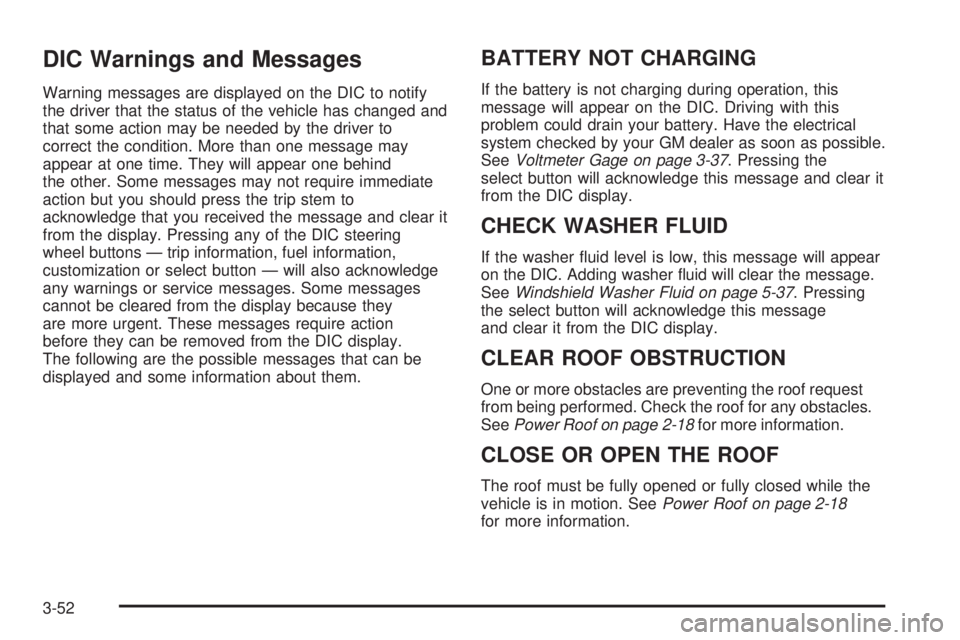
DIC Warnings and Messages
Warning messages are displayed on the DIC to notify
the driver that the status of the vehicle has changed and
that some action may be needed by the driver to
correct the condition. More than one message may
appear at one time. They will appear one behind
the other. Some messages may not require immediate
action but you should press the trip stem to
acknowledge that you received the message and clear it
from the display. Pressing any of the DIC steering
wheel buttons — trip information, fuel information,
customization or select button — will also acknowledge
any warnings or service messages. Some messages
cannot be cleared from the display because they
are more urgent. These messages require action
before they can be removed from the DIC display.
The following are the possible messages that can be
displayed and some information about them.
BATTERY NOT CHARGING
If the battery is not charging during operation, this
message will appear on the DIC. Driving with this
problem could drain your battery. Have the electrical
system checked by your GM dealer as soon as possible.
SeeVoltmeter Gage on page 3-37. Pressing the
select button will acknowledge this message and clear it
from the DIC display.
CHECK WASHER FLUID
If the washer uid level is low, this message will appear
on the DIC. Adding washer uid will clear the message.
SeeWindshield Washer Fluid on page 5-37. Pressing
the select button will acknowledge this message
and clear it from the DIC display.
CLEAR ROOF OBSTRUCTION
One or more obstacles are preventing the roof request
from being performed. Check the roof for any obstacles.
SeePower Roof on page 2-18for more information.
CLOSE OR OPEN THE ROOF
The roof must be fully opened or fully closed while the
vehicle is in motion. SeePower Roof on page 2-18
for more information.
3-52
Page 185 of 474

CLOSE THE ROOF
The roof must be closed to enable future roof and/or
tailgate operations. SeePower Roof on page 2-18
for more information.
CLOSE THE TAILGATE
The tailgate must be closed to operate the tailgate
glass. SeeTailgate on page 2-14.
CURB VIEW ACTIVATED
The curb view activated message is displayed when the
passenger outside rearview mirror moves into the
curb view position. SeeOutside Curb View Assist Mirror
on page 2-51for more information.
DRIVER DOOR AJAR
If the driver’s door is not fully closed, this message will
appear on the display and you will hear a chime.
Stop and turn off the vehicle, check the door for
obstacles, and close the door again. Check to see if the
message still appears on the DIC. Pressing the select
button will acknowledge this message and clear it
from the DIC display.
ENGINE COOLANT HOT/ENGINE
OVERHEATED
If the cooling system temperature gets hot, this message
will appear in the DIC and you will hear a chime.
SeeEngine Overheating on page 5-28for the proper
course of action. This message will clear when the
coolant temperature drops to a safe operating
temperature.
FUEL LEVEL LOW
If the fuel level is low in the vehicle’s gas tank this
message will appear on the DIC and you will hear a
chime. Refuel as soon as possible. Pressing the select
button will acknowledge this message and clear it
from the DIC display. SeeLow Fuel Warning Light on
page 3-47,Filling Your Tank on page 5-8andFuel
on page 5-5for more information.
ICE POSSIBLE
If the outside temperature reaches a level where ice
could form on the roadway, this message may appear
on the DIC. If the temperature rises to a safe level,
the message will clear. Pressing the select button will
acknowledge this message and clear it from the
DIC display.
3-53
Page 186 of 474
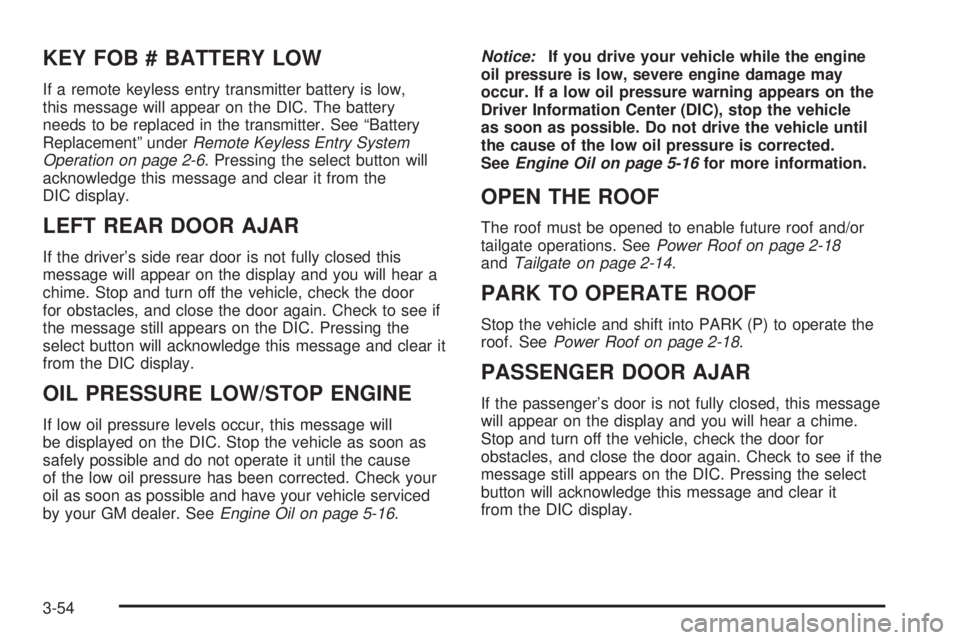
KEY FOB # BATTERY LOW
If a remote keyless entry transmitter battery is low,
this message will appear on the DIC. The battery
needs to be replaced in the transmitter. See “Battery
Replacement” underRemote Keyless Entry System
Operation on page 2-6. Pressing the select button will
acknowledge this message and clear it from the
DIC display.
LEFT REAR DOOR AJAR
If the driver’s side rear door is not fully closed this
message will appear on the display and you will hear a
chime. Stop and turn off the vehicle, check the door
for obstacles, and close the door again. Check to see if
the message still appears on the DIC. Pressing the
select button will acknowledge this message and clear it
from the DIC display.
OIL PRESSURE LOW/STOP ENGINE
If low oil pressure levels occur, this message will
be displayed on the DIC. Stop the vehicle as soon as
safely possible and do not operate it until the cause
of the low oil pressure has been corrected. Check your
oil as soon as possible and have your vehicle serviced
by your GM dealer. SeeEngine Oil on page 5-16.Notice:If you drive your vehicle while the engine
oil pressure is low, severe engine damage may
occur. If a low oil pressure warning appears on the
Driver Information Center (DIC), stop the vehicle
as soon as possible. Do not drive the vehicle until
the cause of the low oil pressure is corrected.
SeeEngine Oil on page 5-16for more information.
OPEN THE ROOF
The roof must be opened to enable future roof and/or
tailgate operations. SeePower Roof on page 2-18
andTailgate on page 2-14.
PARK TO OPERATE ROOF
Stop the vehicle and shift into PARK (P) to operate the
roof. SeePower Roof on page 2-18.
PASSENGER DOOR AJAR
If the passenger’s door is not fully closed, this message
will appear on the display and you will hear a chime.
Stop and turn off the vehicle, check the door for
obstacles, and close the door again. Check to see if the
message still appears on the DIC. Pressing the select
button will acknowledge this message and clear it
from the DIC display.
3-54
Page 187 of 474

REAR WIPER OBSTRUCTION
Check the rear wiper. An object is preventing it from
moving to the off position. Tailgate glass operations
cannot be performed if the rear wiper is not in the off
position. SeeWindshield Wiper Blade Replacement
on page 5-53.
RIGHT REAR DOOR AJAR
If the passenger’s side rear door is not fully closed this
message will appear on the display and you will hear
a chime. Stop and turn off the vehicle, check the door for
obstacles, and close the door again. Check to see if
the message still appears on the DIC. Pressing
the select button will acknowledge this message and
clear it from the DIC display.
ROOF CLOSED
The roof is closed and latched. SeePower Roof on
page 2-18for more information.
ROOF IS CLOSING
The roof is moving in the closed direction. SeePower
Roof on page 2-18for more information.
ROOF IS OPENING
The roof is moving in the opened direction. SeePower
Roof on page 2-18for more information.
ROOF OPENED
The roof is opened and stowed. SeePower Roof on
page 2-18for more information.
SERVICE AIR BAG
If there is a problem with the airbag system this
message will be displayed on the DIC. Have your
GM dealer inspect the system for problems. SeeAirbag
Readiness Light on page 3-34andAirbag System on
page 1-46for more information. Pressing the select
button will acknowledge this message and clear it from
the DIC display.
SERVICE BRAKE SYSTEM
If a problem occurs with the brake system this message
will appear on the DIC. If this message appears, stop
as soon as possible and turn off the vehicle. Restart the
vehicle and check for the message on the DIC display.
If the message is still displayed, or appears again when
you begin driving, the brake system needs service.
See your GM dealer.
3-55
Page 254 of 474

Fixed Mast Antenna
The xed mast antenna can withstand most car washes
without being damaged. If the mast should ever
become slightly bent, straighten it out by hand. If the
mast is badly bent, replace it.
Check occasionally to make sure the mast is still
tightened to the fender. If tightening is required,
tighten by hand, then with a wrench one quarter turn.
XM™ Satellite Radio Antenna
System
The XM™ Satellite Radio antenna is located on the roof
of your vehicle. Keep this antenna clear of snow and
ice build up for clear radio reception.
The performance of the XM™ system may be affected if
the sunroof is open.
Loading items onto the roof of your vehicle can interfere
with the performance of the XM™ system. Make sure
that the XM™ satellite antenna is not obstructed.
Chime Level Adjustment
The radio is the vehicle’s chime producer. To change
the volume level, press and hold pushbutton 6 with
the ignition on and the radio power off. The chime
volume level will change from the normal level to loud,
and LOUD will appear on the radio display. To change
back to the default or normal setting, press and hold
pushbutton 6 again. The chime level will change
from the loud level to normal, and NORMAL will appear
on the radio display. Removing the radio and not
replacing it with a factory radio or chime will disable
vehicle chimes.
3-122
Page 271 of 474
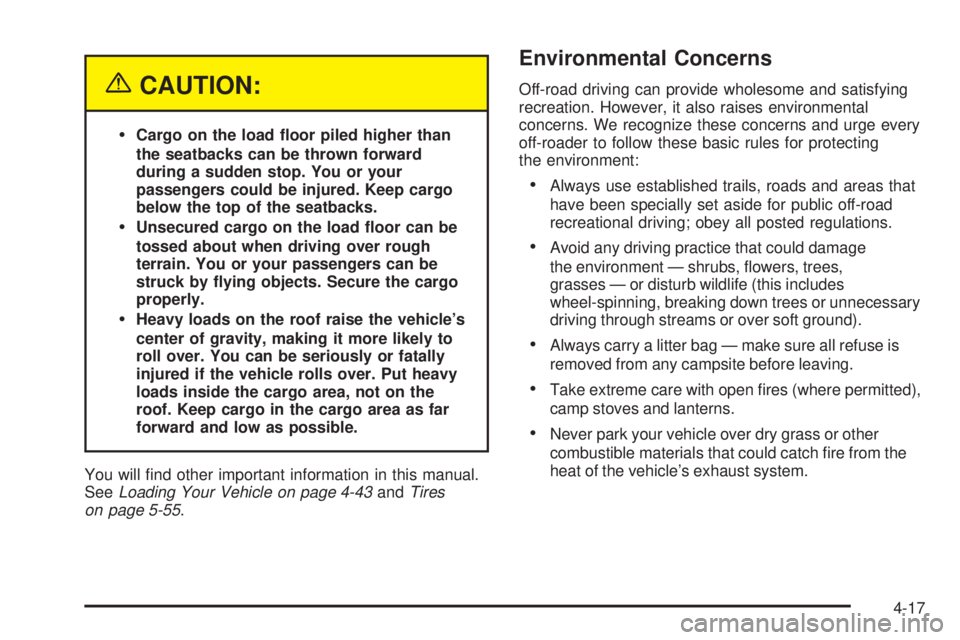
{CAUTION:
Cargo on the load oor piled higher than
the seatbacks can be thrown forward
during a sudden stop. You or your
passengers could be injured. Keep cargo
below the top of the seatbacks.
Unsecured cargo on the load oor can be
tossed about when driving over rough
terrain. You or your passengers can be
struck by ying objects. Secure the cargo
properly.
Heavy loads on the roof raise the vehicle’s
center of gravity, making it more likely to
roll over. You can be seriously or fatally
injured if the vehicle rolls over. Put heavy
loads inside the cargo area, not on the
roof. Keep cargo in the cargo area as far
forward and low as possible.
You will nd other important information in this manual.
SeeLoading Your Vehicle on page 4-43andTires
on page 5-55.
Environmental Concerns
Off-road driving can provide wholesome and satisfying
recreation. However, it also raises environmental
concerns. We recognize these concerns and urge every
off-roader to follow these basic rules for protecting
the environment:
Always use established trails, roads and areas that
have been specially set aside for public off-road
recreational driving; obey all posted regulations.
Avoid any driving practice that could damage
the environment — shrubs, owers, trees,
grasses — or disturb wildlife (this includes
wheel-spinning, breaking down trees or unnecessary
driving through streams or over soft ground).
Always carry a litter bag — make sure all refuse is
removed from any campsite before leaving.
Take extreme care with open res (where permitted),
camp stoves and lanterns.
Never park your vehicle over dry grass or other
combustible materials that could catch re from the
heat of the vehicle’s exhaust system.
4-17
Page 322 of 474
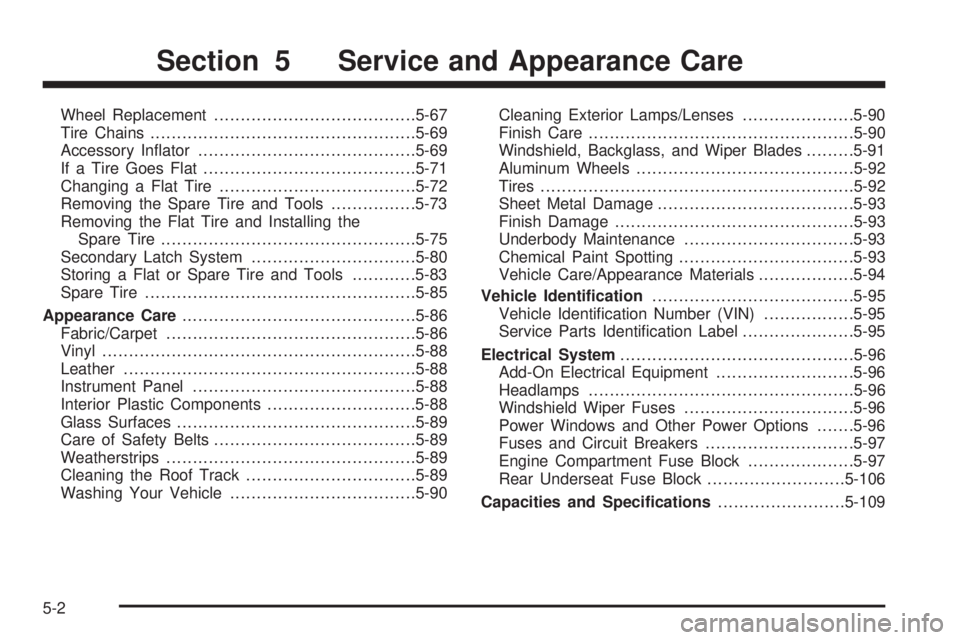
Wheel Replacement......................................5-67
Tire Chains..................................................5-69
Accessory Inator.........................................5-69
If a Tire Goes Flat........................................5-71
Changing a Flat Tire.....................................5-72
Removing the Spare Tire and Tools................5-73
Removing the Flat Tire and Installing the
Spare Tire................................................5-75
Secondary Latch System...............................5-80
Storing a Flat or Spare Tire and Tools............5-83
Spare Tire...................................................5-85
Appearance Care............................................5-86
Fabric/Carpet...............................................5-86
Vinyl...........................................................5-88
Leather.......................................................5-88
Instrument Panel..........................................5-88
Interior Plastic Components............................5-88
Glass Surfaces.............................................5-89
Care of Safety Belts......................................5-89
Weatherstrips...............................................5-89
Cleaning the Roof Track................................5-89
Washing Your Vehicle...................................5-90Cleaning Exterior Lamps/Lenses.....................5-90
Finish Care..................................................5-90
Windshield, Backglass, and Wiper Blades.........5-91
Aluminum Wheels.........................................5-92
Tires...........................................................5-92
Sheet Metal Damage.....................................5-93
Finish Damage.............................................5-93
Underbody Maintenance................................5-93
Chemical Paint Spotting.................................5-93
Vehicle Care/Appearance Materials..................5-94
Vehicle Identication......................................5-95
Vehicle Identication Number (VIN).................5-95
Service Parts Identication Label.....................5-95
Electrical System............................................5-96
Add-On Electrical Equipment..........................5-96
Headlamps..................................................5-96
Windshield Wiper Fuses................................5-96
Power Windows and Other Power Options.......5-96
Fuses and Circuit Breakers............................5-97
Engine Compartment Fuse Block....................5-97
Rear Underseat Fuse Block..........................5-106
Capacities and Specications........................5-109
Section 5 Service and Appearance Care
5-2
Page 409 of 474
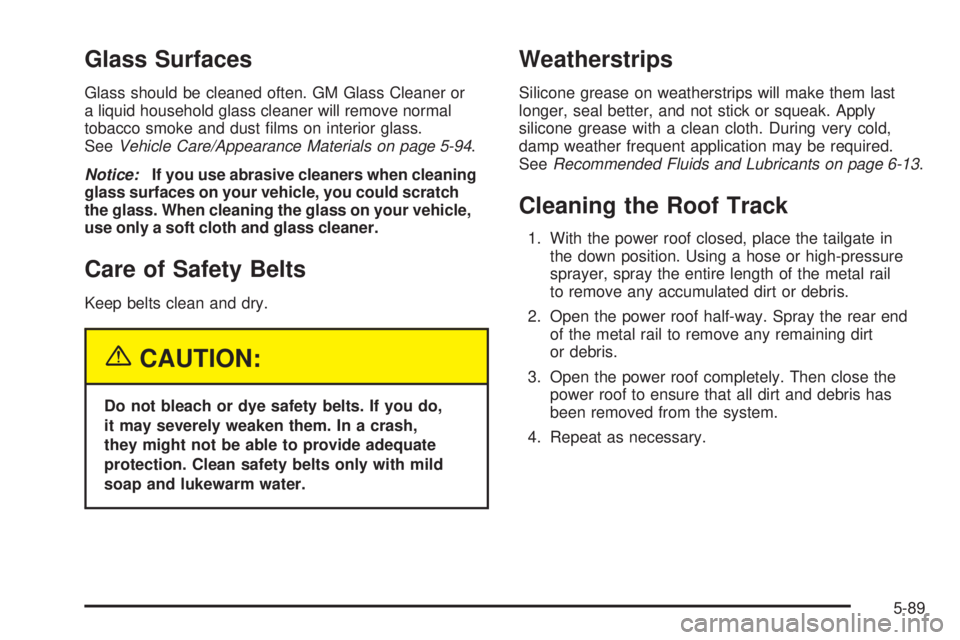
Glass Surfaces
Glass should be cleaned often. GM Glass Cleaner or
a liquid household glass cleaner will remove normal
tobacco smoke and dust lms on interior glass.
SeeVehicle Care/Appearance Materials on page 5-94.
Notice:If you use abrasive cleaners when cleaning
glass surfaces on your vehicle, you could scratch
the glass. When cleaning the glass on your vehicle,
use only a soft cloth and glass cleaner.
Care of Safety Belts
Keep belts clean and dry.
{CAUTION:
Do not bleach or dye safety belts. If you do,
it may severely weaken them. In a crash,
they might not be able to provide adequate
protection. Clean safety belts only with mild
soap and lukewarm water.
Weatherstrips
Silicone grease on weatherstrips will make them last
longer, seal better, and not stick or squeak. Apply
silicone grease with a clean cloth. During very cold,
damp weather frequent application may be required.
SeeRecommended Fluids and Lubricants on page 6-13.
Cleaning the Roof Track
1. With the power roof closed, place the tailgate in
the down position. Using a hose or high-pressure
sprayer, spray the entire length of the metal rail
to remove any accumulated dirt or debris.
2. Open the power roof half-way. Spray the rear end
of the metal rail to remove any remaining dirt
or debris.
3. Open the power roof completely. Then close the
power roof to ensure that all dirt and debris has
been removed from the system.
4. Repeat as necessary.
5-89
Page 427 of 474
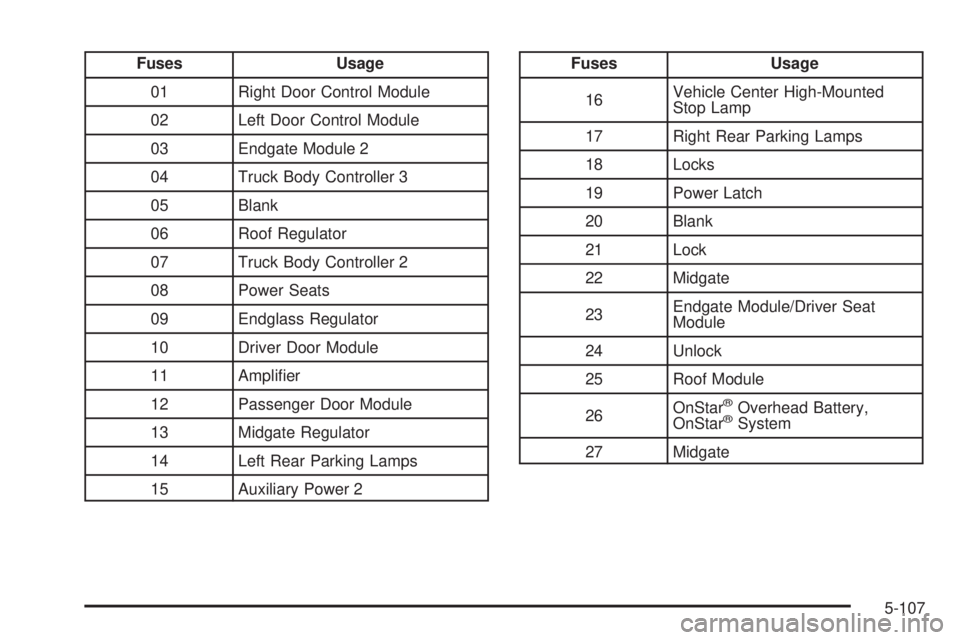
Fuses Usage
01 Right Door Control Module
02 Left Door Control Module
03 Endgate Module 2
04 Truck Body Controller 3
05 Blank
06 Roof Regulator
07 Truck Body Controller 2
08 Power Seats
09 Endglass Regulator
10 Driver Door Module
11 Amplier
12 Passenger Door Module
13 Midgate Regulator
14 Left Rear Parking Lamps
15 Auxiliary Power 2Fuses Usage
16Vehicle Center High-Mounted
Stop Lamp
17 Right Rear Parking Lamps
18 Locks
19 Power Latch
20 Blank
21 Lock
22 Midgate
23Endgate Module/Driver Seat
Module
24 Unlock
25 Roof Module
26OnStar
®Overhead Battery,
OnStar®System
27 Midgate
5-107
Page 428 of 474
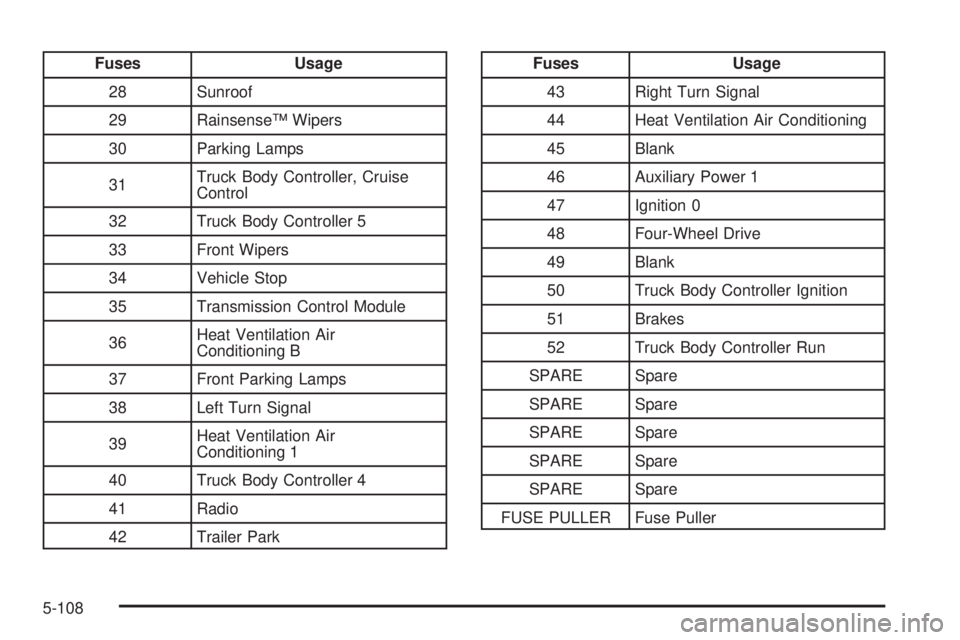
Fuses Usage
28 Sunroof
29 Rainsense™ Wipers
30 Parking Lamps
31Truck Body Controller, Cruise
Control
32 Truck Body Controller 5
33 Front Wipers
34 Vehicle Stop
35 Transmission Control Module
36Heat Ventilation Air
Conditioning B
37 Front Parking Lamps
38 Left Turn Signal
39Heat Ventilation Air
Conditioning 1
40 Truck Body Controller 4
41 Radio
42 Trailer ParkFuses Usage
43 Right Turn Signal
44 Heat Ventilation Air Conditioning
45 Blank
46 Auxiliary Power 1
47 Ignition 0
48 Four-Wheel Drive
49 Blank
50 Truck Body Controller Ignition
51 Brakes
52 Truck Body Controller Run
SPARE Spare
SPARE Spare
SPARE Spare
SPARE Spare
SPARE Spare
FUSE PULLER Fuse Puller
5-108