battery GMC JIMMY 1997 User Guide
[x] Cancel search | Manufacturer: GMC, Model Year: 1997, Model line: JIMMY, Model: GMC JIMMY 1997Pages: 410, PDF Size: 20.03 MB
Page 126 of 410
This device complies with Part 15 of the FCC Rules.
Operation is subject to the following two conditions:
( I ) This device may not cause harmful interference, and
(2) This device must accept any interference received,
including interference that may cause undesired operation.
Programming the Transmitter
Do not LIS~ the transmitter with any garage door opener
that does not have the ”stop and reverse’‘ feature. This
includes any garage door opener model manufactured
before April
1, 1982.
Re .WI-P tllcrt pwplt~ cml ohjucts c11-0 clmr of‘the g(it-cqe
cloo~. Jolr citxl I?t-~.’s”L“ll}”ill,s!
Your vehicle’s engine should be turned off while
programming the transmitter. Follow these steps to
program
up to three channels:
I, If you have not previously programmed a universal
channel, proceed to Step
2. Otherwise, hold down the
two outside buttons on the universal transmitter
until
the red light begins to flash rapidly (approximately
20 seconds). Then rekase the buttons. This procedure
initializes the memory and erases any previous
settings for all three channels.
2. Hold the end of the hand-held transmitter against the
bottom surface of the ~~niversal transmitter
so that
you can still see the red
light.
3. Decide which one of the three channels you want to
program. Using both hands, press the hand-held
transmitter button and the desired button on the
universal transmitter. Continue
to hold both buttons
through Step
4.
4.
Hold down both buttons until yo~r see the red light
on the Llniversal transmitter flash rapidly. The rapid
flashing, which could take up
to 90 seconds,
indicates that the universal transmitter has been
programmed. Release both buttons once the light
starts
to flash rapidly.
If you have trouble programming the universal
transmitter, make s~rre that you have followed the
directions exactly
as described and that the battery in the
hand-held transmitter is not dead.
If yo~t still cannot
program
it, rotate the hand-held transmitter end over end
and
try again. The universal transmitter may not work
with older garage door openers that do not meet current
Federal Consumer Safety Standards.
If you cannot
program the transmitter after repeated attempts. consult
your
GM dealer.
Be sure to keep the original hand-held transmitter in case
you need
to erase and reprogram the universal transmitter.
2-65
Page 134 of 410

Air Bag Readiness Light
There is an air bag readiness light 011 the instrument
panel, which shows
AIR RAG. The system checks the
air bag's electrical system for ~~~alfunctions. The light
tells you if there is an electrical problem. The syslem
check includes the air bag sensors. the air
bag module,
the wiring and the diagnostic module. For n~ore
information
on the air bag system. sec .'Air Rag" in
the Index.
AIR
BAG
This light will ~0111e on
when you start your engine,
and it will flash for a few
seconds. Then thc light
should go out. This means
the system
is ready.
If the air bag readiness light stays 011 after you start the
engine or comes on when you are driving, your ail- bag
system
may not work properly. Have your vehicle
serviced right
away.
The air bag readiness light should flash for a few
seconds when you turn the ignition key to
RUN. If the
light doesn't
co111e on then. have it fixed so it will be
re.ady
to warn you if there is a problem.
_. -
lrging System Indicator Light
II
The charging system light
will come on brietly when
you turn on the ignition,
but the engine is not
running, as
a check to
show you it is working.
It should go out once the engine is running. If it stays
on. or comes on while you are driving. you may have
a problem with the. charging system. It could indicate
that
you have problem with a generator drive belt. or
another electrical problem. Have it checked right away.
Driving while this light
is on could drain your battery.
If you must drive a short distance with the light 011, be
certain to turn off
all your accessories. such as the radio
and air conditioner.
2-73
Page 135 of 410
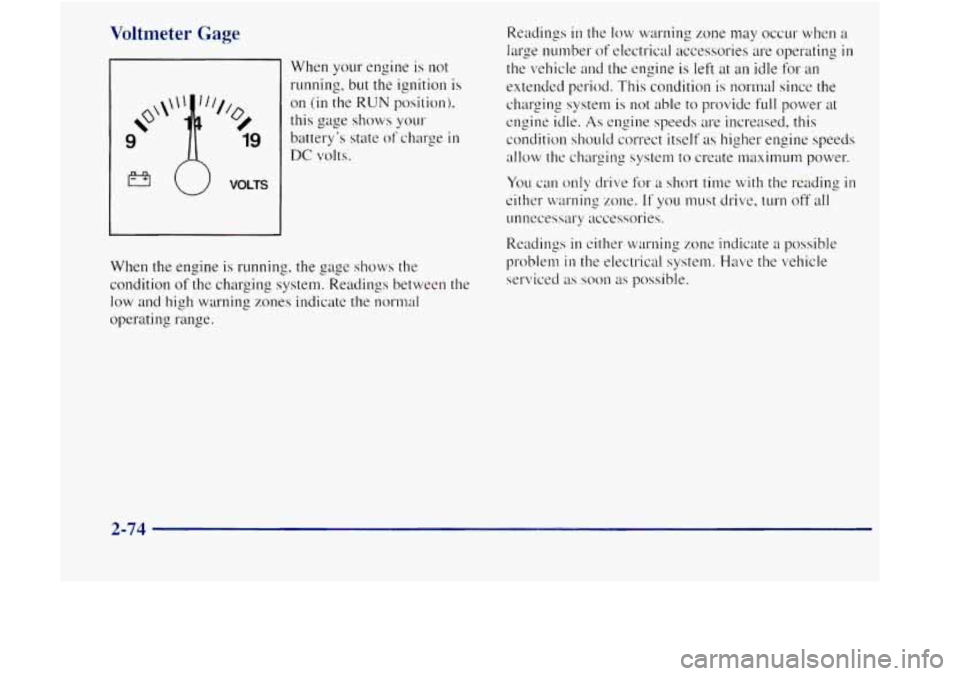
Voltmeter Gage
When your engine is not
running. but the ignition is
on (in the RUN position).
this gage shows
your
battery’s state of charge in
DC volts.
VOLTS
When the engine is running, the gage shows the
condition
of the. charging system. Readings between the
low and high warning zones indicate the normal
operating range. Readings
in the
low warning mne may occur when a
large number of electrical accessories are operating in
the vehicle and the engine is left at an idle for an
extended period. This condition is normal since
the
charging system is not able to provide full power at
engine idle. As engine speeds are increased, this
condition should correct itself
as higher engine speeds
allow the charging system to create maximum power.
You can only drive for a short time with the reading in
either warning zone. If you must drive, turn off all
unnecessary accessories.
Readings
in either warning zone indicate a possible
problem
in the electrical system. Have the vehicle
serviced
as soon as possible.
2-74
Page 160 of 410
CD AUX: To switch between the player and the radio
when a disc is playing, press the
AM-FM button. To
return to the player, press CD AUX. When a disc is
playing, the letters CD and the
CD symbol will appear
on the display. (If the radio is turned off, the disc stays
in the player and will resume playing at the point where
it stopped.)
EJECT: Press this button to eject the disc from the
player and play the radio.
When the same or a new disc
is inserted, the disc will
start playing on track one. If a compact disc is left
sitting in the opening for more than a few seconds,
the
player will pull the CD back in. The radio will continue
playing. When the ignition is
off, press this button to
load a
CD. If you leave a compact disc in the player
while listening to the radio, it may become warm.
Theft-Deterrent Feature
THEFTLOCK" is designed to discourage theft of your
radio. It works by using a secret code to disable all radio
functions whenever battery power is removed.
The THEFTLOCK feature for the radio may be used or
ignored.
If ignored, the system plays normally and the
radio is not protected by the feature. If THEFTLOCK
is
activated, your radio will not operate if stolen.
When
THEFTLOCK is activated, the radio will display
LOC to indicate a locked condition anytime battery
power is removed. If your battery loses power for any
reason, you must unlock the radio with the secret code
before it will operate.
Activating the Theft-Deterrent Feature
The instructions which follow explain how to enter your
secret code to activate the THEFTLOCK system. It is
recommended that
you read through all nine steps
before starting the procedure.
NOTE: If you allow more than
15 seconds to elapse
between any steps, the radio automatically reverts to
time and you must start the procedure over at Step
4.
3-17
Page 205 of 410

Snow can trap exhaust gases under your vehicle.
This can cause deadly
CO (carbon monoxide) gas
to get inside.
CO could overcome you and kill
you. You can’t see it or smell it,
so you might not
know it is in your vehicle. Clear away snow from
around the base of your vehicle, especially any
that is blocking your exhaust pipe. And check
around again from time to time to be sure snow
doesn’t collect there.
Open a window just a little on the side of the
vehicle that’s away from the wind. This will help
keep
CO out.
Run your engine only as long as you must. This saves
fuel. When
you run the engine, make it go a little faster
than just idle. That is, push the accelerator slightly.
This
uses less fuel for the heat that you get and it keeps the
battery charged.
You will need a well-charged battery to
restart the vehicle. and possibly for signaling later on
with your headlamps. Let the heater run for a while.
Then, shut the engine
off and close the window almost
all the way
to preserve the heat. Start the engine again
and repeat this only when you feel really uncomfortable
from the cold.
But do it as little as possible. Preserve the
fuel as long
as you can. To help keep warm, you can get
out of the vehicle and
do some hirly vigorous exercises
every half
hour or so until help comes.
4-40
Page 206 of 410

Recreational Vehicle Towing (Four-wheel Drive With
7
Shift Transfer Case Only)
1.
2.
3.
3.
Set the par' * lg brake firmly.
Place an automatic transmission
in PARK (P) or a
manual transmission in FIRST ( I ).
Firmly attach the vehicle being towed to the tow
vehicle.
Do not tow the vehicle by the rear bumper
bar. Refer
to the hitch manufacturer's instructions.
Place the manual shift transfer case shift lever
in
NEUTRAL (N).
A CAUTION:
Shifting the transfer case into NEUTRAL (N) can
cause your vehicle to roll even if the transmission
is
in PARK (P), for an automatic transmission, or
if your vehicle is in gear, for a manual
transmission. You
or others could be injured.
Make sure the parking brake
is firmly set before
you shift the transfer case into
NEUTRAL (N).
5. Release the parking brake only after the vehicle
being towed is firmly attached
to the tow vehicle.
6. Insert the ignition key into the ignition switch and
turn
it one notch forward of the LOCK position. This
places the key
in the OFF position, which unlocks
the steering column while preventing battery drain.
Unlocking the steering column will allow
for proper
movement
of the front wheelshires during towing.
4-41
Page 226 of 410

CAUTION:
Using a match near a battery can cause battery
gas to explode. People have been hurt doing this,
and some have been blinded. Use a flashlight
if
you need more light.
Be sure the battery has enough water. You don't
need to add water to the Delco Freedom"' battery
installed in every new
CbI vehicle. But if a
battery has filler caps, be sure the right amount
of fluid is there. If it
is low, add water to take care
of that first. If
you don't, explosive gas could
be present.
Battery fluid contains acid that can burn you.
Don't get it on you. If you accidentally get it
in
your eyes or on your skin, flush the place with
water and get medical help immediately.
6. Connect the red
positive (+) cable to
the positive
(+) terminal
of the vehicle with the
de.ad battery.
5-5
Page 227 of 410

7. Don't let the other end
touch metal. Contwct it to
the positive (+) terminal
8. Now connect the
black negative (-) cable
to the good battery's
negative
(-) terminal.
Don't let the other
end
touch anything until the
next step. The other end
of the negative cable
doesn't go to the dead
battery.
It pes to a heavy
unpainted metal ~U'I on
the engine of the vehicle
with the dead battery.
9. Attach the cable at least
18 inches (45 crn) away
from
the dead battery,
but
not near engine purts
that ITIOW.
The electrical
connection
is just as
good there, but the
chance
of sparks getting
back to
the battery is
much less.
10. Now start the vehicle with the good battery and run
the engine for ;1 while.
1 I. Try to start the vehicle with the dead battery. If it
won't start after a few tries make sure all
connections we good. If it still won't start. it
probably needs service.
A CAUTION:
I
Fans or other moving engine parts can injure you
badly. Keep your hands away from moving parts
once the engines arc running.
5-6
Page 260 of 410

Section 6 Service and Appearance Care
6-3 6-4
6-5
6-6
6-9
6-13
6- 14
6- 1 8
6- 19
6-20
6-2
1
6-23
6-26
6-26 6-26
6-27
6-28
6-32
6-33
6-3
8
6-40
6-49
6-49
6-5 2
6-54
6-57
6-58
6-5 8
6-58
6-62
6-63
6-64 Brakes
Battery
Bulb
Replacement
Windshield Wiper Blade
Repl~tcenwnt
Tires Appemlnce Care
Cleaning
the Inside of Your Vehicle
Care of Safety Belts
Cleaning the Outside
of Your Vehicle
Appearance Care Materiuls
Chart
Vehicle Identification Number (VIN)
Service Parts Identification Label
Electrical System
Replacement Bulbs
Ci,plcities
and Specifications
Air Conditioning Refrigerants
Page 267 of 410
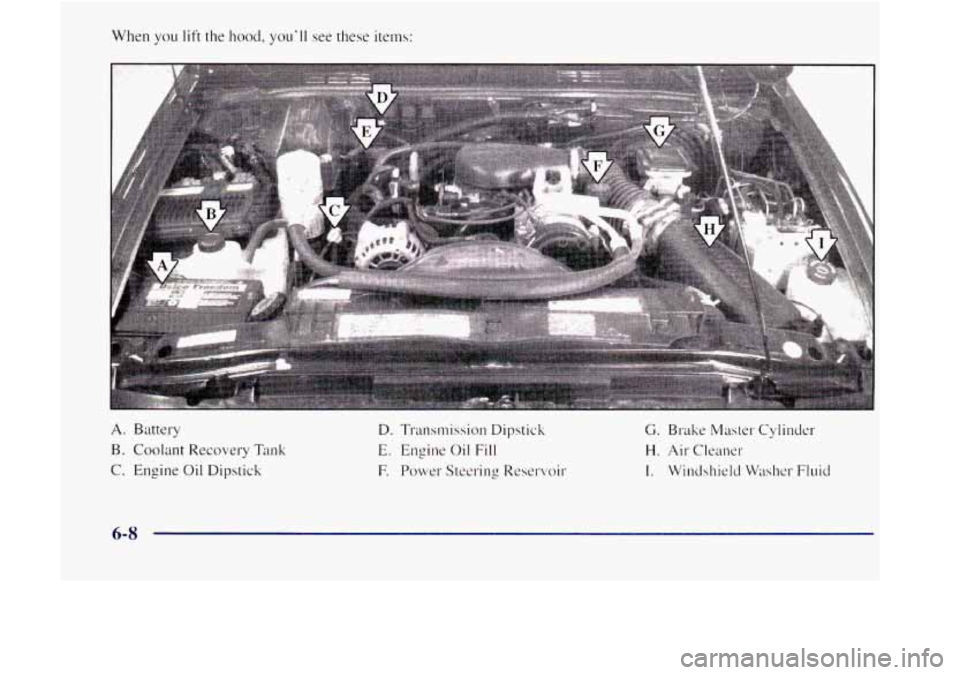
When you lift the I~ood, you'll see these items:
A. Battery
B. Coolant Re,covery
Tank
C. Engine Oil Dipstick
D. Transmission Dipstick C. Brake Master Cylinder
E. Engine Oil Fill H. Air Cleaner
E Power Steering Reservoir I. Windshield Washer Fluid
6-8