radio GMC SAVANA 2018 Owner's Manual
[x] Cancel search | Manufacturer: GMC, Model Year: 2018, Model line: SAVANA, Model: GMC SAVANA 2018Pages: 354, PDF Size: 5.09 MB
Page 6 of 354
GMC Savana Owner Manual (GMNA-Localizing-U.S./Canada-11374214) -
2018 - CRC - 2/2/18
In Brief 5
In Brief
Instrument Panel
Instrument Panel . . . . . . . . . . . . . . . . 6
Initial Drive Information
Initial Drive Information . . . . . . . . . . 8
Remote Keyless Entry (RKE)System . . . . . . . . . . . . . . . . . . . . . . . . 8
Remote Vehicle Start . . . . . . . . . . . 8
Door Locks . . . . . . . . . . . . . . . . . . . . . 9
Windows . . . . . . . . . . . . . . . . . . . . . . . . 9
Seat Adjustment . . . . . . . . . . . . . . . 10
Seat Belts . . . . . . . . . . . . . . . . . . . . . . 11
Airbag On-Off Switch . . . . . . . . . . 11
Mirror Adjustment . . . . . . . . . . . . . . 12
Steering Wheel Adjustment . . . . 12
Interior Lighting . . . . . . . . . . . . . . . . 13
Exterior Lighting . . . . . . . . . . . . . . . 13
Windshield Wiper/Washer . . . . . . 14
Climate Controls . . . . . . . . . . . . . . . 15
Transmission . . . . . . . . . . . . . . . . . . 16
Vehicle Features
Infotainment System . . . . . . . . . . . 17
Radio(s) . . . . . . . . . . . . . . . . . . . . . . . 17
Satellite Radio . . . . . . . . . . . . . . . . . 18
Portable Audio Devices . . . . . . . . 18
Bluetooth . . . . . . . . . . . . . . . . . . . . . . 19 Steering Wheel Controls . . . . . . . 19
Cruise Control . . . . . . . . . . . . . . . . . 20
Side Blind Zone
Alert (SBZA) . . . . . . . . . . . . . . . . . . 20
Rear Vision Camera (RVC) . . . . 20
Parking Assist . . . . . . . . . . . . . . . . . 20
Power Outlets . . . . . . . . . . . . . . . . . 21
Performance and Maintenance
Traction Control/Electronic
Stability Control . . . . . . . . . . . . . . 21
Tire Pressure Monitor . . . . . . . . . . 22
Fuel (Gasoline) . . . . . . . . . . . . . . . . 22
Fuel (Diesel) . . . . . . . . . . . . . . . . . . . 22
E85 or FlexFuel . . . . . . . . . . . . . . . . 22
Engine Oil Life System . . . . . . . . 22
Driving for Better Fuel Economy . . . . . . . . . . . . . . . . . . . . . 23
Roadside Assistance Program . . . . . . . . . . . . . . . . . . . . . . 23
Page 18 of 354
GMC Savana Owner Manual (GMNA-Localizing-U.S./Canada-11374214) -
2018 - CRC - 2/2/18
In Brief 17
Vehicle Features
Infotainment System
If the vehicle has a base radio it is
included in this manual. See the
separate infotainment manual for
information on the connected radios,
audio players, phone, navigation
system, and voice or speech
recognition. There is also
information on settings and
downloadable applications (if
equipped).
Radio(s)
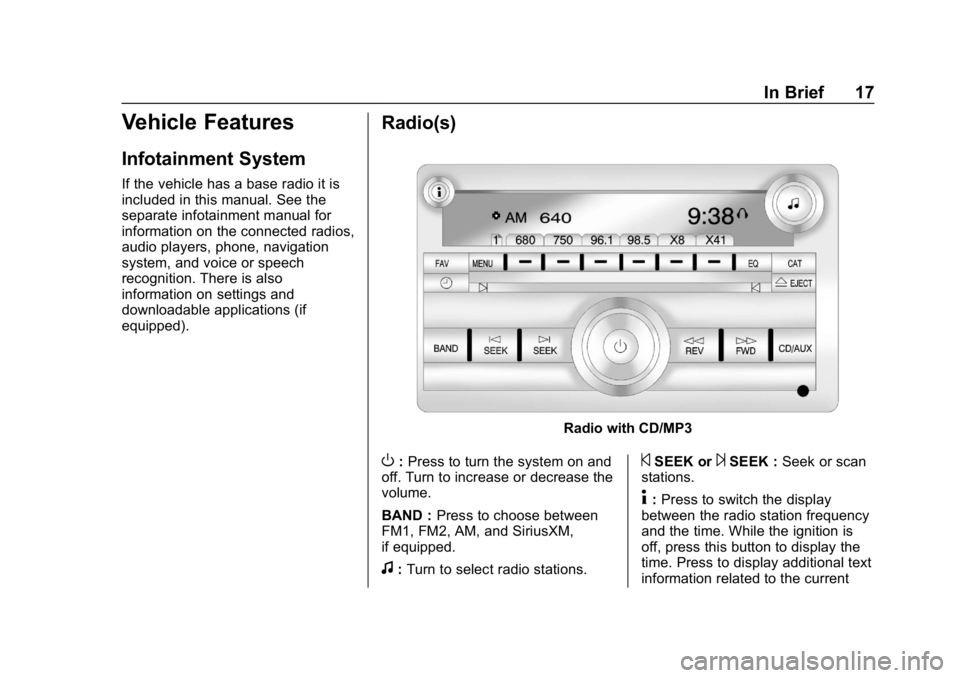
Radio with CD/MP3
O:Press to turn the system on and
off. Turn to increase or decrease the
volume.
BAND : Press to choose between
FM1, FM2, AM, and SiriusXM,
if equipped.
f: Turn to select radio stations.
©SEEK or¨SEEK : Seek or scan
stations.
4: Press to switch the display
between the radio station frequency
and the time. While the ignition is
off, press this button to display the
time. Press to display additional text
information related to the current
Page 19 of 354
GMC Savana Owner Manual (GMNA-Localizing-U.S./Canada-11374214) -
2018 - CRC - 2/2/18
18 In Brief
FM-RDS station or MP3 song.
A choice of additional information
such as Channel, Song, Artist, and
CAT (category) can display.
Continue pressing to highlight the
desired tab, or press the softkey
under any one of the tabs and the
information about that tab displays.
For more information about these
and other radio features, see
Infotainment0127.
Storing a Favorite Station
Depending on which radio the
vehicle has, radio stations are
stored as either favorites or presets.
For vehicles with a FAV button, a
maximum of 36 stations can be
stored as favorites using the six
softkeys below the radio station
frequency tabs and by using the
radio FAV button. Press FAV to go
through up to six pages of favorites,
each having six favorite stations
available per page. Each page of
favorites can contain any
combination of AM and FM stations. For more information on storing a
favorite station, see
Operation
0 131.
Setting the Clock
1. With the radio on, pressHand
the HR, MIN, MM, DD, and
YYYY (hour, minute, month,
day, and year) display.
2. Press the softkey under any one of the tabs to be changed.
3. Press
©SEEK or¨SEEK,
sREV or\FWD, or turnfclockwise or counterclockwise
to increase or decrease the
time or date.
For more information on setting the
clock, see Clock093.
Satellite Radio
SiriusXM®is a satellite radio service
based in the 48 contiguous United
States and 10 Canadian provinces.
SiriusXM satellite radio has a wide
variety of programming and
commercial-free music, coast to
coast, and in digital-quality sound. A fee is required to receive the
SiriusXM service.
For more information, refer to:
.
www.siriusxm.com or call
1-888-601-6296 (U.S.)
. www.siriusxm.ca or call
1-877-438-9677 (Canada)
See Satellite Radio 0134.
Portable Audio Devices
This vehicle may have an auxiliary
input on the center stack and a USB
port on the instrument panel.
External devices such as an iPod,
laptop computer, MP3 player,
or USB storage device can be
connected to the auxiliary port using
a 3.5 mm (1/8 in) input cable or the
USB port depending on the audio
system.
See "Using the Auxiliary Input Jack"
and "Using the USB Port" in
Auxiliary Devices 0141.
Page 20 of 354
GMC Savana Owner Manual (GMNA-Localizing-U.S./Canada-11374214) -
2018 - CRC - 2/2/18
In Brief 19
Bluetooth
If equipped with a Bluetooth system,
it allows users with a
Bluetooth-enabled cell phone to
make and receive hands-free calls
using the vehicle’s audio system
and controls.
The Bluetooth-enabled cell phone
must be paired with the Bluetooth
system before it can be used in the
vehicle. Not all phones will support
all functions. For more information,
see www.gm.com/bluetooth and
Bluetooth 0146.
Steering Wheel Controls
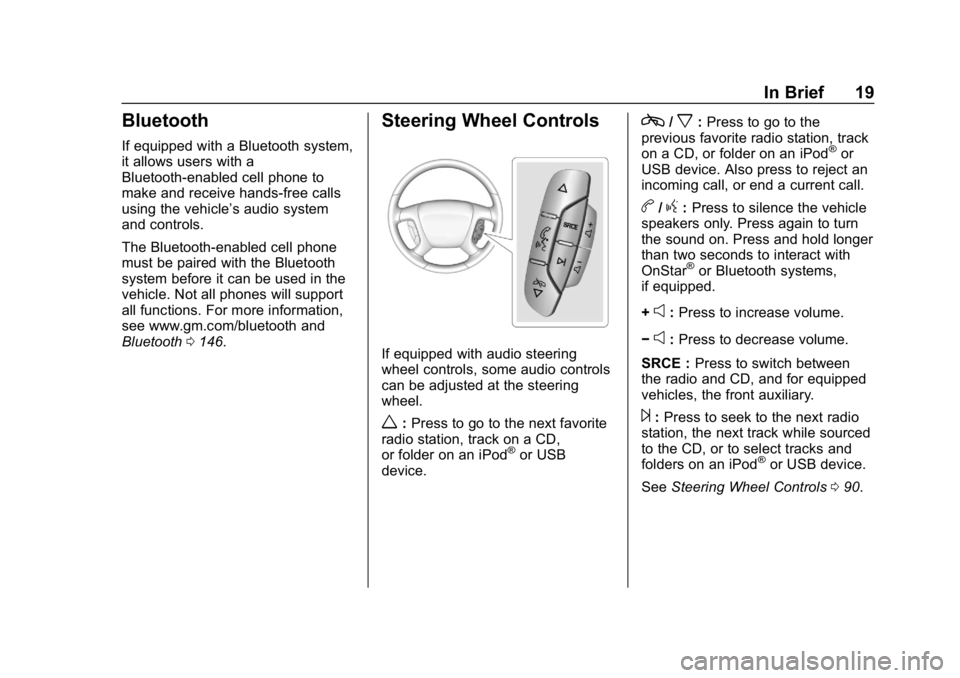
If equipped with audio steering
wheel controls, some audio controls
can be adjusted at the steering
wheel.
w:Press to go to the next favorite
radio station, track on a CD,
or folder on an iPod
®or USB
device.
c/x: Press to go to the
previous favorite radio station, track
on a CD, or folder on an iPod
®or
USB device. Also press to reject an
incoming call, or end a current call.
b/g: Press to silence the vehicle
speakers only. Press again to turn
the sound on. Press and hold longer
than two seconds to interact with
OnStar
®or Bluetooth systems,
if equipped.
+
e: Press to increase volume.
−
e: Press to decrease volume.
SRCE : Press to switch between
the radio and CD, and for equipped
vehicles, the front auxiliary.
¨: Press to seek to the next radio
station, the next track while sourced
to the CD, or to select tracks and
folders on an iPod
®or USB device.
See Steering Wheel Controls 090.
Page 27 of 354
GMC Savana Owner Manual (GMNA-Localizing-U.S./Canada-11374214) -
2018 - CRC - 2/2/18
26 Keys, Doors, and Windows
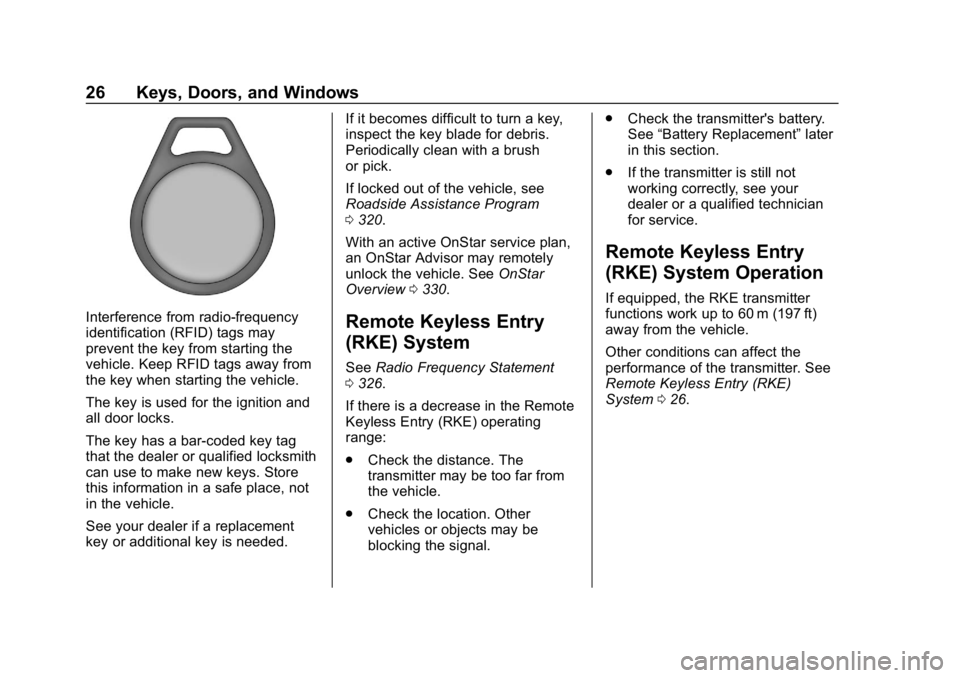
Interference from radio-frequency
identification (RFID) tags may
prevent the key from starting the
vehicle. Keep RFID tags away from
the key when starting the vehicle.
The key is used for the ignition and
all door locks.
The key has a bar-coded key tag
that the dealer or qualified locksmith
can use to make new keys. Store
this information in a safe place, not
in the vehicle.
See your dealer if a replacement
key or additional key is needed.If it becomes difficult to turn a key,
inspect the key blade for debris.
Periodically clean with a brush
or pick.
If locked out of the vehicle, see
Roadside Assistance Program
0
320.
With an active OnStar service plan,
an OnStar Advisor may remotely
unlock the vehicle. See OnStar
Overview 0330.Remote Keyless Entry
(RKE) System
See Radio Frequency Statement
0 326.
If there is a decrease in the Remote
Keyless Entry (RKE) operating
range:
. Check the distance. The
transmitter may be too far from
the vehicle.
. Check the location. Other
vehicles or objects may be
blocking the signal. .
Check the transmitter's battery.
See “Battery Replacement” later
in this section.
. If the transmitter is still not
working correctly, see your
dealer or a qualified technician
for service.
Remote Keyless Entry
(RKE) System Operation
If equipped, the RKE transmitter
functions work up to 60 m (197 ft)
away from the vehicle.
Other conditions can affect the
performance of the transmitter. See
Remote Keyless Entry (RKE)
System 026.
Page 35 of 354
GMC Savana Owner Manual (GMNA-Localizing-U.S./Canada-11374214) -
2018 - CRC - 2/2/18
34 Keys, Doors, and Windows
Warning (Continued)
permanent injuries or even
death from heat stroke.
Always lock the vehicle
whenever leaving it.
. Outsiders can easily enter
through an unlocked door
when you slow down or stop
the vehicle. Locking the
doors can help prevent this
from happening.
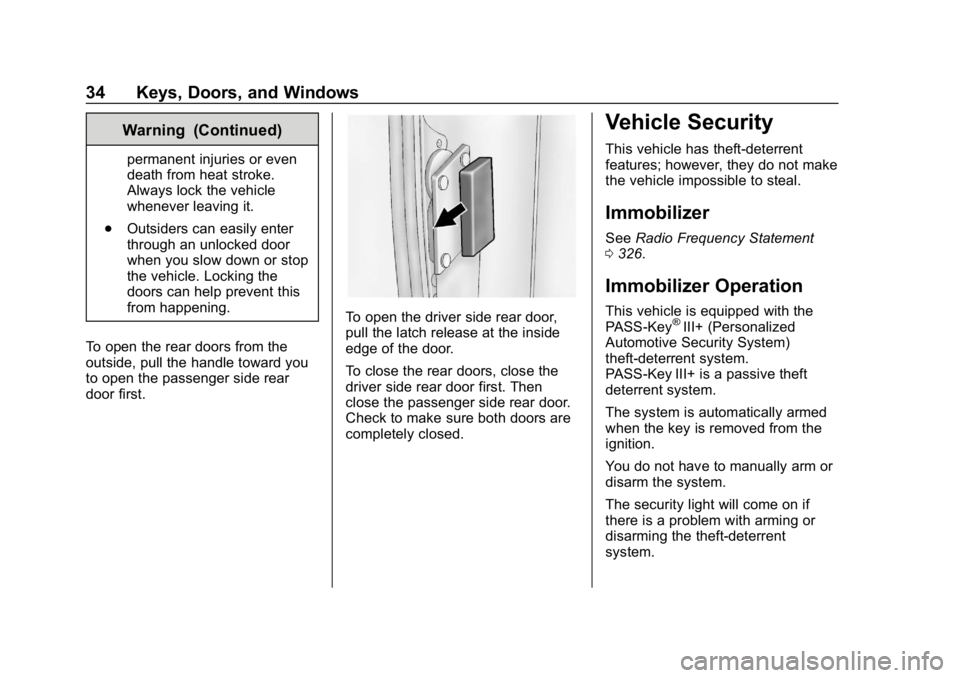
To open the rear doors from the
outside, pull the handle toward you
to open the passenger side rear
door first.
To open the driver side rear door,
pull the latch release at the inside
edge of the door.
To close the rear doors, close the
driver side rear door first. Then
close the passenger side rear door.
Check to make sure both doors are
completely closed.
Vehicle Security
This vehicle has theft-deterrent
features; however, they do not make
the vehicle impossible to steal.
Immobilizer
See Radio Frequency Statement
0 326.
Immobilizer Operation
This vehicle is equipped with the
PASS-Key®III+ (Personalized
Automotive Security System)
theft-deterrent system.
PASS-Key III+ is a passive theft
deterrent system.
The system is automatically armed
when the key is removed from the
ignition.
You do not have to manually arm or
disarm the system.
The security light will come on if
there is a problem with arming or
disarming the theft-deterrent
system.
Page 91 of 354
GMC Savana Owner Manual (GMNA-Localizing-U.S./Canada-11374214) -
2018 - CRC - 2/2/18
90 Instruments and Controls
Do not adjust the steering wheel
while driving.
Steering Wheel Controls
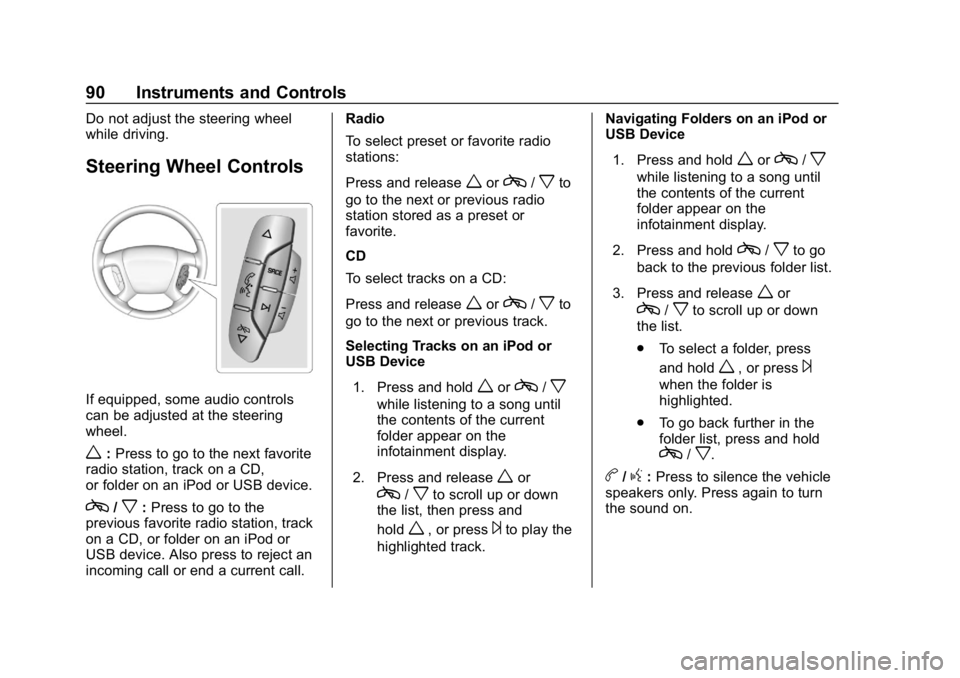
If equipped, some audio controls
can be adjusted at the steering
wheel.
w:Press to go to the next favorite
radio station, track on a CD,
or folder on an iPod or USB device.
c/x: Press to go to the
previous favorite radio station, track
on a CD, or folder on an iPod or
USB device. Also press to reject an
incoming call or end a current call. Radio
To select preset or favorite radio
stations:
Press and release
worc/xto
go to the next or previous radio
station stored as a preset or
favorite.
CD
To select tracks on a CD:
Press and release
worc/xto
go to the next or previous track.
Selecting Tracks on an iPod or
USB Device
1. Press and hold
worc/x
while listening to a song until
the contents of the current
folder appear on the
infotainment display.
2. Press and release
wor
c/xto scroll up or down
the list, then press and
hold
w, or press¨to play the
highlighted track. Navigating Folders on an iPod or
USB Device
1. Press and hold
worc/x
while listening to a song until
the contents of the current
folder appear on the
infotainment display.
2. Press and hold
c/xto go
back to the previous folder list.
3. Press and release
wor
c/xto scroll up or down
the list.
. To select a folder, press
and hold
w, or press¨
when the folder is
highlighted.
. To go back further in the
folder list, press and hold
c/x.
b/g:Press to silence the vehicle
speakers only. Press again to turn
the sound on.
Page 92 of 354

GMC Savana Owner Manual (GMNA-Localizing-U.S./Canada-11374214) -
2018 - CRC - 2/2/18
Instruments and Controls 91
For vehicles with Bluetooth or
OnStar systems, press and hold for
longer than two seconds to interact
with those systems.
SeeBluetooth 0146 andOnStar
Overview 0330, if equipped.
SRCE : Press to switch between
the radio and CD, and for equipped
vehicles, the front auxiliary.
¨: Press to go to the next radio
station while in AM, FM,
or SiriusXM, if equipped.
If equipped with a CD player or
USB port:
Press
¨to go to the next track or
chapter while sourced to the CD.
Press
¨to select a track or a folder
when navigating folders on an iPod
or USB device.
While listening to a CD, press and
hold
¨to quickly move forward
through the tracks. Release to stop
on the desired track.
+
e: Press to increase volume.
−
e: Press to decrease volume.
Horn
Press the horn symbol on the
steering wheel to sound the horn.
Windshield Wiper/Washer
The lever is on the left side of the
steering column.
Turn the band with
Non it to select
the wiper speed.
8: Use for a single wipe. Hold the
band on
z, then release. For
several wipes, hold the band on
z
longer.
6: Use to adjust the delay time
between wipes. Turn the band up
for more frequent wipes or down for
less frequent wipes.
d: Fast wipes.
a:Slow wipes.
9: Use to turn the wipers off.
When driving during the day and the
wipers are activated, the headlamps
automatically turn on after
completing eight wipe cycles.
Clear ice and snow from the wiper
blades before using them. If frozen
to the windshield, carefully loosen or
thaw them. Damaged blades should
be replaced.
Windshield Washer
The windshield wiper paddle is on
top of the turn signal lever.
L: Push the paddle to spray
washer fluid on the windshield. The
wipers will clear the window and
then either stop or return to the
preset speed.
Page 94 of 354
GMC Savana Owner Manual (GMNA-Localizing-U.S./Canada-11374214) -
2018 - CRC - 2/2/18
Instruments and Controls 93
Compass Calibration
The compass can be manually
calibrated. Only calibrate the
compass in a magnetically clean
and safe location, such as an open
parking lot, where driving the
vehicle in circles is not a danger.
It is suggested to calibrate away
from tall buildings, utility wires,
manhole covers, or other industrial
structures, if possible.
If CAL should ever appear in the
DIC display, the compass should be
calibrated.
If the DIC display does not show a
heading, for example, N for North,
or the heading does not change
after making turns, there may be a
strong magnetic field interfering with
the compass. Such interference
may be caused by a magnetic CB or
cell phone antenna mount, a
magnetic emergency light, magnetic
note pad holder, or any other
magnetic item. Turn off the vehicle,
move the magnetic item, then turn
on the vehicle and calibrate the
compass.To calibrate the compass, use the
following procedure:
Compass Calibration Procedure
1. Before calibrating the compass, make sure the compass zone
is set to the variance zone in
which the vehicle is located.
See “Compass Variance (Zone)
Procedure” earlier in this
section.
Do not operate any switches
such as window, climate
controls, seats, etc. during the
calibration procedure.
2. Press
Tuntil PRESSVTO
CALIBRATE COMPASS
displays.
3. Press
Vto start the compass
calibration.
4. The DIC will display CALIBRATING: DRIVE IN
CIRCLES. Drive the vehicle in
tight circles at less than 8 km/h
(5 mph) to complete the
calibration. The DIC will display
CALIBRATION COMPLETE for
a few seconds when the calibration is complete. The
DIC display will then return to
PRESS
VTO CALIBRATE
COMPASS.
Clock
Setting the Time or Date
1. With the radio on, pressHand
the HR, MIN, MM, DD, and
YYYY (hour, minute, month,
day, and year) display.
2. Press the softkey under any one of the tabs to be changed.
Every time the softkey is
pressed again, the time or the
date if selected, increases
by one.
Another way to increase the
time or date is to press
¨SEEK or\FWD (forward).
3. To decrease, press
©SEEK or
sREV. Turn thefknob, on
the upper right side of the
radio, to adjust the selected
setting.
Page 95 of 354
GMC Savana Owner Manual (GMNA-Localizing-U.S./Canada-11374214) -
2018 - CRC - 2/2/18
94 Instruments and Controls
Changing the Time or Date Default
Settings1. With the radio on, press
Hand
then the softkey under the
forward arrow that is currently
displayed on the infotainment
display until the time 12H
(hour) and 24H (hour), and the
date MM/DD (month and day)
and DD/MM (day and month)
are displayed.
2. Press the softkey under the desired option.
3. Press
Hagain to apply the
selected default, or let the
screen time out.
Power Outlets
Power Outlets 12 Volt Direct
Current
The accessory power outlets can be
used to plug in electrical equipment,
such as a cell phone or an MP3
player. The vehicle may have two
accessory power outlets on the
instrument panel.
Remove the cover to access and
replace when not in use.
Certain power accessory plugs may
not be compatible to the accessory
power outlet and could overload
vehicle or adapter fuses. If a
problem is experienced, see your
dealer.
{Warning
Power is always supplied to the
outlets. Do not leave electrical
equipment plugged in when the
vehicle is not in use because the
vehicle could catch fire and cause
injury or death.
Caution
Leaving electrical equipment
plugged in for an extended period
of time while the vehicle is off will
drain the battery. Always unplug
electrical equipment when not in
use and do not plug in equipment
that exceeds the maximum
20 amp rating.
When adding electrical equipment,
be sure to follow the proper
installation instructions included with
the equipment. See Add-On
Electrical Equipment 0210.
Caution
Hanging heavy equipment from
the power outlet can cause
damage not covered by the
vehicle warranty. The power
outlets are designed for
accessory power plugs only, such
as cell phone charge cords.