lock GMC SIERRA 1995 Workshop Manual
[x] Cancel search | Manufacturer: GMC, Model Year: 1995, Model line: SIERRA, Model: GMC SIERRA 1995Pages: 488, PDF Size: 26.01 MB
Page 164 of 488
SCAN - Press and hold the center of the SEEK button to momentarily hear
each available station. Release the button when SCAN appears in the
display. The receiver will continue to scan and momentarily stop at each
station until you press
the center of the SEEK button again.
p. SCAN (Preset Scan) - Press this button to scan each preset pushbutton
station. The receiver
will continue to scan and momentarily stop at each
station until
you press either P. SCAN again or one of the six pushbuttons.
The AUTO SCAN setting for that preset button will also return. The
pushbutton number (Pl-P6) will appear momentarily just before frequency
is displayed.
AUTO TONE -Press this button to select between five preset equalization
settings and tailor the sound to the music or voice being heard. Each time
you press the button, the selection will switch to one
of the preset settings of
CLASSIC, NEWS, ROCK, POP, or JAZZ. The display will show which
mode the receiver is in.
To return to the manual mode, press and release
AUTO TONE
until MAN (manual) appears in the display. This will return
the
tone adjustment to the TREB and BASS controls. Also, any time a
TREB
or BASS control is rotated, tone is automatically set back to MAN
(manual).
FADE
- Press lightly on the FADE knob to release it from its stored
position and pull it
out to the fully extended position. Rotate the knob
clockwise to adjust sound
to the front speakers and counterclockwise to
adjust sound
to the rear speakers. Push the knob back in to the stored
position when done.
BAL
- Press lightly on the BAL knob to release it from its stored position
and pull
it out to the fully extended position. Rotate the knob clockwise to
adjust sound to the right speakers and counterclockwise to adjust sound
to
the left speakers. Push the knob back in to the stored position when done.
BASS
- Press lightly on the BASS knob to release it from its stored
position and pull
it out to the fully extended position. Rotate the knob
clockwise
to increase the bass response and counterclockwise to decrease
bass response. Any time the
BASS control is rotated, tone is automatically
set back to MAN (manual). Push
the knob back in to the stored position
when done.
TREBLE
- Press lightly on the TREB knob to release it from its stored
position and pull it out to the
fully extended position. Rotate the knob
clockwise to increase the treble response and counterclockwise to decrease
treble response. Any time the TREB control
is rotated, tone is automatically
set back
to MAN (manual). Push the knob back in to the stored position
when done.
3-18
ProCarManuals.com
Page 166 of 488
REV (4)- Press and hold REV to return rapidly to a I'avorite passage. You
will hear the disc selection play at high speed while you press the REV
button. This allows you to listen and find out when the disc is at the desired
selection passage. Release
REV to reslmle playing.
00 (5)- Press 00 to reduce tape noise (fez Iwrotc ctr.s.smc picy~~r is
rrscci. The 00 symbol will appear in the display while thc player is in this
mode.
FWD
(6)- Press and hold FWD to adc.ance rapidly within a track. You will
hear the disc selection play
at high speed while you press the FWD button.
This allows
you to listen and find out when the disc is at the desired
selection passage. Release FWD
to resume playing.
CD AUX
- To switch between the player and thc radio whcn a disc is
pluying, press the AMEM button. To return to the tape player. press CD
AUX. When
a disc is plqing. thc letters CD and the CD symbol will appear
in the display.
EJECT - Press EJECT to eject the disc from the plnycr and play the radio.
When
the same or a new disc is inserted. the disc will start playing on track I.
00 Dolby'"' Noise Reduction is manufactured under a license from Dolby
Laboratories Licensing Corporation. Dolby" and the
00 symbol are
trademarks
of Dolby Laboratories Licensing Corporation.
THEFTLOCK Theft Deterrent Feature
THEFTLOCK is an anti-theft feature for the compact disc player. It can be
used or ignored.
If igno~-c=d, the system plays normally. If it is used. your
player
won't be usable if it is ever stolen. because it will go to LOC mode
any time
the battery power is removed. After a loss of battery power, the
player cannot
be turned on unless an unlock code is entered.
The following instructions
tell you how to enter II secret code into the
system. If your vehicle loses battery power for any reason. you must unlock
the system with
the secret code before the radio will turn on.
To Lock The System:
1. Write down any number from 000 to 999 and keep it in a safe place
2. Turn the ignition to ACC or RUN.
3. Turn the radio off.
4. Press the I and 4 buttons together. Hold them down until .'- - -" shows
on the display.
You are 11ow ready to enter your secret code. Don't wait more than 15
seconds bctween any of the following steps. If you do, the radio
automatically returns to time display
and you must start the procedure
over at step
4.
3-20
ProCarManuals.com
Page 167 of 488
5. Press MIN and “000” will appear on the display.
6. Press the MIN button again to make the last two digits agree with your
code.
7. Press HR to make the first one or two digits agree with your code.
8. Press AM/FM after you have confirmed that the code matches the one
you wrote down. rEP appears
in the display, indicating that you need to
repeat steps
5 through 7.
9. Press AM/FM and this time the display will show SEC.
With the ignition off, the THEFTLOCK indicator will flash.
To Unlock THEFTLOCK After a Power Loss
When battery power is reapplied to a secured radio, the radio won’t turn on
and
“LOC” will appear on the display.
Enter your secret code as follows. Pause no more than
15 seconds between
steps.
1. Turn the ignition on.
2. Turn the radio off.
3. Press MIN and “000” will appear on the display.
4. Press the MIN button again to make the last two digits agree with your
code.
5. Press HR to make the first one or two digits agree with your code.
6. Press AM/FM after you have confirmed that the code matches the one
you wrote down.
SEC appears in the display indicating that the radio is
now operable.
To Disable THEFTLOCK
1.
2.
3.
4.
5.
6.
Turn the ignition on.
Turn the radio off.
With the time showing
in the display, press the 1 and 4 buttons
together. Hold them down until
“SEC” shows on the display.
You are now ready
to enter your secret code. Don’t wait more than 15
seconds between any of the following steps.
Press MIN and
“000” will appear on the display.
Press the MIN button again
to make the last two digits agree with your
code.
Press
HR to make the first one or two digits agree with your code.
3-21
ProCarManuals.com
Page 180 of 488
Anti-Lock Brakes (ABS)
Your vehicle has an advanced electronic braking system that can help you
keep it under control. When you start your vehicle and begin to drive away,
you may hear a momentary motor or clicking noise. This is the
ABS system
testing itself.
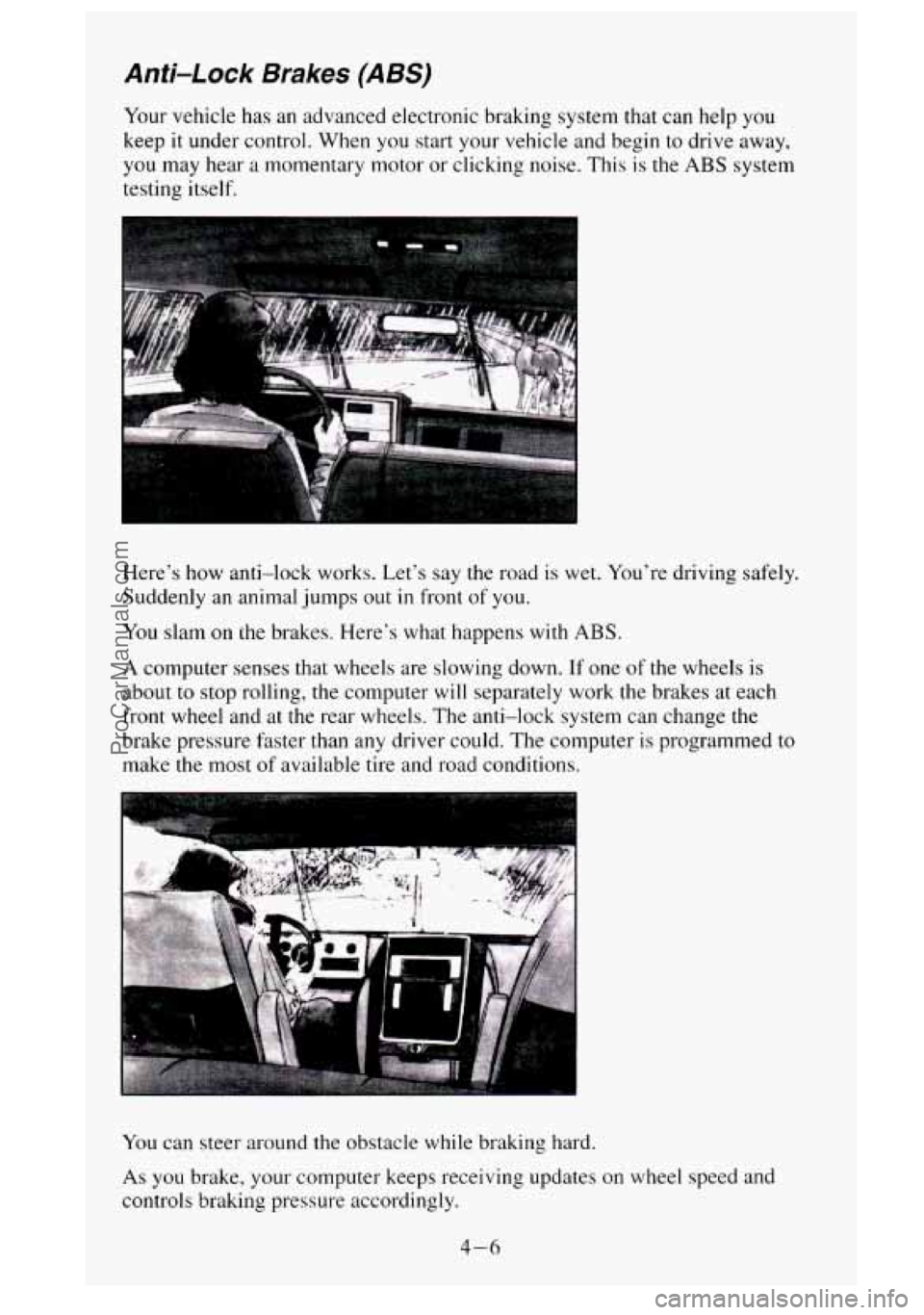
Here's how anti-lock works. Let's say the road is wet. You're driving safely.
Suddenly an animal jumps out
in front of you.
You slam on the brakes. Here's what happens with ABS.
A computer senses that wheels are slowing down. If one of the wheels is
about
to stop rolling, the computer will separately work the brakes at each
front wheel and at the rear wheels. The anti-lock system can change the
brake pressure faster than any driver could. The computer is programmed to
make the most
of available tire and road conditions.
You can steer around the obstacle while braking hard.
As you brake, your computer keeps receiving updates on wheel speed and
controls braking pressure accordingly.
4-6
ProCarManuals.com
Page 181 of 488
Remember: Anti-lock doesn’t change the time you need to get your foot up
to the brake pedal. If you get too close to the vehicle in front of you, you
won’t have time
to apply your brakes if that vehicle suddenly slows or
stops. Always leave enough room up ahead to stop, even though
you have
anti-lock brakes.
To Use Anti-Lock
Don’t pump the brakes. Just hold the brake pedal down and let anti-lock
work for you. You may feel the brakes vibrate, or you may notice some
noise, but this is normal. On vehicles
with four-wheel drive, your anti-lock
brakes work at all times
- whether you are in two-wheel drive or
four-wheel drive.
Braking in Emergencies
Use your anti-lock braking system when you need to. With anti-lock, you
can steer and brake at the same time. In many emergencies, steering can
help you more than even the very best braking.
Steering
Power Steering
If you lose power steering assist because the engine stops or the system is
not functioning, you can steer but it will take much more effort.
Steering Tips
Driving on Curves
It’s important to take curves at a reasonable speed.
A lot of the “driver lost control’’ accidents mentioned on the news happen
on curves. Here’s why:
Experienced driver or beginner, each of
us is subject to the same laws of
physics when driving on curves. The traction of the tires against the road
surface makes
it possible for the vehicle to change its path when you turn
the front wheels.
If there’s no traction, inertia will keep the vehicle going in
the same direction. If you’ve ever tried to steer
a vehicle on wet ice, you’ll
understand this.
The traction
you can get in a curve depends on the condition of your tires
and the road surface, the angle at which the curve is banked, and your
speed. While you’re
in a curve, speed is the one factor you can control.
4-7
ProCarManuals.com
Page 182 of 488
Suppose you’re steering through a sharp curve. Then you suddenly
accelerate.
Both control systems - steering and acceleration - have to do
their work where the tires meet the road. Adding the sudden acceleration
can demand too much of those places. You can lose control.
What should you do if
this ever happens‘? Ease up on the accelerator pedal,
steer the vehicle the way you want
it to go, and slow down.
Speed limit signs near curves warn that you should adjust your speed.
Of
course, the posted speeds are based on good weather and road conditions.
Under less fivorable conditions you’ll want to go slower.
If you need to reduce your speed as
you approach a curve, do it before you
enter the curve, while your front wheels are straight ahead.
Try
to adjust your speed so you can “drive” through the curve. Maintain a
reasonable, steady speed. Wdit to accelerate until you are out of the curve,
and then accelerate gently
into the straightaway.
Steering in Emergencies
There are times when steering can be more effective than braking. For
example, you come over a
hill and find a truck stopped in your lane, or a car
suddenly
pulls out from nowhere, or a child darts out from between parked
cars and stops right in front of you. You can avoid these problems by
braking
- if you can stop in time. But sometimes you can’t; there isn’t
room. That’s the time for evasive action
- steering around the problem.
Your vehicle can perform very
well in emergencies like these. First apply
your brakes. (See “Braking in Emergencies” earlier
in this section.) It is
better to remove
as much speed as you can from a possible collision. Then
steer around the problem, to the left or right depending on the space
available.
An emergency like this requires close attention and a quick decision. If you
are holding the steering wheel at the recommended
9 and 3 o’clock
positions, you can turn
it a full 180 degrees very quickly without removing
either hand. But you have to act fast, steer quickly, and just as quickly
straighten the wheel once you have avoided the object.
4-8
ProCarManuals.com
Page 185 of 488
Try not to pass more than one vehicle at a time on two-lane roads.
Reconsider before passing the next vehicle.
0 Don’t overtake a slowly moving vehicle too rapidly. Even though the
brake lights are
not flashing, it may be slowing down or starting to turn.
If you’re being passed, make it easy for the following driver to get
ahead
of you. Perhaps you can ease a little to the right.
Loss of Control
Let’s review what driving experts say about what happens when the three
control systems (brakes, steering and acceleration) don’t have enough
friction where the tires meet the road
to do what the driver has asked.
In any emergency, don’t give up. Keep trying
to steer and constantly seek an
escape route or area of less danger.
Skidding
In a skid, a driver can lose control of the vehicle. Defensive drivers avoid
most skids by taking reasonable care suited
to existing conditions, and by
not “overdriving” those conditions. But skids are always possible.
The three types of skids correspond to your vehicle’s three control systems.
In the braking skid your wheels aren’t rolling. In the steering or cornering
skid, too much speed or steering in
a curve causes tires to slip and lose
cornering force. And
in the acceleration skid too much throttle causes the
driving wheels to spin.
A cornering skid and an acceleration skid are best handled by easing your
foot off the accelerator pedal.
If your vehicle starts to slide, ease your foot
off the accelerator pedal and
quickly steer the way you want the vehicle
to go. If you start steering
quickly enough, your vehicle may straighten out. Always be ready for
a
second skid if it occurs.
Of course, traction is reduced when water, snow, ice, gravel, or other
material is on
the road. For safety, you’ll want to slow down and adjust your
driving to these conditions. It is important to slow down on slippery
surfaces because stopping distance will be longer and vehicle control more
limited.
While driving on a surface
with reduced traction, try your best to avoid
sudden steering, acceleration. or braking (including engine braking
by
shifting to a lower gear). Any sudden changes could cause the tires to slide.
You may not realize the surface is slippery until your vehicle
is skidding.
Learn
to recognize warning clues - such as enough water, ice or packed
snow
on the road to make a “mirrored surface” - and slow down when you
have any doubt.
Remember:
Any anti-lock brake system (ABS) helps avoid only the braking
skid.
4-13
ProCarManuals.com
Page 186 of 488
Driving Guidelines
Off-Road Driving with Your Four-wheel Drive
Vehicle
This off-road guide is for vehicles that have four-wheel drive.
Also, see “Anti-Lock Brakes”
in the Index.
If your vehicle doesn’t have four-wheel drive, you shouldn’t drive off-road
unless you’re
on a level, solid surface.
Off-road driving can be great fun. But it does have some definite hazards.
The greatest of these
is the terrain itself.
“Off-roading” means you’ve left the great North American road system
behind. Traffic lanes aren’t marked. Curves aren’t banked. There are no
road signs. Surfaces can
be slippery. rough, uphill or downhill. In short,
you’ve gone right back to nature.
Off-road driving involves some new skills. And that’s why it’s very
important that
you read this guide. You’ll find many driving tips and
suggestions. These will help make your off-road driving safer and more
enjoyable.
Before You Go Off-Roading
There are some things to do before you go out. For example, be sure to have
all necessary maintenance and service work done. Check to make sure all
underbody shields
(if so equipped) are properly attached. Be sure you read
all the information about your four-wheel drive vehicle in this manual.
Is
there enough fuel? Is the spare tire fully inflated? Are the fluid levels up
where they should be? What are
the local laws that apply to off-roading
where you’ll be driving?
If you don’t know, you should check with law
enforcement people in the area. Will you be
on someone’s private land? If
so, be sure to get the necessary permission.
Loading Your Vehicle for Off-Road Driving
There are some important things to remember about how to load your
vehicle.
The heaviest things should be on the load floor and forward of your
rear axle. Put heavier items as far forward
as you can.
doesn’t toss things around.
Be sure the load is secured properly, so driving on the off-road terrain
4- 12
ProCarManuals.com
Page 187 of 488
A CAUTION:
0
0
0
Cargo on the load floor piled higher than the seatbacks can be
thrown forward during a sudden stop.
You or your passengers
could be injured. Keep cargo below the top of the seatbacks.
Unsecured cargo on the load floor can be tossed about when
driving over rough terrain.
You or your passengers can be
struck by flying objects. Secure the cargo properly.
Heavy loads on the roof raise the vehicle’s center of gravity,
making it more likely to roll over. You can be seriously or
fatally injured if the vehicle rolls over. Put heavy loads inside
the cargo area, not on the roof. Keep cargo in the cargo area
as far forward and low as possible.
You’ll find other important information in this manual. See “Vehicle
Loading,” “Luggage Carrier” and “Tires”
in the Index.
Traveling to Remote Areas
It makes sense to plan your trip, especially when going to a remote area.
Know the terrain and plan your route. You are much less likely to get bad
surprises. Get accurate maps
of trails and terrain. Try to learn of any
blocked or closed roads.
It’s also a good idea to travel with at least one other vehicle. If something
happens to one of them, the other can help quickly.
Does your vehicle have a winch‘?
If so, be sure to read the winch
instructions. In
a remote area, a winch can be handy if you get stuck. But
you’ll want to know how to use it properly.
Getting Familiar with Off-Road Driving
It’s a good idea to practice in an area that’s safe and close to home before
you go into the wilderness. Off-road driving does require some new and
different driving
skills. Here’s what we mean.
Tune your senses to different kinds
of signals. Your eyes, for example, need
to constantly sweep the terrain for unexpected obstacles. Your ears need to
listen for unusual tire or engine sounds. With your arms, hands, feet, and
body you’ll need
to respond to vibrations and vehicle bounce.
4-13
ProCarManuals.com
Page 190 of 488
Here are some other things to consider as you approach a hill.
Is there a constant incline, or does the hill get sharply steeper in places?
Is there good traction on the hillside, or will the surface cause tire
slipping?
Is there a straight path up or down the hill so you won’t have to make
0 Are there obstructions on the hill that can block your path (boulders,
turning maneuvers?
trees,
logs or ruts)?
What’s beyond the hill? Is there a cliff, an embankment, a drop-off, a
fence? Get out and walk
the hill if you don’t know. It’s the smart way
to find out.
Is the hill simply too rough? Steep hills often have ruts, gullies, troughs
and exposed rocks because they are more susceptible
to the effects of
erosion.
Driving Uphi//
Once you decide you can safely drive up the hill, you need to take some
special steps.
0 Use a low gear and get a firm grip on the steering wheel.
0 Get a smooth start up the hill and try to maintain your speed. Don’t use
more power than you need, because you don’t want your wheels
to start
spinning or sliding.
Try to drive straight up the hill if at all possible. If the path twists and
turns, you might want to find another route.
1 A CAUTION:
nrning or driving across steep hills can be dangerous. You
could lose traction, slide sideways, and possibly
roll over. You
could be seriously injured or killed. When driving up hills,
always try to
go straight up.
Ease up on your speed as you approach the top of the hill.
0 Attach a flag to the vehicle to make you more visible to approaching
traffic on trails
or hills.
Sound the horn as you approach the top of the hill to let opposing
traffic
know you’re there.
to oncoming traffic.
Use your headlights even during the day. They make you more visible
4- 16
ProCarManuals.com