lock GMC SIERRA 2004 Owners Manual
[x] Cancel search | Manufacturer: GMC, Model Year: 2004, Model line: SIERRA, Model: GMC SIERRA 2004Pages: 588, PDF Size: 3.74 MB
Page 399 of 588
All engine speed values listed above are factory preset
values. With the exception of the TCC lockup speed
(1,100 rpm) and the ªtap²increment (100 rpm), all
of these values are programmable and can be adjusted
by your dealer or body up®tter. If the PTO software
settings do not match the settings shown here, then they
may have already been altered in order to satisfy the
requirements of the installed PTO system and body
equipment.
When the PTO switch is turned on, the engine is limited
to 2200 rpms. If there are no accessories installed on
the vehicle, make sure the PTO switch is turned off.Step-Bumper Pad
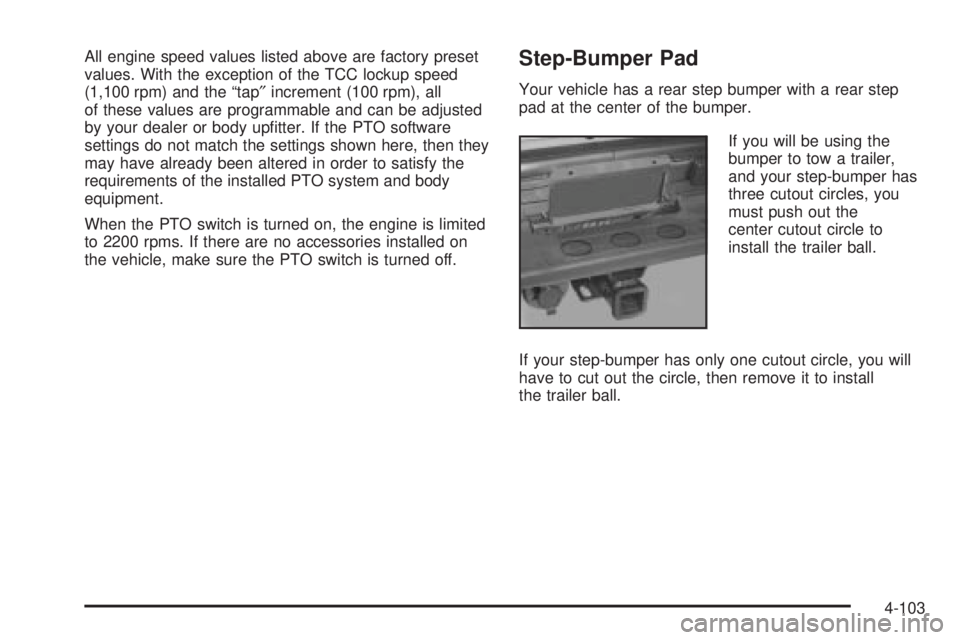
Your vehicle has a rear step bumper with a rear step
pad at the center of the bumper.
If you will be using the
bumper to tow a trailer,
and your step-bumper has
three cutout circles, you
must push out the
center cutout circle to
install the trailer ball.
If your step-bumper has only one cutout circle, you will
have to cut out the circle, then remove it to install
the trailer ball.
4-103
Page 408 of 588
To remove the fuel cap, turn it slowly to the left
(counterclockwise). It will require more effort to turn the
fuel cap on the last turn as you loosen it.
{CAUTION:
If you spill fuel and then something ignites it,
you could be badly burned. Fuel can spray out
on you if you open the fuel cap too quickly. This
spray can happen if your tank is nearly full, and
is more likely in hot weather. Open the fuel cap
slowly and wait for any ªhissº noise to stop.
Then unscrew the cap all the way.Be careful not to spill fuel. Don't top off or over®ll your
tank and wait a few seconds after you've ®nished
pumping before you remove the nozzle. Clean any
spilled fuel from painted surfaces as soon as possible.
See
Cleaning the Outside of Your Vehicle on
page 5-120.
When you put the fuel cap back on, turn it to the right
(clockwise) until you hear a clicking sound. It will require
more effort to turn the fuel cap on the last turn as you
tighten it. Make sure you fully install the cap. The
diagnostic system can determine if the fuel cap has
been left off or improperly installed. this would allow fuel
to evaporate into the atmosphere. See
Malfunction
Indicator Lamp on page 3-49.
5-8
Page 413 of 588
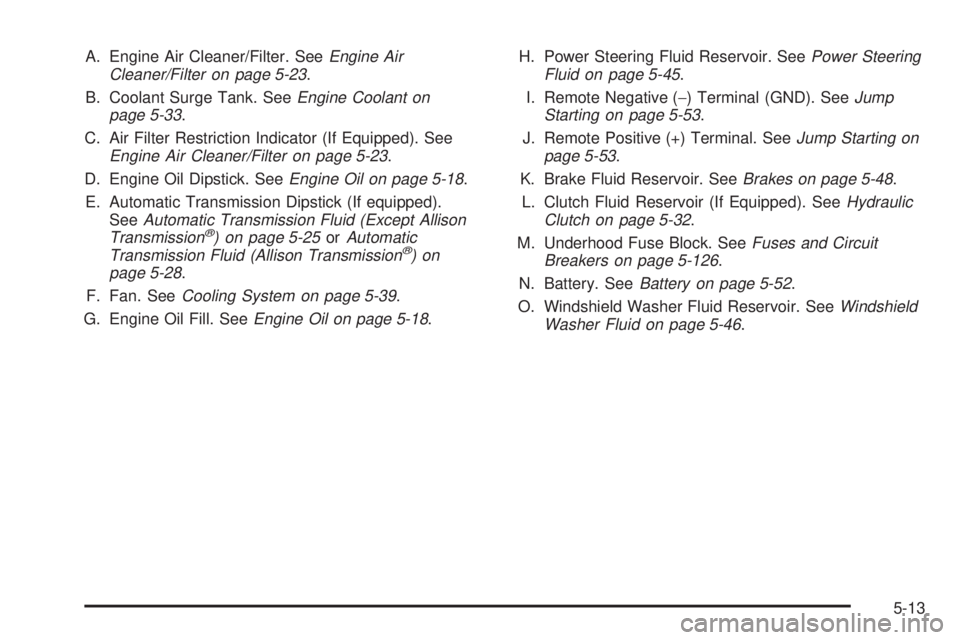
A. Engine Air Cleaner/Filter. SeeEngine Air
Cleaner/Filter on page 5-23.
B. Coolant Surge Tank. See
Engine Coolant on
page 5-33.
C. Air Filter Restriction Indicator (If Equipped). See
Engine Air Cleaner/Filter on page 5-23.
D. Engine Oil Dipstick. See
Engine Oil on page 5-18.
E. Automatic Transmission Dipstick (If equipped).
See
Automatic Transmission Fluid (Except Allison
Transmissionž) on page 5-25orAutomatic
Transmission Fluid (Allison Transmissionž)on
page 5-28.
F. Fan. See
Cooling System on page 5-39.
G. Engine Oil Fill. See
Engine Oil on page 5-18.H. Power Steering Fluid Reservoir. See
Power Steering
Fluid on page 5-45.
I. Remote Negative (-) Terminal (GND). See
Jump
Starting on page 5-53.
J. Remote Positive (+) Terminal. See
Jump Starting on
page 5-53.
K. Brake Fluid Reservoir. See
Brakes on page 5-48.
L. Clutch Fluid Reservoir (If Equipped). See
Hydraulic
Clutch on page 5-32.
M. Underhood Fuse Block. See
Fuses and Circuit
Breakers on page 5-126.
N. Battery. See
Battery on page 5-52.
O. Windshield Washer Fluid Reservoir. See
Windshield
Washer Fluid on page 5-46.
5-13
Page 415 of 588
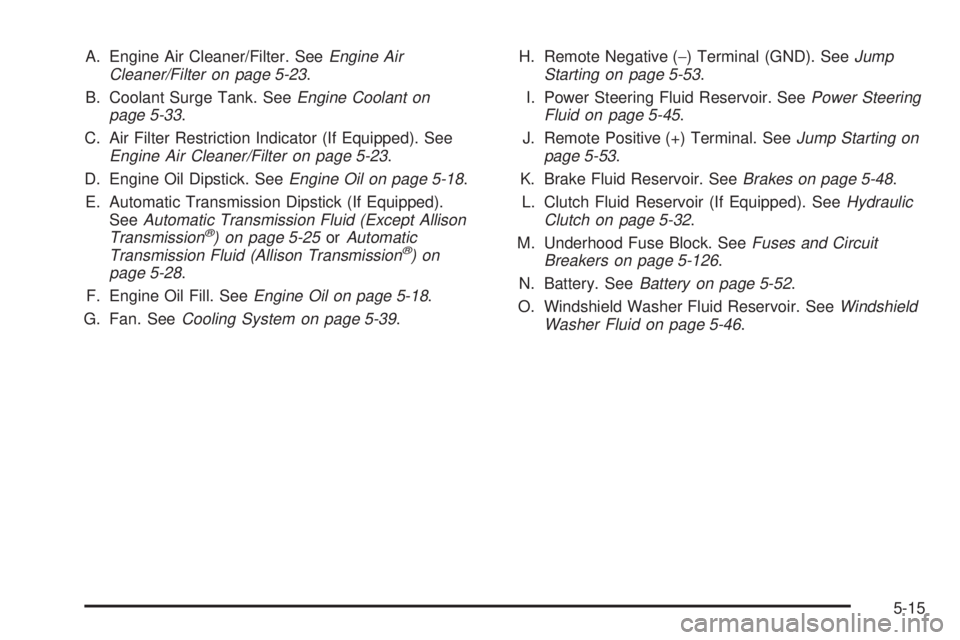
A. Engine Air Cleaner/Filter. SeeEngine Air
Cleaner/Filter on page 5-23.
B. Coolant Surge Tank. See
Engine Coolant on
page 5-33.
C. Air Filter Restriction Indicator (If Equipped). See
Engine Air Cleaner/Filter on page 5-23.
D. Engine Oil Dipstick. See
Engine Oil on page 5-18.
E. Automatic Transmission Dipstick (If Equipped).
See
Automatic Transmission Fluid (Except Allison
Transmissionž) on page 5-25orAutomatic
Transmission Fluid (Allison Transmissionž)on
page 5-28.
F. Engine Oil Fill. See
Engine Oil on page 5-18.
G. Fan. See
Cooling System on page 5-39.H. Remote Negative (-) Terminal (GND). See
Jump
Starting on page 5-53.
I. Power Steering Fluid Reservoir. See
Power Steering
Fluid on page 5-45.
J. Remote Positive (+) Terminal. See
Jump Starting on
page 5-53.
K. Brake Fluid Reservoir. See
Brakes on page 5-48.
L. Clutch Fluid Reservoir (If Equipped). See
Hydraulic
Clutch on page 5-32.
M. Underhood Fuse Block. See
Fuses and Circuit
Breakers on page 5-126.
N. Battery. See
Battery on page 5-52.
O. Windshield Washer Fluid Reservoir. See
Windshield
Washer Fluid on page 5-46.
5-15
Page 417 of 588
A. Engine Air Cleaner/Filter. SeeEngine Air
Cleaner/Filter on page 5-23.
B. Coolant Surge Tank. See
Engine Coolant on
page 5-33.
C. Air Filter Restriction Indicator (If Equipped). See
Engine Air Cleaner/Filter on page 5-23.
D. Engine Oil Dipstick. See
Engine Oil on page 5-18.
E. Automatic Transmission Dipstick (If Equipped).
See
Automatic Transmission Fluid (Except Allison
Transmissionž) on page 5-25orAutomatic
Transmission Fluid (Allison Transmissionž)on
page 5-28.
F. Engine Oil Fill. See
Engine Oil on page 5-18.
G. Fan. See
Cooling System on page 5-39.H. Remote Negative (-) Terminal (GND). See
Jump
Starting on page 5-53.
I. Remote Positive (+) Terminal. See
Jump Starting on
page 5-53.
J. Power Steering Fluid Reservoir. See
Power Steering
Fluid on page 5-45.
K. Brake Fluid Reservoir. See
Brakes on page 5-48.
L. Clutch Fluid Reservoir (If Equipped). See
Hydraulic
Clutch on page 5-32.
M. Underhood Fuse Block. See
Fuses and Circuit
Breakers on page 5-126.
N. Battery. See
Battery on page 5-52.
O. Windshield Washer Fluid Reservoir. See
Windshield
Washer Fluid on page 5-46.
5-17
Page 422 of 588
How to Reset the CHANGE ENGINE OIL
Message
The GM Oil Life System calculates when to change
your engine oil and ®lter based on vehicle use. Anytime
your oil is changed, reset the system so it can
calculate when the next oil change is required. If a
situation occurs where you change your oil prior to a
CHANGE ENGINE OIL message being turned on, reset
the system.
To reset the CHANGE ENGINE OIL message, see ªGM
Oil Life Systemº under
DIC Operation and Displays
on page 3-55for vehicles equipped with the DIC, or do
the following:
1. Turn the ignition key to RUN with the engine off.
2. Fully press and release the accelerator pedal three
times within ®ve seconds.
If the OIL LIFE RESET message ¯ashes for 10
seconds, the system is resetting.
3. Turn the key to LOCK.
If the CHANGE ENGINE OIL message comes back on
when you start your vehicle, the engine oil life system
has not reset. Repeat the procedure. If it still does
not reset, see your dealer for service.
What to Do with Used Oil
Used engine oil contains certain elements that may be
unhealthy for your skin and could even cause cancer.
Do not let used oil stay on your skin for very long. Clean
your skin and nails with soap and water, or a good
hand cleaner. Wash or properly dispose of clothing or
rags containing used engine oil. See the manufacturer's
warnings about the use and disposal of oil products.
Used oil can be a threat to the environment. If you
change your own oil, be sure to drain all the oil from the
®lter before disposal. Never dispose of oil by putting it in
the trash, pouring it on the ground, into sewers, or into
streams or bodies of water. Instead, recycle it by taking it
to a place that collects used oil. If you have a problem
properly disposing of your used oil, ask your dealer, a
service station or a local recycling center for help.
5-22
Page 427 of 588
SeeEngine Compartment Overview on page 5-12for
more information on location.
1. Flip the handle up and then pull out the dipstick
and wipe it with a clean rag or paper towel.
2. Push it back in all the way, wait three seconds and
then pull it back out again.
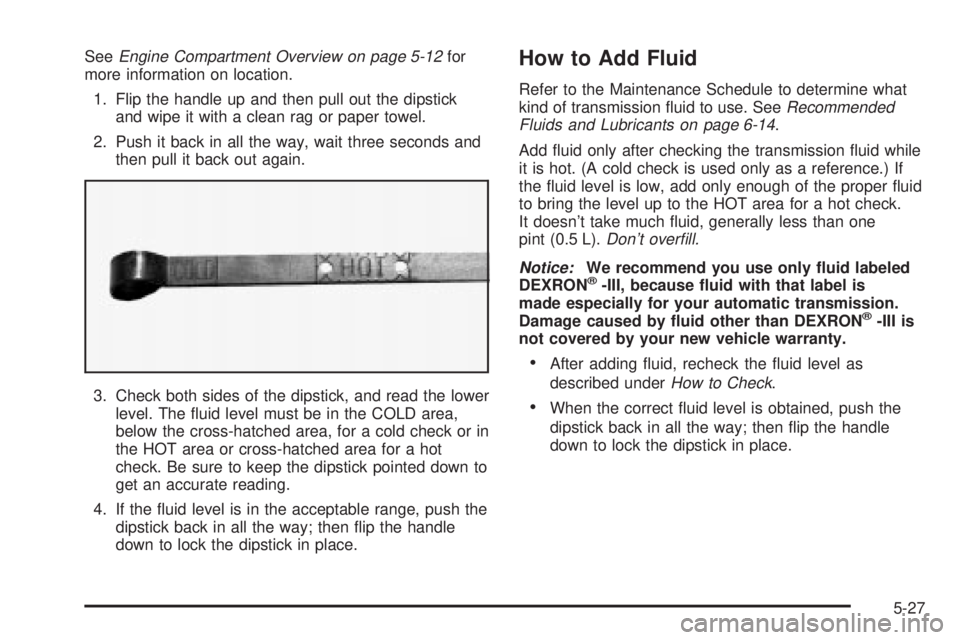
3. Check both sides of the dipstick, and read the lower
level. The ¯uid level must be in the COLD area,
below the cross-hatched area, for a cold check or in
the HOT area or cross-hatched area for a hot
check. Be sure to keep the dipstick pointed down to
get an accurate reading.
4. If the ¯uid level is in the acceptable range, push the
dipstick back in all the way; then ¯ip the handle
down to lock the dipstick in place.How to Add Fluid
Refer to the Maintenance Schedule to determine what
kind of transmission ¯uid to use. SeeRecommended
Fluids and Lubricants on page 6-14.
Add ¯uid only after checking the transmission ¯uid while
it is hot. (A cold check is used only as a reference.) If
the ¯uid level is low, add only enough of the proper ¯uid
to bring the level up to the HOT area for a hot check.
It doesn't take much ¯uid, generally less than one
pint (0.5 L).
Don't over®ll.
Notice:
We recommend you use only ¯uid labeled
DEXRONž-III, because ¯uid with that label is
made especially for your automatic transmission.
Damage caused by ¯uid other than DEXRON
ž-III is
not covered by your new vehicle warranty.
·After adding ¯uid, recheck the ¯uid level as
described under
How to Check.
·When the correct ¯uid level is obtained, push the
dipstick back in all the way; then ¯ip the handle
down to lock the dipstick in place.
5-27
Page 443 of 588
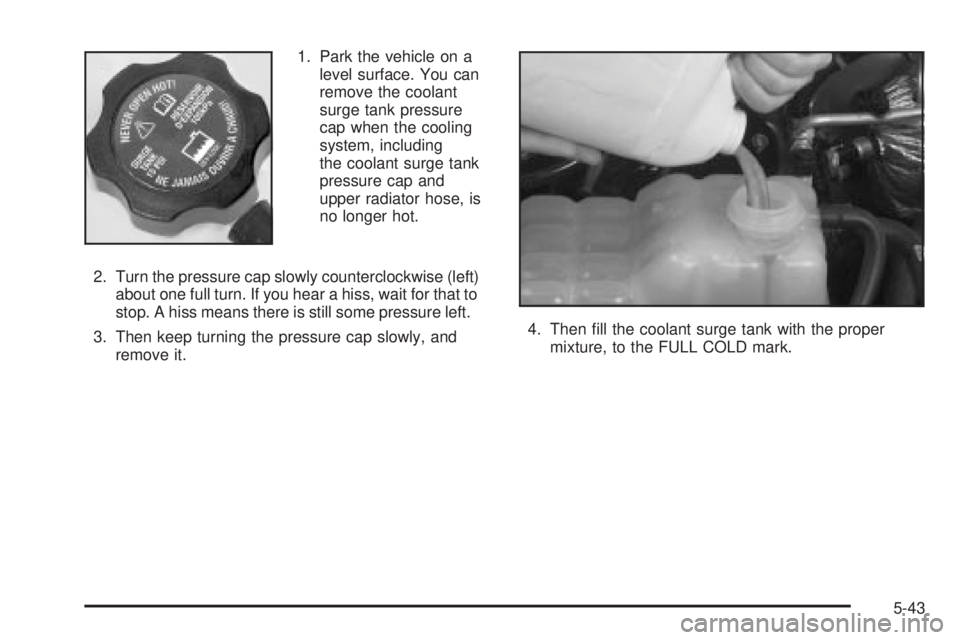
1. Park the vehicle on a
level surface. You can
remove the coolant
surge tank pressure
cap when the cooling
system, including
the coolant surge tank
pressure cap and
upper radiator hose, is
no longer hot.
2. Turn the pressure cap slowly counterclockwise (left)
about one full turn. If you hear a hiss, wait for that to
stop. A hiss means there is still some pressure left.
3. Then keep turning the pressure cap slowly, and
remove it.4. Then ®ll the coolant surge tank with the proper
mixture, to the FULL COLD mark.
5-43
Page 465 of 588
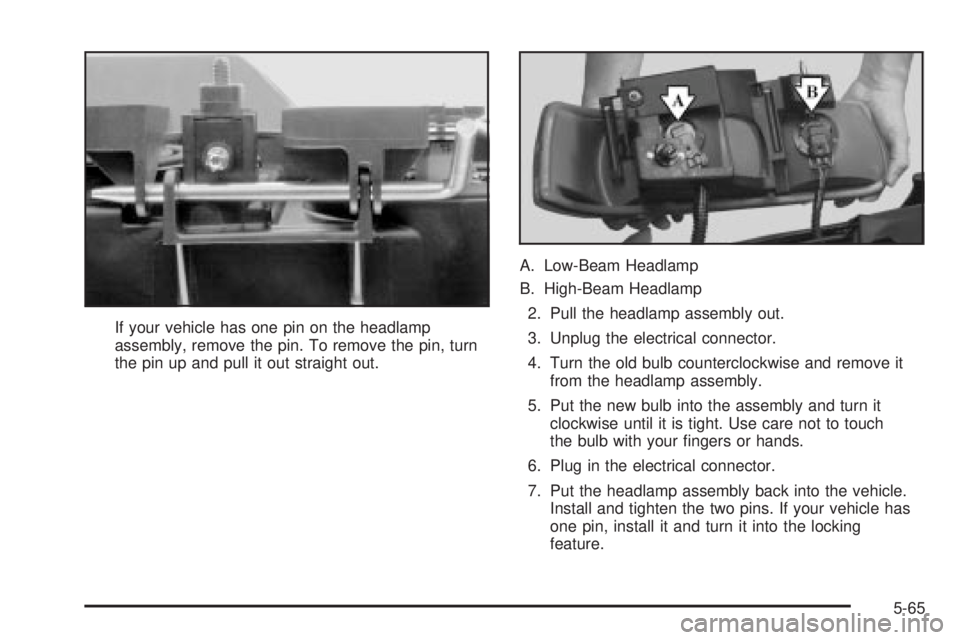
If your vehicle has one pin on the headlamp
assembly, remove the pin. To remove the pin, turn
the pin up and pull it out straight out.A. Low-Beam Headlamp
B. High-Beam Headlamp
2. Pull the headlamp assembly out.
3. Unplug the electrical connector.
4. Turn the old bulb counterclockwise and remove it
from the headlamp assembly.
5. Put the new bulb into the assembly and turn it
clockwise until it is tight. Use care not to touch
the bulb with your ®ngers or hands.
6. Plug in the electrical connector.
7. Put the headlamp assembly back into the vehicle.
Install and tighten the two pins. If your vehicle has
one pin, install it and turn it into the locking
feature.
5-65
Page 466 of 588
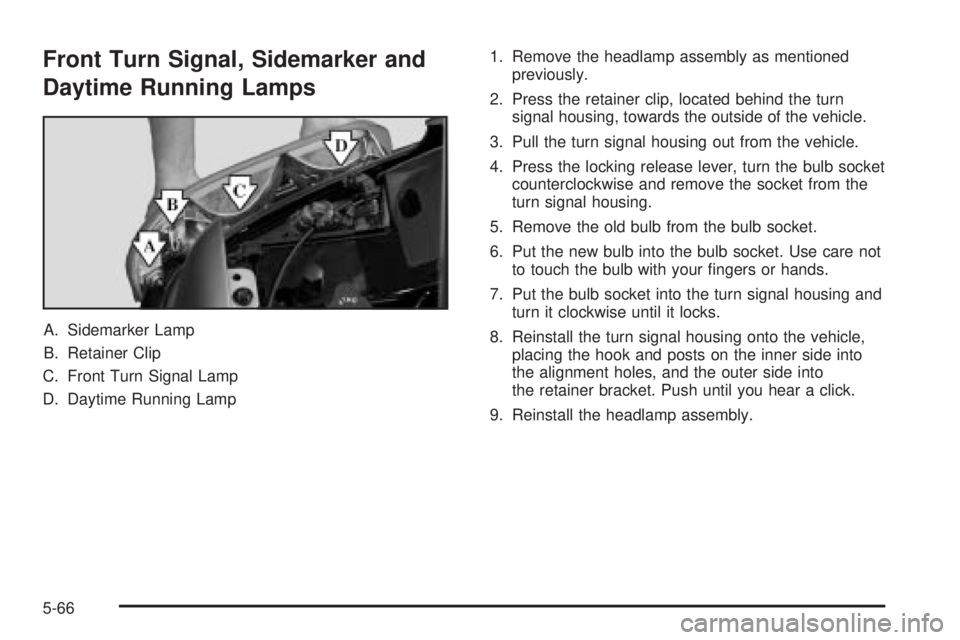
Front Turn Signal, Sidemarker and
Daytime Running Lamps
A. Sidemarker Lamp
B. Retainer Clip
C. Front Turn Signal Lamp
D. Daytime Running Lamp1. Remove the headlamp assembly as mentioned
previously.
2. Press the retainer clip, located behind the turn
signal housing, towards the outside of the vehicle.
3. Pull the turn signal housing out from the vehicle.
4. Press the locking release lever, turn the bulb socket
counterclockwise and remove the socket from the
turn signal housing.
5. Remove the old bulb from the bulb socket.
6. Put the new bulb into the bulb socket. Use care not
to touch the bulb with your ®ngers or hands.
7. Put the bulb socket into the turn signal housing and
turn it clockwise until it locks.
8. Reinstall the turn signal housing onto the vehicle,
placing the hook and posts on the inner side into
the alignment holes, and the outer side into
the retainer bracket. Push until you hear a click.
9. Reinstall the headlamp assembly.
5-66