Rear GMC SIERRA 2004 Workshop Manual
[x] Cancel search | Manufacturer: GMC, Model Year: 2004, Model line: SIERRA, Model: GMC SIERRA 2004Pages: 588, PDF Size: 3.74 MB
Page 107 of 588
This feature is located on the inside edge of the rear
doors.
1. To use one of the locks do the following:
2. Open one of the rear doors.
3. To engage the rear door security lock, move the
lever forward.
4. To disengage the lock, move the lever rearward.
5. Close the door.
6. Do the same thing to the other rear door.
The rear doors of your vehicle cannot be opened from
the inside when this feature is in use. If you want to
open the rear door while the security lock is engaged,
unlock the door and open the door from the outside.
Lockout Protection
This feature protects you from locking your key in the
vehicle when the key is in the ignition and a door
is open.
If the power lock switch is pressed when a door is open
and the key is in the ignition, all of the doors will lock
and then the driver's door will unlock.
Rear Doors
Your vehicle may be equipped with a rear access
door(s) that allows easier access to the rear area of the
extended cab.
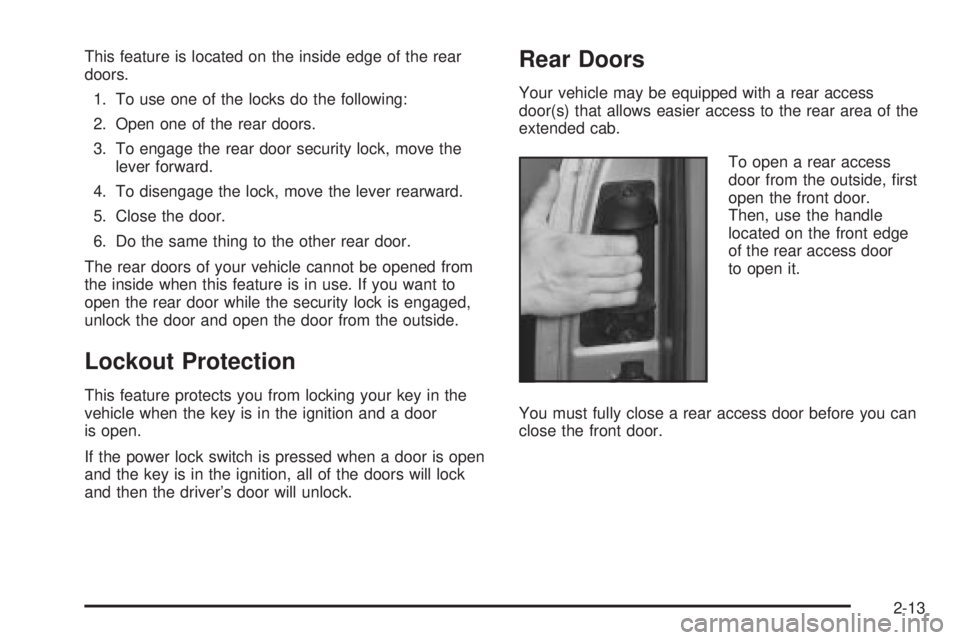
To open a rear access
door from the outside, ®rst
open the front door.
Then, use the handle
located on the front edge
of the rear access door
to open it.
You must fully close a rear access door before you can
close the front door.
2-13
Page 108 of 588
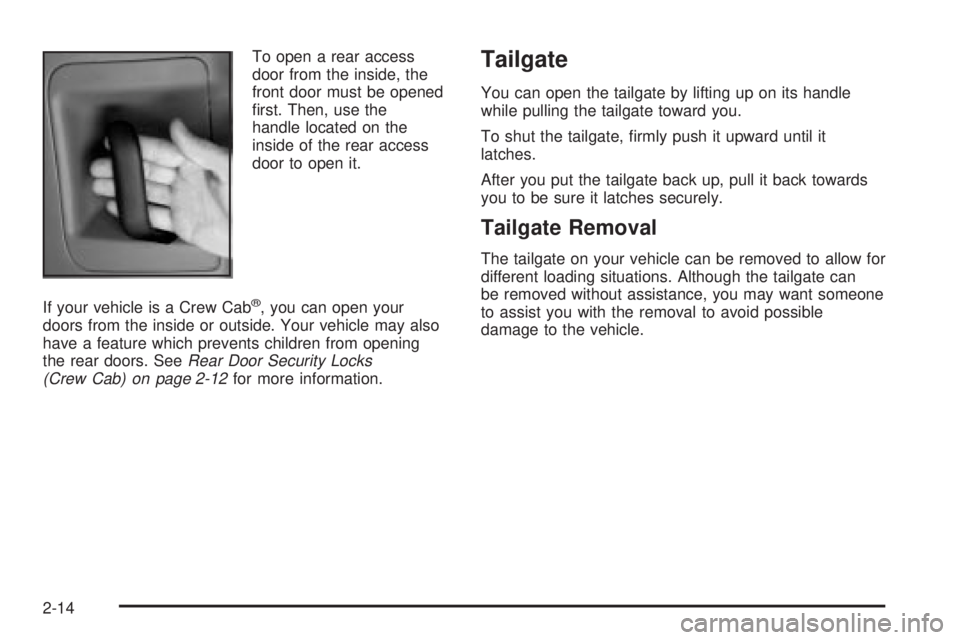
To open a rear access
door from the inside, the
front door must be opened
®rst. Then, use the
handle located on the
inside of the rear access
door to open it.
If your vehicle is a Crew Cab
ž, you can open your
doors from the inside or outside. Your vehicle may also
have a feature which prevents children from opening
the rear doors. See
Rear Door Security Locks
(Crew Cab) on page 2-12for more information.
Tailgate
You can open the tailgate by lifting up on its handle
while pulling the tailgate toward you.
To shut the tailgate, ®rmly push it upward until it
latches.
After you put the tailgate back up, pull it back towards
you to be sure it latches securely.
Tailgate Removal
The tailgate on your vehicle can be removed to allow for
different loading situations. Although the tailgate can
be removed without assistance, you may want someone
to assist you with the removal to avoid possible
damage to the vehicle.
2-14
Page 111 of 588
Power Windows
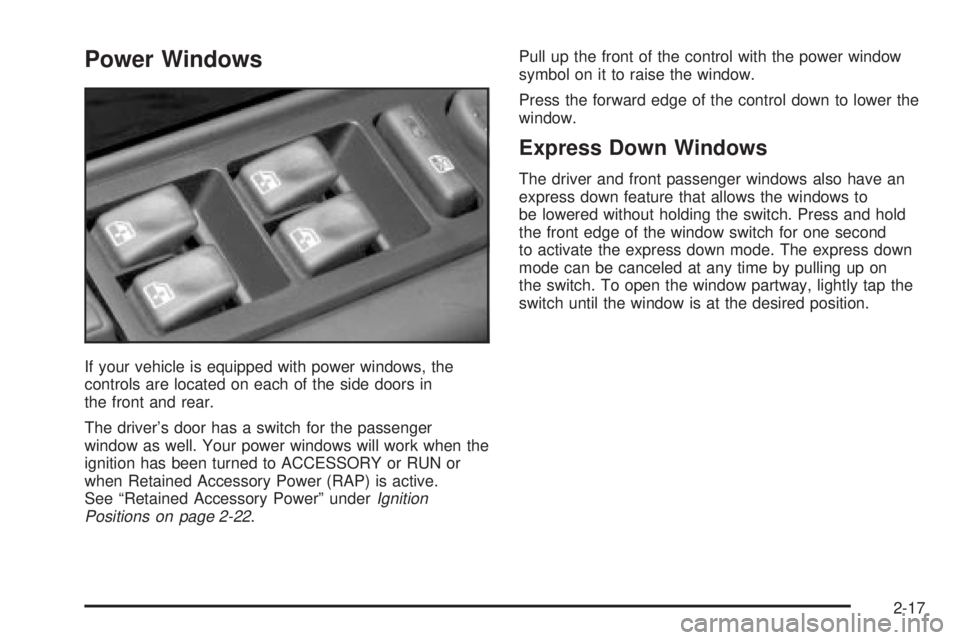
If your vehicle is equipped with power windows, the
controls are located on each of the side doors in
the front and rear.
The driver's door has a switch for the passenger
window as well. Your power windows will work when the
ignition has been turned to ACCESSORY or RUN or
when Retained Accessory Power (RAP) is active.
See ªRetained Accessory Powerº under
Ignition
Positions on page 2-22.Pull up the front of the control with the power window
symbol on it to raise the window.
Press the forward edge of the control down to lower the
window.
Express Down Windows
The driver and front passenger windows also have an
express down feature that allows the windows to
be lowered without holding the switch. Press and hold
the front edge of the window switch for one second
to activate the express down mode. The express down
mode can be canceled at any time by pulling up on
the switch. To open the window partway, lightly tap the
switch until the window is at the desired position.
2-17
Page 112 of 588
Lock-Out Switch
If you have power windows on a Crew Cabž, the
driver's door power window switch has a lockout feature.
The lockout switch is located in front of the window
switches. This feature prevents all windows from
operating, except from the driver's position, when the
driver's door button is engaged. To engage the lock-out
feature press the switch, and an indicator light on the
switch will illuminate. To disengage the lock-out feature
press the switch again, and the indicator light will
turn off. When the button is not engaged, the rear power
windows will operate.
Swing-Out Windows
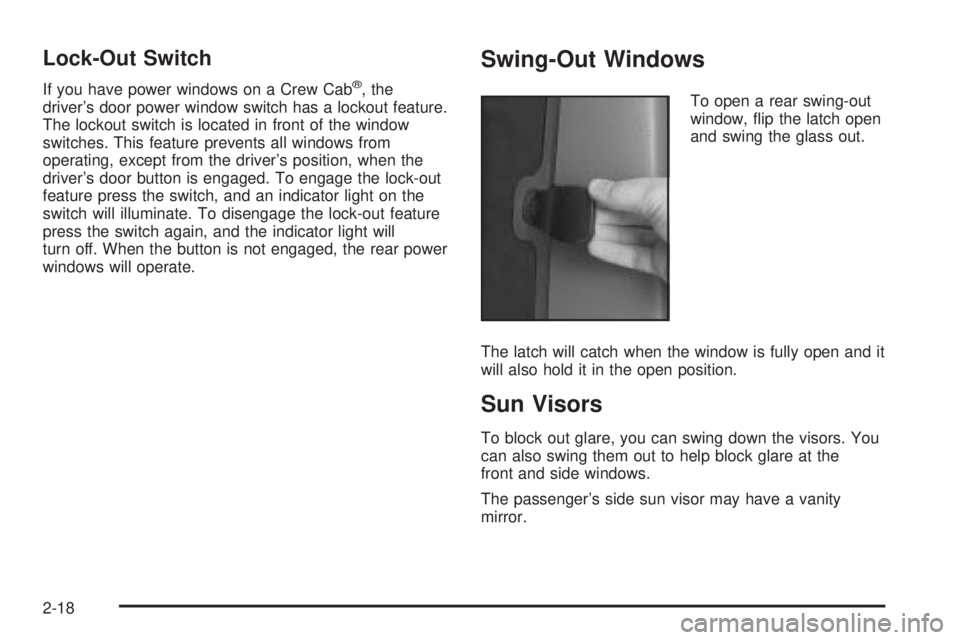
To open a rear swing-out
window, ¯ip the latch open
and swing the glass out.
The latch will catch when the window is fully open and it
will also hold it in the open position.
Sun Visors
To block out glare, you can swing down the visors. You
can also swing them out to help block glare at the
front and side windows.
The passenger's side sun visor may have a vanity
mirror.
2-18
Page 120 of 588
How long should you keep the coolant heater plugged
in? The answer depends on the outside temperature, the
kind of oil you have, and some other things. Instead
of trying to list everything here, we ask that you contact
your dealer in the area where you'll be parking your
vehicle. The dealer can give you the best advice for that
particular area.
Automatic Transmission Operation
If your vehicle is equipped with an automatic
transmission, it features an electronic shift position
indicator within the instrument panel cluster. This display
must be powered anytime the shift lever is capable of
being moved out of PARK (P). See
Fuses and
Circuit Breakers on page 5-126.
There are several different positions for your shift lever.
PARK (P):This position locks your rear wheels. It's
the best position to use when you start your engine
because your vehicle can't move easily. If your vehicle
is equipped with the Allison
žTransmission, use
PARK (P) for stationary operation of the Power Takeoff
(PTO), if equipped.
{CAUTION:
It is dangerous to get out of your vehicle if the
shift lever is not fully in PARK (P) with the
parking brake ®rmly set. Your vehicle can roll.
Do not leave your vehicle when the engine is
running unless you have to. If you have left the
engine running, the vehicle can move
suddenly. You or others could be injured. To
be sure your vehicle will not move, even when
you are on fairly level ground, always set your
parking brake and move the shift lever to
PARK (P). See
Shifting Into Park (P) on
page 2-49
. If you are pulling a trailer, see
Towing a Trailer on page 4-70.
2-26
Page 122 of 588
DRIVE (D):This position is for normal driving. If you
need more power for passing, and you're:
·Going less than about 35 mph (55 km/h), push your
accelerator pedal about halfway down.
·Going about 35 mph (55 km/h) or more, push the
accelerator all the way down.
You'll shift down to the next gear and have more power.
Drive (D) can be used when towing a trailer, carrying
a heavy load, driving on steep hills or for off-road driving.
You may want to shift the transmission to THIRD (3)
or, if necessary, a lower gear selection if the
transmission shifts too often.
Notice:Extended idling for more than ®ve minutes
in DRIVE (D) on vehicles equipped with the Allison
Transmission may cause transmission overheating
and damage. Always put the gearshift lever in
PARK (P) if idle time is longer than ®ve minutes.
If your vehicle is equipped with the Allison
ž
Transmission, it will initially attain ®rst range when
DRIVE (D) is selected. As vehicle speed increases, the
transmission will upshift automatically through each
available range up to FIFTH (5). As the vehicle slows,
the transmission will downshift automatically.
THIRD (3):This position is also used for normal driving,
however it offers more power and lower fuel economy
than DRIVE (D).SECOND (2):This position gives you more power but
lower fuel economy. You can use SECOND (2) on
hills. It can help control your speed as you go down
steep mountain roads, but then you would also want to
use your brakes off and on.
If you manually select SECOND (2) in a light duty
automatic transmission, the transmission will drive in
second gear. You may use this feature for reducing the
speed of the rear wheels when you are trying to start
your vehicle from a stop on slippery road surfaces.
FIRST (1):This position gives you even more power
(but lower fuel economy) than SECOND (2). You
can use it on very steep hills, or in deep snow or mud.
If the selector lever is put in FIRST (1) while the
vehicle is moving forward, the transmission won't shift
into ®rst gear until the vehicle is going slowly enough.
Notice:Spinning the tires or holding the vehicle in
one place on a hill using only the accelerator
pedal may damage the transmission. If you are
stuck, do not spin the tires. When stopping on a hill,
use the brakes to hold the vehicle in place.
On cold days, approximately 32ÉF (0ÉC) or colder, your
transmission is designed to shift differently until the
engine reaches normal operating temperature. This is
intended to improve heater performance.
2-28
Page 134 of 588
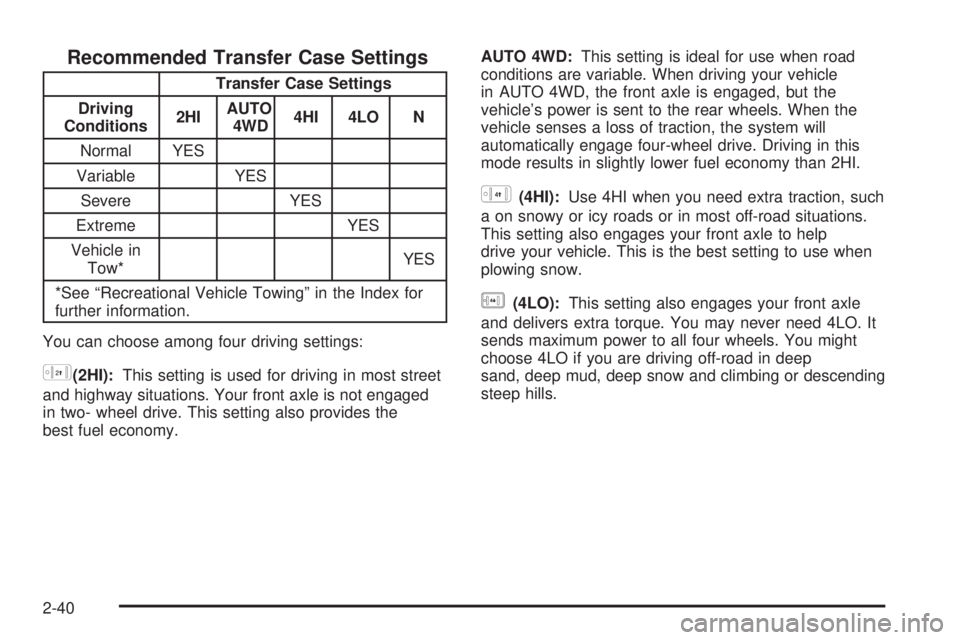
Recommended Transfer Case Settings
Transfer Case Settings
Driving
Conditions2HIAUTO
4WD4HI 4LO N
Normal YES
Variable YES
Severe YES
Extreme YES
Vehicle in
Tow*YES
*See ªRecreational Vehicle Towingº in the Index for
further information.
You can choose among four driving settings:
h(2HI):This setting is used for driving in most street
and highway situations. Your front axle is not engaged
in two- wheel drive. This setting also provides the
best fuel economy.AUTO 4WD:This setting is ideal for use when road
conditions are variable. When driving your vehicle
in AUTO 4WD, the front axle is engaged, but the
vehicle's power is sent to the rear wheels. When the
vehicle senses a loss of traction, the system will
automatically engage four-wheel drive. Driving in this
mode results in slightly lower fuel economy than 2HI.
G(4HI):Use 4HI when you need extra traction, such
a on snowy or icy roads or in most off-road situations.
This setting also engages your front axle to help
drive your vehicle. This is the best setting to use when
plowing snow.
g(4LO):This setting also engages your front axle
and delivers extra torque. You may never need 4LO. It
sends maximum power to all four wheels. You might
choose 4LO if you are driving off-road in deep
sand, deep mud, deep snow and climbing or descending
steep hills.
2-40
Page 148 of 588
{CAUTION:
It can be dangerous to get out of your vehicle
if the shift lever is not fully in PARK (P) with
the parking brake ®rmly set. Your vehicle can
roll. Do not leave your vehicle when the engine
is running unless you have to. If you have left
the engine running, the vehicle can move
suddenly. You or others could be injured. To
be sure your vehicle will not move, even when
you are on fairly level ground, always set your
parking brake and move the shift lever to
PARK (P).
{CAUTION:
Four-wheel drive vehicles with the transfer
case in NEUTRAL will allow the vehicle to roll,
even if your shift lever is in PARK (P). So, be
sure the transfer case is in a drive gear Ð not
in NEUTRAL. Always set your parking brake.
Follow the proper steps to be sure your vehicle will not
move. See
Shifting Into Park (P) on page 2-49.
If you are pulling a trailer, see
Towing a Trailer on
page 4-70.
Mirrors
Manual Rearview Mirror
Pull the tab under the mirror toward you to reduce glare
from headlamps behind you after dark. Push the tab
away from you for normal daytime operation.
2-54
Page 149 of 588
Automatic Dimming Rearview Mirror
with OnStar
ž, Compass and
Temperature Display
Your vehicle may have this feature. When on, an
automatic dimming mirror automatically dims to the
proper level to minimize glare from lights behind
you after dark.
The mirror also includes a dual display in the upper
right corner of the mirror face. The compass reading and
the outside temperature will both appear in the display
at the same time.
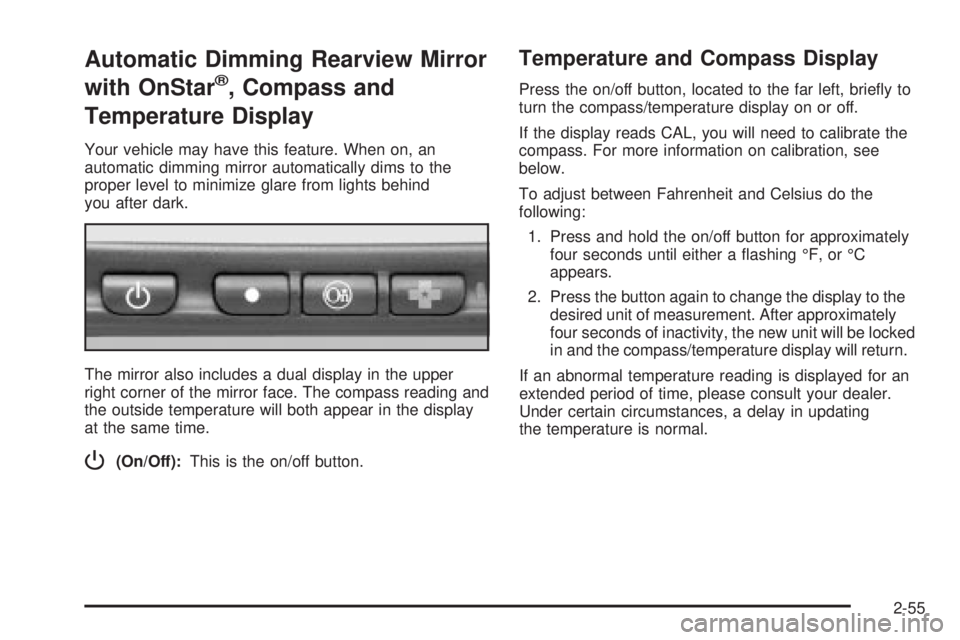
P(On/Off):This is the on/off button.
Temperature and Compass Display
Press the on/off button, located to the far left, brie¯y to
turn the compass/temperature display on or off.
If the display reads CAL, you will need to calibrate the
compass. For more information on calibration, see
below.
To adjust between Fahrenheit and Celsius do the
following:
1. Press and hold the on/off button for approximately
four seconds until either a ¯ashing ÉF, or ÉC
appears.
2. Press the button again to change the display to the
desired unit of measurement. After approximately
four seconds of inactivity, the new unit will be locked
in and the compass/temperature display will return.
If an abnormal temperature reading is displayed for an
extended period of time, please consult your dealer.
Under certain circumstances, a delay in updating
the temperature is normal.
2-55
Page 151 of 588
3. Keep pressing the on/off button until the desired
zone number appears in the display. Release the
button. After approximately four seconds of
inactivity, the new zone number will be locked in
and the compass/temperature display will return.
4. Calibrate the compass as described below.
Compass Calibration
The compass may need calibration if one of the
following occurs:
·After approximately ®ve seconds, the display does
not show a compass heading (N for North, for
example), there may be a strong magnetic ®eld
interfering with the compass. Such interference may
be caused by a magnetic antenna mount, magnetic
note pad holder or a similar magnetic item.
·The compass does not display the correct heading
and the compass zone variance is set correctly.
In order to calibrate, CAL must be displayed in the
mirror compass windows. If CAL is not displayed, push
the on/off button for approximately 12 seconds or
until CAL is displayed.
The compass can be calibrated by driving the vehicle in
circles at 5 mph (8 km/h) or less until the display
reads a direction.
Passenger Air Bag Indicator
Your vehicle may be equipped with a passenger air bag
indicator, on the mirror glass, just above the buttons.
If your vehicle has this feature, the mirror will display the
word ON, or an air bag symbol in Canada, when the
passenger air bag is enabled. For more information, see
Passenger Sensing System on page 1-81.
Cleaning the Mirror
When cleaning the mirror, use a paper towel or similar
material dampened with glass cleaner. Do not spray
glass cleaner directly on the mirror as that may cause
the liquid cleaner to enter the mirror housing.
Automatic Dimming Rearview Mirror
with Compass and Temperature
Display
If your vehicle is equipped with an automatic mirror, it
will, when on, automatically dim to the proper level
to minimize glare from lights behind you after dark.
The mirror also includes a display in the upper
right corner of the mirror face. The compass reading
and the outside temperature will both appear in
the display at the same time. The dual display can be
turned on or off by brie¯y pressing either the TEMP
or the COMP button.
2-57