Transfer case GMC SIERRA 2008 Owner's Guide
[x] Cancel search | Manufacturer: GMC, Model Year: 2008, Model line: SIERRA, Model: GMC SIERRA 2008Pages: 578, PDF Size: 6.47 MB
Page 305 of 578
The traction control disable
button is located on the
instrument panel below the
climate controls.
The traction control part of StabiliTrak
®can be turned
off by pressing and releasing the StabiliTrak®button
if both systems (traction control and StabiliTrak®) were
previously on. To disable both traction control and
StabiliTrak
®, press and hold the button for ve seconds.
Traction control and StabiliTrak
®can be turned on by
pressing and releasing the StabiliTrak®button if
not automatically shut off for any other reason.
When the TCS or StabiliTrak
®system is turned off,
the StabiliTrak®light and the appropriate TCS off
or StabiliTrak®off message will be displayed on the DIC
to warn the driver. Your vehicle will still have
brake-traction control when traction control is off, but will
not be able to use the engine speed management
system. See “Traction Control Operation” next for more
information.
When the traction control system has been turned off,
you may still hear system noises as a result of the
brake-traction control coming on.It is recommended to leave the system on for normal
driving conditions, but it may be necessary to turn the
system off if your vehicle is stuck in sand, mud, ice or
snow, and you want to “rock” your vehicle to attempt to
free it. It may also be necessary to turn off the system
when driving in extreme off-road conditions where high
wheel spin is required. SeeIf Your Vehicle is Stuck in
Sand, Mud, Ice, or Snow on page 4-34.
When the transfer case is in 4LO, the stability system is
automatically disabled, the StabiliTrak
®light will come
on and the STABILITRAK OFF message will appear on
the DIC. Both traction control and StabiliTrak
®are
automatically disabled in this condition.
Traction Control Operation
The traction control system is part of the StabiliTrak®
system. Traction control limits wheel spin by reducing
engine power to the wheels (engine speed
management) and by applying brakes to each individual
wheel (brake-traction control) as necessary.
The traction control system is enabled automatically
when you start your vehicle. It will activate and the
StabiliTrak
®light will ash if it senses that any of the
wheels are spinning or beginning to lose traction while
driving. If you turn off traction control, only the
brake-traction control portion of traction control will
work. The engine speed management will be disabled.
4-7
Page 306 of 578
In this mode, engine power is not reduced automatically
and the driven wheels can spin more freely. This can
cause the brake-traction control to activate constantly.
Notice:If you allow the wheel(s) of one axle to spin
excessively while the StabiliTrak
®, ABS and brake
warning lights and the SERVICE STABILITRAK
message are displayed, you could damage the
transfer case. The repairs would not be covered by
your warranty. Reduce engine power and do not
spin the wheel(s) excessively while these lights and
this message are displayed.
The traction control system may activate on dry or
rough roads or under conditions such as heavy
acceleration while turning or abrupt upshifts/downshifts
of the transmission. When this happens, you may
notice a reduction in acceleration, or may hear a noise
or vibration. This is normal.
If your vehicle is in cruise control when the system
activates, the StabiliTrak
®light will ash and the cruise
control will automatically disengage. When road
conditions allow you to use cruise again, you may
re-engage the cruise control. SeeCruise Control on
page 3-14.
StabiliTrak
®may also turn off automatically if it
determines that a problem exists with the system. If the
problem does not clear itself after restarting the
vehicle, you should see your dealer/retailer for service.
Steering
Power Steering
If you lose power steering assist because the engine
stops or the system is not functioning, you can steer but
it will take much more effort.
Steering Tips
It is important to take curves at a reasonable speed.
A lot of the “driver lost control” accidents mentioned on
the news happen on curves. Here is why:
Experienced driver or beginner, each of us is subject to
the same laws of physics when driving on curves.
The traction of the tires against the road surface makes
it possible for the vehicle to change its path when
you turn the front wheels. If there is no traction, inertia
will keep the vehicle going in the same direction. If
you have ever tried to steer a vehicle on wet ice, you
will understand this.
The traction you can get in a curve depends on the
condition of the tires and the road surface, the angle at
which the curve is banked, and your speed. While
you are in a curve, speed is the one factor you
can control.
4-8
Page 319 of 578
If, after stalling, you try to back down the hill and decide
you just cannot do it, set the parking brake, put the
transmission in PARK (P) and turn off the engine. Leave
the vehicle and go get some help. Exit on the uphill side
and stay clear of the path the vehicle would take if it rolled
downhill. Do not shift the transfer case to NEUTRAL
when you leave the vehicle. Leave it in some gear.
{CAUTION:
Shifting the transfer case to NEUTRAL can
cause your vehicle to roll even if the
transmission is in PARK (P). This is because
the NEUTRAL position on the transfer case
overrides the transmission. You or someone
else could be injured. If you are going to leave
your vehicle, set the parking brake and shift
the transmission to PARK (P). But do not shift
the transfer case to NEUTRAL. Leave the
transfer case in the Two-Wheel High,
Four-Wheel High or Four-Wheel Low position.
Driving Downhill
When off-roading takes you downhill, you will want to
consider a number of things:
How steep is the downhill? Will I be able to maintain
vehicle control?
What is the surface like? Smooth? Rough?
Slippery? Hard-packed dirt? Gravel?
Are there hidden surface obstacles? Ruts? Logs?
Boulders?
What is at the bottom of the hill? Is there a hidden
creek bank or even a river bottom with large
rocks?
4-21
Page 323 of 578
Driving in Mud, Sand, Snow, or Ice
When you drive in mud, snow, or sand, your wheels will
not get good traction. You cannot accelerate as
quickly, turning is more difficult, and you will need longer
braking distances. If your vehicle has four-wheel
drive, seeFour-Wheel Drive on page 2-36for transfer
case mode selection.
It is best to use a low gear when you are in mud — the
deeper the mud, the lower the gear. In really deep
mud, the idea is to keep your vehicle moving so you do
not get stuck.
When you drive on sand, you will sense a change in
wheel traction. But it will depend upon how loosely
packed the sand is. On loosely packed sand, such as
on beaches or sand dunes, your tires will tend to
sink into the sand. This has an effect on steering,
accelerating, and braking. Drive at a reduced speed and
avoid sharp turns or abrupt maneuvers.Hard packed snow and ice offer the worst tire traction.
On these surfaces, it is very easy to lose control.
On wet ice, for example, the traction is so poor that you
will have difficulty accelerating. And if you do get
moving, poor steering and difficult braking can cause
you to slide out of control.
{CAUTION:
Driving on frozen lakes, ponds, or rivers can
be dangerous. Underwater springs, currents
under the ice, or sudden thaws can weaken the
ice. Your vehicle could fall through the ice and
you and your passengers could drown. Drive
your vehicle on safe surfaces only.
4-25
Page 350 of 578
4. Securely attach the vehicle being towed to the tow
vehicle.
{CAUTION:
Shifting a four-wheel-drive vehicle’s transfer
case into NEUTRAL can cause your vehicle to
roll even if the transmission is in PARK (P).
You or others could be injured. Make sure the
parking brake is rmly set before you shift the
transfer case to NEUTRAL.
5. Shift the transfer case to NEUTRAL. See
Four-Wheel Drive on page 2-36for the proper
procedure to select the neutral position for
your vehicle.
6. Release the parking brake only after the vehicle
being towed is rmly attached to the towing
vehicle.
7. Turn the ignition to LOCK/OFF.
Dolly Towing
Front Towing (Front Wheels Off the
Ground)
Two-Wheel-Drive Vehicles
Notice:If you tow a two-wheel-drive vehicle with
the rear wheels on the ground, the transmission
could be damaged. The repairs would not be
covered by your warranty. Never tow your vehicle
with the rear wheels on the ground.
Two-wheel-drive vehicles should not be towed with the
rear wheels on the ground. Two-wheel-drive
transmissions have no provisions for internal lubrication
while being towed.
To dolly tow a two-wheel-drive vehicle, you must tow
the vehicle with the rear wheels on the dolly. See “Rear
Towing (Rear Wheels Off the Ground)” later in this
section for more information.
4-52
Page 351 of 578
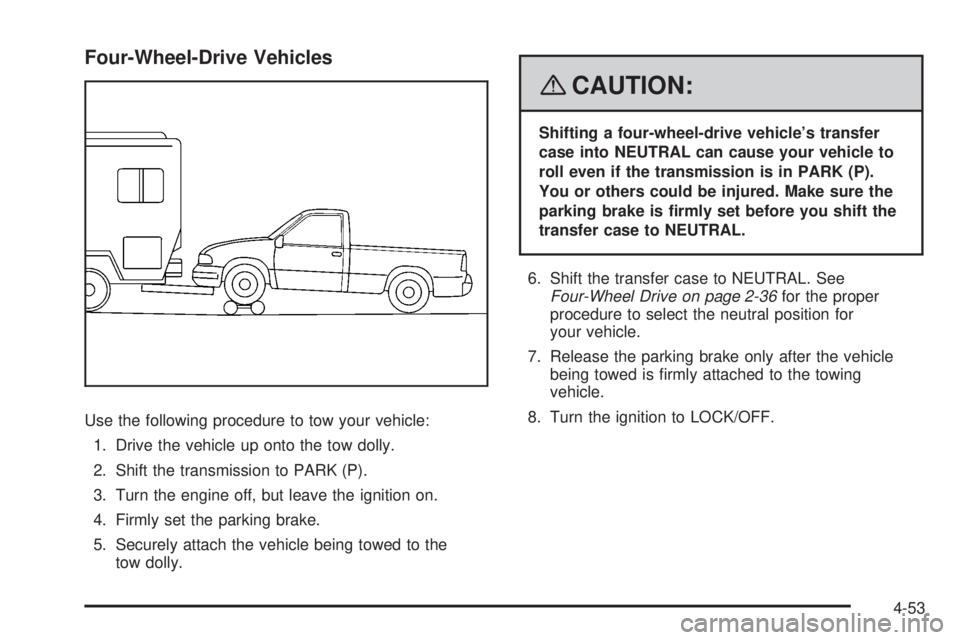
Four-Wheel-Drive Vehicles
Use the following procedure to tow your vehicle:
1. Drive the vehicle up onto the tow dolly.
2. Shift the transmission to PARK (P).
3. Turn the engine off, but leave the ignition on.
4. Firmly set the parking brake.
5. Securely attach the vehicle being towed to the
tow dolly.
{CAUTION:
Shifting a four-wheel-drive vehicle’s transfer
case into NEUTRAL can cause your vehicle to
roll even if the transmission is in PARK (P).
You or others could be injured. Make sure the
parking brake is rmly set before you shift the
transfer case to NEUTRAL.
6. Shift the transfer case to NEUTRAL. See
Four-Wheel Drive on page 2-36for the proper
procedure to select the neutral position for
your vehicle.
7. Release the parking brake only after the vehicle
being towed is rmly attached to the towing
vehicle.
8. Turn the ignition to LOCK/OFF.
4-53
Page 352 of 578
Rear Towing (Rear Wheels Off the
Ground)
Two-Wheel-Drive Vehicles
Use the following procedure to tow your vehicle from
the rear:
1. Drive the vehicle onto the dolly.
2. Firmly set the parking brake. SeeParking Brake on
page 2-49.
3. Put the transmission in PARK (P).
4. Follow the dolly manufacturer’s instructions to attach
and secure the vehicle being towed to the dolly and
then the loaded dolly to the tow vehicle. Make sure
the wheels are straight before towing.
Use an adequate clamping device to ensure that
the front wheels are locked into the straight position.
5. Release the parking brake only after the vehicle
being towed is rmly attached to the tow vehicle.
6. Turn the ignition to LOCK/OFF.
Four-Wheel-Drive Vehicles
Use the following procedure to tow your vehicle from
the rear:
1. Drive the vehicle onto the dolly.
2. Firmly set the parking brake. SeeParking Brake on
page 2-49.
3. Put the transmission in PARK (P).
4. Follow the dolly manufacturer’s instructions to attach
and secure the vehicle being towed to the dolly and
then the loaded dolly to the tow vehicle.
Use an adequate clamping device to ensure that
the front wheels are locked into the straight position.
{CAUTION:
Shifting a four-wheel-drive vehicle’s transfer
case into NEUTRAL can cause your vehicle to
roll even if the transmission is in PARK (P).
You or others could be injured. Make sure the
parking brake is rmly set before you shift the
transfer case to NEUTRAL.
5. Shift the transfer case to NEUTRAL. See
Four-Wheel Drive on page 2-36.
4-54
Page 387 of 578
Parking on Hills
{CAUTION:
You really should not park your vehicle, with a
trailer attached, on a hill. If something goes
wrong, your rig could start to move. People
can be injured, and both your vehicle and the
trailer can be damaged.
But if you ever have to park your rig on a hill, here’s
how to do it:
1. Apply your regular brakes, but don’t shift into
PARK (P) yet.
2. Have someone place chocks under the trailer
wheels.
3. When the wheel chocks are in place, release the
regular brakes until the chocks absorb the load.
4. Reapply the regular brakes. Then apply your
parking brake and shift into PARK (P).
5. If you have a four-wheel-drive vehicle, be sure the
transfer case is in a drive gear and not in
NEUTRAL.
6. Release the regular brakes.
{CAUTION:
It can be dangerous to get out of your vehicle
if the shift lever is not fully in PARK (P) with
the parking brake rmly set. Your vehicle
can roll.
If you have left the engine running, the vehicle
can move suddenly. You or others could be
injured. To be sure your vehicle will not move,
even when you are on fairly level ground, use
the steps that follow.
Always put the shift lever fully in PARK (P)
with the parking brake rmly set.
If the transfer case on four-wheel-drive vehicles
is in NEUTRAL, your vehicle will be free to roll,
even if your shift lever is in PARK (P). So, be
sure the transfer case is in a drive gear — not in
NEUTRAL.
4-89
Page 439 of 578
3. Get the vehicles close enough so the jumper cables
can reach, but be sure the vehicles are not touching
each other. If they are, it could cause an unwanted
ground connection. You would not be able to start
your vehicle, and the bad grounding could damage
the electrical systems.
To avoid the possibility of the vehicles rolling, set
the parking brake rmly on both vehicles involved in
the jump start procedure. Put the automatic
transmission in PARK (P) or a manual transmission
in NEUTRAL before setting the parking brake.
If you have a four-wheel-drive vehicle, be sure the
transfer case is in a drive gear, not in NEUTRAL.
Notice:If you leave your radio or other accessories
on during the jump starting procedure, they could
be damaged. The repairs would not be covered
by your warranty. Always turn off your radio and
other accessories when jump starting your vehicle.
4. Turn off the ignition on both vehicles. Unplug
unnecessary accessories plugged into the cigarette
lighter or the accessory power outlets. Turn off the
radio and all the lamps that are not needed. This will
avoid sparks and help save both batteries. And it
could save the radio!5. Open the hood on the other vehicle and locate the
positive (+) and negative (−) terminal locations on
that vehicle.
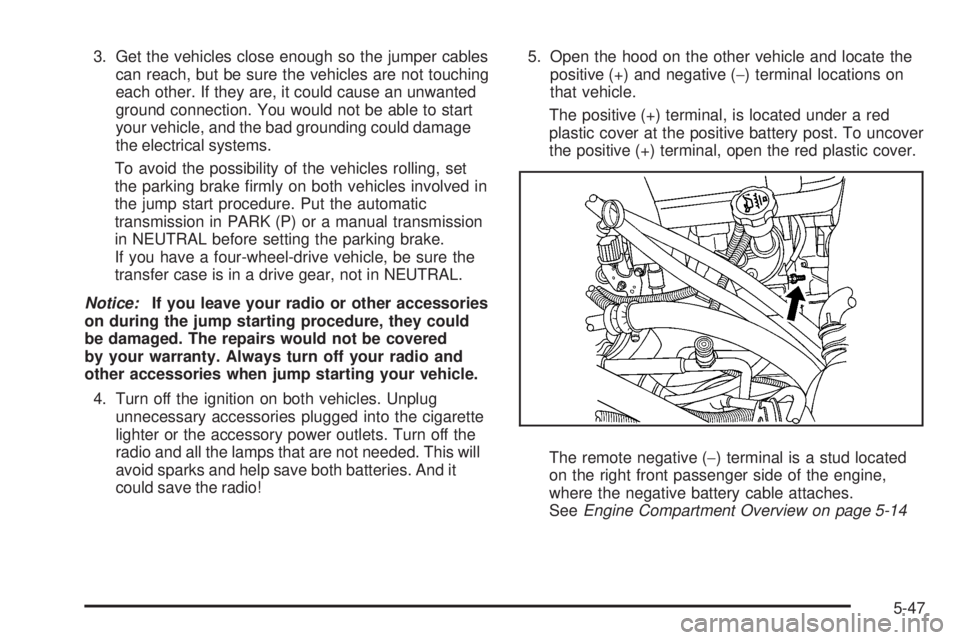
The positive (+) terminal, is located under a red
plastic cover at the positive battery post. To uncover
the positive (+) terminal, open the red plastic cover.
The remote negative (−) terminal is a stud located
on the right front passenger side of the engine,
where the negative battery cable attaches.
SeeEngine Compartment Overview on page 5-14
5-47
Page 444 of 578
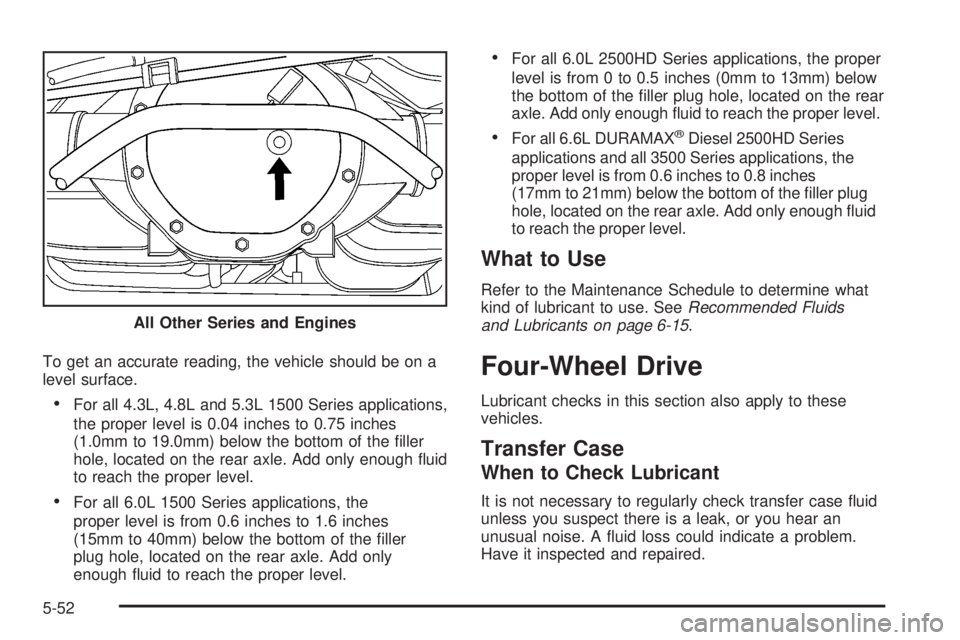
To get an accurate reading, the vehicle should be on a
level surface.
For all 4.3L, 4.8L and 5.3L 1500 Series applications,
the proper level is 0.04 inches to 0.75 inches
(1.0mm to 19.0mm) below the bottom of the ller
hole, located on the rear axle. Add only enough uid
to reach the proper level.
For all 6.0L 1500 Series applications, the
proper level is from 0.6 inches to 1.6 inches
(15mm to 40mm) below the bottom of the ller
plug hole, located on the rear axle. Add only
enough uid to reach the proper level.
For all 6.0L 2500HD Series applications, the proper
level is from 0 to 0.5 inches (0mm to 13mm) below
the bottom of the ller plug hole, located on the rear
axle. Add only enough uid to reach the proper level.
For all 6.6L DURAMAX®Diesel 2500HD Series
applications and all 3500 Series applications, the
proper level is from 0.6 inches to 0.8 inches
(17mm to 21mm) below the bottom of the ller plug
hole, located on the rear axle. Add only enough uid
to reach the proper level.
What to Use
Refer to the Maintenance Schedule to determine what
kind of lubricant to use. SeeRecommended Fluids
and Lubricants on page 6-15.
Four-Wheel Drive
Lubricant checks in this section also apply to these
vehicles.
Transfer Case
When to Check Lubricant
It is not necessary to regularly check transfer case uid
unless you suspect there is a leak, or you hear an
unusual noise. A uid loss could indicate a problem.
Have it inspected and repaired. All Other Series and Engines
5-52