instrument panel GMC SIERRA 2008 Owner's Guide
[x] Cancel search | Manufacturer: GMC, Model Year: 2008, Model line: SIERRA, Model: GMC SIERRA 2008Pages: 578, PDF Size: 6.47 MB
Page 196 of 578
Certain power accessory plugs may not be compatible
to the accessory power outlet and could result in
blown vehicle or adapter fuses. If you experience a
problem, see your dealer/retailer for additional
information on the accessory power plugs.
The accessory power outlets are powered, even when
the ignition is in LOCK/OFF. Continuing to use
power outlets while the ignition is in LOCK/OFF may
cause the vehicle’s battery to run down.
Notice:Adding any electrical equipment to your
vehicle may damage it or keep other components
from working as they should. The repairs would not
be covered by your warranty. Do not use equipment
exceeding maximum amperage rating of 20
amperes. Check with your dealer/retailer before
adding electrical equipment.
When adding electrical equipment, be sure to follow the
proper installation instructions included with the
equipment.
Notice:Improper use of the power outlet can cause
damage not covered by your warranty. Do not
hang any type of accessory or accessory bracket
from the plug because the power outlets are
designed for accessory power plugs only.Ashtray(s) and Cigarette Lighter
Your vehicle may have a front ashtray located near the
center of the instrument panel. Pull on the door to
open it. The ashtray may have a cigarette lighter.
Notice:If you put papers, pins, or other ammable
items in the ashtray, hot cigarettes or other
smoking materials could ignite them and possibly
damage your vehicle. Never put ammable items in
the ashtray.
To remove the ashtray, open the door and pull the
ashtray bin toward you. To replace the ashtray, insert
the ashtray bin inside the ashtray door and press down
until it engages. To use the cigarette lighter, push it
in all the way, and let go. When it is ready for use, the
lighter pops back out.
Notice:Holding a cigarette lighter in while it is
heating does not let the lighter back away from the
heating element when it is hot. Damage from
overheating can occur to the lighter or heating
element, or a fuse could be blown. Do not hold a
cigarette lighter in while it is heating.
3-24
Page 197 of 578
Climate Controls
Climate Control System (With Air
Conditioning)
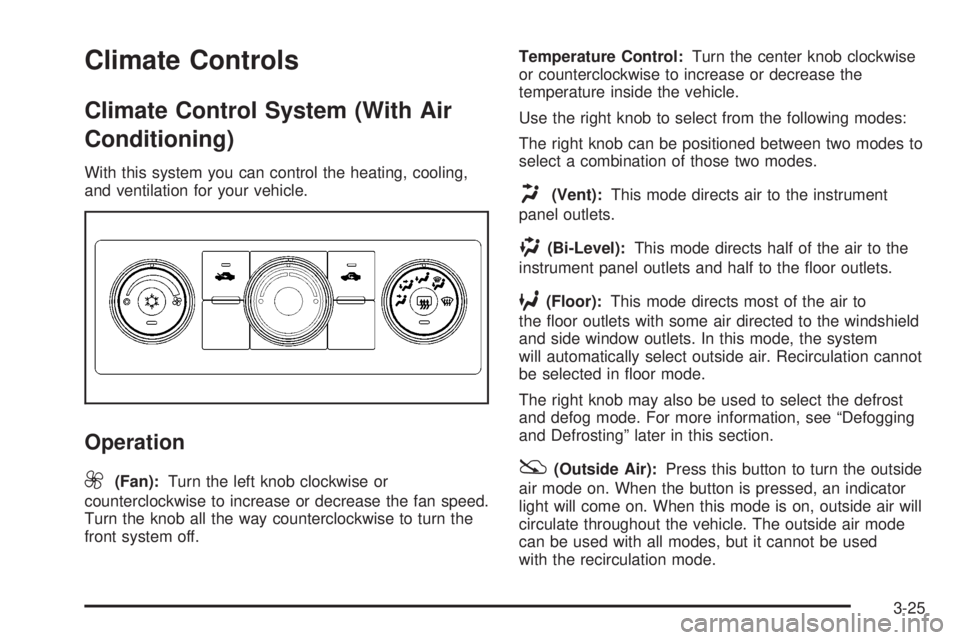
With this system you can control the heating, cooling,
and ventilation for your vehicle.
Operation
9
(Fan):Turn the left knob clockwise or
counterclockwise to increase or decrease the fan speed.
Turn the knob all the way counterclockwise to turn the
front system off.Temperature Control:Turn the center knob clockwise
or counterclockwise to increase or decrease the
temperature inside the vehicle.
Use the right knob to select from the following modes:
The right knob can be positioned between two modes to
select a combination of those two modes.
H(Vent):This mode directs air to the instrument
panel outlets.
)(Bi-Level):This mode directs half of the air to the
instrument panel outlets and half to the oor outlets.
6(Floor):This mode directs most of the air to
the oor outlets with some air directed to the windshield
and side window outlets. In this mode, the system
will automatically select outside air. Recirculation cannot
be selected in oor mode.
The right knob may also be used to select the defrost
and defog mode. For more information, see “Defogging
and Defrosting” later in this section.
:(Outside Air):Press this button to turn the outside
air mode on. When the button is pressed, an indicator
light will come on. When this mode is on, outside air will
circulate throughout the vehicle. The outside air mode
can be used with all modes, but it cannot be used
with the recirculation mode.
3-25
Page 200 of 578
Use the right knob to select from the following modes:
The right knob can be positioned between two modes to
select a combination of those two modes.
H(Vent):This mode directs air to the instrument
panel outlets.
)(Bi-Level):This mode directs half of the air to the
instrument panel outlets and to the oor outlets.
6(Floor):This mode directs most of the air to the
oor outlets with some air directed to the windshield,
side window outlets, and second row oor outlets. In this
mode, the system will automatically select outside air.
Defogging and Defrosting
Fog or frost on the inside of windows is a result of high
humidity (moisture) condensing on the cool window
glass. This can be minimized if the climate control
system is used properly.
Turn the right knob to select the defog or defrost mode.
-(Defog):This mode clears the windows of fog or
moisture and warm the passengers. The air is directed to
the windshield, oor outlets, and side window vents.
0(Defrost):This mode removes fog or frost from the
windshield more quickly. A portion of the air is directed
to the windshield and the side window vents, with someair directed to the oor vents. The system will
automatically force outside air into the vehicle.
Do not drive the vehicle until all the windows are clear.
Dual Automatic Climate Control
System
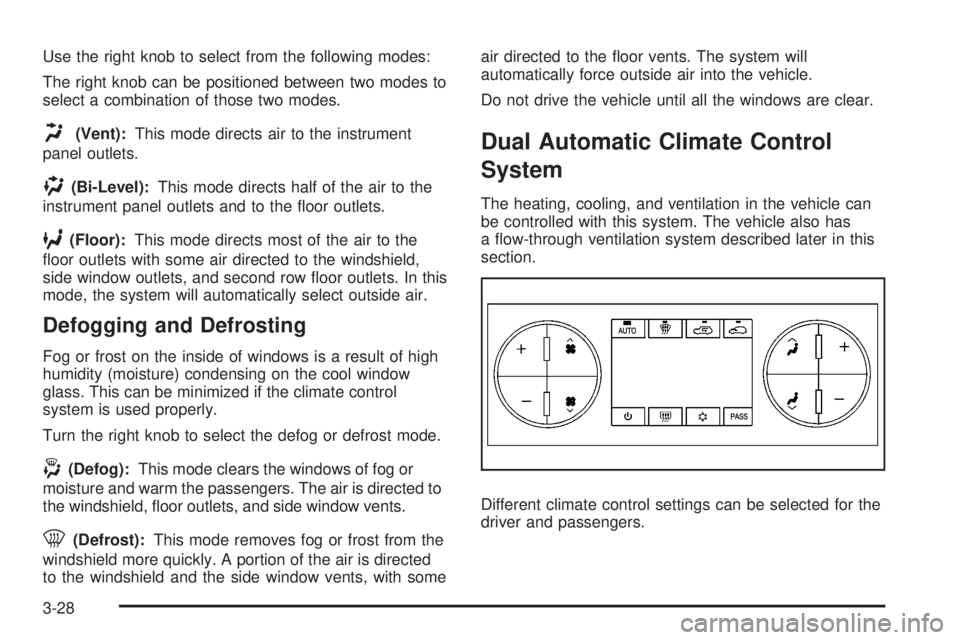
The heating, cooling, and ventilation in the vehicle can
be controlled with this system. The vehicle also has
a ow-through ventilation system described later in this
section.
Different climate control settings can be selected for the
driver and passengers.
3-28
Page 202 of 578

Be careful not to cover the solar sensor located on the
top of the instrument panel near the windshield. This
sensor regulates air temperature based on sun load. For
more information on the solar sensor, see “Sensors”
later in this section.
To avoid blowing cold air in cold weather, the system
delays turning the fan on until warm air is available. The
length of delay depends on the engine coolant
temperature. Pressing the fan switch overrides this
delay and changes the fan to a selected speed.
O(On/Off):Press this button to turn off the climate
control system. Outside air still enters the vehicle, and is
directed to the oor. This direction can be changed by
pressing the mode button. Recirculation can be selected
once you have selected vent or bi-level mode. The
temperature can also be adjusted using either
temperature button. If the air delivery mode or
temperature settings are adjusted with the system off,
the display illuminates briey to show the settings
and then returns to off. Press the on/off button or the up
down arrows on the fan switch, the defrost button,
AUTO button, or the air conditioning button to turn the
system on when it is off.
Manual Operation
The air delivery mode or fan speed can be manually
adjusted.
DC(Fan):These buttons let you manually adjust the
fan speed. Press
Dto increase fan speed andC
to decrease fan speed.
Pressing either fan button while the system is off turns
the system on. Pressing either fan button while in
automatic control places the fan under manual control.
The fan setting remains displayed and the AUTO
light turns off. The air delivery mode remains under
automatic control.
HG(Mode):PressHandGto manually change the
direction of the airow in the vehicle. Repeatedly
press either button until the desired mode appears on
the display. Pressing either mode button while the
system is off changes the air delivery mode without
turning the system on. Pressing either mode button
while in automatic control places the mode under
manual control.
The air delivery mode setting is displayed and the
AUTO light turns off. The fan remains under automatic
control.
H(Vent):Air is directed to the instrument panel
outlets.
3-30
Page 203 of 578
)(Bi-Level):Air is directed partly to the instrument
panel outlets and to the oor outlets. A little air is
directed towards the windshield and side window outlets.
Cooler air is directed to the upper outlets and warmer
air to the oor outlets.
6(Floor):Air is directed to the oor outlets, with
some to the windshield, side window outlets, and
second row oor outlets. In this mode, the system will
automatically select outside air.
-(Defog):See “Defogging and Defrosting” later in
this section.
@(Recirculation):Press this button to turn the
recirculation mode on. When the button is pressed, an
indicator light comes on.
This mode keeps outside air from entering the vehicle.
It can be used to reduce outside air and prevent
odors from entering the vehicle. Recirculation may also
help cool the air inside the vehicle more quickly once
the temperature inside the vehicle is less than the
outside temperature.
The recirculation mode cannot be used with oor, defog,
or defrost modes. If recirculation is selected with one
of those modes, the indicator light ashes three
times and then turns off. The air conditioning
compressor also comes on when this mode is activated.While in recirculation mode the windows may fog when
the weather is cold and damp. To clear the fog,
select either the defog or defrost mode and increase the
fan speed.
The recirculation mode can be turned off by pressing
the outside air button, or by turning off the ignition.
;(Outside Air):Press this button to turn on
the outside air mode. When this mode is selected, air
from outside the vehicle circulates throughout the
vehicle. An indicator light on the button comes on to
show that it is activated. The outside air mode can be
used with all modes, but it cannot be used with the
recirculation mode.
Air Conditioning
#
(Air Conditioning):Press this button to turn the
air conditioning (A/C) compressor on and off. When
air conditioning is selected, an indicator light comes on
to show that the air conditioning has been activated.
Pressing this button when the outside temperature is too
cool for air conditioning makes the air conditioning
indicator ash three times and then turn off to let you
know the air conditioning mode is not available. If the air
conditioning is on and the outside temperature drops
below a temperature which is too cool for air conditioning
to be effective, the air conditioning light turns off to show
that the air conditioning mode has been canceled.
3-31
Page 204 of 578
On hot days, open the windows long enough to let hot
inside air escape. This helps to reduce the time it
takes for the vehicle to cool down. It also helps the
system to operate more efficiently.
The air conditioning system removes moisture from the
air, so a small amount of water might drip underneath
the vehicle while idling or after turning off the engine.
This is normal.
Sensors
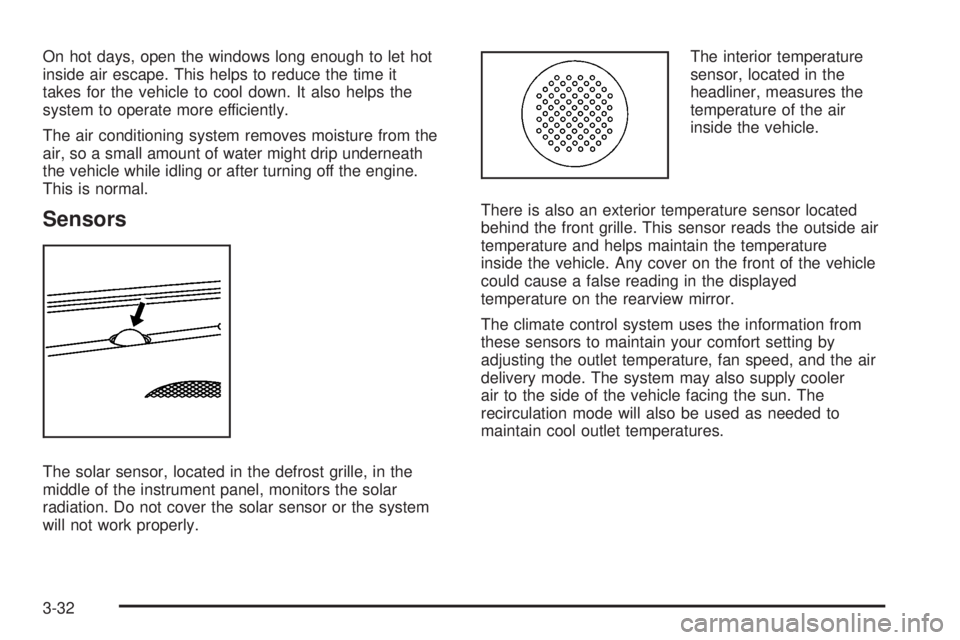
The solar sensor, located in the defrost grille, in the
middle of the instrument panel, monitors the solar
radiation. Do not cover the solar sensor or the system
will not work properly.The interior temperature
sensor, located in the
headliner, measures the
temperature of the air
inside the vehicle.
There is also an exterior temperature sensor located
behind the front grille. This sensor reads the outside air
temperature and helps maintain the temperature
inside the vehicle. Any cover on the front of the vehicle
could cause a false reading in the displayed
temperature on the rearview mirror.
The climate control system uses the information from
these sensors to maintain your comfort setting by
adjusting the outlet temperature, fan speed, and the air
delivery mode. The system may also supply cooler
air to the side of the vehicle facing the sun. The
recirculation mode will also be used as needed to
maintain cool outlet temperatures.
3-32
Page 205 of 578
Defogging and Defrosting
Fog on the inside of the windows is a result of high
humidity (moisture) condensing on the cool window
glass. This can be minimized if the climate control
system is used properly. There are two modes to clear
fog or frost from the windshield.
Use
HandGto select the defog or defrost modes.
-(Defog):Press this button to clear the windows of
fog or moisture and warm the passengers. This
mode directs air to the windshield, oor outlets, and
side window vents. When this mode is selected,
the system turns off recirculation and runs the air
conditioning compressor unless the outside temperature
is close to freezing. The recirculation mode cannot be
selected while in the defog mode. Do not drive the
vehicle until all the windows are clear.
0(Defrost):Press this button to remove fog or frost
from the windshield more quickly. This mode directs
a portion of the air to the windshield and side window
vents and some to the oor vents. In this mode, the
system will automatically force outside air into your
vehicle. The recirculation mode cannot be selected while
in the defrost mode. The air conditioning compressor
will run automatically in this setting, unless the outside
temperature is close to freezing. Do not drive the
vehicle until all the windows are clear.
Rear Window Defogger
The rear window defogger uses a warming grid to
remove fog from the rear window.
<(Rear Window Defogger):If your vehicle has this
feature, press this button to turn the defogger on or
off. It automatically turns off several minutes after it has
been activated. The defogger can also be turned off
by turning the engine off. Do not drive the vehicle until
all the windows are clear.
Notice:Do not use a razor blade or sharp object to
clear the inside rear window. Do not adhere
anything to the defogger grid lines in the rear glass.
These actions may damage the rear defogger.
Repairs would not be covered by your warranty.
Heated Mirrors:If your vehicle has heated outside
rearview mirrors, the mirrors will heat to help clear fog
or frost from the surface of the mirror when the rear
window defog button is pressed. SeeOutside Power
Mirrors on page 2-59.
Outlet Adjustment
Use the air outlets located in the center and on the side
of the instrument panel to direct the airow.
3-33
Page 207 of 578

Instrument Panel Cluster
Your instrument cluster is designed to let you know at a glance how your vehicle is running. You will know how fast you
are going, about how much fuel you have and many other things you will need to know to drive safely and economically.
If your vehicle has the DURAMAX
®Diesel engine, see the DURAMAX®Diesel manual for more information. United States Light Duty Premium version shown. Canada, Uplevel, Base, Heavy Duty Clusters similar.
3-35
Page 208 of 578
Speedometer and Odometer
Your speedometer lets you see your speed in both
miles per hour (mph) and kilometers per hour (km/h).
Your odometer shows how far your vehicle has
been driven, in either miles (used in the United States)
or kilometers (used in Canada).
Engine Hour Meter Display
The Driver Information Center (DIC) can also display
the number of hours the engine has run. To display the
engine hours, turn the ignition off, press and hold the
reset button for at least four seconds. The hour
meter will be displayed for up to 30 seconds, or until the
ignition is turned on. SeeDIC Operation and Displays
(With DIC Buttons) on page 3-55orDIC Operation
and Displays (Without DIC Buttons) on page 3-60for
more information.
Trip Odometer
The trip odometer can tell you how far your vehicle has
been driven since you last set the trip odometer to zero.
Press the reset button, located on the instrument panel
cluster next to the voltmeter, to toggle between the
trip odometer and the regular odometer. Holding
the reset button for approximately one second while the
trip odometer is displayed will reset it.
To display the odometer reading with the ignition off,
press the reset button.
SeeDIC Operation and Displays (With DIC Buttons) on
page 3-55orDIC Operation and Displays (Without
DIC Buttons) on page 3-60for more information.
Tachometer
Your tachometer displays the engine speed in
revolutions per minute (rpm). See “Grade Braking
(Allison Transmission
®)” underTow/Haul Mode on
page 2-34for more information.
3-36
Page 210 of 578
Airbag Readiness Light
There is an airbag readiness light on the instrument
panel cluster, which shows the airbag symbol. The
system checks the airbag’s electrical system for
malfunctions. The light tells you if there is an electrical
problem. The system check includes the airbag
sensor, the pretensioners, the airbag modules, the
wiring and the crash sensing and diagnostic module.
For more information on the airbag system, seeAirbag
System on page 1-68.
This light will come on
when you start your
vehicle, and it will ash
for a few seconds.
The light should go out
and the system is ready.
If the airbag readiness light stays on after you start the
vehicle or comes on when you are driving, your
airbag system may not work properly. Have your vehicle
serviced right away.{CAUTION:
If the airbag readiness light stays on after you
start your vehicle, it means the airbag system
may not be working properly. The airbags in
your vehicle may not inate in a crash, or they
could even inate without a crash. To help
avoid injury to yourself or others, have your
vehicle serviced right away if the airbag
readiness light stays on after you start your
vehicle.
The airbag readiness light should ash for a few
seconds when you start the engine. If the light does not
come on then, have it xed immediately. If there is a
problem with the airbag system, an airbag Driver
Information Center (DIC) message may also come on.
SeeDIC Warnings and Messages on page 3-63for
more information.
3-38