battery replacement GMC SIERRA 2008 Owner's Manual
[x] Cancel search | Manufacturer: GMC, Model Year: 2008, Model line: SIERRA, Model: GMC SIERRA 2008Pages: 578, PDF Size: 6.47 MB
Page 96 of 578
Remote Keyless Entry (RKE)
System
If the vehicle has the Remote Keyless Entry (RKE)
system, it operates on a radio frequency subject
to Federal Communications Commission (FCC) Rules
and with Industry Canada.
This device complies with Part 15 of the FCC Rules.
Operation is subject to the following two conditions:
1. This device may not cause interference.
2. This device must accept any interference received,
including interference that may cause undesired
operation of the device.
This device complies with RSS-210 of Industry Canada.
Operation is subject to the following two conditions:
1. This device may not cause interference.
2. This device must accept any interference received,
including interference that may cause undesired
operation of the device.Changes or modications to this system by other than
an authorized service facility could void authorization to
use this equipment.
At times you may notice a decrease in range. This is
normal for any RKE system. If the transmitter does not
work or if you have to stand closer to your vehicle
for the transmitter to work, try this:
Check the distance. You may be too far from your
vehicle. You may need to stand closer during
rainy or snowy weather.
Check the location. Other vehicles or objects may
be blocking the signal. Take a few steps to the
left or right, hold the transmitter higher, and
try again.
Check to determine if battery replacement is
necessary. See “Battery Replacement” later in this
section.
If you are still having trouble, see your dealer/retailer
or a qualied technician for service.
2-4
Page 99 of 578
Battery Replacement
Replace the battery if the REPLACE BATTERY IN
REMOTE KEY message displays in the DIC. See
“REPLACE BATTERY IN REMOTE KEY” underDIC
Warnings and Messages on page 3-63for additional
information.
Notice:When replacing the battery, use care not to
touch any of the circuitry. Static from your body
transferred to these surfaces may damage the
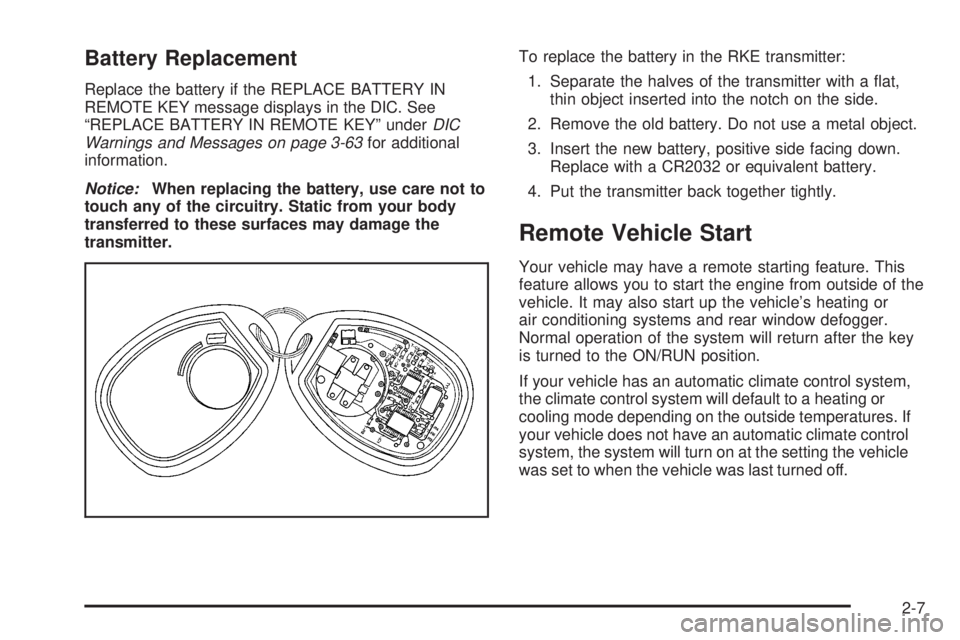
transmitter.To replace the battery in the RKE transmitter:
1. Separate the halves of the transmitter with a at,
thin object inserted into the notch on the side.
2. Remove the old battery. Do not use a metal object.
3. Insert the new battery, positive side facing down.
Replace with a CR2032 or equivalent battery.
4. Put the transmitter back together tightly.
Remote Vehicle Start
Your vehicle may have a remote starting feature. This
feature allows you to start the engine from outside of the
vehicle. It may also start up the vehicle’s heating or
air conditioning systems and rear window defogger.
Normal operation of the system will return after the key
is turned to the ON/RUN position.
If your vehicle has an automatic climate control system,
the climate control system will default to a heating or
cooling mode depending on the outside temperatures. If
your vehicle does not have an automatic climate control
system, the system will turn on at the setting the vehicle
was set to when the vehicle was last turned off.
2-7
Page 239 of 578
PARK ASSIST OFF
If your vehicle has the Ultrasonic Rear Parking Assist
(URPA) system, after the vehicle has been started, this
message displays to remind the driver that the URPA
system has been turned off. Press the set/reset
button or the trip odometer reset stem to acknowledge
this message and clear it from the DIC display. To
turn the URPA system back on, seeUltrasonic Rear
Parking Assist (URPA) on page 2-63.
PASSENGER DOOR OPEN
This message displays and a chime sounds if the
passenger door is not fully closed and the vehicle is in a
drive gear. Stop and turn off the vehicle, check the
door for obstructions, and close the door again. Check
to see if the message still appears on the DIC.
REMOTE KEY LEARNING ACTIVE
This message displays while you are matching a
Remote Keyless Entry (RKE) transmitter to your vehicle.
See “Matching Transmitter(s) to Your Vehicle” under
Remote Keyless Entry (RKE) System Operation
on page 2-5andDIC Operation and Displays (With DIC
Buttons) on page 3-55orDIC Operation and Displays
(Without DIC Buttons) on page 3-60for more
information.
REPLACE BATTERY IN REMOTE KEY
This message displays if a Remote Keyless Entry (RKE)
transmitter battery is low. The battery needs to be
replaced in the transmitter. See “Battery Replacement”
underRemote Keyless Entry (RKE) System Operation
on page 2-5.
RIGHT REAR DOOR OPEN (Crew Cab)
This message displays and a chime sounds if the
passenger side rear door is not fully closed and the
vehicle is in a drive gear. Stop and turn off the vehicle,
check the door for obstructions, and close the door again.
Check to see if the message still appears on the DIC.
SERVICE 4 WHEEL DRIVE
This message displays if a problem occurs with the
four-wheel-drive system. If this message appears, stop
as soon as possible and turn off the vehicle. Restart
the vehicle and check for the message on the DIC
display. If the message is still displayed or appears
again when you begin driving, the four-wheel-drive
system needs service. See your dealer/retailer.
3-67
Page 286 of 578
Headphones
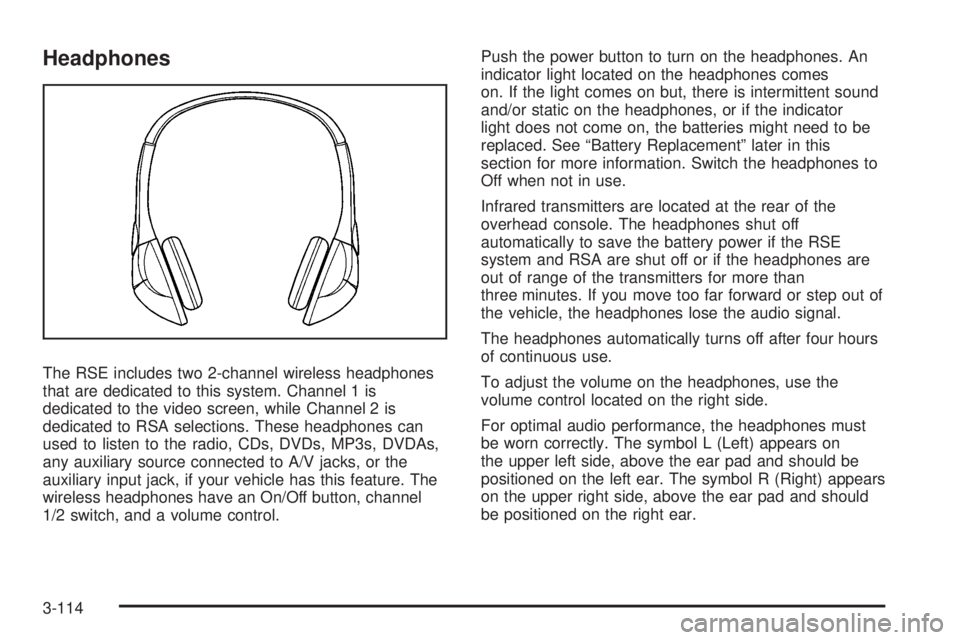
The RSE includes two 2-channel wireless headphones
that are dedicated to this system. Channel 1 is
dedicated to the video screen, while Channel 2 is
dedicated to RSA selections. These headphones can
used to listen to the radio, CDs, DVDs, MP3s, DVDAs,
any auxiliary source connected to A/V jacks, or the
auxiliary input jack, if your vehicle has this feature. The
wireless headphones have an On/Off button, channel
1/2 switch, and a volume control.Push the power button to turn on the headphones. An
indicator light located on the headphones comes
on. If the light comes on but, there is intermittent sound
and/or static on the headphones, or if the indicator
light does not come on, the batteries might need to be
replaced. See “Battery Replacement” later in this
section for more information. Switch the headphones to
Off when not in use.
Infrared transmitters are located at the rear of the
overhead console. The headphones shut off
automatically to save the battery power if the RSE
system and RSA are shut off or if the headphones are
out of range of the transmitters for more than
three minutes. If you move too far forward or step out of
the vehicle, the headphones lose the audio signal.
The headphones automatically turns off after four hours
of continuous use.
To adjust the volume on the headphones, use the
volume control located on the right side.
For optimal audio performance, the headphones must
be worn correctly. The symbol L (Left) appears on
the upper left side, above the ear pad and should be
positioned on the left ear. The symbol R (Right) appears
on the upper right side, above the ear pad and should
be positioned on the right ear.
3-114
Page 287 of 578
Notice:Do not store the headphones in heat or
direct sunlight. This could damage the headphones
and repairs will not be covered by your warranty.
Storage in extreme cold can weaken the batteries.
Keep the headphones stored in a cool, dry place.
If the foam ear pads attached to the headphones
become worn or damaged, the pads can be replaced
separately from the headphone set. Refer to your
dealer/retailer for more information.
Battery Replacement
To change the batteries on the headphones, do the
following:
1. Turn the screw to loosen the battery door located
on the left side of the headphones. Slide the
battery door open.
2. Replace the two batteries in the compartment.
Make sure that they are installed correctly, using
the diagram on the inside of the battery
compartment.
3. Replace the battery door and tighten the door
screw.
If the headphones are to be stored for a long period of
time, remove the batteries and keep them in a cool,
dry place.
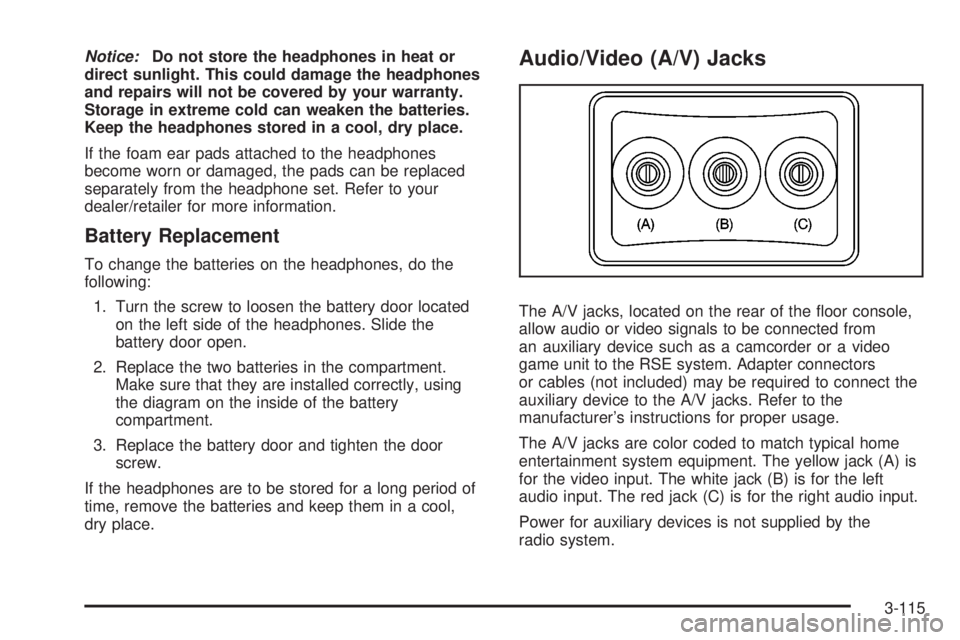
Audio/Video (A/V) Jacks
The A/V jacks, located on the rear of the oor console,
allow audio or video signals to be connected from
an auxiliary device such as a camcorder or a video
game unit to the RSE system. Adapter connectors
or cables (not included) may be required to connect the
auxiliary device to the A/V jacks. Refer to the
manufacturer’s instructions for proper usage.
The A/V jacks are color coded to match typical home
entertainment system equipment. The yellow jack (A) is
for the video input. The white jack (B) is for the left
audio input. The red jack (C) is for the right audio input.
Power for auxiliary devices is not supplied by the
radio system.
3-115
Page 289 of 578
Video Screen
The video screen is located in the overhead console.
To use the video screen, do the following:
1. Push the release button located on the overhead
console.
2. Move the screen to the desired position.
When the video screen is not in use, push it up into its
locked position.
If a DVD is playing and the screen is raised to its locked
position, the screen remains on. This is normal, and
the DVD continues to play through the previous audio
source. Use the remote control power button or eject the
disc to turn off the screen.
The overhead console contains the infrared transmitters
for the wireless headphones and the infrared receivers
for the remote control. They are located at the rear
of the console.
Notice:Avoid directly touching the video screen,
as damage may occur. See “Cleaning the Video
Screen” later in this section for more information.
Remote Control
To use the remote control, aim it at the transmitter
window at the rear of the RSE overhead console and
press the desired button. Direct sunlight or very
bright light could affect the ability of the RSE transmitter
to receive signals from the remote control. If the
remote control does not seem to be working, the
batteries might need to be replaced. See “Battery
Replacement” later in this section. Objects blocking the
line of sight could also affect the function of the
remote control.
If a CD or DVD is in the Radio DVD slot, the remote
control
O(power) button can be used to turn on
the video screen display and start the disc. The radio
can also turn on the video screen display. SeeRadio(s)
on page 3-84for more information.
Notice:Storing the remote control in a hot area or
in direct sunlight can damage it, and the repairs
will not be covered by your warranty. Storage
in extreme cold can weaken the batteries. Keep the
remote control stored in a cool, dry place.
If the remote control becomes lost or damaged, a new
universal remote control can be purchased. If this
happens, make sure the universal remote control uses a
code set of Toshiba
®.
3-117
Page 292 of 578
Battery Replacement
To change the remote control batteries, do the following:
1. Slide the rear cover back on the remote control.
2. Replace the two batteries in the compartment. Make
sure they are installed correctly using the diagram
on the inside of the remote control.
3. Replace the battery cover.
If the remote control is to be stored for a long period of
time, remove the batteries and keep them in a cool,
dry place.
Problem Recommended Action
No power. The ignition might not be
turned ON/RUN or in
ACC/ACCESSORY.
The picture does not ll
the screen. There are
black borders on the
top and bottom or on
both sides or it looks
stretched out.Check the display mode
settings in the setup menu
by pressing the display
menu button on the
remote control.
In auxiliary mode, the
picture moves or scrolls.Check the auxiliary input
connections at both
devices.
Problem Recommended Action
The remote control does
not work.Check to make sure there
is no obstruction between
the remote control and the
transmitter window.
Check the batteries to
make sure they are not
dead or installed
incorrectly.
After stopping the player,
I push Play but sometimes
the DVD starts where I left
off and sometimes at the
beginning.If the stop button was
pressed one time, the
DVD player resumes
playing where the DVD
was stopped. If the stop
button was pressed two
times the DVD player
begins to play from the
beginning of the DVD.
The auxiliary source is
running but there is no
picture or sound.Check that the RSE video
screen is in the auxiliary
source mode.
Check the auxiliary input
connections at both
devices.
3-120
Page 437 of 578
Replacing Brake System Parts
The braking system on a vehicle is complex. Its many
parts have to be of top quality and work well together if
the vehicle is to have really good braking. Your vehicle
was designed and tested with top-quality brake parts.
When you replace parts of the braking system — for
example, when the brake linings wear down and you
need new ones put in — be sure you get new approved
replacement parts. If you do not, the brakes might not
work properly. For example, if someone puts in brake
linings that are wrong for your vehicle, the balance
between the front and rear brakes can change — for the
worse. The braking performance you have come to
expect can change in many other ways if someone puts
in the wrong replacement brake parts.
Battery
Your vehicle has a maintenance free battery
(or batteries). When it is time for a new battery, see
your dealer/retailer for one that has the replacement
number shown on the original battery’s label. See
Engine Compartment Overview on page 5-14for
battery location.
Warning:Battery posts, terminals, and related
accessories contain lead and lead compounds,
chemicals known to the State of California to cause
cancer and reproductive harm. Wash hands after
handling.
Vehicle Storage
{CAUTION:
Batteries have acid that can burn you and gas
that can explode. You can be badly hurt if you
are not careful. SeeJump Starting on
page 5-46for tips on working around a battery
without getting hurt.
Infrequent Usage: If you drive your vehicle infrequently,
remove the black, negative (−) cable from the battery.
This will help keep the battery from running down.
Extended Storage: For extended storage of your vehicle,
remove the black, negative (−) cable from the battery or
use a battery trickle charger. This will help maintain the
charge of the battery over an extended period of time.
5-45
Page 553 of 578
Roadside Assistance Program
For vehicles purchased in the U.S. call,
1-800-GMC-8782 (1-800-462-8782); (Text
telephone (TTY): 1-888-889-2438).
For vehicles purchased in Canada, call1-800-268-6800.
Service is available 24 hours a day, 365 days a year.
As the owner of a new GMC vehicle, you are
automatically enrolled in the GMC Roadside
Assistance program.
Who is Covered?
Roadside Assistance coverage is for the vehicle
operator, regardless of ownership. In Canada,
a person driving the vehicle without the consent
of the owner is not eligible for coverage.
Services Provided
The following services are provided in the U.S. and
Canada up to 5 years/100,000 miles (160 000 km),
whichever occurs rst, and, in Canada only, up
to a maximum coverage of $100.
Fuel Delivery:Delivery of enough fuel for the
vehicle to get to the nearest service station
(approximately $5 in Canada). In Canada, service
to provide diesel may be restricted. For safety
reasons, propane and other alternative fuels will
not be provided through this service.
Lock-out Service:Lock-out service will be covered
at no charge if you are unable to gain entry into
your vehicle. A remote unlock may be available if
you have an active OnStar
®subscription. To ensure
security, the driver must present personal
identication before lock-out service is provided. In
Canada, the vehicle registration is also required.
Emergency Tow From a Public Roadway or
Highway:Tow to the nearest dealership for warranty
service or in the event of a vehicle-disabling crash.
Winch-out assistance is provided when the vehicle is
mired in sand, mud, or snow.
Flat Tire Change:Installation of a spare tire in good
condition, when equipped and properly inated, is
covered at no charge. The customer is responsible
for the repair or replacement of the tire if not covered
by a warrantable failure.
Jump Start:A battery jump start is covered at no
charge if the vehicle does not start.
Trip Routing Service:Upon request, Roadside
Assistance will send you detailed, computer
personalized maps, highlighting your choice of either
the most direct route or the most scenic route to your
destination, anywhere in North America, along with
helpful travel information pertaining to your trip.
Please allow three weeks before your planned
departure date. In Canada, trip routing requests will
be limited to six per calendar year.
7-7
Page 566 of 578
Audio System (cont.)
Navigation/Radio System, see Navigation
Manual.................................................3-112
Radio Reception........................................3-125
Rear Seat Audio (RSA)...............................3-122
Setting the Clock.........................................3-81
Theft-Deterrent Feature...............................3-123
XM™ Satellite Radio Antenna System...........3-126
Audio System(s).............................................3-84
Automatic Headlamp System............................3-19
Automatic Transmission
Fluid..................................................5-22, 5-25
Operation...................................................2-28
Auxiliary Roof Mounted Lamp Switch.................3-20
B
Battery..........................................................5-45
Electric Power Management..........................3-22
Run-Down Protection...................................3-23
Brake
Emergencies................................................ 4-5
Brakes..........................................................5-42
System Warning Light..................................3-44
Braking........................................................... 4-3
Braking in Emergencies..................................... 4-5
Break-In, New Vehicle.....................................2-22
Bulb Replacement...........................................5-59Center High-Mounted Stoplamp (CHMSL) and
Cargo Lamp............................................5-61
Halogen Bulbs............................................5-59
Headlamp Aiming........................................5-56
Headlamps.................................................5-60
License Plate Lamps....................................5-64
Pickup Box Identication and Fender
Marker Lamps.........................................5-62
Replacement Bulbs......................................5-65
Taillamps, Turn Signal, Stoplamps and
Back-up Lamps........................................5-62
Buying New Tires...........................................5-84
C
Calibration.............................................2-55, 2-57
California Fuel.................................................. 5-7
California Perchlorate Materials Requirements....... 5-5
California Proposition 65 Warning....................... 5-4
Canadian Owners................................................ ii
Capacities and Specications..........................5-130
Carbon Monoxide...................2-14, 2-53, 4-31, 4-55
Care of
Safety Belts..............................................5-115
Cargo Lamp...................................................3-22
Cargo Management System.............................2-78
CD, MP3 ............................................3-102, 3-106
Center Console Storage Area...........................2-76
2