CD player GMC SIERRA DENALI 2017 User Guide
[x] Cancel search | Manufacturer: GMC, Model Year: 2017, Model line: SIERRA DENALI, Model: GMC SIERRA DENALI 2017Pages: 511, PDF Size: 6.88 MB
Page 207 of 511
GMC Sierra/Sierra Denali Owner Manual (GMNA-Localizing-U.S./Canada/
Mexico-9955992) - 2017 - crc - 4/18/17
206 Infotainment System Root Directory
The root directory is treated as a
folder. All files contained directly
under the root directory are
accessed prior to any root directory
folders.
Empty Folders
If a root directory or folder is empty
or contains only folders, the player
advances to the next folder in the
file structure that contains a
compressed audio file. The empty
folder(s) are not displayed or
numbered.
No Folder
When the CD only contains
compressed audio files without any
folders, all files are under the root
folder.
USB Port (Base Radio) Playing from a USB
A USB mass storage device or
Media Transfer Protocol (MTP)
device can be connected to the
USB port. The vehicle may have USB ports in
the front of the center console,
armrest, or one in the upper glove
box.
See Center Console Storage 0 120
and Glove Box 0 119 .
USB MP3 Player and USB Drives
.
The USB MP3 players and USB
drives connected must comply
with the USB Mass Storage
Class specification (USB MSC).
.
Hard disk drives are not
supported.
.
Supported file system is FAT32.
To play a USB device:
.
Connect the USB.
.
Press MEDIA on the faceplate
until the connected device is
shown.
While the USB source is active,
press the corresponding faceplate
button for the icons on the screen to
operate USB function:
.
t .
u .
j /
r .
Z For information on how to use the
screen icons, see “ Playing an
Audio CD. ”
USB Menu
Press MENU to display the USB
menu and the following may display:
Browse : Select to display the files
and folders on the USB device.
Tone Settings : Select to adjust
Bass, Midrange, Treble, Balance,
Fade, and EQ (Equalizer). See
“ Tone Settings ” in AM-FM Radio
(Base Radio with Touchscreen)
0 199 or AM-FM Radio (Base
Radio) 0 197 .
Auto Volume : If equipped, see
“ Auto Volume ” in AM-FM Radio
(Base Radio with Touchscreen)
0 199 or AM-FM Radio (Base
Radio) 0 197 .
EQ (Equalizer) : If equipped, this
feature adjusts the equalizer
settings. See “ EQ (Equalizer)
Page 212 of 511
GMC Sierra/Sierra Denali Owner Manual (GMNA-Localizing-U.S./Canada/
Mexico-9955992) - 2017 - crc - 4/18/17
Infotainment System 211.
Some iPod/iPhone product
models may not support the
connectivity or functionality of
this product.
.
Only connect the iPod/iPhone
with connection cables
supported by iPod/iPhone
products. Other connection
cables cannot be used.
.
The iPod/iPhone may be
damaged if it is connected to the
vehicle with the ignition on.
When not in use, disconnect the
iPod/iPhone.
.
When the iPod/iPhone is
connected to the USB port by
using the iPod/iPhone cable, the
Bluetooth music is not
supported.
.
The iPod/iPhone playback
functions and the information
displayed may be different when
played on the infotainment
system. .
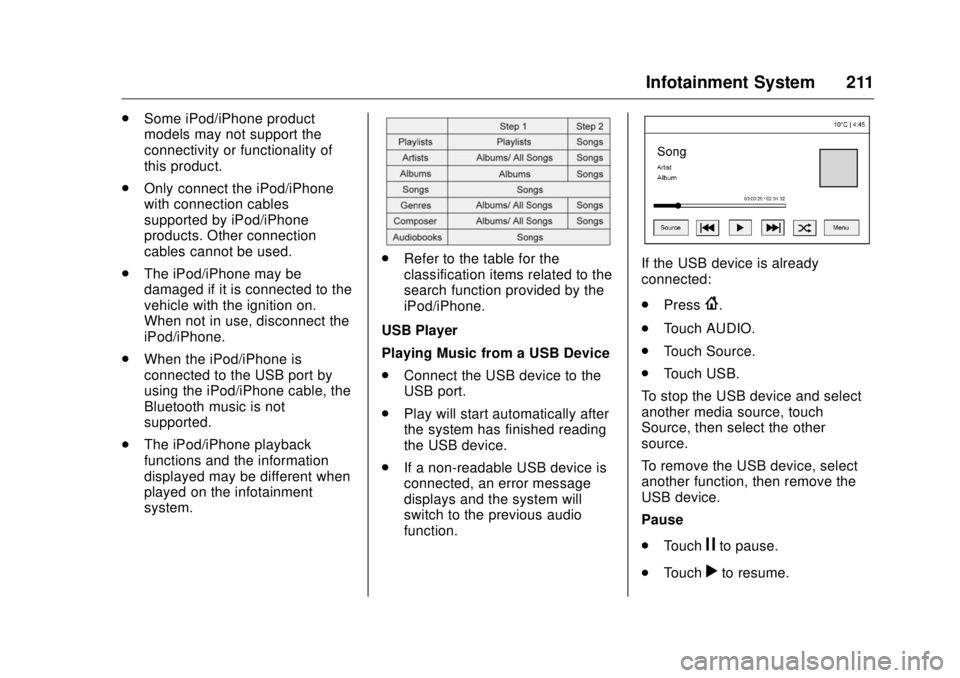
Refer to the table for the
classification items related to the
search function provided by the
iPod/iPhone.
USB Player
Playing Music from a USB Device
.
Connect the USB device to the
USB port.
.
Play will start automatically after
the system has finished reading
the USB device.
.
If a non-readable USB device is
connected, an error message
displays and the system will
switch to the previous audio
function. If the USB device is already
connected:
.
Press
{ .
.
Touch AUDIO.
.
Touch Source.
.
Touch USB.
To stop the USB device and select
another media source, touch
Source, then select the other
source.
To remove the USB device, select
another function, then remove the
USB device.
Pause
.
Touch
j to pause.
.
Touch
r to resume.
Page 213 of 511
GMC Sierra/Sierra Denali Owner Manual (GMNA-Localizing-U.S./Canada/
Mexico-9955992) - 2017 - crc - 4/18/17
212 Infotainment System Changing to Next/Previous Files
.
Touch
l to change to the
next file.
.
Touch
g within five seconds of
the playback time to play the
previous file.
Returning to the Beginning of the
Current File
Touch
g after five seconds of the
playback time.
Scanning Forward or Backward
Touch and hold
g or
l during
playback to rewind or fast forward.
Release the button to resume
playback at normal speed.
Playing a File Randomly
Touch
Z during playback.
.
ON: Plays all files randomly.
.
OFF: Returns to normal
playback.
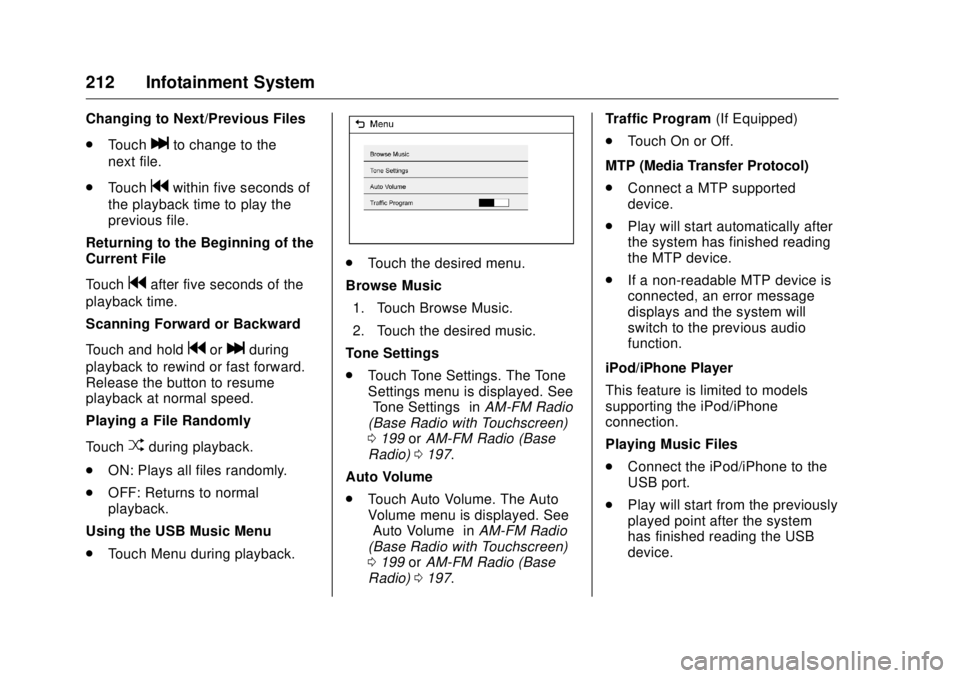
Using the USB Music Menu
.
Touch Menu during playback. .
Touch the desired menu.
Browse Music
1. Touch Browse Music.
2. Touch the desired music.
Tone Settings
.
Touch Tone Settings. The Tone
Settings menu is displayed. See
“ Tone Settings ” in AM-FM Radio
(Base Radio with Touchscreen)
0 199 or AM-FM Radio (Base
Radio) 0 197 .
Auto Volume
.
Touch Auto Volume. The Auto
Volume menu is displayed. See
“ Auto Volume ” in AM-FM Radio
(Base Radio with Touchscreen)
0 199 or AM-FM Radio (Base
Radio) 0 197 . Traffic Program (If Equipped)
.
Touch On or Off.
MTP (Media Transfer Protocol)
.
Connect a MTP supported
device.
.
Play will start automatically after
the system has finished reading
the MTP device.
.
If a non-readable MTP device is
connected, an error message
displays and the system will
switch to the previous audio
function.
iPod/iPhone Player
This feature is limited to models
supporting the iPod/iPhone
connection.
Playing Music Files
.
Connect the iPod/iPhone to the
USB port.
.
Play will start from the previously
played point after the system
has finished reading the USB
device.
Page 215 of 511
GMC Sierra/Sierra Denali Owner Manual (GMNA-Localizing-U.S./Canada/
Mexico-9955992) - 2017 - crc - 4/18/17
214 Infotainment System .
Some files may not operate due
to a different recording format or
the condition of the file.
Viewing Pictures
1. Connect the USB device to the
USB port.
2. Touch the screen to open to full
screen. Touch the screen again
to return to the previous
screen.
If the USB device is already
connected:
1. Press
{ .
2. Touch GALLERY.
Some features are disabled while
the vehicle is in motion.
Viewing a Slide Show
1. Touch
z from the picture
screen.
2. Touch the screen to cancel the
slide show during the slide
show playback. Viewing a Previous or Next
Picture
Touch
S or
T from the picture
screen.
Rotating a Picture
Touch
w from the picture screen.
Enlarging a Picture
Touch
x from the picture screen.
Using the USB Picture Menu
1. Touch MENU from the picture
screen.
2. Touch the appropriate menu:
.
Slide Show Time: Allows
selection of the slide show
interval.
.
Clock, Temp. Display:
Allows selection of On or
Off to show the clock and
temperature on the full
screen.
.
Display Settings: Adjusts
for Brightness and Contrast.
3. Touch
0 to exit. Auxiliary Jack This vehicle may have an AUX jack
in the center console or armrest.
See Center Console Storage 0 120 .
Possible auxiliary audio sources
include:
.
Laptop computer
.
Audio music player
This jack is not an audio output. Do
not plug headphones into the
auxiliary input jack. Auxiliary
devices should be set up while the
vehicle is in P (Park).
Connect a 3.5 mm (1/8 in) cable
from the auxiliary device to the
auxiliary input jack.
If an auxiliary device has already
been connected, but a different
source is currently active, press the
MEDIA faceplate button repeatedly
to scroll through all of the available
audio source screens, until the AUX
source screen is shown.
Page 217 of 511
GMC Sierra/Sierra Denali Owner Manual (GMNA-Localizing-U.S./Canada/
Mexico-9955992) - 2017 - crc - 4/18/17
216 Infotainment System 2. Once paired, go into the audio
application from the Home
Page or via the application tray.
Select MEDIA until Bluetooth
displays.
Bluetooth Audio Menu
Press the MENU screen button to
display the Bluetooth Audio menu.
The following may be available:
Tone: Turn the MENU knob to
adjust the tone settings.
Press
o BACK to go back to the
previous menu.
Manage Bluetooth Devices: Select
to go to the Bluetooth page to add
or delete devices.
When selecting Bluetooth Audio, the
radio may not be able to launch the
audio player on the connected
device to start playing. When the
vehicle is not moving, use the
phone to begin playback. All devices launch audio differently.
When selecting Bluetooth Audio as
a source, the radio may show as
paused on the screen. Press play
on the device or press
r to begin
playback.
Some phones support sending
Bluetooth music information to
display on the radio. When the radio
receives this information, it will
check to see if any is available and
display it. For more information
about supported Bluetooth features,
see www.gm.com/bluetooth for U.S.
and Canada only. Voice Recognition If equipped, voice recognition allows
for hands-free operation within the
audio and phone applications. This
feature can be started by pressing
either the
g button on the steering
wheel or by selecting the
g on the
screen display.
However, not all features within
these areas are supported by voice
commands. Generally, only complex
tasks that require multiple manual
interactions to complete are
supported by voice commands.
For example, tasks that take more
than one or two button presses such
as selecting a song or artist to play
from a media device would be
supported by voice commands.
Other tasks, like adjusting the
volume or seeking up or down are
audio features that are easily
performed by pressing one or two
buttons, and are not supported by
voice commands.
In general there are flexible ways to
speak commands for completing the
tasks. Most of them, except
Page 234 of 511
GMC Sierra/Sierra Denali Owner Manual (GMNA-Localizing-U.S./Canada/
Mexico-9955992) - 2017 - crc - 4/18/17
Infotainment System 233information. For information on how
to delete this information, see
“ Deleting a Paired Phone. ”
Bluetooth (Infotainment
Controls - Base Radio
with Touchscreen) To use infotainment controls to
access the menu system, see
Overview (Base Radio with
Touchscreen) 0 193 or Overview
(Base Radio) 0 189 .
Pairing A Bluetooth-enabled cell phone
must be paired to the Bluetooth
system and then connected to the
vehicle before it can be used. See
your cell phone manufacturer's user
guide for Bluetooth functions before
pairing the cell phone. If a Bluetooth
phone is not connected, calls will be
made using OnStar Hands-Free
Calling, if available. See OnStar
Overview 0 488 . Pairing Information
.
A Bluetooth phone with MP3
capability cannot be paired to
the vehicle as a phone and an
MP3 player at the same time.
.
Up to 10 cell phones can be
paired to the Bluetooth system.
.
The pairing process is disabled
when the vehicle is moving.
.
Pairing only needs to be
completed once, unless the
pairing information on the cell
phone changes or the cell phone
is deleted from the system.
.
Only one paired cell phone can
be connected to the Bluetooth
system at a time.
.
If multiple paired cell phones are
within range of the system, the
system connects to the first
available paired cell phone in the
order that they were first paired
to the system.
When the Bluetooth device and
infotainment system are
successfully paired, the phone book
is downloaded automatically. This is
dependent on the type of the phone paired. If the automatic download
does not occur, proceed with the
phone book download on the
phone.
Pairing a Phone - SSP and No
Paired Device
When there is no paired device on
the infotainment system and Simple
Secure Pairing (SSP) is supported:
1. Press
{ .
2. Touch PHONE, press
# on the
faceplate, or press
g on the
steering wheel without OnStar.
3. Touch Search Device.
4. Touch the desired device to
pair on the searched list
screen.
5. Touch Yes on the pop-up
screen of the Bluetooth device
and infotainment system.
6. When the Bluetooth device and
infotainment system are
successfully paired, the phone
screen is displayed on the
infotainment system.
Page 500 of 511

GMC Sierra/Sierra Denali Owner Manual (GMNA-Localizing-U.S./Canada/
Mexico-9955992) - 2017 - crc - 4/18/17
Index 499Antilock Brake System
(ABS) (cont'd)
Warning Light . . . . . . . . . . . . . . . . . 146
Appearance Care
Exterior . . . . . . . . . . . . . . . . . . . . . . . 444
Interior . . . . . . . . . . . . . . . . . . . . . . . . 449
Apple CarPlay and
Android Auto . . . . . . . . . . . . . . . . . . 237
Assistance Program,
Roadside . . . . . . . . . . . . . . . . . . . . . . 478
Assistance Systems for
Driving . . . . . . . . . . . . . . . . . . . . . . . . 308
Assistance Systems for
Parking and Backing . . . . . . . . . . 306
Audio
Bluetooth . . . . . . . . . . . . . . . . . . . . . 215
Theft-Deterrent Feature . . . . . . . 189
Audio Players
CD . . . . . . . . . . . . . . . . . . . . . . . . . . . 203
Automatic
Dimming Mirrors . . . . . . . . . . . . . . . . 49
Door Locks . . . . . . . . . . . . . . . . . . . . . 40
Forward Braking . . . . . . . . . . . . . . 310
Headlamp System . . . . . . . . . . . . 181
Transmission . . . . . . . . . . . . . . . . . 283
Transmission Fluid . . . . . . 368, 371
Automatic Transmission
Manual Mode . . . . . . . . . . . . . . . . . 286 Automatic Transmission (cont'd)
Shift Lock Control Function
Check . . . . . . . . . . . . . . . . . . . . . . . 387
Auxiliary
Roof Mounted Lamp . . . . . . . . . . 183
Auxiliary Jack . . . . . . . . . . . . . . . . . . . 214
Axle, Front . . . . . . . . . . . . . . . . . . . . . . 384
Axle, Rear . . . . . . . . . . . . . . . . . . . . . . 385
B Battery
Load Management . . . . . . . . . . . . 186
Power Protection . . . . . . . . . . . . . 187
Voltage and Charging
Messages . . . . . . . . . . . . . . . . . . . 157
Battery - North America . . . . 383, 435
Blade Replacement, Wiper . . . . . 388
Blind Spot Mirrors . . . . . . . . . . . . . . . 49
Bluetooth
Overview . . . . . . . . 222, 224,
228, 233
Bluetooth Audio . . . . . . . . . . . . . . . . 215
Brake
Pedal and Adjustable
Throttle . . . . . . . . . . . . . . . . . . . . . . 273
System Warning Light . . . . . . . . 145
Brakes . . . . . . . . . . . . . . . . . . . . . . . . . . 381
Antilock . . . . . . . . . . . . . . . . . . . . . . . 297
Assist . . . . . . . . . . . . . . . . . . . . . . . . . 298 Brakes (cont'd)
Fluid . . . . . . . . . . . . . . . . . . . . . . . . . . 381
Parking . . . . . . . . . . . . . . . . . . . . . . . 297
System Messages . . . . . . . . . . . . 158
Braking . . . . . . . . . . . . . . . . . . . . . . . . . 254
Automatic Forward . . . . . . . . . . . 310
Break-In, New Vehicle . . . . . . . . . . 273
Bulb Replacement . . . . . . . . . . . . . . 392
Center High-Mounted
Stoplamp (CHMSL) and
Cargo Lamp . . . . . . . . . . . . . . . . . 391
Halogen Bulbs . . . . . . . . . . . . . . . . 389
Headlamp Aiming . . . . . . . . . . . . . 389
Headlamps . . . . . . . . . . . . . . . . . . . 389
High Intensity Discharge
(HID) Lighting . . . . . . . . . . . . . . . 390
Taillamps, Turn Signal,
Stoplamps, and Back-up
Lamps . . . . . . . . . . . . . . . . . . . . . . 390
Buying New Tires . . . . . . . . . . . . . . . 418
C Calibration . . . . . . . . . . . . . . . . . . . . . . 126
California
Fuel Requirements . . . . . . . . . . . 316
Page 501 of 511

GMC Sierra/Sierra Denali Owner Manual (GMNA-Localizing-U.S./Canada/
Mexico-9955992) - 2017 - crc - 4/18/17
500 Index California (cont'd)
Perchlorate Materials
Requirements . . . . . . . . . . . . . . . 357
California
Proposition
65 Warning . . . . . . . . . .357, 383, 435
Canadian Vehicle Owners . . . . . . . . 2
Capacities and
Specifications . . . . . . . . . . . . . . . . . 470
Carbon Monoxide
Engine Exhaust . . . . . . . . . . . . . . . 282
Tailgate . . . . . . . . . . . . . . . . . . . . . . . . . 41
Winter Driving . . . . . . . . . . . . . . . . 263
Cargo
Tie-Downs . . . . . . . . . . . . . . . . . . . . 121
Cargo Lamp . . . . . . . . . . . . . . . . . . . . 184
Caution, Danger, and Warning . . . . 3
CD Player . . . . . . . . . . . . . . . . . . . . . . 203
Center Console Storage . . . . . . . . 120
Center High-Mounted
Stoplamp (CHMSL) and
Cargo Lamp . . . . . . . . . . . . . . . . . . . 391
Center Seat . . . . . . . . . . . . . . . . . . . . . 57
Chains, Tire . . . . . . . . . . . . . . . . . . . . 422
Charging
Wireless . . . . . . . . . . . . . . . . . . . . . . 130
Charging System Light . . . . . . . . . 143 Check
Engine Light (Malfunction
Indicator) . . . . . . . . . . . . . . . . . . . . 144
Ignition Transmission Lock . . . 388
Child Restraints
Infants and Young Children . . . . . 89
Lower Anchors and Tethers
for Children . . . . . . . . . . . . . . . . . . . 95
Older Children . . . . . . . . . . . . . . . . . . 87
Securing . . . . . . . . . . . . . . . . . 106, 110
Systems . . . . . . . . . . . . . . . . . . . . . . . . 91
Cleaning
Exterior Care . . . . . . . . . . . . . . . . . 444
Interior Care . . . . . . . . . . . . . . . . . . 449
Climate Control
Systems . . . . . . . . . . . . . . . . . 243, 245
Air Conditioning . . . . . . . . . 243, 245
Dual Automatic . . . . . . . . . . . . . . . 246
Heating . . . . . . . . . . . . . . . . . . 243, 245
Clock . . . . . . . . . . . . . . . . . . . . . . . . . . . 127
Cluster, Instrument . . . . . . . . . . . . . 132
Collision Damage Repair . . . . . . . 481
Compartments
Storage . . . . . . . . . . . . . . . . . . . . . . . .119
Compass . . . . . . . . . . . . . . . . . . . . . . . 126
Messages . . . . . . . . . . . . . . . . . . . . 158
Connections
OnStar ®
. . . . . . . . . . . . . . . . . . . . . . 491 Control . . . . . . . . . . . . . . . . . . . . . . . . . 301
Traction and Electronic
Stability . . . . . . . . . . . . . . . . . . . . . 299
Control Light
Hill Descent . . . . . . . . . . . . . . . . . . 147
Control of a Vehicle . . . . . . . . . . . . . 254
Convex Mirrors . . . . . . . . . . . . . . . . . . 46
Coolant
Engine . . . . . . . . . . . . . . . . . . . . . . . . 374
Engine Temperature Gauge . . 138
Engine Temperature
Warning Light . . . . . . . . . . . . . . . 149
Cooling . . . . . . . . . . . . . . .243, 245, 246
Cooling System . . . . . . . . . . . . . . . . . 372
Engine Messages . . . . . . . . . . . . 159
Courtesy Transportation
Program . . . . . . . . . . . . . . . . . . . . . . . 480
Cruise Control . . . . . . . . . . . . . . . . . . 302
Light . . . . . . . . . . . . . . . . . . . . . . . . . . 152
Cupholders . . . . . . . . . . . . . . . . . . . . . 119
Customer Assistance . . . . . . . . . . . 477
Offices . . . . . . . . . . . . . . . . . . . . . . . . 476
Text Telephone (TTY)
Users . . . . . . . . . . . . . . . . . . . . . . . 477
Customer Information
Service Publications
Ordering Information . . . . . . . . 483