ECO mode GMC YUKON DENALI 2003 Owner's Manual
[x] Cancel search | Manufacturer: GMC, Model Year: 2003, Model line: YUKON DENALI, Model: GMC YUKON DENALI 2003Pages: 447, PDF Size: 21.97 MB
Page 211 of 447
Playing a Cassette Tape
Your tape player is built to work best with tapes that are
up
to 30 to 45 minutes long on each side. Tapes
longer than that are
so thin they may not work well in
this player. The longer side with the tape visible should
face
to the right. If the ignition is on, but the radio is
off, the tape can be inserted and will begin playing. A
tape symbol is shown on the display whenever a tape is
inserted. If you hear nothing but a garbled sound, the
tape may not be in squarely. Press the eject symbol
to
remove the tape and start over.
While the tape is playing, use the VOL, AUDIO and
SEEK controls just as you
do for the radio. The display
will show TAPE and an arrow showing which side of
the tape is playing.
If you want to insert a tape while the ignition is off, first
press the eject symbol or DISP.
If an error appears on the display, see “Cassette Tape
Messages” later in this section.
1 PREV (Previous): Your tape must have at least three
seconds of silence between each selection for previous
to work. Press this pushbutton to go to the previous
selection on the tape
if the current selection has been
playing for less than three seconds.
If pressed when the
current selection has been playing from 3
to 13 seconds,
it
will go to the beginning of the previous selection or
the beginning
of the current selection, depending upon
the position on the tape. If pressed when the current
3-68 selection has been playing
for more than 13 seconds, it
will go
to the beginning of the current selection.
SEEK and a negative number will appear on the display
while the cassette player is in the previous mode.
Pressing this pushbutton multiple times will increase the
number of selections
to be searched back, up to -9.
2 NEXT: Your tape must have at least three seconds of
silence between each selection for next
to work. Press
this pushbutton
to go to the next selection on the tape. If
you press the pushbutton more than once, the player will
continue moving forward through the tape. SEEK and a
positive number will appear on the display.
3 REV (Reverse): Press this pushbutton to reverse the
tape rapidly. Press it again
to return to playing speed.
The radio will play while the tape reverses. The
station frequency and
REV will appear on the display.
You may select stations during reverse operation
by using the
TUNE and SEEK.
4 FWD (Forward): Press this pushbutton to advance
quickly
to another part of the tape. Press this pushbutton
again
to return to playing speed. The radio will play
while the tape advances. The station frequency
and FWD will appear on the display. You may select
stations during forward operation by using TUNE
and SEEK.
5 SIDE: Press this pushbutton to play the other side of
the tape.
Page 217 of 447
Stopping and Resume Playback
To stop a disc, press and release the stop button on the
DVD player or the remote control. To resume playback,
press the play/pause button on the DVD player or
the remote control.
As long as the disc has not been
ejected and the stop button has not been pressed twice,
the movie should resume play from where it was last
stopped.
If the disc has been ejected, or if the stop
button has been pressed twice, the disc will resume play
at the beginning.
Ejecting a Disc
Press the eject button on the DVD player to eject
the disc.
If a disc is ejected from the player, but is not removed,
the DVD player will reload the disc within
25 to 30
seconds. The disc will then be stored in the DVD player.
The DVD player will not resume play of this disc
automatically.
DVD Messages
The following errors may be displayed on the video
screen:
0 Disc Format Error: This message will be displayed
if a disc is inserted upside down, if the disc is not
able
to be read or if the disc format is not
compatible with the DVD player.
the disc is not properly loaded or ejected.
Load/Eject Error: This message will be displayed if
a
0
0
Disc Play Error: This message will be displayed if
the DVD player can not play the disc. Severely
damaged discs will cause this error.
Region Code Error: This message will be
displayed
if the region code of the DVD is not
compatible with the DVD player.
No Disc: This message will be displayed if the
PLAY button is pressed and no disc is in the player.
Parental Control Button: This button is located on the
front of the DVD console, behind the video screen,
near the driver of the vehicle. Press this button while a
DVD or
CD is playing to freeze the video and mute
the audio. The video screen will display Parental Control
ON and the power indicator light on the DVD player
will flash.
It will also disable all other button operations
from the remote control and the DVD player, with
the exception of the eject button. The driver will then be
able
to gain the attention of the rear seat passengers.
Press this button again
to restore normal operation
of the DVD player.
This button may also be used
to turn the DVD player
power on and automatically resume play
if the vehicle is
in an enabled power mode.
3-74
Page 222 of 447
The RSE system is capable of outputting audio to the
wired headphone jacks on the Rear Seat Audio system
(if equipped). The RSE system may be selected as
an audio source on the Rear Seat Audio system
if the
RSE system power
is on. Refer to Rear Seat Audb
(RSA) on page 3-81 for more information.
~~
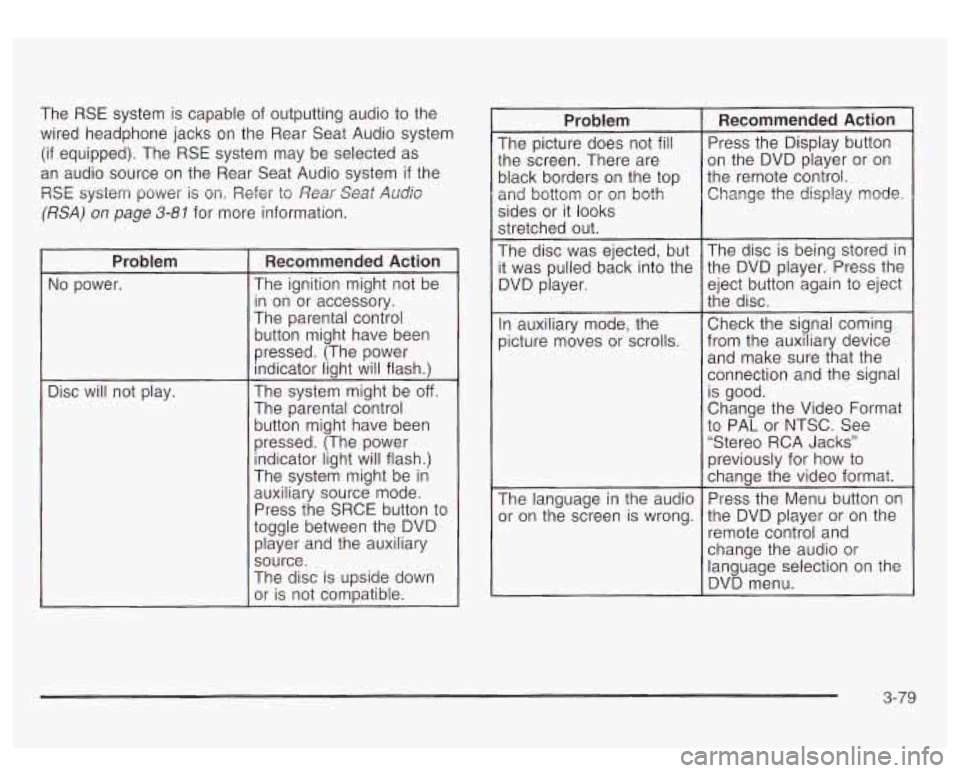
Problem
No power.
Disc will not play.
Recommended Action
The ignition might not be
in on or accessory.
The parental control
button might have been
pressed. (The power
indicator light will flash.)
The system might be
off.
The parental control button might have been
pressed. (The power indicator light will flash.)
The system might be
in
auxiliary source mode.
Press the SRCE button to
toggle between the DVD player and the auxiliary
source.
The disc is upside down
or is not compatible.
Problem
The picture does not fill
:he screen. There are
)lack borders on the top
2nd bottom or
or^ both
sides or it looks
stretched out.
The disc was ejected, but
t was pulled back into the
3VD player.
In auxiliary mode, the
Dicture moves
or scrolls.
The language in the audio
)r on the screen is wrong.
Recommended Action
Press the Display button
on the DVD player or on
the remote control. Change the display mode.
The disc is being stored in
the DVD player. Press the
eject button again
to eject
the disc.
Check the signal coming
from the auxiliary device and make sure that the
connection and the signal
is good.
Change the Video Format
to PAL or NTSC. See
“Stereo RCA Jacks”
previously for how to
change the video format.
Press the Menu button on
the DVD player or on the
remote control and
change the audio or
language selection on the
DVD menu.
3-79
Page 223 of 447
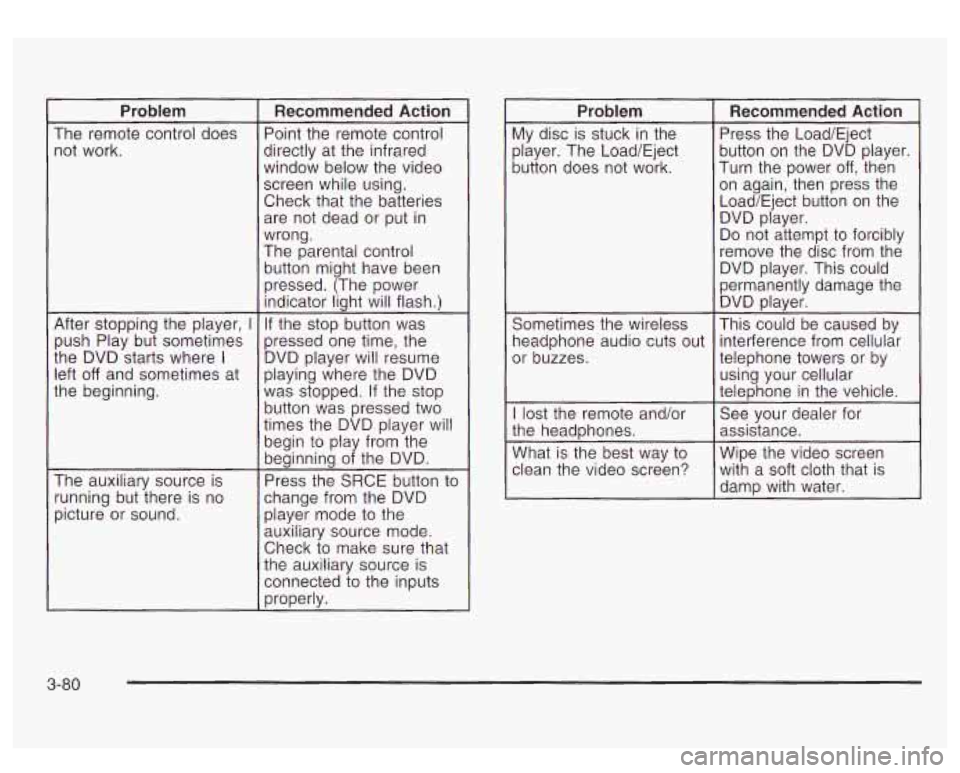
Problem
The remote control does not work.
After stopping the player,
I
push Play but sometimes
the DVD starts where
I
left off and sometimes at
the beginning.
The auxiliary source is
running but there is no
picture or sound.
Recommended Action
Point the remote control
directly at the infrared
window below the video
screen while using.
Check that the batteries are not dead or put in
wrong.
The parental control
button might have been
pressed. (The power indicator light will flash.)
If the stop button was
pressed one time, the
DVD player will resume
playing where the DVD
was stopped. If the stop
button was pressed two
times the DVD player will
begin to play from the
beginning of the DVD.
Press the SRCE button to
change from the DVD player mode
to the
auxiliary source mode.
Check to make sure that
the auxiliary source is
connected to the inputs
properly.
Problem
My disc is stuck in the
player. The Load/Eject
button does not work.
Sometimes the wireless
headphone audio cuts out
or buzzes.
I lost the remote and/or
the headphones.
What is the best way
to
clean the video screen?
Recommended Action
Press the Load/Eject
button on the DVD player.
Turn the power
off, then
on again, then press the
Load/Eject button on the DVD player.
Do not attempt
to forcibly
remove the disc from the
DVD player. This could
permanently damage the DVD player.
This could be caused by
interference from cellular
telephone towers or by
using your cellular
telephone in the vehicle.
See your dealer for
assistance.
Wipe the video screen with a soft cloth that
is
damp with water.
3-80
Page 279 of 447
Automatic Level Control
The automatic level control rear suspension comes as a
part of the AutorideTMsuspension. See AutorideTM on
page
4-46.
This type of level control is fully automatic and will
provide a better leveled riding position as well as better
handling under a variety of passenger and loading
conditions. An air compressor connected
to the rear
shocks will raise or lower the rear of the vehicle
to maintain proper vehicle height. The system is
activated when the ignition key
is turned to RUN and
will automatically adjust vehicle height thereafter.
The system may exhaust (lower vehicle height) for up
to
10 minutes after the ignition key has been turned to
OFF. You may hear the air compressor operating when
the height is being adjusted.
If a weight-distributing hitch is being used, it is
recommended
to allow the shocks to inflate, thereby
leveling the vehicle prior to adjusting the height.
AutorideTM
The AutorideTM feature provides superior vehicle ride
and handling under a variety
of passenger and loading
conditions.
The system is fully automatic and
uses a computer
controller
to continuously monitor vehicle speed, wheel
to body position, IifVdive and steering position of the
vehicle. The controller then sends signals to each shock
absorber
to independently adjust the damping level to
provide the optimum vehicle ride.
AutorideTM also interacts with the towlhaul mode that,
when activated, will provide additional control of
the shock absorbers. This additional control results in
better ride and handling characteristics when the vehicle
is loaded or towing a trailer. See "Tow/Haul Mode"
under Towing a Trailer on page
4-47 for more
information.
4-46
Page 281 of 447
To identify the trailering capacity for your vehicle, you
should read the information in “Weight of the Trailer” that
appears later in this section.
If yours was built with trailering options, as many are,
it’s ready for heavier trailers. But trailering is different
than just driving your vehicle by itself. Trailering means
changes in handling, durability and fuel economy.
Successful, safe trailering takes correct equipment, and
it has
to be used properly.
That’s the reason for this part. In it are many time-tested,
important trailering tips and safety rules. Many of
these are important for your safety and that of your
passengers.
So please read this section carefully before
you pull a trailer.
0
0
If You Do Decide To Pull A Trailer
If you do, here are some important points:
There are many different laws, including speed limit
restrictions, having
to do with trailering. Make sure
your rig will be legal, not only where you live
but also where you’ll be driving.
A good source for
this information can be state or provincial police. Consider using a
sway control
if your trailer will
weigh
5,000 Ibs. (2 270 kg) or less. You should
always use a sway control
if your trailer will weigh
more than
5,000 Ibs. (2 270 kg). You can ask a
hitch dealer about sway controls.
Don’t tow a trailer at all during the first
500 miles
(800 km) your new vehicle is driven. Your engine,
axle or other parts could be damaged.
Then, during the first
500 miles (800 km) that you
tow a trailer, don’t drive over
50 mph (80 km/h)
and don’t make starts at full throttle. This helps your
engine and other parts of your vehicle wear in at
the heavier loads.
You can tow in
DRIVE (D). You may want to shift
the transmission
to THIRD (3) or, if necessary, a
lower gear selection
if the transmission shifts
too often (e.g., under heavy loads and/or hilly
conditions). See “Tow/Haul Mode” under Towing
a
Trailer on page 4-47.
Three important considerations have to do with weight:
0 the weight of the trailer,
the weight of the trailer tongue
0 and the weight on your vehicle’s tires.
4-48
Page 282 of 447
Tow/Haul Mode
The tow/haul feature assists when pulling a heavy trailer
or a large or heavy load. The purpose
of the tow/haul
mode
is to:
Reduce the frequency and improve the predictability
of transmission shifts when pulling a heavy trailer or
a large or heavy load.
Provide the same solid shift feel when pulling a
heavy trailer or a large or heavy load as when
the vehicle is unloaded.
Improve control of vehicle speed while requiring
less throttle pedal activity when pulling a heavy
trailer or a large or heavy load.
Your vehicle is provided with a button at the end of the
shift lever which when pressed enables tow/haul.
When the button is pressed, a light on the instrument
panel will illuminate
to indicate that tow/haul has
been selected. Tow/haul may be turned
off by pressing
the button again, at which time the indicator light on
the instrument panel will turn off. The vehicle will
automatically turn off tow/haul every time it is started. Tow/haul
is designed
to be most effective when the
vehicle and trailer combined weight is at least
75 percent
of the vehicle’s Gross Combination Weight Rating
(GCWR). See Weight
of the Trailer later in this section.
Tovdhaul is mcst useful wder the f~l!~~ing driving
conditions:
When pulling a heavy trailer or a large or heavy
0 When pulling a heavy trailer or a large or heavy
load through rolling terrain.
load
in stop and go traffic.
When pulling a heavy trailer or a large or heavy
load in busy parking
lots where improved low
speed control of the vehicle is desired.
Operating the vehicle in tow/haul when lightly loaded or
with no trailer at all will not cause damage. However,
there is no benefit
to the selection of tow/haul when the
vehicle is unloaded. Such a selection when unloaded may result in unpleasant engine and transmission driving
characteristics and reduced fuel economy. Tow/haul
is recommended only when pulling a heavy trailer or a
large or heavy load.
4-49
Page 434 of 447
........... 3-30
....... 4-13
New
Vehicle Break-In
...................................... 2-18
Normal Maintenance Replacement Parts
............ 5-98
0
Odometer ................................
Oil Off-Road Recovery
............
Engine .............. .............. 5-13
Pressure Gage
.......... .................. 3-40
OIL LIFE RESET ............................................ 3-53
OIL PRESSURE LOW
..................................... 3-53
Older Children. Restraints
................................ 1-48
Online Owner Center
........................................ 7-3
Onstar@ Personal Calling
................................. 2-37
Onstar@ Services
............................................ 2-36
Onstar@ Steering Wheel Controls
...................... 2-37
Onstar@ System
............................................. 2-36
Onstar@ Virtual Advisor
.................................... 2-37
Operating Your All-Wheel-Drive Vehicle
Off
Paved Roads .............................................. 4-1 6
Other Warning Devices
...................................... 3-6
Outlet Adjustment
............................................ 3-25
Outside Automatic Dimming Mirror with Curb
View Assist
............................................. 2-35
Convex Mirror
............................................. 2-34
Heated Mirrors
............................................ 2-35 Outside
(cont.)
Power Mirrors
............................................. 2-34
Overheated Engine Protection Operating Mode
..... 5-25
Owners. Canadian
............................................... ii
Owner’s Information
........................................ 7-11
P
Park (P)
Parking Shifting Out
of
............................................ 2-28
Brake
........................................................ 2-25
Over Things That Burn
................................. 2-29
Parking Brake and Automatic Transmission Park
(P) Mechanism Check
.................................. 6-13
Parking on Hills .............................................. 4-55
Park( P)
Shifting Into
................................................ 2-26
Part
A - Scheduled Maintenance Services ............ 6-4
Part B
- Owner Checks and Services ................ 6-10
Part C
- Periodic Maintenance Inspections .......... 6-14
Part
D - Recommended Fluids and Lubricants .... 6-15
Part E
- Maintenance Record ........................... 6-17
Passenger Air Bag Indicator
............................. 2-33
Passenger Sensing System
.......................... 1-81
PASSENGER
DOOR AJAR ........ ............ 3-56
Passing
............................................. 4-13, 4-53
Passlock@
...................................................... 2-17
Personalization Button
..................................... 3-47
Passenger
Air Bag Status Indicator
................... 3-32
10