ECU GMC YUKON DENALI 2003 Owner's Guide
[x] Cancel search | Manufacturer: GMC, Model Year: 2003, Model line: YUKON DENALI, Model: GMC YUKON DENALI 2003Pages: 447, PDF Size: 21.97 MB
Page 133 of 447
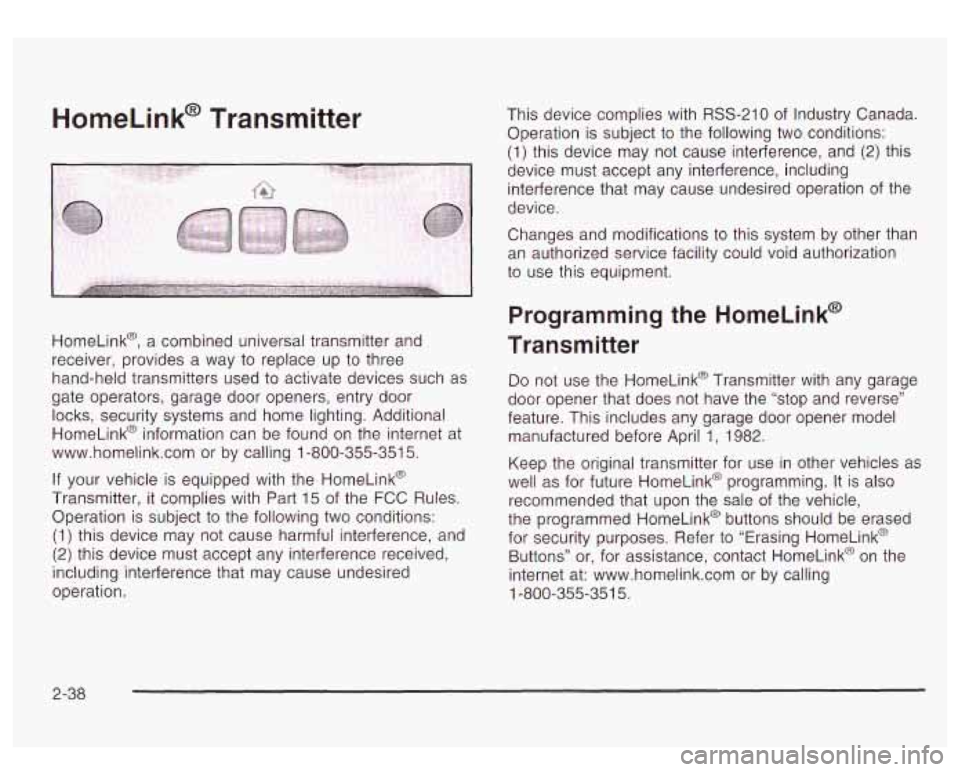
HomeLink@ Transmitter
HomeLink@, a combined universal transmitter and
receiver, provides a way to replace up to three
hand-held transmitters used to activate devices such as
gate operators, garage door openers, entry door locks, security systems and home lighting. Additional
HomeLink@ information can be found
on the internet at
www.homelink.com or by calling
1-800-355-351 5.
If your vehicle is equipped with the HomeLink@
Transmitter, it complies with Part
15 of the FCC Rules.
Operation is subject to the following two conditions:
(1) this device may not cause harmful interference, and
(2) this device must accept any interference received,
including interference that may cause undesired
operation. This device complies
with
RSS-210 of Industry Canada.
Operation is subject to the following two conditions:
(1) this device may not cause interference, and (2) this
device must accept any interference, including
interference that may cause undesired operation of the
device.
Changes and modifications to this system by other than
an authorized service facility could void authorization
to use this equipment.
Programming the HomeLink@
Transmitter
Do not use the HomeLink@ Transmitter with any garage
door opener that does not have the “stop and reverse”
feature. This includes any garage door opener model
manufactured before April
1, 1982.
Keep the original transmitter for use in other vehicles as
well as for future HomeLink@ programming. It is also
recommended that upon the sale of the vehicle,
the programmed HomeLink@ buttons should be erased
for security purposes. Refer to “Erasing HomeLink@
Buttons” or, for assistance, contact HomeLink@ on the
internet at: www.homelink.com or by calling
1-800-355-351 5.
2-38
Page 137 of 447
Storage Areas
Glove Box
To open your glove box, lift up the latch and pull the
door open.
Cupholder(s)
Your vehicle is equipped with cupholders for the front
and rear passengers.
The cupholders are located in the center console for the
front passengers and on the rear of the center console
for the rear passengers.
To use the front cupholders, press down on the access
door and release. The door will then open. Push the
door back down
to close it.
To use the rear cupholders, pull down on the door
located on the back
of the console.
Center Console Storage Area
Your vehicle has a console compartment between the
bucket seats.
To open it, press the button on the side of the console
and swing the console lid open.
The console may be equipped with an accessory power
outlet inside. See
Accessory Power Outlets on
page 3- 17.
The rear of the console also has a cupholder that
swings down for the rear seat passengers
to use.
Luggage Carrier
You can load things on top of your vehicle with this
feature.
The luggage carrier has slats and siderails attached to
the roof and crossrails which can be moved back
and forth
to help secure cargo. Tie the load to the
siderails or siderail supports.
Notice: Loading cargo that weighs more than 200
Ibs. (91 kg) on the luggage carrier may damage your
vehicle. When you carry large things, never let
them hang over the rear or the sides
of your vehicle.
Load your cargo
so that it rests on the slats and
does not scratch or damage the vehicle. Put
the cargo against the side rails and fasten it
securely to the luggage carrier. Put the main weight
as far forward as
you can.
2-42
Page 138 of 447
Don’t exceed the maximum vehicle capacity when
loading your vehicle. For more information on vehicle
capacity and loading, see Loading
Your Vehicle on
page
4-44.
To prevent damage or loss of cargo as you’re leaving,
check now and then to make sure the luggage and
cargo are still securely fastened.
Be sure the cargo
is properly loaded.
If small heavy objects are placed on the roof, place
the load in the area over the rear wheels (behind
the rear side door on Yukon
XL Denali models).
If you need to, cut a piece
of 3/8 inch plywood to fit
inside the crossrails and siderails to spread the
load.
If plywood is used, tie it to the siderail
supports.
0 Tie the load to the crossrails or the siderail supports.
Use the crossrails only to keep the load from
sliding. To move the crossrails, pull out on the latch
release handle at each end. Slide the crossrail to
the desired position balancing the force side to side.
Push the release handle back into the latched
position and slide the crossrail back and forth
slightly to be sure the latch snaps securely
into place.
If you need to carry long items, move the crossrails
as far apart as they will go. Tie the load to the
crossrails and the siderails or siderail supports. Also
tie the load
to the bumpers. Do not tie the load
so tightly that the crossrails or sideraiis are
damaged.
front crossrail approximately 18 to
24 inches
(46 to 58 cm) rearward
of the front supports.
For the purpose of wind noise reduction, locate the
0 After moving a crossrail, be sure it is securely
locked into the siderail.
Your vehicle has a Center High-Mounted Stoplamp
(CHMSL) located above the rear glass.
If items are loaded on the roof of the vehicle, care
should be taken not to block or damage the CHMSL unit.
2-43
Page 140 of 447
Car?? Cover
An improperly storc cargo cover COL., be
thrown about the vehicle during a collision or
sudden maneuver. You or others could be
injured.
If you remove the cover, always store
it in the proper storage location. When you put
it back, always be sure that is securely
reattached.
If you have a cargo cover, you can use it to cover items
in the cargo area of your vehicle.
To use the cover, do the following:
1. Pull the cover handle toward the rear of the vehicle.
2. Latch the cover posts into the retaining sockets
on the cargo area trim panels.
To return the cover to the retracted position, do the
following:
1. Pull up on the cover handle to release the cover
2. Let the cover move forward to the full retracted
posts
from the retaining sockets.
position. To remove the cover from the vehicle, do
the following:
1. Let the cover go all the way into the holder.
2. Then, grasping the passenger’s side cover endcap,
push the cover endcap toward the driver’s side of
the vehicle. The endcap should lock in the
compressed position.
cover rearward and take it out
of the vehicle.
3. Lift the cover up on the passenger’s side, swing the
To put the cover in the vehicle, do the following:
1. Make sure the cover slot in the holder faces
rearward with the round surface facing down.
2. Then, hold the cover at an angle and place the
cover holder tab into the
slot in the driver’s side
trim panel.
3. Move the other end of the cover forward and hold it
next
to the passenger’s side trim panel slot.
4. Push the button on top of the passenger’s side
endcap. This will allow the cover to extend into
the trim
slot.
5. Lightly pull on the cover holder to make sure it is
secure. On some models there are two
slots. The
slots furthest forward allow the cover to be used
if the third seat is removed or folded down.
2-45
Page 144 of 447
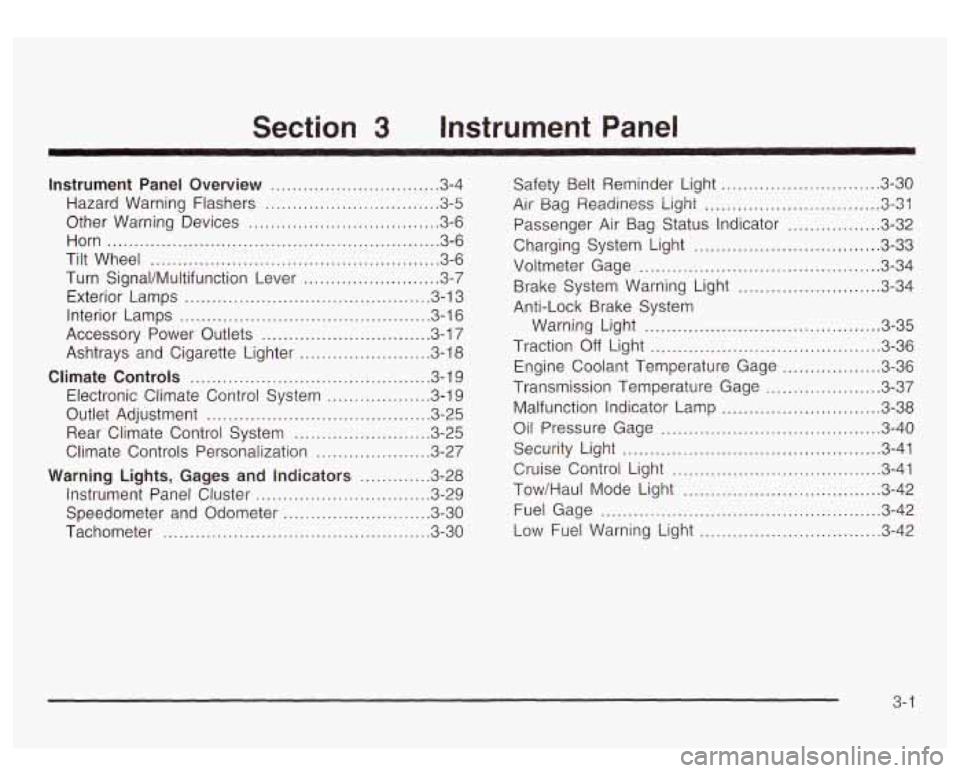
Section 3 Instrument Panel
Instrument Panel Overview ............................... 3.4
Hazard Warning Flashers
................................ 3.5
Other Warning Devices ................................... 3.6
Horn
............................................................. 3.6
Tilt Wheel
..................................................... 3-6
Turn SignaVMultifunction Lever
......................... 3.7
Exterior Lamps
............................................. 3.13
Interior Lamps
.............................................. 3.16
Accessory Power Outlets
............................... 3.17
Ashtrays and Cigarette Lighter
........................ 3.18
Climate Controls ............................................ 3. 1 9
Electronic Climate Control System
................... 3.19
Outlet Adjustment
......................................... 3.25
Rear Climate Control System
......................... 3.25
Climate Controls Personalization
..................... 3.27
Warning Lights, Gages and Indicators ............. 3.28
Instrument Panel Cluster
................................ 3.29
Speedometer and Odometer
........................... 3.30
Tachometer
................................ ......... 3.30
~
Safety Belt Reminder Light ............................. 3.30
Air Bag Readiness Light
................................ 3.31
Passenger Air Bag Status Indicator ................ -3-32
Charging System Light
.................................. 3-33
Voltmeter Gage
............................................ 3-34
Brake System Warning Light
...................... 3-34
Anti-Lock Brake System Warning Light
........................................... 3-35
Traction
Off Light .......................................... 3-36
Transmission Temperature Gage
..................... 3-37
Malfunction Indicator Lamp
............................. 3-38
Oil Pressure Gage ........................................ 3-40
Security Light
............................................... 3-41
Tow/Haul Mode Light .................................... 3-42
Fuel Gage
................................................... 3-42
Low Fuel Warning Light
............................. 3-42
Engine Coolant Temperature Gage
.................. 3-36
Cruise Control
Light ...................................... 3-41
3- 1
Page 161 of 447
Notice: Adding some electrical equipment to your
vehicle can damage it or keep other things from
working as they should. This wouldn’t be covered by
your warranty. Check with your dealer before
adding electrical equipment, and never use anything
that exceeds the amperage rating.
Certain power accessory plugs may not be compatible
to the accessory power outlets and could result in
blown vehicle or adapter fuses.
If you experience a
problem, see your dealer for additional information on
the accessory power plugs.
Notice: Power outlets are designed for accessory
plugs only. Do not hang any type of accessory
or accessory bracket from the plug. Improper use of
the power outlet can cause damage not covered
by your warranty.
Ashtrays and Cigarette Lighter
The front ashtray and lighter are located in the center
console near the cupholders. Press
on the access door
to open it and use the ashtray and lighter.
Notice: Don’t put papers or other flammable
items into your ashtrays. Hot cigarettes or other
smoking materials could ignite them, causing
a damaging fire.
To remove the ashtray, pull
it from the center console.
Slide it back in and push down
to be sure it is secure.
To use the cigarette lighter, push
it in all the way, and let
go. When it’s ready,
it will pop back out by itself.
Notice: Don’t hold a cigarette lighter in with your
hand while
it is heating. If you do, it won’t be able to
back away from the heating element when it’s
ready. That can make it overheat, damaging the
lighter and the heating element.
3-1 8
Page 184 of 447
A reading in the low pressure zone may be caused by a
dangerously low oil level or some other problem
causing
low oil pressure. Check your oil as soon as
possible. See
Engine Oil on page 5-13.
DL.. t kc-> dl - - jng if -..3 oil pressure is IOL- If
you do, your engine can become
so hot that it
catches fire. You or others could be burned.
Check your oil as soon as possible and have
your vehicle serviced.
Notice: Damage to your engine from neglected oil
problems can be costly and is not covered by
your warranty.
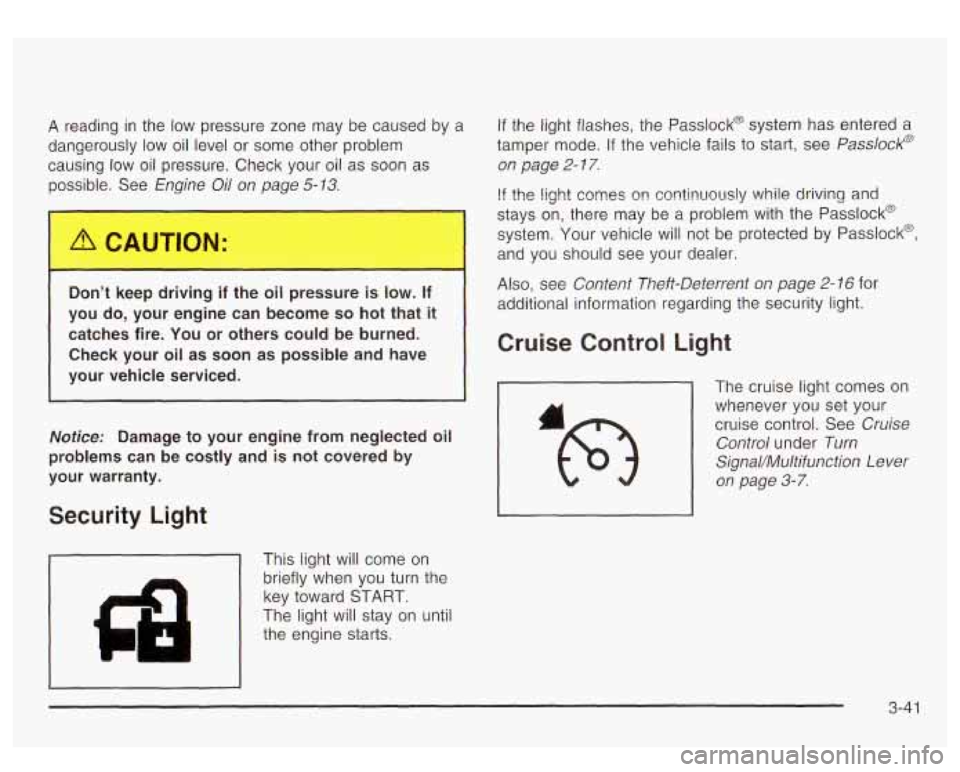
Security Light
1 This light will come on
I'
brieflywhen you turn the
key toward START.
The light will stay on until
the engine starts.
If the light flashes, the Passlock@ system has entered a
tamper mode. If the vehicle fails
to start, see Passlock@
on page
2- 17.
If the iight comes on continuously while driving and
stays on, there may be a problem with the Passlock@
system. Your vehicle will not be protected by Passlock@,
and you should see your dealer.
Also, see Content Theft-Deterrent on page 2- 16 for
additional information regarding the security light.
Cruise Control Light
The cruise light comes on
whenever you
set your
cruise control. See Cruise
Control under Turn
SignaVMultifunction Lever
on page 3-7.
3-4 1
Page 210 of 447
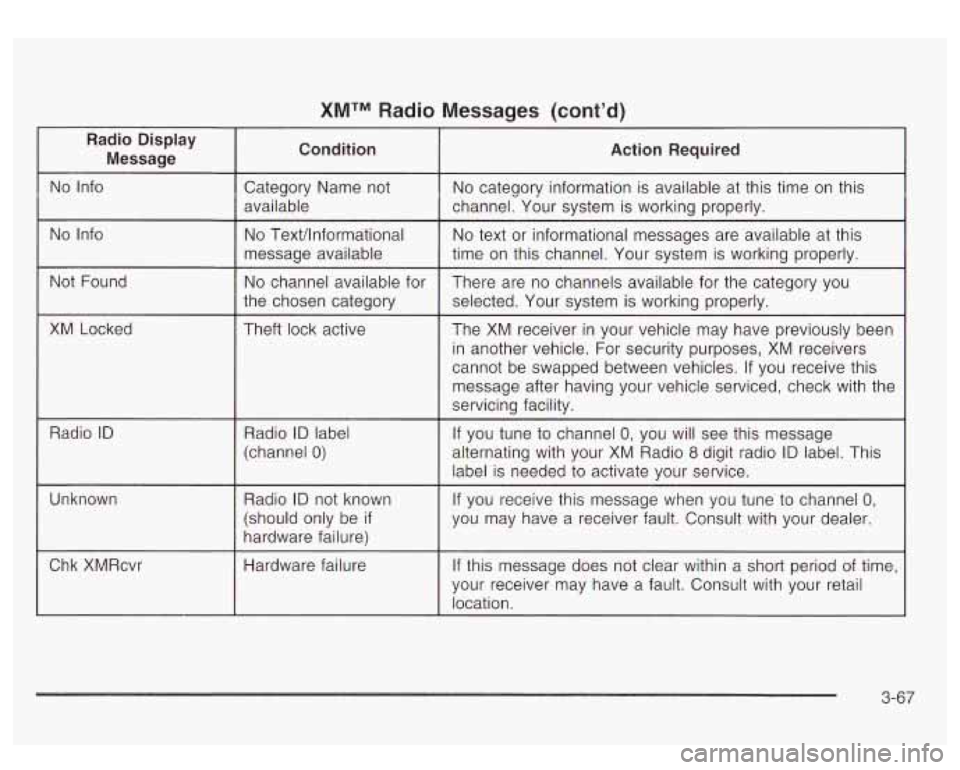
XMTM Radio Messages (cont’d)
Radio Display Message Condition Action Required
No
Info Category Name not No category information is available at this time on this
available channel. Your system is working properly.
No Info No TexVlnformational
message available
the chosen category
Not
Found
No channel available for
XM Locked Theft lock active
Radio
ID Radio ID label
~~
(channel 0)
No text or informational messages are available at this
time on this channel. Your system
is working properly.
There are no channels available for the category you
selected. Your system is working properly.
The XM receiver in your vehicle may have previously been
in another vehicle. For security purposes, XM receivers
cannot be swapped between vehicles.
If you receive this
message after having your vehicle serviced, check with the
servicing facility.
If you tune to channel
0, you will see this message
alternating with your XM Radio
8 digit radio ID label. This
label is needed to activate your service.
Unknown
If you receive this message when you tune to channel 0,
you may have a receiver fault. Consult with your dealer.
3-67
Page 220 of 447
Battery Replacement
To change the batteries, do the following:
1.
2.
3.
Remove the battery compartment door located on
the bottom of
the remote control.
Replace the two AA batteries in the compartment.
Make sure that they are installed correctly.
Close the battery door securely.
Notice: Do not store the remote control in heat or
direct sunlight. This could damage the remote
control and it would not be covered by your vehicles
warranty. Keep the remote control stored in a
cool, dry place.
If the remote control is to be stored for a long period of
time, remove the batteries and keep them in a cool,
dry place.
Headphones
The RSE system includes two sets of wireless infrared
headphones.
Each set
of headphones has an OWOFF control. An
indicator light will illuminate
on the headphones
when they are on. If the light does
not illuminate, the
batteries may need
to be replaced. See “Battery
Replacement” later in this section for more information.
To turn the headphones OFF activate the ON/OFF
control. Each
set of headphones has a volume knob. To adjust
the volume, adjust this knob.
The headphones will automatically turn
off if they lose
the infrared signal from the system after approximately
four minutes in order
to preserve their battery power.
The signal may be
lost if the system is turned off or if the
headphones are out
of range of the infrared signal
transmitters that are located below the video display screen.
Battery Replacement
To change the batteries, do the following:
1. Loosen the screw on the battery compartment door
located on the left side of the headphone earpiece.
2. Replace the two AAA batteries in the compartment.
3. Tighten the screws to close the compartment door.
Make sure that they are installed correctly.
Notice: Do not store the
headphones in heat or
direct sunlight. This could damage the headphones
and would not be covered by your warranty.
Keep the headphones stored in a cool place.
If the headphones are to be stored for a long period of
time, remove the batteries and keep them in a cool,
dry place.
3-77
Page 249 of 447
Operating Your All-Wheel-Drive
Vehicle
Off Paved Roads
Many of the same design features that help make your
vehicle responsive on paved roads during poor weather
conditions
- features like all-wheel drive - help make it
much better suited for off-road use than a conventional
passenger car.
Its higher ground clearance also helps
your vehicle step over some off-road obstacles. But your
vehicle doesn’t have features like special underbody
shielding and
a transfer case low gear range, things that
are usually thought necessary for extended or severe
off-road service. This guide is for operating your vehicle
off paved roads.
Also, see
Braking on page 4-6.
Off-road driving can be great fun. But it does have
some definite hazards. The greatest of these is
the terrain itself.
“Off-roading” means you’ve left the great North American
road system behind. Traffic lanes aren’t marked.
Curves aren’t banked. There are no road signs.
Surfaces can be slippery, rough, uphill or downhill.
In short, you’ve gone right back
to nature.
Off-road driving involves some new skills. And that’s
why it’s very important that you read this guide.
You’ll find many driving tips and suggestions.
These will help make your off-road driving safer
and more enjoyable.
Before You Go Off-Roading
There are some things to do before you go out. For
example, be sure
to have all necessary maintenance
and service work done. Check
to make sure all
underbody shields (if
so equipped) are properly
attached.
Is there enough fuel? Is the spare tire fully
inflated? Are the fluid levels up where they should be?
What are the local laws that apply
to off-roading
where you’ll be driving? If you don’t know, you should
check with law enforcement people in the area. Will you
be on someone’s private land? If
so, be sure to get
the necessary permission.
Loading Your Vehicle for Off-Road Driving
There are some important things to remember about
how
to load your vehicle.
The heaviest things should be on the load floor and
forward
of your rear axle. Put heavier items as far
forward as you can.
Be sure the load is secured properly, so driving on
the off-road terrain doesn’t
toss things around.
4-1 6