key GMC YUKON DENALI 2009 Owner's Manual
[x] Cancel search | Manufacturer: GMC, Model Year: 2009, Model line: YUKON DENALI, Model: GMC YUKON DENALI 2009Pages: 100, PDF Size: 1.41 MB
Page 41 of 100
Getting Started on Your Route
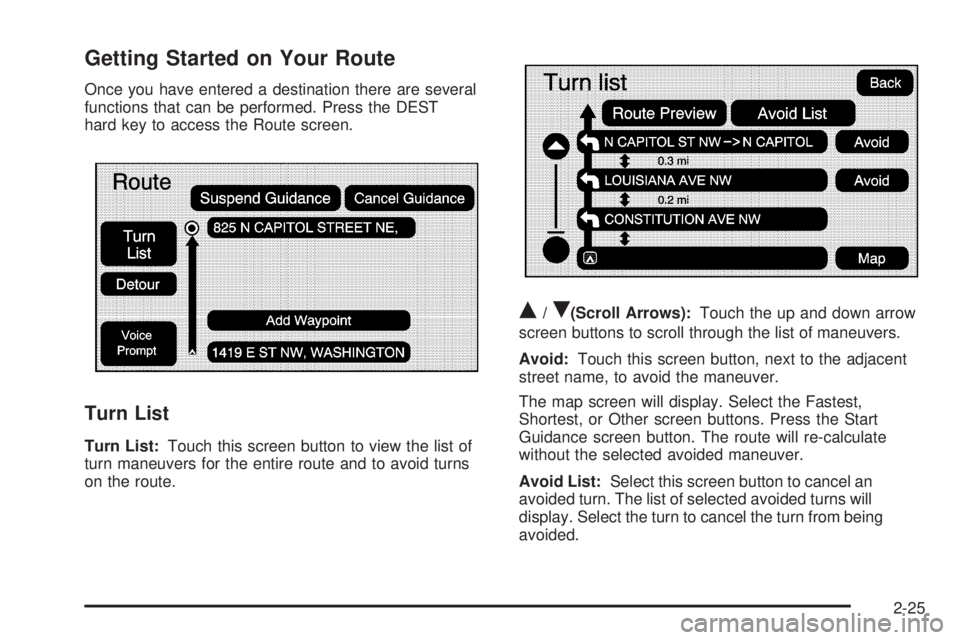
Once you have entered a destination there are several
functions that can be performed. Press the DEST
hard key to access the Route screen.
Turn List
Turn List:Touch this screen button to view the list of
turn maneuvers for the entire route and to avoid turns
on the route.
Q/R(Scroll Arrows):Touch the up and down arrow
screen buttons to scroll through the list of maneuvers.
Avoid:Touch this screen button, next to the adjacent
street name, to avoid the maneuver.
The map screen will display. Select the Fastest,
Shortest, or Other screen buttons. Press the Start
Guidance screen button. The route will re-calculate
without the selected avoided maneuver.
Avoid List:Select this screen button to cancel an
avoided turn. The list of selected avoided turns will
display. Select the turn to cancel the turn from being
avoided.
2-25
Page 43 of 100
Add Waypoint
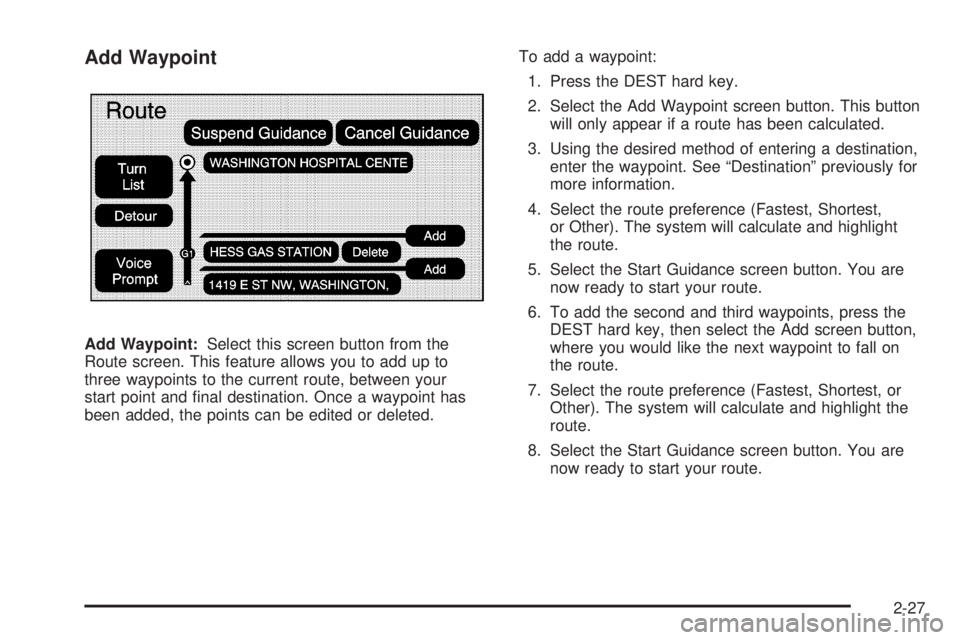
Add Waypoint:Select this screen button from the
Route screen. This feature allows you to add up to
three waypoints to the current route, between your
start point and nal destination. Once a waypoint has
been added, the points can be edited or deleted.To add a waypoint:
1. Press the DEST hard key.
2. Select the Add Waypoint screen button. This button
will only appear if a route has been calculated.
3. Using the desired method of entering a destination,
enter the waypoint. See “Destination” previously for
more information.
4. Select the route preference (Fastest, Shortest,
or Other). The system will calculate and highlight
the route.
5. Select the Start Guidance screen button. You are
now ready to start your route.
6. To add the second and third waypoints, press the
DEST hard key, then select the Add screen button,
where you would like the next waypoint to fall on
the route.
7. Select the route preference (Fastest, Shortest, or
Other). The system will calculate and highlight the
route.
8. Select the Start Guidance screen button. You are
now ready to start your route.
2-27
Page 44 of 100
To delete a waypoint from your current route:
1. Press the DEST hard key.
2. Select the Delete screen button for the desired
waypoint to delete.
3. The system will display a pop-up conrmation
message. Choose Yes to delete the waypoint;
touch No to cancel this operation.
4. Select the route preference (Fastest, Shortest, or
Other). The system will calculate and highlight the
route.
5. Select the Start Guidance screen button. You are
now ready to start your route.
Suspend Guidance
Press this screen button, from the Route screen, to put
the current route on hold.
Resume Guidance
Press this screen button, from the Route screen,
to resume guidance on the current route.
Cancel Guidance
Press this screen button, from the Route screen,
to cancel the current route.
Adding Destinations to the
Address Book
There are two ways to add a destination to the
address book:
To add the current nal destination to the address
book, press the Mark screen button from the map
screen. The system will automatically save the nal
destination information in the address book.
Press the Add to Address Book screen button
when available on POI information screens,
Destination Entry screens, or POI screens.
The system will automatically save this information
in the address book.
See “Nav” underConfigure Menu on page 2-30for
information on editing address book entries.
2-28
Page 45 of 100
Adding or Changing Preset
Destinations
This feature allows you to add or change one of
ve preset destinations. When a destination has been
added as a preset destination, it will be available to
select from the Destination Entry screen. See “Preset
Destination” previously for information on how to select
a preset destination as a nal destination.
To store the current nal destination as a preset
destination:
1. Select the Mark screen button from the map screen
to add the current nal destination. The Address
Book screen will appear.
2. Select the Name screen button. An alpha-keyboard
will display. Enter the name.
3. Press and hold one of the buttons at the bottom of
the screen until a pop-up conrmation displays.
The name will appear in that preset destination
screen button and is now available to select from
the Destination Entry screen.To store an address book entry as a preset destination:
1. Select the MENU hard key.
2. Select the Nav screen button or press the
MENU key until the Nav screen button is selected
or touch the Nav screen button.
3. Select the Edit/View screen button.
4. Select the address book entry that you would like to
store as the preset destination. Select the Name
screen button to add a name, if needed.
5. Press and hold one of the buttons at the bottom of
the screen until a pop-up conrmation displays.
The name will appear in the that preset destination
screen button and is now available to select
from the Destination Entry screen.
2-29
Page 46 of 100
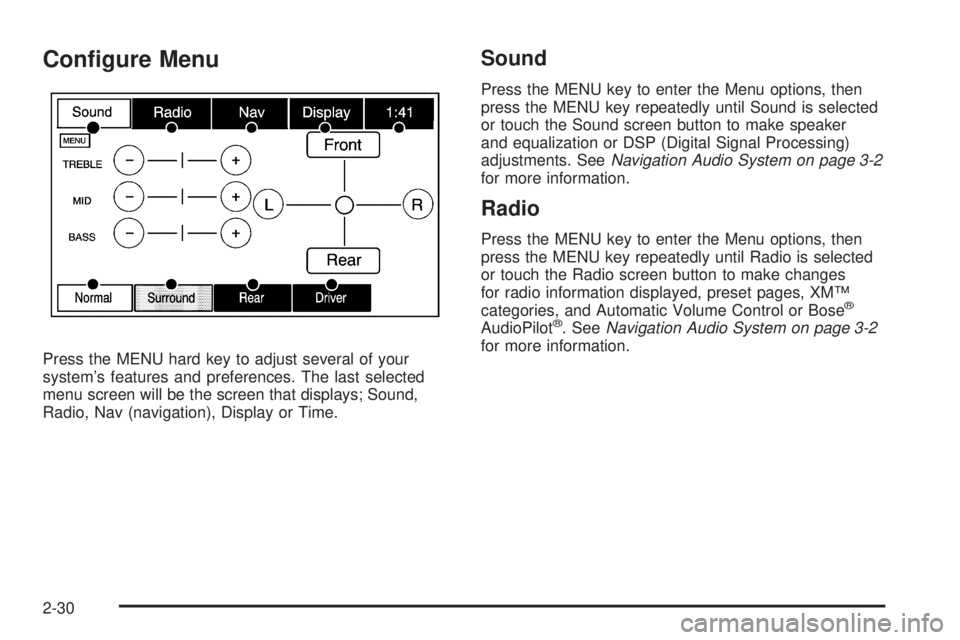
Congure Menu
Press the MENU hard key to adjust several of your
system’s features and preferences. The last selected
menu screen will be the screen that displays; Sound,
Radio, Nav (navigation), Display or Time.
Sound
Press the MENU key to enter the Menu options, then
press the MENU key repeatedly until Sound is selected
or touch the Sound screen button to make speaker
and equalization or DSP (Digital Signal Processing)
adjustments. SeeNavigation Audio System on page 3-2
for more information.
Radio
Press the MENU key to enter the Menu options, then
press the MENU key repeatedly until Radio is selected
or touch the Radio screen button to make changes
for radio information displayed, preset pages, XM™
categories, and Automatic Volume Control or Bose
®
AudioPilot®. SeeNavigation Audio System on page 3-2
for more information.
2-30
Page 47 of 100
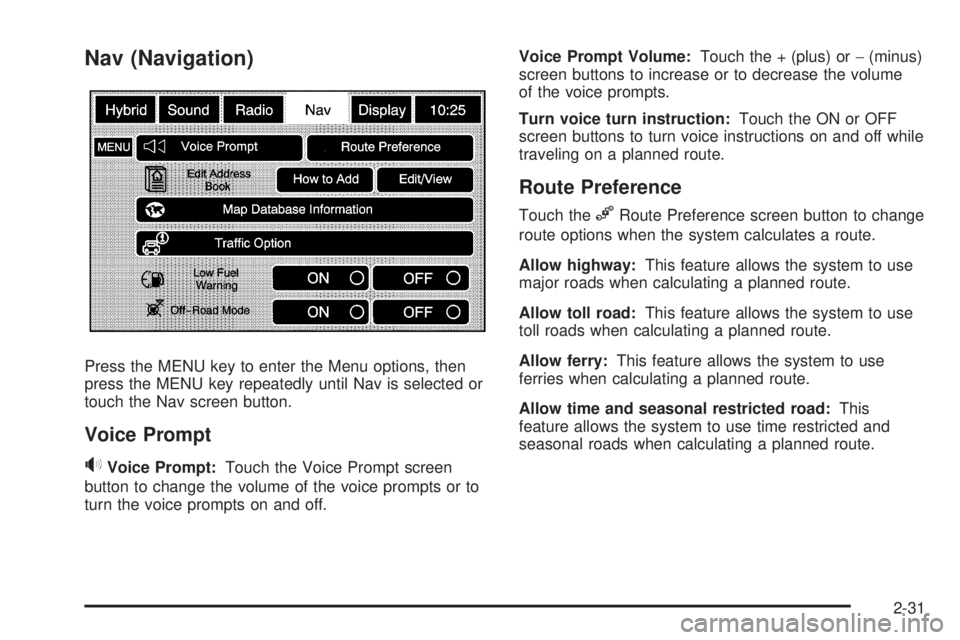
Nav (Navigation)
Press the MENU key to enter the Menu options, then
press the MENU key repeatedly until Nav is selected or
touch the Nav screen button.
Voice Prompt
>Voice Prompt:Touch the Voice Prompt screen
button to change the volume of the voice prompts or to
turn the voice prompts on and off.Voice Prompt Volume:Touch the + (plus) or−(minus)
screen buttons to increase or to decrease the volume
of the voice prompts.
Turn voice turn instruction:Touch the ON or OFF
screen buttons to turn voice instructions on and off while
traveling on a planned route.
Route Preference
Touch the%Route Preference screen button to change
route options when the system calculates a route.
Allow highway:This feature allows the system to use
major roads when calculating a planned route.
Allow toll road:This feature allows the system to use
toll roads when calculating a planned route.
Allow ferry:This feature allows the system to use
ferries when calculating a planned route.
Allow time and seasonal restricted road:This
feature allows the system to use time restricted and
seasonal roads when calculating a planned route.
2-31
Page 48 of 100
Edit Address Book — How to Add
To add an address to the address book, see “Adding
Destinations to the Address Book” underDestination
on page 2-15.
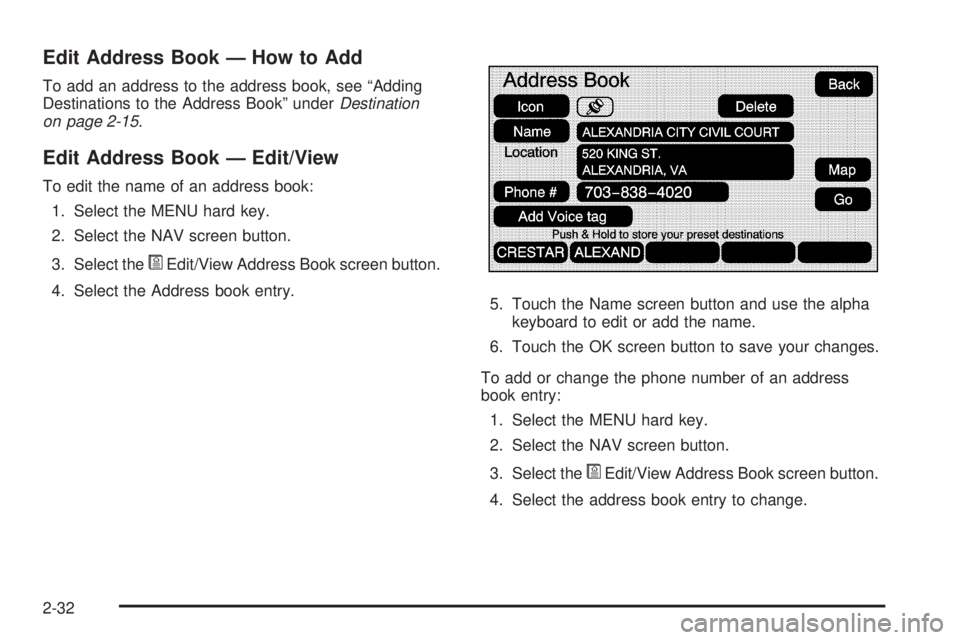
Edit Address Book — Edit/View
To edit the name of an address book:
1. Select the MENU hard key.
2. Select the NAV screen button.
3. Select the
*Edit/View Address Book screen button.
4. Select the Address book entry.
5. Touch the Name screen button and use the alpha
keyboard to edit or add the name.
6. Touch the OK screen button to save your changes.
To add or change the phone number of an address
book entry:
1. Select the MENU hard key.
2. Select the NAV screen button.
3. Select the
*Edit/View Address Book screen button.
4. Select the address book entry to change.
2-32
Page 49 of 100
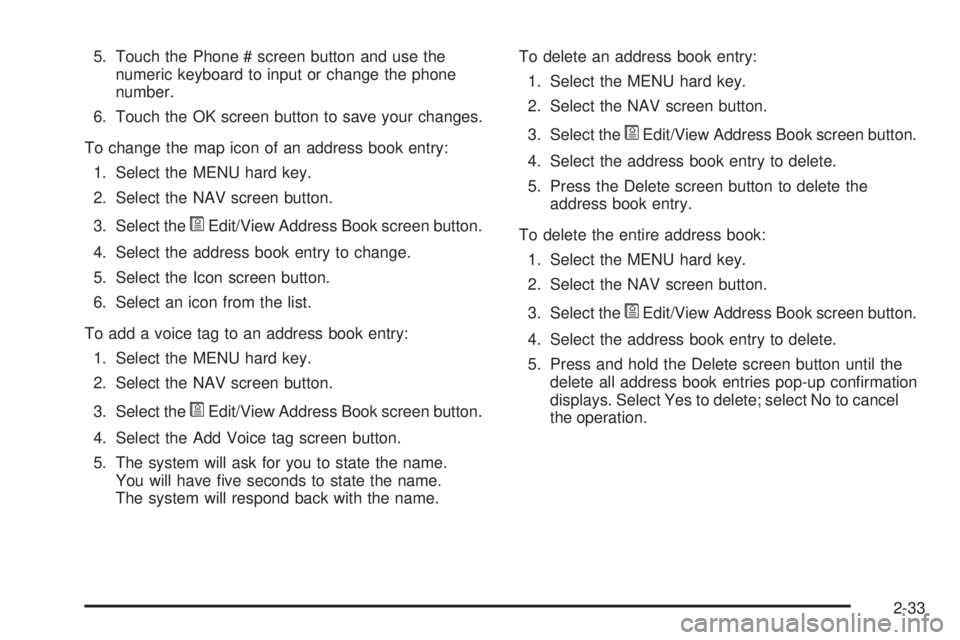
5. Touch the Phone # screen button and use the
numeric keyboard to input or change the phone
number.
6. Touch the OK screen button to save your changes.
To change the map icon of an address book entry:
1. Select the MENU hard key.
2. Select the NAV screen button.
3. Select the
*Edit/View Address Book screen button.
4. Select the address book entry to change.
5. Select the Icon screen button.
6. Select an icon from the list.
To add a voice tag to an address book entry:
1. Select the MENU hard key.
2. Select the NAV screen button.
3. Select the
*Edit/View Address Book screen button.
4. Select the Add Voice tag screen button.
5. The system will ask for you to state the name.
You will have ve seconds to state the name.
The system will respond back with the name.To delete an address book entry:
1. Select the MENU hard key.
2. Select the NAV screen button.
3. Select the
*Edit/View Address Book screen button.
4. Select the address book entry to delete.
5. Press the Delete screen button to delete the
address book entry.
To delete the entire address book:
1. Select the MENU hard key.
2. Select the NAV screen button.
3. Select the
*Edit/View Address Book screen button.
4. Select the address book entry to delete.
5. Press and hold the Delete screen button until the
delete all address book entries pop-up conrmation
displays. Select Yes to delete; select No to cancel
the operation.
2-33
Page 50 of 100
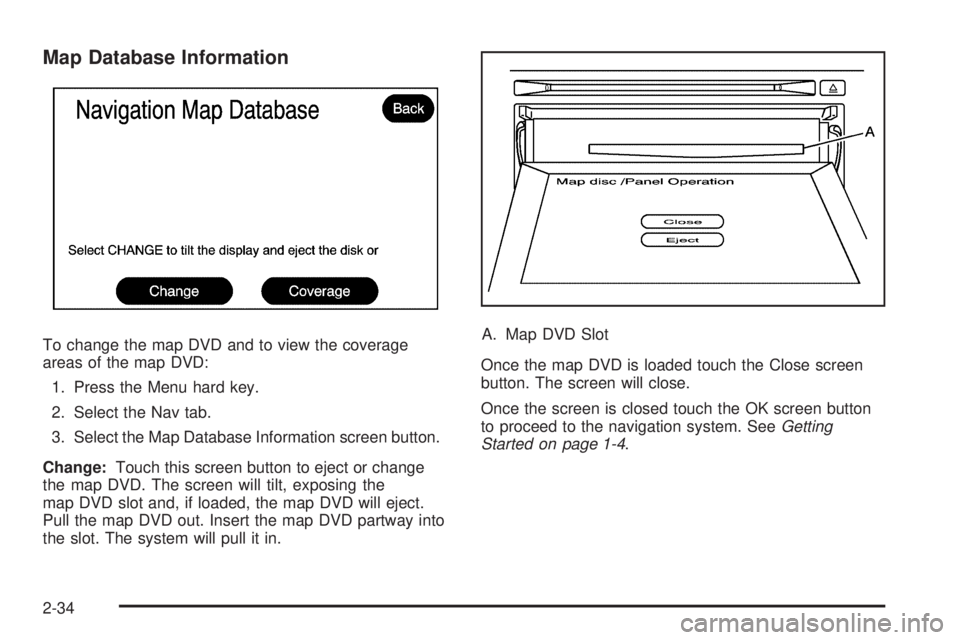
Map Database Information
To change the map DVD and to view the coverage
areas of the map DVD:
1. Press the Menu hard key.
2. Select the Nav tab.
3. Select the Map Database Information screen button.
Change:Touch this screen button to eject or change
the map DVD. The screen will tilt, exposing the
map DVD slot and, if loaded, the map DVD will eject.
Pull the map DVD out. Insert the map DVD partway into
the slot. The system will pull it in.A. Map DVD Slot
Once the map DVD is loaded touch the Close screen
button. The screen will close.
Once the screen is closed touch the OK screen button
to proceed to the navigation system. SeeGetting
Started on page 1-4.
2-34
Page 52 of 100
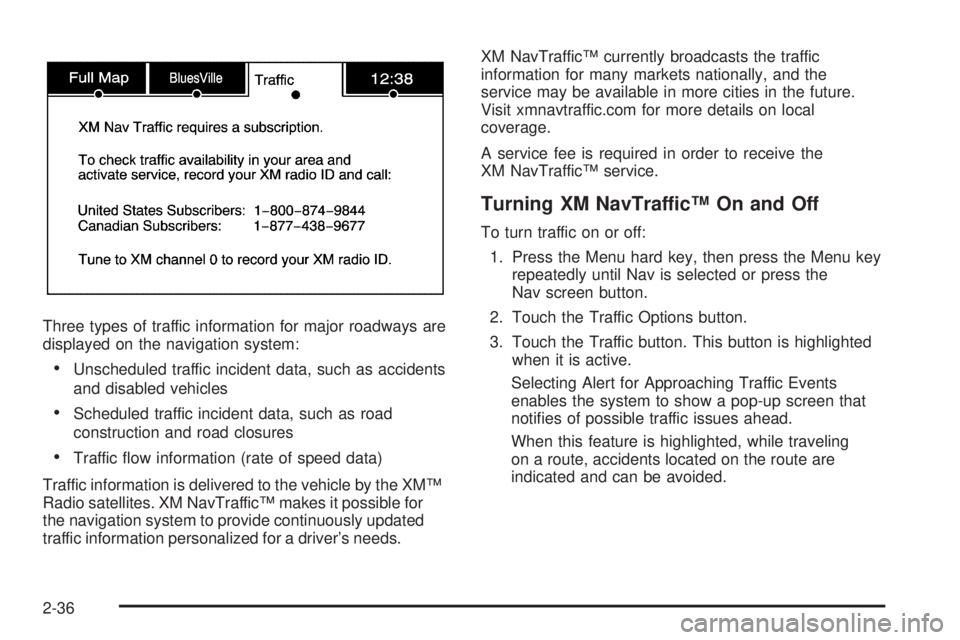
Three types of traffic information for major roadways are
displayed on the navigation system:
Unscheduled traffic incident data, such as accidents
and disabled vehicles
Scheduled traffic incident data, such as road
construction and road closures
Traffic ow information (rate of speed data)
Traffic information is delivered to the vehicle by the XM™
Radio satellites. XM NavTraffic™ makes it possible for
the navigation system to provide continuously updated
traffic information personalized for a driver’s needs.XM NavTraffic™ currently broadcasts the traffic
information for many markets nationally, and the
service may be available in more cities in the future.
Visit xmnavtraffic.com for more details on local
coverage.
A service fee is required in order to receive the
XM NavTraffic™ service.
Turning XM NavTraffic™ On and Off
To turn traffic on or off:
1. Press the Menu hard key, then press the Menu key
repeatedly until Nav is selected or press the
Nav screen button.
2. Touch the Traffic Options button.
3. Touch the Traffic button. This button is highlighted
when it is active.
Selecting Alert for Approaching Traffic Events
enables the system to show a pop-up screen that
noties of possible traffic issues ahead.
When this feature is highlighted, while traveling
on a route, accidents located on the route are
indicated and can be avoided.
2-36